The daily reality of service desk life: Why incident management matters
If you’re a service desk manager, you know the pressure all too well. Your job isn’t just about fixing problems. It’s about ensuring business continuity while constantly balancing a never-ending stream of urgent issues.
IT incidents don’t always happen when it’s convenient. Whether it’s an unexpected server crash at 2 a.m., a growing backlog, or a sudden surge of requests after a software update, you’re the first line of defense. And if there’s one thing that keeps you up at night, it’s the question: “Why are we still tracking incidents in a spreadsheet?”
You’re stuck in a loop of firefighting i.e., constantly jumping from one urgent issue to the next without time to focus on what really matters. Your team’s stress level rises, productivity drops, and those repeatable, low-level problems turn into bigger disruptions. It’s exhausting, and worse, unsustainable.
Here’s the problem: without a structured approach to incident management, you’re left scrambling to keep up. Backlogs grow, SLAs slip, and key issues get lost in the shuffle, all while burnout looms large. It’s a never-ending cycle of reacting to crises rather than addressing the root causes.
That’s where Incident Management (IM) comes in. Think of IM as your team’s security blanket, i.e. a framework that empowers you to:
- Prioritize: Knowing which issues need immediate attention and which can wait. No more feeling pulled in every direction.
- Standardize: Implementing repeatable, structured processes that turn chaos into controlled, predictable actions.
- Minimize downtime: Quickly identifying and resolving issues before they disrupt workflows.
With IM in place, you’re not just tracking tickets. You’re creating a smooth, predictable process that frees up your team’s time, reduces stress, and shifts focus from firefighting to strategic work that improves service quality and scalability.
In the bigger picture, adopting a structured incident management process isn’t just about solving individual issues; it’s about transforming your service desk into a strategic advantage that drives better business outcomes.
Ready to stop firefighting and start managing incidents with confidence? It’s time to embrace a structured, repeatable approach that puts you back in control.
What is incident management?
To get out of the chaos and into control, the first step is understanding exactly what you’re managing. Incident management is all about restoring normal service operations as quickly as possible, minimizing the disruption to your business, and getting things back on track before they impact productivity.
Understanding incidents: ITIL’s take
In IT terms, an incident is any unplanned interruption or decrease in the quality of a service. Simply put, it’s an outage or the immediate symptom of something failing.
If you’re familiar with ITIL (Information Technology Infrastructure Library) 4, the standard framework for IT Service Management (ITSM), it defines an incident as just that—a “disruption”.
But here’s a key point: Incidents don’t always have to be noticed by the end user right away. In fact, with proactive monitoring in place, IT teams can often catch a problem before the user even realizes there’s an issue. For example, automated systems might detect a dip in performance or a spike in errors, allowing your team to step in early and prevent the problem from escalating into a major disruption.
Answering the common questions
For helpdesk teams and system administrators, understanding the different types of support requests is key to managing workload effectively and ensuring quick resolution.
Is every ticket an incident?
No, not every ticket is an incident. A ticket is simply a formal record of a support request, but an incident specifically refers to an unexpected interruption or disruption.
Does a locked account count as an incident?
Yes, a locked account is considered an incident. It’s a common issue that disrupts a user’s ability to access critical services or applications. These types of incidents are high‑volume, repetitive, and require efficient processes to resolve quickly.
Some common incidents might seem small but they all have one thing in common i.e., they disrupt the user experience. For instance:
- A printer jam that stops work from progressing
- A slow software application that delays productivity
- A backup failure that risks losing data
The key takeaway is that Incident management is not about achieving perfection; it’s about speed. The goal is to restore functionality fast, often using a temporary workaround, to get back to business as usual and minimize the Mean Time to Resolution (MTTR).
Incident vs. problem vs. service request: Why it gets confusing
If you’ve ever tried to explain the difference between an incident, a problem, and a service request and watched eyes glaze over,you’re in good company. These distinctions seem obvious inside IT, but to the rest of the organization, everything with a whiff of technology magically becomes a P1 emergency.
It’s one of the biggest sources of operational drag. When work is misclassified, priorities skew, SLAs slip, and your team ends up firefighting issues that were never emergencies to begin with.
To cut through the noise, IT teams need a simple, shared language. Here’s how to frame these three key aspects:
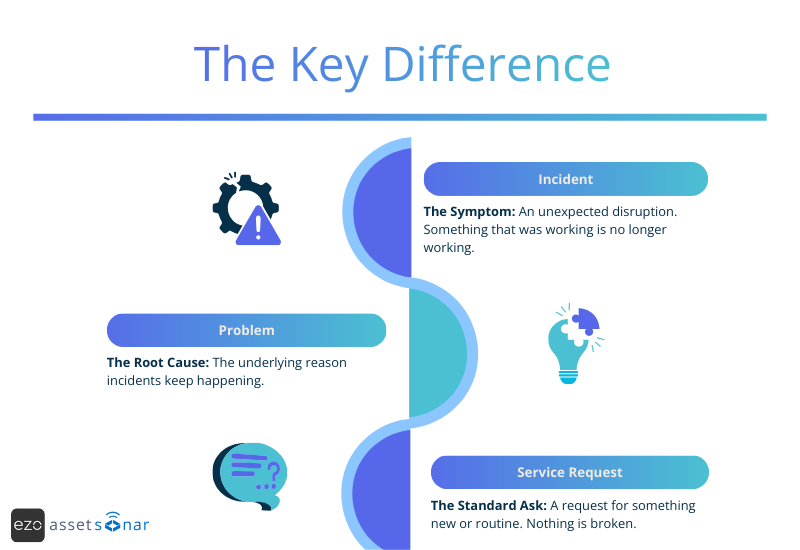
1. Incident: The symptom
An incident is an unexpected disruption. Something that was working isn’t working anymore.
This could be a VPN outage, a failed login, a broken integration, or anything that blocks work. The goal here is straightforward. Restore service as quickly as possible, even if you don’t yet know why it broke.
Incidents are about speed, containment, and getting people moving again.
2. Problem: The root cause
A problem is the reason the incident happened in the first place. If an incident is a symptom, the problem is the underlying condition.
If one server crashes, that’s an incident. However, if servers crash every Monday at 9 a.m., that’s a problem.
Problem management exists to dig into recurring disruptions, identify the pattern, and remove the cause so you don’t keep solving the same issue on repeat. It’s the difference between patching the leak and fixing the pipe.
3. Service request: The standard ask
Not everything hitting IT is “broken.” Sometimes users simply need something. This could be a new laptop, a software installation, access to a system, or a license assignment.
Asks that are predictable, repeatable, and fulfillment-based can be termed as service requests. They should never sit in the same workflow as incidents or problems because urgency and intent are entirely different here.
Why the distinction actually matters
When teams lump everything into the incident queue, two things happen:
- Real incidents drown in the noise.
- Recurring issues never receive root-cause attention.
Take this common scenario: multiple users log tickets saying a business app is slow. You could treat each one as an isolated incident, or you could recognize the pattern, open a single problem ticket, and investigate what’s actually happening. Maybe it’s a query bottleneck. Maybe it’s a load balancer issue. Either way, the team works smarter when the work is categorized correctly.
Once the root cause is fixed, all the linked incidents close together, saving hours of repeated triage and dramatically improving SLA performance.
Why incident management and problem management must stay separate
ITIL separates these practices for a reason. One is about restoring service quickly, the other is about preventing the disruption from happening again.
Incident management is your short-term strategy requiring fast triage, fast routing, and fast recovery. Alternatively, problem management is your long-term strategy requiring analysis, elimination, and prevention.
When teams blur the two, they get stuck in a cycle where the same issue returns week after week, draining your bandwidth and morale. However, when both practices work in harmony, you create a help desk that is:
- faster in the moment
- smarter over time
- and far less chaotic overall
That’s the point of mastering the distinction: not semantics, but stability. Incident management keeps the business moving. Problem management, on the other hand, keeps it from breaking the same way twice.
ITSM Ticket Classification Comparison
| Request Type | Goal | Definition | Metaphor | Example |
| Incident | Restore service operation ASAP. | An unplanned interruption or reduction in service quality. | The Symptom | A critical application is slow or unresponsive. |
| Problem | Find and eliminate the root cause to prevent recurrence. | The underlying cause, or potential cause, of one or more incidents. | The Disease | A recent server patch causing recurrent application failures. |
| Service Request | Fulfill the request efficiently. | A request for information or a standard service. | The Need | Requesting a new mouse or software installation. |
Why incident management matters (For the business and your sanity)
For anyone who has lived through a major outage, incident management isn’t just a paperwork exercise; it’s survival. It shapes how the business experiences technology, how leadership perceives IT, and how your team keeps from burning out when the pressure hits. When it’s done well, everything runs smoothly. When it’s missing, every disruption feels bigger than it needs to be.
Here’s why it matters more than most people realize.
1. The quantifiable cost of downtime
Nothing makes the case for incident management faster than a minute of downtime. As organizations become fully digital, a “small outage” can quickly turn into a real financial hit.
Across industries, downtime now costs anywhere from $2,300 to $9,000 per minute. In high-stakes sectors like finance, retail, and healthcare, that number can climb past $1 million per hour.
IT managers don’t need complex math to prove the point. A simple formula makes the impact painfully clear:
Downtime Cost = Minutes of Downtime × Cost per Minute
This is why every mature IT team obsesses over reducing MTTR . MTTR isn’t just a metric. It’s the strongest indicator of how resilient your operations are. Every minute shaved off an incident protects revenue, preserves productivity, and buys your team credibility when leadership asks, “How fast can we get back online?”
2. Protecting credibility and compliance
Not all consequences show up on a balance sheet. When SLAs slip repeatedly, trust erodes, both internally and externally. Department leaders start losing confidence in IT. Clients question reliability. The help desk becomes the face of every disruption, whether or not it caused it.
In regulated industries, the stakes are even higher. Financial services, healthcare, and public-sector organizations carry SLA and uptime expectations tied directly to compliance obligations. A mishandled outage or a slow response isn’t just inconvenient; it can violate contracts or regulatory requirements.
Strong incident management also reinforces cybersecurity readiness. Reactive teams tend to miss patches. Without dedicated incident management, communication becomes messy, and containment steps usually get improvised. This means that during a real cyber incident, ambiguity magnifies risk. The more structured your incident management process is, the less likely a chaotic moment becomes a costly one.
This is where disciplined workflows matter. Not because frameworks are trendy, but because they keep you out of the headlines.
Regaining sanity: Escaping the daily firefight
There’s also a human reason incident management matters: it keeps IT teams from living permanently underwater.
Without a clear IM process, every outage feels like an emergency, every user complaint feels urgent, and every day starts with the team reacting instead of improving anything. You can’t plan strategic work when half the team is stuck chasing the latest fire.
Structured incident management changes that dynamic. It gives your team:
- predictable steps
- clear roles
- automated triage
- communication guardrails
- realistic workloads
When SLAs stabilize and the noise in the queue drops, something big happens: the team finally gets space to focus on the work that moves the organization forward. This may include initiatives like automation, documentation, optimization projects, and preventive maintenance.
That’s what reduces burnout, lifts morale, and turns IT from a reactive function into a strategic partner.
Incident management isn’t just about putting out fires; it’s about building an environment where you don’t have to fight the same ones every week.
The incident management lifecycle (Step-by-step)
Every high-functioning IT team follows a predictable rhythm when something breaks. ITIL formalizes it, but anyone who has worked a help desk knows the pattern by heart: detect, log, triage, diagnose, fix, close, learn. The goal isn’t bureaucracy; it’s restoring service quickly and building enough discipline so you don’t repeat the same chaos tomorrow.
Here’s how a mature incident management process actually operates in the real world.
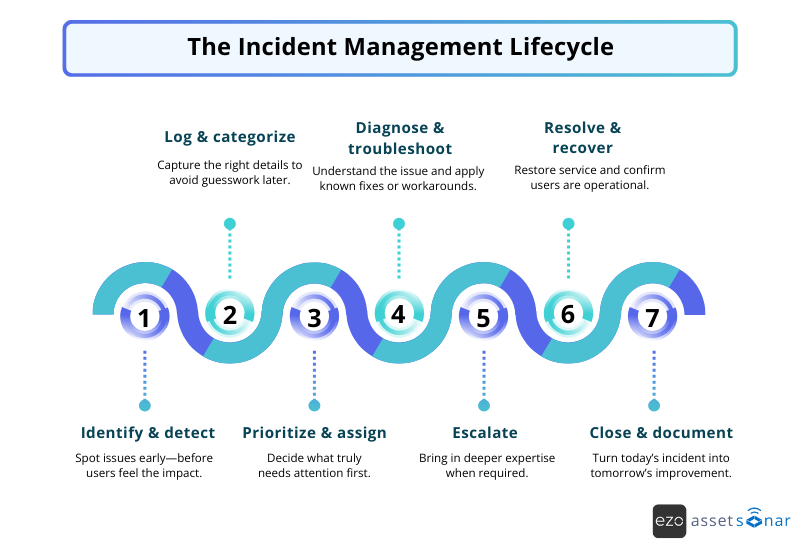
Step 1: Identify and detect
Every incident starts with detection. Sometimes monitoring catches an early warning like a spike in latency, a failing disk, or a dip in uptime. This means IT can respond before a single user notices. That’s the dream!
Other times, the first sign of trouble is the message no IT manager loves: “Is the system down for anyone else?”
Relying solely on users for detection guarantees missed SLAs. Modern teams lean heavily on monitoring and alerting so outages surface early, not after half the company is already stuck.
Step 2: Log and categorize
Once an incident is confirmed, it gets logged with the details that matter: who reported it, when it occurred, what they experienced, and where it fits in your taxonomy (e.g., Network → VPN → Connectivity).
Categorization is not clerical work. It’s what determines routing, priority, and who gets pulled in next.
One of the most universal help desk frustrations is the empty-ticket problem: “No description. No steps. No screenshots.”
Structured intake forms and required fields remove the guesswork and keep your triage team from becoming detectives before they’ve even started troubleshooting.
Step 3: Prioritize and assign
Not all incidents deserve the same level of panic. Priority is determined by Impact × Urgency, a simple formula that prevents every disruption from becoming a political P1. Once prioritized, the incident is routed to the right support tier or specialized group.
Smart assignment ensures two things:
- The right people see it immediately
- The wrong people don’t waste time on it
Step 4: Diagnose and troubleshoot
This is where the real work begins. Tier 1 gathers context, checks knowledge base articles, tests known fixes, and hunts for a quick workaround.
Diagnosis is either smooth or painfully slow, depending entirely on visibility. If your team can see the device owner, the OS version, the last applied patch, the installed apps, or the recent configuration changes, troubleshooting is fast. If not, then every incident turns into a forensic investigation.
Asset visibility is the difference between a 10-minute fix and a 2-hour slog.
Step 5: Escalate
Not every issue belongs in Tier 1. When the problem requires deeper expertise, such as database tuning, identity issues, backend logs, or vendor intervention, the incident gets escalated.
Clear escalation rules are what prevent:
- Unnecessary pileups in Tier 2 or Tier 3
- Tickets bouncing endlessly
- And the dreaded “I’ve been transferred three times” user frustration
Escalation isn’t failure; it’s efficiency.
Step 6: Resolve and recover
Once the fix or workaround is applied, the service comes back online, and IT confirms the user is operational. The communication here matters. Users want to know what’s happening rather than discovering that the system was restored after silently refreshing for 10 minutes.
Recovery completes the technical work; communication completes the user experience.
Step 7: Close and document
Closing the ticket isn’t the end. Instead, it’s the beginning of improvement.
A good closure includes confirmation that the issue is resolved, a clear summary of steps taken, notes on what caused the issue, and details useful for future incidents.
This documentation becomes tomorrow’s knowledge articles and next month’s automation opportunities. It’s how help desks shift from reactive firefighting to predictable, proactive operations. When these learnings feed into problem management, recurring issues finally get the long-term fixes they deserve.
Who owns what? Roles and responsibilities
Nothing slows down an incident like confusion over who’s supposed to do what. When roles aren’t clear, tickets bounce, escalations stall, and users end up repeating themselves while your team quietly wonders who should take the wheel. A well-defined tiered model removes that ambiguity. It ensures that every incident lands with the right person, at the right time, with the right context.
Here’s how ownership breaks down when a help desk is running the way it should.
1. Tier 1/Helpdesk (The first responder)
Tier 1 is the frontline of IT support. This is the team that absorbs the volume, calms the noise, and keeps everyday disruptions from turning into operational problems. They’re the first people to see alerts, the first to speak with frustrated users, and the first to triage when something feels off.
Their responsibilities typically include:
- Watching real-time alerts and dashboards
- Performing initial triage and classification
- Collecting key details and evidence
- Running through documented SOPs
- Resolving routine issues on first contact
This is where you want a high First Contact Resolution (FCR) rate. Password resets, basic connectivity issues, simple configuration fixes, VPN quirks, printer problems—these should rarely make it past Tier 1 if your process, tools, and documentation are healthy.
A strong Tier 1 doesn’t just reduce workload across the board; it acts as a pressure valve for the entire support operation.
When should Tier 1 escalate
Escalation isn’t a sign that Tier 1 failed. It’s a sign that they understand their boundaries. A good help desk knows when a ticket is out of scope and needs deeper hands.
Tier 1 should escalate when the issue clearly requires specialized technical expertise, approved troubleshooting steps have been exhausted, a predefined resolution time limit is approaching, or the incident category and impact exceed Tier 1 authority.
The handoff itself matters just as much as its timing. Nothing frustrates Tier 2 or Tier 3 more than inheriting a ticket with no notes, no logs, and no context.
A clean escalation includes:
- a summary of what’s been tried,
- relevant device or user information,
- screenshots or logs,
- and any environmental details that could influence diagnosis.
Good handoffs shorten MTTR; bad ones double it.
A tiered support model only works when each layer understands its role and respects the roles around it. Tier 1 keeps the operation stable by resolving the volume. Tier 2 and Tier 3 stay focused on deep technical work instead of triaging the basics.
Clear ownership keeps incidents moving instead of letting them circle endlessly through the queue.
2. Tier 2/Specialist (The Subject Matter Expert)
If Tier 1 is the frontline, Tier 2 is where the deeper technical work begins. These analysts handle the incidents that refuse to crack under basic troubleshooting. These include the stubborn issues, the edge cases, the mysterious failures that show up without warning and won’t go away quietly.
Tier 2 specialists bring the kind of expertise that can’t be scripted. They understand the environment, know how systems behave under stress, and have the access and tools needed to dive beneath the surface. Their work often includes:
- Performing advanced diagnostics
- Restoring critical services when standard fixes fall short
- Validating whether the issue signals a broader system problem
- Coordinating with external vendors or support teams when the incident touches technology outside internal control
But one of the most important parts of the Tier 2 role doesn’t happen during the incident; it happens afterward. Tier 2 is uniquely positioned to turn hard-earned troubleshooting experience into repeatable knowledge. When they document what they’ve solved—steps, clues, root causes, workarounds—they create the playbooks that empower Tier 1 to resolve similar issues faster next time.
This is how a help desk matures, not by expecting Tier 2 to catch every complex ticket forever, but by using their expertise to lift the entire support structure. Strong Tier 2 teams shrink escalations over time because each fix becomes an opportunity to improve the system rather than just resolving the incident.
3. Incident Manager (The Coordinator)
In smaller teams, this role often gets absorbed into someone’s already full plate. But once an organization starts handling high-severity incidents, the kind that disrupt operations, attract executive attention, or trigger compliance obligations, a dedicated Incident Manager becomes indispensable.
The Incident Manager isn’t the person fixing the outage. They’re the person making sure the outage gets fixed without chaos.
What the Incident Manager actually does
Their core job is simple to describe and hard to execute: mitigate the impact and communicate clearly.
During a major incident, the Incident Manager:
- Orchestrates Tier 2 and Tier 3 specialists
- Ensures every step follows the defined IM playbook
- Removes bottlenecks so technical teams can focus
- Acts as the single point of contact for stakeholders, leadership, and anyone affected
They maintain situational awareness while the technical experts dive deep. They keep updates flowing, prevent conflicting messages, and ensure that there’s one consistent narrative for the business, even when the root cause is still unknown.
In the heat of a major outage, this coordination is what keeps the response controlled instead of frantic.
The golden rule: Never be the Resolver and the Coordinator
One of the most misunderstood principles of Incident Management is this. The Incident Manager should never double as the technical resolver.
When the same person is doing both, two things happen:
- Troubleshooting slows down because context switching kills focus.
- Communication breaks down because no one is steering the process externally.
By keeping the technical resolution and the coordination roles separate, you get faster diagnosis, cleaner communication, fewer stalls, and a more predictable major-incident workflow.
This separation isn’t bureaucracy. It’s what prevents major outages from spiraling into organizational panic.
A good Incident Manager doesn’t fix the problem. They make sure the right people can fix it without distraction.
Prioritization in incident management: Impact × Urgency
Every help desk eventually runs into the same problem: everyone thinks their issue is a P1.
A broken report at 4 p.m.? P1. A frozen laptop before a meeting? Definitely P1. A system-wide outage? Also, P1, except now it’s competing with everything else labeled P1.
Without a neutral framework, prioritization becomes a negotiation that is usually based on who escalates the loudest. That’s why the ITIL Priority Matrix exists. It removes the emotion and replaces it with something every IT team desperately needs: consistent, objective decision-making.
At its core, the matrix answers one question: How do we fairly decide what to fix first?
The two levers of prioritization
The ITIL Priority Matrix is built on two factors that matter far more than volume or noise:
Impact
Impact tells you how big the blast radius is.
- How many users are affected?
- Which business processes are disrupted?
- Is revenue at risk?
A high-impact incident is one that stops a major function or the entire organization in its tracks.
Urgency
Urgency tells you how fast things break if you don’t act.
- Is work grinding to a halt right now?
- Will waiting worsen the damage?
- Are we approaching SLA, compliance, or safety thresholds?
High urgency means waiting even a short time will create significant consequences.
Put those two factors together, and you get a standardized Priority level (P1 through P4). No politics, no drama; just operational logic.
Why this matters more than most teams realize
Consistent prioritization prevents “priority creep,” the phenomenon where every request starts sliding toward P1 simply because the requester is stressed. When everything is labeled critical, nothing is actually treated as critical, and real emergencies get buried under noise.
The matrix ensures that limited IT capacity goes to the incidents that pose the greatest actual risk—not the greatest emotional escalation.
The Priority Matrix in practice
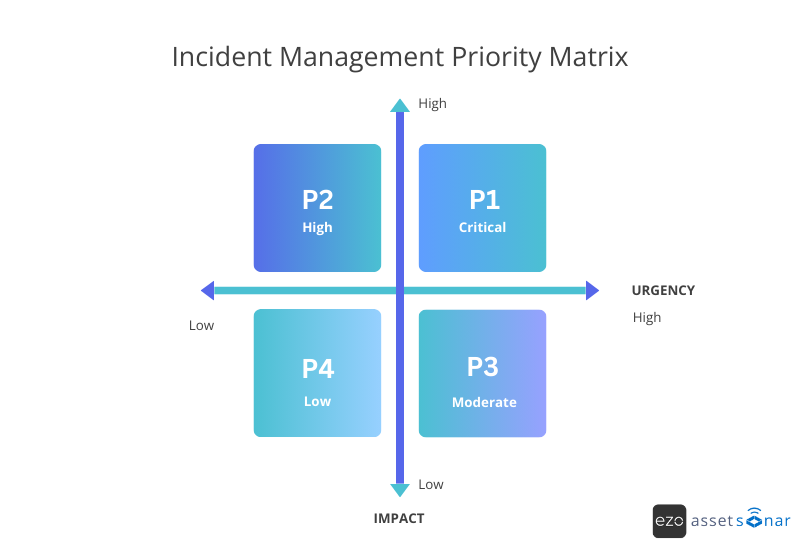
Real-world incident prioritization scenarios
P1: Critical (High Impact × High Urgency)
Think: a payment gateway outage, a checkout freeze, or a mission-critical API going dark. Revenue stops, productivity stops, and leadership notices instantly. This is a true drop-everything incident.
P3: Moderate (Low Impact × Medium Urgency)
Examples include a slow search feature or a minor UI glitch that affects only a small group. Annoying? Yes. Business-stopping? No.
The secret to making the matrix work: Define “Impact” clearly
If you want prioritization to stick, you can’t leave “high impact” to interpretation. IT leaders need to work with department heads to define formally:
- What a “critical business service” is,
- What constitutes downtime
- Which workflows directly affect revenue, compliance, or safety
- What “business as usual” tolerances look like
When impact definitions are published, shared, and agreed upon, the matrix stops feeling like an argument and starts feeling like the operating manual for the entire organization.
Prioritization doesn’t remove urgency; it removes the chaos behind it. When your team has a clear, shared framework, every decision gets faster, calmer, and far more defensible.
Incident management metrics that actually matter
Metrics can feel overwhelming, especially when every platform throws a new dashboard at you. But in incident management, only a handful of numbers truly reveal whether your operation is healthy or quietly sinking. These metrics are what leadership cares about, what budget decisions hinge on, and what your team can use to stay ahead of the next outage.
Here are the ones that actually shape performance, cost, and credibility.
1. Mean Time to Resolution (MTTR)
MTTR is the heartbeat of incident management. It measures how long it takes from the moment something breaks to the moment it’s fully restored, not necessarily to permanently eliminate the root cause.
A low MTTR means your operation is resilient, your processes are tight, and your troubleshooting playbook works. A high MTTR usually means the opposite:
- poor visibility into assets,
- inconsistent diagnosis steps,
- or slow escalations that choke up the queue.
Industry benchmarks vary, but many mid-market organizations aim for under five hours for most incidents. And here’s a nuance that most dashboards miss: MTTR should always be tracked by severity. A single P1 incident can balloon your “overall MTTR” and hide the fact that your day-to-day operations run extremely well.
2. Mean Time to Acknowledge (MTTA)
MTTA is one of the most underrated metrics in IT. It measures how long it takes for a human being or an automated workflow to acknowledge an issue.
It’s deceptively simple, but MTTA often represents the majority of an incident’s total lifecycle. In many organizations, acknowledgement delays account for over 70% of the total downtime.
The fix? Automation. Routing. Alerts that reach the right person right away. Teams that improve MTTA see instant returns because every minute saved from acknowledgement is a minute saved from MTTR.
3. First Contact Resolution (FCR)
FCR tells you how often Tier 1 fixes the issue on the very first interaction. High FCR isn’t just a bragging point; it’s operational gold.
A strong FCR means:
- Tier 1 is well-trained
- Documentation is solid
- Knowledge articles are actually useful
- Routing is clean
- Unnecessary escalations are minimal
Every issue solved at Tier 1 is capacity that your specialists can get back. On the other hand, every unnecessary escalation is time they lose. FCR is one of the most direct paths to happier users and a calmer help desk.
4. Reopen rate
Reopen rate is the honesty metric. It tells you how often “fixed” issues come back.
High reopen rates mean that you’re closing incidents with temporary band-aids, root causes are being ignored, problem management isn’t doing its job, or the resolution notes weren’t accurate in the first place. Reopens don’t just inflate workload; they signal that your incident process is feeding the same problems back into the system.
The goal isn’t zero reopens (that’s unrealistic) but a low and predictable rate that reflects stable, lasting fixes.
When IT teams focus on these core metrics, not vanity numbers, they gain a true picture of how well incident management is working. More importantly, they gain the leverage they need to justify better tooling, more automation, and smarter staffing.
Because good metrics don’t just measure performance. They help you improve it.
The biggest incident challenges IT teams vent about
Talk to any IT practitioner or spend 10 minutes on Reddit or Spiceworks Community, and you’ll hear the same themes repeat over and over. The biggest challenges in incident management aren’t usually technical. They’re systemic. They come from broken processes, missing context, or tools that make simple things harder than they need to be.
Here are the pain points mid-market teams complain about the most.
1. The visibility gap
If there’s one frustration that unites every help desk, it’s this: “I can’t fix what I can’t see.”
Without real-time visibility into assets, owners, configurations, and recent changes, every incident becomes an investigation instead of a resolution. Teams waste precious time tracking down device details, hunting through spreadsheets, or messaging users to ask, “What machine are you on again?”
The visibility gap stemming from unknown devices, missing ownership data, and outdated configurations is one of the biggest drivers of slow MTTR. You can’t diagnose confidently when half the puzzle pieces are missing.
2. Outdated CMDBs and manual effort
In theory, the CMDB is supposed to be the backbone of ITSM. In reality, however, for many teams, it’s a fossil. Poorly maintained, manually updated, and built on workflows no one has time to follow, the CMDB often ends up lagging months behind reality.
That’s why IT teams keep backup notes, sticker spreadsheets, and hallway whiteboards, because the “official source of truth” isn’t actually true.
When your asset data is stale:
- Automations break
- Routing becomes unreliable
- Diagnostics slow down
- Incidents take far longer than they should
A CMDB, hence, is only as good as the data feeding it. When the updates are manual, it can never keep up.
3. Alert fatigue and duplicate tickets
Monitoring tools love to over-communicate, and users love reporting the same outage in four different ways. The result? A help desk drowning in noise.
False positives, duplicated alerts, and redundant tickets can create a wall of clutter that makes it harder to see the real issue. Teams end up in reactive mode, often sorting, deduplicating, and triaging before they can even touch the root problem.
This is how critical warnings get buried. This is why SLAs get missed. This is where burnout begins.
4. Tool sprawl and shadow IT
Most mid-market IT environments like yours weren’t designed; they just happened. A ticketing tool here, a spreadsheet there. There’s Slack for communication, email for approvals, a shared drive for notes, and three different systems for asset records.
This patchwork of tools creates fractured data, inconsistent workflows, and bottlenecks that slow every decision.
Add Shadow IT, including devices and apps the team didn’t approve and can’t monitor into the mix, and the incident landscape becomes even more unpredictable. You can’t patch what you don’t know exists, and you can’t secure what never reaches your management tools. It’s not incompetence. It’s architectural drift.
Such challenges aren’t unique; they’re universal. And they’re the reason incident management feels harder than it should. When visibility is limited, systems are outdated, alerts are noisy, and tools don’t talk to each other, even simple incidents turn into multi-hour puzzles.
Fix the system, and you fix the incident process. Leave the system as-is, and the same problems keep resurfacing, no matter how skilled your team is.
Smart incident management best practices that actually work for mid-market teams
You don’t need a Fortune 500 budget or a 30-person Site Reliability Engineering team to run a solid incident management function. What you do need, however, is consistency. Mid-market IT teams succeed when they stop reinventing the wheel for every incident and start building repeatable habits i.e., small processes that add up to big gains in uptime, response time, and sanity.
Here are the practices that can make the biggest difference without overwhelming your team.
1. Start by standardizing how you categorize incidents
If categorization is messy, everything built on top of it, whether it’s automation, reporting, or routing, will become messy too. The goal isn’t to create a complex taxonomy that no one remembers. The goal is clarity.
A simple hierarchy works best here. You can specify how incidents impact the business in the following order:
Service Impacted → System Impacted → Application Impacted
Define approximately 10–15 high-level categories based on actual ticket history, not theoretical ones. Then lock the structure down under change control so it doesn’t morph every quarter.
Consistent categorization is the foundation that makes every other part of your IM process faster and more predictable.
2. Set clear triage rules and escalation paths
Too many teams rely on “tribal knowledge”—the unwritten rules only senior engineers know. This works until they’re out sick or pulled into a major incident.
Instead, your team should write down:
- Who owns what
- Which issues Tier 1 should handle
- When escalation should happen,
- What information must be included in the handoff
This eliminates confusion. When everyone knows the path, incidents move quickly, and small issues stop stealing attention from major ones.
3. Build a knowledge base and self-service portal
Most support teams don’t suffer from too many hard problems. They suffer from too many repeat problems. Password resets, connectivity hiccups, printer quirks, VPN instructions—all these things shouldn’t require an agent every single time. A good knowledge base paired with a simple self-service portal can cut your ticket volume dramatically.
The real win? It frees your help desk to focus on the incidents that actually matter.
Start small: document the top 10 repeat tickets, publish them, and refine them over time. Let Tier 1 evolve them into playbooks. Your workload will shift almost immediately.
4. Keep post-incident reviews light, honest, and useful
Post-incident reviews (PIRs) don’t need to be hour-long meetings with slide decks and blame games. In fact, they shouldn’t be.
A good PIR (especially for mid-market teams) should be short, objective, and focused on learning. It should answer questions like:
- What actually happened?
- What slowed the response?
- What information was missing?
- What would prevent this incident from happening next time?
Avoid finger-pointing. Stick to timelines, facts, and improvements. Over time, lightweight PIRs can become one of the most powerful tools for eliminating repeat incidents and tightening your IM process.
These best practices don’t require new headcount or fancy platforms; they require commitment to structure. When mid-market teams adopt even a few of them, tickets move faster, stress goes down, and the entire help desk becomes more predictable.
Better incident management isn’t about doing more. It’s about doing the basics consistently and intentionally.
Should incident management be automated?
At this point, the question isn’t whether to automate incident management; it’s where to start. Automation goes beyond cutting headcount or replacing expertise. It’s about removing the slow, manual steps that drain your team’s time and stall incident response.
When done right, automation gives IT staff the one thing they never have enough of: space to focus on real problems instead of repetitive tasks.
1. Start with high-impact, low-risk automations
Mid-market IT teams don’t need complex orchestration engines or heavy AIOps tooling to see meaningful gains. The biggest wins usually come from automating the basics i.e., the tasks that are easy to standardize and cause most of the delay when handled manually.
Below are some of the best starting points:
1. Automated incident routing
Manual triage is one of the biggest contributors to a low MTTA. It leads to tickets sitting in the wrong queue, agents guessing at categories, and issues bouncing between teams like a pinball.
With automated routing, incidents go straight to the right group based on categorization, severity, service type, and impact.
It’s the simplest way to eliminate delays and make sure specialists aren’t drowning in misrouted tickets.
2. Automated status updates
Users hate silence during an incident, and agents hate manually sending updates.
Automating status notifications for tickets across stages such as New, Assigned, In Progress, and Resolved keeps everyone informed without stealing time from your support team. It can reduce user anxiety, lower duplicate tickets, and ensure that leadership isn’t pinging the help desk every 10 minutes for an update.
Consistency matters here, and automation guarantees it.
3. Self-service deflection
Some incidents shouldn’t be incidents at all.
AI chatbots, automated knowledge suggestions, and guided troubleshooting can deflect a massive portion of repetitive tickets like password resets, VPN FAQs, basic connectivity issues, “how do I install X” tickets, and so on.
Every ticket avoided can translate into saved time and cost, removing load from Tier 1, and one less interruption for your specialists.
Self-service is both convenience and capacity creation.
The impact: Faster resolution without extra headcount
Teams that automate even a handful of these steps can see measurable results almost immediately, especially in MTTR and MTTA. Some studies show MTTR improvements of up to 95% when automated response workflows are implemented.
But the real benefit is operational calm. Automation removes the noise so your team can focus on the work that actually requires human judgment.
With automatons, incident management becomes faster, smoother, and far more predictable. This isn’t because the team is working harder, but because the system is finally working with them.
The ITAM connection: You can’t fix what you can’t see
Every IT team has lived this moment: an incident comes in, you look up the device and… nothing matches. The user isn’t tied to the asset, or the asset isn’t tied to the configuration. The CMDB entry hasn’t been updated since last year. Half the time, you’re not even sure if the device still exists.
This is why so many incidents feel like detective work instead of troubleshooting.
You simply can’t resolve issues quickly when you don’t know what assets you have, who owns them, or how they’re configured. That’s where IT Asset Management (ITAM) becomes the backbone of effective incident management—not a nice-to-have but a critical dependency.
ITAM provides the context that incident management can’t function without. It gives accurate, real-time insight into hardware, software, licenses, and configuration items across the environment.
When ITAM is strong, incident management becomes fast, predictable, and far less chaotic. When it’s weak, every ticket turns into guesswork.
How asset visibility accelerates incident resolution
1. Faster diagnosis
Troubleshooting moves dramatically faster when teams can instantly see:
- Device details
- Configuration baselines
- Dependencies
- Relationships to other systems
You don’t need to ask users to read serial numbers off the bottom of their laptops. There’s no more guess-and-check involved. Asset visibility gives ITSM the starting point that outdated CMDBs never do.
2. Accurate ownership and location
Knowing exactly who owns the device and where it is, both physically or organizationally, cuts down triage time. Ownership clarity results in faster communication, fewer back-and-forths, and immediate accountability.
It’s the difference between “Who has this laptop?” and “Let’s reach out to Sarah in Finance.”
3. Context and history
Every device has a story. Has it failed before? Was it recently re-imaged? Did a change roll out last night?
When that history is visible in one place, agents don’t waste time repeating old diagnostic steps or reinventing fixes. They go straight to the most likely cause and resolve it faster.
4. Mitigating shadow IT
Shadow IT creates “mystery failures”. It results in systems and devices that IT doesn’t know about, can’t monitor, and can’t patch.
When your asset inventory is complete and real-time:
- unknown devices disappear,
- unexplained incidents shrink,
- and security risks drop dramatically.
IT finally gets to see the full environment instead of discovering it one surprise at a time.
Why modern IT can’t rely on static CMDBs anymore
Most CMDBs fail not because the concept is flawed, but because the data can’t keep up. Manual updates and static records fall behind reality the moment devices move, software changes, or new services appear.
Modern incident management requires automated discovery, continuous monitoring, real-time asset status, and a single source of truth. When asset context syncs directly with the incident ticket, troubleshooting stops being a scavenger hunt and becomes a guided process.
Visibility isn’t just helpful, it’s foundational. You can’t resolve what you can’t see. With a strong ITAM practice behind incident management, your team never has to worry about poor issue resolution.
What to look for in incident management tools
If you’re running IT in a mid-market environment, you already know the truth: basic ticketing systems don’t cut it anymore. They log the noise, but they don’t help you solve it. What teams really need is a tool that brings the entire incident story together rather than five different systems patched together with spreadsheets, tribal knowledge, and luck.
At some point, every IT leader faces the same fork in the road:
Do we keep stitching ITSM, CMDB, and ITAM together… or adopt a platform that actually unifies them?
The teams getting ahead are the ones choosing tools that eliminate fragmentation, not add to it.
Here’s what actually matters when you’re evaluating incident management platforms.
1. Unified asset + incident data (Non-negotiable)
If your incident tool can’t show you what device needs fixing, who owns it, what’s installed on it, and what changed, you’re going to spend your day guessing. Incident-to-asset correlation in real time is the feature that stops every ticket from becoming an investigation. When ITAM and ITSM live in the same ecosystem, troubleshooting becomes straightforward.
2. Real-time device visibility
You can’t run modern incident management on a CMDB that was last accurate during last quarter’s audit. A good tool should be able to discover new devices automatically, update configuration changes continuously, and reflect reality—not last month’s spreadsheet.
If your data is stale, your diagnosis will be too.
3. Auto-routing and prioritization (without manual triage)
Manual assignment kills MTTA. Your tool should instantly route incidents based on factors like category, impact, urgency, and the team best equipped to fix it. Think of it as taking the guesswork, the Slack messages, and the “Who owns this queue?” moments out of your day.
4. Strong integrations that don’t require wrestling
If incident management exists in a vacuum, it slows everything down. Your platform should plug cleanly into the following tools:
- Active directories (for identity)
- MDM/EDRs (for device context)
- Monitoring systems (for alerts)
- Slack/Teams (for communication)
When signals don’t flow into your incident tool, you end up stitching incidents together by hand. That’s how things get missed.
5. Dashboards and reporting you’ll actually use
Leadership’s always asking for the following updates from IT managers: “Are we hitting SLAs? What’s our MTTR trend? Where are we falling behind?”
You shouldn’t need a data analyst to answer those questions. Look for incident management tools with dashboards that surface operational metrics for the day-to-day and strategic insights for quarterly reviews.
If the reporting isn’t clear, the tool won’t help you justify headcount or investment.
6. Usability and affordability (Because you’re not hiring a full admin team)
For most mid-market teams, the right tool isn’t the most complex one. It’s the one your staff can actually use. Your techs prefer a tool with a clean interface, workflows that they can configure without coding, and your leadership is looking for pricing that doesn’t punish the org for growing.
A tool that’s powerful but impossible to adopt becomes shelfware. The right one should make your life easier on day one, not month six.
Bottom line: Choose the tool that reduces friction, not the one that adds features you’ll never use. The best incident management platforms help your team move faster by giving them the context, automation, and visibility they were missing all along.
Common incident scenarios every IT team recognizes
If you’ve spent any time on a help desk, you know incidents don’t arrive in neat categories. They show up in patterns. The same types of disruptions hit over and over, and unless you recognize them as recurring signals, your team stays stuck in firefighting mode instead of fixing the root causes. Mature IT teams can treat these patterns as opportunities by building better knowledge articles, automating the routine, and preventing the ones that shouldn’t be happening at all.
Here are the incidents every IT team knows a little too well.
1. The credential quagmire
Account lockouts are the unofficial soundtrack of internal IT. A user updates their password but their old credentials keep trying to authenticate from somewhere in the background across mapped drives, VPN clients, email apps, mobile devices—you name it. After a few failed attempts, the domain controller slams the door shut.
By the time the user calls the help desk, they’re stuck in a loop of unlock → retry → re-lock while your logs light up like a warning siren. It’s low-tech, high-volume work that’s perfect for automation but until it’s fixed, it drains your Tier 1 queue daily.
2. The critical failure at the worst possible time
Every IT team has lived this moment minutes before an executive call or a sales demo: the VPN drops, a major SaaS app refuses to authenticate, or a license gateway times out. Suddenly, the outage isn’t just an outage; it’s a business emergency.
These are the incidents that hit with maximum impact and zero warning. They stall operations, flood the queue, and require calm escalation under stress. And because they usually happen at peak hours, they test not just your tooling but your team’s communication playbook.
3. The recurring nightmare
Some incidents haunt the help desk like clockwork. For instance, the same printer keeps failing every payroll day, the same network segment keeps dropping devices once a week, and the same departmental app keeps crashing in exactly the same way.
These aren’t “incidents” anymore, they’re symptoms. Every recurrence is a reminder that the underlying problem hasn’t been solved, documented, or escalated properly. Fixing these once (properly) is worth weeks of regained productivity.
4. The vague complaint
Few tickets consume Tier 1 time like:
- “My computer is slow.”
- “Outlook isn’t working.”
- “Something’s acting weird.”
These incidents demand detective work before any real troubleshooting can even begin. Half the battle is gathering enough detail to understand what the user is actually experiencing. This is exactly where structured intake, diagnostic scripts, and automated data capture can save hours of human effort and spare your team from playing twenty questions with every user.
5. The deployment delay
Onboarding should feel seamless. But a permissions mismatch, a dead-on-arrival laptop, a failed app install, or a missing license on a new hire’s first day can derail the experience instantly.
These incidents don’t just frustrate users; they shape their perception of IT for months. During heavy recruitment cycles, even small onboarding failures can snowball into major workload spikes.
Recognizing these patterns goes beyond categorizing tickets. It’s about designing your incident workflows around reality. When teams build automation, documentation, and root-cause fixes around the incidents they see every day, the help desk stops absorbing chaos and starts preventing it.
The foundation of incident resolution: A call to action
Every IT team eventually learns the same truth i.e., incident management is the difference between controlled disruption and full-blown chaos. It’s not just paperwork or process. It’s the operating system that keeps the business steady when something breaks. When done well, it turns scattered reactions into predictable workflows, protects your team from burnout, and keeps the organization moving even when the unexpected hits.
Standardized steps, clear ownership, automated triage, consistent communication—these aren’t “nice-to-haves.” They’re the backbone of an environment where outages don’t spiral, SLAs don’t slip quietly, and your specialists aren’t dragged into every password reset.
But here’s the part most teams overlook: You can’t resolve incidents efficiently if you can’t see the environment you’re supporting.
Too many mid-market IT teams end up troubleshooting in the dark. A ticket opens, something critical is down, and suddenly everyone is piecing together asset data from spreadsheets, old CMDB entries, monitoring alerts, user guesses, and half-remembered documentation. At that point, even a routine incident feels like a forensic investigation.
The difference between a 10-minute fix and a 2-hour fire drill often comes down to one thing: asset visibility.
Fast, confident resolution starts with knowing exactly what assets exist, where they are, how they’re configured, and who’s relying on them. When your team can see that picture clearly without hunting for it, incidents stop being mysteries and start becoming solvable problems.
Platforms like EZO AssetSonar give IT teams real-time insight into configuration items and dependencies, meaning your first action isn’t “track down information,” it’s “start resolving the issue.” That shift, from guesswork to certainty, is where incident management transforms from a reactive practice into a genuine operational advantage.
If the goal is smoother operations, quieter queues, and fewer high-stakes surprises, this is where it begins: see your environment clearly, and everything else in incident management gets easier.