
Introduction
Internal IT support is the quiet engine that keeps a company running, until something breaks. The moment an employee can’t log in, a printer refuses to cooperate, or a critical SaaS app stalls, the entire organization looks to one place: the help desk. And they expect answers fast.
Modern employees assume IT support will work like the tools they use every day: instant, efficient, and—when possible—self-service. Knowledge bases, automated workflows, and AI-backed service portals aren’t “nice-to-haves” anymore; they’re the baseline.
But behind the scenes, the reality is tougher. Tickets spike without warning. Teams stretch thin. KPIs drift. And without the right processes, even the most experienced IT managers end up firefighting instead of improving service quality.
We’ve built this guide to stop that cycle.
Rather than splitting this into multiple pieces, we’re giving you a complete, end-to-end playbook from service desk KPIs to staffing models, tech stacks, industry differences, and the trends shaping IT support in 2026.
Whether you’re an IT manager trying to stabilize operations, or a help desk lead building a more predictable support engine, this is your one-stop resource to help your team work with more clarity, less noise, and a lot fewer 9 a.m. “Is the Wi-Fi down?” pings.
Key Performance Indicators (KPIs) for internal IT Support
You can’t improve what you can’t see. And in internal IT support, the fastest way to lose control is to operate without the right metrics. If you don’t, tickets can pile up quietly, SLAs slip, users get frustrated. Above all, leadership starts asking uncomfortable questions.
Tracking the right KPIs gives you a live pulse on your help desk operations i.e. what’s working, what’s slipping, and where your team is about to get overwhelmed. While every environment is different, the metrics below form the backbone of a healthy internal service desk.
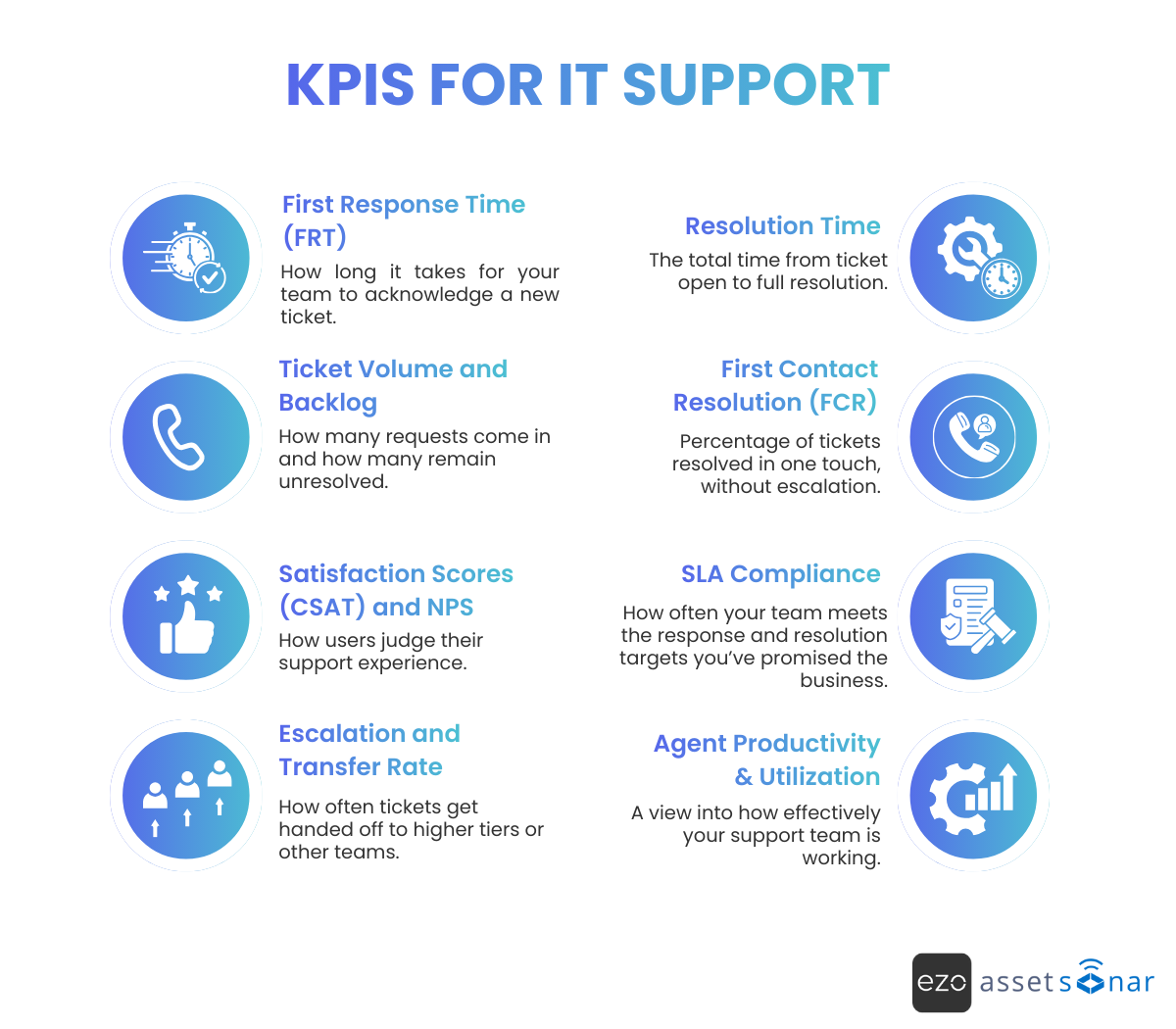
1. First Response Time (FRT)
How long it takes for your team to acknowledge a new ticket.
Rapid acknowledgment doesn’t mean solving the issue instantly, it tells employees: “We see you, and we’re on it.” Slow FRT is one of the earliest signs that the help desk is stretched thin or that automation isn’t pulling its weight. Even a simple automated acknowledgment can dramatically improve perceived responsiveness.
2. Resolution Time
The total time from ticket open to full resolution.
This one tells you whether your support engine is actually fixing problems efficiently. Long resolution times often point to bottlenecks: missing documentation, recurring issues, insufficient access rights, or gaps in training. When certain issue types consistently drag out, it’s a signal to dig deeper.
3. Ticket Volume and Backlog
How many requests come in and how many remain unresolved.
Volume spikes aren’t random. They often happen during onboarding cycles, system updates, new software rollouts, or Monday mornings after long weekends. A growing backlog is a red flag. It indicates that issues are arriving faster than they’re being resolved. If you want to forecast staffing needs, start here.
4. First Contact Resolution (FCR)
Percentage of tickets resolved in one touch, without escalation.
High FCR means your frontline team is empowered and well-trained. Low FCR often means Tier-1 needs stronger documentation, better tools, or additional permissions. From a user perspective, nothing kills satisfaction faster than having to repeat their issue to three different people
5. Satisfaction Scores (CSAT) and NPS
How users judge their support experience.
Speed matters, but satisfaction is the real outcome. CSAT gives you immediate feedback on a ticket. NPS (adapted internally) shows employees’ long-term trust in IT. If CSAT is high but NPS is low, it often means the help desk is doing a great job fixing issues but users don’t love the overall IT experience.
6. SLA Compliance
How often your team meets the response and resolution targets you’ve promised the business.
SLAs keep support predictable. Missing them repeatedly tells a story: demand outpaces supply, priorities aren’t balanced, or deeper systemic issues are slowing down the team. Strong SLA compliance, on the other hand, builds credibility with department heads and leadership.
7. Escalation and Transfer Rate
How often tickets get handed off to higher tiers or other teams.
Every escalation means extra time, extra context switching, and a more frustrated employee. High transfer rates usually signal either knowledge gaps or permission barriers. Tier-1 techs can’t fix what they aren’t allowed or trained to fix. Reducing escalations is one of the simplest ways to shrink overall ticket load.
8. Agent Productivity & Utilization
A view into how effectively your support team is working.
Metrics like average handle time and utilization rates help you balance workloads. If utilization is too high, burnout is around the corner. Too low, and you may be overstaffed or under-leveraging your team’s capabilities. Productivity metrics also highlight your strongest and most overloaded agents. This is useful when assigning queues or training others.
Why do these KPIs matter?
These metrics don’t just quantify performance, they reveal patterns. Low FCR might point to missing documentation. High backlog might expose a staffing gap. Falling CSAT might indicate issues with communication, not technical skill.
When IT teams track the right KPIs consistently, they get ahead of problems instead of reacting to them. And over time, the benefits compound: lower costs, faster fixes, fewer escalations, and happier employees.
Internal IT support runs best when you can see exactly where things break, and where they’re getting better.
Staffing and resource management for IT Support
Staffing a help desk is always a balancing act. Too few technicians, and the team drowns in tickets. Too many, and costs creep up with no real improvement in service quality. Most IT managers already know this tension well. When queues spike, leadership expects miracles; when things are stable, headcount suddenly feels “too high.”
Getting the staffing model right starts with understanding what “normal” looks like, but also acknowledging that no two environments operate the same way.
What industry benchmarks really say
Most organizations use user-to-IT ratios as a baseline. But these numbers only tell part of the story:
- Small businesses (<500 employees): ~18 users per IT support staff
- Mid-market (500–5,000 employees): ~25:1
- Large enterprises (10,000+ employees): often 40:1 or higher
Big organizations get leverage from standardization and automation, which lets each tech support more users. Smaller companies rarely have that luxury.
Gartner has historically floated 1 support employee per ~70 users as a generalized goal. But in practice, most companies fall short. One survey of CIOs showed that they were operating at 136 users per tech, even though their “ideal” ratio was around 82:1. Translation: many help desks are running thinner than they’d like to admit.
None of these benchmarks are universal. They’re starting points.
Factors that change your staffing ratio overnight
1. Industry & Regulatory Demands
Your staffing ratio doesn’t start with headcount, it starts with the industry you operate in. Some sectors simply generate more support load per employee, no matter how efficient your processes are.

Finance, healthcare, and government
These environments run hot by default. Encryption workflows, compliance checks, EHR systems, audit cycles, and specialized software all require hands-on support. That’s why ratios often fall in the 1:50–1:100 range. Downtime isn’t an inconvenience here, it’s a risk.
Manufacturing and retail
These sectors often sit on the opposite end of the spectrum. Much of the workforce relies on minimal IT so support teams can stretch further, sometimes 1:200+ without degrading service. But when issues do arise e.g. POS outages, handheld scanner failures, Wi-Fi gaps on shop floors, they tend to be operationally critical. So responsiveness still matters.
Education and public sector
This is where ratios can spike to extreme levels, sometimes hundreds of users per tech. Not because the workload is lighter, but because budgets are tight and teams are forced to absorb more than they reasonably should. The result is predictable: overloaded staff, long queues, and structural ticket backlogs.
Industry sets the baseline for how much work your help desk must absorb before something breaks. The more regulated or business-critical the environment, the lower your staffing ratio needs to be to keep operations stable.
2. Organization size and IT maturity
Bigger companies don’t automatically need bigger support teams, they need mature ones. The only reason large organizations can support more users per technician is because their IT environments are usually more predictable.
Teams with standardized hardware, automated workflows, strong documentation, and clean provisioning can stretch far further than teams fighting daily fires.
A small business might genuinely need approximately 1 technician for every 20 users because every laptop, every app, and every workflow looks different. A well-automated enterprise, on the other hand, can comfortably operate at 1:100 or even higher without sacrificing service quality.
The difference isn’t size. It’s maturity.
When systems are consistent and automation is doing the heavy lifting, each technician can handle more issues with less context switching. But when every department has its own exceptions or when documentation is outdated, ratios collapse quickly. This isn’t a staffing problem. It’s a predictability problem.
3. Complexity of the IT environment
Not all user bases are created equal. Your staffing needs don’t just depend on how many people you support, but how much technology they rely on to do their jobs.
Your support load multiplies instantly if your environment includes:
- multiple operating systems
- hundreds of specialized or legacy apps
- a mix of office, remote, and field workers
- different hardware standards across departments
Supporting 100 users with a standardized setup (one OS, one hardware profile, a predictable app stack) is straightforward. However, supporting 100 engineers, each with their own toolchains, VMs, sandbox environments, and niche software? That’s an entirely different world.
Every layer of variation including devices, permissions, application stacks, and network conditions adds friction. More friction means more tickets, deeper troubleshooting, and higher expertise requirements.
IT complexity is one of the biggest hidden drivers of ticket volume. When your environment becomes a patchwork of exceptions, no staffing ratio will ever feel “right” until the underlying complexity is brought under control.
4. Ticket volume and user behavior
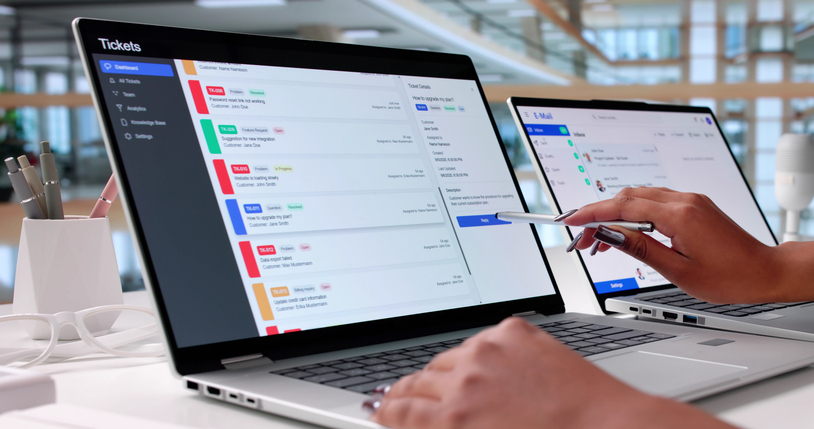
Ticket volume is one of the clearest signals of how much pressure your help desk is under. And unlike staffing ratios, this one rarely lies.
A basic example shows how quickly things scale:
If one technician can realistically resolve 10 tickets per day, and your organization receives 100 tickets per day, you’re looking at a 10-person team just to stay level. Add multi-step issues, PTO, outages, or big onboarding waves, and the number rises fast.
But high ticket volume doesn’t always point to a broken IT environment. It can simply reflect the rhythm of your business i.e. large onboarding cycles, unstable or aging applications, seasonal change windows, and low adoption of self-service or knowledge bases.
These spikes are normal and predictable if you track them over time.
On the other hand, teams with stable systems, tight change management, and strong self-service often support a surprisingly large user base with a lean staff. When users can solve common issues themselves, every resolved ticket is essentially recovered capacity for your team.
Ticket volume isn’t just a number, it’s a mirror. It reflects how users behave, how systems perform, and how much of your workload could be automated instead of manually triaged.
5. Automation and self-service
If there’s one factor that can transform your staffing model overnight, it’s automation. The moment routine work stops relying on human hands, your support capacity expands without increasing headcount.
Teams that invest in automated ticket routing, chatbot or AI-driven triage, scripted one-click fixes, remote endpoint management, and robust self-service and knowledge bases can support dramatically more users per technician. In many cases, a strong automation stack functions like adding several full-time staff members without adding salary lines or burning out your team.
On the flip side, if every password reset, software install, and troubleshooting step still requires manual intervention, your staffing ratios will always stay low. It’s not inefficiency, it’s simple math.
Automation doesn’t replace your support team. It removes the work that shouldn’t require them in the first place.
Finding the right staffing level isn’t one-and-done
Right-sizing an internal IT support team is never a one-time decision, it’s an ongoing calibration. Your ticket queues, SLA performance, backlog trends, and aging reports will tell you far more about staffing health than any headcount target ever will. When tickets consistently roll over from one day to the next, SLAs begin slipping, CSAT scores dip, or Tier-2 analysts find themselves drowning in Tier-1 issues, it’s a clear sign your team is running too lean. Burnout and excessive overtime usually show up next.
But the opposite problem exists too. If agents have long stretches of idle time, utilization numbers flatten, or the team resolves far fewer tickets than expected for its size, you may be over-resourced or simply not allocating talent effectively. In many cases, proactive initiatives like documentation improvements, automation projects, or preventive maintenance get sidelined when teams have more capacity than they realize. That imbalance leads to the strange situation where headcount grows but outcomes don’t.
Most mature organizations settle on a tiered support structure to keep things efficient: Tier-1 generalists absorb high-volume issues while Tier-2 and Tier-3 specialists handle deeper, more complex work. The real magic is in keeping escalations low and knowledge flowing downward. The more issues you can resolve at the first touch and the more your lower tiers are empowered to handle, the smoother your support operation becomes.
Ultimately, finding the right staffing level is an ongoing process of listening to the data, adjusting workloads, and ensuring the team has enough capacity to maintain quality without burning out. It’s less about numbers and more about keeping the engine running cleanly.
The real goal of IT staffing
Staffing has never truly been about hitting the perfect ratio, it’s about building a support function that stays reliable under real-world pressure. A well-balanced IT team can meet its SLAs without slipping into constant firefighting mode. It protects technicians from burnout, keeps cost per ticket under control, and delivers a consistently positive experience for the employees who rely on it. Most importantly, it has enough breathing room to work on the things that prevent tomorrow’s problems instead of just reacting to today’s.
As your business evolves, so will your staffing model. New tools, new offices, new compliance demands, new hiring cycles—they all reshape the workload in ways that ratios alone can’t predict. That’s why the smartest IT Support leaders review their staffing and performance data quarterly, not once a year. Catching the early signs of overload or underutilization is what keeps your help desk stable instead of slipping into chaos.
The goal isn’t perfection. It’s reliability, resilience, and the capacity to stay ahead of the work.
Industry verticals and compliance considerations

If you’ve ever worked in internal IT long enough, you know the rules don’t just come from your ticket queue, they come from the industry you’re in. A help desk inside a hospital or a bank lives a very different life from one inside a retail chain or a design studio. Compliance frameworks, audit requirements, and the nature of the work itself shape what “good IT support” looks like long before headcount or tooling enters the picture.
Take highly regulated industries like healthcare, finance, or government. Here, the help desk isn’t just solving login issues, they’re handling sensitive information under strict legal oversight. A hospital support tech answering a ticket may be staring at something that contains protected health information. That means HIPAA applies instantly: unique user logins, role-based access, encrypted records, logged activity, the whole chain of custody. Even the vendors offering your IT support tools need Business Associate Agreements, because a simple screen capture or ticket trace could technically expose health data. Finance teams face similar pressure. There needs to be multi-factor authentication on admin tasks, documented incident trails for SOX or GLBA audits, and zero tolerance for sloppy data handling. In these worlds, the help desk isn’t adjacent to compliance; it is part of it. And it must be audit-ready at all times.
Compliance frameworks like ISO 27001 and SOC 2 bring their own flavor of discipline, even outside heavily regulated industries. Companies working toward these certifications quickly realize how much of the control environment runs straight through the service desk. ISO 27001 expects a defined and documented incident management process. SOC 2 auditors will absolutely look at how support tickets containing sensitive information are handled, escalated, or restricted. That means your team needs strong ticket histories, consistent incident response steps, access controls on high-sensitivity tickets, and predictable communication workflows. These aren’t just “good IT hygiene”, they’re evidence that the organization takes security seriously. And when done right, they make your support function feel more reliable to the rest of the company.
Industry-specific workflows add another layer of complexity. A manufacturing plant experiencing downtime on a production line doesn’t have the luxury of waiting three hours for a follow-up. A broken CNC machine or a failing MES terminal is an operational emergency. Compare that with a software company, where the bottleneck might be a developer’s specialized local environment or a broken integration tool. In education, spikes hit on academic cycles when back-to-school seasons turn quiet help desks into temporary war rooms. Every vertical brings its own rhythms, peak loads, and specialty applications, which means your team’s knowledge base needs depth, not just breadth. Sometimes that means additional training. Sometimes it means certification on specialized tools. And sometimes it means having vendor escalation pathways ready because your internal team can’t memorize every nuance of a highly niche system.
No matter the industry, security and privacy expectations keep rising, and the help desk is often the first line of defense. Social engineering attempts regularly target support teams because attackers know a convincing ticket request can be easier to exploit than a firewall. That’s why many organizations now require strict verification steps before password resets or privileged actions, even if it adds friction to the workflow.
Support technicians also become frontline responders during cyber incidents. When malware spreads or phishing campaigns hit, they’re the ones fielding the flood of reports, isolating machines, escalating alerts, and helping the security team contain the blast radius. Privacy laws like GDPR and the growing patchwork of state regulations raise the stakes even further: a mishandled ticket can become a compliance violation.
The truth is simple: internal IT Support must operate with the same security and compliance posture as the rest of the organization. The help desk can’t be the weak link. That means regular compliance training for support staff using tools that meet the regulatory bar for logging and access control, documenting everything thoroughly, and building workflows that reflect the legal and operational reality of the industry you’re serving.
When IT Support aligns with its industry’s compliance expectations, the entire organization becomes harder to breach, easier to audit, and far more resilient. And that’s the whole point.
Emerging trends and challenges in IT Support
If you’ve been running internal IT support over the last few years, you’ve probably felt the ground shift beneath your feet.
Tickets look different. Workflows look different. The tools you use and the expectations your users bring are all changing faster than most teams can keep up. The biggest challenge now isn’t solving issues, it’s staying ahead of the trends that will shape how you support your workforce next year, not last year.
Here’s what you must consider to brave your IT Support for the coming year:
1. AI and automation take center stage
AI isn’t coming for IT support, it’s already here. And at its best, it’s lifting a massive weight off the help desk. Chatbots and virtual assistants can now handle a surprising amount of Tier-1 work from answering common questions and suggesting knowledge base articles to even unlocking accounts or triggering password resets before an agent ever touches the ticket.
Behind the scenes, AIOps platforms are scanning logs, spotting anomalies, and flagging issues long before they turn into “everything is down” emergencies. Got a server creeping toward low disk space? AI can warn you and prevent a ticket before it happens.
But AI has its limits. Complex issues still need a human. If you’ve ever seen a user trapped in a chatbot loop while trying to report something serious, you know exactly why over-automation can backfire.
Most modern IT teams are finding the right balance by letting AI handle the volume and the noise, and letting humans handle the nuance. In 2026, expect AI to get even more integrated from ticket triage to recommended fixes, while IT staff shifts toward deeper troubleshooting and the kind of empathetic communication no machine can replace.
2. Supporting a remote and hybrid workforce
If there’s one trend that permanently rewrote the rules for IT, it’s hybrid work. The “walk over and fix it” method is gone. Now you’re dealing with home Wi-Fi mysteries, personal devices, VPN outages, and machines scattered across living rooms, coworking spaces, airports, and office floors. Support requires remote-first tools such as secure remote desktop control, screen sharing, video walkthroughs, and in some cases, augmented reality apps that let a technician guide a user through a hardware fix using on-screen overlays.
Security expectations are higher, too. Remote devices still need patching. Corporate data still needs protection, even on a personal laptop. BYOD, split tunneling, out-of-date routers—everything becomes part of the helpdesk world. Many teams now ship pre-configured laptops to new hires, enforce policies through MDM tools, and extend their service hours to match the “work whenever, wherever” reality of hybrid staff.
The silver lining? Remote support has matured. Issues that once required hands-on intervention are now fixed entirely through remote sessions. Hybrid is here to stay. Internal IT is simply refining the experience so it feels seamless no matter where the user is located.
3. Self-service and shift-left push

One of the quiet revolutions in IT support is the rise of self-service. Today’s employees don’t want to wait in a queue for basic answers. They expect instant solutions. And done right, self-service is a win for everyone. Users get faster resolutions; the IT team gets fewer repetitive tickets.
Knowledge bases, FAQ portals, and AI-powered search now give employees the tools to solve problems on their own. Need to install a standard app? Request it through the portal. Forgot your password? Self-unlock. Want to know if there’s an outage? Check the status page. Every issue resolved upstream is one less ticket downstream. This is a textbook “shift-left” strategy.
The tricky part is making self-service actually useful. That means searchable, authoritative content, clear how-to guides, and the discipline to keep everything up to date. IT teams are also taking on more knowledge management responsibilities and educating users on where to find answers. Looking ahead, AI-powered knowledge bases will become the norm, helping employees troubleshoot in natural language at any hour.
4. Cost pressure and tool consolidation
IT budgets aren’t getting any looser. Support teams are being asked to deliver better service with tighter constraints, forcing an efficiency-first mindset. One of the biggest trends is tool consolidation. Instead of juggling a patchwork of systems i.e. ticketing, chat, monitoring, remote control, and documentation, organizations are collapsing them into integrated or all-in-one platforms. Fewer vendors means fewer contracts, fewer silos, and far less operational drag.
Automation plays a huge role here too. When routine tasks are automated, technician time gets freed up, and the support operation becomes leaner without cutting quality. Many IT leaders are re-evaluating their entire tool stack, eliminating redundant licenses, and leaning harder into cloud-based solutions that are easier to scale and manage.
But cost optimization isn’t about cutting corners. The best teams invest in preventing problems with strong monitoring, clean deployments, and better change management because preventing one outage is always cheaper than resolving it.
5. A renewed focus on employee experience
Internal IT support is no longer just a function, it’s part of the employee experience. When your technology works smoothly, people feel supported; when it doesn’t, frustration grows quickly. That’s why IT teams are borrowing principles from customer service i.e. cleaner portals, more intuitive ticketing experiences, personalized support, and follow-ups to ensure issues are fully resolved.
Some companies are even measuring employee experience scores tied directly to IT services. It’s a reflection of a broader shift. IT support is no longer seen as a cost center but as a contributor to productivity, culture, and retention.
In practice, this looks like more proactive communication, better onboarding for new hires, publishing IT tips or quick how-to videos, and running “office hours” for recurring tech topics. It also requires stronger soft skills inside the support team because fixing the device is one part of the job, leaving the user feeling confident is the other.
Architecting your help desk for 2026: A multi-tiered support model
A well-run help desk doesn’t happen by accident. It’s designed—intentionally, carefully, and with a clear understanding of where issues should land the moment they appear. Mature IT teams build their support structure the same way they build everything else. With layers that protect time, talent, and attention.
At the heart of that design is a simple principle i.e. shift left. Resolve problems as early and as cheaply as possible. Keep the heavy work away from the experts who should be focused on deeper issues, not password resets and printer mysteries.
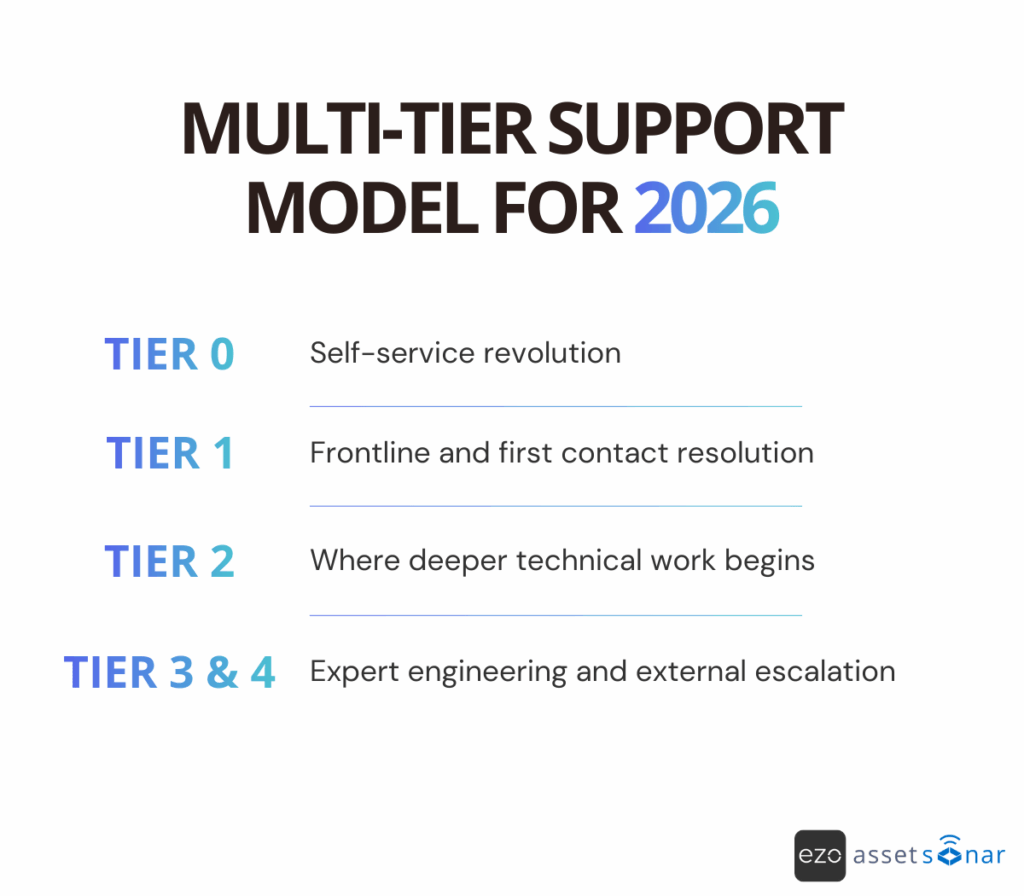
Modern support models take this further than the old Tier 1 to Tier 3 setup. They start before the ticket even exists and extend beyond what your own team can handle:
Tier 0: Self-Service. Knowledge bases, automated flows, and AI-driven portals that solve the easy stuff without pulling a technician off real work.
Tier 1 to Tier 3: Human Expertise. Generalists triage the volume. Specialists jump in when the problem needs deeper hands and cleaner access.
Tier 4: Vendor Escalation. When the issue sits inside proprietary software or a vendor-owned system, the help desk hands it off with a clean trail and a clear expectation.
This layered model isn’t about hierarchy, it’s about protecting your most valuable people and making sure tickets land exactly where they should, the moment they surface. When you architect support this way, resolution speeds up, escalations drop, and your team finally gets the space to work proactively instead of living in a permanent reaction loop.
Tier 0: The self-service revolution
Tier 0 is where modern IT support quietly does some of its best work, before a ticket is ever created or anyone on your team even knows something was wrong. It’s the layer built entirely on self-service: knowledge bases, FAQ portals, automated workflows, and increasingly, AI-driven chat interfaces that can answer questions faster than a human ever could.
The idea is simple: Take the high-volume, low-value work off your team’s plate. Password resets. “How do I connect to Wi-Fi?” questions. Basic troubleshooting. Policy lookups. All the things that clog queues and burn hours without requiring real IT expertise.
When Tier 0 works well, it acts like a pressure valve. Tickets disappear before they hit the queue, users get instant answers, and your support team finally has the breathing room to tackle the work that actually moves the needle.
Most IT managers measure Tier 0 by its deflection rate i.e. how many issues never make it to a human. The higher the number, the smoother everything else runs. But Tier 0 isn’t a “set it and forget it” asset. It lives or dies on knowledge discipline. Content must be accurate, searchable, and actually useful or it becomes just one more place for users to get stuck.
Done right, Tier 0 isn’t just a convenience; it’s the foundation of a modern, high-functioning help desk. It delivers instant answers at scale and gives your team the freedom to focus on work that requires more than a scripted response.
Tier 1: The frontline and first contact resolution
Tier 1 is where IT support becomes human again. It’s the first voice a frustrated user hears, the first set of eyes on a vague “something’s not working,” and the team responsible for keeping small problems from snowballing into big ones. These analysts handle the day-to-day chaos including basic troubleshooting, password resets, incident logging, and spotting the early signs of something bigger breaking.
If Tier 0 relieves pressure, Tier 1 absorbs what’s left. How well it performs is measured by one number that every IT manager watches closely: First Contact Resolution (FCR).
A strong FCR rate means the frontline team is doing exactly what they’re supposed to do i.e. fixing issues on the first try, without bouncing the user around the support ladder. High FCR doesn’t happen by accident. It requires three things:
- good documentation
- the right tools
- the right permissions
When any of those are missing, escalations spike. And escalations are expensive. They introduce delays, force specialists into context-switching mode, and frustrate employees who just want their issue solved at the moment.
Here’s the reality most leaders eventually learn: A low FCR rate is rarely a Tier 1 problem. It’s an architectural problem.
If the frontline team isn’t trained, if they don’t have remote access tools, if they can’t update drivers, check logs, or reset systems due to permissions, they can’t resolve issues no matter how capable they are. They will escalate because the system gives them no other choice.
Improving Tier 1 performance starts upstream with Tier 0 knowledge and continues downstream with better training, cleaner documentation, and appropriate access rights. When Tier 1 is empowered, everything else in the support model gets lighter, faster, and cheaper.
Tier 2: Where deeper technical work begins
If Tier 1 is the frontline, Tier 2 is the first layer of true technical depth. This is where the issues that won’t crack under basic troubleshooting finally land i.e. the stubborn tickets, the edge cases, the “it was working yesterday” mysteries that need someone who understands the company’s environment beyond the surface level.
Tier 2 analysts sit in that middle ground between everyday fixes and full-blown engineering problems. They know the stack. They understand the quirks of your environment. And they have the skills (and access) to dive deeper than Tier 1 ever could.
Their work ranges from detailed diagnostics and intermediate troubleshooting to installing specialized software, untangling backend application issues, and validating whether something needs to be escalated further. In many environments, Tier 2 also becomes the team that updates the knowledge base by closing the loop so that the next version of the problem can be solved earlier, cheaper, and faster.
When remote fixes fail, Tier 2 is often the group that goes hands-on by visiting the user, checking the hardware, or validating that a root cause isn’t hiding somewhere physical.
Tier 2 isn’t just “more advanced Tier 1”, it’s the point in the support model where real technical investigation begins and where the help desk starts to turn reactive work into institutional knowledge that prevents future escalations.
Tier 3 and Tier 4: Expert engineering and external escalation
Tier 3 is where the help desk stops troubleshooting and starts engineering. These are your deep specialists i.e. the people who understand the infrastructure, the architecture, and the edge cases that only show up once a year but can take down half the business when they do. When an issue lands here, it’s no longer about “getting someone back to work”, it’s about stabilizing the environment itself.
Tier 3 analysts work on the problems that demand real technical depth: patch management, vulnerability response, hard-to-diagnose service failures, compliance-sensitive fixes, and the permanent resolutions that come out of problem management. They collaborate closely with developers, security, and infrastructure teams because the issues reaching this tier often overlap multiple systems or expose flaws that were never fully addressed.
This level exists because modern IT environments aren’t simple anymore. Hybrid cloud footprints, legacy systems that no one is allowed to turn off, niche vendor toolchains, and mission-critical SaaS make specialization not optional but necessary. Tier 3 absorbs the high-risk work so the rest of the help desk doesn’t drown in it.
Tier 4 takes it one step beyond the internal team. This is where the organization formally brings in external vendors—the people who own the proprietary systems, the codebases you can’t see, and the tools your team can’t legally touch. Tier 4 manages vendor tickets, escalates high-severity issues, negotiates support timelines, and coordinates fixes for systems like ERP platforms, specialized medical software, or core financial systems.
In other words: Tier 3 solves the hardest problems your team can solve. Tier 4 handles the ones they can’t.
Together, these tiers form the upper edge of a mature support model where high-risk issues get resolved without chaos and the business stays stable even when technical problems aren’t as much.
Building and empowering the modern IT Support team
A tiered support model only works if the people inside it are equipped to succeed. Tools, workflows, and frameworks matter but the real backbone of a high-performing help desk is a team that’s trained, confident, and prepared for the situations that hit their queue every day. The most mature IT organizations treat support roles as a professional discipline, not an entry-level checkpoint. Plus, they invest accordingly.
1. Entry points and foundational technical credentials
For anyone starting their IT Support career, a solid technical foundation is non-negotiable. Certifications aren’t a magic bullet but they are a reliable signal that someone understands the basics such as how systems work, how issues break, and how to troubleshoot without spiraling into guesswork.
CompTIA A+ remains the gold standard for beginners. It validates the essentials: hardware fundamentals, networking concepts, OS internals across Windows and Linux, security basics, and the ability to use remote support tools effectively. Think of it as the baseline confidence layer; proof that a technician knows how to navigate the core building blocks of the environment they’re supporting.
Alongside A+, programs like the Google IT Support Professional Certificate help new technicians convert theory into practice. These tracks lean heavily into real-world tasks e.g. diagnosing connectivity issues, managing system administration workflows, working with DNS/DHCP/Active Directory, and understanding the early stages of cloud operations. They prepare technicians for the day-to-day realities of the help desk rather than just the exam questions.
And to round out technical capabilities with operational discipline, many teams encourage ITIL Foundation early in a technician’s career. It provides the shared language and process awareness that a tiered model relies on, helping new team members understand why incidents are handled a certain way, how changes are governed, and where their work fits in the broader service lifecycle.
Together, these certifications don’t just create capable technicians, they create a help desk team that speaks the same language, solves problems consistently, and can grow into higher tiers without losing operational rigor.
2. Developing core competencies through continuous training
In a field that changes as quickly as IT, one-off training isn’t enough. New tools, new attack surfaces, new ticket patterns—everything shifts faster than most teams can document it. The only way to keep a help desk running smoothly is to treat training as a continuous, structured discipline rather than an annual checkbox.
Most high-performing teams blend three training modalities to build well-rounded, steadily improving technicians.
On-the-job training (OJT) remains the backbone of skill development. It’s fast, practical, and grounded in real systems, not the theoretical ones described in manuals. When new team members sit beside experienced technicians, they learn how the environment actually behaves, which shortcuts are safe, and which recurring issues signal deeper problems. OJT accelerates confidence and competence because it offers immediate feedback in real contexts.
Formal and specialized training fills the gaps OJT can’t reach. As environments adopt AIOps tooling, cloud-native stacks, or more advanced automation, support teams need structured learning paths to keep up. Deep-dive courses and role-specific certifications (especially for Tier 2 and Tier 3 engineers) ensure that the people responsible for diagnosing and stabilizing complex systems have the technical depth to do it well.
Simulations and hands-on labs round out the learning cycle. Whether it’s practicing disk partitioning, experimenting with networking configurations, or role-playing a high-tension major incident call, practical environments build instinct and muscle memory. Labs give support staff a safe place to make mistakes before they’re in front of a frustrated exec or mission-critical system.
Of course, maintaining a strong training program isn’t easy. Teams often struggle to free internal experts from their day jobs, keep materials current, or secure budgets for specialized courses. Many organizations offset this by using flexible online programs, rotating internal instructors, or subscribing to on-demand technical training libraries that evolve along with the technology stack.
The goal isn’t just to keep skills fresh, it’s to build a team that can adapt when the environment shifts, absorb new responsibilities without burning out, and resolve problems before they become outages.
3. Cultivating essential soft skills and clear communication

Technical skills keep systems running but soft skills keep the workplace running. IT support lives at the intersection of complicated technology and stressed, time-pressed employees. Therefore, the way technicians communicate often matters just as much as the fix itself.
Modern IT leaders invest in soft-skills training because it directly affects employee satisfaction, ticket friction, and even SLA performance. The goal isn’t to turn technicians into customer service reps, it’s to make sure that users feel heard, respected, and informed at every step.
A strong soft-skills foundation usually revolves around three areas:
- Empathy and user-centricity. When someone’s locked out of their laptop or can’t access a critical system, they’re not just reporting a “ticket”, they’re dealing with a disruption to their workday. Technicians who lead with empathy reduce tension, build trust, and create a smoother overall interaction.
- Listening and de-escalation. Not every conversation starts calmly. Help desk staff need the ability to actively listen, identify what the user is actually asking for, and keep situations from spiraling when frustration bubbles up. Quick acknowledgment and clear next steps do more to defuse stress than any canned script ever will.
- Transparent communication. During outages, slow resolutions, or multi-step fixes, silence is the enemy. Users tolerate delays far better when they know what’s happening and why. Clear, frequent communication, especially during high-visibility incidents, keeps expectations aligned and prevents frustration from compounding.
Teams can typically build these capabilities through a mix of self-paced modules, live workshops, and role-play scenarios that mimic real support interactions. The intent isn’t just to “be nicer”, it’s to create a help desk that users trust. When people feel supported and understood, technical problems feel less disruptive and IT becomes a partner rather than a last resort.
Soft skills don’t replace technical expertise but they elevate it. Combined, they can turn a functional support team into a genuinely effective one.
Conclusion: Turning IT Support into a strategic advantage
If there’s one thread running through modern IT support, it’s this: the help desk is no longer a “ticket factory.” It’s the nervous system of the business. When IT support runs well, people get work done, projects move forward, and outages become speed bumps instead of roadblocks. When it doesn’t, everyone feels it.
Getting there isn’t about a single tool or one big re-org. It’s about tightening a few critical levers at the same time.
The path to that reliability isn’t complicated, it’s disciplined. Track the right KPIs so you can see where the operation is slipping before it becomes a problem. Calibrate staffing to match the actual needs of the business (not a one-size-fits-all ratio), and adjust as complexity grows. Remember that industry and compliance pressures shape your playbook just as much as ticket volume. What works for a SaaS company won’t cut it inside a hospital, and a bank’s help desk won’t survive on startup-style improvisation.
Above all, lean into the trends reshaping IT support. Automation, self-service, and remote-first tooling aren’t optional anymore, they’re the difference between a team that’s constantly firefighting and one that stays ahead of the work. Hybrid environments demand smarter workflows. Users expect consumer-grade experiences. Compliance expectations are rising, not retreating.
None of that works without investing in the people inside the model. Strong foundations (A+, Google IT Support, ITIL), continuous training, and hands-on labs can keep technical skills relevant in an environment that changes monthly. Soft skills including empathy, active listening, clear and transparent communication can turn “IT support” into an experience employees trust, not just a function they tolerate.
Then, you must architect how work flows. A layered, shift-left support model, from Tier 0 self-service through Tier 1–3 specialists and Tier 4 vendor escalation, can ensure issues land in the right place the first time. Tier 0 handles the repeatable noise, Tier 1 resolves as much as possible on first contact, Tier 2 and Tier 3 dive into deeper diagnostics and permanent fixes, and vendors only get pulled in when they truly need to be.
When IT managers take a holistic, modern approach to support by blending metrics, staffing strategy, industry awareness, forward-looking technology, and upskilling their team, the help desk stops being a cost center and starts becoming a strategic advantage. Issues get resolved faster, operations become more predictable, employees stay happier, and the business becomes more resilient.
The goal isn’t a perfect queue or a zero-incident world. The goal is a help desk that’s reliable under pressure, resilient when things change, and trusted by the people who depend on it every day. When you get that right, IT support stops being just the place problems go and becomes one of the reasons the business can move faster with confidence.



![[How-to] Enhance IT Support With Service Catalog Workflows in AssetSonar](https://cdn.ezo.io/wp-content/uploads/2024/11/26132116/Service-catalog-workflows-scaled-1.webp)




