
Mia, an IT manager, is sitting at her desk, pensively reviewing a report on new security vulnerabilities. All of a sudden, she noticed that some critical devices in her organization’s network are flagged for unpatched vulnerabilities.
It suddenly dawns on her that these devices aren’t just any old laptops or services; they are assets that should have been flagged in her IT asset management (ITAM) system much earlier. Yet, they’re nowhere to be found.
Bewildered, Mia opens and checks her ITAM tool, only to discover that these assets weren’t properly synchronized with the company’s identity provider (IdP) or MDM system, which would have made it easier to track those devices along with their patch status.
Her ITAM tool was supposed to be the single source of truth, but because it wasn’t integrated with other enterprise tools, Mia is left scrambling to identify and update her asset records, while also managing escalating security risks.
This challenge has become quite prevalent in today’s world, and IT managers are struggling to overcome it. An ITAM tool is not just used to maintain a list of devices; it is also used to ensure that devices, software, and assets are properly tracked, secured, and optimized throughout their lifecycle.
However, without seamless integration between the ITAM tool and other enterprise systems, such as MDM, IdP, ITSM, and security tools, IT managers like Mia often struggle to keep track of their organization’s assets and maintain security compliance.
In this blog, we will discuss the top 5 ITAM integration challenges that IT managers face, along with actionable strategies to overcome them. Using these solutions, IT managers can experience smoother workflows, gain better asset visibility, achieve improved security, and face fewer administrative headaches.
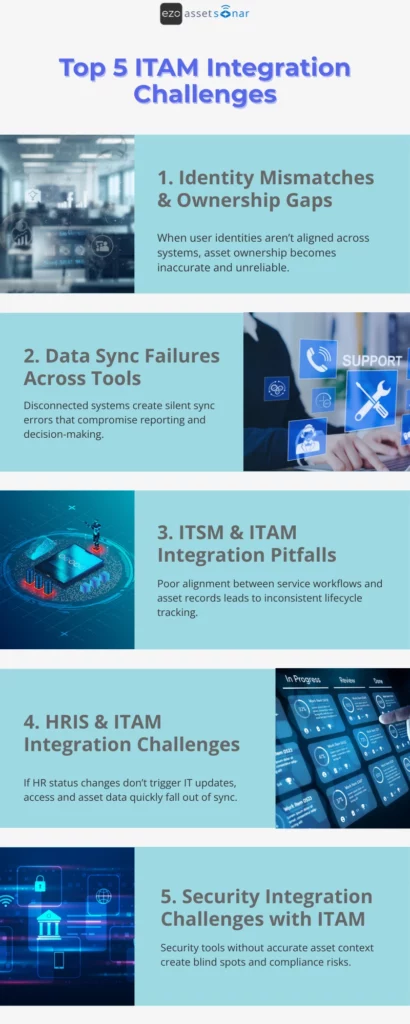
What are the top 5 ITAM integration challenges?
1. Identity mismatches and ownership gaps
One of the primary causes of integration failures in ITAM is poor synchronization between identity management systems (IdP) and ITAM tools. In most cases, assets get assigned to the wrong individuals, and ownership records don’t match across systems.
For example, an employee may leave the organization, but their assigned device remains marked as “active” in the ITAM system, resulting in outdated records and security gaps.
Some of the symptoms IT managers usually see include incorrect user-to-device assignments, devices left in the “Assigned” status after an employee leaves the company, and confusion around which employee or department is responsible for certain assets.
Here’s how IT Managers can overcome these issues:
- Use consistent and unique employee identifiers, such as employee IDs, UPNs, and email addresses, across all systems. This is done so all systems can sync without discrepancies.
- Integrate HRIS with ITAM to automatically update asset assignments when employees join, move, or leave the company. All HRIS data, including employee status, department, and role, should automatically update the ITAM system to reflect changes as they occur.
- Use automated workflows to trigger offboarding actions and asset reclamation tasks to ensure no device is forgotten.
In a hybrid work environment, a contractor leaves the company, but their laptop is still marked as “Assigned” in the ITAM system. Using automated offboarding workflows that sync HRIS and ITAM can ensure that assets are reassigned or reclaimed immediately after termination, preventing ownership gaps and missing devices.
2. Data sync failures across tools
Many organizations use different tools to manage devices (MDM), users (IdP), software (SaaS), and ticketing (ITSM). However, these systems often operate in silos. Without proper integration, asset data may not sync properly between ITAM, MDM, IdP, and security tools. This can lead to discrepancies in asset records and create gaps in real-time visibility. When this happens, it becomes hard to track compliance.
Some of the symptoms IT managers typically see include duplicate or incomplete asset records, assets in ITAM that are not updated with the latest security patches or statuses, and difficulty correlating asset history with service tickets or security alerts.
Here’s how IT Managers can overcome these issues:
- Implement centralized data governance to standardize the fields used for asset records across all systems. This includes using unique identifiers (such as employee IDs and asset serial numbers) to link assets across all platforms.
- Set up automated data syncs between ITAM and other tools to maintain near-real-time accuracy, especially for critical data like compliance status, patch updates, and asset lifecycle information.
- Implement a centralized asset dashboard that pulls data from multiple sources to provide a unified view of asset status and health.
An IT Manager uses Microsoft Intune to manage device compliance, but finds that their ITAM tool is not updated with the latest patch device status. By setting up a real-time sync between Intune and the ITAM tool, the IT manager ensures that all compliance and patch data is always up to date across systems.
3. ITSM and ITAM integration pitfalls
IT service management (ITSM) tools like Zendesk or Jira store incident and service ticket information. However, they cannot provide a complete asset context without proper integration with ITAM. ITSM tools alone do not let teams track the complete history of assets involved in incidents or service requests. This creates inefficiencies in the workflow, especially when teams manually link tickets to assets or drill into the root causes without having enough context on device health, wasting time and increasing the risk of errors.
Some of the symptoms that IT managers usually come across include service tickets raised without accurate asset information, difficulty in tracking asset-related issues across ITSM tools and ITAM systems, and increased response times, back-and-forth, and errors due to a lack of asset context.
Here’s how IT Managers can overcome these issues:
- Use a unified configuration item (CI) model that links assets in both ITAM and ITSM tools to provide a complete view of the asset’s service history. This way, teams can ensure that assets are always linked to the right tickets and vice versa.
- Use automated workflows to attach the relevant asset to each ticket based on the issue or service request. This reduces manual errors and ensures faster ticket resolution.
- Implement a two-way sync between ITAM and ITSM systems to keep asset data consistent across both platforms and provide complete visibility to IT teams. This way, teams can access accurate, up-to-date information that is always available.
When an employee submits a service request in Zendesk, the ITSM tool automatically retrieves asset information from the ITAM system, including warranty status, previous repairs, and compliance status, ensuring faster, more informed issue resolution.
4. HRIS and ITAM integration challenges
Both onboarding and offboarding processes are critical for the IT asset management lifecycle. Therefore, when HRIS and ITAM systems are not integrated, IT teams have no choice but to manually update asset records when employees join, transfer, or leave the organization.
Employees often walk away with assets that haven’t been properly tracked, or devices may remain assigned to employees who have left the organization. This leads to mismanagement of assets and devices that are not properly returned.
Some common symptoms that IT managers see include assets not being returned after an employee leaves the organization, employees getting assigned outdated or untracked devices (devices being assigned incorrectly during onboarding), and delays in reclaiming devices when employees transfer departments or change their roles.
Here’s how IT Managers can overcome these issues:
- Integrate HRIS systems with ITAM tools to automatically update asset records as soon as employees join, transfer, or leave the organization. This ensures that assets are accurately tracked throughout the employee lifecycle in the company.
- Set up automated workflows that trigger asset return tasks when an employee leaves the company or changes roles. You can also set alerts to remind employees to return the assigned devices.
- Ensure that asset ownership is clearly defined across departments and HR systems, especially for shared devices or specialized assets.
- Use HRIS data to drive lifecycle decisions such as when to retire or replace assets.
When an employee leaves the company, the HR system automatically updates the ITAM tool, triggering asset reclamation workflows. The employee is reminded to return their assigned laptop and any accessories to ensure all assets are accounted for.
5. Security integration challenges with ITAM
Security tools like EDR (Endpoint Detection and Response) and vulnerability management platforms provide critical information about asset health and potential risks. However, without integration with ITAM systems, it is difficult for IT teams to get a comprehensive view of asset health and obtain the risk profile in real time.
The symptoms that IT managers typically see include unpatched vulnerabilities on devices that are not reflected in the ITAM system, difficulty in correlating security alerts with asset ownership and history, and gaps in security posture visibility across IT and security teams.
Here’s how IT Managers can overcome these issues:
- Integrate ITAM with security tools to synchronize asset health and risk status, including patch levels, encryption status, and vulnerability exposure. This enables IT managers to prioritize risk-based remediation.
- Tag assets in the ITAM system based on security risk levels, making it easy to see which devices need immediate attention.
- Enable real-time syncing of vulnerability data to flow into the ITAM system so assets with known vulnerabilities can be tracked and remediated before they cause issues.
When a new security vulnerability (CVE) is disclosed, an integrated ITAM and EDR system automatically flags all impacted devices in the ITAM dashboard. This way, IT and security teams can quickly prioritize remediation actions based on asset criticality, ownership, and patch status.
Best practices for overcoming ITAM integration challenges
Step 1: Start with clear integration goals
Before integrating systems, define what success actually looks like. ITAM integrations should help IT managers solve specific operational problems, not just “connect tools because we can.”
Some questions IT managers should ask upfront:
- Are you trying to reduce manual updates?
- Are you looking to improve audit readiness?
- Do you need to tighten offboarding and access control?
- Would you prefer to get better visibility into risk and spend?
Let’s take a look at this example:
An IT manager integrates ITAM with MDM without a clear goal. Devices start to sync, but nothing improves. Later, they redefine the objective: “Automatically flag and recover devices inactive for more than 30 days.”
Once the goal is clear, they configure the integration to trigger alerts and recovery workflows in case devices show “Inactive” status for more than 30 days. This helps turn raw data sync into real operational impact.
Hence, this shows that integrations become passive data pipes without defined outcomes. With goals, they become execution engines.
Step 2: Standardize data across systems
IT managers should ensure that every system that uses asset data adheres to common standards for identifiers and data fields.
It is very usual for integrations to break down quickly when systems do not agree on identity. If one tool uses email, another uses UPN (User Principal Name), and a third uses employee ID, ownership and reporting will never align with each other.
It is important to pick a single authoritative identifier for:
- Users (e.g., employee ID or UPN)
- Devices (BIOS serial number or hardware ID)
- Assets (asset tag or internal ID)
Let’s consider this scenario:
An organization sees duplicate laptops in itsITAM tool because devices are re-enrolled in MDM. By standardizing on the BIOS serial number as the primary device key, the ITAM system can correctly reconcile re-enrollments instead of creating new records.
With clean identifiers, IT managers can prevent duplicate assets, broken ownership, and unreliable reports, especially during audits.
Step 3: Automate wherever possible
Manual updates don’t fail because people are careless. They fail because they are the first thing that teams skip when they are busy.
It is crucial for IT managers to automate the tasks that matter most:
- Asset creation on device enrollment
- Ownership updates when users change roles
- Status changes when devices go inactive
- Recovery tasks during offboarding
Consider this scenario:
Instead of relying on technicians to manually update ownership, an IT team links ITAM to their identity system. When a user moves to another department, asset ownership updates automatically, keeping reporting accurate without putting extra effort.
Hence, this shows that automation doesn’t necessarily remove control; it removes friction. It ensures accuracy even when IT teams are stretched thin.
Step 4: Test and monitor integrations continuously
IT teams are wrong when they assume the integrations will run smoothly once they have set them up. They need to be continuously monitored for errors, data mismatches, or sync failures.
Regular testing ensures the ongoing accuracy and integrity of your asset data. You can’t set integrations only to forget them later. APIs change, permissions expire, and syncs silently fail, often without obvious alerts.
Some best practices include:
- Monitoring sync success/failure logs
- Alerting when data hasn’t updated in the expected timeframes
- Periodic reconciliation checks (e.g., MDM vs ITAM counts)
Let’s take a look at this example:
An IT team discovers during an audit that HRIS data stopped syncing three months ago due to an expired API token. Had they set up a simple alert for “no employee updates in 24 hours,” the issue would have been caught immediately.
Silent integration failures create false confidence. Continuous monitoring ensures your “source of truth” stays truthful.
Download the ITAM Integration Health Check PDF
Conclusion
Successfully integrating ITAM with other tools is key to managing the increasing complexity of modern IT environments. By addressing common challenges like identity mismatches, data sync failures, and a lack of real-time risk visibility, IT managers can ensure better asset visibility, security, and operational efficiency.
When systems are well integrated, IT managers can proactively track assets, automate workflows, and respond quickly to security threats, creating a seamless and effective ITAM ecosystem. Overcoming these integration challenges is the foundation of a future-proof IT asset management strategy.