Why It Matters
Documenting fixes ensures that when one agent solves a complex problem, the entire team—and potentially the end-users—can instantly benefit from that knowledge, deflecting repetitive tickets before they are submitted.
How to Do It
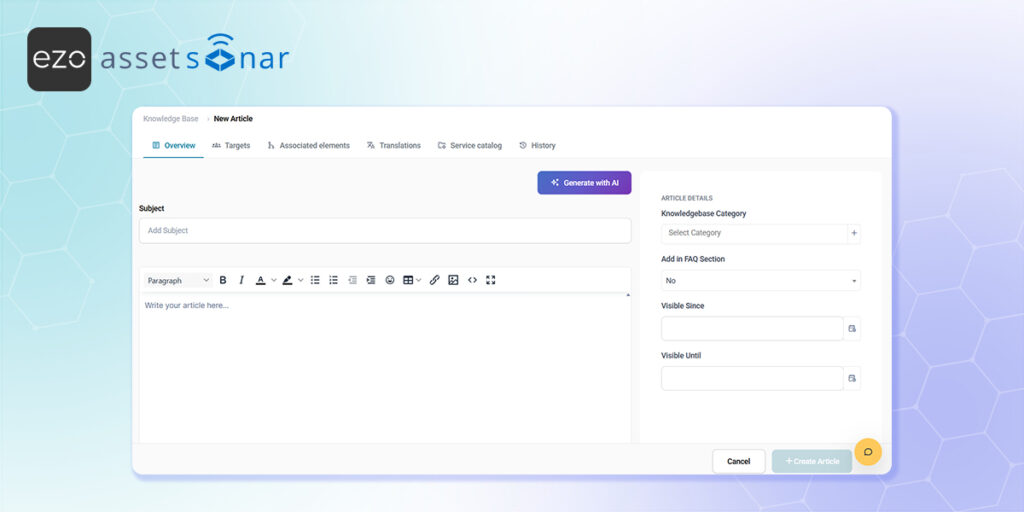
- Open the Editor: Navigate to Tools → Knowledge Base to access your central repository and click New Article to open the creation form.
- Draft the Content: Fill out the Overview tab by giving your article a clear Subject, assigning it to the correct Knowledgebase Category, drafting your content in the rich text editor, and adding any necessary Attachments.
- Define the Audience: Move to the Targets tab to define exactly which users, groups, or profiles are allowed to see the article.
- Publish to the Portal: Finally, use the Service catalog tab to configure exactly how and where the article appears for your end-users on the self-service portal.
Next Steps
Log into the end-user portal and use the global search bar to look up a keyword from your new article. This verifies that the search engine successfully indexes your content and displays it correctly to the intended audience.
Was this helpful?
Thanks for your feedback!





