Countless mid-market and enterprise organizations have been facing this challenge for years: critical hardware assets disappearing due to poor tracking systems. Because of this challenge, they have to face significant security risks and a budget drain.
For a long time, hardware asset management (HAM) has lived quietly in the background. As long as laptops were issued, servers were monitored, and spreadsheets were mostly in order, it didn’t require much attention. However, that world no longer exists.
In 2026, IT managers are dealing with a very different environment: employees are working from anywhere, devices are changing places faster than records, IoT and peripherals are outnumbering traditional endpoints, and security and compliance teams are expecting proof, not just assumptions.
The hardware asset management market has significantly evolved over the past few years as mid-market and enterprise companies have increasingly prioritized gaining control over their physical IT infrastructure.
Untracked hardware leads to more than misplaced and lost devices, especially for IT operations managers and sysadmins. This highlights security blind spots, compliance risks, and unnecessary spend.
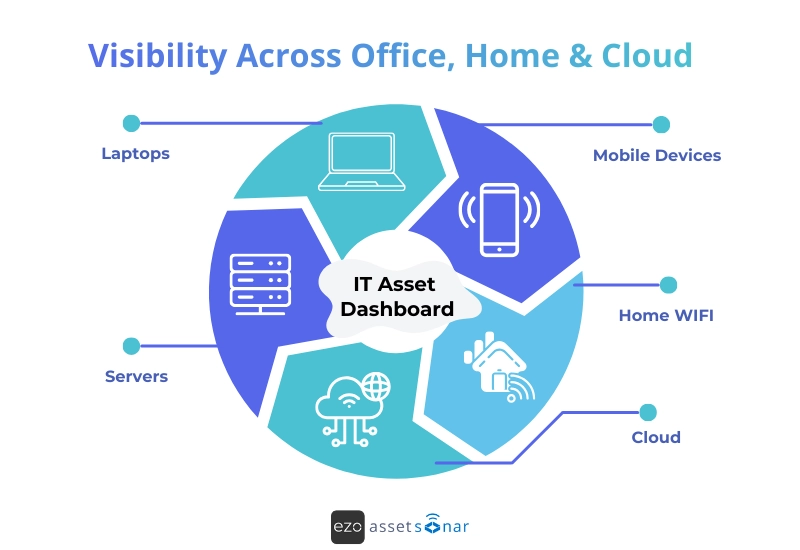
With remote work becoming more prevalent and devices being dispersed across home offices, traditional tracking methods no longer work. This is where hardware asset management solutions become essential for restoring visibility, accountability, and control across today’s distributed IT environments.
It’s important to bear in mind that hardware didn’t just become more complex; it has become more distributed, dynamic, and deeply tied to risks.
Modern-day HAM is no longer about keeping a clean inventory. It is more about continuous visibility, IT lifecycle intelligence, and security context at scale.
In this blog, we will discuss the key hardware asset management trends shaping how IT teams are operating in 2026, and what they mean in practical terms.
Trend 1: Automation has become the only way to scale accuracy
Manual updates fail for one simple reason: they’re the first thing skipped when teams are busy.
In an IT environment where the number of devices, users, and SaaS tools grows exponentially, manual processes just can’t keep up. As a result, the data in your IT asset management (HAM) system quickly becomes stale, inaccurate, or incomplete. This leads to issues in everything from patch management to security audits and license compliance.
In 2026, accurate HAM depends on automation.
Automation ensures the data stays current by doing the work automatically:
- Assets update when devices enroll: As soon as a device is registered in an MDM system, it’s automatically added to the HAM system.
- Ownership updates when users move roles: When an employee moves to a different department or changes their role, the ownership of the device they were using updates in the system automatically, ensuring accurate asset attribution.
- Status changes when devices go inactive: If a device hasn’t been used or checked in for a set period, an automated flag triggers for review or decommissioning.
- Alerts trigger when expectations aren’t met: Automated alerts notify IT teams when devices miss important updates, fail security checks, or violate company policies.
What do teams typically automate first
IT teams looking to increase accuracy and reduce friction often begin by automating the most fundamental asset lifecycle management processes. These include:
- Asset creation from MDM enrollment
Instead of manually adding assets to the system as they’re enrolled in MDM, this process is automated so that every device that’s registered is instantly logged into the ITAM system with the relevant metadata (e.g., serial number, OS version, user details, etc.). For example, Microsoft Intune automatically triggers asset creation, eliminating manual data entry errors.
Imagine your organization has hundreds of new laptops enrolled each month. By automating this step, the IT team doesn’t need to spend time manually cataloging each device. Your HAM system can sync directly with MDM tools to automatically add those laptops, ensuring the asset inventory is always up to date.
- Ownership updates from identity systems
When employees change roles or departments, the ownership of their assigned devices can automatically be updated through integrations with Identity Providers (IdPs) like Azure AD or Okta. This ensures the IT asset records are always aligned with the latest organizational structure.
If an employee switches departments, their device is automatically reassigned to the correct new owner, with the updated details flowing from the identity system into ITAM tools. This eliminates the risk of outdated ownership records or asset mismanagement.
- Inactivity flags (“last seen > X days”)
Devices that haven’t been used or checked in for a specific period are flagged automatically for review. With a HAM tool, you can set automatic inactivity triggers, alerting IT teams to investigate and take action (e.g., reassignment, recovery, or decommissioning).
A laptop used by an employee who left the company months ago might be collecting dust in a drawer, still marked as “Active”. With an inactivity flag, the IT team is automatically notified, reducing the chance of missing this asset during audits or security scans.
- Recovery workflows for offboarding
When employees leave the organization, offboarding processes, including asset recovery, should be automated. Your HAM solution must integrate with HRIS tools and automatically trigger the necessary tasks, such as reclaiming laptops, updating asset records, and initiating wipe procedures.
When an employee leaves, your HAM software must be able to send automated alerts to IT to collect the device, reset it, and update its status in the system. This reduces the risk of missing devices or leaving sensitive data exposed.
What this means for IT managers in 2026
Automation has become the backbone of scalable accuracy in IT asset management. Without it, teams would be constantly firefighting and struggling to keep up with the growing number of assets and devices.
In 2026, automation matters to IT managers because it:
- Frees up IT teams to focus on strategy, security, and optimization instead of manual updates
- Improves accuracy by keeping asset data continuously updated and compliant
- Reduces human error in complex environments where manual tracking fails
- Enables faster, data-driven decisions by surfacing risk, cost, and lifecycle insights
In short, automation turns asset management from an operational burden into a strategic advantage.
Trend 2: Hybrid work has turned a stationary endpoint into a moving target
The biggest shift in hardware asset management isn’t the number of devices; it’s where they live and how they move.
In a hybrid environment, hardware no longer flows in clean, predictable loops between IT storage and office desks. Devices are shipped directly to homes, handed between teams, and often never physically return to IT control after employees exit.
In hybrid environments:
- Laptops rarely return to HQ: Devices are shipped to employees, contractors, or interns and may stay offsite for years. When someone leaves, recovery depends on manual follow-ups, shipping labels, and cooperation—none of which are guaranteed.
- Devices change hands without formal handoffs: A manager passes a laptop to a new hire. A contractor hands equipment to a teammate. A spare device gets reused “temporarily.” These transitions often happen outside IT workflows, leaving records outdated.
- Ownership becomes ambiguous: The asset says it’s assigned to an employee named Alex, but Alex left three months ago. Bob, the new hire, is using it now. IT doesn’t know it either until something breaks or an audit comes up.
- Location-based controls stop working: “In office” vs. “remote” tags are no longer meaningful. Devices move across cities, countries, and networks, making physical labels and assumptions unreliable.
Where visibility breaks down
As a result, many IT managers know how many laptops were purchased, but not which devices are actively in use, which are powered off in home offices or drawers, which were never returned after offboarding, and which haven’t been checked in or patched in months. The inventory looks complete, but the reality is fragmented.
What breaks in practice
Here’s a common scenario. A contractor leaves at the end of a project. Their laptop wasn’t recovered immediately. The asset remains marked as assigned and compliant in the system. No alerts triggered because nothing appeared wrong. Six months later, it is found that the device has surfaced in a vulnerability scan, an EDR alert, and an audit. It’s still trusted, still connected, but still unpatched.
At that point, the IT team is reacting to a problem that should have been prevented.
Why static tracking no longer works
The problem with traditional asset models is that they assume known locations, known owners, and periodic verification or syncs. Enter hybrid work that breaks all three of them.
That’s why IT teams are being forced to shift from static assignment models to continuous verification, which includes answering the following questions:
- When was this device last seen on the network?
- Who is the current, verified user?
- Is the device still encrypted, compliant, and patched?
- Has it missed multiple check-ins or update cycles?
These questions must be answered continuously, not once at the time of employee assignment.
What this means for IT managers in 2026
Hardware asset management systems that rely on manual updates, one-time assignments, and assumed ownership will always fall behind reality.
The teams that stay in control treat hybrid hardware as dynamic assets, validated by live signals rather than assumptions. Continuous ownership checks, last-seen tracking, and compliance verification are no longer “advanced features.” They’re the minimum required to keep hybrid endpoints secure, auditable, and manageable.
Trend 3: Continuous discovery is no longer optional
No matter how uncomfortable the truth is, every IT manager is still aware of it. Your inventory is wrong the moment you stop updating it.
This doesn’t happen because the IT teams are careless. This happens because modern environments tend to move faster than the pace of manual tracking.
Assets appear, disappear, and change their states constantly during different scenarios, such as:
- Reimaged laptops that come back with new identifiers
- Virtual machines (VMs) spin up for “temporary” projects that never get torn down later
- Network gear gets installed during an outage and is never documented
- Lab equipment, printers, POS systems, kiosks, and badge readers are added outside IT workflows
Even teams that are disciplined and follow strong ITAM practices often struggle to keep up when asset discovery relies completely on spreadsheets, ticket-based updates, and periodic IT audits.
What this looks like in practice
Let’s take a look at some of the real scenarios to understand what this means in the practical context:
A laptop is reimaged for a new hire: When a new employee joins the organization, the IT team hands them a device with a new hostname and enrollment ID. The ITAM tool now shows two assets, one active and one “lost,” but both are technically the same machine.
A virtual machine is created to test a vendor integration: A project comes to an end. However, the VM still remains running, exposed, unpatched, and forgotten because no one “owns” decommissioning it.
A printer or kiosk is installed by Facilities or Operations: The device is connected to the network, works completely fine, and is never entered into IT’s inventory or patch cycle.
Individually, these may not feel like major failures. But collectively, they add up fast.
The rise of “ghost assets”
This indicates the emergence of ghost assets. Intrinsically, ghost assets are devices that exist on the network, do not appear (even if they do appear, they appear incorrectly) in ITAM or CMDB systems, and never enter patching, monitoring, or vulnerability workflows.
This means ghost assets are not exceptions or uncommon. These situations can occur frequently. In many environments, 20 to 30 percent of connected assets are missing, duplicated, or misclassified at any given time.
Attackers prefer endpoints that are easy to slip into the system and are hard to notice, including ones that:
- Are already trusted by the network and are seen as “safe” by the organization, so they’re allowed access without much scrutiny.
- Are often unpatched or outdated, with known security weaknesses that attackers can easily exploit.
- Nobody is actively monitoring closely, so unusual activity can go unnoticed for a long time.
- Has vague alerts, if triggered at all, do not indicate who is responsible for the system, causing delays in response or no response at all.
From a security or audit perspective, ghost assets are worse than unknown threats. They’re known devices (yet hiding in plain sight) that no one realizes are unmanaged.
Why periodic audits no longer work
Traditional approaches such as annual audits, quarterly inventory checks, or “cleanup sprints” often fail for one simple reason: By the time the audit finishes, the environment has already changed again.
Hybrid work, cloud provisioning, and decentralized purchasing mean assets are constantly entering and exiting the environment. Static snapshots can’t keep up with dynamic reality.
What mature teams do differently
Instead of trying to “perfect” inventory once or twice a year, mature IT teams focus on continuous discovery and reconciliation.
That typically means combining:
- Agent-based signals from managed endpoints (last check-in, health, ownership)
- Agentless discovery to surface unmanaged devices, IoT, and network-only assets
- Reconciliation rules to merge duplicates, resolve conflicts, and flag anomalies
Here are a few practical examples:
- A device appears in network scans but not in an ITAM tool. It is instantly flagged for investigation.
- A device hasn’t checked in for more than 30 days. It is immediately flagged for recovery or isolation.
- Two assets share the same serial number. It is automatically merged or queued for review.
It is worth mentioning that the goal is not a perfectly clean inventory at all times. The goal is early detection, such as:
- Catching new or unknown assets quickly
- Classifying them before they age into risk
- Pulling them into patching, security, and ownership workflows
What this means for IT managers in 2026
In 2026, discovery isn’t just “a phase”; it’s continuous control. Teams that still rely on periodic audits will always be reacting to yesterday’s environment. Teams that invest in continuous discovery can turn unknown assets into governed assets before they become security incidents, audit findings, or compliance failures.
In modern IT, visibility isn’t something you achieve. It’s something you maintain continuously.
Trend 4: Lifecycle intelligence has voided replace when it breaks
In 2026, hardware lifecycle status is not a procurement concern anymore. It has now become a security signal. For years, many IT teams operated on a simple rule: If it still works, keep it.
That logic made sense when environments were smaller and patch cycles were predictable. In modern IT, this creates a dangerous illusion.
Why end-of-life hardware is deceptively risky
End-of-life (EOL) hardware doesn’t obviously break. On the surface, everything seems fine.
From the user’s perspective, the device still works. It turns on, applications open, and daily tasks get done. This means there is no reason to complain. From the IT team’s perspective, there are no warning signs either. No tickets are coming in, no outages are reported, and nothing appears urgent. Everything appears to be stable.
But the real problem is hidden. Behind the scenes, the risk profile changes completely. Once the hardware reaches the end of life, vendors stop supporting it. That means there are no more security patches and no updates for newly discovered threats; hence, known vulnerabilities stay exposed. Over time, this quietly increases security and compliance risks. The device may look healthy, but it can no longer be properly protected.
What this looks like in real environments
Below, we’ve outlined some scenarios that most IT teams still encounter, such as:
- Windows 10 devices approaching or passing support deadlines, still in daily use
- Older Linux kernels running on internal tools or forgotten servers
- POS systems, kiosks, or lab machines locked to outdated OS versions because “upgrading would be disruptive”
These systems often remain trusted because they stay on the corporate network, pass basic health checks, and aren’t flagged by traditional monitoring.
This remains the same until one day, a vulnerability scan reveals a critical issue with no available patch, an audit flags unsupported systems in scope, or a breach investigation traces entry back to an aging endpoint. Therefore, the risk cannot be termed as a sudden failure; it was a silent exposure over time.
Why “age-based replacement” no longer works
Many IT teams still follow simple rules like:
- Replace laptops every 3 to 4 years
- Refresh servers every 5 years
- Retire equipment only when there’s a budget
The issue is that age doesn’t equal risk. A newer device can actually be more dangerous than an older one. For example, a three-year-old laptop that isn’t encrypted and no longer gets security updates is a much bigger risk than a five-year-old device that’s still supported, monitored, and properly secured.
Today’s IT environments are hybrid: devices are spread across offices, homes, and cloud systems. IT teams don’t always have full visibility. When replacements are based only on time, some risky devices slip through without getting noticed.
What lifecycle-aware HAM looks like in 2026
Modern HAM systems don’t treat lifecycle information as something you check once and forget. They use it as a live warning signal.
These systems constantly highlight:
- Devices that are close to the end-of-life or no longer supported by the vendor
- Hardware that no longer receives security patches
- Equipment that costs more to repair and support than it’s worth replacing
- Devices that become non-compliant simply because of their lifecycle status, even if their settings look fine
Instead of asking, “How old is this device?”, modern systems ask, “Can we still safely and confidently defend this device?”
That shift, from tracking age to assessing risk, is what lifecycle-aware HAM looks like in 2026.
How mature teams use lifecycle intelligence
With lifecycle intelligence in place, IT managers can:
- Prioritize replacements based on risk, not just age (e.g., replace unsupported laptops before perfectly functional but low-risk desktops)
- Isolate devices that can’t be retired immediately (restrict network access, limit privileges, tighten monitoring)
- Tie lifecycle directly to patching and security posture (unsupported devices translate to an elevated risk score, which means that action is required)
- Justify budget with evidence (clear linkage between lifecycle status, vulnerability exposure, and business risk)
This shifts IT lifecycle management from a reactive, budget-driven discussion to a defensible security and compliance practice.
What this means for IT managers in 2026
In 2026, asking the question, “Does this device still work?” is not enough. The real question IT managers need to ask is, “Is this device still safe to trust?”
Teams that only fix things when they break, or replace hardware purely on age, often carry risks they can’t see until something goes wrong. Outdated devices may still run, but they quietly fall behind on security, support, and compliance.
On the other hand, teams that build lifecycle intelligence into their HAM systems gain real control. They don’t just know what they have; they know when a device is becoming risky.
When lifecycle data is treated as part of your security signal, aging hardware stops being an unpleasant surprise. It becomes something you can plan for, manage proactively, and confidently explain to leadership, auditors, and security teams.
Trend 5: IoT and peripherals have become first-class assets (whether IT likes it or not)
For years, devices like printers, cameras, routers, smart TVs, and badge readers have sat in a gray zone, connected to the network but rarely treated as “real” IT assets. Now, this distinction is no longer valid.
Modern peripherals behave like computers. For instance, they run firmware and operating systems, communicate over IP, authenticate (or fail to), and persist on networks for years. Yet in many environments, they’re still managed like furniture.
Why peripherals quietly became a security problem
Unlike laptops or servers, peripherals and IoT devices often slip past normal IT controls. They’re easy to install but just as easy to forget.
In reality, these devices usually:
- Don’t update automatically or require risky manual updates
- Are set up once and ignored unless they stop working
- Aren’t covered by MDM, UEM, or endpoint security tools
- Don’t have a clear owner
If somebody asks who’s responsible for something like a badge reader or an IP camera, the answers are usually vague, such as:
“Facilities installed it.”
“Security requested it.”
“It’s always been there.”
When no one clearly owns a device, updates don’t happen. And when updates don’t happen, security risk builds up silently, until it becomes a real problem.
What this looks like on the ground
In real life, overlooked devices create hidden risks:
- Printers running old firmware that hasn’t been updated for years because “they still work”
- Security IP cameras left on flat networks with default passwords
- Smart TVs in conference rooms connected to Wi-Fi but never monitored
- Routers or switches added temporarily and never formally recorded in inventory
- Badge readers or access systems handled by vendors with unclear update responsibilities
These devices stay online, trusted, and often last five to ten years without proper updates. Hackers know this, and they exploit it.
Why traditional IT controls fail here
Most endpoint-focused controls (or standard IT tools) weren’t built for peripherals and IoT devices:
- Mobile device management (MDM) tools don’t manage printers or cameras
- Endpoint detection tools can’t be installed on them
- Patch systems expect full OS access
- Asset records often miss firmware or network details
This leaves these devices as long-lasting, unpatched entry points that are tempting targets because they’re hardly ever monitored, they don’t generate user complaints, and they’re assumed to be “low value”.
What mature teams do differently
Leading IT teams don’t try to manage IoT and peripherals like regular laptops. Instead, they focus on seeing what’s there, understanding it, and keeping it contained.
This looks like:
- Assigning owners and locations: Every device has someone responsible, whether IT or another team.
- Tracking firmware and activity: They monitor versions and usage to spot devices that are outdated, abandoned, or unknown.
- Segmenting high-risk devices: Printers, cameras, and similar devices are separated from core systems to limit potential damage.
- Including devices in audits: Network scans make sure these peripherals are visible and accounted for.
The real goal: containment, not perfection
For IoT devices and peripherals, IT isn’t trying to patch everything constantly or make them behave like laptops.
The focus is on basics, i.e., knowing what devices exist, where they are, who is responsible for them, and understanding what risks they pose.
Once these are clear, teams can make smart decisions like:
- Can this device stay on the network safely?
- Should it be isolated from critical systems?
- Does it need replacement or vendor attention?
IT teams focus on controlling risk, not achieving perfection.
What this means for IT managers in 2026
In 2026, IoT devices and peripherals are no longer “someone else’s problem.” They’re part of the attack surface, whether IT provisioned them or not.
Teams that continue to ignore IoT devices will keep discovering them the hard way: during incidents, audits, or breaches. Teams that bring peripherals into HAM workflows gain something far more valuable than control, i.e., predictable risk management. IoT devices don’t need to be perfectly managed. They need to be seen, owned, and contained.

Trend 6: Inventory alone isn’t enough. Security context matters
For years, Hardware Asset Management focused on a simple goal: know what you own. That was enough when environments were smaller and threats were slower. Today, that approach is no longer sufficient. An accurate inventory is just the starting point. What matters is understanding which assets are risky right now.
Two devices can look identical on paper, yet carry very different levels of exposure. Without a security context, IT can’t tell the difference. That’s where HAM and security finally converge.
In modern environments, HAM increasingly intersects with:
- Vulnerability management (what’s exploitable, not just what’s outdated)
- Endpoint Detection & Response (EDR) (what’s protected, what’s exposed)
- Exposure management (what’s reachable, critical, and likely to be attacked)
HAM stops being a static record system and becomes the layer that gives security signals real-world meaning.
Why this shift matters
An unpatched kiosk, a CFO’s laptop, and a retired VM all sit side by side in inventory. That leads to predictable problems, including:
- Every asset looks equally important so nothing or everything feels urgent
- Remediation gets scattered, with teams chasing volume instead of risk
- High-risk devices stay hidden, buried inside long patch backlogs
- Security alerts slow down response because ownership and history aren’t clear
IT teams aren’t failing here. They’re missing context.
What changes when a security context is added
When security signals are tied directly to asset records, the picture sharpens immediately.
With security context:
- IT can prioritize assets with known exploits, not just missing patches
- Devices tied to critical users or systems get fixed first
- “Low-risk noise” stops competing with real threats
- Incident response accelerates because ownership, lifecycle status, and history are already known
Instead of asking “How many devices are unpatched?”, teams can ask: “Which unpatched devices actually matter?” That shift alone reduces real-world risk faster than adding more tools.
What “security context” looks like in practice
Security-aware HAM moves beyond basic inventory to show not only what assets exist but also how secure and exposed they are.
It reveals whether EDR is active, vulnerabilities are exploitable, devices are vendor-supported, patch cycles have been missed, or endpoints have stopped checking in. It also adds business clarity, who owns the asset, how it’s used, and whether it’s internet-facing or isolated.
When these signals sit alongside ownership and lifecycle data, IT teams stop reconciling spreadsheets and start making decisions.
Consider this practical example that IT managers recognize immediately. A new high-severity CVE is disclosed. Without a security context, IT and security teams export separate reports, manually cross-reference data, and struggle to determine which devices are truly at risk. Response slows while alignment happens.
With security-aware HAM, teams can instantly identify affected assets, confirm exploitability, see ownership, and understand business impact. The result isn’t just faster response; it’s prioritized, confident execution.
The real shift: from counting assets to judging risk
The key question is no longer: “Do we know about this device?” It’s: “Is this device safe to keep connected?”
When HAM includes security signals, IT teams can:
- Prioritize remediation based on real risk
- Focus on assets attackers care about
- Respond faster during incidents
What this means for IT managers in 2026
In 2026, simply having a clean asset list isn’t enough anymore. That’s the bare minimum. Every serious IT team already knows what devices they own. What really sets teams apart is knowing which of those devices are risky.
If IT focuses only on inventory, they’ll stay in firefighting mode, reacting only after problems show up. But when hardware data is combined with security information, teams can spot trouble early and act before it turns into an incident.
The shift is simple:
- Knowing what you have gives you visibility
- Knowing what can be exploited gives you control
This way, IT managers can have fewer surprises, clearer priorities, and stronger conversations with leadership. You’re no longer guessing where the risk is; you can see it, explain it, and manage it with confidence.
Trend 7: Audit readiness has shifted from annual panic to an always-on proof
In 2026, audit readiness is no longer a once-a-year scramble. IT teams are expected to have constant visibility into their entire asset inventory with clear evidence of lifecycle management, patching, and security status at all times. Gone are the days of sending auditors off with a vague “we believe everything is patched.”
Today’s auditors demand precise, real-time information about assets, their ownership, their patch status, and their history of exceptions. This shift has moved the process from a panic-driven event to an ongoing, seamless operation.
What’s changed in audit readiness?
Here’s what auditors want now:
- What devices exist: Every asset, whether it’s a laptop, server, printer, or IoT device, needs to be cataloged and monitored at all times. IT managers must be able to quickly report on the status of these devices, including those that may not be actively in use.
- Who owns them: It’s not enough to know that a device exists. Auditors want to know who’s responsible for it, whether that’s a specific department, user, or team. This goes beyond basic asset tagging to ensure accountability across the organization.
- What their lifecycle and patch status is: Auditors require detailed reports on a device’s lifecycle status, including when it was acquired, when it last received a patch, and if it’s eligible for replacement. It’s not just about “patching” anymore; it’s about demonstrating proactive lifecycle management and the steps taken to ensure security.
- When exceptions were handled: If a device is out of compliance, auditors expect a clear record of what exceptions were granted, why they were necessary, and how the risks were managed. They also want proof of when the exception was addressed and whether it has been resolved.
Always-on audit readiness
Instead of waiting until the end of the year to scramble for this information, modern IT teams are building systems that ensure continuous readiness with hardware asset management. This is made possible through a combination of regular processes and automated workflows that maintain up-to-date records.
- Continuous asset discovery: Regular scans and automated discovery tools ensure that every new asset is identified, categorized, and updated in the asset management system. This prevents blind spots where devices could be missed during audits.
- Documented lifecycle decisions: By documenting the lifecycle, acquisition, updates, retirements, and replacements of each device, IT teams can demonstrate that they are actively managing their hardware assets. This includes tracking when devices are patched, when they reach end-of-life, and when they are decommissioned.
- Patch and exception histories tied to assets: Continuous patch management systems, paired with tracking for any exceptions or delays, provide a comprehensive audit trail. This ensures that when an auditor asks about a device’s patching history, IT managers can provide precise, up-to-date records.
Why this matters for IT managers in 2026
Audit readiness has shifted from last-minute prep to continuous compliance. IT systems now need to collect and update audit-ready data automatically, all the time.
This shift matters because it reduces audit disruption by making reviews faster and smoother, improves security by addressing patching, lifecycle, and ownership issues proactively, and builds compliance confidence, without the need to scramble for data
In 2026, audit readiness isn’t an event. It’s built into day-to-day IT operations.
Trend 8: Hardware lifecycle outcomes have become the new KPIs
In 2026, HAM isn’t just about tracking how many devices or assets you have. Success is now measured by outcomes; the ability to proactively manage your hardware’s lifecycle, secure your endpoints, and keep everything running efficiently. Leading IT managers have shifted from focusing on asset counts to more dynamic, operational metrics that provide clear visibility into IT’s effectiveness.
What this shift means for IT managers
In today’s evolving landscape, lifecycle outcomes have become the true indicators of an IT team’s success.
The most critical KPIs that IT managers are tracking are as follows:
- Percentage of assets with verified ownership
Ownership of an asset should be clear at all times. Not knowing who’s responsible for an asset means critical devices might go unpatched, unmonitored, and unmanaged. Verified ownership metrics ensure that every asset is tied to a user, team, or department.
An IT manager notices that 95% of assets are correctly attributed to employees and departments, but the remaining 5% belong to unassigned devices or contractors. This allows the team to correct the discrepancies, assign ownership, and address any risks associated with these assets.
Verified ownership ensures that assets are continuously tracked, that security measures (like patching) are in place, and that compliance audits run smoothly.
- Devices nearing or past end-of-life (EOL)
25% of unsupported or end-of-life devices in production.
As devices approach or exceed vendor end-of-support, they stop receiving critical patches and security updates, significantly increasing risk exposure. Tracking the percentage of unsupported assets in active use helps IT proactively prioritize refresh cycles, reduce vulnerability windows, and prevent avoidable security gaps.
An organization tracks a laptop fleet with an average age of 4 years, and upon reviewing the lifecycle data, the IT manager realizes that 10% of devices are nearing their EOL status. These devices are flagged for replacement before they start receiving critical vulnerabilities or compliance risks.
Monitoring and replacing aging devices ensures that the organization doesn’t unknowingly expose itself to security risks by continuing to use outdated hardware.
- Mean time to recover assets after offboarding
When an employee leaves, the process of recovering their devices, revoking access, and reclaiming assets becomes critical. If this process takes too long, it can lead to unaccounted devices or data leaks.
An IT team tracks the recovery of 75% of employee laptops within 2 weeks after offboarding. The team then notices a consistent 25% of devices that aren’t recovered, prompting an internal process improvement to minimize this gap.
Faster recovery times prevent data from staying on devices that are no longer in the employee’s possession, reducing the chances of data breaches and unauthorized access.
- Aging “unknown asset” queues
This metric tracks devices that remain untracked or unaccounted for in the system, often referred to as ghost assets. These devices might not show up on asset inventories but are still connected to the network, potentially increasing risk and vulnerabilities.
An IT team notices an increasing number of devices in the “unknown” queue after running a network discovery scan. These devices are flagged for further investigation, and once properly categorized, their patching and security status are checked.
Monitoring unknown assets ensures that every device is cataloged and that no device is left unmanaged, especially when it could be a vulnerability waiting to happen.
- Refresh compliance vs. exceptions
This metric measures how often assets are upgraded or replaced on schedule versus how often they are allowed to remain in service past their expected lifecycle due to exceptions or delays.
An IT team has a goal of refreshing 20% of its device fleet every year. They track the compliance rate and find that only 15% were replaced on time, with the remainder being kept in service beyond the acceptable refresh period due to exception handling. The team then works to reduce these exceptions and speed up the refresh process.
This metric gives a clear indication of how well the team adheres to the device refresh schedule and helps prevent aging devices from becoming liabilities.
The impact of these KPIs
These metrics aren’t just numbers; they provide actionable insights for IT managers. Tracking and improving lifecycle outcomes means that IT leaders can prove control by showing assets are actively managed, reduce risk by spotting EOL and unmanaged devices early, boost efficiency through automated lifecycle processes, and build leadership trust with clear, data-backed answers
What this means for IT managers in 2026
In 2026, HAM isn’t about counting devices; it’s about results. What matters is whether hardware stays secure, compliant, and optimized throughout its lifecycle. By tracking the right lifecycle KPIs, IT managers gain control, make smarter decisions, and reduce risk before it grows.
The IT world is moving fast, and these lifecycle metrics will be the defining factor in an IT team’s ability to manage hardware at scale, ensuring security, compliance, and business continuity in the years to come.
What IT managers should do next
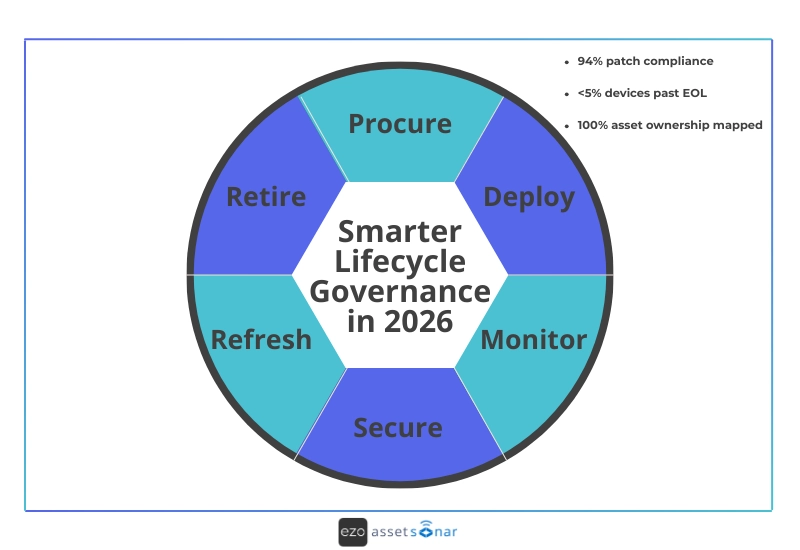
A practical path forward looks like this for IT managers: Start with foundation → Add context → Scale with automation.
- Start with foundations
- Continuous discovery: Implement continuous discovery tools to keep track of all devices, ensuring no asset goes unnoticed, even if it’s not actively in use.
- Ownership clarity: Assign clear ownership to every device, ensuring that IT and other departments know who is responsible for each asset, avoiding accountability gaps.
- Lifecycle visibility: Gain complete visibility into the lifecycle status of each device, from procurement to retirement, enabling proactive decision-making.
- Then add context
- Security signals: Integrate security signals to link assets with vulnerability data, helping you identify and prioritize high-risk devices quickly.
- Risk prioritization: Not all risks are equal—categorize devices based on exposure levels, such as critical vulnerabilities or outdated firmware, to ensure the most urgent issues are addressed first.
- Patch posture: Establish clear patching processes, making sure that every device receives the necessary updates to stay secure and compliant.
- Finally, scale with automation
- Lifecycle-driven workflows: Automate lifecycle events, such as onboarding, offboarding, and device refresh, to reduce manual effort and ensure timely actions.
- Exception handling: Set up automated workflows for exception management, ensuring that any deviation from the standard lifecycle is tracked and acted upon quickly.
- Audit-ready reporting: Use automated reporting to ensure that your hardware asset management system is always ready for audits, reducing the stress of last-minute scrambling and enhancing compliance.
This approach transforms hardware asset management from a static inventory list into a dynamic execution layer that drives IT operations with efficiency and accuracy.
Final thoughts
Unmanaged hardware risk doesn’t announce itself. It hides in aging laptops, forgotten routers, idle VMs, peripheral devices no one owns, and assets that still work but shouldn’t be trusted anymore.
In 2026, the most resilient IT teams aren’t necessarily the ones with the most tools. They are the teams that embrace continuous truth, lifecycle intelligence, and automated control to ensure everything is accounted for, updated, and secure.
That’s the core of modern hardware asset management: keeping pace with change, minimizing risks, and ensuring that no asset is left behind in the process.