If you’re managing IT at a mid-sized company, chances are someone’s floated the idea of a CMDB, and just as quickly, someone else shot it down, saying:
“It’s too heavy.”
“It’s too complicated.”
“We tried that once. Didn’t work.”
It’s not just you. Across mid-market IT teams, the Configuration Management Database (CMDB) has picked up a reputation: bloated, overbuilt, enterprise-only, and nearly impossible to maintain. It’s often seen as a project that looks good on paper, eats up months of effort, and ends with a dusty system that nobody trusts.
The data backs up this skepticism.
Depending on who you ask, up to 80% of CMDB initiatives fail, not because they’re useless, but because they collapse under the weight of unclear goals, poor execution, or unrealistic scope. You end up with something that’s out-of-date the moment it goes live. Teams quietly revert to spreadsheets and tribal knowledge while the “official” CMDB becomes shelfware.
So why are we still talking about it?
Because behind all the baggage, there’s a very real problem that the CMDB is meant to solve; one that mid-market IT teams eventually can’t ignore.
This article is a grounded look at:
- Why CMDB efforts so often fail, especially in mid-sized environments
- What problems a CMDB is actually designed to solve (hint: it’s not just inventory)
- The warning signs your current tracking is breaking down
- When a CMDB starts paying off and when it backfires
- How to know if your team is truly ready
This isn’t any tool pitch. This guide offers honest signals and practical framing to help you figure out if your environment has outgrown patchwork.
The CMDB reputation problem
If you’ve heard about CMDBs in the past, you probably know the reputation: complex, high-maintenance, a “necessary evil” in large enterprises. Many mid-market IT teams look at CMDBs the way you might look at a gym membership, i.e., a good idea in theory but hard to stick with once the initial excitement fades.
The problem isn’t just perception. CMDBs have failed in many organizations, especially when they were rolled out without a clear plan. Gartner, for example, found that the majority of CMDB initiatives deliver little to no value, leading to skepticism across IT teams. The reality is that when CMDBs go wrong, they can end up full of stale, unreliable data. This leaves teams using spreadsheets as their go-to source of truth. It’s no wonder that many IT managers remain cautious when the topic of CMDBs comes up.
But why do CMDBs fail so often?
The CMDB’s reputation comes from mismatched expectations and a lack of long-term upkeep. It’s often seen as a costly, time-consuming tool that doesn’t live up to the “single source of truth” promise.
But before you dismiss the concept entirely, it’s important to revisit the core problem CMDBs were created to solve because, as your IT environment grows more complex, those challenges don’t go away. In that case, a CMDB can just be the solution you’ve been looking for.
The real problem a CMDB is meant to solve
At its core, a CMDB is a tool built to solve real, practical problems that emerge as your IT environment grows in complexity. When systems expand and the number of assets rises, keeping track of everything becomes overwhelming. The result? Unknowns, which lead to chaos.
So, what problems is a CMDB designed to fix? Here are some of the pain points it helps address:
1. Unknown dependencies causing surprises
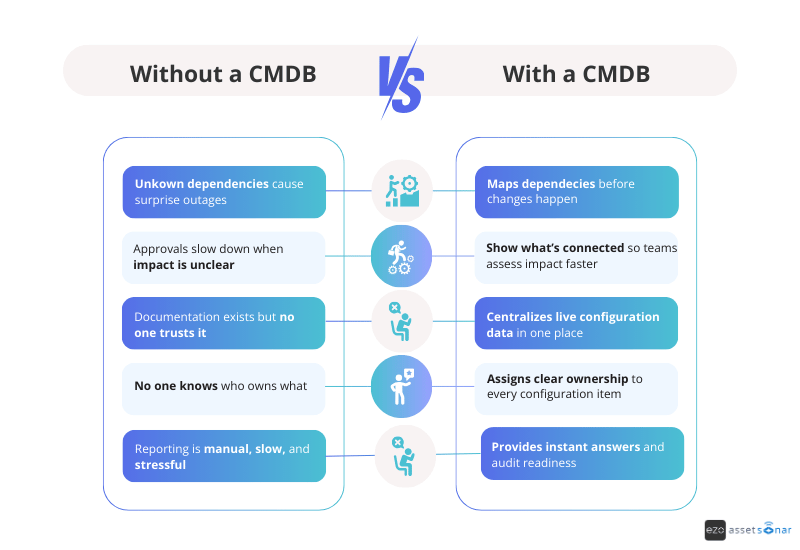
As your systems multiply, it’s easy to lose track of which applications depend on which infrastructure components. That’s when you get nasty surprises: a routine server reboot unexpectedly taking down a critical app, or a small update causing a massive ripple effect. This isn’t just annoying; it’s costly.
In fact, unknown dependencies are one of the leading causes of failed changes and outages. A CMDB helps you map these dependencies so you can see the potential impact of a change or failure before it happens. This way, you’re prepared, not caught off guard.
2. Poor change confidence and slow approvals
When you don’t know what’s connected to what, every change request feels like a gamble. You’re left guessing about what might break. As a result, change approvals get delayed, and the process becomes slow and bureaucratic.
With a CMDB, you can see relationshipsand dependencies. This means faster, more confident decisions. Instead of waiting for approval on a change that could disrupt everything, the team can quickly assess what services or users will be affected and make informed decisions. The process becomes less about “hope” and more about insight.
3. Outdated, untrusted documentation
Many mid-sized IT teams start by documenting their systems in Word docs, wikis, or spreadsheets. Over time, though, this data gets stale and unreliable. Suddenly, no one knows if a network diagram is still accurate, or if that list of servers is up-to-date. When you’re in the middle of an incident, checking information that may be outdated, or worse, bypassing the docs altogether, leads to wasted time
A well-maintained CMDB centralizes this configuration data, ensuring it stays current. Instead of scrambling to find the right details, you’ll have a single, trusted source of truth. It’s a living, breathing system that keeps your data accurate and actionable.
4. Implicit or unclear ownership
As companies grow, it’s easy for ownership of systems to become unclear. “Is that legacy database still Joe’s responsibility? Who’s in charge of the marketing software?” Without clear ownership, everyone assumes someone else is handling it until something breaks.
A CMDB fixes this by allowing you to assign clear owners or responsible teams to each configuration item. This ensures that when an issue arises or an audit comes up, you know exactly who to reach out to. No more running in circles to figure out ownership.
5. Leadership and compliance questions
IT leaders frequently ask questions like:
- “What do we have?”
- “How is everything connected?”
- “Are we compliant?”
- “What’s the risk if this fails?”
Without a central, reliable source of truth, these questions turn into fire drills. Compliance audits can become nightmares as you piece together information from multiple spreadsheets, ticketing systems, and a few heads who “remember.”
A CMDB addresses this by keeping documented proof of all your IT assets and configurations in one place. It helps ensure compliance and makes answering leadership’s high-level questions easy. Instead of scrambling for information, you can generate reports that show exactly what’s in your environment. No more “I’ll get back to you in a week” responses are needed.
As one IT leader put it, “Failing an audit because information is spread across 15 spreadsheets is far more expensive than investing in a CMDB.”
A CMDB is meant to bring clarity and confidence to your IT operations. It solves the problem of unknowns, from dependencies to ownership, and even impact. When done right, a CMDB becomes that single pane of glass that shows how everything fits together. With it, you can manage changes, incidents, and growth with insight instead of guesswork.
If the pain points we’ve discussed don’t sound familiar, then your environment might not need a CMDB just yet. However, as your IT environment scales, these challenges often start to emerge.
The next section will help you identify the signals that indicate whether your existing tracking methods are starting to fail and if it is time to seriously consider a CMDB.
The 7 failure patterns that signal CMDB readiness
As your IT environment grows, it’s natural to start hitting limits with spreadsheets, wikis, and those “heroic” manual tracking methods. But how do you know when it’s time to admit that these tools just aren’t cutting it anymore?
For mid-sized IT teams, certain failure patterns begin to emerge as complexity increases. If you’re noticing these patterns, it’s a strong sign that your organization might be ready for a CMDB (or a similar centralized system).
1. Incident response depends on who’s online
When an incident strikes, the resolution process shouldn’t rely on tracking down that one engineer who “knows” the system inside and out. Yet, in many mid-market IT teams, a major outage can turn into an all-hands-on-deck search for the right person who holds the crucial knowledge.
If you find yourself sending frantic Slack messages asking, “Who knows what this server does?” or “Where’s the latest asset inventory?”, it’s a red flag.
One real-world example described a service outage in which outdated inventories and missing ownership data led to confusion and delays. Every minute spent hunting for answers is an operational tax you pay, incident after incident.
A well-maintained CMDB can capture dependencies and ownership details so responders can quickly find the affected systems and the right contact — no matter who’s on shift.
2. Root cause analysis rarely leads to prevention
Do problems keep popping up, even after you’ve fixed the immediate issue? While teams may excel at firefighting, they often struggle with preventing recurring incidents. This usually happens because problem management is nearly impossible without a full view of your systems and their relationships.
If your post-mortems end with “We think we fixed it, but we’re not entirely sure why it happened”, that’s a clear sign of missing context.
A CMDB helps by providing a comprehensive view of configuration relationships so you can trace the cause of issues and address them more effectively. With a CMDB, you can move from reacting to incidents to preventing them by having a clearer picture of how each component interacts with others.
3. Change approvals are slow and cautious
When your Change Advisory Board (CAB) or approvers treat even routine changes like risky maneuvers, you’re facing a visibility problem. If no one can confidently say which systems will be impacted by a proposed change, it naturally leads to delays and over-analysis.
Comments like “We can’t approve this until we figure out what might break” are common. Worse, when impact analysis is done by guesswork, you either block beneficial changes or risk outages from unanticipated consequences.
A CMDB makes these decisions easier. With a clear map of dependencies, change planners can quickly see which services or users will be affected by a change. This visibility turns approval processes from reactive to informed, speeding up safe, necessary changes.
4. Documentation exists but isn’t trusted
You probably already have documentation in the form of network maps, asset inventories, and application diagrams, etc. But how much of it do you trust?
It’s common for teams to rely on outdated or incomplete docs. Perhaps your network diagrams haven’t been updated in months, or the application wiki is a few versions behind. In an incident, this means wasting valuable time checking whether the information is accurate.
A CMDB solves this problem by centralizing reliable, up-to-date configuration data in one place. When maintained properly, it provides a single source of truth you can rely on, avoiding the back-and-forth with different documents or relying on someone’s memory. It’s not about adding more documents; it’s about creating a living repository that evolves with your environment.
5. System ownership is implicit, not explicit
As companies grow, ownership of systems can become unclear. If you don’t have explicit ownership defined, these systems can slip through the cracks.
A CMDB allows you to assign owners or responsible teams to each configuration item. With this clarity, you can avoid delays when issues arise because it’s easy to find who to contact for every system.
If you’re noticing gaps in ownership that lead to confusion or delays, it’s a sign that a CMDB could improve accountability across your environment.
6. Compliance audits create chaos and fire drills
When auditors arrive, do you scramble to gather the necessary data? Are you frantically searching through spreadsheets and emails to compile reports? If so, this is a major signal that your current tracking methods aren’t sustainable.
A CMDB centralizes your IT asset data, making compliance reporting routine, not a stressful event. Instead of piecing together information from multiple sources, you can quickly pull the necessary reports, showing everything from system patch levels to access controls.
The cost of scrambling for an audit can far exceed the investment in a CMDB, which helps keep you organized and compliant year-round.
7. IT complexity is outpacing your headcount
Perhaps the biggest sign that you’re ready for a CMDB is the sheer complexity of your IT environment. As organizations grow, so do their systems — cloud services, microservices, third-party integrations, and more. If your team can no longer mentally map your entire infrastructure or keep track of everything with spreadsheets or whiteboards, it’s time for a more scalable solution.
A CMDB can centralize the data on what you have, how it’s connected, and who’s responsible for it. When your existing tools and methods stop scaling with your business, a CMDB provides a clear, organized way to track, manage, and monitor your growing IT estate.
If these patterns sound familiar, then your IT tracking methods might be reaching their limits. A CMDB can help address these challenges by giving you visibility, clarity, and control over your environment.
In the next section, we’ll dive into why ad-hoc methods fail at scale and why it’s time to consider a more robust solution like a CMDB.
Why good enough tracking stops working
For a small company or a simple IT environment, informal tracking can get the job done. You might get by with a handful of Excel spreadsheets, a Visio diagram for your network, a Notion page for app information, and a lot of institutional memory. This works… until it doesn’t. The shift from “We’ve got this” to “This is a disaster” can happen fast and it often does.
Let’s break down why those “good enough” tracking methods such as spreadsheets, wikis, whiteboards, and siloed tools eventually fail as your organization scales:
1. Scattered information and no single source
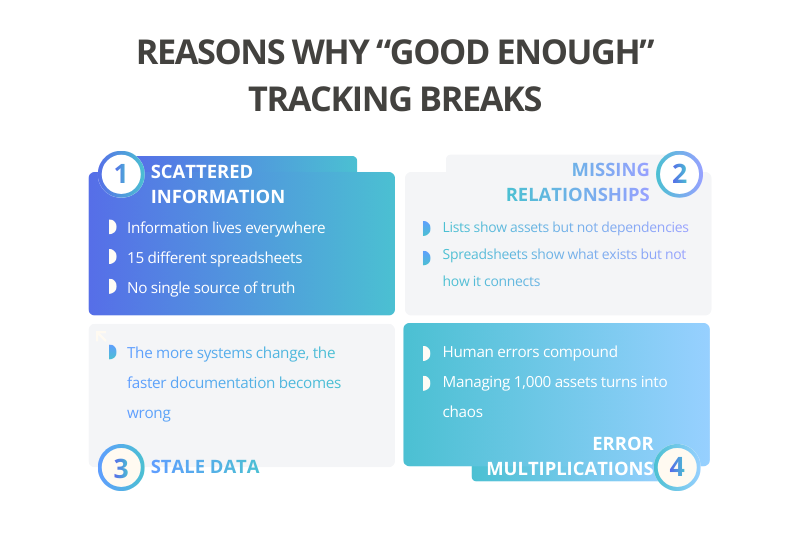
By nature, ad-hoc tracking spreads across multiple documents and platforms. One team updates a hardware inventory spreadsheet, another handles a wiki for app configurations, maybe a separate tool for tracking cloud resources. There’s no unified view.
When you need to answer questions like, “What’s the current configuration of System X and what depends on it?”, you’re left manually pulling data from several places (if you can even get them to match).
This scattered approach works when there are just two to three sources of truth, but as things grow, say 15 spreadsheets and files, it all starts to collapse. As one IT expert put it, failing an audit or managing an incident with information “spread across 15 different spreadsheets” is a costly, inefficient mess.
2. Lack of relationships or context
One of the biggest limitations of simple lists and documents? They capture items, but not their relationships.
A spreadsheet might list all your servers, but it won’t tell you that Server A hosts Database B, which is used by Application C. Diagrams can show parts of this, but they’re usually just static snapshots. As your environment becomes more interconnected, these relationships become critical to understanding impact. Ad-hoc tracking methods struggle to keep up with this relational context.
That’s where a CMDB shines. It’s not just a list of assets, it’s a map of how everything is connected. This is what turns a “configuration database” into something more powerful than a mere inventory.
When your tools can’t easily answer questions like, “What depends on this?” or “Where does the data from here go?”, you’re missing the context. And when you don’t have context, you get surprises like outages and slow change approvals because visibility without context is just a glimpse, not the full picture.
3. Manual effort and stale data
“Good enough” tracking often relies on manual updates. Someone has to remember to update the wiki after a change or refresh the spreadsheet when a new VM gets created. As the volume of changes grows, this becomes a battle you can’t win.
Things slip through the cracks, and over time, the data goes stale. The more outdated it gets, the less anyone trusts it, which only reinforces the vicious cycle. Eventually, that “living document” is just another dead relic.
Without automation (like discovery tools) and clear processes to update records in real-time, configuration data drifts further from reality. So when an incident hits, the information you’re relying on might be from the last quarter (let’s say before that big cloud deployment), leading to wrong assumptions and more headaches.
This is why a wiki or whiteboard that was accurate on Day 1 can mislead you on Day 100 if it’s not constantly maintained. The larger and more dynamic your environment becomes, the faster manual documentation turns into a ticking time bomb.
4. Error-prone and unscalable
Humans make mistakes; it’s inevitable. However, when you’re managing hundreds or thousands of assets manually, those errors add up quickly. In spreadsheets, it’s easy to mistype an IP address or forget to remove a decommissioned server. When you have just a few assets, you can catch those errors, but as your environment scales, small mistakes lead to big problems.
Ad-hoc methods typically lack data validation. You could end up with duplicate records, inconsistent naming conventions, or missing fields, and no one will catch them until it’s too late. The ad-hoc approach doesn’t scale. Five people can manage 100 assets with spreadsheets, but managing 1,000 assets with the same method can quickly become a quagmire of errors and inefficiency.
5. No real-time insight
Informal tracking systems aren’t connected to live systems, which means you’re always working with outdated data. When someone makes a change i.e., installs a new software version, tweaks a config file, or adds a new cloud instance, your documents won’t reflect it until someone manually updates them (if that ever happens). This means your view is always lagging behind.
Modern infrastructures, especially in cloud and virtualized environments, are constantly changing. Instances spin up and down, containers get redeployed, but a static spreadsheet can’t keep up with that pace.
The result? Blind spots, particularly in security and performance. For example, you might not realize a new server was added without proper hardening because it hasn’t made it into your manual tracker yet. By the time you update the sheet a month later, that server could already be a security risk.
A CMDB with automated discovery fixes this by catching changes as they happen, keeping your data up-to-date in real-time. No more playing catch-up; just accurate, timely insights that help you stay ahead.
Being good enough works, until it doesn’t
“Good enough” works, until it doesn’t. What started as a simple, low-maintenance approach becomes a liability as your IT environment grows. The methods that were fine when things were small can’t keep up with the scale, leaving you with outdated, inaccurate, and disconnected data.
Many mid-market IT teams hit a tipping point where the pain of relying on ad-hoc tools (and the risk of missing crucial information) starts to outweigh the effort of setting up something more robust. That’s the moment it’s time to seriously consider investing in a CMDB or a similar configuration management solution.
Let’s be clear: a CMDB isn’t a magic fix. It needs to be implemented and maintained properly (we’ll get into potential pitfalls later). But the difference is, a CMDB is built for scale and relationships, whereas spreadsheets and wikis were never designed to handle that.
A well-tuned CMDB can dynamically pull in data, enforce consistency, and provide a navigable map of your environment. If your current toolkit can’t do that, it’s a sign that “good enough” has stopped being good enough for your organization’s growing needs.
CMDB doesn’t mean an asset database: Clearing up the confusion
One of the most common misconceptions, especially for those new to ITIL concepts, is thinking, “We already have an asset inventory. Why do we need a CMDB?” It’s true that asset management and configuration management overlap in some ways but they’re not the same thing.
Understanding this difference is crucial because mixing up an asset database with a CMDB can lead to wrong expectations and design mistakes. So, what’s the difference?
Simply put, an asset database is just a list of things, while a CMDB is a web of information about those things.
An asset database (often used by finance or procurement) tracks devices or software as line items, usually focusing on financial, warranty, and lifecycle details. A CMDB, on the other hand, is focused on configuration items (CIs); not just assets but also software components, services, etc., and most importantly, the relationships between them. The key here is that a CMDB is all about how things connect and interact, while an asset database is about what you have.
There’s a saying in the IT world: All CIs are assets, but not all assets are CIs.
A configuration item is something you need to manage in order to deliver IT services. It’s a component that can change. Those changes impact services, which is why they are subject to change control. Many assets like laptops, projectors, or capital equipment might be tracked for financial reasons, but they might not be modeled in the CMDB unless they directly affect service delivery.
For example, a developer’s laptop is an asset, but unless it’s critical to your services, it doesn’t usually belong in the CMDB. Instead, the CMDB might track the corporate VPN service, which involves many asset components (like appliances and certificates), because that service is crucial for IT operations.
To break it down: Imagine a physical server. In an asset register, this server would have details like purchase price, depreciation, serial number, and location. It’s all about tracking its existence and value.
In a CMDB, that same server would be a CI that includes technical details (e.g., OS version, installed software, IP address), its relationships (e.g., it hosts the Inventory Database, it’s part of the Order Processing Service), and its ownership (e.g., the Infrastructure team). Plus, the CMDB would track whether changes to this server need to go through change management, linking it to incident and problem records. Meanwhile, the asset database doesn’t need that level of detail. It just needs to know whether the server exists and who owns it.
In simpler terms:
- Asset management is about what you have and how much it costs.
- Configuration management is about how things are configured, how they’re connected, and why they matter.
Both are important, but they serve different purposes. A mature IT organization integrates asset management and a CMDB closely, often pulling foundational asset data into the CMDB and adding the relational context on top. But treating one as the other is a recipe for disaster.
For instance, if you try to use an asset list to answer “What will be impacted if this server goes down?”, you’re going to hit a wall. That list doesn’t contain the dependency mapping or service context you need. On the flip side, if you try to use a CMDB to track every little asset detail, you’ll burden it with data that isn’t relevant to IT operations.
The danger is overloading the CMDB with asset details it doesn’t need. People might try to cram every piece of equipment and every asset attribute into the CMDB, thinking it should be a one-stop shop for everything. That “single source of truth” mentality, if taken too literally, is more harmful than helpful. The best approach is to store financial data in an IT asset management (ITAM) system and keep technical relationships in the CMDB, linking them only when necessary.
The key takeaway here is that a CMDB provides context on the assets that matter for delivering services. It’s not just an expensive spreadsheet of devices. If you’re only using it as a list of assets, you’re missing the point, and you might as well stick with the spreadsheet.
For mid-market IT managers, understanding this distinction helps set realistic goals. If leadership is wondering, “Why invest in a CMDB when we already track assets?” explain that the CMDB will answer different questions.
It shows how things are connected and configured, not just what you have. An asset inventory might tell you you’ve got 100 servers; the CMDB will show you which services those servers support, what apps run on them, who owns them, and how they all fit together. Both perspectives are valuable. But trying to treat one as the other? That’s where things get messy.
Keep the distinction clear: assets vs. CIs, lists vs. relationships, visibility vs. context. Knowing this will help ensure your CMDB is scoped and used properly, complementing your asset tracking rather than complicating or duplicating it.
When a CMDB starts paying for itself
CMDB projects are often a tough sell in purely financial terms upfront. They demand effort and investment before you start seeing the returns.
But there comes a tipping point, usually after you’ve survived the initial data population and process tweaks, when the benefits of a CMDB become crystal clear in daily operations. That’s when the relief starts to set in. This is where the CMDB essentially pays for itself by saving time, reducing risk, and enabling faster, smarter decisions:
1. Faster incident triage and resolution
Arguably, the most celebrated payoff includes a dramatic reduction in the time it takes to troubleshoot incidents.
With a CMDB, when an issue arises, the team can immediately see which configuration items (CIs) are involved and how they’re connected. This slashes the time spent diagnosing the problem. Instead of spending an hour manually gathering details such as “What does this server do? Who’s using this app? What changed recently?”, the on-call engineer can pull up the CI in the CMDB and get a snapshot of its context and any recent changes.
In real-world scenarios, companies have seen impressive results. One company reported a 70% reduction in escalation time within 90 days of implementing their CMDB.
Faster resolution not only saves labor hours, but it also translates directly to less downtime, and downtime costs money. When your mean-time-to-recover (MTTR) shrinks, that’s a win everyone can see and appreciate.
Let’s be honest, those 3 AM war-room calls are a lot less stressful when you’re not “chasing ghosts” in the dark.
2. Confident, accelerated change management
Here’s another way a CMDB pays for itself: it takes the anxiety and delay out of change management.
With a reliable CMDB, the change process shifts from detective work to straight-up execution. Approvers can quickly pull up impact analysis reports from the CMDB to answer questions like: “These 5 services depend on this component. Have their owners been notified and tested?” This reduces last-minute surprises and rollback emergencies because you’ve already caught the potential issues before they explode.
It also means faster approval cycles for standard changes. When the impact is clear and contained, you might even automate approvals for low-risk changes.
Organizations with a solid CMDB in place have seen a dramatic drop in “unknown” changes causing incidents. One company reported a 50% reduction in change-related incidents within a few months.
Over time, this adds up to massive cost savings and a huge reliability boost. Plus, it does wonders for IT’s reputation in the business. When changes stop being synonymous with outages, trust between IT and other departments grows stronger.
3. Less firefighting, more preventative work
When your CMDB is in place and accurate, IT operations shift from being constantly reactive to becoming more proactive.
Instead of always putting out fires, you can spot weaknesses before they turn into incidents. For example, the CMDB might flag a single point of failure like one database supporting multiple services, and give you the chance to fix it before it blows up. Or, it might show you configuration drift, letting you address it early before it leads to a bigger issue.
The result? Fewer incidents overall, not just faster resolutions. Your ops team stops living in a constant state of firefighting.
As one expert put it, the real benefit is a future where your ops team “leads the game instead of chasing ghosts,” gaining control and clarity instead of being in a perpetual reaction mode.
This shift has a ripple effect: less stress and burnout for your team, and more time for innovation or strategic improvements — things that were always pushed to the back burner when your team was too busy putting out fires.
4. Clear ownership and accountability
Once your CMDB is populated with owners for each CI and service, it becomes much easier to assign responsibility and escalate issues the right way. No more guessing who’s the right person to sign off on a change or scrambling to figure out who should be alerted when a system goes down. The CMDB record has you covered.
This clarity cuts down delays (no more waiting hours needed to get the right team involved during an incident) and makes sure nothing slips through the cracks.
It also gives your audits a huge boost: you can prove that every critical system has a designated owner and that accountability is baked right into your processes.
The real payoff here is subtle but powerful. It fosters a culture where people know what they own. And when people know their responsibilities, they take more pride in their systems, becoming more proactive. Plus, it makes cross-team collaboration smoother since roles are clearly defined.
5. Better answers and alignment for leadership
With a solid CMDB, IT leaders can answer those big-picture questions fast and with precision.
- Need to brief the CIO on “What’s our exposure to that newly announced critical vulnerability?” The CMDB can list all systems running the affected software in seconds.
- Planning budgets? The CMDB can pinpoint redundant or underused components across services.
- Got an office move or cloud migration on the horizon? The CMDB can map out everything that will be impacted.
In short, the CMDB becomes a decision-making powerhouse for both IT and business leadership. It gives you figures that used to take hours, if not days, to uncover.
This clarity leads to better alignment. IT can now show, with real data, how systems connect to business services and where investment is truly needed.
For mid-sized organizations, this level of insight elevates IT from being just a firefighting cost center to a strategic partner. For example, leaders can now clearly see how a new product launch will depend on certain IT components, helping them allocate resources more effectively.
The ROI here isn’t just about saving time; it’s about making smarter decisions. By avoiding costly mistakes and targeting spending in the right areas, IT gains the confidence of executives, knowing that when they ask “what if,” IT can answer quickly and accurately.
6. Reduction in audit, compliance, and security risk
Here’s a tangible benefit of a well-maintained CMDB: it takes the chaos out of compliance audits and boosts your security game. Instead of scrambling every time an audit comes around, it becomes part of your routine.
You can quickly generate reports on things like access controls, software versions, and asset lists with owners — all from the CMDB. This not only saves labor (no more frantic, last-minute audit prep) but also helps avoid penalties or incidents due to missing info.
On the security side, many breaches happen because of unknown assets or misconfigurations. A CMDB ensures that you know everything in your environment and can check its configuration. Faster incident response, as mentioned earlier, is also a big win for security. It helps limit the damage. While it’s tough to slap a dollar value on things like “breach that didn’t happen” or “audit fines avoided,” these benefits are huge. They might show up as lower insurance premiums or, better yet, the absence of costly disruptions.
One UC Davis expert pointed out that cybersecurity threats often exploit gaps in asset visibility and outdated configurations. These are exactly the kinds of gaps a CMDB is built to close. So, a CMDB can actually pay for itself the first time it helps you spot vulnerable systems during a zero-day exploit, potentially preventing a major incident.
Finally, the CMDB pays for itself by swapping chaos and guesswork with control and predictability. When you reach the point where an outage is resolved in 15 minutes instead of two hours, or a major change happens without any surprises, the value becomes clear. Many organizations realize that the cost of not having a CMDB in terms of prolonged outages, failed changes, compliance issues, and inefficiency, ends up being way higher than the cost of building and maintaining one.
As one Atlassian author put it, it’s often “cheaper to build a CMDB than to face a major incident without critical configuration data or fail an audit because your information is spread across spreadsheets.” The relief we’ve talked about, including faster triage, smoother changes, less firefighting, clear ownership, and informed leadership — all add up to real, tangible savings.
When those boxes start getting checked, you’ll know your CMDB initiative has shifted from being a cost to a full-blown benefit.
Why CMDB fails when introduced too early
So far, we’ve made a strong case for when a CMDB becomes necessary. But just as important as why is when. Implementing a CMDB too early in an organization’s maturity or without the right foundation can lead to failure. Many companies have learned this the hard way.
Let’s dive into why introducing a CMDB at the wrong time tends to flop and what “too early” looks like.
1. No maturity or process to support it
A CMDB isn’t just a fancy database; it’s a practice that needs to integrate seamlessly with your IT processes — incident management, change control, asset tracking, and so on. If your organization hasn’t established the basic ITSM practices, slapping a CMDB in the mix is like building a house on sand.
For example, if changes are made on a whim, with no formal change management process, how is the CMDB supposed to stay up to date? Or if incidents aren’t formally tracked, nobody will think to consult the CMDB while they’re scrambling to put out fires. In immature environments, a CMDB often gets ignored. It’s there, but nobody uses it because the processes don’t demand or support it. This happens when a CMDB is treated as just another tool (“here’s the software, now go use it”) instead of developing it as a true service capability with governance.
If no one is explicitly responsible for CMDB data and no workflows rely on it, its accuracy will drop off, and people will just stop caring. In the early stages of an IT organization, it’s more important to first nail down core processes like defining change procedures, incident workflows, and asset ownership before layering a CMDB on top. Otherwise, you’re building on quicksand.
2. Over-modeling and scope creep
One of the biggest traps in early CMDB efforts? Trying to boil the ocean.
Teams often dive in with too much ambition, trying to capture every CI, every attribute, every relationship they can think of, right off the bat. The instinct is to make the CMDB a “single source of truth” for absolutely everything in IT. Sounds good, right? The problem is, this approach leads to a massive scope that’s nearly impossible to maintain, especially in the early days.
Instead of focusing on what truly matters, teams end up filling the CMDB with tons of data that doesn’t add much value, while the crucial stuff gets buried in the noise.
As Atlassian’s experts point out, the term “single source of truth” has probably caused more harm than good in the CMDB world, because it often gets misinterpreted as an invitation to shove everything in there.
The result is a disaster. You create massive workloads and complexity with little immediate payoff, which quickly leads to frustration and disillusionment.
A smarter approach is to “start small, solve one specific problem, then expand”. But in immature organizations, this discipline is often missing.
Instead, companies often think that more data means better data. This leads to a CMDB that’s “wide but shallow” with thousands of CI records containing minimal ownership and incomplete relationships
Once people see that the CMDB is filled with holes and half-baked data, they stop trusting it. And that’s the end of the project. Over-modeling is especially tempting when you haven’t yet felt the pain of missing data. So, you preemptively model “everything,” but without a clear use case, none of it gets used or validated.
3. The pitfall of accuracy over completeness
When a CMDB is rolled out too early, organizations often focus on completeness.
Their motto is, “Let’s get every device in there!” instead of accuracy and currency. This is completely counterproductive. A small CMDB that’s 95% accurate is way more useful than a “complete” one that’s only 60% accurate.
What tends to happen is this: the team does a big initial data dump, maybe from an old spreadsheet or a quick network scan, and declares the CMDB “done.”
But without the right processes to continually reconcile and update that data, that so-called “complete” CMDB starts to degrade almost immediately. Users begin to spot inaccuracies, and confidence in the system drops fast.
It’s been said that an inaccurate CMDB can be worse than no CMDB at all because it misleads people. That’s exactly what happens when you rush to fill the CMDB but fail to maintain its integrity.
Successful teams take a slower, more disciplined approach: they focus on data governance and expand the CMDB in phases, ensuring quality at each step. Doing it too early often means you don’t have the right people or processes in place to handle the ongoing maintenance. The end result? The CMDB’s data quality falls below a useful threshold, and it “fails” in the eyes of the organization.
4. Lack of immediate value demonstration
If you roll out a CMDB when people don’t urgently need it, you’re in for a tough ride.
Early implementations often get stuck in a vacuum: the team spends months populating data, but since the real painful incidents or audit challenges haven’t hit yet (or aren’t happening often enough), stakeholders don’t see the value. When that happens, they start questioning why so much effort is going into something that doesn’t seem to solve immediate problems.
One of the best ways to avoid CMDB failure is to show value early, ideally by targeting a known pain point and showing improvement. But if it’s too early, you might not have a clear pain. You’re trying to solve a hypothetical or future problem, and that’s a tough sell. Without a tangible need, it’s hard to keep momentum going, let alone secure funding for it.
Plus, users won’t have the patience to keep the CMDB updated if they’re not seeing direct benefits. It becomes just another chore with no payoff. That’s why introducing the CMDB when the need is clear is so important.
You want people to start using it to solve real issues, which creates a positive feedback loop — they find it useful, which motivates them to keep it accurate and use it more.
5. Organizational readiness and culture
It’s not just about processes. There’s a cultural factor at play here, too.
Companies early in their IT maturity might not have the culture of documentation or cross-team collaboration that a CMDB needs to thrive. Some businesses, for example, operate in silos, jealously guarding “their” system information. Try to introduce a CMDB in that environment (especially early on, when roles and responsibilities are still up in the air), and you could face a ton of pushback.
People might not want to populate data they feel is irrelevant or that just adds more work. I’ve heard teams say, “Why should I update the CMDB? I know my stuff, just come to me.” In a small company, that attitude can be the norm.
It’s only when the pain of not having shared knowledge outweighs the convenience of keeping things to yourself that people start to warm up to the CMDB.
If you push for a CMDB too early, before the culture is ready, it can become an unwelcome mandate; something people ignore or actively undermine by entering garbage data. A CMDB isn’t just a tool; it’s a mindset. Without the right organizational readiness and cultural acceptance, it’s destined to fail.
In summary: Timing is everything
When it comes to a CMDB, timing is everything. A CMDB introduced at the right moment — when your environment is complex enough to need it, when your processes are mature enough to manage it, and when the pain points are sharp enough that people actively seek its insights, can thrive. But put it in place too early, and you’ve got an over-engineered solution looking for a problem. More often than not, it collapses under the weight of its own ambition.
This is why most experts advise starting with a narrow scope tied to a real, urgent issue.
If you’re pushing for a CMDB and getting responses like “remind me why we need this?” or if your organization hasn’t even outgrown a basic asset list, it might be time to pump the brakes.
Start by building the discipline, like change management and incident linking, on a smaller scale. Then, when those seven failure patterns we talked about start showing up, you’ll be ready to roll out the CMDB with a clear purpose and a team that’s actually on board.
In short: don’t plant the seed until the soil is ready; otherwise, it won’t take root.
The CMDB readiness question: Self-assessment for mid-market IT
We’ve covered a lot of ground on why CMDBs fail and when they become necessary.
Now, it’s time to help you, as an IT manager, figure out where your organization stands. Is your environment ready for a CMDB, or can you keep going with your existing tools for a while longer?
It all comes down to recognizing the signs in your own operations. So, let’s put this into perspective.
Here are some self-assessment questions to help you gauge whether your organization is ready for a CMDB (and whether you actually need one). These questions reflect the patterns and pain points we’ve discussed:
1. Do we rely on specific individuals for system knowledge?
Let’s say a critical system crashes right now. Do you already know exactly what it interfaces with and where to look, or would you immediately need to call on “that one guy/gal” who set it up?
If your incident resolution would grind to a halt without certain people around, it’s a clear sign that knowledge isn’t documented centrally. This is one of those red flags that show your environment might be ready for a CMDB.
2. Are we frequently surprised by the impact of incidents or changes?
Think back to the last few major incidents or change deployments. Were there any “I didn’t realize that would be affected” moments? If unknown dependencies caught you off guard like when a change took down something you didn’t plan for, or an incident had a bigger impact than expected, that’s a clear sign your visibility is lacking.
When you’re surprised by what gets hit, it’s time to face the reality: you don’t have the full picture. A CMDB could help connect the dots and give you the clarity you need to stop those surprise moments.
3. Do we have recurring issues that aren’t being permanently resolved?
Let’s get real: are the same problems popping up over and over because you’re not truly getting to the root cause? If incidents keep resurfacing or temporary fixes become the norm, that’s a sign your view is too narrow. Maybe you can’t see all the contributing factors or connections that are causing the issues.
A CMDB helps by giving you a broader perspective, correlating related CIs and past incidents. Instead of just patching things up, you can start fixing the problem for good.
4. Is our documentation or asset tracking often outdated or inconsistent?
How much trust does your team really have in your documentation or asset tracking? If people are saying things like, “The inventory list might not be up to date,” or you’re finding discrepancies between different sources of truth, it’s a clear sign you need a single, reliable source. Do you maintain spreadsheets for data that just get ignored or are flat-out mistrusted?
That trust gap is the real issue here. Closing it might mean you need a complete reboot of how you handle configuration data. If your team doesn’t trust the data, they won’t use it; and that’s a problem no CMDB can solve without a solid foundation.
5. Are system ownership and responsibilities clearly documented?
Can you, right now, pull up a list of key systems and their primary owners? Or would that require a few calls and emails to figure out? If ownership is blurry and there’s no clear record linking systems to their owners, that’s a major gap.
A CMDB, with assigned CI owners, can fix that. Think about it: has the lack of clarity ever caused delays? Maybe a patch rolled out late because nobody knew who should approve it? If that’s the case, it’s time to fill that gap with a system that tracks ownership and accountability, keeping everyone on the same page.
6. Do audits, compliance checks, or executive inquiries cause scramble and stress?
Think back to the last time you had to gather IT information for an audit or a major report. Did your team have everything ready to go, or was it a mad scramble across multiple sources? If audits feel like a fire drill, i.e., pulling data from “15 different spreadsheets” or drives, that’s a clear sign your configuration and asset data need to be centralized. The same goes for when your CIO asks, “What’s our exposure to X risk?” or “How many of Y do we have, and who uses them?” and it takes days to find the answers.
A CMDB could slash that time and turn your chaotic, last-minute scramble into a smooth, efficient process.
7. Is our environment growing more complex than the current tools can handle?
Is your IT environment becoming harder to manage manually? If you’re adding more assets, services, or cloud resources, and your tools or team size haven’t scaled accordingly, it might be time for a CMDB. When you can’t easily map your infrastructure on a whiteboard anymore, it’s a clear sign your tracking methods need an upgrade.
8. How many separate places do you store configuration/asset information in, and can they talk to each other?
If the answer is “quite a few, and not really,” then you’ve got a mess of inefficiency and risk. Multiple disconnected sources lead to inconsistency.
A CMDB can help fix that by federating or consolidating all that data into one place.
Think about it: if you’re already maintaining a device inventory in one system, a cloud resource list in another, and an app catalog in yet another, how much effort could be saved if you linked all that info into one unified IT graph? It would prevent gaps, reduce errors, and stop things from slipping through the cracks.
Wrapping it up: Is it time for a CMDB?
Take a step back and really think about your answers. If you found yourself answering “yes” to many of the pain points, “yes, we scramble during audits,” “yes, we have recurring incidents,” “yes, we rely on key people,” it’s a strong sign that your environment has outgrown the ad-hoc methods.
In that case, it’s probably time to start planning a CMDB implementation, and it should be scoped around your biggest problem areas.
But if these issues haven’t shown up yet, you might have the luxury of keeping things simple for now.
A smart approach is to pick one or two high-value use cases where a CMDB would clearly make a difference and focus on solving those first. For example, you might say, “Our biggest headache is slow incident triage because we don’t have dependency information. Let’s start by building a CMDB that maps our top ten services and their infrastructure to speed up incident response.”
That’s a focused, practical goal which is much better than the vague “we need a CMDB because ITIL says so.”
One expert even recommends tying the CMDB effort directly to specific pain points people actually feel, like faster incident resolution, better change risk assessment, or reliable reporting.
Keep in mind, implementing a CMDB isn’t a one-time thing; it’s a journey. The real readiness question isn’t just “Do we need it now?” but also “Are we ready to maintain it once we have it?” If you decide to move forward, make sure you’ve got commitment for ownership, processes for data maintenance, and buy-in from stakeholders. These are the key ingredients that stop a CMDB from becoming shelfware. If you’re not ready to sustain those, even if you need the capabilities, you might not be ready to take the plunge.
In conclusion, use these questions as a mirror to reflect on your IT operations. They’ll show you whether the frustrations and risks of flying blind without a CMDB are already causing you headaches. If they are, then despite its rough reputation, a CMDB (done right) could be the ticket to leveling up your IT management.
If they aren’t (yet), take this time to prepare, maybe by tightening up existing documentation practices so that when the time comes, you’ll be ready to roll out the CMDB at just the right moment, with the right focus.
As with most IT initiatives, knowing where you stand is half the battle. Answering the CMDB readiness questions honestly will guide you on the next step of your configuration management journey.

![[How-to] Gain Clear Visibility Into Your IT Asset Dependencies With CMDB](https://cdn.ezo.io/wp-content/uploads/2022/04/20123107/Gain-Clear-Visibility-Into-Your-IT-Asset-Dependencies-With-CMDB.webp)
![[How-to] Import CMDB Relationships and Create Two-way Linkages in AssetSonar](https://cdn.ezo.io/wp-content/uploads/2022/12/Import-CMDB-Relationships-and-Create-Two-way-Linkages-in-AssetSonar.png)