
From live events and corporate conferences to film production and broadcast studios, AV/media rental companies play a critical role in powering seamless experiences.
These businesses manage a wide range of high-value equipment, including cameras, lighting rigs, and audio systems, while juggling tight schedules and demanding client expectations.
However, as operations scale, manual processes often lead to inefficiencies, double bookings, and revenue loss.
This is where AV rental automation becomes critical. With modern AV media rental equipment management software, you can automate your everyday rental operations, streamline workflows, and gain real-time visibility into assets and bookings, turning reactive processes into predictable, scalable operations.
In this blog, we’ll break down why traditional rental workflows hurt ROI, and explore 7 practical ways AV/media companies can automate operations, from inventory and scheduling to invoicing, maintenance, and customer self-service.
We’ll also show how EZRentOut brings all of this together on a single unified platform to help rental businesses operate more efficiently and profitably.
Let’s get started!
Challenge: Why Traditional Rental AV/Media Rental Operations Hurt ROI
Most AV/media rental companies don’t struggle because they lack demand. They struggle because their operations can’t keep up with it.
Behind the scenes, many teams are still relying on spreadsheets, manual coordination, and disconnected tools to manage high-value equipment and rapidly changing rental schedules. On the surface, things may seem under control. However, operational cracks start to show as soon as volume increases.
The result?
Revenue leakage, operational inefficiencies, and poor customer experiences that directly impact ROI. This isn’t just all talk, as inventory inaccuracies alone can cost businesses up to 4% of annual revenue, while idle equipment continues to incur costs without generating returns.
Let’s break down where traditional workflows fall short:
1. Disorganized inventory leads to lost or underutilized gear
When inventory isn’t centralized, teams lose track of what’s available, what’s rented out, and what’s sitting idle. High-value assets like cameras or lighting kits may go underutilized, or worse, misplaced, leading to missed revenue opportunities and unnecessary replacement costs.
Example:
A production house owns 15 DSLR cameras, but only 9 are consistently rented because the rest aren’t properly tracked across storage locations and job sites. Meanwhile, the team ends up renting additional cameras externally, paying extra, simply because they don’t have clear visibility into what they already own.
2. Double bookings result in unhappy clients
Without a reliable scheduling system, overlapping reservations become inevitable. Double-booked equipment leads to last-minute scrambles, delayed deliveries, and frustrated clients, damaging both reputation and repeat business potential.
Example:
A lighting kit gets booked for two different events on the same day due to a spreadsheet error. The team scrambles for hours before dispatch, either downgrading equipment for one client or sourcing last-minute replacements at a premium cost.
3. Manual paperwork creates operational inefficiency
Rental agreements, approvals, invoices, and checklists handled manually slow everything down. Teams spend more time chasing signatures and updating records than actually managing operations, increasing turnaround time and the risk of human error.
Example:
A rental coordinator spends hours emailing contracts back and forth for approvals, manually updating booking details, and creating invoices in separate tools. A simple booking that should take minutes ends up taking half a day or even more, delaying confirmations and impacting overall customer experience.
4. Lack of visibility leads to poor decision-making
When data is scattered across systems (or worse, locked in spreadsheets), decision-making becomes reactive instead of strategic. Teams lack clarity on utilization rates, asset performance, and revenue drivers, making it difficult to optimize inventory or plan for growth.
Example:
The business continues to invest in new audio equipment because demand appears high, while existing inventory remains underutilized. At the same time, high-demand items like wireless mics are frequently unavailable, but this pattern isn’t visible due to a lack of proper reporting.
7 Practical Ways to Streamline and Automate AV Rental Operations
To improve efficiency and eliminate manual bottlenecks, AV/media rental equipment managers need to focus on automating the core workflows that drive day-to-day operations.
These include:
1. Centralized equipment management
The first step toward automation is creating a single, reliable source of truth for all your equipment. Instead of relying on scattered spreadsheets or siloed records, centralized systems allow you to track every asset, including cameras, lighting rigs, audio gear, and accessories, in one place, in real time.
This isn’t just about knowing what you own. It’s about knowing:
- what’s available right now
- what’s reserved for upcoming events
- what’s currently in use or in transit
- what’s due for return or maintenance
For instance, having a unified dashboard provides real-time visibility into orders, equipment status, and revenue, enabling faster and more informed decisions.
With this level of visibility, your teams can operate with confidence, allocating equipment faster, planning rentals more accurately, and reducing the constant back and forth required to confirm availability.
For growing AV/media rental businesses, centralized equipment management becomes the operational backbone that supports everything else, from scheduling and tracking to billing and reporting.
Without it, automation efforts remain fragmented. With it, every downstream workflow becomes more efficient and predictable.
2. Automated equipment booking & scheduling
Once your equipment data is centralized, the next step is ensuring that every reservation is accurate, conflict-free, and easy to manage.
Automated booking and scheduling systems replace manual coordination with structured, calendar-based workflows. So, teams can see availability using the availability calendar, allocate equipment, and confirm bookings without second-guessing or cross-checking multiple sources.
Instead of relying on static spreadsheets, teams can:
- reserve equipment directly against live availability
- visualize bookings across timelines, projects, or clients
- receive instant conflict alerts before a booking is confirmed
This not only eliminates double bookings but also reduces the operational friction that comes with managing overlapping requests and last-minute changes.
Example: How EZRentOut flags equipment booking conflicts
In the image below, the system automatically flags that a piece of equipment is already rented out for a specific time period. Instead of discovering this conflict later, teams are alerted in real time while creating the order, preventing overlapping bookings before they happen.
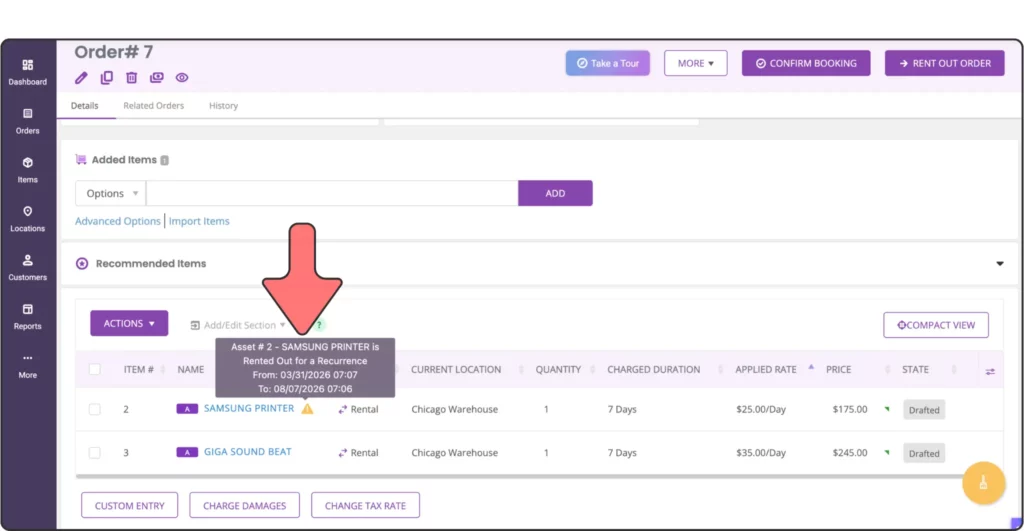
For AV/media rental equipment managers handling tight production timelines, this level of scheduling accuracy is critical. Otherwise, the cost of scheduling errors quickly adds up. Ensuring the right equipment is assigned to the right job, at the right time, helps avoid delays and compromises.
Ultimately, automated scheduling brings structure to demand. It allows teams to handle higher booking volumes with confidence while maintaining consistency and reliability across every rental.
3. Digital contracts & e-signatures
Once a booking is confirmed, the next step is formalizing the agreement, without slowing down the process.
Traditional contract workflows often introduce unnecessary delays. Drafting agreements manually, sending them back and forth for approvals, and tracking signatures across emails can quickly turn into bottlenecks, especially when timelines are tight.
Digital contracts and e-signatures streamline this entire process by enabling teams to:
- generate standardized rental agreements instantly
- share contracts with clients in a few clicks
- collect approvals and signatures without manual follow-ups
Instead of treating contracts as a separate, time-consuming step, they become a seamless extension of the booking workflow.
Why this matters for AV/media rental companies
This is particularly valuable in AV/media rentals, where last-minute bookings, revisions, and quick turnarounds are common. Faster contract execution means equipment can be reserved, confirmed, and dispatched without unnecessary delays.
More importantly, it ensures consistency. Every agreement follows a defined structure, reducing errors, improving accountability, and making it easier to track the status of each rental, from draft to signed.
In practice, this shifts contracts from being a bottleneck to becoming an enabler, keeping operations moving without compromising control or clarity.
4. Automated invoicing & payments
Once a rental is confirmed and executed, billing should be immediate, accurate, and frictionless.
Where manual invoicing breaks down
Manual invoicing often creates delays and inconsistencies, as rates may be entered incorrectly, charges can be missed, and invoices are sometimes sent late. These gaps not only slow down cash flow but also create unnecessary back and forth with clients, ultimately damaging your relationship with them.
How automated invoicing resolves this
Automated invoicing solves this by tying billing directly to booking and usage data. As soon as a rental is finalized, invoices can be generated instantly with pre-configured pricing, durations, and applicable charges already applied. AV/media rental equipment managers can also use customer-level pricing so the rental rate can be customized based on their relationship with a specific client.
This allows teams to:
- generate invoices without manual data entry
- ensure pricing consistency across all rentals
- reduce errors caused by duplicate or incorrect inputs
Beyond invoicing, integrated payment workflows make it easier for clients to complete transactions without delays. Instead of relying on offline methods or separate systems, businesses can offer secure, online payment options directly within the rental software.
EZRentOut: Simplifying payments with integrated gateways
For example, platforms like EZRentOut support integrations with payment gateways such as Stripe and Square, enabling businesses to accept payments quickly and securely, whether for deposits, partial payments, or full invoices.
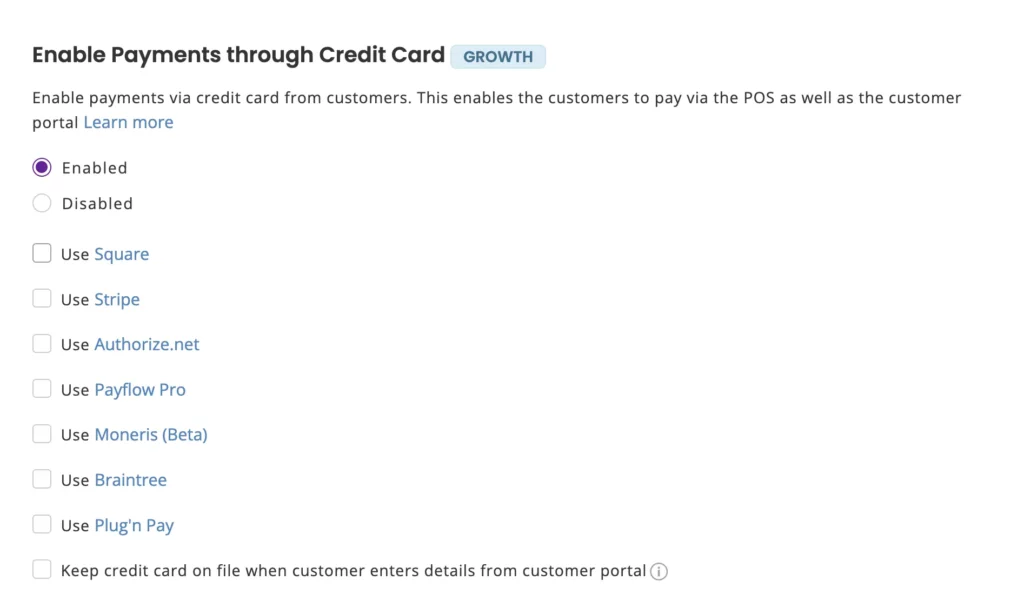
The result is a faster billing cycle, improved cash flow, and a smoother customer experience, where payments are no longer a follow-up task, but a natural extension of the rental workflow.
5. Maintenance & service automation
Reliable equipment isn’t just about availability; it’s about readiness as well.
In AV/media rentals, even a single equipment failure can disrupt an entire production schedule. Relying on reactive fixes or manual tracking often means issues are only addressed when something breaks, usually at the worst possible time.
Maintenance and service automation shifts this approach from reactive to proactive.
Instead of tracking service needs informally, teams can:
- schedule preventive maintenance based on usage, time intervals, or rental cycles
- receive alerts for upcoming or overdue servicing
- maintain a clear record of service history for each asset
This ensures that equipment is routinely checked, serviced, and ready before it goes out on the next event.
For fast-moving rental environments, this level of control reduces unexpected downtime and minimizes the risk of sending faulty equipment to clients. It also helps extend the lifespan of high-value AV/media equipment by ensuring they are maintained consistently rather than sporadically.
Over time, this leads to more predictable operations, where equipment performance is no longer a variable, but a controlled part of the workflow.
6. Reporting & analytics for smarter decisions
Once core workflows are automated, the real advantage comes from understanding how your operations are performing and where to optimize.
In many AV/media rental businesses, decisions are often based on instinct or fragmented data. Without a clear view of performance, it’s difficult to identify which assets drive revenue, which ones sit idle, and where operational gaps exist.
Reporting and analytics bring structure to this.
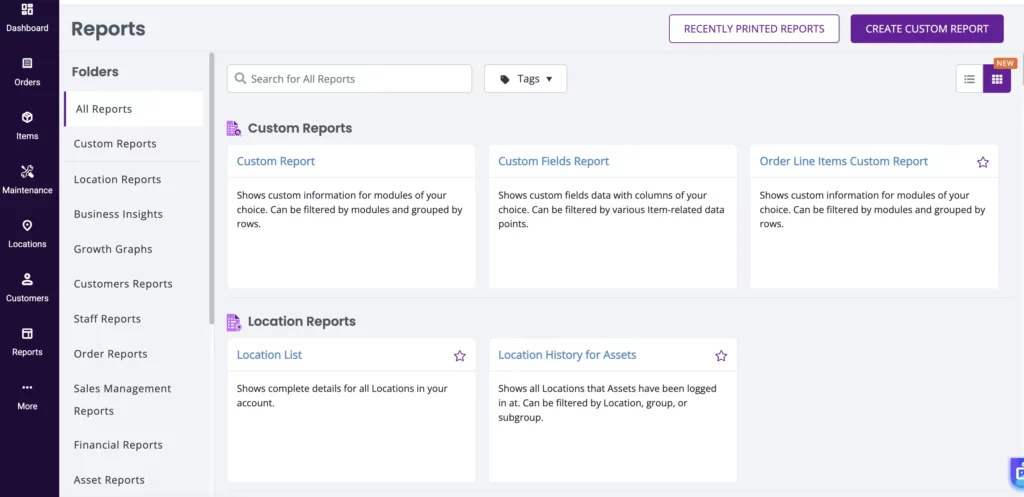
With the right system in place, teams can:
- track equipment utilization across time periods, locations, or projects
- identify high-performing assets versus underutilized inventory
- monitor rental trends, demand patterns, and revenue contribution
- evaluate operational bottlenecks and areas of inefficiency
This shifts decision-making from reactive to intentional.
For example, instead of expanding inventory based on perceived demand, teams can invest in equipment that consistently generates revenue. Similarly, underperforming assets can be reallocated, bundled, or phased out, improving overall ROI.
At a leadership level, this visibility enables better planning, whether it’s forecasting demand for upcoming seasons, optimizing pricing strategies, or aligning inventory with business growth.
In essence, reporting and analytics turn rental operations into a measurable system, where every decision is backed by data, not guesswork.
7. Customer portal & self-service
As operations become more streamlined internally, the next step is extending that efficiency to your customers.
In many AV/media rental businesses, clients still rely on emails or calls to check availability, request quotes, or confirm bookings. This slows down the process on both sides, creating delays, back and forth communication, and missed opportunities.
A customer portal with self-service capabilities changes this dynamic.
Instead of routing every request through your team, customers can:
- browse available equipment through an online webstore
- view pricing, specifications, and availability in real time
- submit booking requests or place orders directly
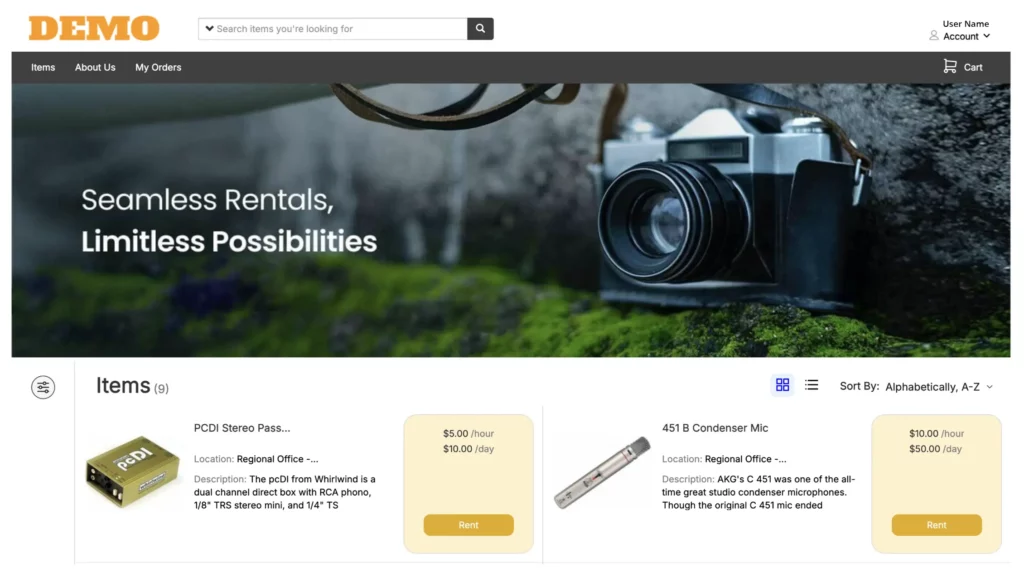
This not only reduces the operational load on your team but also gives customers the flexibility to engage on their own terms, whether they’re planning in advance or making last-minute requests.
For AV/media rental companies handling multiple clients and fast turnaround times, this creates a more responsive and scalable front-end experience. Customers no longer have to wait for confirmations as they can move forward with clarity and confidence.
At the same time, teams gain more structured and accurate incoming requests, reducing manual coordination and improving overall workflow efficiency.
In effect, self-service portals turn your rental operations into an always-available system, where customers can interact, explore, and initiate bookings without friction.
How EZRentOut Brings It All Together
Each of the workflows we’ve covered, inventory, scheduling, contracts, billing, maintenance, reporting, and customer self-service, solves a specific operational challenge. But in practice, managing these across separate tools often creates new problems: data silos, duplicate work, and constant reconciliation between systems.
EZRentOut brings all of these capabilities into a single, connected platform.
Instead of stitching together multiple tools, teams can manage the entire rental lifecycle, from equipment tracking, rental order management, and bookings to invoicing, maintenance, and customer interactions, within one system. This ensures that data flows seamlessly across workflows, eliminating the need to switch contexts or manually sync information.
The advantage isn’t just convenience, it’s operational alignment.
When everything lives in one place:
- bookings reflect real-time availability without cross-checking
- contracts, invoices, and payments stay tied to each order
- maintenance schedules align with actual equipment usage
- reports draw from consistent, up-to-date data
- customers interact with a unified system, not fragmented touchpoints
This level of integration removes the friction that typically comes with scaling rental operations. Teams spend less time managing tools and more time focusing on execution, utilization, and customer experience.
To Wrap It All Up…
Improving rental performance isn’t about adding more tools; it’s about removing the friction that slows everything down.
When key workflows are disconnected, even simple tasks require coordination, follow-ups, and manual checks. Over time, this not only impacts efficiency but also limits how quickly your rental business can respond to demand, take on more projects, or deliver a consistent customer experience.
The ability to automate AV/media rental operations changes that dynamic.
It creates a system where processes move forward without constant intervention, where bookings, approvals, billing, and customer interactions happen in a structured, predictable flow.
As a result, teams can operate with greater clarity, handle higher volumes, and make decisions based on what’s actually happening in the business.