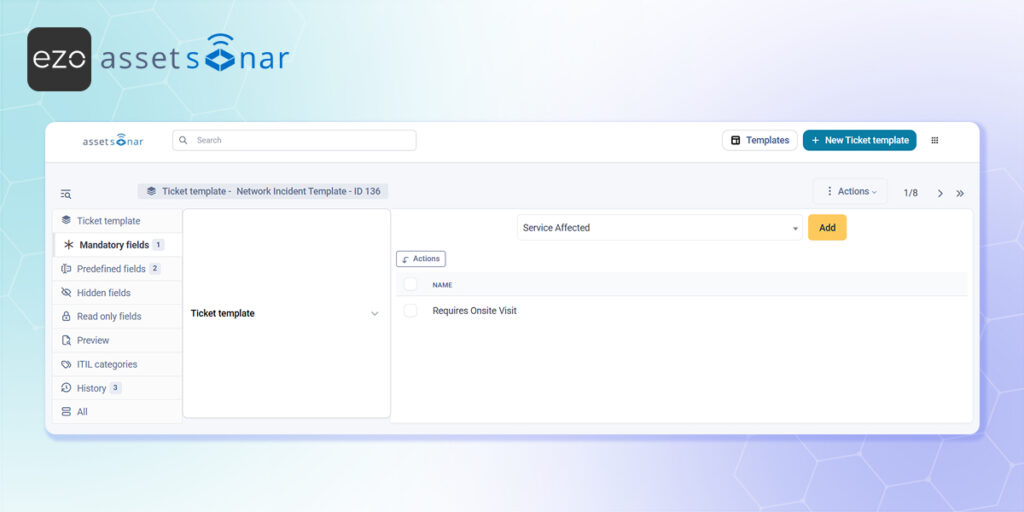
Why It Matters
Once you have created custom fields, embedding them into your ticket templates allows you to standardize how data is collected and presented. By defining exactly how these fields behave when a template is applied—such as forcing a field to be mandatory or keeping it hidden for background tracking—you reduce manual data entry for your agents and ensure your tickets remain perfectly organized as your volume scales.
How to Set It Up
- Access the Templates: Log into your ITSM workspace, navigate to Assistance → Tickets, and click on Templates.
- Open a Template: Click on New Ticket Template to create a fresh layout, or open one of your existing templates to update it.
- Define Field Behavior: Within the template configuration, you can add your newly created custom field to one of four distinct categories to dictate how it acts when the template is applied:
- Mandatory fields: Forces the user or agent to fill out the custom field before the ticket can be successfully created or saved.
- Hidden fields: Keeps the custom field active in the background for tracking purposes without cluttering the user interface.
- Read only fields: Displays the custom field and its value so the user can see it, but locks it so it cannot be edited.
- Select and Save: Simply select your existing custom field from the list within your desired category, apply any necessary default values, and save the template.
Next Steps
Create a test ticket and apply your newly updated template to verify that the custom field behaves exactly as intended (for example, try leaving a “Mandatory field” blank to ensure the system correctly blocks you from submitting the ticket).
Was this helpful?
Thanks for your feedback!





