
Did you know that most IT asset management (ITAM) tools don’t fail because the tool is bad? They fail because the data feeding it is stale.
In 2026, it would be wrong to say that a successful ITAM can function as a standalone system. It is a connected layer that sits between identity, devices, tickets, security, and finance. If those systems are not integrated with one another, your “source of truth” quietly drifts out of date. Everything built on top of it, including audits, offboarding, cost control, and security, starts to crack.
Depending on the context, the ITAM integration stack (i.e. your IT asset management integrations) can have different meanings. In this blog, we use it to describe it as the process of connecting your ITAM with processes, systems, and tools to expand its reach and impact.
In a practical sense, this means linking your ITAM solution with other applications to maximize its usefulness. When integrated with other applications, an ITAM solution is considered to be a robust one. As per a G2 study, a solution equipped with integration capabilities makes it a lot easier for users to make a decision while purchasing it.
In fact, integration capabilities are a decisive factor in software purchasing decisions, and they rank even higher than other factors such as cost and ease of use.
If you’re a sysadmin or an IT manager already running tools like Intune, Jamf, an ITSM platform, or Azure AD, this guide will help you build an ITAM system that’s current, connected, and contextual.
After reading this guide, you will learn:
- The 10 ITAM integration categories that matter most in 2026
- What data to sync from each system (field-level guidance)
- Which workflows do these integrations actually unlock
- The most common integration failure modes
- A practical “connect this first” blueprint you can execute on
Let’s dive right into the guide about IT manager’s 2026 ITAM integration stack (and what to connect first), especially required in the mid-market to enterprise context.
What is the ITAM integration stack
The ITAM integration stack is basically the connections that allow an ITAM solution to exchange data and workflows with other tools (integrations), extending its functionality and enabling automation across various processes.
Depending on the scope, these integrations can take many forms. In this guide, we will focus on the ITAM integration stack that links ITAM software with complementary applications to enhance asset visibility, automate tasks, and improve the user experience across IT teams and processes.
Why integrated IT asset management matters
Integrated IT asset management is important because it removes data silos, ensuring asset information is shared consistently across systems. When asset data flows smoothly among tools, IT teams spend less time preparing and reconciling spreadsheets and more time acting on reliable information and making data-driven decisions.
What’s the outcome?
Better data accuracy, stronger operational efficiency, and clearer visibility across the entire IT asset lifecycle. More importantly, having an ITAM integration stack enables informed decision-making, reduces operational and compliance risks, and helps organizations obtain real value from their ITAM investments.
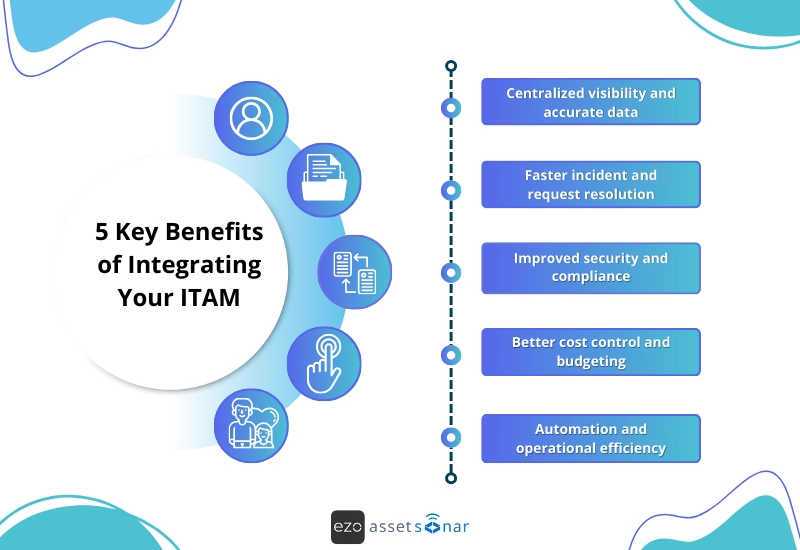
5 key benefits of integrating your ITAM
Integrating your ITAM solution with the rest of your IT stack doesn’t just simplify daily operations. In fact, it significantly strengthens your overall ITAM strategy.
By connecting ITAM with other tools such as IT Service Management (ITSM), discovery software, security platforms, financial systems, and collaboration apps, IT teams can gain benefits beyond basic asset tracking.
- Centralized visibility and accurate data
Having an ITAM integration stack keeps your asset data synchronized across all systems, ensuring consistency and accuracy. This gives IT teams a dependable single source of truth they can trust for reporting, audits, and planning.
- Faster incident and request resolution
When ITAM is integrated with ITSM tools, support teams can instantly access asset details during incidents or service requests. This speeds up troubleshooting, reduces resolution times, and minimizes downtime.
- Improved security and compliance
Integrations with IAM, security, and monitoring tools help enforce access controls, track asset ownership, automate patching, and support compliance with regulatory and licensing requirements.
- Better cost control and budgeting
Financial system integrations provide visibility into asset costs, depreciation, contracts, and renewals. This enables smarter budgeting decisions, reduces unnecessary SaaS spend, and helps avoid compliance or audit-related penalties.
- Automation and operational efficiency
APIs and workflow automation reduce manual effort across asset provisioning, updates, and lifecycle management. This frees IT teams from repetitive tasks and allows them to focus on strategic, higher-value initiatives.
ITAM in 2026 isn’t a tool. It’s a connected system
In the last few years, the role of ITAM has significantly evolved. ITAM is no longer about keeping a clean inventory list in your dashboard. Most IT teams already have an asset list somewhere. The real challenge is when it comes to keeping that list updated, accurate, and actionable as business IT environments change on a daily basis.
In 2026, ITAM’s job is to automate IT lifecycle actions without waiting for tickets, spreadsheets, or human reminders.
Here’s what that looks like in practice:
- Assets appear when devices enroll
When a new laptop is enrolled in Intune or Jamf, the asset record should be automatically created or updated in ITAM—complete with the serial number, model, OS version, and assigned user. No one should be manually creating assets after the device is already in use.
- Ownership updates when users move roles
When an employee changes departments or managers in Entra ID or the HR system, ITAM should automatically reflect that change. This ensures reporting like “assets by department” or “licenses by team” stays accurate without manual cleanup.
- Access is removed when someone leaves
When an employee leaves an organization, the termination is recorded in HRIS, or an account is disabled in the identity provider. ITAM should be able to trigger downstream actions: flag assets for recovery, mark licenses for reclamation, and update ownership status. Waiting for an offboarding checklist to be completed manually is how assets and licenses disappear.
- Licenses are reclaimed before renewals
By pulling usage signals from Microsoft 365 or key SaaS tools, ITAM can surface unused or underused licenses weeks before renewal. Instead of reacting after Finance questions the bill, IT teams can proactively reduce spend.
- Risky or unmanaged devices surface before audits
By integrating with security tools or network discovery, ITAM can highlight devices that lack encryption, haven’t checked in recently, or aren’t covered by EDR, long before an audit or incident forces a scramble.
None of this works if ITAM depends on manual updates or periodic imports. In modern environments, data changes too fast.
Remember, your ITAM is only as accurate as the systems feeding it. Without an ITAM integration stack, even the best-designed ITAM tool slowly drifts out of sync and fails to align with reality.
What counts as a must-have ITAM integration stack in 2026?
Not every system in your environment needs to be tightly integrated with an ITAM solution. Sometimes, trying to connect everything together usually creates more chaos than value.
However, the systems that do matter tend to share a few common traits. In 2026, IT managers should be intentional about integrations. They should pick integrations based on operational impact rather than popularity or vendor checklists.
Before connecting anything, use this simple filter:
A system deserves first-class ITAM integration if it meets one or more of these criteria:
1. Source of truth
“Does this system own authoritative data?”
Some systems are where data is created and maintained. Others merely consume or reference it. An ITAM solution should never compete with a true source of truth; it should listen to it.
For example:
- Your MDM is the source of truth for device enrollment status, compliance posture (encryption, OS version, health), and last check-in and device activity.
- Your identity provider is the source of truth for users’ accounts, employment status, departments, roles, managers, group membership, and access eligibility.
- Your HRIS is the source of truth for employee start dates, termination dates, role changes, employment status, location, and reporting structure.
When an ITAM solution tries to guess or manually replicate this data, it will always be behind reality. This is how you often end up with devices assigned to former employees, licenses owned by “ghost” accounts, and assets displaying the wrong department or cost center.
A must-have integration stack ensures that ITAM obtains truth, rather than simply guessing it.
2. Frequency of change
“Does the data change daily or automatically?”
Some data remains static, whereas other data changes constantly, often without human intervention.
Systems like Intune, Entra ID, SaaS platforms, and security tools update in real time:
- Devices fall out of compliance overnight
- Users move teams or locations
- SaaS licenses get assigned, reassigned, or go unused
- Assets stop checking in or drop off the network
If data keeps changing at this frequency, manual updates wouldn’t just slow things down; they’d stop them altogether. They would create blind spots.
In practice, this means:
- An asset list that’s always slightly wrong
- Audit reports that require manual validation
- Offboarding workflows that miss steps because data arrived late
For these systems, periodic imports aren’t enough.
They require continuous or near-real-time sync, so ITAM reflects what’s happening now, not last week.
3. Risk impact
“Does stale data create security, compliance, or audit exposure?”
Not all data inaccuracies are equal. Some are minor, whereas others can cause serious problems.
You can always ask a simple question: If this data is wrong, what would be the consequences?
Some common high-risk scenarios include:
- A laptop still marked as “active” after an employee leaves
- A device missing encryption but not flagged in ITAM
- Licenses assigned to disabled or terminated accounts
- Devices visible in an Endpoint Detection and Response (EDR) tool but completely absent from the asset inventory and not being tracked in ITAM
These are just not reporting issues; they are risk events waiting to occur.
When stale data can fail an audit, increase exposure to breaches, increase software spend, and undermine executive trust in reports, then having an ITAM integration becomes mandatory, not optional.
4. Workflow impact
“Should this data trigger actions, not just reports?”
In mature environments, ITAM doesn’t exist just to answer questions. It exists to make things happen automatically.
Strong ITAM integrations don’t stop at syncing fields. They enable workflows like:
- Reclaiming or retiring assets when devices go inactive
- Downgrading or disabling licenses based on usage thresholds
- Opening recovery or replacement tasks during offboarding
- Flagging exceptions that need human review
When a system’s data leads to an action, and someone is currently taking that action manually, then that’s a clear signal that the integration belongs in ITAM. This is where ITAM shifts from inventory to execution.
Putting the filter to work
When an integration meets one or more of these criteria:
- It owns authoritative data
- The data changes frequently
- Stale data creates risk
- The data should trigger workflows
Then it stops being “nice to have” and becomes foundational.
The integrations covered in this guide pass this test. Together, they turn ITAM from a static inventory into an execution layer that supports audits, security, cost control, and day-to-day IT operations, reducing manual work.
The top 10 ITAM integrations IT managers need in 2026
Below, we’ve discussed the top 10 ITAM integration stack IT managers must have in 2026.
1. MDM/UEM: Your endpoint source of truth
MDM/UEM acts as your single source of truth for endpoint devices, providing real-time visibility into ownership, configuration, compliance, and security posture. This integration helps IT teams automatically sync device data, enforce policies, and maintain control across the entire device lifecycle.
What it fixes
In modern environments, updating assets manually wouldn’t scale them. Devices constantly change states such as new enrollments, OS upgrades, compliance drift, encryption status, and last check-ins. When an ITAM solution relies on manual updates or periodic imports, asset records slowly drift out of sync almost immediately.
A Mobile Device Management (MDM) or Unified Endpoint Management (UEM) ensures ITAM showcases the real, current state of every managed endpoint, not just a snapshot from weeks ago.
What data to sync
At the very least, an ITAM solution should be able to collect the key fields that identify a device, show its security, and track how it’s being used. Without this foundation, asset records quickly become unreliable and risky.
Here’s the data that needs to be synced:
- Device name, serial number, and model
- Operating system and version
- Last check-in/last seen timestamp
- Compliance status (policy adherence, health state)
- Encryption status (critical for audits and security reviews)
- Assigned user (where the MDM reliably tracks ownership)
Together, these data points form the backbone of a reliable hardware inventory, providing IT teams with the visibility they need to confidently manage assets, reduce risk, and make informed decisions.
Workflows unlocked
Once ITAM has access to live endpoint data, it stops being just a tracking tool and becomes something IT teams can actually act on. Instead of manually updating records or chasing missing information, many routine tasks can happen automatically, including:
- Automatically creating or updating asset records when devices enroll
- Identifying devices that haven’t checked in in ‘x’ days and flagging them for recovery or retirement
- Generating compliance reports that show encrypted vs non-encrypted devices
- Supporting audits with defensible “last seen” and ownership evidence via audit trails
- Triggering downstream workflows (tickets, notifications, offboarding steps) based on device state
Common gotchas to watch for
MDM integrations often run into problems, not because data is missing, but because it is not governed properly. This includes:
- Device re-enrollments that create duplicate asset records
- User mismatches caused by inconsistent identifiers (UPN vs email vs username)
- Multiple systems that try to overwrite the same fields (e.g., user or location)
- Treating MDM as one of many sources, instead of the authoritative endpoint truth
To avoid these issues, ownership rules need to be clearly defined: MDM should own device state and real-time data, whereas ITAM should own asset lifecycle and context.
Common MDM platforms
Examples of MDM solutions commonly integrated with ITAM include Microsoft Intune, Jamf Pro, Kandji, Mosyle, and VMware Workspace ONE.
2. Identity provider/directory: Ownership and accountability
Identity provider/directory systems establish clear ownership and accountability by linking every device and system access to a verified user identity. This integration ensures accurate user mapping, enables timely access changes during onboarding or offboarding, and strengthens security and compliance across the organization.
What it fixes
If you are unable to confidently answer the question “who is responsible for this device or license?”, then everything else, including reporting and security, becomes harder to manage.
For instance:
- Security doesn’t know who to contact when a risky device shows up
- Offboarding misses assets and licenses because “ownership” is unclear
- Audits turn into guesswork (“Who had this laptop last?”)
- Reporting to leadership becomes shaky because the people data doesn’t match the asset data
Your identity provider (IdP) is where the official record lives. The record includes who a person is, where they sit in the organization, and whether they’re still employed.
What data to sync
For an ITAM tool to work properly and become a single source of truth, it needs reliable user and organizational data. This information helps IT teams clearly understand who owns what, ensures accurate reporting, and prevents confusion during support, audits, and offboarding.
- Users + org info: department, title, manager, location
- Account status: active/disabled/terminated (this is key for offboarding)
- Identifiers: email, UPN, employee ID (pick one “primary key” and stick to it)
- Group membership: helps with role-based reporting (e.g., “Finance devices” or “Engineering admins”)
Workflows unlocked
IT teams can move from guesswork to clarity when the ITAM tool is synced with reliable user and identity data. They don’t have to chase people, spreadsheets, or outdated records to understand who owns what.
- Correct user-to-asset ownership (so every device/license has an accountable owner). This eliminates guesswork, reduces finger-pointing, and ensures support tickets, security actions, and approvals reach the right owner every time.
- Leaver automation: When a user account is disabled or terminated in the identity provider, ITAM can immediately trigger follow-up actions, without waiting for emails or reminders:
- Reclaim unused software licenses
- Launch access reviews to confirm permissions are removed
- Send device recovery or return reminders
This closes gaps during offboarding and prevents assets and licenses from disappearing unnoticed.
- Org-level reporting: With identity data mapped correctly, IT teams can easily report on assets, licenses, and spend by department, team, or location. This supports better budgeting, capacity planning, and accountability across the business.
- Cleaner audits: Instead of relying on manual logs or tribal knowledge, audits are backed by directory truth. IT can confidently answer “who had what, and when,” using accurate identity records as proof.
Common gotchas to watch for
Identity provider integrations often fail not because of missing data but because of inconsistent data.
No consistent unique identifier: When different systems rely on different identifiers (email in one tool, UPN or employee ID in another), ownership breaks down. Devices and licenses end up misassigned or duplicated.
Contractors and shared accounts: Generic or shared accounts (e.g., shared@company.com) appear to be real users but don’t represent actual ownership. This creates false attribution and weakens accountability, especially during audits and offboarding.
Group sprawl: Uncontrolled growth of groups makes reporting noisy and unreliable. Without normalizing groups into clean, meaningful categories, segmentation by role or department quickly becomes messy.
Common MDM platforms
Common identity platforms used with ITAM include Microsoft Entra ID (Azure AD), Okta, Google Workspace, and JumpCloud.
3. ITSM/ticketing: Operational context
ITSM / ticketing systems add operational context by linking assets to incidents, requests, and changes. This integration helps teams understand how devices are actually used, track recurring issues, and make faster, more informed support and lifecycle decisions.
What it fixes
When your ticketing system and your asset system don’t interact with each other, support becomes guesswork.
Imagine this scenario. A support ticket comes in: “My laptop is extremely slow,” or “VPN won’t connect to my laptop.”
But the agent can’t instantly see which device it is, who it’s assigned to, its warranty status, its past repairs/recurring issues, or the recent changes (patches, software installs, reassignments).
So teams end up asking basic questions, chasing context, and repeating troubleshooting that was already done last month. That’s why tickets take longer and why problems keep coming back.
What data to sync
The goal is simple: every ticket should automatically carry the correct asset context. The agents should not be searching, guessing, or asking follow-up questions.
When ITAM and ITSM tools are connected, tickets stop being isolated issues and start telling the full story of the device or software involved.
Sync (or link) the following:
- Asset links on incidents/requests/changes (the device or software tied to the ticket)
- Service history and past activity: repair notes, downtime, “what was done last time,” replacement history
- Ticket metadata that adds business context: requester, assignee, timestamps, category (and ideally location/department)
It’s worth noting that you don’t need to sync everything on day one. Simply linking the asset to the ticket is already a major unlock. Once that connection exists, teams can gradually layer in richer data to improve reporting, automation, and service quality over time.
Workflows unlocked
Once tickets and assets are connected, IT teams can move faster and make better calls:
- Auto-attach the right asset to the right ticket: If someone submits a request from the “My Items” portal or via Teams, the ticket is automatically tied to their actual laptop. This means no manual searching is required.
- Better repair vs replace decisions: If a device has had 4 break-fix tickets in 3 months, you can stop “patching the same wound” and trigger a replacement workflow.
- Faster root-cause analysis with an asset timeline: “Laptop started crashing right after a driver update + patch cycle” becomes visible because you can see changes and incidents in one place.
Common gotchas to watch for
This is where integrations usually look fine on paper but cause problems in real life if not handled carefully.
CI vs. Asset mismatches: Many ITSM tools separate Configuration Items (CIs) from Assets, even though they sound similar. If you map tickets to the wrong object type, links can break, or important details (like ownership or lifecycle status) won’t show up. The result: tickets with partial context and confused reporting.
Weak linking rules assign the wrong asset: If asset-to-ticket matching relies on a single field, like hostname, it’s easy to link the wrong device. Hostnames get reused, renamed, or cloned. Without stronger identifiers (such as a serial number, asset ID, or a user + device combo), tickets can end up attached to someone else’s hardware.
Two-way sync without ownership rules causes “ping-pong edits”: When both ITAM and ITSM can update the same fields (owner, status, location), they can keep overwriting each other. Unless you clearly define which system is authoritative for each field, you’ll see constant data flips and unreliable records.
Common ITSM platforms
Common ITSM/ticketing platforms include Jira Service Management, Zendesk
4. HRIS: Joiner, mover, leaver automation
HRIS integrations power joiner, mover, and leaver automation by tying employee records to IT access and assets. They ensure timely provisioning, role-based changes, and secure offboarding, reducing manual work while minimizing access and compliance risks.
What it fixes
Most asset loss, access sprawl, and license waste don’t happen because of bad intent or because teams are careless; it happens because IT isn’t informed on time. Also, it happens because employee changes move faster than IT updates.
When someone joins, changes roles, or leaves the company, IT often finds out late (or not at all). Devices don’t get reclaimed, licenses stay assigned, and access hangs around longer than it should.
HRIS is the earliest signal that someone is joining, changing, or leaving. If ITAM isn’t connected to HRIS, IT is always reacting late. Connecting your HR system to ITAM fixes this by automatically triggering IT actions when people changes occur.
What data to sync
You don’t need everything from HR. You only need the fields that drive lifecycle decisions:
- Start date and end date: This tells IT when to act; onboarding on day one, offboarding immediately when someone leaves.
- Employment status (active, on leave, terminated): This is the main signal for automation. A status change should drive access and asset workflows.
- Role, department, and location: These determine what devices, software, and access someone should have.
- Employee ID (critical): This should be the shared, unique identifier across HR, ITAM, IdP, and ITSM. Without it, matching records becomes unreliable.
Workflows unlocked
Once HR data is synced, IT can stop reacting and start running clean, predictable workflows:
- Auto-assign standard IT kits: New joiner in Finance? Laptops, monitors, and finance software are automatically assigned based on role and location.
- Mover workflows: Role or department changes trigger license swaps, access updates, and asset reassignments without manual follow-ups.
- Termination-driven asset recovery: When an employee is marked as terminated, ITAM can automatically:
- Create device return tasks
- Notify IT or facilities
- Flag assets for recovery or remote wipe
- License and access reclamation: Licenses and system access are reclaimed immediately, reducing security risk and wasted spend.
Common gotchas to watch for
This is where HRIS integrations often fall short:
- Late termination updates: If HR records aren’t updated on time, automation fires too late, after the employee has already left with devices or access.
- Movers are not treated as lifecycle events: Promotions and department changes are often ignored, even though they should trigger major IT changes.
- Missing or inconsistent employee IDs: If HR, ITAM, and identity systems don’t share the same employee ID, ownership and automation break down quickly.
Common HRIS platforms
Some common examples of HRIS platforms include Workday, BambooHR, UKG, and SAP SuccessFactors
5. SaaS license signals: Usage vs spend
SaaS license signal integrations compare actual usage data with license spend to reveal waste, underutilization, and optimization opportunities. They help IT reclaim unused licenses, right-size subscriptions, and align software costs with real business demand.
What it fixes
Many organizations waste money paying for software licenses that aren’t being used or are unsure which licenses are truly critical. SaaS has now become one of the largest line items in IT budgets, but it is also one of the least controlled. Most teams can tell you how many licenses they pay for and which apps are officially approved. However, only a few of them can confidently tell who is actually using those licenses, which seats are idle, duplicated, or assigned to the wrong users, and whether renewals are based on real demand or just guesswork.
Without usage signals feeding into ITAM, SaaS management becomes reactive. Licenses pile up quietly, renewals auto-extend, and spend continues to grow even in organizations that are budget-conscious. This is why connecting usage data to ITAM is crucial. It helps IT and finance teams see exactly what’s being used, by whom, and where costs can be optimized.
What data to sync
The goal isn’t to turn ITAM into a SaaS admin console; it’s to give IT decision-grade signals.To get meaningful insights, ITAM should collect the following from SaaS apps:
- License assignments and SKUs: Find out which user has which license type. This is the foundation for tracking spend vs. utilization.
- User-to-app mapping: Understand which applications each employee actually uses. This ensures proper allocation and helps identify unused subscriptions.
- Usage or activity signals (when available): Metrics like login frequency, active sessions, or feature usage help you see which licenses are actively consumed versus idle.
Workflows unlocked
When usage data is linked with ITAM, you can automate smarter decisions:
- Identify reclaimable licenses: Unused or rarely used licenses can be reclaimed, reassigned, or disabled, freeing up budget. ITAM flags the license as reclaimable, giving IT a clean review queue, evidence to justify reclaim, and confidence that nothing critical will break.
- Renewal readiness reporting: See which licenses are actively used and which can be reduced before renewal cycles, preventing overspending. This will help in shifting renewals from panic-driven to data-backed.
- Controlled downgrade or disablement: Reduce unused premium licenses to standard tiers or disable inactive accounts, without disrupting active users. This will keep automation helpful, not disruptive.
Common gotchas to watch for
- “Usage” varies by vendor: Some tools count logins, others track feature use, and some only report monthly activity. IT teams must compare carefully before making decisions.
- Shared accounts inflate activity: If multiple people share a single login, usage data can look higher than actual adoption, leading to incorrect reclamation decisions.
- Over-aggressive automation: Automatically reclaiming licenses without review can disrupt workflows and make teams resist automation altogether. SaaS automation needs thresholds and human checkpoints. Always combine automated insights with a verification step.
Common SaaS platforms
Some examples of SaaS platforms include Microsoft 365, Google Workspace, Slack, Zoom, Adobe, and Atlassian.
6. Procurement & finance: Cost control
Procurement and finance integrations connect assets and licenses to purchase data, contracts, and renewal dates. This gives IT clear visibility into true ownership, spend, and lifecycle costs—enabling better budgeting, preventing surprise renewals, and strengthening cost control and compliance.
What it fixes
Without linking ITAM to financial data, it’s hard to see where your money is going, prove ROI on technology investments, or control unnecessary spend. You might know what assets exist, but you won’t be able to know how much they cost, who approved them, which department pays for them, and when they renew or depreciate.
When procurement and finance data live outside ITAM, cost control becomes reactive. Renewals get missed, budgets drift, and IT is asked to explain spend after the fact, without the data to back it up.
Integrating purchasing and finance information into ITAM gives IT and finance teams visibility over costs and helps avoid wasted spend on unused or expired assets.
What data to sync
The goal is simple. Connect money → asset → owner → lifecycle.
To manage spend effectively, ITAM should track these key financial and procurement fields:
- Purchase orders, invoices, vendors: Knowing who supplied an asset and how it was purchased provides transparency and simplifies audits.
- Unit cost and purchase date: Tracking how much each asset costs and when it was bought helps with budgeting, depreciation, and ROI calculations.
- Cost centers and depreciation data: Linking assets to specific departments or cost centers enables accurate chargebacks and internal reporting. Depreciation tracking helps with asset lifecycle planning and replacement budgets.
- Renewal dates and cancellation windows: Keep tabs on contract renewals, subscriptions, and licenses so you can plan ahead, avoid auto-renewals you don’t need, and prevent lapses that impact operations.
Workflows unlocked
Once procurement and financial data are connected, ITAM can automate processes that save time and prevent overspend:
- Auto-create assets from purchases: When a purchase is approved, ITAM can automatically generate the asset record. Hence, no manual entry is required.
- Renewal alerts and risk prevention: Notifications for upcoming renewals help avoid missed deadlines, unexpected charges, or expired licenses.
- Chargeback and showback reporting: ITAM can generate reports showing asset and license costs by department or team, helping finance allocate spend correctly and increase accountability.
Common gotchas to watch for
- Inconsistent vendor naming: Multiple spellings or abbreviations for the same vendor can make reporting messy and reconciliation difficult. “Adobe,” “Adobe Inc,” and “ADBE” when treated as separate vendors break reporting unless normalized.
- One purchase order mapping to many assets: POs often include multiple items; if ITAM isn’t configured to handle this, costs and assets can be misaligned.
- Renewals tracked in email instead of systems: When renewals live in email threads or calendars, automation can’t help, and deadlines get missed. The missed renewals cost money and risk disrupting the service.
Common procurement & finance systems
Some examples of procurement and finance systems include NetSuite, SAP, QuickBooks, Coupa, and Tipalti.
7. Security stack: Risk context
Security stack integrations enrich assets with vulnerability, compliance, and threat data from security tools. This adds risk context to every device and user, helping teams prioritize remediation, reduce exposure, and align asset management with security outcomes.
What it fixes
Having a list of all devices isn’t enough. IT teams need to know which assets pose a risk, such as unpatched devices, unprotected endpoints, or machines with known vulnerabilities. Basically, you don’t just need a list of assets; you need a list of risky assets.
Without a security context, IT teams often know what exists, but not which devices are actually protected, which ones are exposed or vulnerable, or which assets matter most if something goes wrong. Security tools already know this. ITAM just needs to listen. Connecting ITAM to your security tools gives teams the full picture of risk across your environment.
What data to sync
The goal is to layer risk signals onto every asset record.
To make risk actionable, ITAM should pull relevant security data for each asset:
- EDR coverage status: Identify which devices are protected by endpoint detection and response tools and which are unmanaged or unprotected.
- Vulnerabilities and exposure findings: Link CVEs, missing patches, misconfigurations, or other threat indicators directly to the affected devices.
- Patch status signals: Understand whether systems are up to date or require immediate remediation. This is crucial for proactive risk reduction.
- Device criticality (if available): Assign a priority or criticality rating to assets. For example, servers hosting production applications vs. test laptops. This helps IT focus on high-impact assets first.
Workflows unlocked
When security signals are connected to ITAM, your security team can work smarter and faster:
- Alerts for unmanaged or unprotected assets: Quickly identify devices that aren’t protected by security tools, reducing protection gaps. For example, a device appears in EDR but not in ITAM. Then, ITAM flags it as an exception. A task is created to enroll, investigate, or isolate the device. This closes one of the most common audit and security gaps: “We didn’t know it existed.”
- Risk-based remediation prioritization: Focus patching, configuration fixes, and other security tasks on devices that matter most, rather than applying a “one-size-fits-all” approach. Instead of treating all vulnerabilities equally, high-risk devices with active exposure move to the top of the queue, and low-risk or offline assets are deprioritized. This helps lean IT teams focus effort where it actually reduces risk.
- Faster incident response with ownership context: When a threat is detected, ITAM shows exactly who owns the device, its location, and service history, making remediation faster and more precise. This removes the first 30–60 minutes of every incident: the time spent figuring out what the alert actually refers to.
Common gotchas to watch for
- Different device identifiers across tools: If ITAM and security tools don’t use the same device ID, data can become mismatched, leading to blind spots. For instance, security tools may rely on hostnames or GUIDs, whereas ITAM uses serial numbers. This is why it is important to clearly and carefully define the matching logic.
- BYOD or IoT devices appearing in security but not in ITAM: Devices outside ITAM’s inventory may generate alerts with no context, making remediation confusing or delayed. These often appear in security tools before ITAM, creating “ghost assets” unless triaged intentionally.
- Incomparable risk scores across vendors: Different security tools score risks differently; without normalization, it’s hard to prioritize remediation effectively. Therefore, raw scores should be normalized or contextualized before driving automation.
Common security platforms
Some common security platforms include Microsoft Defender for Endpoint, CrowdStrike, SentinelOne, Tenable, and Qualys.
8. Network discovery: Agentless reality checks
Network discovery integrations provide an agentless view of everything connected to the network. They help uncover unmanaged, unknown, or rogue devices, validate asset records, and close visibility gaps that agents alone can’t cover.
What it fixes
Even the best ITAM and MDM setups can miss devices. Even well-managed environments can have blind spots. Rogue endpoints, test lab machines, printers, IoT devices, or laptops that haven’t enrolled in management tools can create blind spots. Network discovery fills these gaps, giving IT a complete picture of everything on the network, even devices that don’t have agents installed.
What data to sync
Network discovery doesn’t provide rich lifecycle data, but it’s invaluable for exposure detection. To be effective, network discovery tools should provide key details about every device detected:
- MAC/IP and hostname: Basic identifiers to locate the device on the network and distinguish it from others.
- OS guess and open ports: Helps determine the device type and security posture without installing agents.
- Last seen timestamp: Shows when the device was last active, which is critical for tracking dormant or rogue devices.
- Network segment or VLAN: Understanding where the device is located helps IT route remediation and maintain network segmentation policies.
Workflows unlocked
With accurate network discovery feeding into ITAM, teams can automate and streamline critical workflows:
- Detect unmanaged assets: Identify devices that aren’t under IT control, so they can be enrolled, secured, or investigated. For example, a device appears on the network but has no matching ITAM record. It is flagged as “unknown” rather than silently ignored. This is often how teams discover devices missed during onboarding, equipment brought in by teams without IT involvement, and assets that slipped through offboarding
- Enrollment or investigation queues: Automatically create tasks for IT to onboard unknown devices or review suspicious endpoints. Rather than treating discovery as noise, ITAM can route unknown devices into a triage queue, prompt enrollment into MDM, and assign investigation tasks to the right team. This turns discovery into action, not just alerts.
- Audit validation ahead of time: Validate the inventory before internal or external audits to ensure nothing is missing or misclassified. Network discovery is especially valuable before audits. IT teams can compare network-visible devices against ITAM records, resolve discrepancies before auditors find them, and prove that “unknown” assets are actively monitored. This reduces last-minute scrambles and uncomfortable audit questions.
Common gotchas to watch for
- False positives from noisy devices: Network printers, smart devices, or lab systems may show up repeatedly, creating duplicate or misleading entries.
- Lack of serial numbers for matching: Some devices can only be identified by MAC/IP, making it harder to tie them to an existing asset record.
- Discovery intervals too long to be useful: If scans run only weekly or monthly, new devices or rogue assets may go undetected for too long.
Common network discovery platforms
Some examples of network discovery platforms include Nmap (process-level), Lansweeper, Rapid7 discovery, and Armis
9. RMM/Remote support tools: Remote action and enforcement
These integrations enable real-time monitoring and remote actions such as patching, troubleshooting, locking, or wiping devices. They turn ITAM insights into immediate fixes, helping teams respond faster and enforce controls without manual intervention.
What it fixes
IT teams often spend too much time chasing device health, past actions, and asset history across multiple tools. Without integration, support becomes reactive, troubleshooting takes longer, and recurring issues can go unnoticed. Connecting RMM (Remote Monitoring & Management) tools to ITAM brings all the relevant device information in one place, saving time and improving decision-making.
What data to sync
RMM tools don’t need to dump everything into ITAM. The goal is signal, not noise. To get actionable insights from RMM tools, ITAM should collect:
- Device health and uptime: Key metrics like CPU/memory usage, storage capacity, or error reports help IT understand the current state of a device.
- Last online status: Shows when a device was last active or connected, making it easier to identify offline, dormant, or potentially abandoned endpoints.
- Remote actions taken (optional): Logs of patching, updates, software installs, or troubleshooting steps help IT teams build a complete asset history and avoid repeating work.
Workflows unlocked
Integrating RMM with ITAM enables smarter, faster IT operations:
- Faster troubleshooting in a single view: Support staff can see health metrics, past actions, and asset context without jumping between tools. For example, a ticket comes in for a slow laptop. Instead of starting from scratch, the technician sees uptime issues over the past 30 days, repeated script runs, and prior incidents tied to the same device. This shortens resolution time and avoids redundant work.
- Record remediation actions in asset history: Every fix, update, or remote action is automatically logged in the ITAM record, building a full lifecycle history for each device. RMM actions written back to ITAM mean that repairs and fixes are documented automatically, and asset timelines show what was done, not just when tickets were closed. This is invaluable for audits, root-cause analysis, and lifecycle decisions.
- Identify “frequent flyer” devices: Assets that repeatedly fail, crash, or require support can be flagged for replacement instead of wasting time on repeated repairs. IT teams can then make data-backed replace vs repair decisions, instead of reacting ticket by ticket.
Common gotchas to watch for
- Too much raw telemetry flooding ITAM: RMM tools generate a lot of data. Therefore, only sync what’s meaningful for asset management to avoid clutter and confusion.
- Duplicate discovery with MDM: Devices already tracked in MDM may show up again from RMM, creating duplicates unless identifiers are aligned. Decide which system owns discovery and identity.
- Overwriting curated asset fields: Automated RMM updates can unintentionally overwrite carefully maintained ITAM data (like owner, location, or business-critical tags).
Common RMM/remote support platforms
Some examples of RMM/remote support tools include Syncro and ConnectWise Automate
10. Open APIs & webhooks: Your escape hatch
These integrations fill the gaps where native connectors don’t exist. They allow IT teams to sync custom data, trigger event-based automations, and connect niche or legacy systems, ensuring ITAM remains complete, flexible, and responsive as the environment evolves.
What it fixes
No matter how “integrated” your stack is, there’s always one system that doesn’t have a native connector: a custom procurement portal, a lab inventory tool, an internal HR workflow, a security system, or even a spreadsheet-driven process that leadership won’t retire yet.
Open APIs and webhooks give you the flexibility to connect these “outlier” systems, so you’re not forced to manage data manually or leave gaps in your asset, user, or license tracking. Think of this as your “build-your-own connector” option; lightweight when needed, powerful when done well.
What data to sync
APIs matter most when they keep your core records up to date and your lifecycle actions automated. With APIs and webhooks, you can integrate virtually anything, but these are the most critical types of data to pass between systems:
- Create or update assets, users, and assignments: Keep ITAM in sync with any system, even if it doesn’t have native support
Workflows unlocked
Using APIs and webhooks opens up a world of automation and custom integrations:
- Custom integrations for niche systems: Integrate legacy apps, bespoke platforms, or internal tools that don’t otherwise talk to ITAM or ITSM. Examples IT teams actually deal with include a procurement system that records purchases but doesn’t talk to ITAM, a lab tool (or fixed-asset register) that stores ownership and location, or a finance tool tracking renewals/cost centers. With APIs, you can still sync the basics, so your ITAM stays the “single view.”
- Event-driven automation via webhooks: Trigger workflows instantly when something changes, like a new hire in HR, a device update in MDM, or a security alert from your EDR platform. For example, when a user is offboarded in the HRIS, the webhook is triggered, ITAM marks the user’s account as inactive, and then ITAM triggers tasks to recover the user’s devices (laptop, phone, etc.) or to reclaim or deactivate software licenses.
- Clear source-of-truth rules: Decide which system is authoritative for each type of data, so your ITAM records remain clean and reliable. APIs let you enforce governance like “MDM owns encryption + last check-in”, “IdP owns department + manager’, “HRIS owns employment status + start/end dates”, and “ITAM owns lifecycle status (in stock, assigned, retired).” That prevents messy, conflicting updates and keeps your data trustworthy.
Common gotchas to watch for
- No field governance: Without agreed-upon mappings and formats, APIs can create inconsistent or duplicate data.
- Ignored rate limits and error handling: Systems often limit how many API calls you can make. If you don’t manage these limits, integrations can fail silently or crash.
- No monitoring when integrations fail silently: Without alerts or dashboards, errors can go unnoticed, leaving ITAM out of sync with critical systems.
Common API / webhook platforms
Some common examples of API/webhook platforms include REST APIs (custom scripts / small services), webhooks (event triggers: hire/offboard, enroll device, vuln detected), and iPaaS tools: Zapier, Make, Workato, Tray.io (useful when you need speed, workflows, and less custom code).
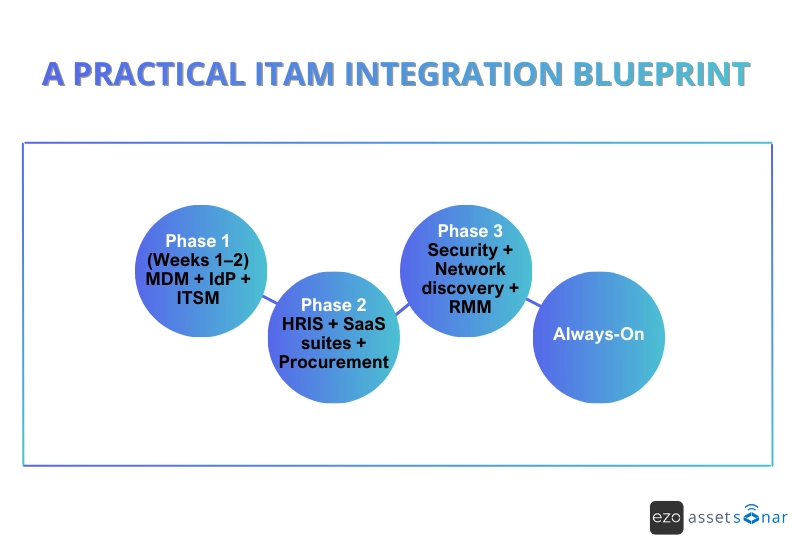
A practical ITAM integration blueprint
The biggest mistake IT teams make with integrations is trying to connect everything at once. Trying to do this leads them to stalled projects, partial syncs, and low trust in the data.
A phased approach helps them build integrations in the right order, starting with accuracy, then automation, and finally risk visibility, without overwhelming systems or people.
Phase 1 (Weeks 1–2): Foundations first
MDM + Identity Provider + ITSM
Goal: Establish device truth, ownership, and operational context
Start with the systems that define what devices exist, who owns them, and how they’re supported.
- MDM/UEM ensures ITAM always knows what devices exist, their status, compliance, and last check-in.
- Identity Provider answers who owns what, tying devices and licenses to real users, departments, and roles.
- ITSM connects assets to tickets, incidents, and changes so IT has full lifecycle context, not just a static list.
This phase creates a reliable single source of truth so IT can trust the data before automating anything. Within two weeks, IT teams typically eliminate manual asset updates, reduce misassigned tickets, and gain immediate audit and troubleshooting clarity. This is where ITAM stops being an inventory and starts supporting daily operations.
Phase 2: Automate lifecycle and spending
HRIS + SaaS Suites + Procurement
Goal: Automate lifecycle events and regain control of spend
Once asset and user data are clean, bring in systems that manage people changes and money.
- HRIS triggers joiner/mover/leaver workflows automatically, assigning kits, reclaiming assets, and shutting down access in a timely manner.
- SaaS suites provide visibility into licenses, usage, and reclaim opportunities before renewals hit.
- Procurement and finance integrations tie assets and licenses to real costs, renewal dates, and cost centers.
This phase reduces asset loss, reclaims unused licenses, and prevents unnecessary renewals. IT teams stop chasing down assets after employees leave, avoid unnecessary renewals, and finally align ITAM data with finance and leadership reporting.
Phase 3: Surface risk and close blind spots
Security + Network Discovery + RMM
Goal: Surface risk and close blind spots
With lifecycle automation and spend under control, the focus shifts to risk and reliability.
- Security tools add vulnerability, coverage, and risk context to assets.
- Network discovery finds what isn’t enrolled or managed: rogue devices, labs, IoT, or shadow infrastructure.
- RMM tools bring health and remediation history into the asset record.
This phase turns ITAM into a risk lens. Instead of reacting to incidents, teams can prioritize remediation, validate audit readiness, and identify weak points before they become problems.
Always-On: Fill the gaps
APIs and Webhooks
Goal: Handle gaps, edge cases, and custom workflows
No stack is perfect. APIs and webhooks ensure ITAM can still integrate with niche tools, legacy systems, or custom workflows, without breaking the overall model.
- Fill gaps where no native integration exists
- Trigger real-time actions for events like offboarding, enrollments, or high-risk findings
- Maintain clear source-of-truth rules across systems
APIs ensure ITAM stays accurate even as the environment changes. They prevent brittle processes and future-proof the integration strategy.
This blueprint lets IT teams move from accuracy to automation, then to risk control, in a deliberate, low-friction way. Each phase delivers immediate value, builds trust in the data, and prepares ITAM to function as an execution layer, not just a system of record.
Common integration mistakes IT managers warn about
Even well-planned integrations can fail if ownership and data rules aren’t clear. These are the most common pitfalls IT leaders see after go-live:
Multiple systems owning the same field
When two or more systems are allowed to update the same data (like asset owner, status, or location), records quickly become inconsistent. This leads to confusion, overwritten data, and teams no longer trusting the system of record.
Here’s how to fix it: Clearly define which system is authoritative for each field and lock it down.
Bad identity matching (email vs UPN vs employee ID)
If systems don’t agree on how to identify a user, assets, and licenses can end up linked to the wrong person or no one at all. This usually shows up during offboarding or audits, when ownership can’t be confirmed suddenly.
Here’s how to fix it: Choose one unique identifier and use it consistently across all integrations.
Sync frequency too low for audits or offboarding
If data only syncs once a day (or worse, weekly), offboarding actions can trigger too late, and audits may show outdated information. This creates security risk and compliance gaps.
Here’s how to fix it: Use near-real-time sync or event-based triggers for critical lifecycle events.
No clear ownership for integrations once live
After deployment, integrations often get ignored until something breaks. Without a named owner, failures go unnoticed, and data slowly drifts out of sync.
Here’s how to fix it: Assign clear ownership for monitoring, maintenance, and change management of integrations.
Integrations don’t fail because of tools; they fail because of unclear ownership, weak identity standards, and poor governance. Once you get them right, everything downstream works better.
Final thoughts
By 2026, having a list of assets alone will not be enough. Most IT teams already have inventory data; the real difference is what they can do with it. That gap isn’t closed by adding more features, dashboards, or reports. It’s closed by having an ITAM integration stack.
When ITAM is connected to the systems that manage people, devices, security, support, and spend, it moves from passive tracking to active control. Assets update themselves, lifecycle events trigger automatically, risks surface early, and decisions are based on live context, not outdated spreadsheets.
Done right, ITAM stops being “something you check” and becomes the backbone of daily IT operations, quietly coordinating workflows, reducing manual effort, and helping IT teams stay ahead instead of constantly catching up.





