Why It Matters
Routing approvals directly through the helpdesk ensures that high-impact requests, like budget spends or system access, are officially authorized and documented before IT begins any work.
How to Do It
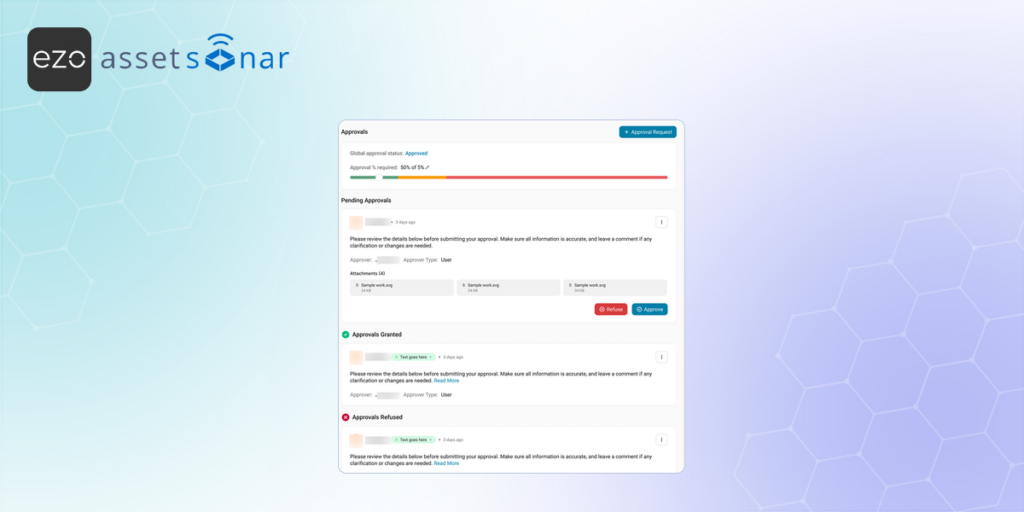
- Draft the Request: Navigate to Assistance → Tickets and open the specific ticket that requires authorization. Click on the Approvals tab and hit the Add Approval Request button to open a new draft.
- Fill in the Details: On the form, you can apply a pre-built Template, define the Approval step, verify the Requester, and select your Approver (you can route this to a specific User, multiple Team users, or an entire Team). You also have the option to attach a file if they need supporting documentation.
- Submit for Review: Once filled out, click Submit. The designated manager will immediately be notified.
- Manager Authorization: The manager can open the ticket, review the request details directly on the Conversation tab, and click either the Approve or Refuse button right there in the thread. The system will automatically log their decision into the ticket’s history.
Next Steps
Send a test approval request to a colleague, have them open the Conversation tab to click Approve, and verify that the ticket correctly updates to reflect their authorization.
Was this helpful?
Thanks for your feedback!

![[ITSM | How-to] Adding Attachments & Inline Images in AssetSonar Tickets](https://cdn.ezo.io/wp-content/uploads/2026/03/18133927/05-ticket-reply-attachments-banner.png)
![[ITSM | How-to] Adding Observers to Tickets in AssetSonar](https://cdn.ezo.io/wp-content/uploads/2026/03/18134051/06-ticket-observer-dropdown-banner.png)
![[ITSM | How-to] Assigning Tickets in AssetSonar](https://cdn.ezo.io/wp-content/uploads/2026/03/20072744/Assigning-Tickets-in-AssetSonar.png)




