


Do you remember the last time you lost a customer because a piece of equipment was unavailable? How much revenue did you lose due to this mistake? When you promise two customers the same equipment, you not only risk losing a customer but also risk damaging your business reputation in the long run. Losing a customer and jeopardizing your business reputation are certainly more consequential than any other factor impacting your rental operations.
A scheduling error like double-bookings is not to be taken lightly. It requires a comprehensive review of your rental equipment management strategies, operational workflows, and automation processes.
Rental asset management software, such as EZRentOut, plays a critical role in addressing this issue. Let’s dive deeper into how such platforms help reduce the risk of scheduling mistakes, such as double-booking.
What includes double-bookings?
Double-bookings occur when two pieces of equipment are booked at the same time for two different customers. In rental operations, this might look like promising the same excavator, generator, or audio-visual equipment to two separate clients for overlapping time slots. However, its repercussions are far-reaching, impacting revenue, customer trust, and operational efficiency.
Double-bookings can occur due to multiple reasons, including:
- Manual scheduling: Using spreadsheets, paper logs, or multiple disconnected systems increases the likelihood of mistakes. Without a centralized source of truth, it’s easy to assign the same equipment twice.
- Miscommunication: When teams operate across multiple locations or departments, a lack of clear communication can result in conflicting bookings. A request might be approved in one branch without being updated in the central schedule.
- Lack of in-depth visibility: In fast-paced rental businesses, delays in updating availability can lead to overlapping reservations. By the time your staff notices the double booking, it is often too late to reallocate resources efficiently.
- Presence of data silos: If you are not entering your booking details into a centralized location, you will not be able to provide your staff with visibility into the most recent status of your equipment. This happens when you operate in silos, without a consolidated platform that provides a comprehensive view of your bookings. Due to the data silos, these details will not automatically appear in your availability calendar (especially if you are not using software), which can lead to client frustration.
Consequences of increased double bookings in rental settings
Ad-hoc systems like spreadsheets are known to be inefficient for automatic updates. When you manage an extensive equipment fleet, a minor booking slip-up can result in noticeable revenue leakage that can multiply over time if the problem persists.
Here’s how manual scheduling, legacy systems, and organizational-level miscommunication can impact your revenue in unprecedented ways:
1. Disrupted operations
Imagine you have a 10-ton excavator ready for delivery to a client. You check your records, find a booking, and arrange the delivery for one of your most loyal clients. However, you receive a call from another client who states they booked the same equipment and that it has not yet been delivered. You review your records again, but find no entry. You then ask your fleet manager, who confirms they booked it and recorded the details on a different sheet.
Result: a frustrated customer, a lost rental opportunity, and notable damage to your reputation. Booking errors can hamper the momentum of your rental business and significantly reduce your efficiency.
This is one scenario of disrupted operations due to double booking. Consider the damage this can do to your rental operations if errors like these become routine.
2. Reduced asset utilization
Using manual systems to manage your booking schedule directly impacts your financial operations. When your records show an item as “available” but, in reality, the equipment has been sent for delivery, your staff can unknowingly book it to another customer.
Conversely, an item may be marked unavailable in the system even though it’s actually available, leading to an increase in underutilized equipment. Such equipment sits idle, adding to costs associated with underutilization, while other equipment is overutilized, reducing its lifespan. Idle assets represent lost revenue potential, and recurring idle periods can increase your cost per rental day.
Similarly, rental managers rely on utilization metrics to forecast future buying trends and make fleet management decisions. Metrics not properly reported lead to:
- Over-purchasing or under-purchasing equipment.
- Scheduling maintenance at the wrong time means increasing the risk of downtime or service delays.
- Misjudging seasonal demand causes either shortages or excess idle inventory.
3. Operational chaos
Double bookings create a trickle-down effect. Miscalculated bookings put your staff in a frenzy; they struggle to appease angry customers and try to arrange alternatives. The inability to find alternative equipment exacerbates the problem as clients push you to find a solution while their project is delayed. The chaos and the hurry necessitate reaching out to competitors to rent equipment at higher rates, thereby significantly increasing your operational costs.
This level of increased stress affects productivity and accuracy, leading to even more mistakes. The operations team blames the booking manager, while the booking manager blames the field manager for the inaccurate equipment count. Such inefficiencies hamper your workflows and slow down operations, affecting your other bookings as well.
4. Disrupted maintenance planning
One of the main processes impacted by poor scheduling is maintenance planning. Equipment often marked as “in use” is actually due for monthly, quarterly, or yearly maintenance, but it never makes it to the service center. The reason is the lack of strategic reporting and planning reflecting the impact of scheduling errors on equipment maintenance.
Preventive maintenance and inspections rely on accurate usage data. Double bookings may falsely indicate that a piece of equipment has been used extensively or insufficiently. As a result, maintenance may be scheduled too early or delayed, either wasting resources or risking equipment failure.
Additionally, reliable maintenance data is essential for assessing the health and longevity of your equipment. Double bookings distort usage metrics, making it harder to determine when the equipment should be retired, replaced, or refurbished. Over time, this can lead to increased operational costs and inefficient fleet management.
5. Direct revenue loss
When you book the same equipment twice, you jeopardize your business reputation. When a customer learns their order will not be available, they cancel it. This is not just a lost sale; it’s lost trust. The customer will turn to your competitor while you lose repeat customers and referrals.
To address such situations, your rental team has no solution but to:
- Pay for expedited transport or delivery to get an alternative unit to the customer on time.
- Offer discounts or compensation to satisfy the affected customer.
- Arrange for backup equipment
All these options increase costs and hamper your cash flows. Rental businesses often rely on daily or weekly revenue forecasts to manage payroll, service costs, and maintenance schedules. When a booking is canceled at the last minute, cash flow projections are thrown off, creating operational stress; for small or medium rental companies, even one or two cancellations a week can affect budgeting for fuel, staff hours, or equipment servicing.
How to overcome the problem of double bookings with EZRentOut
EZRentOut is a cloud-based rental asset management software designed to automate and deliver quality workflows for enterprise-level rental businesses. Its processes are designed to streamline and organize the rental operations of heavy equipment rental businesses across construction, AV and media, transportation, and oil and gas.
All these industrial segments need their scheduling processes to be error-free to avoid revenue loss. Even a slight hiccup can easily distort their revenue tracking and financial reporting! Let’s see how EZRentOut serves as a smart scheduling tool, helping you prevent revenue loss due to double bookings:
1. Complete visibility into your rental catalog
Inefficiencies occur when you and your rental operations team lack visibility into your rental landscape, including your equipment, its condition, location, quantity, age, and maintenance needs. Equipment does not receive proper care when you do not know where it is or in what capacity it exists, which eventually leads to scheduling issues. The field teams are unable to provide an accurate picture of the equipment out for delivery and what is available on the field.
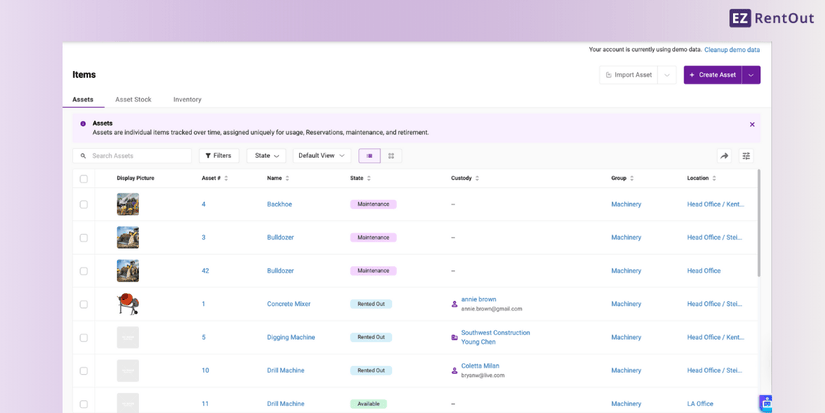
EZRentOut’s workflows are deeply rooted in its asset register, which stores information on all equipment. As soon as you purchase a piece, simply enter its information into the software and process it accordingly. This includes managing rental orders both in-app and through the webstore, sending the equipment for service, and most importantly, updating its availability on the built-in availability calendar.
Based on the equipment’s current status, the availability calendar will update you on its availability. Before booking a piece, you can check the calendar to see if the equipment is available on the requested date. This streamlines the booking process and ensures that if a piece of equipment is already rented, it’s not promised to another customer.
2. Enable scheduling alerts
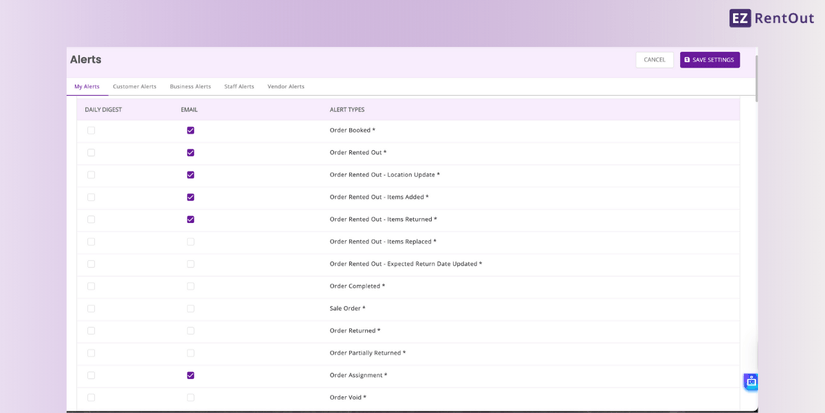
EZRentOut lets users schedule alerts to avoid missing critical updates. This includes check-in and checkout alerts that notify relevant staff members as soon as equipment moves in or out of the warehouse. This way, users can get an idea of the equipment that is frequently rented out, so they can look for alternatives if a booking is expected.
Similarly, when a staff member tries to book an already-booked piece of equipment, the user will receive a prompt and an in-app notification informing them of the equipment’s unavailability. Because the system updates availability the moment a booking is made or checked out, no two users can accidentally reserve the same item for overlapping time periods.
These alerts are highly useful for large teams that handle bookings across several locations and need urgent updates on equipment booked asynchronously. Likewise, even low-usage alerts can be set up so that, as soon as the equipment reaches a certain threshold, the system notifies the staff. This is critical for rental businesses that rely on repeat customers and have back-to-back bookings. When inventory is limited, even one late return can throw off the entire schedule, leading to overlapping reservations and broken commitments.
3. Use bundles for bookings
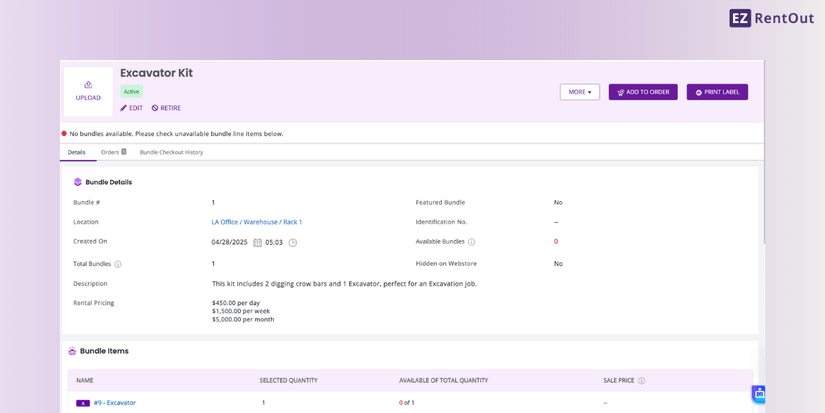
When you use bundles in EZRenOut to book items to be rented together, you significantly reduce the risk of double bookings. But, how? It’s straightforward: bundles let you lock the whole set of items for the reservation period, so no other staff member can book the same items. As your bundle is automatically reserved, you do not need to update the reservation manually, eliminating the chances of double booking.
Reservations made through the bundles feature are treated the same as individual bookings. Items are marked as reserved, even when booked in a bundle, which helps operations teams who repeatedly check the availability of each piece of equipment.
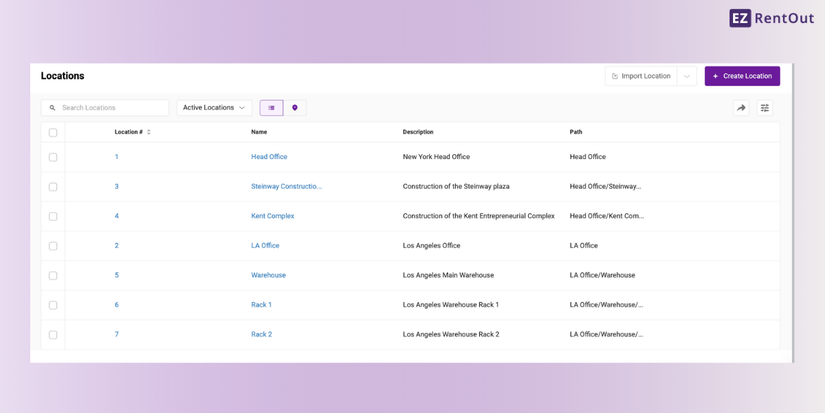
4. Leverage multi-location support
If your rental business operates across several branches, EZRentOut enables location-specific visibility. Staff can see which items belong to which location, what’s available nearby, and what can be transferred. This prevents cross-location double bookings and allows seamless inventory sharing without miscommunication.
You can store equipment details by location, so you have detailed information about all your equipment in one place. You can shift the equipment quickly if a scheduling error occurs in a location during peak season. Without a unified system showing location-specific stock, one location may commit to an item that another location planned to use, exacerbating the booking problem.
5. Set up user-based permissions
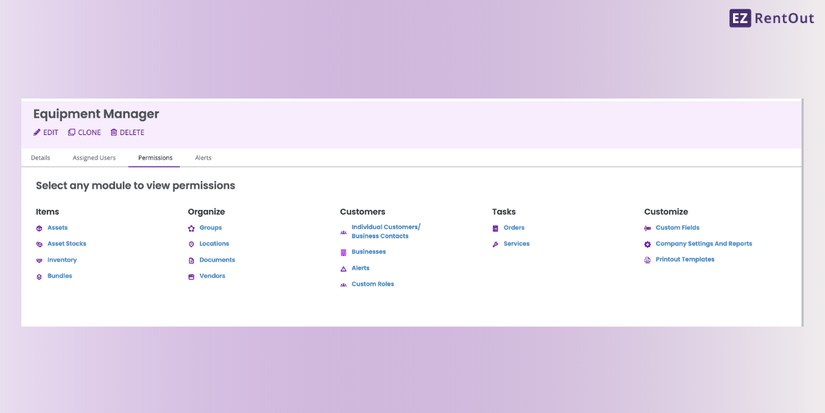
One of the most common causes of double bookings is allowing too many people to access, create, and override equipment bookings. Setting up user-based permissions limits who can see or confirm rental equipment bookings. When several users repeatedly change bookings, there is no single source of truth.
With EZRentOut, you can eliminate this chaos by setting Role-Based Permissions that control exactly who can:
- Create new bookings
- Approve or reject reservations
- Modify rental dates
- Assign or reassign equipment
- Override conflicts
- Access multi-location stock levels
By restricting these actions to trained or authorized staff only, you ensure that every reservation goes through a structured approval process. This improves accountability and reduces accidental edits that lead to scheduling conflicts.
Conclusion: Build a conflict-free rental workflow with EZRentOut
Double bookings are not merely administrative issues; they are slow revenue eaters that alter your entire rental experience. As rental businesses scale, manual systems like spreadsheets cannot do justice to the scale of operations. By centralizing operations, you can ensure that every booking is accurate and aligned with your rental workflows and business values.
EZRentOut offers advanced features to make scheduling workflows as smooth as possible and ensure users enjoy a seamless rental experience. Sign up for a free trial of EZRentOut today and leverage an error-free scheduling system.

![[How-to] Check Item Availability in EZRentOut](https://cdn.ezo.io/wp-content/uploads/2021/08/Check-Availability-in-EZR-1.jpg)
![[How-to] Refer EZRentOut To Your Peers and Earn](https://cdn.ezo.io/wp-content/uploads/2025/11/03084625/Referral-Program.png)






