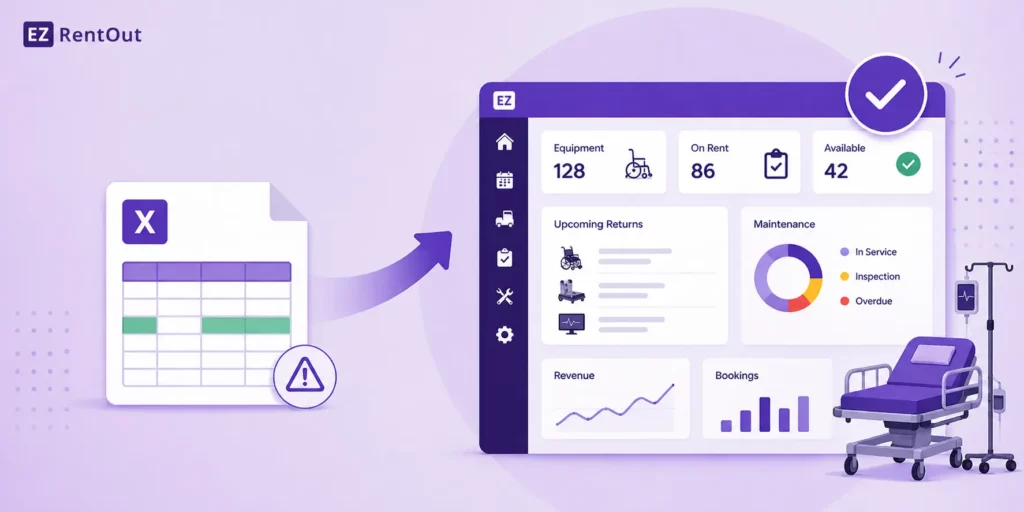
If you’re still relying on spreadsheets to run your rental operations, you’re not alone. But you’re likely feeling the cracks. Inventory lives in Excel, updates come through email, and urgent changes happen over WhatsApp.
Somewhere in between, things slip: a missed return, a billing error, a piece of equipment sitting idle when it shouldn’t be. This is exactly where medical equipment rental software for general managers starts to become relevant, not as a nice-to-have, but as a way to regain control.
Because this isn’t really about tools anymore. It’s about how you run operations at scale. Spreadsheets can track data, but they can’t keep up with the complexity of multi-location inventory, service schedules, contracts, and team coordination.
In this blog, you’ll find out how General Managers, like you, are moving beyond spreadsheets. You’ll also explore what’s breaking, what’s changing, and the top ways teams are shifting to unified rental systems to bring everything into one place and run smoother, more predictable operations.
Why Spreadsheets No Longer Work for Medical Equipment Rental Operations
Spreadsheets might work when your rental operations are small and predictable. But once you’re managing medical equipment across multiple locations, departments, and customers, they start to break down in ways that directly impact availability, compliance, and revenue. For example:
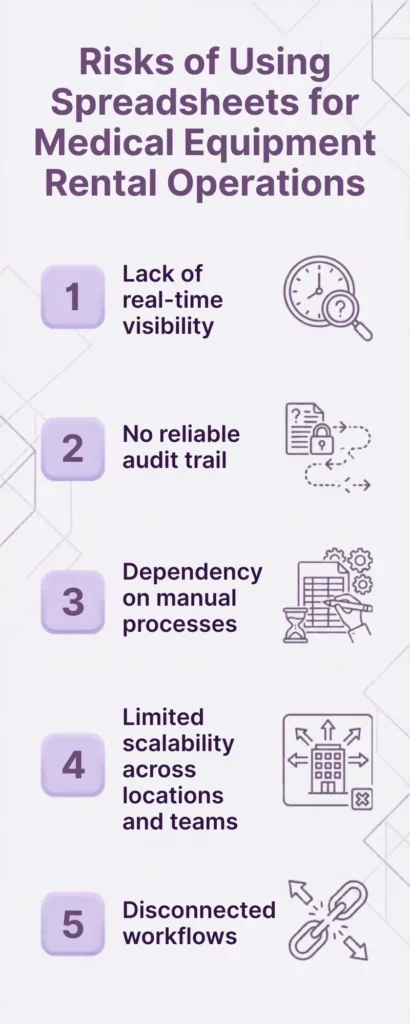
1. Lack of real-time visibility
You don’t get real-time visibility into where critical medical equipment is, who’s using it, or when it’s due back. Updates depend on someone remembering to log them, which means your data is always a step behind reality.
2. No reliable audit trail
There’s also no reliable audit trail. When something goes missing, is delayed, or incorrectly billed, it’s hard to trace what happened or who last updated the record, especially when multiple teams are involved.
3. Reliance on manual processes
Manual processes only make this worse. Scheduling, maintenance tracking, and invoicing often live in separate sheets or tools, increasing the risk of double bookings, missed servicing, or inaccurate billing, none of which you can afford when dealing with high-value, regulated medical equipment rental operations.
4. Limited scalability across locations and teams
And as your operations grow, spreadsheets don’t scale with you. Managing multiple sites, coordinating across teams, and handling more customers quickly becomes fragmented and time-consuming.
5. Disconnected workflows
Most importantly, spreadsheets don’t connect your workflows. Maintenance schedules don’t talk to dispatch. Contracts don’t sync with billing. Equipment availability isn’t tied to real-time usage. You’re left stitching everything together manually.
This is where medical equipment rental software becomes less of an upgrade and more of a necessity.
Top Ways Medical GMs Are Moving Beyond Spreadsheets for Their Rental Operations
Now, let’s talk about seven ways general managers of medical equipment rental companies are moving toward systems that bring clarity, consistency, and control across inventory, teams, and workflows, without relying on manual coordination.
1. Centralizing inventory across locations
One system for all assets (not multiple sheets)
Instead of managing assets across multiple sheets and disconnected records, you bring everything into a single system of record. Every piece of medical equipment, whether it’s in transit, deployed, under maintenance, or available, is tracked in one place.
Real-time availability and allocation visibility
This gives you real-time visibility into availability and allocation, so you can make faster, more accurate decisions without second-guessing your data. You can also track medical equipment at a location level, helping you understand utilization, control costs, and avoid over- or under-stocking across sites.
Modern platforms like EZRentOut make this shift possible by centralizing assets, inventory, usage, and movement into one unified system, so you’re not piecing together information; you’re operating from a single source of truth.
2. Replacing manual scheduling with real-time availability
When scheduling lives across spreadsheets, emails, and quick messages, you’re constantly reacting, checking availability manually, resolving conflicts, and adjusting bookings on the fly.
The shift here is simple but powerful: you move from guesswork to real-time coordination, where availability and allocation are always up to date.
Eliminate double bookings and conflicts
Instead of relying on static entries, you work with live availability. Medical equipment can’t be booked twice, and conflicts are flagged before they become operational issues, especially critical when dealing with high-demand medical devices.
Visual calendars and automated allocation
You get a clear, visual view of what’s going out, what’s coming back, and what’s available via an availability calendar. Allocation happens based on real-time status, not assumptions, so your team spends less time coordinating and more time executing.
Faster order fulfillment
With accurate availability at your fingertips, you can commit to orders confidently and fulfill them faster. There’s no need to double-check across systems because you already know what’s ready to go and where it is.
3. Automating maintenance and service workflows
When maintenance tracking sits in spreadsheets or scattered logs, it’s easy to miss service intervals or lose track of what’s been done. Instead of reacting to issues after they occur, you adopt structured, system-driven workflows that keep medical equipment in a ready-to-rent state.
Preventive maintenance scheduling
You set maintenance schedules based on usage, time intervals, or predefined rules, so servicing happens before issues surface. This keeps critical medical equipment available when it’s needed, without relying on manual reminders.
Service history tied to each asset
Every service event, inspection, and repair is recorded against the medical asset itself. You don’t have to dig through notes or separate files. You can instantly see what’s been done, when, and by whom.
Reduced downtime and compliance risks
With consistent maintenance tracking and clear records, you reduce unexpected breakdowns and stay better prepared for audits. Medical rental equipment stays in circulation longer, and you’re not scrambling to justify service history when it matters most.
4. Bringing billing, contracts, and usage into one system
When billing, contracts, and usage data live in separate places, you’re constantly reconciling information, cross-checking rental durations, validating charges, and chasing contract details.
Bringing these into a single system removes the back-and-forth and gives you a clear, consistent view of what’s being billed and why.
Automated invoicing based on usage or rental duration
Invoices are generated based on actual rental timelines and usage, not manual calculations. For example, if a ventilator is returned two days late, billing adjusts automatically, without someone needing to update a spreadsheet or recalculate charges.
Contract tracking without manual follow-ups
Contracts are tied directly to rentals, so terms, durations, and conditions are always visible. If a hospital extends a rental for an additional week, the system reflects that change immediately; there is no need to track it separately or risk missing it.
Reduced revenue leakage
When usage, contracts, and billing are connected, fewer things slip through the cracks. For instance, equipment that remains deployed beyond its scheduled return continues to be billed correctly, ensuring you’re not losing revenue due to overlooked extensions or delays.
5. Tracking asset utilization and performance
When utilization isn’t clearly tracked, decisions around purchasing, redeployment, or retirement often rely on assumptions. By tying usage data directly to each asset, you start to see how your medical equipment is actually performing across locations and customers, and where adjustments are needed.
Identify underutilized vs high-demand equipment
You can quickly spot which assets are consistently in use and which ones are sitting idle. For example, if infusion pumps at one location are frequently unavailable while the same units remain unused elsewhere, you can rebalance inventory rather than over-purchasing.
Data-backed procurement and retirement decisions
Instead of guessing what to buy or phase out, you rely on actual usage patterns. If certain diagnostic devices are rarely rented or frequently returned early, it may signal overstocking or shifting demand, helping you make more informed procurement or retirement calls.
Move from reactive to proactive planning
With clear performance insights, you’re not waiting for shortages or excess to become a problem. For instance, if utilization trends indicate a seasonal spike in demand for specific medical equipment, you can prepare in advance to ensure availability without scrambling at the last minute.
6. Enabling team collaboration without back-and-forth
When coordination happens across email threads, WhatsApp messages, and quick calls, things get missed, not because your team isn’t capable, but because the system isn’t built for shared visibility.
The shift here is toward structured collaboration, where everyone works from the same context instead of chasing updates.
Replace email/WhatsApp coordination with shared workflows
Instead of asking “Is this unit ready?” or “Has this been picked up?” over chat, updates happen inside a shared workflow. For example, when a portable X-ray machine is returned from a clinic, its status is updated instantly, so the next team doesn’t need to ask; they can see it.
Role-based access for ops, finance, and field teams
Each team works with the information relevant to them, without clutter or confusion. A field technician updating the condition of a returned dialysis machine doesn’t need to notify finance manually; the update is already visible where it needs to be.
Clear ownership and accountability
Every task, whether it’s preparing medical equipment, approving a contract, or scheduling a pickup, has a clear owner. For instance, if a hospital flags an issue with a rented ventilator, you can immediately see who’s responsible for resolving it, instead of tracking down updates across multiple channels.
7. Gaining real-time visibility and reporting
When your data is spread across systems, reporting becomes a manual exercise. Pulling numbers, reconciling differences, and hoping everything lines up.
The shift here for medical equipment rental General Managers is toward having a live operational view, where insights are continuously updated and readily available in the form of reports when you need them.
Dashboards for utilization, revenue, and maintenance
Instead of building reports from scratch, you work off dashboards that reflect current performance. For example, you can instantly see how often surgical tables are being rented, which assets are due for servicing, and how different locations are contributing to revenue, all in one view.
Faster decision-making for GMs
With access to real-time insights, you don’t have to wait for weekly summaries or manual updates. If a sudden increase in demand for patient monitors appears on your dashboard, you can act on it immediately, whether that means reallocating medical equipment or adjusting pricing.
Audit-ready data without manual consolidation
When records are consistently captured within the system, you’re always prepared for audits or internal reviews. Instead of compiling data from multiple sources, you can pull complete, time-stamped records, like service logs for a defibrillator or rental history for a batch of infusion pumps, without extra effort.
How Medical Equipment Rental GMs Are Making the Shift (Without Disrupting Operations)
The biggest misconception about moving beyond spreadsheets is that it requires a full reset, new system, new processes, and immediate change across the board.
In reality, the medical equipment rental teams that transition smoothly treat it as an operational shift, not a system replacement. They layer structure onto what already works, so nothing critical breaks in the process.
1. Start with one workflow (inventory or scheduling)
You don’t start by fixing everything. You start where the friction is highest. That might be inventory accuracy, where teams aren’t sure what’s available, or scheduling, where conflicts are slowing down fulfillment.
For example, a team managing portable ultrasound machines across multiple clinics might begin by centralizing just their inventory. The goal isn’t perfection, it’s clarity. Once you can trust what’s available and where it is, everything else becomes easier to improve.
2. Gradually migrate data from spreadsheets
Trying to clean years of spreadsheet data upfront is where most transitions stall. Instead, you move what matters now, like active rentals, upcoming bookings, and in-use medical equipment. Older records can follow later, if needed.
For instance, a team renting infusion pumps might only migrate current deployments and upcoming reservations first, while historical data stays in spreadsheets until there’s a clear need for it. The historical data in the spreadsheets can be imported into the rental software later on. This keeps momentum going without slowing teams down.
3. Train teams in phases
Different teams interact with operations in different ways, so adoption works best when it’s introduced in layers. Operations teams typically go first, since they manage day-to-day coordination.
Field teams follow, updating statuses and handling the movement of medical equipment. Finance transitions once billing workflows are ready.
Imagine a scenario where field technicians servicing ventilators start updating equipment status directly in the system, without changing how finance handles invoicing just yet. Each team adopts the system in a way that aligns with their role, rather than forcing a one-size-fits-all rollout.
4. Parallel run before full switch
For a period of time, both systems run side by side. This creates a safety net while your team builds confidence in the new workflow.
A medical rental provider handling patient monitors might, for example, continue logging bookings in spreadsheets while also using the new system to track availability and movement.
Over a few weeks, as the new system proves reliable, the spreadsheet naturally becomes redundant, rather than being abruptly removed.
The shift, in practice, is gradual but intentional. You’re not asking your team to abandon what they know overnight. You’re giving them a better way to operate, one workflow at a time. And as each piece moves over, the friction that once felt unavoidable starts to disappear.
The Bigger Shift: From Tracking Assets to Running Operations
At some point, the conversation stops being about spreadsheets vs software and starts becoming about how your business actually runs.
Spreadsheets were built for recording information. They tell you what happened. But running a medical equipment rental operation requires knowing what’s happening right now and what needs to happen next.
With spreadsheets, you’re piecing together a story after the fact. A delayed return shows up only when someone notices. A piece of equipment sits idle until it’s manually checked. A missed service isn’t obvious until it becomes a problem. Everything depends on someone catching it in time.
With software like EZRentOut, the system doesn’t just store data; it drives action. It reflects the current state of your rental operations and surfaces what needs attention, whether that’s equipment ready for deployment, contracts nearing completion, or assets that require servicing before the next rental.
The role of a General Manager in medical equipment rental shifts with this. You’re no longer spending time verifying information or chasing updates across teams. Instead, you’re making decisions based on a live operational view.
For example, instead of asking, “Do we have enough infusion pumps available this week?”, you can see availability patterns, upcoming demand, and usage trends in one place and act on them before it becomes a constraint.
Or instead of reviewing revenue after the fact, you can understand how different medical equipment categories are performing as rentals happen, not weeks later.
This is the real shift:
- Spreadsheets help you track medical assets
- Software helps you run medical equipment rental operations
And once you start operating this way, the focus changes. You’re not just managing inventory, you’re optimizing how that inventory performs across utilization, revenue, and service delivery.