
Software license management is one of the most critical factors shaping the state of IT operations today. If your organization uses multiple software tools, managing their licenses, renewals, purchase records, and usage can be challenging. The real issue arises when none of this information is in a single consolidated place.
A license may be purchased by Procurement, processed by Operations, assigned by IT, accessed through SSO, and renewed via a contract in another system. When an IT manager needs information on license usage or needs to assess whether compliance audits have been conducted, they find answers scattered across different systems.
Over time, these gaps lead to unused licenses, missed renewal dates, lost entitlement records during onboarding and offboarding, and unreliable software-usage reporting. License management software helps IT teams track usage, allocation, renewals, and ownership by connecting software records to users, devices, contracts, and broader ITAM or ITSM workflows.
In this guide, you’ll compare commonly shortlisted license management platforms by use case, capabilities, pricing model, implementation fit, and operational maturity.
What criteria should you use to evaluate license management software?
A license management software goes beyond basic license tracking. The real value of such software lies in being able to see who is using which software, how many software seats have been purchased, if any unapproved software is being used, and how software spending can be optimized.
License management falls under software asset management, which provides an overarching view of how all software licenses are managed, optimized, and governed. With licenses as the focal point, the goal is to prevent under- and over-licensing by providing complete visibility into your licensing framework.
Using the following criteria can help when evaluating a license management software:
1. Software discovery
Evaluate if the software you intend to use can help you find which software is being used across the organization. This includes assessing the software type, the number of licenses being used, their version history, and software ownership across users, devices, and departments. Depending on the platform and configured data sources, installed software may be discovered through agents, agentless scans, MDM/UEM tools, endpoint integrations, or imports, which can reduce blind spots in the software inventory.
Software discovery will also help detect when a specific software was purchased, track its expiration date, and ensure it does not unexpectedly stop working one day. If renewal or expiration data is available, the platform should send configurable alerts so IT, Procurement, or application owners can decide whether to renew, reclaim, downgrade, or cancel.
Software discovery includes detecting SaaS applications for your team to strategically catalog SaaS tools, assess costs and usage, and retrieve comprehensive software information. This is useful for avoiding budget drains from unnecessary software and for storing its details for future use.
2. Centralized license inventory
License data often sits across different systems, including vendor portals, procurement records, finance systems, contracts, and IT spreadsheets. A good license management platform should consolidate this information into a single centralized inventory.
This inventory should include license type, quantity, vendor, cost, purchase date, renewal date, expiration date, assigned users, associated contracts, and payment information. With a central license record, IT teams can answer basic but critical questions faster, such as how many software licenses they own, how many are assigned, and how many are still available.
3. Usage tracking
License data becomes more informative and valuable when it accurately reflects the usage of each piece of software. This includes analyzing who uses a certain software, how many seats are available, and whether it’s active or inactive.
Once this is analyzed, IT managers can either avoid buying extra seats or invest in software that serves the same purpose as the one already purchased. For example, if a department has 100 paid licenses but only 65 active users, IT can reclaim or downgrade unused licenses before the next renewal. Usage tracking also helps support better budget conversations with finance and department heads. Ensure that the software you are evaluating has reporting capabilities to help assess who is using it, in what capacity, and whether it needs to be canceled or renewed.
4. License compliance
One reason mid-market IT teams invest in software is to ensure it complies with external and internal requirements. License management software tracks license expiration dates, license entitlements, and usage patterns, helping assess whether the software meets the requirements.
This is critical for audit readiness. Instead of scrambling to pull records from multiple systems when an audit request arrives, IT teams should be able to generate reliable reports showing license ownership, assignments, usage, and history. This supports audit readiness and license compliance and can reduce compliance risk, provided purchase records, contracts, entitlements, discovery data, and vendor licensing terms are accurate and regularly reviewed.
5. Software renewal management
The software you use must be able to flag any upcoming renewals. This includes renewal alerts, expiration reminders, payment tracking, and contract visibility. Renewals can be costly if the tool is no longer being used across the organization. To ensure proper usage, your license management software should flag used and unused licenses and audit their last logins to determine whether they need renewal.
A strong renewal management workflow gives IT and procurement enough time to review usage, confirm business need, reclaim unused licenses, and renegotiate contracts before renewal deadlines. This turns renewals into planned decisions instead of last-minute administrative tasks.
6. Cost optimization
Software licenses are a major recurring cost for many organizations. A good license management platform should help IT teams identify where money is being wasted. This includes unused licenses, duplicate tools, inactive subscriptions, over-assigned seats, and software that no longer supports business needs.
Cost optimization features help IT leaders make data-driven recommendations instead of relying on assumptions. The goal is not simply to cut software spending, but to ensure every license being paid for has a clear owner, purpose, and usage pattern.
7. Software normalization
It’s ideal if the license management software you use includes software normalization as an embedded feature, so similar software can be categorized by name, user, publisher, and software type, among other details.
When different versions of the same software are tagged separately, it becomes challenging for IT teams to assess how many licenses each version has and what their activity status is.
For example, one system may show “Microsoft Office 365,” another may show “Microsoft 365 Apps for Enterprise,” and another may list individual components like Word, Excel, PowerPoint, or Outlook separately. Without normalization, IT may treat these as separate software components, leading to inaccurate license counts, duplicate records, and poor renewal planning.
A smart license management tool detects them as the same software, groups them under the same category, and provides visibility into the accurate counts of seats, installations, and subscriptions.
8. Scalability
The need to track and monitor can quickly escalate if your IT operations expand rapidly. License management software that could track the growing license usage would be a wise choice. The tool should be able to support an increased number of software licenses, users, and the associated approval workflows.
This is especially critical for teams moving away from manual spreadsheets to an automated system for comprehensive license tracking. Ensure that the software can support your growing operations without adding administrative workload.
Segments best served by license management software
License management software may not be used the same way by companies operating in different niches. Each type of business has its own industry and needs, determining the need for software license tracking. Here are some business areas/industries that need license management the most:
- SaaS-heavy environments: Organizations that rely heavily on SaaS tools need to track licenses actively. These companies use dozens or hundreds of cloud applications across teams. License management software helps track app usage, identify unused seats, control renewals, and reduce SaaS sprawl.
- Mid-market IT teams: As companies grow, spreadsheets stop working. License management software helps mid-sized IT teams centralize software records, manage renewals, reclaim licenses, and connect software usage to users and devices.
- Enterprise organizations: Large enterprises need stronger license governance across departments, regions, business units, and vendors. The software helps manage complex entitlements, vendor audits, compliance exposure, and high software spend.
- Regulated industries: Healthcare, tech, financial services, education, government, and legal organizations need accurate software records for compliance, audits, data security, and access control.
- Companies with frequent onboarding and offboarding: Organizations with high employee movement need a reliable way to assign licenses during onboarding and reclaim them during offboarding so inactive users do not continue consuming paid seats.
For teams already using an ITAM-first solution with strong software asset management, license tracking can become a natural extension of the asset lifecycle because software records can be connected to users, devices, contracts, requests, and renewal workflows.
Comparison criteria for the best license management software
AssetSonar is an ITAM-first solution that combines IT service management and hardware and software asset management capabilities into a holistic suite of features. We evaluated other software in a similar domain while maintaining a neutral stance to assess how they differ fully.
Let’s dig into the capabilities on which we evaluated the top license management software:
- Ease of use: Evaluate whether the software is easy to set up and whether the onboarding process and time are manageable. The user should be fully onboarded onto the software within the time frame requested by the client based on their business needs.
- Pricing: Pricing varies based on users, devices, and features. Evaluate which platform fits your budget, pricing model, asset volume, user count, module requirements, and expected administrative effort.
- Entitlement reconciliation: Assess whether the tool can compare purchased entitlements against assigned licenses, installed software, and active users. This helps IT identify gaps between what the organization owns and what is actually being consumed.
- Duplicate license detection: Look for the ability to identify when the same user holds multiple licenses for similar tools or when different departments pay for overlapping applications. This helps consolidate software usage across the organization.
- Reporting and analytics: Software that can fully report on and assess license usage, costs, entitlements, and renewals would help you analyze how well your software is being managed.
- Vendor-specific license logic: Assess whether the tool supports different licensing models, such as per-user, per-device, concurrent, subscription-based, perpetual, or usage-based. This matters because not every vendor calculates license consumption the same way.
- License request and approval workflows: Assess whether employees can request software licenses through a controlled process and whether approvals can be routed to managers, IT, procurement, or finance. This reduces ad hoc license purchases and improves accountability.
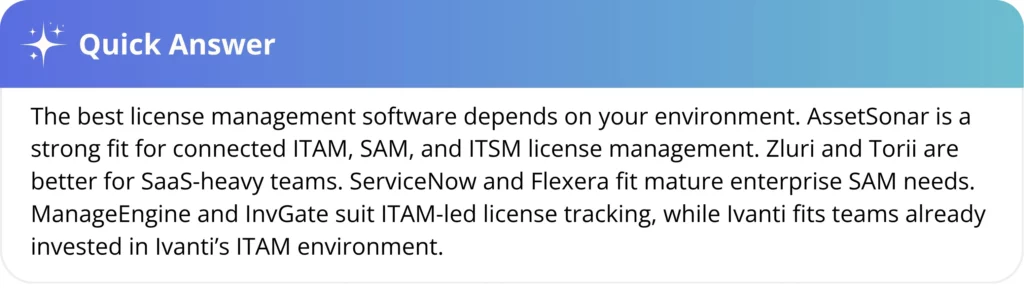
Every IT team has different business needs and may evaluate software based on whether it fulfills those needs. The best license management software is the one that provides full license visibility across departments, fits your budget, and scales as your business grows.
Quick comparison between the top license management software tools
Here’s a list of tools that can be assessed for their license management capabilities:
| Software | Best for | Strengths | Limitations | Overall fit |
| AssetSonar | Mid-market and enterprise IT teams that want license management connected to ITAM, SAM, and ITSM | Strong software discovery, SaaS license tracking, license usage visibility, renewal management, software normalization, compliance reporting, underutilized license detection, and connected user/device/asset context. | May be more suitable for teams that want a broader IT asset and service context, not just a narrow SaaS spend tool. | Strong fit for connected ITAM, SAM, and ITSM license management |
| InvGate | IT teams looking for ITAM with software license and lifecycle control | Covers hardware, software, and license management across the asset lifecycle. InvGate also supports tracking changes in software, hardware, licenses, and device allocation, with automations for license expiration notifications. | Stronger as an ITAM/lifecycle tool than a deep enterprise SAM platform for complex vendor licensing. | Good for ITAM-led license tracking |
| ServiceNow SAM | Large enterprises already using ServiceNow | Enterprise SAM capabilities for software license management, compliance, usage optimization, workflows, governance, and SaaS | Best suited for organizations already invested in ServiceNow; implementation, administration, and cost can be heavy for smaller teams. | Best for ServiceNow-based enterprises |
| Zluri | SaaS-heavy companies focused on license optimization and app visibility | Strong SaaS license usage tracking, renewal reminders, unused license identification, and license cost optimization. | More focused on SaaS management than full ITAM/SAM across endpoints, hardware, and broader service workflows. | Best for SaaS license optimization |
| Torii | SaaS operations teams managing app discovery, renewals, and automation | Strong SaaS discovery, automation, renewal management, license cleanup, deprovisioning, and usage visibility. Torii emphasizes continuous app discovery, entitlement mapping, real usage, and deprovisioning. | Best for SaaS environments; less ideal if the organization needs traditional endpoint software license compliance or hardware-linked ITAM. | Best for SaaS operations automation |
| ManageEngine AssetExplorer | Budget-conscious SMB and mid-market IT teams | Provides software discovery, software license compliance, forecasting, license tracking, unauthorized software alerts, license status visibility, and support for multiple license types. | Practical for core license tracking, but may not offer the same depth as enterprise SAM platforms or a broader connected ITSM context. | Best budget-friendly ITAM/SAM option |
| Flexera One | Large enterprises with complex hybrid licensing and audit exposure | Strong enterprise SAM for complex vendor licensing, hybrid IT estates, software license utilization, audit defense, vendor negotiations, recognition, normalization, and cloud license management. | Can be complex and better suited for mature SAM teams with dedicated resources. | Best for complex enterprise SAM |
| Ivanti Neurons for Spend Intelligence | Organizations that want asset discovery with license management and reclamation | Offers embedded license tracking, contract oversight, software asset visibility, license compliance monitoring, usage monitoring, cost control, and license reclamation for unused software. | Strong ITAM/discovery orientation; buyers should evaluate whether it meets advanced SAM or SaaS-specific optimization needs. | Good for ITAM and license reclamation |
Detailed breakdown of the best license management software
The comparison table provides a quick overview, but selecting the right license management software requires a closer look at how each tool discovers software, interprets usage, manages entitlements, and fits into wider IT operations.
Some platforms focus primarily on SaaS subscriptions. Others provide software license management as part of IT asset management, service management, or a specialist enterprise SAM program. The following breakdown explains where each option fits, what it offers, and what buyers should assess before adding it to their shortlist.
1. AssetSonar

AssetSonar is an IT asset management platform that connects software licenses with users, devices, SaaS applications, service records, and employee lifecycle processes. It is best suited to mid-market and enterprise IT teams that want license management to operate within a broader ITAM and ITSM environment rather than as a separate software-spend system.
Why AssetSonar stands out
AssetSonar stands out for the operational context it provides around each software record. License information can be connected to the employee using the software, the device on which it is installed, its associated costs and renewals, and relevant IT service activity.
This helps IT teams move beyond simply counting licenses. They can investigate whether a license is currently in use, identify which users or devices are affected, and make more informed decisions about reclamation, reassignment, renewal, or cancellation.
Key license management capabilities
AssetSonar provides:
- Discovery of installed software through endpoint and asset discovery methods
- SaaS license data through direct integrations
- Software normalization to consolidate duplicate or inconsistent software records
- License allocation and availability tracking
- Software usage and last-access visibility
- Identification of underused licenses and subscriptions
- Renewal and expiration management
- Software cost, payment, and purchase records
- Reporting for software usage, spending, allocation, and compliance
- Connections between software, users, devices, and IT service records
The platform can also help teams detect unauthorized or unmanaged software through endpoint, identity, SaaS, and browser-related signals.
Operational fit
AssetSonar is for organizations that want software asset management integrated with hardware asset management and service workflows. Its IT Graph links software data to users, devices, identity information, and the tickets associated with it.
This can be useful during onboarding and offboarding. When an employee joins, IT can identify the software and devices required for the role. When an employee leaves, teams can review the assigned software and reclaim licenses rather than allowing unused seats to remain active.
AssetSonar is available with ITAM or ITSM capabilities, while Advanced SAM extends the platform with additional software discovery, governance, license optimization, SaaS visibility, and reclamation capabilities.
User feedback
G2 rating: 4.5/5
AssetSonar earns frequent praise for its ease of use, customizable records, integrations, and centralized asset tracking. Reporting and filtering flexibility are among the more frequent areas users say could be improved.
AssetSonar may be broader than necessary for teams that only need SaaS subscription tracking. Buyers with complex publisher licensing should verify which license models, integrations, and reconciliation rules are supported.
Pricing and implementation
AssetSonar pricing starts at $0.75 per asset per month for ITAM and $1.08 per asset per month for ITSM. Advanced SAM can be added to either plan for $0.42 per asset per month, with volume discounts available for 1,000 or more assets.
Deployment requirements depend on the selected package, asset volume, discovery methods, and the identity, endpoint, SaaS, or procurement systems being connected.
Verdict
AssetSonar should be shortlisted by IT teams that want license records connected to the wider technology environment in which software is purchased, assigned, used, serviced, and reclaimed. A dedicated SaaS management platform may be more appropriate when the requirement is limited to cloud subscriptions and SaaS spending.
2. InvGate Asset Management
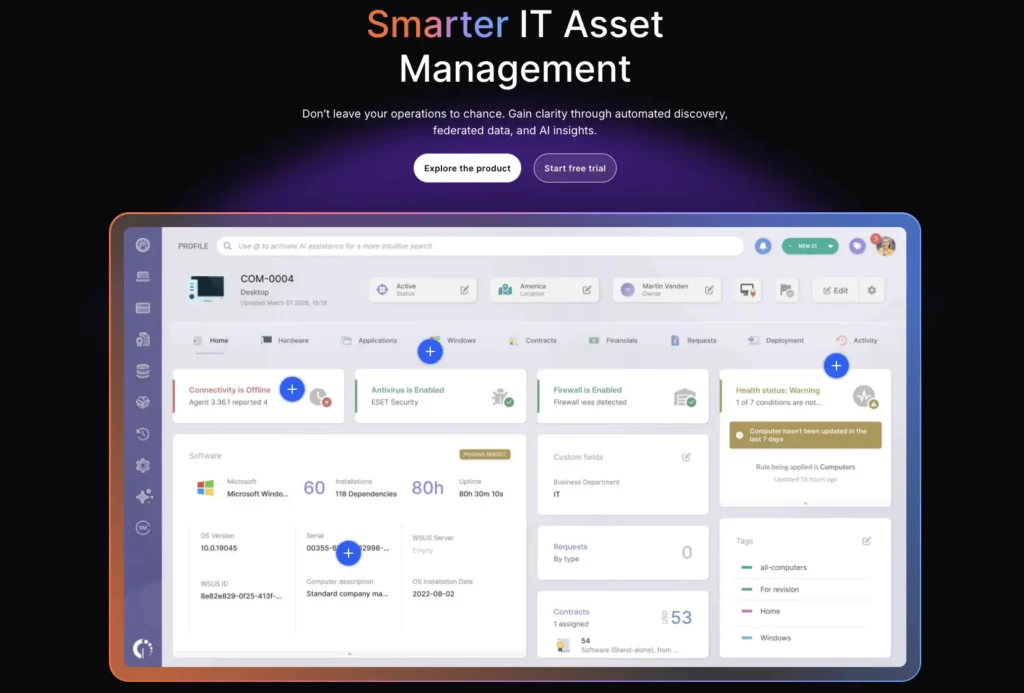
InvGate Asset Management is an ITAM platform that manages software licenses alongside hardware, cloud resources, contracts, and other technology assets. It is a practical option for teams that want license visibility and optimization as part of a broader asset lifecycle program.
Why InvGate stands out
InvGate connects software license management with the systems on which the software is installed. Teams can compare purchased licenses with discovered software, monitor usage, maintain contract and renewal information, and investigate discrepancies within the same asset inventory.
This approach is useful for organizations whose main challenge is maintaining an accurate record of hardware and software across a distributed environment.
Key license management capabilities
InvGate Asset Management supports:
- Discovery and import of installed software
- Centralized software and license records
- Comparison of purchased licenses with software usage
- Software normalization
- Usage-frequency monitoring
- License value and maintenance-contract records
- Renewal dates and cost visibility
- Alerts for expiration and cancellation windows
- Software reports and audit records
- Connections between software, users, and devices
The platform also supports asset discovery through agents, cloud integrations, MDM systems, and other infrastructure sources.
Operational fit
InvGate Asset Management can operate as a standalone ITAM platform. Organizations can also integrate it with InvGate Service Management or third-party service desks to make asset information available within incident, request, or support workflows.
Its integrations include endpoint, MDM, cloud, identity, remote access, reporting, and service management tools. This makes it most relevant to teams that want a single inventory of physical, virtual, cloud, hardware, and software assets.
User feedback
G2 rating: 4.7/5
User feedback for InvGate Service Management often highlights its intuitive interface, ease of implementation, and workflow automation. Some users mention limitations in advanced customization, reporting filters, integrations, and initial setup.
Because these reviews cover Service Management rather than InvGate Asset Management, buyers should test its license reconciliation, SaaS visibility, and publisher-specific capabilities separately.
Pricing and implementation
InvGate has three asset-based plans. Starter costs $1,499 per year for 500 IP devices, Pro starts at $2,500 per year and scales at $5 per IP device, and Enterprise pricing starts at $12,000 per year with custom options.
A 30-day trial is available without a credit card. Buyers requiring on-premises hosting, data residency, or dedicated infrastructure should evaluate the Enterprise plan.
Verdict
InvGate is a strong candidate for IT teams that want software license management built around a complete IT asset inventory. Organizations primarily managing complex vendor entitlements or a large SaaS portfolio may require a more specialized platform.
3. ServiceNow IT Asset Management
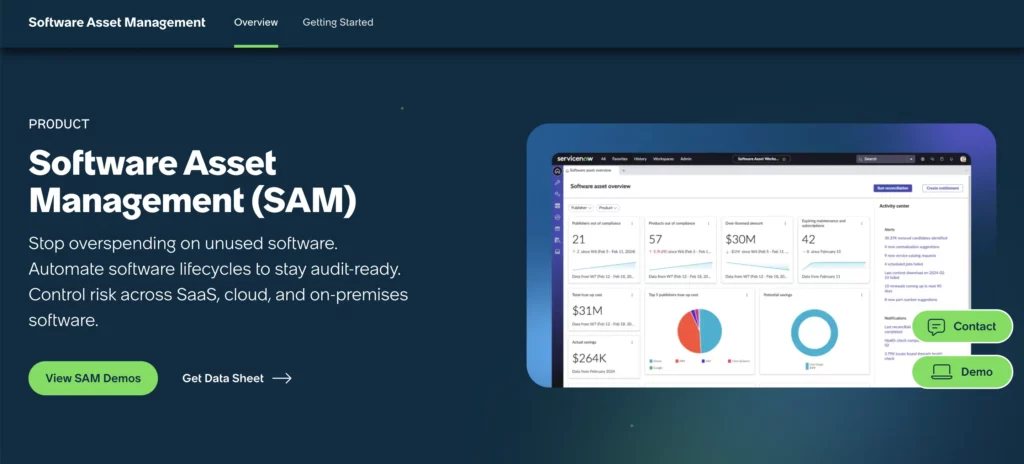
ServiceNow Software Asset Management is designed for large organizations that want license governance, optimization, and lifecycle workflows within the ServiceNow platform. It is most relevant when ServiceNow is already used for IT service management, CMDB, procurement, operations, or other enterprise workflows.
Why ServiceNow stands out
ServiceNow connects software entitlements, installations, subscriptions, usage, and remediation activities to its broader workflow and configuration-management environment.
This allows organizations to treat a licensing issue as an operational workflow. For example, an unused license can be identified, reviewed, reclaimed, and made available for another request without having to manage each stage in separate spreadsheets and email threads.
Key license management capabilities
ServiceNow Software Asset Management includes capabilities for:
- Recording and managing software entitlements
- Reconciling entitlements with installations and consumption
- Software recognition and normalization
- License position analysis
- SaaS subscription and license management
- Reclamation of unused software
- Renewal planning and calendars
- Software asset analytics
- Publisher-specific license management
- Compliance and audit preparation
- Software lifecycle workflows
- Integration with CMDB and ServiceNow processes
Its SaaS License Management works within the Software Asset Management environment and requires the relevant SaaS License Management plugin and configuration. Buyers should confirm package, plugin, publisher pack, and integration requirements before scoping implementation.
Operational fit
The product is best suited to organizations with established ServiceNow data, workflows, and administrative expertise. It can use configuration, asset, service, procurement, and workflow records from across the platform to support software governance.
This connected environment can be valuable for global businesses managing software across departments, business units, and geographic regions. It also allows software requests, approvals, provisioning, and reclamation to be incorporated into standardized enterprise processes.
User feedback
G2 rating: 4.3/5
ServiceNow ITSM reviewers frequently value its workflow automation, centralized management, and ability to connect multiple IT processes. Common concerns include setup complexity, customization effort, cost, and the learning curve.
These reviews reflect the wider ServiceNow platform rather than Software Asset Management specifically. Buyers should confirm the required SAM packages, publisher packs, integrations, and implementation resources.
Pricing and implementation
ServiceNow provides custom pricing based on the organization’s requirements and offers scalable packages rather than standard published rates.
Typical implementations focus on establishing accurate software discovery, importing entitlement data, aligning records with the CMDB, and configuring the workflows needed to support ongoing license management. ServiceNow’s scalable approach allows organizations to tailor the deployment to their operational and compliance requirements while expanding capabilities over time.
Verdict
ServiceNow Software Asset Management is best evaluated by enterprises that already use ServiceNow as a core operating platform. A smaller team seeking straightforward license tracking may find a dedicated mid-market ITAM or SaaS management tool easier to implement and administer.
4. Zluri
Zluri is a SaaS management and identity-governance platform focused on cloud applications, subscriptions, access, and user activity. It is best suited to SaaS-heavy organizations that need to identify applications, understand license utilization, control renewals, and reduce unnecessary subscription spending.
Why Zluri stands out
Zluri combines SaaS discovery with user-activity, access, contract, and license information. This gives IT teams a clearer picture of which applications employees access, which licenses are inactive, where duplicate tools exist, and which subscriptions may need to be reclaimed or downgraded.
Its focus on SaaS and identity data also makes it relevant to organizations managing shadow IT and access risk alongside software costs.
Key license management capabilities
Zluri provides:
- Discovery of SaaS and AI applications
- Identification of managed, unmanaged, and shadow applications
- License, subscription, user, role, and usage visibility
- Inactive-user and unused-license identification
- Automated license reclamation or downgrading based on configured thresholds
- SaaS spending analysis
- Contract and renewal management
- Redundant-application detection
- Application access requests
- Employee onboarding and offboarding workflows
The platform uses direct application integrations and other data sources to build a centralized SaaS inventory.
Operational fit
Zluri is particularly relevant to organizations that depend on SaaS applications across many departments. It can connect SaaS management to identity lifecycle processes, allowing teams to assess both whether a license is in use and whether the user should still have access.
Zluri’s SaaS Management capabilities include application discovery, usage visibility, renewals, contracts, and integrations. Buyers should confirm which workflows, access requests, reviews, and lifecycle automations sit in SaaS Management versus Zluri’s IGA modules.
User feedback
G2 rating: 4.6/5
Zluri is often praised on G2 for its ease of use, SaaS application visibility, automation, and onboarding and offboarding workflows. Some users report that the initial setup can take time and that certain integrations or features may be limited.
Zluri is primarily a SaaS management platform. Organizations that need endpoint discovery, hardware context, or complex enterprise licensing may require a broader ITAM or SAM tool.
Pricing and implementation
Zluri uses a tiered pricing model influenced by employee count, selected modules, automation requirements, and integration scope. Pricing varies based on the organization’s needs and the capabilities included in the deployment.
Getting started usually involves connecting data sources for identity, HR, Finance, SSO, browser, and SaaS applications. Buyers should request a detailed breakdown of included integrations, modules, support, and onboarding services.
Verdict
Zluri should be considered by organizations whose primary licensing challenges are SaaS sprawl, inactive subscriptions, shadow applications, or user access governance. Teams requiring traditional software and hardware lifecycle management should compare it with a broader SAM or ITAM platform.
5. Torii
Torii is a SaaS management platform that combines application discovery, license and usage data, contract management, and automated workflows. It is a good fit for SaaS operations teams that want to reduce manual work across renewals, onboarding, offboarding, and license reclamation.
Why Torii stands out
Torii places a strong emphasis on using application data to trigger operational workflows. Instead of only showing that an application is unused or that a renewal is approaching, teams can use the platform to notify stakeholders, collect information, remove access, or coordinate the next action.
This makes it useful when the challenge is not merely finding SaaS waste, but consistently acting on it.
Key license management capabilities
Torii supports:
- SaaS application discovery
- Centralized application, user, license, and usage data
- Direct and custom SaaS integrations
- Contract storage and bulk contract imports
- License information populated from contract line items
- Renewal calendars, forecasts, and notifications
- Contract owners and stakeholder assignments
- SaaS expense and cost-optimization dashboards
- License cost benchmarking
- Onboarding and offboarding workflows
- Automated application and user actions
Torii can also process application data through APIs when a standard integration does not meet the organization’s requirements.
Operational fit
The platform is most suitable for teams with a significant SaaS estate and clear ownership across IT, Procurement, Finance, security, and application owners. Contract owners can be assigned responsibility for upcoming renewals, while configurable notifications help prevent renewal dates from passing without review.
Direct integrations provide richer license and usage data. The quality of reporting and automation for a particular application will therefore depend on what data its integration exposes.
User feedback and buyer considerations
G2 rating: 4.5/5
Torii receives frequent praise for its intuitive interface, SaaS visibility, automation, and ability to identify unused subscriptions. Reporting depth and limited functionality for certain integrations appear among the recurring concerns.
Torii is best suited to SaaS environments. Organizations managing installed software, servers, or complex publisher agreements may need a broader SAM platform.
Pricing and implementation
Torii provides custom quotes for its SaaS Management Platform and Identity Governance and Administration offerings. Buyers focused on license optimization should confirm the scope and pricing of the SaaS Management Platform package.
Setup generally involves importing contracts and connecting SaaS, identity, expense, Finance, and HR systems. The required effort will depend on application volume, data quality, and workflow complexity.
Verdict
Torii is a strong option for organizations that want to turn SaaS applications and license data into repeatable operational workflows. It is less suitable as a standalone answer to traditional enterprise software licensing.
6. ManageEngine AssetExplorer
ManageEngine AssetExplorer is an IT asset management platform with built-in software discovery, software asset management, and license tracking. It is suitable for SMB and mid-market teams that need practical license controls without adopting a specialist enterprise SAM platform.
Why ManageEngine AssetExplorer stands out
AssetExplorer provides a broad set of ITAM and software license features with publicly available, asset-based pricing. This makes it easier for buyers to estimate initial subscription costs than with many quote-only enterprise platforms.
The product connects software installations, purchased licenses, contracts, and asset records, giving teams a straightforward way to monitor their basic license position.
Key license management capabilities
AssetExplorer supports:
- Network software discovery
- Purchased-versus-installed software comparisons
- License allocation to managed software
- Software usage analysis
- Under-licensed, over-licensed, and compliant status tracking
- Unauthorized-software alerts
- Expiration notifications
- License agreements and contract records
- Software forecasting
- Grouping of minor software versions
- Reports and scheduled reporting
- Multiple license types, including named-user, concurrent, OEM, volume, and enterprise licenses
It also includes purchase order, vendor, contract, CMDB, and asset lifecycle functionality.
Operational fit
AssetExplorer is available in cloud and on-premises versions. It is most relevant to organizations that need endpoint and network software inventory connected to wider IT asset records.
A free edition and a 30-day trial allow teams to test software discovery, license management, reporting, contract management, and other core functionality before purchasing.
User feedback and buyer considerations
G2 rating: 4.2/5
AssetExplorer is generally valued for its straightforward asset tracking and license management capabilities. Buyers should pay particular attention to software discovery accuracy, reporting, ease of administration, and the platform’s support for their licensing complexity and growth requirements.
Buyers should independently assess its interface, reporting, discovery accuracy, and support. They should also confirm whether the cloud or on-premises edition provides the required level of reconciliation depth.
Pricing and implementation
AssetExplorer uses asset-based pricing. Published cloud pricing starts at $115 per month or $1,245 per year for 250 IT assets, while on-premises pricing starts at $955 per year for the same number of assets.
A 30-day cloud trial supports up to 250 IT assets, and technical support is included in the subscription. Buyers should compare cloud and on-premises packaging before choosing a deployment model.
Verdict
ManageEngine AssetExplorer is a practical choice for teams that need software discovery, license allocation, contract records, and compliance reporting within an accessible ITAM platform. Organizations with advanced SAM requirements should test their reconciliation depth before making a decision.
7. Flexera One IT Asset Management
Flexera One IT Asset Management is an enterprise platform for organizations managing complex software entitlements, hybrid IT environments, major publishers, and significant audit or renewal exposure. It is best suited to mature ITAM and SAM teams that require detailed license-position calculations and vendor-specific intelligence.
Why Flexera One stands out
Flexera’s core differentiator is the depth with which it interprets software products, licensing rules, purchase rights, and consumption across complex environments.
For large publishers, it is rarely sufficient to compare a simple installation count with the number of licenses purchased. Licensing may depend on processors, cores, virtualization, product bundles, downgrade rights, subscriptions, maintenance terms, and other contractual conditions. Flexera One is built to model these more advanced scenarios.
Key license management capabilities
Flexera One IT Asset Management provides:
- Hardware, installed software, SaaS, and cloud visibility
- Software recognition and normalization
- Purchase and entitlement ingestion
- Product-use-rights intelligence
- Effective license position calculations
- Support for complex enterprise software publishers
- Software reclamation and provisioning workflows
- SaaS usage and spend optimization
- Renewal and audit preparation
- Vendor negotiation support
- Contract and purchasing context
- Hybrid IT analytics
The platform also supports automated workflows for optimization and reclamation.
Operational fit
Flexera One is most appropriate for organizations with large technology estates, dedicated SAM resources, significant software expenditure, or complicated enterprise agreements.
Its data can support collaboration among ITAM, Procurement, Finance, cloud, security, and vendor-management teams. However, the platform still depends on accurate purchase, contract, inventory, and organizational data.
User feedback and buyer considerations
G2 rating: 4.3/5
Flexera One is commonly recognized for its visibility across on-premises and cloud environments, along with its integrations, analytics, and reporting. Its complex setup, learning curve, and need for specialist knowledge are recurring concerns.
Flexera One may be more advanced than teams need for basic license tracking. Buyers should ensure they have the data quality, processes, and SAM expertise required to use its capabilities effectively.
Pricing and implementation
Flexera pricing is tailored to each organization and typically varies based on the number of managed assets or devices, the Flexera modules selected, and the overall scope of the deployment. Organizations can request a customized quote that aligns with their software asset management requirements.
Organizations may need to configure discovery tools, import entitlements and contracts, set up publisher data, establish integrations, and allocate specialist SAM resources. Buyers should assess implementation services and ongoing administration alongside the subscription quote.
Verdict
Flexera One is a strong candidate for enterprises with complex publisher agreements, hybrid infrastructure, large software budgets, and substantial audit exposure. It is unlikely to be the most economical or manageable choice for a smaller team with straightforward license models.
8. Ivanti Neurons for Spend Intelligence

Ivanti Neurons for Spend Intelligence provides license, entitlement, usage, renewal, and SaaS-spend information for on-premises and subscription software. It is suitable for organizations that want to identify unused software and manage spending with additional IT asset context.
Using the specific product name is important because Ivanti offers several IT services, asset, endpoint, and security products. The license management capabilities evaluated here relate primarily to Ivanti Neurons for Spend Intelligence and its integration with Ivanti Neurons for ITAM.
Why Ivanti stands out
Ivanti provides a route from discovered software and usage information to license reclamation and spend decisions. Teams can investigate which software they own, who is using it, how much it costs, and whether unused licenses can be reassigned.
Its integration with Ivanti Neurons for ITAM can add procurement and lifecycle records to the software-spend information maintained in Spend Intelligence.
Key license management capabilities
Ivanti Neurons for Spend Intelligence includes:
- Software product and estate visibility
- License and entitlement management
- Software usage insights
- Identification of inactive or unused licenses
- License reclamation opportunities
- Purchase and transaction history
- Contract and renewal visibility
- SaaS subscription management
- SaaS user-activity reporting
- Software spend monitoring
- End-of-life software information
- Connections with ITAM contract and procurement data
Operational fit
The product is most relevant to organizations that use or evaluate Ivanti’s broader ITAM environment. Contract and license-transaction information can be synchronized between Spend Intelligence and Ivanti Neurons for ITAM when the appropriate products and licenses are in place.
This allows teams to combine software usage and spend information with procurement, contract, and asset lifecycle records.
User feedback and buyer considerations
G2 rating: 4.0/5
Ivanti Neurons for ITAM reviewers commonly value its customization, asset visibility, tracking, and reporting. Some users mention technical complexity, synchronization issues, and an interface that could feel more modern.
These reviews do not specifically cover Spend Intelligence. Buyers should confirm which license, usage, contract, and reclamation capabilities require Spend Intelligence, ITAM, or both products.
Pricing and implementation
Ivanti uses custom, quote-based pricing and asks buyers to discuss their requirements with a solutions specialist.
Common onboarding activities include software discovery, license and contract imports, SaaS or SSO connections, and integration with Ivanti Neurons for ITAM. Buyers should confirm whether Spend Intelligence and ITAM require separate licenses and which capabilities are included in each quote.
Verdict
Ivanti Neurons for Spend Intelligence is a useful option for organizations that want software usage, license reclamation, and spend information connected to an Ivanti-led ITAM environment. Buyers requiring standalone SaaS optimization or highly specialized enterprise reconciliation should compare it with more focused alternatives.
Which license management software is best for your use case?
The best license management software depends on what needs to be discovered, how licenses are calculated, and which teams will act on the information.
| Use case | Capabilities to prioritize | Tools to evaluate |
| Connected ITAM, SAM, and ITSM | User, device, software, service, and lifecycle context | AssetSonar |
| ITAM-led license lifecycle management | Hardware and software inventory, contracts, and lifecycle records | InvGate Asset Management |
| Existing ServiceNow environment | ServiceNow workflows, CMDB context, reconciliation, and enterprise governance | ServiceNow Software Asset Management |
| SaaS license optimization | Application discovery, seat usage, renewals, and access visibility | Zluri |
| SaaS operations automation | Contract management, reclamation, onboarding, and offboarding workflows | Torii |
| Core license tracking with transparent pricing | Discovery, allocation, compliance reporting, and contracts | ManageEngine AssetExplorer |
| Complex enterprise licensing | Publisher-specific logic, effective license positions, and audit preparation | Flexera One IT Asset Management |
| Software visibility and reclamation in an Ivanti environment | Usage, entitlements, contracts, and ITAM integration | Ivanti Neurons for Spend Intelligence |
This table should be treated as a starting point rather than a final purchasing recommendation. Two tools may appear to support the same capability but collect different data, interpret usage differently, or provide different levels of automation.
How to choose the right license management software
Selecting license management software requires more than comparing the number of features on each product page. The platform must be able to represent the organization’s real software estate, licensing rules, data sources, and operational processes.
1. Define which software environments need to be managed
Start by identifying whether the organization needs to manage:
- SaaS applications
- Software installed on laptops and desktops
- Mobile applications
- Server and data-center software
- Cloud-based workloads
- Engineering or specialist applications
- Hybrid environments
A SaaS management platform may be effective for subscriptions such as Microsoft 365, Salesforce, or Zoom, but may not calculate the licensing position for server products. Similarly, an endpoint-focused ITAM platform may detect installed software without providing detailed SaaS activity data.
The shortlist should reflect the actual mix of software being managed.
2. Identify the licensing models that create the most risk
Software may be licensed per user, device, processor, core, installation, named account, concurrent session, subscription, or unit of consumption.
Ask which models account for the largest portion of software spending or audit exposure. A company managing straightforward per-user SaaS subscriptions may not need the same platform as an enterprise managing Oracle, IBM, or Microsoft server software, or engineering software agreements.
The software should be tested against the organization’s most important licensing models rather than generic sample records.
3. Map the required data sources
Reliable license management depends on data from several systems. These may include:
- Endpoint discovery agents
- MDM and UEM platforms
- Identity providers
- SSO systems
- SaaS applications
- Procurement platforms
- Finance and expense systems
- HR systems
- Vendor portals
- Contract repositories
- IT service management tools
Determine which system contains the authoritative record for purchases, assignments, users, contracts, and usage. The selected platform must either integrate with those systems or provide a realistic process for importing and maintaining the data.
4. Test entitlement reconciliation
Discovery tells IT what appears to be installed or accessed. Entitlement reconciliation determines how that consumption compares with what the organization is permitted to use.
During evaluation, provide vendors with representative purchase, entitlement, installation, and user records. Ask the platform to show:
- How many licenses were purchased
- How many are allocated
- How many appear to be consumed
- How many remain available
- Where data is missing or conflicting
- Which assumptions were used in the calculation
The result should be explainable. A license position that cannot be traced back to its supporting data will be difficult to defend internally or during an audit.
5. Assess the quality of usage information
Different platforms define usage differently. A software installation, login, browser visit, active session, and use of a paid feature do not provide the same evidence.
Ask:
- Where does usage data come from?
- How often is it refreshed?
- Does the integration show login activity or meaningful product usage?
- Can inactivity thresholds be adjusted?
- Can seasonal or specialist users be excluded from automatic reclamation?
- How are shared, concurrent, and service accounts handled?
Usage reports should support decisions, but they should not replace business context or application-owner review.
6. Evaluate renewal and employee lifecycle workflows
A report identifying unused licenses has limited value if no one is responsible for acting on it.
The platform should make it clear:
- Who owns each contract
- Who receives renewal notifications
- When usage should be reviewed
- How a license request is approved
- Whether an available license is checked before a new one is purchased
- How software is assigned during onboarding
- How access and licenses are reclaimed during offboarding
- Whether reclaimed licenses can be returned to an available pool
These workflows should include IT, Procurement, Finance, managers, and, where appropriate, application owners.
7. Calculate total cost and administrative effort
Subscription pricing is only one part of the cost. The evaluation should also consider:
- Implementation services
- Discovery deployment
- Integrations and connectors
- Additional modules
- Data cleanup
- Contract and entitlement imports
- Staff training
- Ongoing administration
- Publisher-specific expertise
- Reporting maintenance
- Professional or consulting services
The platform with the lowest subscription fee may require more manual work. Conversely, an enterprise platform may offer advanced functionality that the organization lacks the people or processes to use effectively.
Questions to ask during a license management software demo
A product demonstration should use the organization’s actual requirements rather than a vendor’s standard presentation. Ask each vendor the same core questions so the results can be compared consistently.
- How does the platform compare purchased entitlements with installations, assignments, subscriptions, and active users?
- Can you demonstrate software normalization using different names and versions of the same product?
- Which discovery, identity, SaaS, procurement, Finance, HR, and ITSM systems are supported through direct integrations?
- What usage signal is collected for each of our highest-cost applications?
- How does the platform identify unused, underused, duplicate, or overlapping licenses?
- Which per-user, per-device, concurrent, perpetual, subscription, processor, or usage-based license models are supported?
- What happens when an employee leaves, changes roles, or transfers to another department?
- Can the platform check for an available license before sending a new request to Procurement?
- How are contract owners, renewal alerts, cancellation windows, and approval deadlines managed?
- What historical records are retained for assignments, changes, approvals, reclamation, and renewals?
- Which capabilities require additional modules, integrations, services, or licensing?
- How much internal effort is required to maintain accurate data after implementation?
Where possible, ask the vendor to load a sample of the organization’s own data. A demonstration based on real software records is more informative than one conducted entirely in a prepared environment.
Common mistakes when selecting license management software
Choosing discovery without reconciliation
Software discovery shows what is installed or accessed, but it does not automatically establish whether that use is properly licensed.
A useful platform should connect discovered consumption with purchase records, contracts, entitlements, assignments, and applicable licensing rules. Otherwise, the organization may have a detailed inventory without a reliable license position.
Treating all usage signals as equally reliable
A user who has not logged in for 30 days may still need the application for quarterly reporting, seasonal work, emergency access, or a specialist task.
Usage data should trigger a review rather than an automatic assumption. The workflow should include application owners or managers when a business context is required.
Selecting an enterprise SAM platform before the process is ready
Advanced software cannot compensate for missing contracts, incomplete purchase records, inconsistent product names, or unclear ownership.
Before investing in a complex SAM platform, organizations should determine who owns the data, who reviews license positions, who approves purchases, and who acts on optimization recommendations.
Ignoring onboarding and offboarding
Licenses are frequently wasted when software is purchased during onboarding, but is never reclaimed when the user leaves or changes roles.
The selected platform should connect employee status with application access and license assignments. This is particularly important for organizations with frequent hiring, contractor activity, or employee turnover.
Comparing products only by subscription price
Two platforms with similar subscription costs may require very different levels of setup, data preparation, consulting, and administration.
Total cost should include implementation, integrations, modules, staff effort, support, and the time required to maintain reliable records.
Assuming the software guarantees compliance
No platform can guarantee license compliance on its own.
Software can improve discovery, reconciliation, reporting, and audit preparation. However, the final position still depends on accurate records, current contracts, correct interpretation of vendor terms, internal policies, and human review.
Final recommendation
There is no single license management platform that is the right fit for every organization.
AssetSonar is a strong candidate for teams that want software licenses connected with hardware assets, users, service records, and employee lifecycle workflows. Zluri and Torii are more focused on SaaS applications, subscriptions, and access. ServiceNow Software Asset Management is best evaluated by enterprises already operating within the ServiceNow ecosystem, while Flexera One is designed for mature organizations with complex publishers and licensing models.
InvGate Asset Management and ManageEngine AssetExplorer provide ITAM-led approaches to software license tracking. Ivanti Neurons for Spend Intelligence is particularly relevant when software spend management needs to integrate with an existing Ivanti ITAM environment.
Before making a final decision, shortlist two or three products and test them with representative entitlement, contract, installation, and usage data. The most suitable platform will be the one that produces an accurate, understandable, and actionable license position without creating an administrative workload that the organization cannot sustain.