


Exploring how the best software still fails without a human centered onboarding approach that bridges the needs of leadership and field teams.
The boardroom buys, the field shrugs
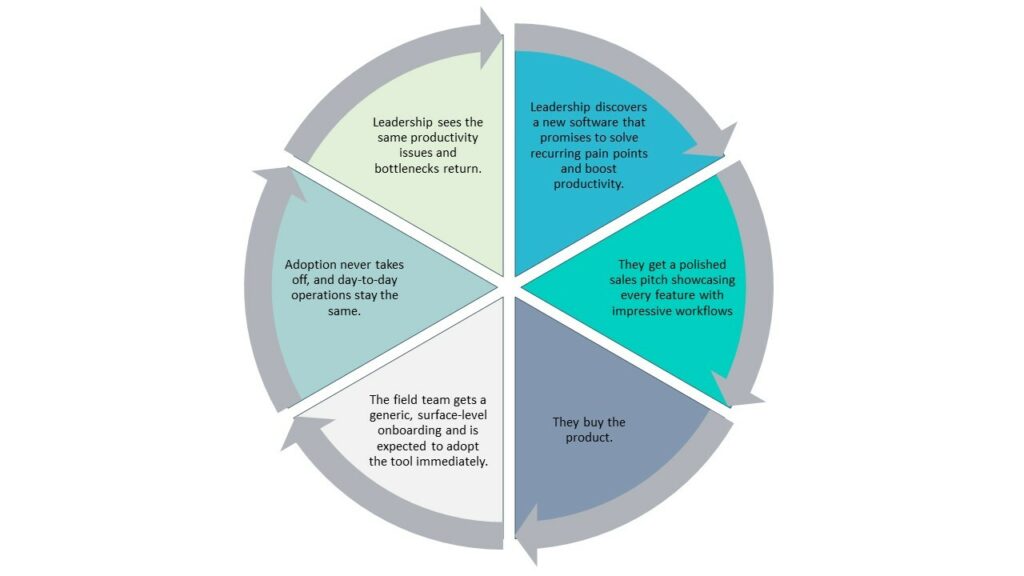
Walk into a construction office the week a new platform is approved and purchased, and the energy feels almost celebratory. Leadership has just signed off on a system after polished Sales demos, clean dashboards, and a promise of better control. Project executives talk about visibility. Finance talks about utilization. IT talks about integrations.
Now walk to the jobsite three months later.
Superintendents are still working from printed look ahead and annotated PDFs. Foremen are texting photos and using radios. Equipment managers are living inside color coded Excel sheets to track what moved where. The new system is “technically” implemented. Logins exist. A few workflows are set up. But daily work has barely changed.
The boardroom bought software. The field shrugged and went back to what works.
This is the uncomfortable truth about construction software adoption. The success or failure of the investment has less to do with feature checklists and far more to do with what happens in onboarding. When onboarding is generic and top down, adoption stalls. When it is human centered and grounded in jobsite reality, even complex platforms become part of the daily rhythm.
This article comes from that frontline lens. At EZO I work with construction teams that experience this tension every day. Our interviews with project managers, superintendents, site supervisors, subs, and equipment heavy contractors told a consistent story across general contractors, construction managers, and subcontractors. Tools are bought for control and reporting, but they fail when they ignore the way work actually happens in the field.
If leadership wants construction software adoption to stick, onboarding has to stop being an IT checklist and start being a solution to the jobsite problem.
Why top-down and generic onboarding kills adoption
Across the different construction professionals we spoke with, from enterprise GCs with formal IT committees to mid-market firms juggling Procore, Sage, Office Connector, and Excel, the pattern was clear and painfully familiar: software is approved in the boardroom, but the jobsite never really changes.
1. Executives get the demos. End users get the leftovers.
Executives experience one reality. End users live another.
Senior leaders, finance, and IT attend carefully curated demos focused on cost control, contract risk, and portfolio level reporting. By the time the tool reaches the field, “training” has been reduced to a two-hour webinar, a recording, and a link to a help center.
One project manager described it bluntly:
“They throw you in the deep end. Execs get the demos, but end users are left to figure it out with a two-hour generic webinar.”
On paper, that’s an onboarding plan. In practice, it’s how adoption dies: without job-specific training, real support, or any sense that the tool was built for the people actually using it.
2. The language doesn’t match jobsite reality
Field teams don’t think in terms of “modules” and “entities.” They think in terms of mobilizations, cranes, RFIs, safety walks, slab pours, and whether the mini-excavator will actually be there tomorrow morning.
Most onboarding material is written from the platform’s point of view rather than the site superintendent’s. It walks through menus and settings instead of answering simple, scenario-based questions like:
- How do I request and track a manlift for a specific week on this project?
- How do I log a breakdown in a way that triggers maintenance without leaving the slab?
- How do I prove an inspection happened, in a way that stands up if there’s a dispute later?
Jobsite leaders consistently asked for “dumbed down”, use case-specific guides that literally say:
- “How do we request and dispatch a mini excavator for next Monday’s slab pour.”
- “How do we log a breakdown and trigger maintenance without leaving the slab.”
- “How to prove an inspection happened in a way that stands up in a dispute.”
When all they get is an “Equipment Module Overview” video and a generic article, the material doesn’t land and the system never becomes part of the field’s daily rhythm.
3. Generic onboarding misses the people who matter most
Most rollouts lean heavily on virtual onboarding: email invites, online webinars, generic videos, and long PDFs. The problem is that the people whose buy-in is most critical – superintendents, foremen, site supervisors, and key subs, are not sitting at a desk waiting to absorb a product tour.
They’re juggling inspections, safety talks, coordination meetings, and live issues. If onboarding doesn’t reach them in a way that fits their day, the software quietly becomes a back-office software. Project managers may upload documents and finance may pull reports. But daily coordination still happens through calls, radios, texts, and color-coded spreadsheets.

4. Self-learning assumes time that doesn’t exist.
From a distance, “they can learn it from the docs” sounds reasonable. In reality, expecting a superintendent or project manager to reverse engineer complex workflows from a generic knowledge base is unrealistic. Their day is governed by inspections, safety issues, RFIs, change orders, subs showing up late, and equipment that may or may not be where it’s supposed to be.
As one subcontractor put it, they will choose tools that are easy to use, straightforward, and that make work faster, every time.
What they actually need is pre-digested, role-specific collateral:
- Short, targeted recordings that answer their scenarios.
- One-page “how we do X on this project” PDFs they can print or share with crews.
- Troubleshooting playbooks that fit into the flow of work, not separate from it.
Without this, “self serve” quickly becomes “never use.”
The result: implementation without adoption
The outcome is familiar to anyone who has watched a construction software rollout up close:
- The system is configured.
- Logins exist and a little data flows in.
- But dispatch, inspections, maintenance requests, site diaries, and compliance proof still live in Excel, email, and ad-hoc apps.
On paper, the company has implemented a new platform. In practice, construction software adoption never really happened. From the outside, it looks like a software problem. From the field’s point of view, it’s an adoption problem.
Monica (Construction Project Manager -Enterprise GC):
“My main gripe with actually all the companies that I’ve worked with — there’s no training. They kind of throw you in at the deep end of the pool and say, “Here, this is what you’re supposed to use, figure it out.”
What human centered onboarding looks like in construction
If top down and generic onboarding kills adoption, what works instead?
From both the interview voices and my own work with EZO customers, a different pattern emerges when projects succeed. Human centered onboarding has a few consistent ingredients:
1. It starts from roles, not from features
A superintendent does not need to know everything the platform can do. They need to know the ten actions they will perform in a typical week. Same for a project manager, an equipment manager, or a maintenance shop lead. In successful rollouts, training and collateral are built around roles and common scenarios, not product menus.
It favors short, jobsite specific paths over one long product tour.
Instead of a single two hour session that tries to cover everything, teams respond better to a sequence of smaller, scenario driven sessions. For example:
1. A quick session on how supers request and return equipment
2. A separate session for maintenance teams on logging issues and closing work orders
3. Another focused on how project managers pull evidence and reports for clients and finance
Each path is anchored in concrete examples from live projects, not generic demo data.
2. It includes simple, durable collateral that crews can reuse.
For construction teams, hand holding is not a luxury, it is the price of admission. When we run onboarding at EZO, the expectation is not that the customer will read a massive feature playbook and then train their own staff. They want tailor made collateral for their use case and their workflows. That often includes:
1. Short screen recordings that show their own projects and equipment
2. One or two page guides that say how we do X on Project Y
3. Simple troubleshooting playbooks that supers and foremen can keep on their phone or in a binder
If the system is going to replace Excel and radio calls, onboarding has to meet that standard of simplicity.
Will Guidara reminds us that someone will always build a better product, but they can’t replicate how you make people feel and the best services are ‘one size fits one.’ In construction, onboarding is where crews feel whether the tool respects their reality: generic training treats them like commodities, tailored onboarding shows it was built for them, and that’s what drives real adoption.
It shows how the tool solves each group’s pain, not just leadership goals.
One theme that is repeated across my interactions with customers is that the pain looks different depending on where you sit. Executives care about risk and margin. Subs and field crews care about uptime and time theft. Equipment managers care about idle rentals and missing assets.
Human centered onboarding makes those tradeoffs visible. For example, tying equipment visibility and checklists directly to the problems field teams described idle rentals, dispatch chaos, and scattered compliance proof is far more powerful than a generic lecture on digital transformation.
3. Finally, it is iterative, not one and done.
The best onboarding programs behave more like coaching than an event. They expect that teams will forget, resist, or drift back to old habits. So they plan for follow up sessions, QBRs, and refreshers as part of change management, not as a sign of failure.
Bring the field into the buying room
Most articles about construction software selection talk about vendor shortlists and feature matrices. Very few talk about who is in the room during those evaluations.
Studies on enterprise and construction software selection are clear on one point. The most successful projects treat selection as a collaborative effort. They include both leadership and end users in requirements gathering, demos, and final decisions. (Xpedeon)
Our interviews with large construction firms match that pattern. Enterprises build technology committees around systems like CMiC, JD Edwards, and Primavera. Operations and accounting sit together. Some go further and invite project managers and site leaders into demos so they can see real workflows and ask hard questions.
For mid market GCs, the structure is looser but the principle is the same. The rollouts that work are the ones where:
1. Field leaders are consulted early on what is broken in the current process
2. Their requirements are captured in plain language, not only in IT terms
3. They get to see the tool before the decision is final and can say this will not work for my crew
Industry guides on ERP and construction software selection echo this. They repeatedly recommend including end users alongside executives in the selection team, so usability and day to day fit are not an afterthought. (MicroAccounting)
The reason is simple. When the field is involved early, three things happen.
First, bad fits get surfaced faster. A tool that looks perfect in a slide deck often breaks down when a superintendent asks how it will work on a low connectivity, multi subcontractor site.
Second, language and workflows start to align. Vendors are forced to explain how the system supports two-week look-aheads, idle rentals, or safety logs instead of hiding behind abstract features.
Third, ownership shifts. When supers, shop managers, and project managers feel they have a say in choosing the system, onboarding is no longer something done to them. It becomes a joint effort to make their own lives easier.
In other words, successful construction software adoption starts before the contract is signed. If you want to do it right, it begins when leaders invite the field into the buying room.
A practical onboarding blueprint, from first demo to steady state
So how do you turn these ideas into a concrete plan for your next rollout?Here is a blueprint from my experience working with hundreds of EZO clients of all sizes that I recommend to construction leaders..
Step 1: Anchor the why in field and financial reality
Do not start with the software. Start with the pain.
For leadership, that might be idle rentals, change order disputes, or equipment that disappears in the spreadsheets. For field teams, it might be time wasted chasing machines, scattered compliance proof, or confusion over who is doing what that week.
Write those pains down in simple language and tie them to real project examples. This becomes the backbone of onboarding.
Step 2: Map staff roles on one flagship project
Choose one live or upcoming project that represents your typical work. Map out who will actually touch the system on that job:
1. Project executive or director
2. Project manager
3. Superintendent and foremen
4. Equipment manager and maintenance lead
5. Key subcontractors
For each staff role, list the five most important tasks you want them to execute inside the system.
Step 3: Design role specific onboarding paths and collateral
Now design training around those tasks, not the software menu. For example:
1. A superintendent path focused on requesting, receiving, and returning equipment, logging issues, and capturing quick proof that work was done
2. A project manager path focused on cost visibility, schedule alignment with equipment and maintenance, and pulling defensible reports for clients
3. An equipment manager path focused on seeing fleet location, dispatching with context, planning preventive maintenance, and watching idle time
For each path, create very simple knowledge sharing material. Short videos in the user’s own environment, one page checklists, and troubleshooting notes that are easy to share with crews.
Step 4: Run a focused pilot, receive feedback, then adjust
Resist the urge to roll out to every project at once. Start with one flagship project.
Measure simple adoption signals such as weekly active use by supers and PMs, percentage of equipment moves or maintenance requests logged in the system rather than by phone, and number of Excel based side systems still in use.
Use feedback from that pilot to refine training, simplify workflows, and fix obvious friction before scaling.
Step 5: Treat the first quarter as coaching, not closure
For the first ninety days after going live, assume people will need repeated help. Plan office hours, floor walks, and short refresher sessions. Encourage supers and shop managers to call out anything that still forces them back into Excel or ad hoc tools.
This is where the partnership with your vendor matters most. If their onboarding stops at the first webinar, you are on your own. If they stay with you through the first quarter, construction software adoption moves from theory to habit.

How EZO supports adoption beyond go live
At EZO we have learned the hard way that a great product alone is not enough in construction. The customers who see the fastest time to value share a few things in common in how we work with them.
First, we treat onboarding as a joint design exercise, not a one time training. Our team spends time understanding how your equipment, crews, and projects actually run today, then maps those realities into EZO’s equipment management capabilities.
Second, we go deep on role specific journeys who would be using the platform. The way a superintendent uses the mobile app on a remote site is very different from how an equipment manager in the yard thinks about dispatch, maintenance, and utilization. We build sessions and collateral specifically for each group, and we stay with them through as many rounds as needed to reach a clear time to value.
Third, we keep the field front and center. EZO’s mobile and offline features are built around realities we heard in interviews: cloud brittleness in the field, radios and paper still dominating, and the expectation that proof should be captured in seconds, not through long forms.
Finally, we do not see adoption as a moment. Customer success stays engaged well beyond implementation to help teams adjust workflows, build new reports, and keep the system aligned with evolving projects and equipment fleets. When software becomes part of everyday decisions about dispatch, maintenance, and cost control, that is when the investment is truly paying off.
Our company is using this software quite frequently at five of our locations, and it has been a rather seamless implementation so far. Customer support was very helpful and professional when we had billing questions as well.- Alyssa B.
What good looks like when adoption is real
How do you know if you have moved beyond implementation to true construction software adoption? A few signals tend to appear across successful customers and in the data we see in our own platform.
1. Time to first value shrinks. On at least one project, you can point to a concrete win in the first month: fewer idle rentals, faster dispatch, or a dispute resolved quickly because the evidence was already in the system.
2. Field usage becomes routine. Superintendents, foremen, and key subs are using the mobile app as part of their normal day, not just when reminded.
3. Parallel tools start to disappear. The number of Excel sheets, personal Google Forms, and side apps used for logging equipment, inspections, or safety drops over time.
4. Conversations change. Instead of arguing about what happened, teams spend more time deciding what to do next because the data is already there.
5. Reporting feels like a by-product, not an extra task. Leaders stop begging for updates. They pull clear reports on utilization, downtime, and cost directly from the system without waiting on manual exports.
When these signs show up, onboarding and software adoption has done its job. It has turned a purchase into a habit.
Onboarding is where strategy meets reality
Construction leaders do not lack vision. They know they need better control of equipment, better proof of work, and better visibility from the jobsite to the boardroom. They invest in platforms that promise all this and more.
But software only becomes real when the crews who pour the concrete, set the steel, and keep the machines running can use it without thinking too hard. That bridge from intent to everyday behavior is built in onboarding.
If you are planning your next rollout, start by asking a simple question.
What would it look like if our superintendents, project managers, equipment managers, and shop leaders felt this system was built for them?
Answer that honestly, involve them in the buying room, and get a vendor that designs onboarding around their reality, and you will be far closer to the return on investment you are hoping for.
If this way of thinking about onboarding and adoption resonates with you, I am always happy to talk to like minded professionals. At EZO, our view is simple. Our customers’ success is our success. If you are rethinking how you roll out new tools to your construction teams and want a partner that takes adoption as seriously as you do, companies like EZO are built to help you close that field to office gap.







