
A single lost laptop, complete with its software licenses and security tools, can cost upwards of $1,500. When multiplied across an organization, these preventable losses represent missed opportunities for strategic investments in innovation, training, infrastructure, or business growth.
With such high stakes on the line, IT asset management solutions have become an absolute investment for IT managers and system administrators to align their enterprise IT architecture and optimize their technology portfolio.
Today’s IT departments manage a complex technology network, from mobile devices and endpoints to virtual machines and containerized applications, requiring precise coordination and oversight.
Effective IT asset management (ITAM) has evolved beyond basic inventory control. It is now considered a command center for your entire digital estate.
While traditional asset tracking focuses on hardware inventory and license compliance, next-generation ITAM solutions enable holistic lifecycle management across your technology landscape.
By providing real-time visibility into technology utilization, cost structures, and security postures, ITAM empowers data-driven decisions that optimize IT investments. This approach helps organizations:
- Transform shadow IT into manageable structures through comprehensive discovery and governance.
- Maximize ROI by identifying underutilized resources and consolidation opportunities across hybrid infrastructure.
- Strengthen security posture through automated asset monitoring and vulnerability management.
- Ensure compliance through centralized policy enforcement and audit-ready reporting.
Forward-thinking organizations leverage IT asset management as a cornerstone of digital transformation. Connecting asset intelligence with business outcomes uplifts any company’s technology management from a support function to a strategic enabler of competitive advantage.
In this article, we’ll explore the top IT asset management software of 2026, highlighting their key features to help you make a well-informed, strategic decision for your organization’s needs.
Let’s dig in!
Why does your organization need an ITAM solution?
Gone are the days when IT managers had to take charge of keeping IT inventory in check. The complexity of the cloud environment is compelling enough for companies to invest in sophisticated IT solutions, such as ITAM platforms, to prevent operational losses and compliance risks and track software and network assets.
Not to mention the financial implications, which strain many small to mid-sized companies. Imagine overspending 30% of your annual budget on software licenses only because you missed an ITAM solution. Without ITAM, you could risk facing SaaS license waste.
A comprehensive ITAM solution helps companies channel their IT structure from chaos to clarity, ensuring every dollar spent delivers maximum value.
However, having an ITAM tool goes beyond cost savings. Modern ITAM solutions are your organization’s strategic compass, empowering decision-making through real-time analytics and actionable insights.
It brings comprehensive performance data to your fingertips, enabling you to make informed decisions rather than rely on guesswork.
So, how does one choose the right ITAM for their organization?
Excellent IT solutions are distinguished by their core functionalities: efficiency, compliance, reliability, and robustness.
Modern ITAM solutions enhance this by being simple and intuitive, making asset management accessible and actionable.
When investing in an ITAM software solution, you get a management tool and a comprehensive platform that delivers critical tracking capabilities.
Here are some prominent benefits of investing in an ITAM that keep your assets invaluable throughout their lifecycles:
- One unified view: An ITAM is an efficient asset repository consolidating all asset-related information through a single reliable system. It provides a unified and accurate view of all information, meaning there are no more information silos, mismatched numbers, misaligned expectations, or outdated information.
- Asset visibility and tracking: One of the foremost advantages of investing in an ITAM is having complete visibility and transparency into a company’s asset landscape. Often, companies overlook the significance of not having a tool to analyze their business performance in light of asset utilization. An ITAM, on the other hand, makes you resourceful and financially savvy in cost reduction, asset breakdown prevention, and unauthorized data loss.
- Hardware and Software asset management: Tracking, managing, and protecting hardware and software assets is pivotal for any business process. IT asset management software makes this convenient and optimizes asset utilization, minimizing downtime and reducing costs.
- Real-time insights into asset health: Knowing your asset’s performance is crucial for company growth. Businesses lose millions yearly through missing devices, unused software licenses, and redundant subscriptions.
- Asset Audit Reports: Asset Audit Reports transform raw data into actionable intelligence. They create a detailed snapshot of your IT infrastructure, including device locations and usage patterns, compliance status, and performance metrics. These insights help optimize spending, prevent asset loss, and guide strategic planning.
Choosing the right IT Asset Management solution
Selecting the best ITAM solution depends on your specific business needs and priorities. Consider factors such as your organization’s size, IT environment’s complexity, budget, and desired capabilities.
We recommend exploring free trials and demos of different solutions before deciding. Don’t hesitate to contact vendors for personalized demos and support.
How to choose an ITAM?
Key factors to keep in mind when selecting an IT Asset Management (ITAM) solution:
Core requirements
- Assess your asset volume, types, and locations
- Define must-have features vs. nice-to-have
- Look for growth plans and scalability needs
- Role Distribution
Technical evaluation
- Integration capabilities with existing systems
- Deployment options (cloud vs. on-premise)
- Security and compliance features
- Automation capabilities and AI features
Operational fit
- User interface and ease of adoption
- Mobile accessibility requirements
- Reporting and analytics needs
- Support and training offerings
Budget considerations
- Total cost of ownership
- Pricing model (subscription vs. perpetual)
- Implementation and training costs
- ROI potential
Vendor assessment
- Market reputation and stability
- Customer support quality
- Update frequency and roadmap
- Client references in your industry
Important Note: Make sure to test before committing to a trial period and start with a pilot program before full deployment.
Top reviewed IT asset management software
1. EZO AssetSonar
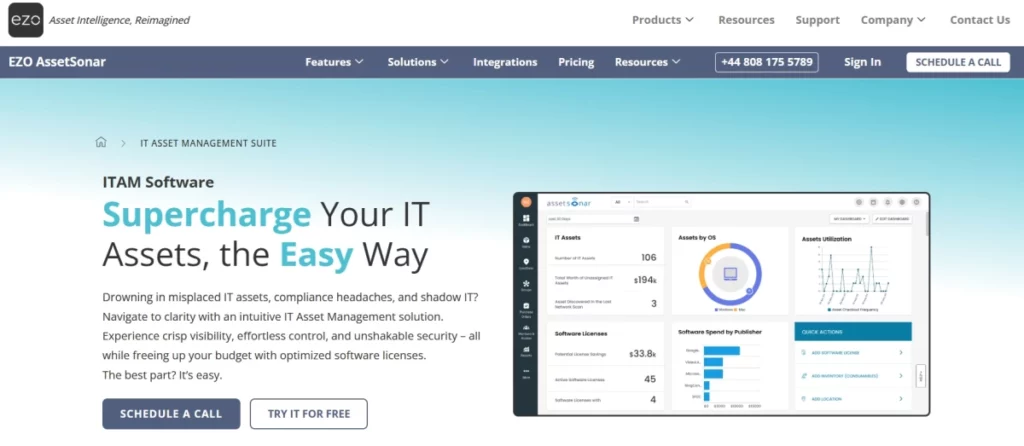
EZO AssetSonar is a leading cloud-based IT asset management suite known for its fast, intuitive, and robust asset tracking and management.
It empowers IT managers and administrators to rely on a single asset repository by providing excellent, value-driven asset monitoring features. Through a unified view, IT teams experience the dynamic functionality of an organization’s efficiency from procurement to disposal.
For instance, consider a mid-sized company that wants to expand its IT functionality but is limited by restricted asset visibility.
On the other hand, imagine having a proactive design and workflow that makes it easier for businesses to navigate asset location, monitor IT asset health, maintain aging assets, configure license renewals, and fortify asset compliance with instant real-time insights and analytical performance, all combined in one place.
EZO AssetSonar’s IT asset management solution provides a consolidated view of complete asset visibility and asset tracking, including the software installations on all IT devices within the organization.
So, how does EZO AssetSonar do that?
Let’s see how AssetSonar works in your daily IT operations
Getting started with EZO AssetSonar follows a straightforward lifecycle approach. The platform streamlines your IT asset management through five key phases: plan, procure, deploy, maintain, and retire. Here’s what this means for your organization;
Imagine 3000 assets have been acquired for the company, and you, as an IT representative, have been tasked to oversee and manage them. You give EZO AssetSonar a trial run, and here is what you’ve found out!
- Planning and Procurement: EZO AssetSonar immediately scans the assets and networks, automatically updating the existing asset inventory. It also means license tracking ensures they are compliant and ready to use. You also enable your IT budget plan to track technology spending.
- Deployment and Onboarding: All the devices and assets are automatically added. The correct licenses are assigned to the employees, and all mobile devices and hardware assets are ready to be tracked.
- Maintenance and Support: Your employees and admins regularly receive asset status updates in case of any license renewals and reminders. You monitor device health and security through MDM support while making necessary adjustments.
- Retiring and Disposal: EZO AssetSonar promptly reported aging assets and revoked licenses, alerting IT managers to dispose of them safely. Reports were generated, the device was wiped, and essential information was stored for compliance.
Now that you’ve seen how EZO AssetSonar transforms your daily IT operations, let’s explore the powerful features that make this possible.
Complete IT lifecycle management
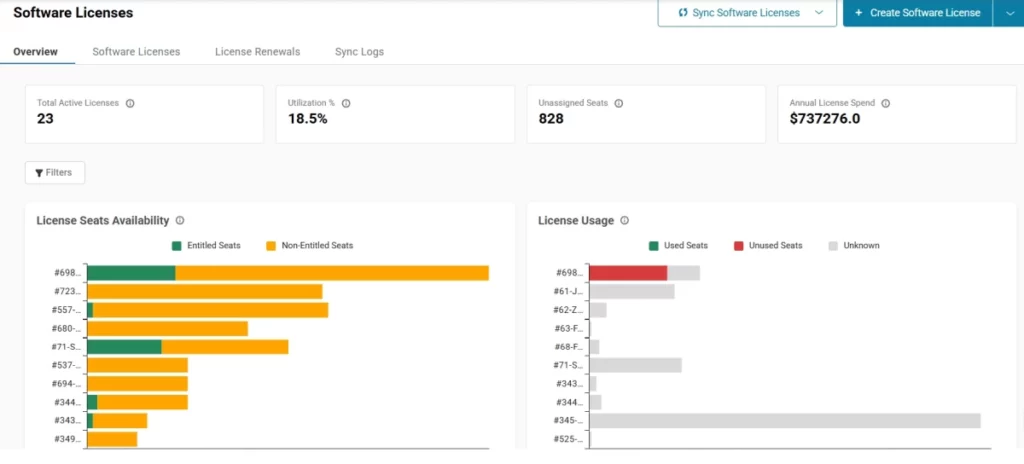
It allows IT managers to integrate with major ITSMs and MDMs, providing a centralized repository for all IT assets.
This helps speed up support requests, improve service delivery, and boost employee productivity. You can keep track of purchase orders (POs), vendors, and procurement costs in one place, simplifying your purchasing process.
Managing Hardware Asset Management (HAM) in EZO AssetSonar
Asset discovery has never been so easy and accurate before. With EZO AssetSonar, IT managers can gain complete visibility in their hardware asset management contracts by storing and managing them centrally, making it easier to stay on top of key agreements.
The check-in and check-out feature boosts accountability by clearly showing who handles items at any time. The availability calendar makes it easy to map out item schedules to avoid double bookings and stockouts.
Location management lets you track assets to the cubicle level, ensuring nothing gets lost. For even quicker processing, you can scan asset labels using barcode and QR code scanning via third-party apps.
Low-stock alerts keep you ahead of the game by notifying you when it’s time to reorder, whereas reservations allow you to secure items in advance, streamlining the checkout process.
Managing Software Asset Management (SAM) in EZO AssetSonar
EZO AssetSonar makes software asset management (SAM) simple and transparent for IT teams
Hard to believe?
Picture managing sprawling technology stacks across multiple departments without unified oversight: unauthorized software proliferation, unmonitored usage patterns, and compliance gaps leading to shadow IT vulnerabilities.
A typical quarter presents critical challenges; employees autonomously deploying unvetted SaaS solutions, absence of license lifecycle management, widespread use of non-approved applications, compliance protocol breaches, and cascading operational disruptions. This creates compliance risks and unexpected costs that put you in a tough spot with legal teams.
EZO AssetSonar addresses these pain points through its enterprise-grade solution. Its user-friendly platform gives IT managers a clear view of everything – from small details to major IT issues – with automatic alerts that keep you informed.
You get complete control through practical features: Chrome browser tracking to see what extensions are used, software normalization to clean up your data, and license management to keep everything compliant.
For example, St. Francis School District implemented EZO AssetSonar and experienced significant improvements within weeks. Authorities reported a 4-fold reduction in Chromebook loss, a 75% increase in productivity, and a remarkable $28,000 savings within the first year of implementation.
Smart IT asset tracking
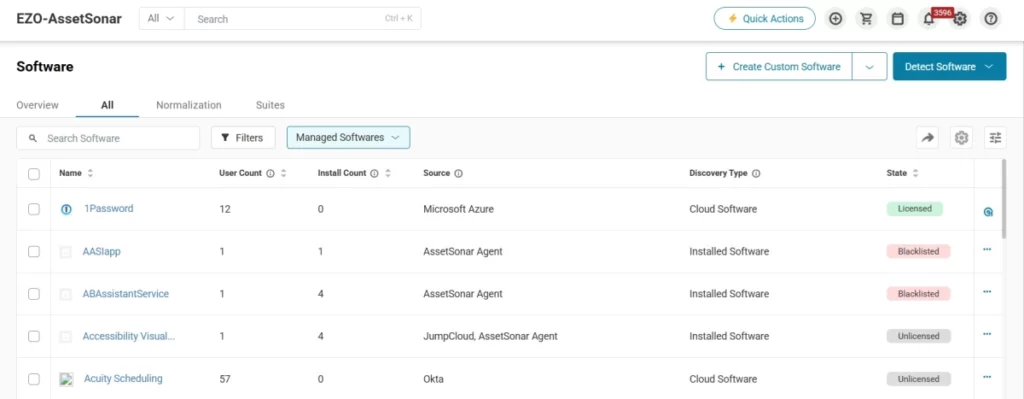
EZO AssetSonar offers comprehensive IT asset management capabilities that streamline the entire lifecycle of both hardware and software assets.
Through agent-based discovery and network scanning, it automatically detects and catalogs devices, creating an accurate inventory database while reducing security risks.
The platform enables organizations to manage resources like laptops and desktops across multiple locations, track software licenses for compliance, and maintain a Configuration Management Database (CMDB) that provides complete visibility into IT asset dependencies.
AssetSonar’s CMDB gives you a clear view of how all your IT assets are connected, making it easier to solve problems quickly. By mapping out the relationships between different items, you can see how they depend on each other.
Additional features include depreciation tracking to optimize asset retirement timing, scan-based audits for enhanced transparency, and customizable fields allowing monitoring of any desired data point.
Supervised user management
Managing user access and asset tracking is streamlined for both security and efficiency. User roles allow you to assign specific permissions, ensuring that sensitive data is only accessible to authorized personnel.
You can enhance security further with access control, limiting item visibility based on item groups, locations, or both.
Arbitration gives administrators the power to approve specific actions, adding an extra layer of oversight. The process is seamless, whether you’re managing login and non-login users or tracking assets with employee ID scans for quick checkouts. Signature capture logs user signatures for specific actions, providing even more accountability.
The employee offboarding process is automated for a smooth and efficient exit, ensuring no assets are left untracked.
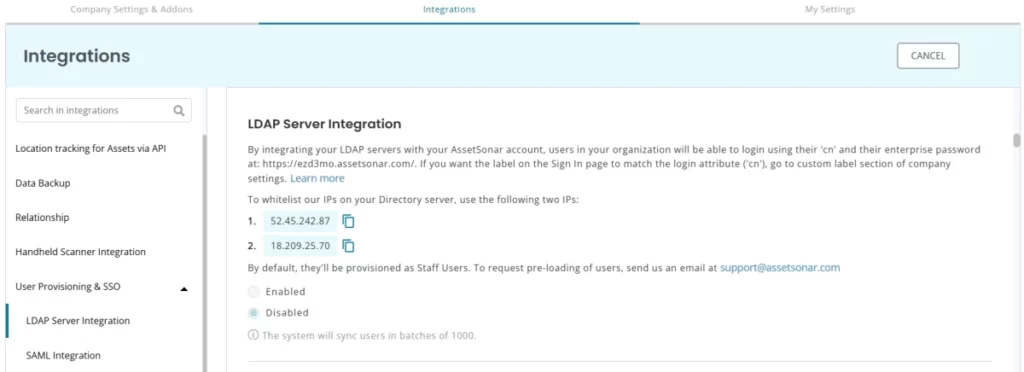
Strengthen your system security with a customizable password policy, and simplify logins with Google/Outlook authentication or SAML SSO for single sign-on convenience. If you’re using an LDAP server, LDAP server integration makes it easy for employees to use their existing credentials. For added transparency, the custody overview feature ensures you always know who has which items and for how long, while vendor management helps you keep track of both procurement and servicing vendors, including their histories.
Proactive license management
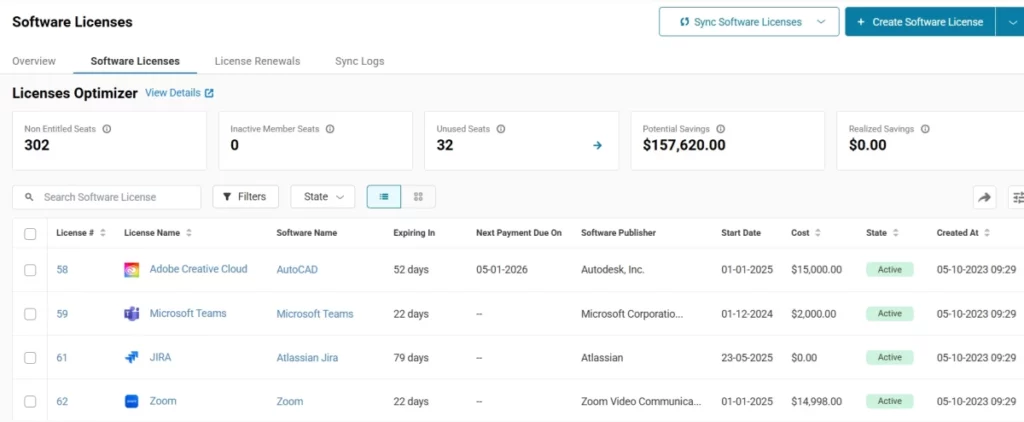
Managing IT services becomes more efficient and organized.
EZO AssetSonar integrates seamlessly with a wide range of ITSM integrations, including Jira server and Zendesk, allowing you to streamline IT support workflows and view service catalogs for quick access to service options. License and warranty tracking ensures you’re always prepared, making monitoring and acting on expiring licenses or warranties easy.
When urgent maintenance issues arise, you can quickly create service tickets to flag problems, while recurring services automate the scheduling of routine maintenance to keep your assets in top shape.
Stay on top of every detail with maintenance alerts that notify relevant parties when services begin, end, or are extended. Service history tracking allows you to identify cost trends and service types, which helps optimize asset productivity.
Work order management allows you to assign and prioritize tasks, ensuring important jobs are tackled first. At the same time, service triage automatically places items into service upon check-in, reducing equipment downtimes and keeping operations running smoothly.
Reporting and analytics
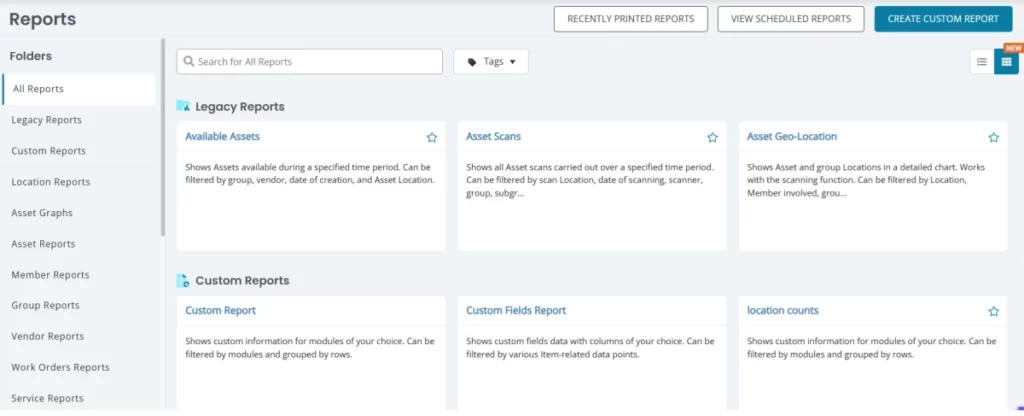
EZO AssetSonar allows flexibility in efficiently viewing and managing your IT asset workflows. It gives a very in-depth yet simplified key reporting analytics on your asset performance and again.
Reporting with AssetSonar is highly customizable, providing clear, actionable insights that drive real value for your company.
The reports are very intuitive and easy to build. Custom email alerts will enable you to set up reminders for specific events, ensuring that important actions or deadlines aren’t missed. Custom reports allow you to dive deep into your IT asset management processes, providing detailed insights that help you make informed decisions.
For added convenience, data backups automatically sync with Dropbox, so all your documents are securely stored and easily accessible. You can also schedule reports to be sent to specific team members regularly, keeping everyone on the same page.
Report exports let you easily share your findings by exporting reports as PDF or CSV files for further analysis.
Want to focus on what matters most? With customized dashboard views, AssetSonar lets you tailor the interface to display the most valuable information, giving you an extensive snapshot of all of your departments. You can quickly import and export data with Excel, making it easy to add, update, or download asset information as needed.
Patch management
EZO AssetSonar’s patch management capability brings vulnerability discovery and remediation directly into your ITAM platform, so you can secure your environment without juggling separate tools.
It continuously scans endpoints across Windows, macOS, and Linux for critical vulnerabilities using real‑time CVE and NIST data, flags at‑risk devices, and enables prioritized patch deployment and scheduled patching during defined maintenance windows — all from a single dashboard.
With unified visibility into patch status, success metrics, and risk scores, teams can automate updates at scale, reduce exposure windows, and generate audit‑ready, time‑stamped compliance reports for standards such as SOC 2, ISO 27001, and HIPAA without producing ticket spikes or disrupting business operations.
AssetSonar’s centralized patch workflow turns vulnerability insights into action, helping IT leaders shorten exposure, strengthen security posture, and stay inspection‑ready with less manual effort.
Service catalog
EZO AssetSonar’s service catalog provides IT teams with a centralized, self‑service portal that streamlines asset‑related requests and accelerates service delivery across the entire organization.
By cataloging common services such as device provisioning, software requests, hardware check‑outs, repairs, and onboarding/offboarding tasks into an easy‑to‑navigate interface, AssetSonar empowers employees to submit and track requests without burdening IT with manual emails or tickets.
Each service item can be configured with predefined workflows, approvals, SLA expectations, and cost centers, ensuring consistent execution and clear accountability. This not only improves operational efficiency and response times but also boosts user satisfaction by eliminating process guesswork.
With built-in reporting and usage analytics, IT leaders gain actionable insights into service trends and bottlenecks, helping them optimize offerings, forecast demand, and align IT services more closely with business priorities, all from one unified platform.
Asset-intelligent IT service management (ITSM)
Building on its strong foundation in IT asset management, EZO AssetSonar extends into asset-intelligent IT service management by connecting service requests, incidents, and workflows directly to the assets they impact.
Instead of treating tickets in isolation, EZO AssetSonar ensures every request is enriched with real-time asset context, ownership, history, warranty status, licenses, and dependencies, giving IT teams faster resolution paths and better decision clarity.
This asset-first approach reduces back-and-forth, improves SLA adherence, and helps teams identify recurring issues tied to specific devices, software, or vendors. By unifying asset intelligence with service execution, EZO AssetSonar enables IT teams to deliver more consistent, accountable, and scalable IT services, without introducing another disconnected ITSM system.
What users have to say about EZO AssetSonar
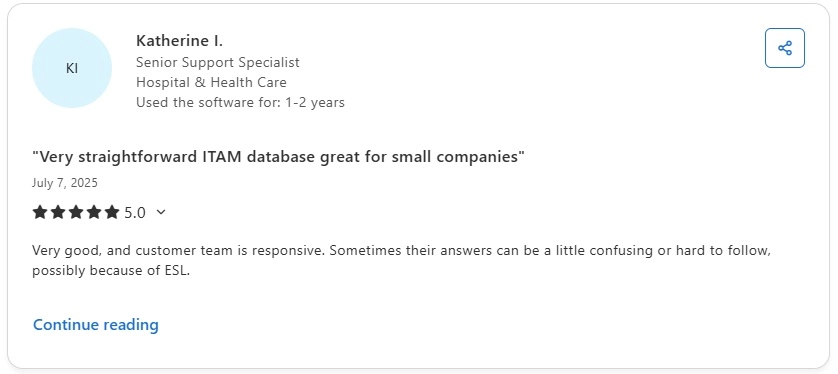
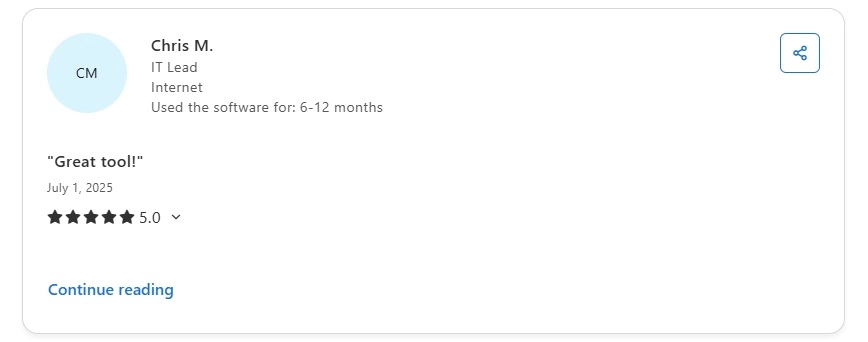
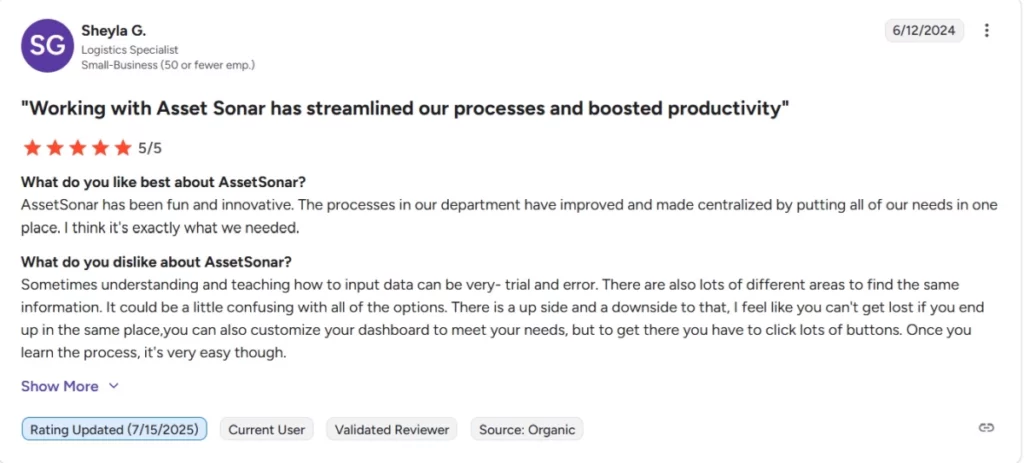
Make it your company’s single source of truth this year with EZO AssetSonar.
Customer Ratings for EZO AssetSonar
Overall Rating – 9.3/10
2. Omnitza
Omnitza is one of the market leaders for hardware and software asset management. The software is widely regarded for its suite of features and integrations, enabling IT managers to gain complete control over their IT infrastructure. The software is ideal for companies looking for an advanced enterprise-grade IT solution.
Key Features
- It offers efficient asset discovery with 95% reported accuracy.
- It gives pre-built applications and low-code workflows, making navigation more straightforward and convenient for IT managers.
- The software tracks all your hardware and software assets with AI-driven insights that help optimize costs and automatically discover new assets.
- IT managers can access everything from anywhere with a cloud-based platform and mobile support for on-the-go management.
- Seamlessly integrate with your ITSM, ERP, and other business systems for smooth workflows and easy license compliance.
- It lets you personalize your experience with customizable dashboards and reports that track asset lifecycle, usage, and depreciation.
Pros
- Automatically detects and tracks all assets for complete visibility.
- Tailor dashboards to display the key data that matters most.
- Easily track and manage software licenses for compliance and cost control.
Cons
- The interface may require a learning curve for new users.
- Generating detailed reports can be more difficult without customization.
- The design can feel cluttered or unintuitive in some areas.
Customer Ratings
- G2: 4.6/5
- Capterra: 4.4/5
3. ServiceNow
ServiceNow is nothing short of a sophisticated IT solution for enterprise-level companies, offering comprehensive software asset management for both on-premise and cloud environments. It provides a suite of features and advanced integrations. ServiceNow is well-equipped with expansive knowledge management capabilities. The software also offers valuable modules for issue ticketing, change management, and configuration management.
Key Features
- It efficiently manages service requests, making IT service-related tasks easier to manage and execute.
- ServiceNow is one unified solution for comprehensive asset tracking and visibility for hardware assets, software licenses, and cloud resources.
- It provides customizable dashboards, giving an informative and personalized view of critical workflows, data, and asset performance.
- The software also offers advanced project management capabilities, giving a scalable workflow system that enhances project efficiency and management.
Pros
- Streamlines operations with AI-driven automation and workflow management.
- Offers extensive customization options to tailor workflows and processes to business needs.
- Streamlines operations with AI-driven automation
Cons
- Setup and configuration can be time-consuming and require specialized expertise.
- Some users experience performance slowdowns in large or highly customized implementations.
- The software comes at a premium price.
Customer Ratings
- G2: 4.4/5
- Capterra: 4.5/5
4. Freshservice
Freshservice is another IT service management solution with integrated ITAM features. It’s known for its user-friendly interface and affordable pricing, making it a good choice for smaller businesses.
Key Features
- A fully cloud-based solution offers scalability, ease of use, and a user-friendly interface for IT teams and end users.
- This includes incident, problem, and change management tools, automation, workflows, and a self-service portal for end users.
- Provides real-time analytics, customizable reports, seamless third-party integrations, mobile support, and strong security with role-based access and compliance.
Pros
- Automated reminders for enabling proactive scheduling maintenance.
- Forecasts future maintenance and cost calculated to help manage expenses for improving profit margins
- Smooth managing of inventory, in-depth visibility of purchase orders and relationship mapping
Cons
- API can be overcomplicated.
- Pricing can be a challenge for smaller firms.
- The mobile app lacks features.
Customer Ratings
- G2 – 4.6/5
- Capterra – 4.5/5
5. Asset Panda
Asset Panda is a cloud-based IT asset management platform that helps organizations track and manage physical and digital assets throughout the lifecycle, from procurement to retirement. It provides a centralized system for maintaining visibility, improving accountability, and reducing asset loss while supporting mobile workflows and extensive customization.
Key features
- Asset Panda allows IT teams to create customizable fields, workflows, and dashboards so that the platform can reflect each organization’s unique asset tracking processes.
- The platform supports mobile barcode and QR code scanning, enabling users to update and retrieve asset information from anywhere using iOS and Android devices.
- Asset Panda tracks inventory in real time, including asset status, condition, location, warranty, and depreciation, helping teams make data-driven lifecycle decisions.
- The solution includes automated alerts for upcoming warranty expirations, service schedules, and low-stock conditions to reduce surprises and improve proactive management.
- Asset Panda provides reporting and analytics tools that allow IT teams to generate custom reports, export data, and visualize trends across asset groups.
- Integrations and API connectivity enable Asset Panda to work with other systems, including ITSM platforms and directory services, improving data synchronization.
Pros
- Users frequently highlight that Asset Panda’s customization capabilities let them tailor the system to match existing workflows rather than conform to rigid software practices.
- Reviewers appreciate the ease of use and intuitive interface, especially for mobile asset scanning and check-in/check-out workflows.
- The platform’s unlimited user model and flexible pricing based on asset counts make it attractive for growing teams that need broad access without incremental per-user costs.
Cons
- Some users note that the initial setup and configuration can be challenging, particularly when defining custom workflows or importing large inventories.
- A few reviews mention that reporting and analytics could be deeper or more intuitive, especially for advanced financial tracking.
- The mobile experience may have limitations in offline mode, requiring connectivity to sync updates effectively.
Customer ratings
- G2: ~4.0/5
- Capterra: ~4.6/5
6. Spiceworks
Spiceworks IT asset management solutions offer cloud-based advanced features tailored to oversee the asset lifecycle. They provide advanced asset tracking and visibility, collect asset data, and efficiently categorize it in inventories.
It adheres to best industry practices for enhancing organizations’ digital asset profiles and reducing compliance and risk assessment issues.
Key Features
- It keeps you current with your inventory, giving IT managers and administrators a clear picture of inventory fluctuations, procurement, and asset health, whether hardware or software.
- Efficiently tackles software licensing, adheres to compliance, and prevents license breaches.
- It helps automate procurement processes and risk management to prevent any IT infrastructure compromise on your end.
Pros
- The active user community provides tips, advice, and troubleshooting support.
- Integrates with popular IT tools and third-party applications.
Cons
- Lacks some advanced features in enterprise-grade tools, especially for larger organizations.
- The free version includes ads, which can be distracting.
Customer Ratings
- G2: 4.3/5
- Capterra: 4.4/5
7. BlueTally
BlueTally is a cloud-based IT asset management solution that helps IT teams track and manage hardware, software, and accessories through a centralized system. It focuses on simplicity and ease of use, making it suitable for teams looking to move away from spreadsheets and manual asset tracking.
Key features
- BlueTally enables end-to-end asset lifecycle tracking, allowing IT teams to manage assets from procurement through assignment, maintenance, and retirement.
- The platform supports check-in and check-out workflows that clearly record asset ownership and improve accountability.
- BlueTally automates onboarding and offboarding workflows, ensuring assets are assigned to new employees and reclaimed during exits without manual follow-ups.
- Warranty and end-of-life tracking features notify IT teams in advance of upcoming expirations, helping them plan replacements proactively.
- The system provides low-stock alerts for accessories and consumables, reducing the risk of shortages.
- BlueTally integrates with identity and device management platforms such as Azure AD, Intune, Jamf, Okta, and Slack to keep asset records continuously updated.
- Custom roles, permissions, and reporting options allow teams to control access and maintain visibility across asset data.
Pros
- The platform offers a simple and intuitive user interface that requires minimal training.
- BlueTally is quick to deploy, making it easy for IT teams to get started without heavy configuration.
- Strong integrations help reduce manual updates and improve asset data accuracy.
Cons
- Advanced reporting and customization capabilities are more limited compared to larger enterprise ITAM platforms.
- The solution is not designed for highly complex CMDB implementations or deep financial asset modeling.
Customer ratings
- G2: Limited review volume (no consolidated public score available)
- Capterra: ~4.6/5
8. Syam Software
Syam is another efficient asset management software that provides visibility into asset tracking and management. It offers comprehensive and straightforward solutions for keeping users’ inventory cost-efficient and productive.
Key Features:
- It maintains a complete history of all valuable information of assets, including their current health, location, and status.
- The software has been designed to steadily monitor asset usage, performance, and maintenance of resource allocation.
- It keeps the procurement processes streamlined to manage asset depreciation of existing and newly acquired assets.
- Syam also assists with software license management and keeps compliance and regulatory agreements in check, reducing risk and asset damage costs.
Pros
- The software provides a unified solution for managing devices.
- The software supports various devices, streamlining asset management for mixed environments.
- Technicians can manage and update tickets through a mobile-friendly interface.
Cons
- The user interface is reported to be confusing in some areas.
- Syncing between devices or tasks can sometimes be slow.
Customer ratings
- G2: ~4.4/5
- Capterra: ~4.5/5
9. Sapphire
Sapphire is an intelligent IT asset lifecycle and inventory management tool that streamlines IT tracking for organizations. It provides end-to-end visibility for versatile asset styles, making it a good choice for companies looking to maintain their servers, licenses, phones, and digital assets in one place.
Using artificial intelligence and NLP, Sapphire provides insights into real-time asset performance and asset location.
Key features
- It offers seamless integrations with enterprise systems and different types of third-party applications. This means smooth data collaboration and exchange through external systems.
- Allows simplified software monitoring to help detect unauthorized assets and software that can potentially lead to security breaches and compliance issues.
- It efficiently identifies applications, maps identities, and curates a visual representation of asset performance.
Pros
- SapphireIMS supports multiple communication channels.
- The platform integrates well with other enterprise tools.
Cons
- The user interface can feel a bit outdated or cluttered.
- Documentation for support is not always comprehensive enough.
Customer rating
- G2: ~4.5/5
- Capterra: ~5/5
10. Lansweeper
Lansweeper is a modern cloud-based IT management solution that is best reviewed for asset lifecycle management. It offers extensive features that aid in quickly navigating comprehensive asset tracking. The platform also provides many beneficial integrations and workflows that help easily monitor, control, and maintain complex IT infrastructures.
Key features
- Offers advanced network discovery and dynamic asset profiling that allows convenient asset mapping and distribution for IT departments.
- Reduce manual efforts by providing complete asset tracking with multiple integrations to keep the processes easy and convenient.
- It also offers incident management tools crucial for expansive IT operations. These tools help significantly reduce downtime and incident recovery.
Pros
- Lansweeper offers deep network scanning capabilities, allowing IT teams to map out their entire network and identify all connected devices.
- The platform integrates well with other IT management tools
- Lansweeper offers both cloud-based and on-premise deployment options
Cons
- New users may experience a steep learning curve
- Help desk and ticketing features are more limited compared to dedicated ITSM platforms.
Customer ratings
- G2: ~4.4/5
- Capterra: ~4.5/5
11. ManageEngine AssetExplorer
A strong contender, ManageEngine AssetExplorer offers a comprehensive suite of features for managing hardware and software assets. It’s known for its strong discovery capabilities and robust reporting engine.
Key features
- ManageEngine helps IT managers identify and catalog all types of assets, whether hardware or software.
- The platform is a great, systematic way of managing the lifecycle of IT assets, ensuring they are effectively organized, utilized, and maintained from their acquisition until their disposal.
- It helps administrators stay financially aligned with business goals. By valuing all assets, it offers real-time insights into the financial worth of an organization’s IT inventory.
Pros
- AssetExplorer is exceptionally easy to install. Its simplified user experience allows its features to be functional from the outset.
- Consistently scans all asset details, strengthening the cloud asset ecosystem.
Cons
- The software is to be installed on each device, making the implementation process challenging, especially for large enterprises.
- The extensive customization in the initial stages can be time-consuming for some companies.
Customer ratings
- G2: ~4.3/5
- Capterra: ~4.8/5
12. Reftab
Reftab simplifies hardware and software asset management, enabling organizations to assign equipment, monitor assets globally, and stay organized.
Key features
- Offers accessibility from anywhere, allowing IT managers scalability and flexibility while also maintaining upkeep with seamless integrations of popular enterprise systems and tools.
- IT managers can generate customized reports and dashboards to track KPIs and monitor performance. The software offers on-the-go, mobile-friendly workflows, approvals, and request management.
- It offers an extensive suite of ITSM integrations and capabilities to help with incident management, change management, and streamlining of IT operations.
Pros
- Simple design that simplifies asset management for both IT teams and end-users
- Easily integrates with popular ITSM tools and other third-party applications.
Cons
- The user interface may feel very basic.
- It may lack some of the advanced functionalities.
- It might not be as scalable for vast enterprises.
Customer ratings
Capterra: ~4.8/5
G2: ~3.8/5
13. SolarWinds Service Desk
While SolarWinds is primarily known for its service desk capabilities, it also offers a solid ITAM module. This makes it a good option for organizations seeking an integrated IT service management and asset-tracking solution.
Key features
- The software efficiently classifies tickets based on urgency, category, and type, streamlining workflows and improving resolution times. It creates tailored workflows to ensure tickets are routed to the appropriate team member or department.
- IT admins can quickly resolve issues independently, and customers can access a self-service portal with FAQs, troubleshooting guides, and knowledge articles. Moreover, IT teams can create, update, and manage knowledge-based articles to solve common problems quickly.
- It helps set and manage SLAs to ensure timely ticket resolution, track performance against set deadlines, and automatically escalate tickets not resolved within the defined SLA timeframe.
- It allows easy viewing of real-time metrics such as ticket status, team performance, and resolution times, which can be used for effective decision-making.
Pros
- Extensive customization options for reports and alerts
- Strong network mapping and topology visualization
- Scalable for large enterprise environments
Cons
- It can be expensive, especially for smaller organizations.
- Complex setup and configuration process.
- The steep learning curve for new users.
Customer ratings
- G2: ~4.3/5
- Capterra: ~4.6/5
14. SysAid
SysAid offers a comprehensive ITAM solution that focuses on help desk integration. It’s a good option for organizations looking to streamline their IT support and asset management processes.
Key features
- Secure access to your assets directly from the service desk. This is ideal for remote teams looking for seamless integration into ITSM systems, enabling automated discovery, license management, and proactive maintenance.
- Customizable interface, real-time asset performance monitoring, mobile support, and strong asset lifecycle and depreciation tracking reporting tools.
- Centralized hardware, software, and IT resource tracking with AI-powered insights to optimize asset utilization and cost.
Pros
- Customizable dashboards and reporting tools
- Mobile app support for technicians and end-users
- Built-in remote control capabilities for IT support
Cons
- Interfaces can feel less intuitive compared to newer ITSM solutions.
- Setup and configuration can be complex and time-consuming
- Some users report the reporting interface could be more user-friendly
Customer ratings
- G2: ~4.5/5
- Capterra: ~4.5/5
15. Flexera One
Flexera One is an enterprise‑grade ITAM and FinOps platform that helps large organizations unify visibility and governance for hardware, software, SaaS, and cloud assets. Its deep SAM capabilities and hybrid discovery extend into cost management and vendor negotiation insights, making it ideal for complex, multi‑cloud deployments.
Key features
- Unified ITAM + SaaS + FinOps dashboard for hybrid environments.
- Intelligent license reconciliation and optimization using Technopedia data.
- Rich compliance & audit reporting for multi‑vendor software estates.
- Cloud cost optimization across AWS, Azure, and Google Cloud.
- Policy automation to enforce governance and reduce risk.
Pros
- Exceptional visibility into hybrid IT estates and licensing positions.
- Strong analytics for cost reduction and vendor negotiations.
- Integration ecosystem supporting ITSM, cloud, and enterprise systems.
Cons
- Complex setup and long onboarding for less mature ITAM teams.
- Steep learning curve for beginners and smaller IT departments.
- Some users report that the reporting and automation modules could be more intuitive.
Customer ratings
• G2: ~4.3/5
16. Ivanti Neurons for ITAM
Ivanti Neurons for ITAM consolidates hardware, software, virtual, and cloud assets into a single lifecycle platform with automated discovery and reconciliation, designed to support broad, enterprise‑scale estates.
Key features
- Real‑time discovery and reconciliation across hardware, software, and virtual environments.
- Asset lifecycle and vendor contract tracking.
- Dashboard reporting for compliance and utilization.
- Integration with ITSM, endpoint management, and service workflows.
Pros
- Comprehensive lifecycle coverage for complex IT estates.
- Automation and normalization speed asset onboarding and cleanup.
- Strong platform for large enterprises with established ITIL processes.
Cons
- It can feel heavy and complex for smaller teams.
- UI/UX and reporting are not as modern as some newer competitors.
- Requires significant setup and customization effort.
Customer ratings
• G2: ~4.2/5
17. Snipe-IT
Snipe-IT is an open-source IT asset management solution that helps organizations manage and track hardware, software licenses, accessories, and other IT assets through a centralized platform. It provides flexible deployment options (self-hosted or cloud) and is designed to eliminate reliance on spreadsheets, giving teams visibility into asset ownership, location, and history.
Key features
- Snipe-IT allows teams to track assets, users, and locations with barcode scanning, QR code generation, and custom fields, making asset inventories easier to maintain.
- The platform includes license management and expiration tracking, helping teams stay compliant and aware of upcoming renewals.
- Built-in alerts notify users about low inventory, license expirations, and warranty expirations, so teams can act before issues arise.
- A powerful REST API enables custom automation and integrations with third-party systems to extend workflows.
- Snipe-IT supports user provisioning via SCIM and integrates with tools like JAMF and Kandji for broader device management.
- The web-based system works across major operating systems and supports multilingual use for distributed teams.
Pros
- Users find Snipe-IT’s interface simple and straightforward, lowering the learning curve for administrators.
- As an open-source platform, it offers a cost-effective asset management option without user or asset limits.
- Reviewers highlight centralized management and ease of tracking as strengths, especially for teams transitioning from manual systems.
Cons
- Setup and configuration can be technical and challenging, particularly for teams without dedicated IT support.
- Some users note that reporting customization and built-in integration breadth are more limited compared with larger commercial tools.
- Alerts and advanced workflow automation are functional but not as comprehensive as those offered by some competitors.
Customer ratings
- G2: ~4.6/5
- Capterra: ~4.4/5
18. InvGate Asset Management
InvGate Asset Management combines intuitive asset tracking with strong discovery and audit reporting, making it a solid choice for mid‑market organizations that want clarity without overly complex setup.
Key features
- Comprehensive hardware and software discovery.
- Asset inventory with lifecycle tracking.
- CMDB integration for configuration insights.
- Remote asset management and expense tracking.
Pros
- Easy to deploy and use for mid‑sized teams.
- Detailed license compliance and audit support.
- Good integration with existing service tools
Cons
- Reporting requires customization for advanced analytics.
- Not as deep in automation or AI‑assisted discovery as top enterprise tools.
- Fewer ecosystem integrations compared to larger platforms.
Customer ratings
- G2: ~4.7/5
- Capterra: ~4.4/5
19. Device42
Device42 is a comprehensive IT asset management and discovery platform that provides deep visibility into hardware, software, and IT infrastructure dependencies. Designed for hybrid and dynamic environments, it automatically discovers devices and services across data centers, clouds, and networks to help IT teams understand inventory, relationships, and configuration contexts in real time.
Key features
- Device42 automatically discovers hardware, software, virtual machines, and cloud resources across on-premise, hybrid, and multi-cloud environments, reducing manual inventory work.
- The platform creates a detailed configuration management database (CMDB) that maps dependencies between applications, services, and infrastructure components to support analysis, change planning, and incident impact understanding.
- Device42 enables asset reconciliation with procurement, usage, and lifecycle status to help IT teams track financial and operational ownership of assets.
- With built-in IP address management (IPAM), the solution provides centralized control over IP allocations and network infrastructure inventory.
- The system supports customizable reporting and dashboards, allowing organizations to generate compliance reports and executive-level insights.
- REST APIs and integrations allow teams to automate workflows and connect Device42 with service management, monitoring, and automation tools.
Pros
- Device42’s automatic discovery and dependency mapping give IT teams a comprehensive baseline inventory, including relationships that traditional spreadsheets or manual tools miss.
- The CMDB and visual mapping features enable better impact analysis and change planning, which are useful in complex hybrid environments.
- Strong support for multi-cloud and physical infrastructure helps organizations manage diverse stacks.
Cons
- Some smaller IT teams find that Device42’s depth and configuration options require initial setup effort and IT expertise.
- Advanced network and IPAM features may be more than what is needed for teams focused purely on lightweight asset tracking.
- A few users note that customizable reporting and dashboards could benefit from additional templates and user-friendly presets.
Customer ratings
- G2: ~4.3/5
- Capterra: ~4.6/5
20. NinjaOne (IT Asset Management)
NinjaOne delivers ITAM as part of a broader endpoint management and RMM suite. It’s intuitive, strong on device discovery and monitoring, and pairs well with teams that also prioritize endpoint security and patch management.
Key features
- Automated endpoint discovery and inventory.
- Real‑time device health tracking.
- Integrated alerts, remote access, and monitoring.
- Patch and security posture insights built in.
Pros
- Very easy to use with minimal training required.
- Excellent for IT teams that also manage endpoints and security.
- Cloud interface and remote capabilities are valuable for distributed teams.
Cons
- Asset management is tied to endpoint/RMM context, limited lifecycle depth vs dedicated ITAM suites.
- Advanced license tracking and SaaS insights are less developed.
- Some users report UI slowdowns with very large datasets.
Customer ratings
- G2: ~4.7/5
- Capterra: ~4.7/5
Choosing the Right ITAM Solution
Selecting the best ITAM solution depends on your specific needs and priorities. Consider factors such as your organization’s size, IT environment’s complexity, budget, and desired features.
We recommend exploring free trials and demos of different solutions before deciding. Don’t hesitate to contact vendors for personalized advice and support.
Ready to take control of your IT assets? Explore EZO AssetSonar today and discover how it can transform your IT management.





