Why It Matters
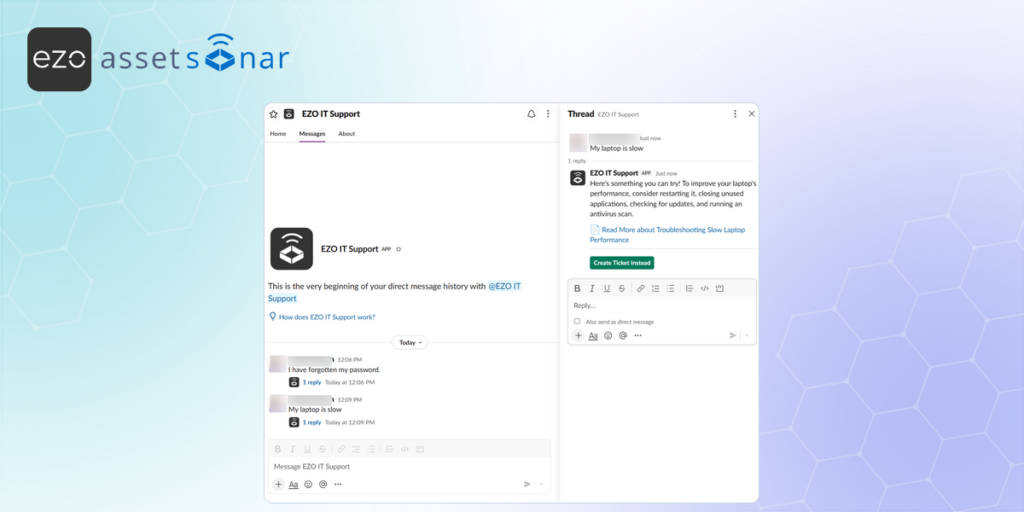
The Slack bot lets employees request support, receive ticket updates, and respond to IT directly from Slack.
This reduces the need to switch between tools and helps employees stay updated while agents continue managing tickets in AssetSonar ITSM.
How It Works
Once the Slack integration is set up, employees can search for the EZO IT Support bot in Slack and send it a direct message explaining their issue.
Based on the user’s request, the bot can surface relevant knowledge base articles or provide the correct form to submit a ticket. The bot respects AssetSonar permissions, so users only see the forms and KB articles they are allowed to access.
After a ticket is created, the user receives ticket updates, and the agent replies in Slack. The user can reply from the Slack conversation, and the response is added back to the ticket in AssetSonar ITSM.
When an agent proposes a solution, the user receives response options such as:
- Solution works
- Solution doesn’t work
If the user confirms that the solution works, AssetSonar can close the ticket and send a satisfaction survey through Slack.
Next Steps
Open Slack, send a direct message to the AssetSonar IT Support bot with a test issue, and confirm that the bot shows the correct form or KB article based on your permissions.

![[ITSM | How-to] Setting Up the Slack Integration in AssetSonar](https://cdn.ezo.io/wp-content/uploads/2026/05/18074314/Setting-Up-the-Slack-Integration-in-AssetSonar.png)
![[ITSM | How-to] Using the MS Teams Bot for IT Support in AssetSonar](https://cdn.ezo.io/wp-content/uploads/2026/03/18092656/microsoft_teams_message_assetsonar_banner.png)




