If you run a heavy equipment rental business, you already know the workflow doesn’t start when the excavator leaves the yard and ends when it comes back. There’s a whole chain of steps before, during, and after that rental. Quotes going back and forth, availability checks, inspection records, dispatch coordination, extensions that nobody remembered to bill, and returns with damage that nobody documented.
And if any one of those steps lives in a spreadsheet, a legacy system, a text thread, or someone’s memory, you’re already carrying more risk than you need to.
That’s the reality for many heavy equipment rental operations today. The individual steps aren’t complicated on their own; it’s the handoffs between them that break down. A quote doesn’t connect to a reservation. A dispatch doesn’t have a photo record. A return doesn’t automatically trigger an invoice. Finance is reconciling things manually because operations ran in a different system. The workflow exists, but it isn’t connected.
This is what a modern heavy equipment rental workflow is designed to fix. Not by adding more complexity, but by connecting every stage, from the first quote to the final return. So, your team always knows what’s available, what’s going out, its condition, and what needs to be billed.
In this article, we’ll walk you through each stage of that workflow and show you exactly how EZRentOut supports it, so you can see what connected rental operations actually look like in practice.
Why the rental workflow is more complex than it looks
Renting out a camera or a folding table is straightforward. Someone books it, picks it up, and brings it back. If something goes wrong, the stakes are manageable.
Heavy equipment rentals don’t work like that.
When you’re moving excavators, aerial lifts, skid steers, or compactors, the operating surface area is completely different, and the cost of a dropped ball at any point in the process isn’t just an inconvenience. It shows up in real money, real disputes, and real downtime.
Here’s what makes the heavy equipment rental workflow genuinely more complex than most people account for.
1. Rentals don’t end when you expect them to
In theory, a customer rents a telehandler for two weeks. In practice, the job runs long, they need it for another ten days, and your team finds out when the driver shows up to collect it, and it’s not there. Extensions happen constantly in construction, but if your workflow doesn’t have a clean way to handle them, you’re either letting equipment remain out unbilled or chasing the customer after the fact to settle the difference.
The same goes for partial returns. A customer rents four pieces of equipment, brings back two, and keeps the other two for another month. That sounds manageable until you’re trying to figure out which items came back, in what condition, and what the revised invoice should look like, without a system that tracks each asset individually through the full rental period.
2. The rental equipments themselves are high-stakes
A missed maintenance flag on a compact excavator isn’t just a scheduling problem; it’s a potential breakdown on a job site, a repair bill, a delayed project, and a customer who won’t rent from you again.
These are assets that can cost anywhere from $30,000 for a skid steer to over $500,000 for a large excavator or crane, and their condition directly affects your ability to rent them, your liability if something goes wrong, and your revenue when they’re sitting in the yard unready.
Damage disputes are equally high stakes. If a bulldozer goes out without a documented condition record and comes back with a hydraulic scratch, you have no ground to stand on. Without photo proof at dispatch and return, that cost is yours to absorb, and in a business where margins are tight and equipment is expensive, that adds up fast.
3. Your field and office teams are working from different information
Your dispatcher knows what’s scheduled. Your yard team knows what’s actually ready. Your field reps know what the customer just asked for on-site. And your office knows what’s been invoiced. The problem is that in most operations, none of these people are looking at the same system, which means decisions get made on stale information.
A field rep confirms availability based on what they remember from yesterday’s conversation. A coordinator double-books a compactor because the reservation wasn’t updated in the shared sheet. A yard crew prepares equipment for dispatch without knowing it’s flagged for a service. These aren’t failures of competence; they’re failures of visibility. When field and office workflows aren’t connected, the gaps fill in with guesswork.
4. Finance needs clean data, not a handoff project
At the end of a rental cycle, someone has to turn operational reality into accurate invoices and accounting records. If your rental system and your accounting system are separate, or if your rental system can’t cleanly account for extensions, damage charges, and partial returns, your finance team is spending hours reconciling what actually happened with what was originally billed.
That friction is why QuickBooks integration consistently shows up as a deciding factor for heavy equipment rental buyers evaluating software. It’s not a nice-to-have. It’s the difference between a workflow that closes cleanly and one that creates a manual reconciliation project at the end of every rental.
All of this is to say: a heavy equipment rental workflow has moving parts that a generic rental tool or a spreadsheet simply wasn’t built to handle.
7 stages of a typical heavy equipment rental workflow
The rest of this article walks through each stage of that workflow and shows you what it looks like when it actually works.
Stage 1: Quote and availability check
Every rental starts the same way. A customer calls, emails, or walks in to ask whether you have a certain piece of equipment available and what it will cost them. It’s a simple question on the surface. But behind it is a chain of checks your team has to run: Is the machine available on those dates? Is it already reserved for another job? Is it currently out for service? And what rate applies? Does this customer get a contract price, a weekly rate, or something negotiated?
In many rental operations, answering that question means opening a spreadsheet, checking a whiteboard, calling the yard, or waiting for someone who “knows the schedule” to get back to you. By the time you have an answer, the customer has already called someone else.
This is where a connected heavy equipment rental workflow changes things from the first touchpoint.
1.1 Instant availability visibility, without the back-and-forth
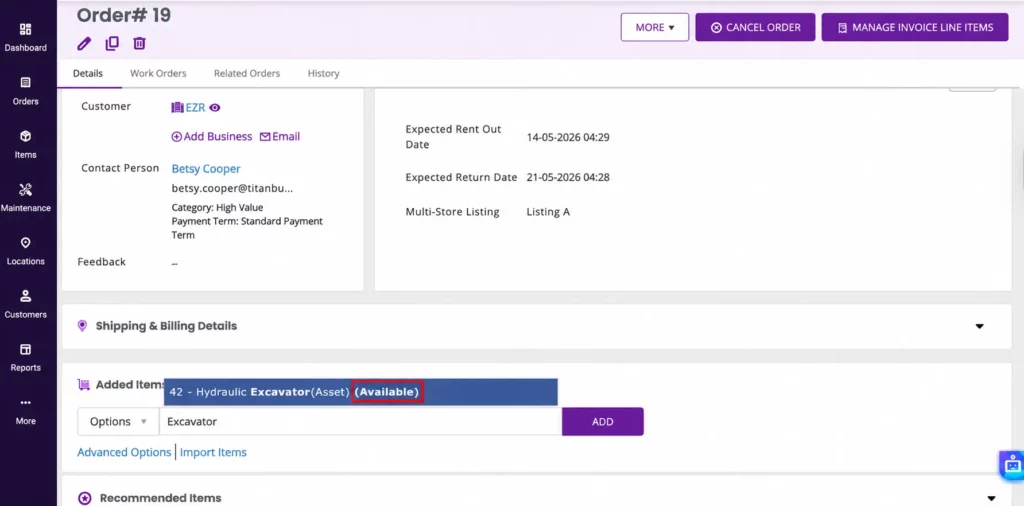
In EZRentOut, when an inquiry comes in, your team opens a new order, and the availability is right there, showing which assets are free, which are reserved, and what dates they’re tied up. There’s no cross-referencing a separate calendar or chasing down a colleague to confirm. If a customer needs a telehandler from the 15th through the end of the month, you can see in real time whether that’s possible and, if not, the next available window.
1.2 Building the quote in the same flow
From the same screen, you build the quote. Equipment is added to the order, and pricing rules apply automatically based on how you’ve set them up: daily, weekly, or monthly rates; customer-specific contracts; or custom pricing for long-term rentals. Your team isn’t manually calculating anything or pulling up a separate rate sheet. The quote comes together in the same flow as the availability check.
1.3 A quote your customer receives, and your team can stand behind
Once the quote is ready, it goes to the customer directly from EZRentOut, which means no copy-pasting into an email or reformatting in Word. The customer sees a clean, professional document, and your team has a record of exactly what was quoted, at what rate, for which pieces of equipment, on which dates.
This part matters more than it might seem. When a customer comes back two weeks later and says, “I thought the rate was different,” you’re not relying on memory or digging through email threads. The quote is in the system, attached to the order, and the conversation is already settled.
Stage 2: Reservation and order confirmation
A quote sitting in a customer’s inbox isn’t a booking. Until the order is confirmed, the equipment is technically still available, which means someone else on your team could quote it for the same dates, or worse, your customer assumes it’s held when it isn’t. The gap between “quote sent” and “reservation locked” is where double-bookings happen and where customer confidence starts to wobble.
The faster you can close that gap, the better for your rental operation and for the customer experience.
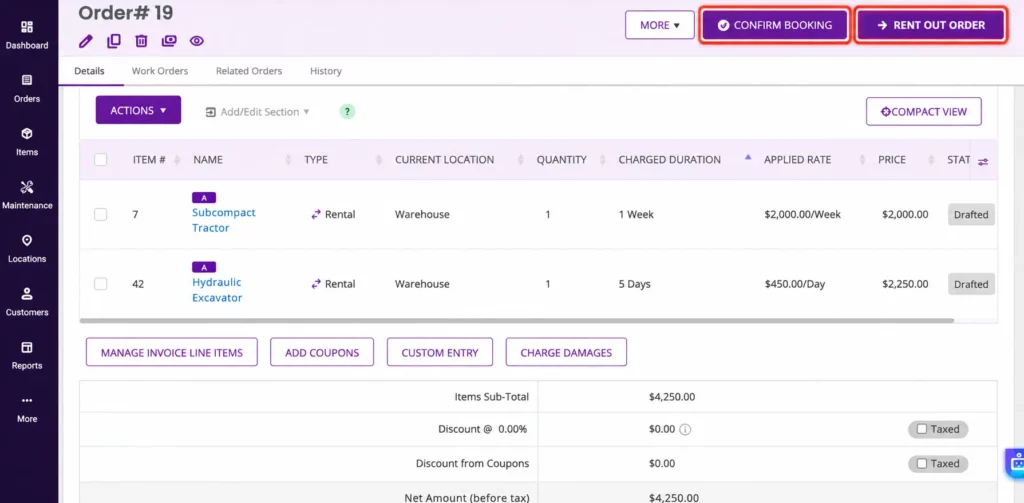
2.1 From quote to confirmed order in one step
In EZRentOut, once a customer approves a quote, converting it into a confirmed reservation doesn’t mean starting over in a different screen or re-entering information. The order is already built, the equipment, the dates, and the pricing, and confirming it locks the assets against those dates immediately. No one else on your team can accidentally quote the same excavator for the same window because the system already knows it’s taken.
This is a small thing that makes a significant operational difference, especially if you’re managing a large fleet across multiple job sites or running a team where several people are creating orders simultaneously.
2.2 Getting the paperwork to the customer without the friction
Once the order is confirmed, the customer needs documentation, an equipment rental agreement, terms and conditions, and any specific clauses that apply to the equipment or the job site. In many cases, this means someone manually drafting or pulling up a template, filling in the details, attaching it to an email, and hoping the customer signs and returns it before the dispatch date.
EZRentOut handles this through Printout Templates, fully configurable document templates that auto-populate with order, customer, and asset information already in the system. Depending on where you are in the rental workflow, the same feature powers your invoices, rental agreements, packing slips, delivery slips, acknowledgment forms, and even asset labels with QR codes or barcodes. Your team isn’t re-entering anything or reformatting a template every time. The right document is generated from the right order, consistently, every time.
You can also use the design labels to create asset labels that streamline internal communication with your yard team and external communication with your customers.
2.3 Capturing payment or deposit before anything leaves the yard
For high-value equipment rentals, taking a deposit at confirmation isn’t just good practice; it’s a safeguard. It filters out uncommitted bookings, gives you coverage if a rental goes sideways, and sets a professional tone with the customer from the start.
EZRentOut’s Stripe integration lets you capture a payment or deposit at the point of order confirmation, without your team having to chase it separately or handle it outside the system.
But it goes a step further than a simple deposit; you can also pre-authorize a payment amount upfront and hold it against the order. So, if you want to hold a $154 advance at confirmation and then charge the full rental amount of $429 when the rental closes, EZRentOut handles that in the same flow.
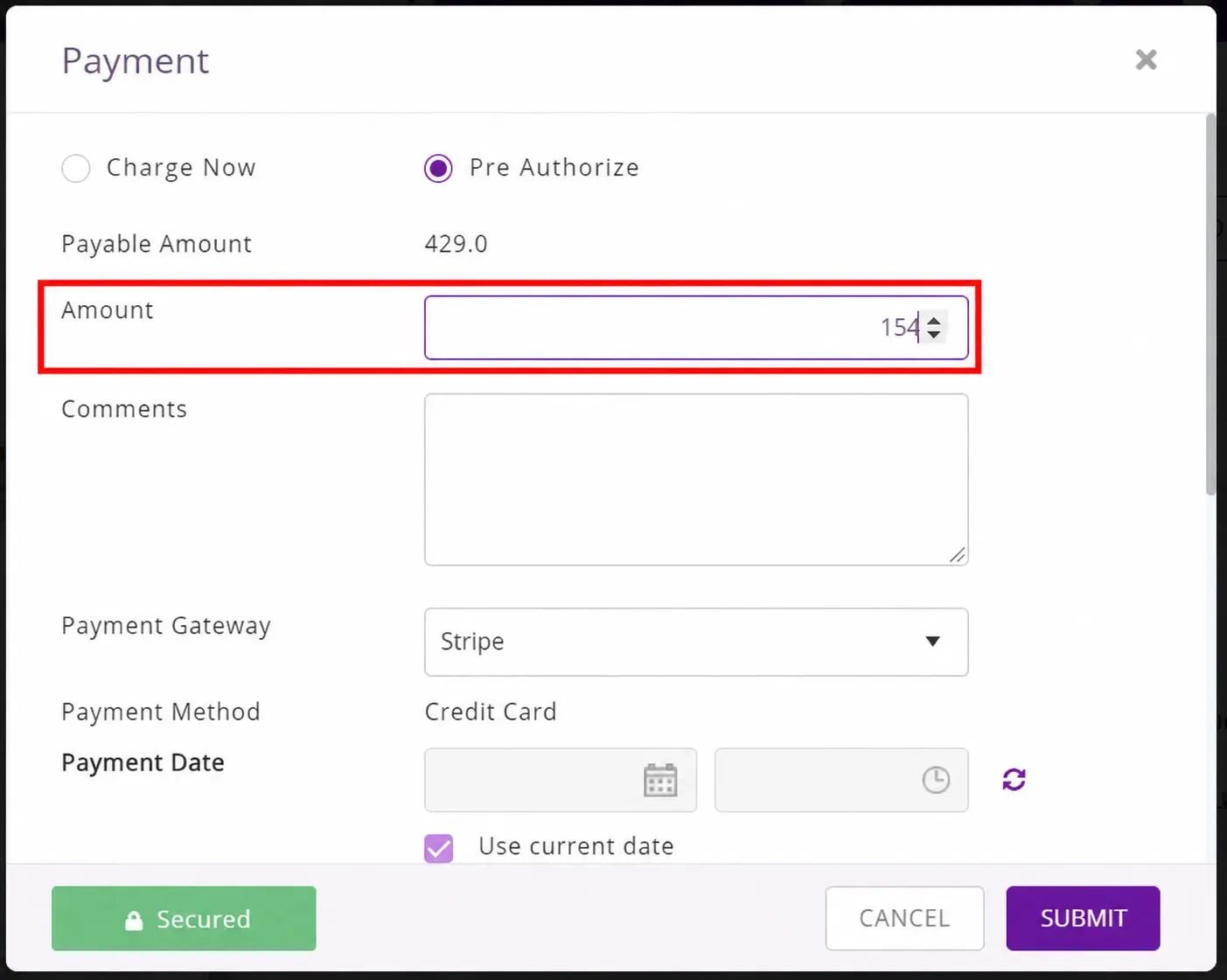
Either way, deposit or pre-authorization, the transaction is recorded against the order, so when it comes time to invoice at the end of the rental, finance already has a clear picture of what’s been collected, what’s been held, and what’s still outstanding. No chasing, no reconciling across separate systems.
By the time this stage is complete, the equipment is reserved, the customer has signed the documentation, and the amount has been deposited. Your team can move to dispatch preparation knowing the rental is solid, and not just verbally agreed upon.
Stage 3: Pre-dispatch inspection and readiness check
By the time an order is confirmed and a deposit is in hand, the temptation is to move straight to getting the equipment out the door. But what happens between confirmation and dispatch is just as important as everything that came before it, and skipping it is one of the most expensive mistakes a heavy equipment rental business can make.
If a machine leaves your yard without a documented condition record, you have no baseline to compare against when it comes back. That scratch on the boom, the cracked lens on the work light, the hydraulic scuff on the door panel, without proof of when it happened, the cost defaults to you.
3.1 Checklists that travel with the job, not the desk
EZRentOut lets you attach inspection checklists directly to an order, so your yard team can complete a structured condition check before anything is loaded for dispatch. These aren’t generic forms your team fills out on paper and files away somewhere; they’re tied to the specific order and the specific heavy equipment going out, and they live in the system where anyone with access can see them.
Critically, your field staff can complete these inspections from the EZRentOut mobile app. They don’t need to be at a desktop, they don’t need to print anything out, and they don’t need to call the office to confirm what needs to be checked. The checklist is on their phone, attached to the order, ready to go.
3.2 Photo documentation at the point of dispatch
A completed checklist tells you what was checked. A photo tells you what condition it was actually in. Both matter, and EZRentOut supports capturing photos directly against an asset at the point of dispatch again, from the mobile app, without needing to email images separately or store them in a folder that gets disconnected from the order record.
When a customer disputes damage on return, your team isn’t scrambling to find a photo someone took on their personal phone three weeks ago. The dispatch photos are attached to the order, timestamped, and ready to pull up in seconds.
3.3 Knowing the equipment is actually ready to go
Condition documentation is one side of pre-dispatch readiness. The other is maintenance visibility, knowing that the machine being loaded onto the truck isn’t flagged for a service that nobody has actioned yet.
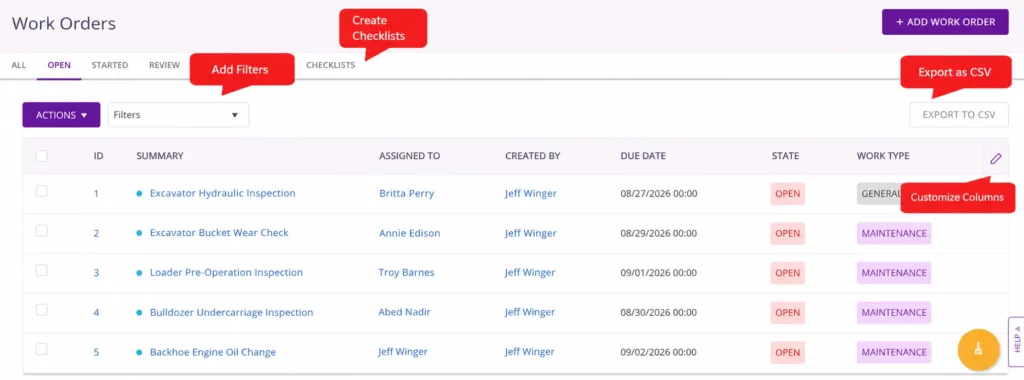
In EZRentOut, work orders are visible for assets, and they come in two types: general work orders for repairs or one-off tasks, and maintenance work orders for scheduled, recurring servicing. Before dispatch, your team can check both, confirming there are no open flags of either kind sitting against the equipment.
If a general repair hasn’t been signed off on, or a scheduled maintenance is overdue, that’s a conversation to have before the machine leaves, not after it breaks down on a job site two hours away.
Stage 4: Dispatch and delivery coordination
The inspection is done, the equipment is ready, and the order is confirmed. Now comes the part that’s deceptively simple on paper. Getting the right machine to the right job site, on the right date, with the right paperwork in hand. When it works, nobody notices. When it doesn’t, you’re fielding calls from a frustrated site manager while your driver is parked at the wrong address with a 10-ton excavator on the back of a trailer.
Dispatch coordination in heavy equipment rentals isn’t just a logistics problem. It’s an information problem. The people moving equipment need to know exactly what’s going out, where it’s going, what documentation travels with it, and what the customer has already agreed to.
When that information lives in a system your dispatch team can actually access, rather than in someone’s notebook or a chain of forwarded emails, the handoff gets much cleaner.
4.1 Dispatch workflows that keep everyone on the same page
In EZRentOut, orders move through defined statuses, from confirmed to out on rent. So, your dispatch team always knows what’s queued, what’s in progress, and what’s been delivered.
There’s no ambiguity about whether an order has been actioned or whether equipment has left the yard. The status is in the system, visible to everyone who needs to see it, updated as things move.
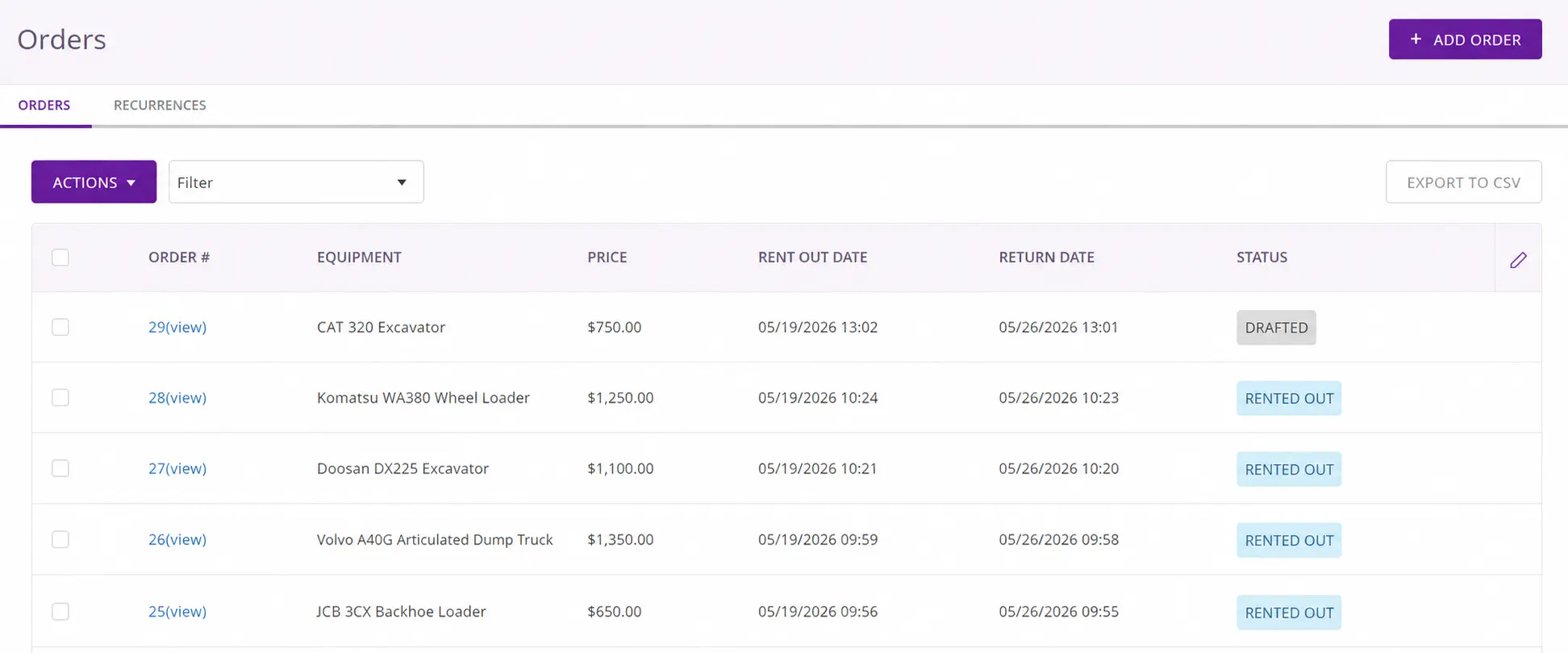
Delivery scheduling ties into this directly. Your team can schedule delivery against an order, so the logistics of when equipment moves and who moves it are connected to the order record, not managed separately in a calendar or a text thread.
4.2 Field reps who aren’t tethered to a desktop for managing rental orders
One of the more common friction points in heavy equipment rental workflows is what happens when a rep is on the road. A customer on-site wants to add a piece of equipment to an existing order, or a new inquiry comes in while the rep is at a job site, and suddenly they’re either turning it down or calling the office to have someone else create the order on their behalf.
With EZRentOut’s mobile app, your reps can create and update orders directly from the field. If a customer needs an additional compactor while the rep is on-site, the order goes in right there, availability is checked, equipment is added, and the order is created, without the rep needing to return to a desk or relay the request through someone else.
4.3 The right paperwork travels with the rental equipment
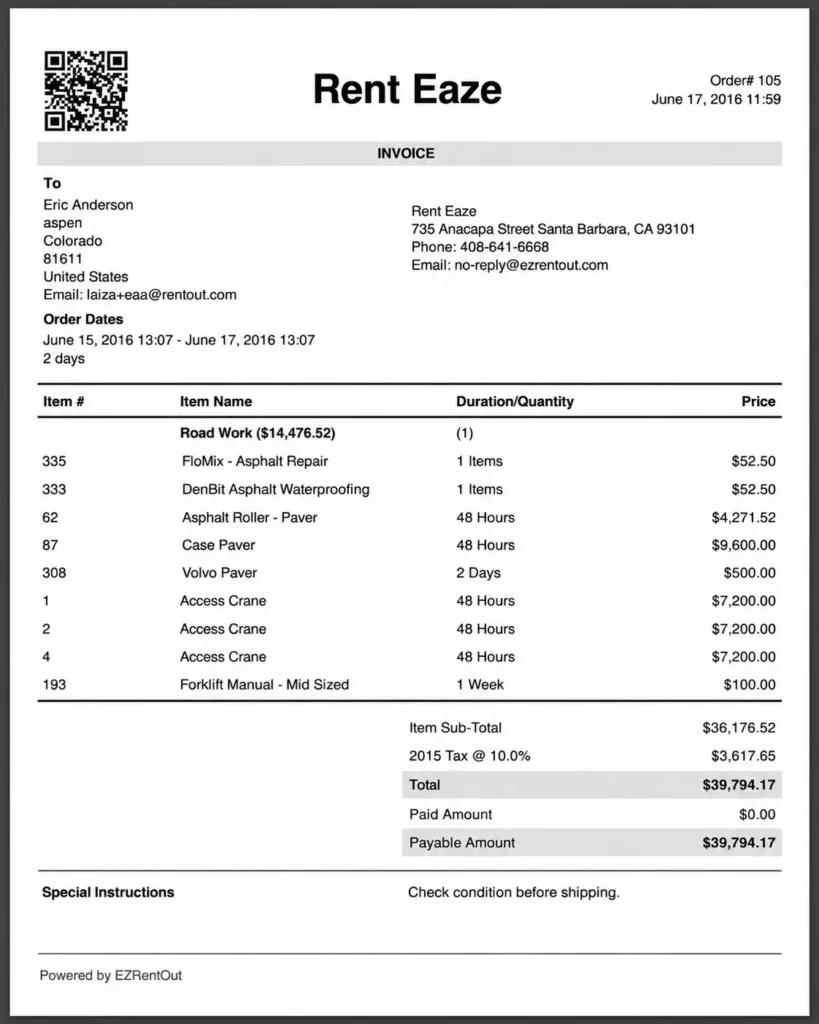
Dispatch isn’t complete until the customer has what they need on their end. Using the Printout Templates covered earlier, your team can generate delivery slips, packing slips, and invoices directly from the order before the truck leaves. So, the driver arrives with documentation that matches exactly what’s on the trailer, and the customer has a record of what they’ve received.
This closes a loop that catches many equipment rental operations off guard. When a customer later questions what was delivered or when it was delivered, the delivery slip, along with an invoice generated at dispatch, is the answer, and it’s already tied to the order in EZRentOut.
Stage 5: Active rental period and maintenance visibility
Once rental equipment leaves your yard, it’s easy to shift focus to the next order. But the active rental period is where a lot of operational problems quietly build up. A service interval that passes while the machine is on-site, a rental that runs two weeks longer than agreed, a booking coming up next month for equipment that will need service the moment it returns.
None of these are emergencies on their own, but left untracked, they stack up into scheduling conflicts, missed revenue, and equipment that isn’t ready when the next customer needs it.
A connected heavy equipment rental workflow doesn’t go quiet once the truck pulls away. It keeps giving your team visibility into what’s happening with every asset, even while it’s in the field.
5.1 Maintenance that doesn’t wait for the equipment to come back
Heavy equipment runs on schedules. Service every 250 hours, oil change every 3 months, and filter replacement at fixed intervals. Those intervals don’t pause because the machine is out on rent. If a service comes due while equipment is on a job site, you need to know about it before it becomes a breakdown, not after.
In EZRentOut, preventive maintenance can be scheduled by time or usage, and the system tracks how each piece of equipment compares to those thresholds, even during an active rental.
When a service interval approaches, your team gains visibility into it. So, you can plan around the return date, schedule the work order in advance, and ensure the equipment isn’t immediately sent out on another rental before the service is completed. This also helps ensure you manage your rental fleet intelligently without jeopardizing its integrity.
This is the difference between reactive maintenance and a maintenance schedule that actually holds up under the pressure of a busy rental fleet.
5.2 When the equipment rental runs longer than planned
Extensions are a normal part of heavy equipment rentals. Job timelines shift, projects run over, and customers need equipment longer than originally agreed. The operational risk isn’t the extension itself. It’s when the extension occurs informally, outside the system, and no one updates the order.
An undocumented extension means the equipment shows as available in your system when it isn’t. It means the next customer’s booking is at risk. And it means the additional rental days either get billed late or don’t get billed at all.
In EZRentOut, rental extensions are handled directly within the order. You can update the dates, and the revised pricing applies automatically, and the equipment stays marked as out on rent until the actual return date. Your availability is accurate, your billing reflects reality, and there’s no gap between what’s happening in the field and what your system shows.
Stage 6: Return, condition check, and damage documentation
The equipment is back. For many rental operations, this is where the exhale happens. The rental is done, the equipment is in the yard, and it’s time to move on. But the return is actually one of the highest-stakes moments in the entire heavy equipment rental workflow, and treating it as a formality is where revenue leaks.
This is the stage where damage disputes surface, where unbilled charges get missed, and where the difference between a well-documented rental and a poorly documented one becomes very real, very quickly.
6.1 The return inspection isn’t a formality
When equipment comes back, it needs to go through the same structured condition check it went through at dispatch. Not a quick visual once-over, but a documented inspection tied to the order.
In EZRentOut, return inspection checklists work the same way as dispatch checklists: they’re attached to the order, completed item by item, and recorded in the system against the asset.
What makes the return inspection meaningful, though, is what it’s being compared against. Because the dispatch condition was documented in Stage 3, the checklist was completed, photos were captured, and everything was tied to the order; your team now has a clear baseline to work from. The return inspection isn’t happening in a vacuum. It’s happening against a record.
6.2 Dispatch photos versus return photos, side by side
The photo record captured at dispatch becomes your strongest asset upon return. If there’s a discrepancy between the condition the equipment left in and the condition it came back in, the photos tell the story without ambiguity.
In EZRentOut, return photos are captured against the same equipment record as the dispatch photos, so your team can compare the two directly. That comparison is what turns a potential dispute into a documented case. Instead of a back-and-forth with a customer about whether a dent was pre-existing, you have timestamped photos from both ends of the rental attached to the same order.
This is the kind of documentation that settles conversations quickly and, in most cases, prevents them from becoming disputes at all.
6.3 Turning damage into a charge without breaking the billing flow
Identifying damage is one thing. Getting it billed correctly is another. In operations where damage documentation and invoicing live in separate systems or worse, where damage charges get added manually to an invoice later, things fall through the cracks. The charge doesn’t appear on the invoice; the customer has already paid, and the conversation becomes uncomfortable.
In EZRentOut, damage charges for line items are created directly within the order at the point of return. If the inspection surfaces a condition that warrants a charge, your team adds it then and there, tied to the order, reflected in the invoice, with the photo documentation sitting right alongside it.
Finance sees a complete picture when the order closes, not a set of notes from the yard team that needs to be manually translated into a line item.
When done well, the return stage closes the loop on everything that was set up at dispatch. The condition record is complete, the photos are compared, any additional charges are captured, and the order is ready to proceed to final invoicing with nothing unresolved.
Stage 7: Invoicing and QuickBooks handoff
Every stage up to this point has been building toward one thing: a clean, accurate financial close. The equipment is back, the condition is documented, and the damage charges are captured. Now the rental needs to turn into an invoice that reflects everything that actually happened, not just what was originally quoted.
This is where many heavy equipment rental operations quietly lose money. Not through bad intent, but through the gap between what happened operationally and what makes it onto the invoice.
7.1 An invoice that reflects the rental as it actually happened
A rental that started as a two-week booking for three pieces of equipment might have ended as a five-week booking for two pieces, with a damage charge on one and a partial return on another. If your invoicing is based on the original quote rather than the actual rental record, the difference between those two things is revenue you’re leaving on the table.
In EZRentOut, the invoice is generated from the live order, so any changes made during the rental cycle are already reflected in it. Extensions updated the order in Stage 5. Damage charges were added at return in Stage 6. Partial returns are accounted for.
Your team isn’t reconstructing what happened from memory or cross-referencing notes from three different places. The order is the record, and the invoice follows directly from it.
7.2 Closing the books without a manual reconciliation exercise
Generating an accurate invoice is one thing. Getting that data into your accounting system without someone manually re-entering it is where a lot of equipment rental operations hit a wall.
If your rental software and QuickBooks aren’t connected, your finance team is doing a reconciliation exercise at the end of every rental cycle, comparing what the rental system shows against what’s in the books, correcting discrepancies, and tracking down charges that didn’t make it across. Multiply that across a fleet of dozens of equipment running concurrent rentals, and it becomes a significant drain on time that should be going elsewhere.
EZRentOut’s QuickBooks integration pushes invoice data directly into QuickBooks once an order closes. Customers, line items, amounts, and payment records are included. Finance gets clean, complete data without a manual import, and the two systems stay in sync without your team acting as the bridge between them.
For heavy equipment rental businesses where QuickBooks is already the accounting backbone, this isn’t a nice-to-have. It’s the handoff that makes the entire workflow close cleanly.
7.3 What a fully closed order looks like
When an order closes in EZRentOut, it’s done in every financial sense. The invoice reflects the complete rental record. The payment, including any deposit or pre-authorized amount captured at confirmation, is reconciled against the total. QuickBooks has what it needs. And the equipment is back in your available inventory, ready to be quoted for the next job with no outstanding items carrying forward.
That’s the financial close a modern heavy equipment rental workflow should deliver every time, not as an exception, but as the default.
What breaks when the equipment rental workflow isn’t connected
Understand the seven stages highlighted above in detail and imagine each one running in a different tool or no tool at all. Quotes in email. Availability on a whiteboard. Inspection photos in a WhatsApp group. Extensions handled over the phone. Invoices being created manually in Excel. QuickBooks updated whenever someone gets around to it.
Chances are, at least one of those sounds familiar. And the cost isn’t always visible as a single line item. It shows up distributed across the business, in ways that are easy to attribute to bad luck or human error rather than a broken workflow.
Here’s what that actually looks like in practice.
- Double-bookings that shouldn’t happen: When availability lives outside the system that manages your orders, someone will eventually confirm the same piece of equipment for two different customers on overlapping dates. It’s not a question of if; it’s a question of when, and which customer you’re calling to apologize to.
- Extensions that never get billed: A customer keeps a compactor for an extra three weeks. Everyone knows about it. Nobody updates the order. The invoice goes out based on the original dates, and three weeks of rental revenue disappear, not stolen, just never captured because there was no single place where the extension and the billing were connected.
- Damage disputes with no ground to stand on: Without documented dispatch conditions and photo evidence tied to the order, every damage conversation becomes a negotiation. Some customers will pay. Many won’t. And your team has no leverage either way because the proof simply doesn’t exist.
- Finance reconciling what operations never recorded: When equipment rental software and financial workflows are two separate worlds, the gap between them becomes a recurring manual project. Someone is always translating operational reality into financial records, and in that translation, things get missed, delayed, or entered incorrectly. The downstream effect shows up in your books, your cash flow, and the hours your finance team spends fixing it.
- A team making decisions on stale information: When the field and office aren’t looking at the same system, decisions get made on whatever information someone happens to have at that moment. A rep confirms availability based on yesterday’s schedule. A coordinator dispatches equipment that’s flagged for service. A yard team prepares the wrong equipment because the order wasn’t updated after a customer change. None of these is catastrophic in isolation, but together, they’re the operational drag that keeps an equipment rental business from scaling.
The pattern across all of these is the same: a workflow that exists in pieces, with gaps between stages that must be filled manually, from memory, or not at all. A connected heavy equipment rental workflow doesn’t eliminate complexity, but it does eliminate the gaps. And that’s where the real operational difference lives.
The workflow is the business
Every stage in this article is something your team is already doing: quoting, reserving, inspecting, dispatching, maintaining, returning, and invoicing. The question was never whether these steps exist. It’s whether they’re connected.
When they are, the right information reaches the right person at the right time. Rentals close cleanly. Revenue doesn’t slip through the cracks. And your team spends their energy on the work, not on filling the gaps between tools.
That’s what a modern heavy equipment rental workflow actually delivers, not just a better process, but a better business. EZRentOut is built to make that connection happen, from the first quote to the final return.