
You already know your equipment rental team training needs work. The problem isn’t motivation; it’s time. Equipment is going out, orders are stacking up, and pulling someone off the floor for a training session feels like a trade-off you can’t afford. So training gets pushed back, squeezed into onboarding week, or handed off as “just figure it out as you go.”
And then the problems show up. A coordinator books equipment that’s already out. A yard tech sends a unit out without running through the inspection checklist. A return is logged incorrectly, and the next customer receives a callback they shouldn’t. A charge gets missed because nobody can find it in the system. None of these are careless mistakes; they’re gaps in how your team was trained on the software your operation is already running.
In a construction or heavy equipment rental operation, the cost of an undertrained team isn’t abstract. It shows up in double bookings, damaged equipment without photo proof, QuickBooks invoices that don’t match what actually went out, and a customer who gets told equipment is available when it isn’t.
The good news is that effective rental team training doesn’t require a dedicated week, a thick manual, or pulling your best people out of rotation. It requires building training into how the work already happens, so your team gets confident in the system you’ve already invested in, without burning hours to get there.
That’s what this guide covers.
Why rental team training breaks down in the first place
In most equipment rental operations, training isn’t deprioritized on purpose. It gets squeezed out by the day-to-day reality of keeping equipment moving and orders closed. And because the software is already in place and the team is technically using it, it’s easy to assume training is done, until the gaps start showing up in the work.
The breakdown usually comes from one of three places.
- It happens once and never again. Training gets treated as an onboarding event. A walk-through in the first week, a few pointers from a senior staff member, and then the new hire is on their own. There’s no reinforcement when processes change and no structured way to bring someone back up to speed. The result is a team where everyone has a slightly different idea of how the system should be used.
- It’s too generic to apply to real workflows. Staff learn how to navigate the rental management software, but not why each step matters in context. When training isn’t connected to real scenarios, a disputed damage charge, a last-minute extension, or equipment returning from a long job, it doesn’t stick because it doesn’t feel relevant to what they’re actually doing every day.
- It relies on documentation nobody reads. Written SOPs have their place, but they’re passive. In a busy equipment rental operation, staff move fast and make decisions in real time. A PDF in a shared folder isn’t going to help a coordinator juggling three orders who needs to remember the correct return process right now.
The compounding problem is that these gaps stay invisible until something goes wrong. By the time a pattern of errors is obvious, recurring double-bookings, missed charges, and equipment going out without inspection, the team has already built habits around the wrong way of doing things, and correcting that takes far more effort than getting it right from the start.
6 ways to build equipment rental team training that actually sticks
The following approaches are built around one core idea: training works best when it’s embedded in the workflows your team is already running, not layered on top of them as a separate activity.
Each one is practical enough to implement without pulling people off the floor for long stretches, and specific enough to make a real difference in how consistently your team uses the system.
1. Start with the roles that have the highest operational impact
Not every team member needs the same depth of training, and trying to train everyone on everything at once is one of the fastest ways to overwhelm people and have nothing land. A smarter starting point is to map your team’s roles to the moments in the rental lifecycle where a mistake costs the most.
In a construction or heavy equipment rental operation, those high-impact roles typically look like this:
- Rental coordinators manage availability, create orders, handle extensions, and communicate with customers. If they’re unclear on how the system tracks equipment status or logs order changes, the downstream effects touch billing, dispatch, and customer experience all at once.
- Yard techs are the last line of defense before equipment leaves the lot. Their training needs to cover pre-rental inspection workflows, how to log condition notes, and what the handoff process looks like in the equipment rental management system, because if that step is skipped or done incorrectly, damage disputes and readiness issues follow.
- Field reps need to be confident in creating or updating orders from the field, capturing photos at dispatch and return, and knowing when to escalate a status change back to the office. If they’re working around the system instead of through it, you’re creating visibility gaps that affect everyone else.
- Operations leads need enough system fluency to catch errors before they compound, whether that’s an availability conflict, an open service item that got missed, or a billing discrepancy that needs to be corrected before it reaches your accounting system.
The goal of this mapping exercise isn’t to create a rigid training hierarchy. It’s to make sure your training effort is concentrated where workflow gaps cause the most operational damage, and that each person on your team knows exactly what confidence looks like in their specific role.
If you’re running EZRentOut, the Availability Calendar gives coordinators and operations leads a single view of what’s reserved, dispatched, and available, so training on availability management and on the system points to the same thing.
2. Build training around real workflows, not system features
The most common mistake in rental team training is treating the equipment rental management software walkthrough as the training itself. When staff learn to click through screens without understanding why each step exists, that knowledge doesn’t carry over to real situations, and the first time something slightly unfamiliar comes up, they’re guessing.
The more effective approach is to anchor training to the equipment rental management lifecycle your team already works through every day:
- Quote to reservation: Does your coordinator know how availability is tracked in the equipment rental system, and what happens to that availability the moment a reservation is confirmed? If not, the risk of overbooking starts here.
- Reservation to dispatch: Is your yard tech clear on what needs to be completed in the system before an order can move to dispatched status, such as inspection sign-off, condition notes, and photo capture? This is where unready equipment slips through.
- Dispatch to return: Does your field rep know how to log an extension, flag damage, or update an order status from the field? If they’re texting the office instead of updating the system, you have a visibility gap that affects availability, billing, and the next booking.
- Return to billing handoff: Is your coordinator confident closing out an order correctly so that charges reflect what actually happened, including extensions, partial returns, and damage notes, before it moves to your accounting system?
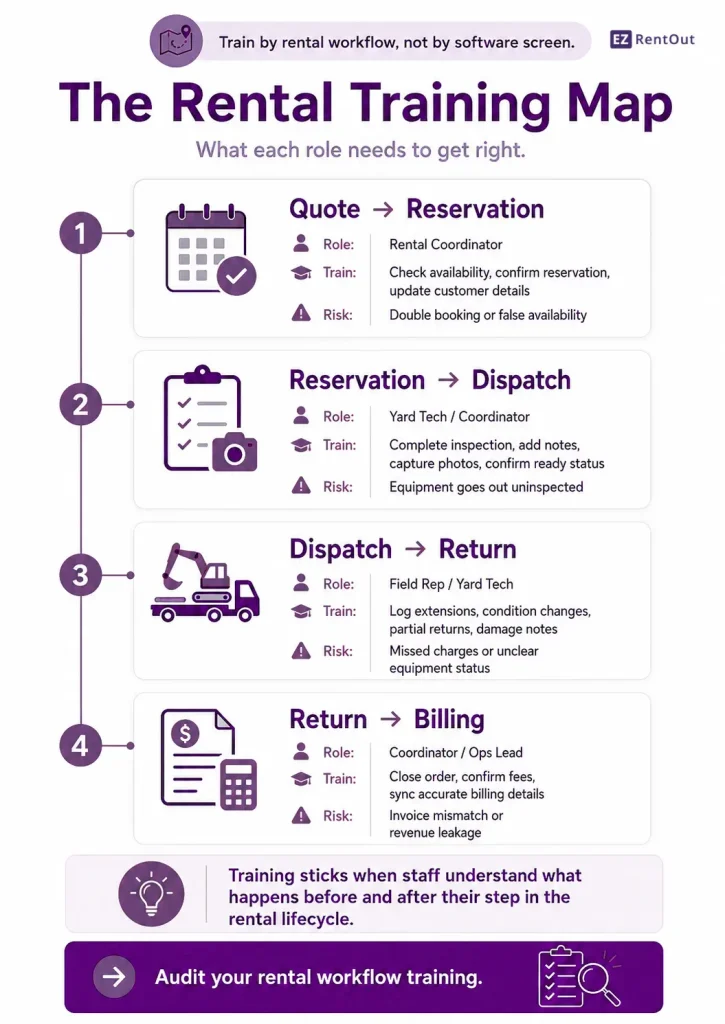
Training built around these stages gives staff a mental model that maps directly to the work. When something unexpected happens on a real order, they know which part of the equipment rental lifecycle they’re in and what the system expects from them at that point.
If you’re using EZRentOut, the order lifecycle maps directly to these stages, from reservation through dispatch to return and billing handoff, so training staff on the equipment rental workflow and training them on the system reinforce each other rather than pulling in different directions.
3. Use the software itself as the training environment
Documentation and slide decks have a role in onboarding, but they have a ceiling. At some point, the only way your team gets confident in the system is by using it on real work, and the sooner that happens, the faster the training sticks.
A few practical ways to make the equipment rental management software your primary training environment:
- Record short, role-specific walkthroughs of the tasks each team member will perform most often. A three-minute clip showing a coordinator how to handle a last-minute extension is more useful than a general system overview, and it’s something they can come back to without pulling a senior staff member away from their work.
- Shadow on live orders, not test data. Test environments are useful for initial orientation, but they don’t replicate the pressure and variability of real orders. Pairing a new team member with an experienced one on actual work, with the explicit goal of observing how the system is used, not just how the job is done, closes the gap between knowing and doing faster.
- Build a small internal library of “how we do it here” clips. Every operation has nuances that generic training materials won’t cover, such as how you handle damage disputes, how extensions are approved, and what the return process looks like for long-term rentals. Capturing those specifics in short recordings creates a reference your team can use independently without escalating every question.
In EZRentOut, role-based access means new team members can be brought into live workflows from day one without exposure to parts of the system outside their remit, which keeps early training focused on the tasks that matter most to their role.
4. Make service and maintenance part of training from day one
In most rental operations, maintenance training gets treated as a separate track, something for the shop or the service team, not for coordinators and yard techs who are focused on getting orders out the door. That separation is where readiness problems start.
The reality in construction and heavy equipment rental is that the people closest to dispatch and return are often the first to notice a condition issue, a missed service interval, or a piece of equipment that isn’t ready to go back out. If they haven’t been trained on how to flag and log those issues in the system, the information doesn’t travel, and the next order goes out on equipment that should have been pulled for service.
Training your team on maintenance workflows alongside order workflows closes that gap. Specifically, that means:
- Yard techs and coordinators should know how to create a work request when equipment comes back with a condition issue, and understand the difference between logging a note and formally flagging something for service, because those two actions have different downstream effects on availability.
- Operations leads should be trained on how open service items affect the Availability Calendar, so they don’t commit equipment to an order with an unresolved maintenance flag.
- Field reps should know what to capture at return, like condition photos, damage notes, any operational issues flagged by the customer, and where that information needs to go in the system so the service team can act on it without chasing it down separately.
In EZRentOut, Service and Maintenance is built into the same system your team uses for order management, so a coordinator who flags a condition issue on return doesn’t need to switch tools or send a separate notification. The information is already where the service workflow starts.
5. Reinforce rental team training through visibility, not supervision
The instinct when training isn’t sticking is to add more oversight, more check-ins, more sign-offs, and more managers reviewing work before it goes out. That approach doesn’t scale, and it creates a team that waits to be corrected rather than one that catches its own errors.
The more durable fix is giving your team the visibility to self-correct. When staff can see the direct consequence of how they use the rental management system, an order logged incorrectly showing a false availability in the Availability Calendar, a return closed without condition notes, leaving the next coordinator with no damage record to reference, a service item left open holding equipment that’s needed for tomorrow’s dispatch, the feedback loop does the work that supervision can’t sustain.
Building this into your training means a few specific things:
- Show the downstream effect during onboarding, not just the step itself. When you’re training a coordinator on how to close out a return, don’t just show them the correct process; show them what the Availability Calendar looks like when it’s done wrong, and what that means for the next booking. That connection between action and consequence is what makes the training stick past the first week.
- Use real order history as a teaching tool. Past orders that went sideways, like a double booking, a missed charge, a damage dispute with no photo record, are more instructive than hypothetical scenarios. Walking a new team member through what actually happened and where the system breakdown occurred gives them a reference point they’ll remember.
- Make it normal to flag errors, not hide them. Teams that have been trained on visibility rather than supervision are more likely to surface a mistake early, before it compounds into a billing dispute or a customer complaint. That culture starts with how you frame training from day one.
In EZRentOut, service items, order status, and Asset Stock levels are all within the same system your team is already working in. So, the information needed to catch an error before it becomes a problem doesn’t require a separate report or a manager pulling data. It’s visible to the people doing the work, at the point where they can still do something about it.
6. Build a training structure that holds up as your operation grows
The approaches covered so far work for teams of five and fifty, but the way you organize and maintain them needs to change as your operation scales. What works as informal knowledge-sharing when everyone is in the same yard breaks down the moment you add a second location, a new fleet category, or a wave of seasonal hires.
The difference between equipment rental operations that maintain a well-trained team at scale and those that don’t usually comes down to whether training is treated as a one-time event or a process that updates when workflows do.
A few structural decisions make that difference concrete:
- Build role-specific onboarding checklists, not a single general one. A coordinator’s first two weeks should look different from a yard tech’s first two weeks. Not just in content, but in how competency is verified before they work independently. Each checklist should map directly to the equipment rental lifecycle stages most relevant to that role, with the system tasks that demonstrate confidence before the checklist closes.
- Tie refresher training to process changes, not the calendar. Quarterly training sessions that cover everything tend to cover nothing well. A more effective approach is to trigger a short, focused refresher whenever a workflow changes, such as a new order type, an updated return process, or a change in how damage is documented. So, the team is current on the specific thing that shifted, not sitting through a review of things they already know.
- Use customer-facing moments as natural training checkpoints. Dispatch, return, and inspection are the points in the equipment rental lifecycle where training gaps are most visible, and where a brief coaching moment lands most effectively. An ops lead who catches a yard tech skipping a condition photo at return and corrects it on the spot is doing more useful training work than a scheduled session could.
- Treat multi-location consistency as a training problem, not a management problem. When a second or third location starts developing its own informal way of doing things, like slightly different return processes, inconsistent damage documentation, and variable inspection standards. The answer isn’t more oversight from the top. It’s shared training materials, shared checklists, and a system that enforces the same workflow regardless of which location an order is processed at.
If you’re running EZRentOut across multiple locations, the same order workflow, Availability Calendar, and Services and Maintenance structure apply to all of them, so your training materials don’t need to be rebuilt for each site. The process your team learns at one location transfers directly to the next.
Conclusion
The gap between a team that uses your equipment rental software correctly and one that works around it almost never comes down to effort or attitude. It comes down to whether training was ever built around the way the work actually happens.
Get that right, role by role, lifecycle stage by lifecycle stage, and the software your team runs every day starts doing what it was built to do. Orders close cleanly. Equipment goes out ready. Charges don’t get missed. And when something does go wrong, your team has enough visibility to catch it before it becomes a customer problem.
That’s not a technology outcome. It’s a training one.