
An IT audit should not feel like a fire drill. But for many IT teams, it does, because the asset data auditors need is rarely stored in a single, clean, reliable place. It may exist across spreadsheets, SaaS tools, cloud systems, ticketing platforms, procurement records, and email threads.
That scattered data becomes harder to defend as IT environments grow across SaaS, cloud, mobile devices, and hybrid infrastructure. The issue is no longer just whether IT can track technology. It is whether the team can prove that every asset record is accurate, current, and ready for review.
This is where visibility becomes a real audit problem. Flexera’s 2025 State of ITAM Report found that complete visibility across the technology stack declined to 43%, down from 47% year over year.
To close that gap, this article breaks down the IT asset management software features that reduce audit stress by improving visibility, traceability, automation, and audit readiness.
What makes an ITAM feature audit-critical?
An ITAM feature is audit-critical when it helps IT prove what assets exist, where they are, who owns them, how they changed, and whether they meet internal or external requirements.
Not all features of IT asset management software provide the same audit value. Some features help with everyday tracking. Others directly support evidence collection, compliance checks, and audit response.
For audit readiness, the most useful ITAM features support three things:
| Audit-critical criterion | What it means | Why it matters during audits |
| Visibility | IT can see hardware, software, users, locations, ownership, and status in one place. | Auditors can validate whether the organization has a complete asset inventory. |
| Traceability | IT can prove the history of an asset from purchase to retirement. | Teams can show who used an asset, what changed, and when each action happened. |
| Automation | The system updates data, enforces workflows, and generates reports with less manual effort. | IT spends less time preparing evidence and less time fixing preventable data gaps. |
The goal is not to buy the longest feature list. The goal is to build an asset management process that keeps evidence ready before an audit request arrives.
Core IT asset management software features that reduce audit stress
The most important IT asset management software features for audit readiness are the ones that keep asset data complete, accurate, centralized, and reportable.
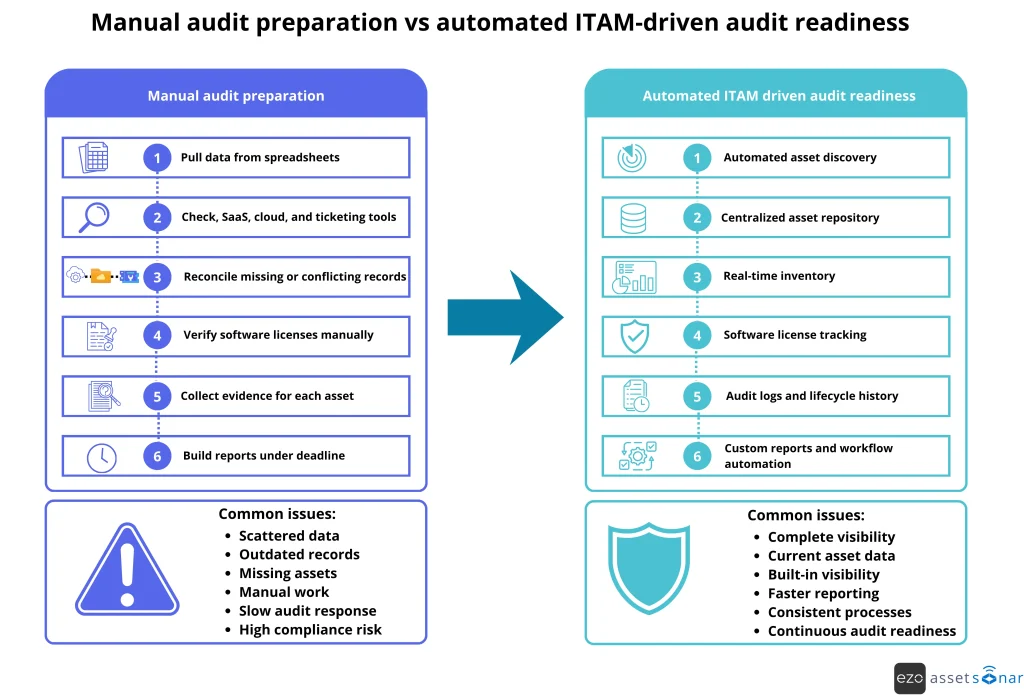
These features reduce audit preparation time by replacing manual inventory checks with automated discovery, standardized records, compliance tracking, and built-in evidence collection.
1. Automated asset discovery across hybrid environments
Automated asset discovery matters because IT teams cannot audit what they cannot see. It supports consistent asset identification by detecting devices, software, servers, virtual machines, and other connected assets. Moreover, teams are provided with a real-time view of devices, software, servers, virtual machines, and other connected assets across hybrid environments.
Without automated discovery, IT often depends on:
- Spreadsheets
- Purchase records
- Employee updates
- Manual device checks
- Department-level asset lists
That creates data siloes and gaps like devices moving between users, employees installing software, teams creating new cloud resources, and hardware being replaced. If these changes are not detected, IT may only learn of them when an auditor asks for proof.
A capable ITAM tool may support:
- Agent-based discovery for Windows, macOS, and Linux devices
- Network discovery for connected assets
- Cloud asset discovery
- Software discovery for installed applications and versions
An employee purchases a design tool with a corporate card and installs it before IT is notified. Automated discovery detects the application, logs it in the centralized repository, and gives IT a chance to validate licensing before the future software audit.
Audit impact: Automated discovery reduces the number of missing assets, shadow software, and manual inventory work. It helps the asset inventory reflect the current environment instead of a spreadsheet from the previous quarter.
2. Centralized asset repository (single source of truth)
A centralized asset repository is important because fragmented asset data is one of the biggest causes of audit confusion.
When hardware data lives in one spreadsheet, software licenses live in another, and user assignments are buried in tickets, IT cannot quickly produce consistent evidence.
A centralized repository acts as the single source of truth for IT asset data. It brings together:
- Hardware assets
- Software assets
- Users and departments
- Locations
- Purchase records
- Contracts and warranties
- Depreciation data
- Maintenance history
- Lifecycle status
For audit purposes, standardization matters as much as centralization. Every asset record should include consistent fields, such as asset name, serial number, assigned user, location, purchase date, warranty details, current status, lifecycle stage, and change history.
A centralized repository can also support CMDB relationships. For example, IT can connect a server to applications, users, tickets, contracts, services, and dependencies.
That context shows not only that an asset exists, but also how it supports the business.
During an internal compliance review, finance has one list of purchased laptops, IT has another list of deployed devices, and HR has a separate list of active employees. A centralized asset repository brings these records together so the team can confirm which laptops are assigned, which are in storage, and which need follow-up.
Audit impact: A centralized asset repository reduces conflicting records and makes audit responses more reliable. Instead of manually comparing multiple files, IT can answer asset questions from a single controlled database.
3. Real-time asset inventory (live data vs static reports)
Real-time asset inventory improves audit accuracy by maintaining up-to-date records of each asset’s status, owner, and location.
A static inventory can become outdated quickly. A laptop may move from storage to an employee. A server may be decommissioned. A software installation may be removed. If these changes are not reflected in the inventory, IT risks reporting inaccurate data.
Inventory keeps asset records updated through:
- Discovery scans
- System integrations
- Workflow triggers
- Status changes
- User or technician updates
For instance, a laptop can move from “In Stock” to “Deployed.” A returned device can be moved to “Under Maintenance.” A retired asset can be marked for secure disposal.
This gives IT a more reliable view of what exists now, not what existed when a spreadsheet was last updated.
An auditor asks for a current list of active laptops assigned to the sales department. Instead of checking a spreadsheet from the previous quarter, IT filters the live inventory by department, status, and location to produce an accurate list within minutes.
Audit impact: Real-time inventory reduces mismatches between reported data and actual asset status. It also helps IT respond faster when auditors request a current list of devices, users, software, or locations.
4. Software license tracking and compliance tracking
Software license management is high-risk because software audits can create direct financial exposure.
If an organization uses more software than it owns, it may face vendor true-up costs, penalties, or difficult contract negotiations. If it buys more licenses than it uses, it wastes budget.
License compliance is difficult to manage manually because software environments change constantly. Employees install applications. Departments buy licenses independently. Some users keep access after switching roles. Others stop using paid software, but the license remains assigned.
Effective software license management helps IT answer questions such as:
- How many licenses did we purchase?
- How many are deployed?
- Who has access?
- Which licenses are unused?
- Are we under-licensed or over-licensed?
- Which license renewals are coming up?
The value comes from connecting entitlements, deployments, usage, contracts, and renewals. Under-licensing creates audit risk. Over-licensing creates avoidable spend. Both problems come from poor visibility.
A department has 120 assigned licenses for a project management tool, but usage data shows only 78 employees have used it in the last 90 days. IT reclaims unused licenses, updates allocation records, and enters the next vendor audit with cleaner entitlement data.
Audit impact: Software license management reduces vendor audit risk, improves renewal planning, and helps IT prove compliance with fewer manual calculations.
5. Full asset lifecycle tracking
Full asset lifecycle tracking supports audit evidence by showing the complete journey of an asset from IT procurement to retirement.
Auditors often need to know more than where an asset is today. They may also need to know:
- When it was purchased
- Who approved it
- Who received it
- Who used it
- When it was transferred
- Whether it was repaired
- When it was returned
- How it was retired or disposed of
Lifecycle tracking is especially important for hardware assets because ownership and condition change over time. A device may be purchased for one department, assigned to one employee, transferred to another, repaired, returned to stock, and eventually retired.
Each step creates evidence.
A strong IT asset lifecycle process tracks requests and approvals, procurement, receipt, tagging, deployment, assignment, maintenance, transfer, return, retirement, and disposal. This helps finance validate depreciation, security confirm device wipe status, and compliance teams prove that assets assigned to former employees were recovered.
A laptop issued to a remote employee is returned during offboarding, reassigned after inspection, and retired two years later. Lifecycle tracking shows the purchase record, user assignments, repair history, return confirmation, and disposal status.
Audit impact: Full asset lifecycle tracking creates end-to-end traceability. It turns each asset record into a defensible history instead of a single inventory entry.
6. Audit logs and change history (built-in evidence system)
Audit logs and change history are essential because they prove who changed what, when the change happened, and what the asset record looked like before and after.
Auditors are not only checking whether the current data looks correct. They also want assurance that the data is controlled.
If anyone can edit asset records without a history, the system becomes less trustworthy.
Audit logs should capture actions such as:
- Asset creation
- Status changes
- Ownership updates
- Location changes
- Software assignment changes
- License allocation changes
- Contract updates
- Retirement actions
- User access changes
- Workflow approvals
A strong audit trail should be time-stamped, user-specific, searchable, and protected from unauthorized changes.
An auditor asks why a device was removed from active inventory. The audit log shows that the asset was returned, inspected, approved for retirement, wiped per policy, and marked as disposed of by an authorized administrator.
Audit impact: Audit logs reduce manual evidence collection and strengthen data integrity by showing that asset changes follow a traceable process.
7. Custom reports and one-click audit documentation
Custom reports and one-click documentation reduce audit work by turning structured asset data into ready-to-share evidence.
Instead of spending days compiling spreadsheets, IT can generate reports in response to auditor requests.
Audit reporting becomes painful when data must be pulled from several places. IT may need endpoint data, procurement records, license files, user lists, and support tickets, then merge them manually.
A configurable audit dashboard can provide reporting views for software records and physical assets, including:
- Active hardware assets by location
- Assets assigned to a department
- Devices without owners
- Software installations by application
- License compliance by the vendor
- Assets nearing warranty expiration
- Retired assets with disposal records
- Audit logs for a defined period
Custom reports are useful because auditors rarely ask questions in a generic format. One auditor may request a list by department. Another may want proof that the hardware has been retired. A software vendor may ask for installation counts by product version.
A compliance team asks IT for all devices assigned to contractors, including device type, owner, location, and return status. Instead of manually combining HR and IT data, the IT team runs a filtered report and exports the required documentation for review.
Audit impact: Custom reports reduce preparation time, improve response consistency, and make it easier to answer follow-up questions without having to rebuild evidence from scratch.
8. Workflow automation and policy enforcement
Workflow automation improves compliance by making required asset processes consistent.
Manual processes depend on people remembering every step. Automated workflows enforce the approvals, alerts, and status updates that keep asset data accurate.
In many organizations, audit gaps are not caused by a lack of policy. They are caused by inconsistent execution.
For example:
- A device policy may require every laptop to have an assigned user.
- A software policy may require manager approval before deployment.
- A return policy may require inspection before an asset is returned to stock.
- A disposal policy may require confirmation of wiping before retirement.
Workflow automation helps enforce these rules. A new device cannot be marked “Deployed” until an owner is assigned. A paid software request routes to the right manager. A device return creates an inspection task. A warranty expiration triggers a replacement alert.
When an employee submits a request for paid software, the workflow routes it to the manager for approval, checks available licenses, assigns the license after approval, and records the approval trail for future audits.
Audit impact: Workflow automation reduces human error, enforces policy consistency, and keeps audit evidence up to date as work progresses.
9. Role-based access control and ownership mapping
Role-based access control and ownership mapping help audits by clarifying two things: who is responsible for each asset, and who is allowed to change asset data.
Clear ownership improves accountability. Controlled access protects data integrity.
During audits, unclear ownership creates delays. If no one knows which team owns a server, who approved a software license, or which employee has a device, IT must spend time investigating instead of responding.
Ownership mapping connects assets to:
- Users
- Departments
- Locations
- Custodians
- Service owners
- Managers
- Cost centers
Role-based access control, or RBAC, ensures that users access only the data and functions relevant to their roles. An end user may see assigned assets. A technician may update operational fields. An IT administrator may manage global records.
An auditor flags a server that hosts sensitive customer data and asks who is responsible for it. Ownership mapping shows the business owner, technical owner, assigned administrator, and cost center, while RBAC ensures only authorized admins can modify that record.
Audit impact: RBAC protects asset data, while ownership mapping speeds up audit responses. Together, they improve accountability and reduce confusion during reviews.
10. ITAM and ITSM integration for contextual data
ITAM should integrate with ITSM and ticketing systems because asset data is more useful when connected to operational history.
Auditors often need context, not just inventory counts.
An asset may appear compliant in inventory, but its operational record may tell a deeper story. A server may have repeated incidents. A laptop may have multiple repair tickets. A software request may have required approval. A device may have been reassigned after an onboarding or offboarding request.
Integrated ITAM and ITSM workflows connect assets to:
- Incidents
- Service requests
- Change records
- Maintenance tasks
- Approvals
- Onboarding and offboarding workflows
- Access requests
- SLA history
This reduces duplicate work for technicians and helps auditors understand what happened around an asset.
A laptop fails a security check during an audit. Because the ITAM record is connected to the ticketing system, IT can show the related incident, remediation steps, technician notes, patch activity, and final resolution without searching across separate systems.
Audit impact: ITAM-based ITSM workflows improve traceability by linking asset records to support, change, and request history.
How these features work together to reduce audit stress
These features reduce audit stress by creating a connected audit-readiness system.
Each feature supports the next:
- Discovery finds assets.
- The repository standardizes records.
- Inventory keeps data current.
- Lifecycle tracking preserves history.
- Logs prove changes.
- Automation enforces policy.
- Reports turn the data into evidence.
The flow below shows how these features connect during an actual audit request, from asset validation to license verification, evidence collection, and final reporting.
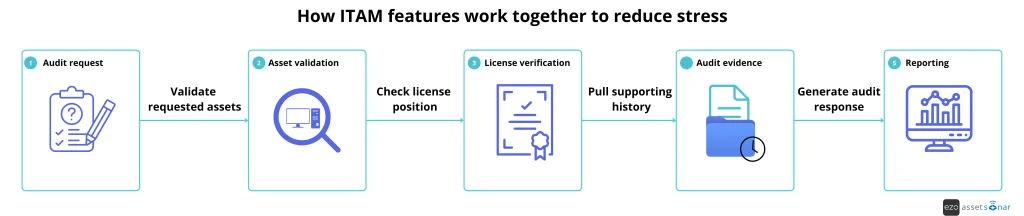
Consider a software audit request:
- The vendor asks for deployment and entitlement data.
- Automated discovery confirms where the software is installed.
- The centralized repository connects installations to users, devices, and departments.
- License management compares deployment counts with purchased entitlements.
- Audit logs show when licenses were assigned or removed.
- Custom reports package the evidence for review.
- Workflow automation helps remediate any compliance gap before the deadline.
A spreadsheet-driven process works differently. IT must request updates from teams, verify endpoint data, review invoices, compare license files, manually calculate usage, and ensure the final report is accurate.
That is where audit stress grows.
A mature ITAM system changes the operating model. Instead of preparing for audits only after receiving a notice, IT maintains audit-ready data as part of daily operations.
What should you look for when comparing ITAM tools for audit readiness?
When comparing ITAM tools, look beyond a long list of features. The right tool should help your team maintain accurate data, prove compliance, and respond to audit requests quickly.
| Capability | Basic IT asset tracking | Audit-ready ITAM |
| Discovery | Manual entry or periodic uploads | Automated discovery across devices, software, cloud, and network assets |
| Inventory | Static spreadsheets | Real-time asset inventory with live status updates |
| Repository | Separate files and tools | Centralized asset repository with standardized records |
| License management | Purchase tracking only | Entitlement, allocation, deployment, and usage tracking |
| Lifecycle tracking | Current status only | Full history from procurement to retirement |
| Audit evidence | Manual screenshots and exports | Built-in audit logs and change history |
| Reporting | Generic exports | Custom reports for audit, finance, compliance, and operations |
| Automation | Manual approvals and reminders | Policy-based workflows, alerts, and approval routing |
| Access control | Broad admin access | Role-based access control and ownership mapping |
| ITSM context | Separate ticketing data | Assets linked to incidents, requests, and changes |
This comparison helps IT leaders avoid buying a tool that only tracks assets at a surface level. For audit readiness, the platform must support evidence, accountability, and repeatable controls.
How does AssetSonar support audit readiness?
AssetSonar supports audit readiness by helping IT teams centralize asset records, automate inventory updates, track software license compliance, and maintain traceable asset history.
For enterprise and mid-market IT teams, the platform integrates hardware, software, patches, users, tickets, and lifecycle activities into a single system. This gives teams a more reliable way to answer audit questions without having to rebuild evidence from scratch.
AssetSonar supports audit-focused ITAM processes through capabilities such as:
- Unified visibility across hardware, software, and SaaS assets
- Automated asset discovery and inventory updates
- Real-time asset tracking for accurate audit responses
- Software license management and compliance tracking
- Asset lifecycle management from procurement to retirement
- Audit logs and change history for built-in evidence
- Workflow automation for standardized IT processes
- Role-based access control to protect asset data
- Integrations that connect asset records with service desk activity
This matters for organizations managing distributed employees, multiple office locations, hybrid infrastructure, and a growing mix of software tools. As the IT asset estate grows, manual tracking becomes harder to defend. A connected ITAM platform helps teams maintain cleaner compliance data across systems and respond to audits with less friction.
Instead of treating audits as one-time events, AssetSonar helps IT teams maintain audit readiness as part of everyday asset operations. Asset records stay current, evidence is captured as work happens, and reports can be generated when stakeholders need them.
Building an audit-ready ITAM process starts with the right features
The IT asset management software features that matter most for audit readiness are the ones that improve visibility, traceability, and automation.
Automated discovery, centralized repositories, real-time inventory, software license management, lifecycle tracking, audit logs, reporting, workflow automation, role-based access control, and ITSM workflows all support a stronger audit process.
For IT leaders, the key question is not “Do we have an asset list?”
The better question is: “Can we prove that our asset data is complete, current, controlled, and ready to share?”
The right ITAM system gives IT teams the structure to maintain accurate records every day, not just before an audit. That is what turns audit preparation from a last-minute scramble into a continuous, manageable process.