If you’ve been searching for equipment rental software, you’ve likely seen these three names in the same breath. They show up on the same shortlists, get recommended by the same peer networks, and often get compared side by side, but they’re not built on the same philosophy, and they’re not the right fit for the same business.
We’re not going to pretend one of these wins on every line item.
Point of Rental has four decades of market presence and is currently pursuing a fast-moving AI push. Texada has gone deeper into equipment servicing and damage documentation than most platforms bother to.
EZRentOut takes a leaner approach built specifically for mid-market-to-enterprise construction and heavy equipment operations, with QuickBooks-centric billing as one of its sharpest, most buyer-validated selling points.
Each of those choices comes with real tradeoffs, and if you ignore them, you end up implementing the wrong system.
Here’s an honest, no-spin look at where each platform actually stands.
At-a-Glance Feature Comparison: EZRentOut vs. Point of Rental vs. Texada
| Category | EZRentOut | Point of Rental | Texada |
| Best fit | Mid-market-to-enterprise construction and heavy equipment rental teams that want connected rental control without a heavy rollout | Rental businesses that need broad category coverage across tools, events, construction, sanitation, access equipment, and more | Heavy equipment dealers and service-heavy fleets that rent, sell, service, and manage serialized equipment |
| Core strength | Practical rental workflow control across availability, maintenance, billing, mobile updates, and QuickBooks | Breadth across rental categories, integrations, training resources, and AI-led business intelligence | Deep equipment servicing, OEM alignment, serialized asset history, parts/service workflows, and damage documentation |
| Rental workflow style | Leaner, operations-focused workflows built around the day-to-day rental loop | Broad, feature-rich workflows built for many rental business types | Equipment-first workflows built around large fleets, service, parts, and lifecycle tracking |
| Maintenance approach | Maintenance is tied directly to rental availability, so equipment due for service can be pulled from the rentable pool | Preventive maintenance, service history, and AI-driven flags for rising maintenance costs | Deeper service history, technician labor, warranty claims, parts, and AI-powered damage detection |
| Integrations | Strong QuickBooks focus, plus Xero, Sage, GPS/telematics, payment gateways, ecommerce, Zapier, and API options | Broad catalog across accounting, CRM, payments, scheduling, telematics, inspections, and automation | Strong OEM and equipment ecosystem fit, including Caterpillar, John Deere, Samsara, Trackunit, and bookkeeping tools |
| Reporting | Workflow-connected reporting for utilization, AR, service history, order activity, and asset performance | Strongest AI-led BI story with Rental Intelligence Suite, benchmarking, and decision support | Fleet performance and utilization analytics tied to equipment-heavy operations |
| Implementation fit | Best for teams that want faster adoption without needing a dedicated IT team | Best for teams that can support structured onboarding and broader rollout planning | Best for teams that value vendor partnership and can support customization and learning time |
| Pricing structure | Public pricing with Growth, Premium, and Enterprise paths | Tailored pricing based on features, users, industry, stage, and deployment needs | Quote-based pricing for equipment-heavy operations |
| Where it wins | When teams need connected rental execution, clearer billing handoffs, QuickBooks-centered workflows, and lower-friction adoption | When companies need rental breadth, third-party integrations, enterprise reporting, and AI-driven BI | When equipment servicing, OEM alignment, serialized asset depth, and damage accountability are central |
| Main tradeoff | Less dealer-grade OEM/service depth than Texada and less AI-BI depth than Point of Rental | Broader system can mean more rollout planning and day-to-day complexity | May be more platform depth than smaller or younger rental teams need |
Who is each platform actually built for?
Before we get into features, it helps to know who each vendor is really designing for. That alone rules out a lot of guesswork.
Point of Rental: the broadest option of the three
Since 1982, Point of Rental has grown to support thousands of rental businesses, like construction, tool rental, events, aerial and access equipment, portable sanitation, and more.
That breadth is a real strength if:
- Your business spans multiple rental categories, not just heavy equipment
- You want a vendor with deep bench strength across verticals
- You’re comfortable with a system that has to serve a lot of different workflows at once (which, as we’ll get into, shows up in onboarding and day-to-day complexity)
Texada: built for heavy equipment dealers and service-heavy fleets
Texada sits at the opposite end. With more than 40 years focused specifically on construction, material handling, mining, agriculture, and oil and gas, it’s designed for businesses that simultaneously sell, service, and rent large fleets of high-value equipment.
This is a strong fit if:
- You’re an equipment dealer as much as a rental house
- Your business has serious service and parts operations tied to your fleet
- You need OEM-level integration with brands like Caterpillar or John Deere
For a smaller or relatively new rental operation, that can be more platform than they actually need.
EZRentOut: leaner, and specifically focused on mid-market-to-enterprise construction and heavy equipment
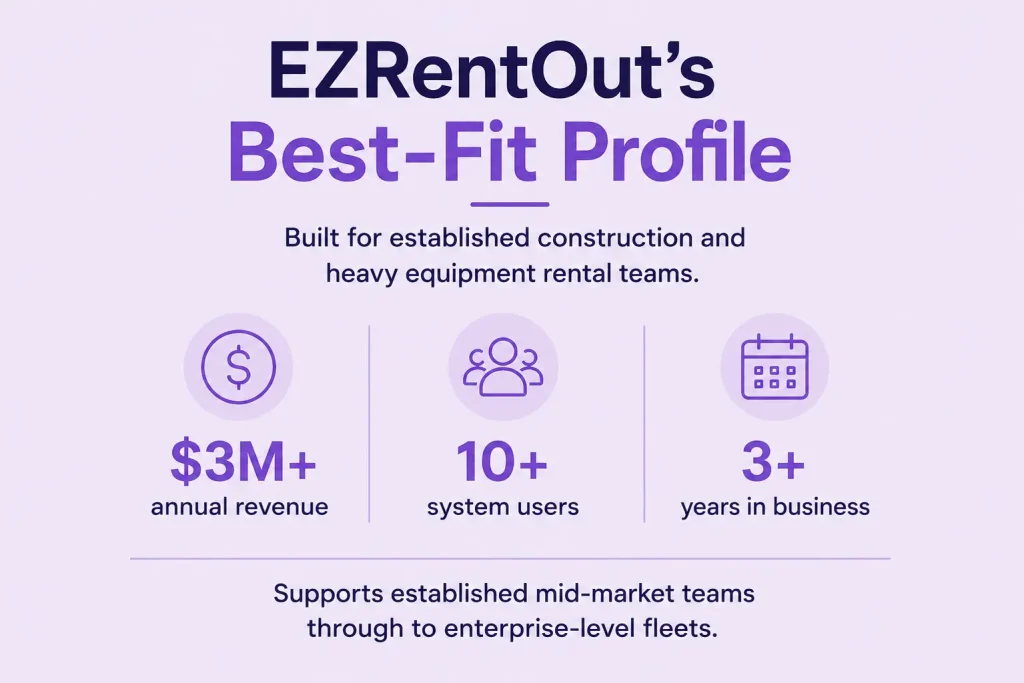
EZRentOut has deliberately narrowed its focus to construction and heavy equipment rental operations, generally businesses with:
- $3M+ in annual revenue
- 10+ system users
- 3+ years in business
That range isn’t a ceiling, either. EZRentOut serves this segment all the way from established mid-market operators up through enterprise-level fleets, rather than treating enterprise as an afterthought bolted onto a small-business product.
It’s a newer, leaner SaaS platform than either competitor. That’s an advantage if you find Point of Rental’s breadth or Texada’s dealer-grade depth heavier than you actually need. It also means EZRentOut has less operating history and less depth in areas like OEM-level service management or advanced AI/BI tooling, both of which its competitors have invested in for longer.
This narrower focus shows up clearly if you’re running an oil and gas fleet specifically. A frequent question from oil and gas buyers is which equipment rental software can handle the compliance and tracking demands unique to their fleets.
Texada’s OEM-dealer roots give it a natural edge here; Point of Rental’s broader industry coverage keeps it in the conversation too (just without oil-and-gas specialization), and EZRentOut is actively building this out as a named vertical rather than claiming it’s already there.
How do the day-to-day workflows actually compare?
All three cover the basics: reservations, contracts, availability tracking, returns, and billing. The real differences show up once you’re actually using the system every day.
Point of Rental’s workflow strengths (and where it gets complicated)
- Real-time inventory tracking and kit/package management
- Subrental handling with overbooking prevention
- Drag-and-drop scheduling interface
- A mobile app (POR One) for inspections, condition photos, and delivery route updates
Reviewers consistently point to functional depth here. Point of Rental is frequently described as more equipped to handle complex business structures than lighter competitors.
The tradeoff: many rental companies find the reports useful for daily decisions and profitability tracking, but some teams say custom report building is hard to learn, certain report formats need cleanup, and specific reporting gaps still require workarounds. (Capterra, Point of Rental Software profile)
Texada’s workflow strengths (and its own learning curve)
- Offline-capable mobile app so technicians can log job details, issue parts, and complete inspections without connectivity, syncing automatically once back online
- Drag-and-drop scheduling for pickups and returns
- Real-time updates to contract terms, equipment swaps, and pricing
The tradeoff, per user reviews: the interface can feel dated to new users, and there’s a real learning curve navigating what some describe as “too many tabs.” (Capterra, Texada Software reviews)
EZRentOut’s workflow strengths (and its honest limits)
EZRentOut leans toward simplicity without dropping the parts of the rental lifecycle that mid-market-to-enterprise buyers care about most, like connected tracking, dispatch, and returns that don’t require a specialized administrator to run. This maps directly to two of the most common things fleet managers ask when comparing asset tracking platforms:
- “What software provides real-time availability tracking to avoid double-booking?”
- “Which platform gives one operating view of what’s available, out, overdue, and in maintenance?”
EZRentOut is built to answer both of these well. Its Availability Calendar gives teams a live, visual view of what’s available, booked, or overdue across every location, so double-booking gets caught before it happens rather than after a customer shows up to an empty yard.
Layered on top of that is a maintenance lock-out: the moment an asset comes due for service, it’s automatically pulled from the rentable pool, no manual flagging required. That combination, real-time availability plus automatic maintenance blocking, is a practical advantage, since it removes the two most common ways equipment rental teams accidentally send out equipment they shouldn’t have.
Maintenance and equipment lifecycle for EZRentOut vs. Point of Rental vs. Texada
This is one of the more differentiated areas across the three, and each platform approaches it from a different angle.
Texada goes deep on service history and damage accountability
- Every maintenance activity, technician labor hour, warranty claim, and part replacement is linked directly to a serialized asset
- Recently launched AI-powered damage detection that analyzes check-out and check-in photos and flags new damage within minutes
If you’ve ever wondered which rental software can actually document equipment condition and charge customers for damage automatically, Texada currently has the clearest answer to that specific question.
Point of Rental leans on preventive scheduling and AI-driven flags
- Preventive maintenance scheduling, service history tracking, maintenance-focused reporting
- Its new Rental Intelligence Suite adds AI-driven flags for rising maintenance costs and underused equipment as part of nightly analysis
EZRentOut builds maintenance directly into the rental workflow itself
This is where EZRentOut’s approach is worth slowing down on, because the value isn’t just that maintenance tracking exists; it’s how tightly it’s wired into the rest of the rental cycle:
- Inspections and work orders are triggered directly off returns, so a piece of equipment coming back damaged or due for service doesn’t rely on someone remembering to flag it manually
- Rental Meter tracks equipment hours and mileage in the background, so instead of maintenance being based on a calendar guess, it’s triggered by actual usage, catching overuse before it turns into an expensive repair
- Once an asset is flagged for service, it’s automatically pulled from the rentable pool through the same availability lock covered earlier, so there’s no separate step where a coordinator has to remember to block it manually
EZRentOut hasn’t gone as far as Texada’s AI-based damage detection or the OEM-level, serialized service-history depth built for dealer-grade operations. Those remain strengths on Texada’s side of this comparison.
Integrations and ecosystem: Who connects to what
When you’re weighing these three platforms on integrations specifically, the differences aren’t really about how many logos each vendor can list; they’re about how deep each connection actually goes.
Point of Rental
- Integration breadth: Point of Rental offers a wide integration catalog across accounting, CRM, payments, scheduling, inspections, telematics, and automation.
- Best fit: It is a strong option for rental companies that want a rental platform to connect with several existing business systems instead of running operations in isolation.
- Key integrations: Its catalog includes Xero, QuickBooks, Sage Intacct, Sage 50, Google Calendar, Salesforce, Stripe, Trackunit, Record360, and Zapier.
- Operational value: These integrations can support finance handoffs, payment collection, customer workflows, equipment tracking, inspection records, and custom automations.
Texada
- OEM integrations: Texada stands out for direct API integrations with major equipment manufacturers, including Caterpillar and John Deere.
- Best fit: It is especially relevant for rental companies whose operations are closely tied to specific equipment brands or OEM ecosystems.
- Telematics relevance: Texada is a natural option for teams searching for rental software that integrates with systems such as Samsara, John Deere, or Trackunit telematics.
- Accounting connections: Texada also connects with QuickBooks and other bookkeeping tools, helping rental teams link operational activity with accounting workflows.
EZRentOut
- QuickBooks depth: EZRentOut’s integration story centers on QuickBooks because that is where many rental buyers feel the most accounting pain. Payments and invoices sync two-way between EZRentOut and QuickBooks, so reconciliation reflects what has happened across both systems rather than leaving finance to update records manually.
- Sync clarity: The two-way sync does not apply equally to every data type. Other records, such as customers and item details, follow defined sync workflows, with EZRentOut items mapping to QuickBooks as services rather than inventory. That distinction matters if your team expects a full bidirectional sync across every field.
- Accounting connections: Beyond QuickBooks, EZRentOut also supports accounting integrations such as Xero and Sage, giving rental companies more flexibility when finance teams are already committed to a specific accounting system.
- GPS and telematics: EZRentOut connects with GPS and telematics tools including Samsara, Hapn, John Deere, and Trackunit. It also supports custom GPS integrations through an open API, so teams can connect existing equipment location data without switching telematics providers.
- Payments and ecommerce: EZRentOut supports payment gateway and webstore integrations with Stripe, PayPal, Square, Braintree, Authorize.Net, Stripe Terminal, WordPress, and Magento. This helps rental teams connect online orders, payments, and customer-facing rental workflows.
- Automation and extensibility: EZRentOut also supports Zapier and a REST-based API, giving teams a way to connect selected business apps, automate updates, or build custom integrations when a direct native connector is not available.
- Best fit: EZRentOut is especially relevant for equipment rental teams seeking software that integrates with QuickBooks, supports multi-location or multi-state operations, and reduces manual reconciliation across rental activity, invoices, payments, and accounting records.
Reporting and business intelligence: What kind of insight do you actually need?
Rental reporting has moved beyond simple exports. Buyers are now asking harder questions: Which assets are underused? Which equipment costs too much to maintain? Which branches are outperforming others? Which machines are nearing replacement? Which items generate strong ROI, and which ones only look busy on paper?
The best reporting tool depends on the type of decision your team needs to make.
Point of Rental: Strongest for AI-led business intelligence
Point of Rental has made the biggest AI-forward move with its Rental Intelligence Suite. The suite is positioned as an AI-powered decision layer for rental businesses, using machine learning, natural language processing, benchmarking, and operational data to turn reports into recommendations. It is built to help leaders move from “what happened?” to “what should we do next?”
That matters if your team wants reporting that can surface underused equipment, rising maintenance costs, revenue trends, seasonal patterns, cross-store performance gaps, and aging assets that may be nearing the end of their useful life. Industry coverage also highlights AI insights, benchmarking across stores or regions, asset performance analytics, and fleet disposition planning as part of Point of Rental’s AI direction.
Best fit: Rental businesses that want an executive BI layer for fleet strategy, benchmarking, asset ROI, replacement planning, and proactive decision-making across multiple stores or regions.
Texada: Strong for fleet performance and utilization analytics
Texada’s reporting story is more fleet-performance oriented. Its platform emphasizes equipment rental management, fleet utilization, intelligent insights, and reducing downtime.
That makes Texada relevant for teams asking questions like: Which equipment categories are being used most? Where is downtime hurting utilization? Which assets should be redeployed? Which locations need better fleet balance? Texada is also a natural fit when analytics needs to connect with OEM, telematics, or brand-specific equipment ecosystems.
Best fit: Rental companies that want reporting tied to fleet performance, equipment utilization, downtime reduction, and operational visibility across heavy equipment categories.
EZRentOut: Strong for workflow-connected rental reporting
EZRentOut doesn’t attempt to match Point of Rental’s AI BI suite feature-for-feature. Its reporting value is different: it gives rental operation teams reporting that stays close to the rental workflows they run every day.
EZRentOut supports custom reports that teams can save and schedule, and item reports that help track utilization, events, quantities, and equipment performance details. That makes it useful for teams that need answers tied to active rental execution: what is available, what is rented out, what is overdue, what is under service, which assets are generating revenue, which orders are affecting AR, and where billing or maintenance follow-up is needed.
For many growing equipment rental teams, that is the more immediate reporting problem. They do not just need a dashboard for leadership. They need reports that help the counter, yard, service team, and finance team stay aligned on the same rental record.
Best fit: Heavy equipment rental teams that need practical reporting across utilization, AR, service history, order activity, asset performance, and billing follow-up without adding a separate BI layer.
Implementation, onboarding, and support: Match the rollout to the team you have
Implementation is where rental software comparisons get real. In any evaluation of all three solutions, the best platform is not only the one with the most features. It is the one your counter team, yard staff, service team, finance users, and managers can actually adopt without slowing down active rental work.
For buyers, the right questions are practical: How much data needs to be migrated? Who trains frontline users? How long before the team can quote, rent out, return, service, and invoice without help? What support channels are available after go-live? And does the system require a dedicated admin or IT team to keep workflows moving?
Point of Rental: Strong training infrastructure, heavier rollout expectations
Point of Rental has one of the more established training ecosystems in the category. Its customer training resources include product documentation, step-by-step instructions, tips, video walkthroughs, live and on-demand webinars, and product deep-dives.
That makes it a strong fit for rental companies that want structured training across roles and have the time to put teams through a more formal enablement process.
The tradeoff is not necessarily support quality; it is rollout scope. A broader rental platform often requires more planning around data migration, user roles, workflows, reporting, and branch-level processes before teams can use it confidently every day.
Best fit: Rental businesses that want a mature training model, can commit staff time to onboarding, and are prepared for a more structured implementation across departments.
Ask before buying:
- Who handles data migration?
- How much role-based training is included?
- What happens after go-live if users need help with billing, inventory, reports, or branch workflows?
Texada: Relationship-led support with a real learning curve
Texada’s support story is often relationship-driven. Customer-facing proof highlights responsive technical and support teams during implementation, and reviews commonly discuss support, integrations, training, and learning curve as key evaluation areas.
That makes Texada a strong option for teams that value vendor partnership, especially if the operation has a more complex fleet, OEM, telematics, or equipment-specific workflows.
The watchout is customization and learning time. Some users note that custom reports or development requests can take time, which matters if your team expects the system to match company-specific workflows quickly.
Best fit: Heavy equipment rental companies that want a strong vendor relationship and can support a learning curve while tailoring the platform to fleet, finance, or operational needs.
Ask before buying:
- Which customizations are included?
- Which require paid services or development time?
- How long does it take to train new counter, yard, service, and finance users?
EZRentOut: Lower-friction adoption for teams without extra IT bandwidth
EZRentOut’s implementation value is not about being the biggest training machine in the category. It is about reducing rollout risk for heavy equipment rental teams that need to move quickly and do not want software adoption to become a separate operations project.
EZRentOut doesn’t require an in-house developer to implement or maintain the system, as its Customer Success team helps you understand and implement workflows.
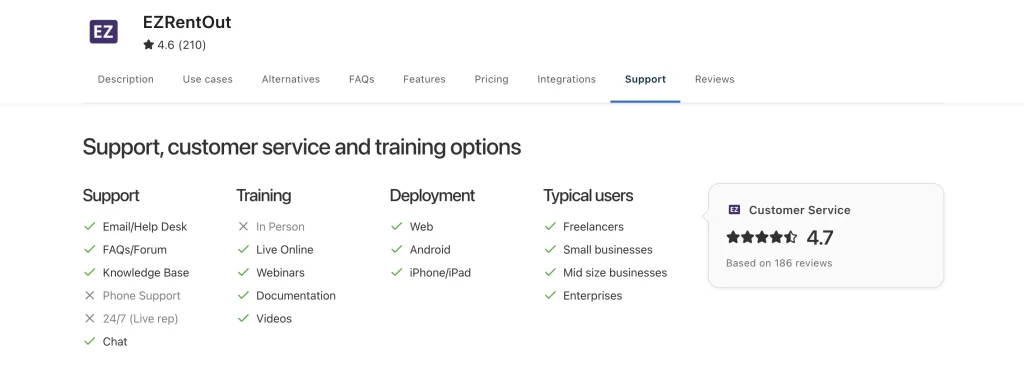
Capterra also lists EZRentOut support and training options across email/help desk, knowledge base, chat, live online training, webinars, documentation, and videos. As of early 2026, EZRentOut holds a 4.7 customer service rating on Capterra, ahead of Texada’s 4.5 and Point of Rental’s 4.1 on the same metric, per their respective Capterra profiles.
That matters for mid-market-to-enterprise heavy equipment rental businesses, where the same people often manage orders, equipment, billing, customer calls, and field coordination. The faster the team can adopt workflows for quoting, availability, returns, service updates, billing, and QuickBooks, the faster the software starts reducing manual follow-up.
Best fit: Rental operators that want guided setup, practical training, and faster adoption without needing a dedicated IT team or a long change-management program.
Ask before buying:
- What does onboarding include?
- Who helps configure rental workflows, item categories, rates, users, and QuickBooks?
- How quickly can the team process a real rental from quote to return to invoice?
Pricing and contract structure: Look past the sticker price
Pricing in heavy equipment rental software is rarely just about the monthly subscription. The real cost depends on the workflows you need live, the number of users and locations, implementation scope, accounting setup, integrations, reporting needs, and how much support your team needs after go-live.
Point of Rental: Tailored pricing for broader rollout needs
Point of Rental uses a tailored pricing model built around features, users, rental type, company stage, and deployment needs. That can work well for equipment rental companies that want a package shaped around a larger operation rather than a fixed, one-size-fits-all plan.
The tradeoff is that buyers need to enter the sales process before they can understand final cost. Teams should ask what is included in the base package, what counts as an add-on, how user and feature pricing works, and whether implementation, training, ecommerce, reporting, payments, integrations, and support are priced separately.
Best fit: Rental companies that want a configurable package and are prepared to evaluate total cost through a vendor-led pricing process.
Texada: Quote-based pricing for equipment-heavy operations
Texada’s pricing is also quote-led, which makes sense for a platform serving heavy equipment sales, rental, and service teams with deeper OEM, fleet, and operational requirements. Since pricing is not publicly listed, buyers should treat the demo process as a cost-discovery exercise, not just a feature walkthrough.
That means asking how the quote changes based on modules, users, branches, integrations, reporting, implementation, data migration, and customization. This is especially important for teams evaluating Texada for OEM integrations, telematics, service workflows, or multi-branch fleet visibility.
Best fit: Equipment rental companies that expect pricing to reflect a more tailored fleet, service, and integration footprint.
EZRentOut: Public pricing with an enterprise path
EZRentOut gives buyers more upfront pricing visibility. Its public pricing page lists Growth at $399/month, Premium at $499/month, and a custom Enterprise tier for larger heavy equipment rental companies that need multiple sites, custom integrations, GPS and telematics, item audits, and custom roles.
That structure makes the buying process clearer for growing rental businesses that want to estimate cost before a long sales cycle. It also signals where EZRentOut is positioned: not as the cheapest lightweight booking tool, but as a rental operations platform for teams that need availability, service, billing, mobile workflows, and accounting to work together.
Best fit: Mid-market-to-enterprise rental teams that want transparent starting prices, room to scale, and a clear path from core rental workflows to heavier multi-site operations.
What buyers should compare
Do not compare only the monthly price. Compare the total operating cost of each platform:
- Are implementation and onboarding included?
- How many users, locations, and roles are covered?
- Which integrations are included, and which cost extra?
- Are ecommerce, payments, reporting, mobile workflows, and accounting included in the plan?
- What happens to pricing as the business adds branches, equipment categories, or more advanced workflows?
- How much manual work remains in finance, service, and operations after the software goes live?
The strongest pricing choice is not always the lowest quote. It is the structure that matches the rental operation you are actually trying to run.
EZRentOut vs. Point of Rental vs. Texada: Where each platform wins
The right rental platform depends on the kind of operation you are trying to run. A dealer-grade equipment business, a multi-category rental company, and a growing heavy equipment rental team do not need the same software depth, rollout model, or integration strategy.
| Platform | Best-fit decision |
| Texada | Best when the decision centers on equipment servicing, OEM alignment, serialized asset depth, and damage documentation. |
| Point of Rental | Best when the business needs broad rental-category coverage, third-party integrations, enterprise reporting, and AI-driven BI. |
| EZRentOut | Best when heavy equipment rental teams need tighter availability control, connected readiness, cleaner billing, mobile field updates, and accounting workflows they can adopt quickly. |
Texada wins when equipment depth matters most
Texada is strongest for equipment businesses that need rental, sales, service, parts, and fleet workflows in one equipment-focused platform. It is a strong fit for organizations tied closely to heavy equipment brands, OEM ecosystems, or dealer-style operations where serialized assets, service history, parts, and equipment lifecycle visibility matter as much as the rental order itself.
Texada is also notable for OEM/API depth, with public listings referencing integrations with manufacturers such as Caterpillar, Bobcat, and John Deere.
It also stands out when damage documentation is a major revenue recovery issue. Texada’s AI Damage Detection is designed to help rental teams identify equipment damage during check-in and check-out, protect rental revenue, and provide clearer customer-facing proof at returns.
Point of Rental wins when breadth and BI matter most
Point of Rental is strongest when the business needs broad rental coverage across multiple rental categories, locations, departments, and third-party systems.
Its integration catalog is one of its biggest advantages, with support across accounting, CRM, payments, telematics, inspections, and other operational tools, including QuickBooks, Sage, Xero, Salesforce, Stripe, Trackunit, and Record360.
Point of Rental also has the clearest AI-led reporting story of the three right now. Its Rental Intelligence Suite is positioned as an AI-powered analytics layer that turns rental data into insights, identifies patterns, benchmarks performance, and guides next steps for owners, operations leaders, and finance teams.
EZRentOut wins when equipment rental control needs to stay practical
EZRentOut is strongest for growing heavy equipment rental teams that need the rental workflow to stay connected without turning software adoption into a larger enterprise project. It is built for teams that want availability, reservations, returns, maintenance, billing, mobile updates, and accounting handoffs to work from the same operational record.
Its clearest advantage is practical control: teams can keep equipment availability, readiness, customer activity, invoices, payments, and rental changes closer to the workflows people use every day. That matters when the buyer is not looking for dealer-grade ERP depth or the widest software ecosystem, but for a rental platform that helps the office, yard, service team, field crew, and finance team stay aligned.
QuickBooks is also a major part of the fit. EZRentOut’s QuickBooks integration is positioned around rental businesses that need to manage invoices, track payments, and reduce manual bookkeeping, with two-way sync for invoices and payments and related accounting workflows for rental transactions.
Final thoughts
A strong equipment rental platform should not force your team to choose between visibility and usability. The real test is whether the system helps people make faster decisions when the rental day gets messy: a machine comes back damaged, a customer extends a contract, a branch needs a transfer, finance needs the invoice cleaned up, or a manager wants to know whether an asset is still worth keeping.
That is where the comparison matters.
Do not evaluate software only by feature lists. Evaluate how each platform behaves when work changes after the order is created. That is the real difference in EZRentOut vs. Point of Rental vs. Texada.