
For most IT teams, the problem is not knowing how to fulfill common requests. The problem is that those requests often arrive without structure.
For small teams, this may feel manageable. But as the organization grows, scattered intake leads to delayed fulfillment, unclear ownership, missed approvals, limited SLA visibility, and inconsistent service delivery.
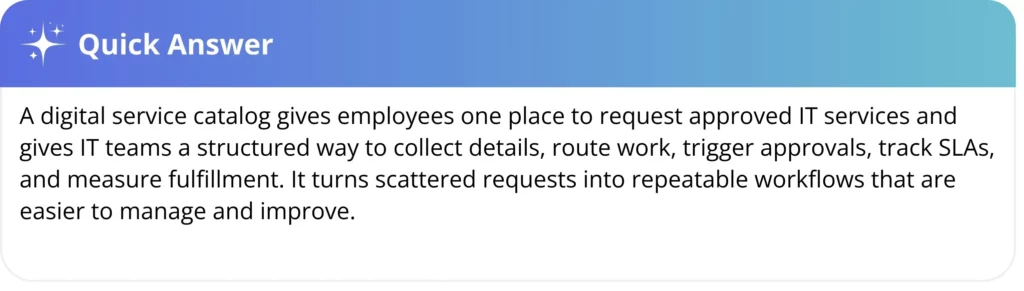
A digital service catalog is a self-service menu of approved IT services, such as software access, laptop requests, device replacements, password resets, and employee offboarding tasks. Unlike a static list, it collects request details, triggers approvals, routes work, tracks SLAs, and gives IT a repeatable way to manage service fulfillment.
In this blog, we’ll look at why every IT team needs a digital service catalog and how it helps move IT from reactive request handling to structured service delivery.
The hidden cost behind IT requests
In most mid-market and enterprise environments, IT work does not always arrive in a structured way.
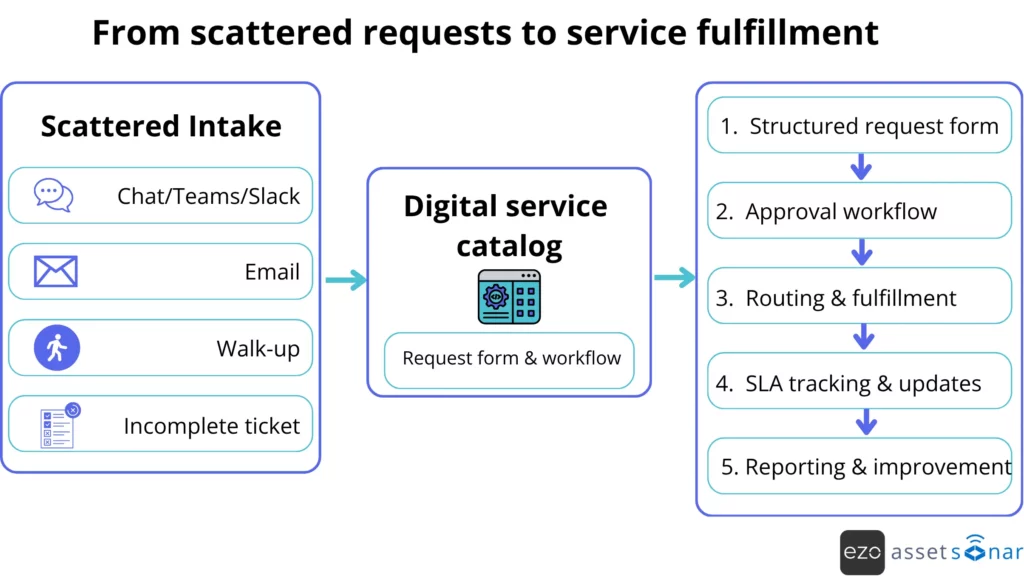
A request comes through Slack or Teams. Another arrives by email. Someone walks over with a “quick ask.” A ticket is logged, but it lacks basic context. By the time the request reaches the service desk, the real work has not started because the team is still trying to understand what is being asked.
Instead of fulfilling requests, the service desk spends time reconstructing them:
- What exactly is needed?
- Which system, device, or user is involved?
- Who needs to approve it?
- What is the expected timeline?
- Is this a standard request or an exception?
The cost is not only slower fulfillment. It is lost technician capacity, weaker reporting, inconsistent approvals, and less visibility into where IT demand is actually coming from.
Why unstructured requests slow IT teams down
A large share of IT’s daily workload is not incident response. It is service fulfillment: repeatable, user-initiated work such as software access, password resets, device requests, onboarding support, and resource provisioning. Service request management is commonly used to handle predefined user requests such as access requests, information requests, and requests for hardware or software resources.
The issue is not always the request volume. It is the lack of a request structure.
Without a consistent way to request IT services, intake varies by channel, execution varies by technician, and outcomes vary by request. What works at 200 employees starts to break at 2,000 because there are more users, tools, approvals, and compliance expectations.
At that scale, IT leaders need more than a ticket queue. They need request workflows that capture business context, enforce approvals, connect to asset and software records, and produce trustworthy reporting.
Service catalog tools are commonly used to help users search, request, and track services through a simple interface. At the same time, more advanced setups can integrate with ITSM, ITAM, or CMDB systems to provide better operational context.
For example, a new hire laptop request may start in Slack, then move to email for approval, and finally become a ticket with missing details. With a digital service catalog, the employee or manager selects “New Laptop Request,” fills in the required fields, triggers the right approval, and gives IT the device, user, and timeline context upfront.
The shift looks simple on the surface, but it changes how IT work moves through the service desk:
What is a digital service catalog?
A digital service catalog is the structured front door for IT services. It shows employees what they can request, captures the details IT needs to fulfill the request, and connects each submission to the right approval, workflow, SLA, or fulfillment team. Instead of treating service requests as scattered messages or incomplete tickets, it turns repeatable IT work into a defined process.
In ITIL-aligned service management, service catalog management is meant to provide a single source of consistent information on services and service offerings, made available to the relevant audience. A strong catalog also explains what the service includes, who can request it, how to request it, and what level of service the user can expect.
In practical terms, a digital service catalog lets employees:
- Browse available IT services
- Understand what each service includes
- Submit requests through structured forms
- See required approvals or expected timelines
- Track request status from submission to fulfillment
For IT teams, the bigger value sits behind the form. A digital catalog connects each request to a fulfillment process. That process can include approvals, routing, tasks, notifications, SLA tracking, and status updates.
A spreadsheet can list services. A digital service catalog turns those into repeatable, trackable work.
| Static service list | Digital service catalog |
| Usually lives in a spreadsheet, PDF, or document | Lives in a self-service portal or ITSM system |
| Tells users what services exist | Allows users to request services directly |
| Requires manual follow-up | Collects required details upfront |
| Does not trigger workflows | Can trigger approvals, routing, tasks, and notifications |
| Difficult to measure | Supports reporting on volume, fulfillment time, SLA performance, and bottlenecks |
| Easy to ignore or become outdated | Can be maintained as part of IT service operations |
1. It gives employees one place to request IT services
When there is no clear front door for IT requests, employees choose whatever channel is easiest for them. That may be email, chat, direct messages, calls, or walk-ups.
Fragmented intake creates two problems: First, requests are easy to lose. A message in someone’s inbox does not have the same visibility as a ticket in a shared queue. Second, employees do not always know what IT offers or how to ask for it. Vague requests like “I need access” or “My laptop needs replacing” force IT to ask follow-up questions before any real work can begin.
A digital service catalog gives employees a visible, consistent starting point. They can search for the right service, read what is included, submit the correct form, and track progress without having to chase the service desk for updates.
For IT, a single request path means less demand scattered across private conversations and more work captured in a system that can be assigned, measured, and improved.
This is where the service catalog becomes the front end of ITSM: employees use a self-service portal to request approved services, while IT keeps the work visible inside a managed queue.
2. It standardizes request intake
A service desk cannot fulfill a request efficiently if the request is incomplete.
A software access request may need the requester’s role, department, manager’s approval, application name, access level, and business justification. A laptop request may need device types, location, replacement reason, budget owner, and delivery timeline.
Without structured catalog forms, technicians collect those details manually. That creates back-and-forth before fulfillment even begins.
A digital service catalog solves this by defining the required fields for each service. The requester sees exactly what information is needed, and the service desk receives a more complete request from the start.
Better intake also improves reporting. If every request is categorized consistently, IT leaders can see which services are most requested, where delays occur, and which requests should be automated first.
In AssetSonar, structured request forms can capture the details technicians need upfront, so requests arrive with clearer categories, required fields, approval context, and asset or software details where relevant.
3. It makes service delivery more consistent
When service fulfillment depends on individual technician judgment, outcomes become inconsistent.
One technician may know exactly how to process a laptop replacement. Another may ask for missing details later. A third may route the request to the wrong team. The same request can produce different results depending on who handles it.
A digital service catalog reduces that variation by defining how each request should move from intake to fulfillment.
For example, a device replacement request should not depend on which technician receives it. The catalog item can define the required replacement reason, assigned device, warranty status, approval path, fulfillment team, and expected turnaround time.
| Catalog element | Why it matters |
| Service name | Helps employees choose the right request type |
| Description | Explains what the service includes and excludes |
| Eligibility | Shows who can request the service |
| Required fields | Reduces incomplete submissions |
| Approval path | Ensures the right manager, owner, or department reviews the request |
| Fulfillment team | Routes work for the right group |
| SLA or expected timeline | Sets realistic expectations |
| Status updates | Reduces follow-up messages |
| Reporting fields | Helps IT measure demand and performance |
Consistency matters most as IT scales. A small team may manage informal processes through memory. A larger team needs shared workflows that do not rely on a single person knowing how things are usually done.
4. It makes automation realistic
Automation fails when requests are inconsistent.
If the same type of request arrives with different wording, missing details, and unclear approval paths, the system cannot reliably route or fulfill it. Before IT can automate work, it has to standardize the work.
A digital service catalog creates that foundation. Once a service is defined as a catalog item, IT can attach workflow rules to it. For example:
- Software access requests can route to the application owner
- Hardware requests can route to the asset manager
- Paid software requests can trigger manual approval
- New hire requests can create linked tasks for device preparation, account setup, and app access
- SLA rules can flag requests that are close to breaching their target
- Status notifications can keep employees informed without manual updates
AssetSonar’s ITSM direction fits here because automation is most useful when it connects each request to the right user, asset, software, approval path, SLA, and fulfillment task. A service request should not exist independently of the user, asset, software, approval path, fulfillment task, and service history involved in the work.
When those pieces are connected, technicians do not have to switch between tools to understand what they are working on. They can see the request and the operational context together, which makes fulfillment faster and less dependent on manual lookup. AssetSonar addresses this by connecting hardware, software, users, tickets, vulnerabilities, and lifecycle history in one system, so technicians can act with the full context behind the request.
For example, a strong onboarding workflow helps new employees become productive faster because IT can coordinate equipment, access, approvals, and setup through a single process.
A strong offboarding workflow reduces security and compliance risks by ensuring that access, assets, and licenses are properly removed, recovered, and documented.
That is the difference between creating a ticket and running a workflow.
5. It improves SLA visibility and expectation setting
Employees often get frustrated with IT because they do not know what to expect.
Is this request available? How long will it take? Does it need approval? Who is responsible for it? Is it delayed, or still within the expected timeline?
A service catalog answers these questions before the request is submitted. Each service can include a clear description, eligibility rules, expected fulfillment time, support owner, and service level target. That helps employees understand what is available and how long standard work should take.
IT also gets a clearer way to measure performance. If laptop replacement requests are expected to take three business days, the team can track whether the target is being met. If software access requests continue to miss their SLA targets due to slow approvals, the bottleneck becomes apparent.
A service catalog is not only a request menu. It is also a reporting structure. When services are defined clearly, IT can measure volume, cycle time, approval delays, fulfillment effort, and SLA performance by service type.
This gives IT leaders a service-level view of performance, not just a ticket-level view. They can see which request types breach most often, whether approvals are causing delays, and where automation could improve fulfillment time.
6. It strengthens governance and access control
Some IT requests are simple. Others carry real risk.
Access to sensitive applications, privileged permissions, paid software, procurement requests, and device replacements all need control. If those requests happen through informal channels, approvals become difficult to enforce and harder to audit.
A digital service catalog allows governance to be built into the request flow.
For example, an application access request can require:
- Business justification
- Role or department selection
- Manager approval
- Application owner approval
- Access level selection
- Recorded approval history
That matters because access should be limited to what users need to perform their assigned work. NIST’s least privilege control states that organizations should allow only authorized access necessary to accomplish assigned tasks.
A catalog-backed workflow does not replace security policy. It helps operationalize it. Requests, approvals, and fulfillment actions become part of daily IT operations instead of separate after-the-fact documentation.
7. It connects service requests to asset context
Many IT service requests are tied to assets.
A laptop replacement is tied to an assigned device. A software request is tied to licensing and user roles. An incident may depend on a device’s warranty, software version, or service history. An offboarding request may require asset recovery and license reclamation.
When ITSM and ITAM live in separate systems, technicians have to switch tools before they can act. They open the ticket, look up the device, check ownership, review history, and then return to the ticket. That context gap slows down fulfillment.
A digital service catalog becomes more useful when request data is connected to asset data. The technician should not only see that an employee requested a replacement laptop. They should be able to see which laptop is currently assigned, whether it is under warranty, what software is installed, whether a spare is available, and the device’s history.
This is a core mid-market pain point: technicians need asset context within the ticket itself, including the device, owner, software, vulnerabilities, and service history, without having to jump between tools. AssetSonar’s IT Graph solves this by connecting hardware, software, users, vulnerabilities, and lifecycle history in one unified data model.
That is the real service catalog opportunity for IT teams. The request form is only the starting point. The larger value comes when the catalog request connects to the asset, user, license, and workflow needed to fulfill it.
8. It helps IT move from reactive support to structured service delivery
A digital service catalog forces IT to define what it provides.
That sounds basic, but it is a major step in maturity.
Without a catalog, IT is often judged by how quickly it reacts. With a catalog, IT can operate around defined services, standard workflows, measurable outcomes, and continuous improvement.
Mature service management depends on a structured system for planning, operating, monitoring, reviewing, maintaining, and improving services. ISO/IEC 20000 defines service management as a system for planning, establishing, implementing, monitoring, reviewing, maintaining, and improving service management capabilities.
A digital service catalog supports that model by providing IT with a defined service layer for measurement and improvement.
IT leaders can track:
- Which services do employees request the most
- Which requests take the longest to fulfill
- Where approvals slow down delivery
- Which services should be automated
- Which services need clear descriptions
- Which teams are overloaded
- Which requests create the most avoidable manual work
This is how IT moves from reactive support to structured service delivery.
What services should be included in a digital service catalog?
The best place to start is with high-volume, repeatable services. These are the requests employees often submit, and the service desk fulfills them predictably.
| Service category | Example catalog items |
| Access management | Application access, folder access, role changes, privileged access requests |
| Hardware services | New laptop, device replacement, peripherals, loaner devices, asset returns |
| Software services | Standard software requests, license approvals, plugin requests, renewals |
| Identity support | Password reset, MFA reset, account unlock, and authentication issues |
| Employee lifecycle | New hire onboarding, employee transfer, and offboarding |
| Network services | VPN access, Wi-Fi onboarding, firewall change request, where appropriate |
| Collaboration tools | Shared mailbox, distribution list, workspace/channel request |
| Endpoint services | Device enrollment, configuration changes, repair, or warranty support |
Try not to catalog everything at once. Start with the services that create the most repetitive work, the most avoidable back-and-forth, or the highest governance risk.
Signs your IT team needs a digital service catalog
A digital service catalog becomes more urgent when these patterns start showing up:
- Employees submit requests through too many channels
- Tickets often arrive with missing information
- Technicians spend more time clarifying requests than fulfilling them
- Similar requests are handled differently by different people
- Approval steps are informal or hard to track
- Employees do not know what IT services are available
- SLA performance is difficult to measure by request type
- Offboarding and onboarding require too much manual coordination
- Asset, user, and software context exist outside of demand or bottlenecks
- IT leaders cannot clearly report service demand and bottlenecks
If these issues are already visible, the service catalog is not just an improvement in user experience. It is an operating model improvement.
From request chaos to structured service delivery
A digital service catalog gives IT teams a controlled way to publish services, collect requests, route work, trigger approvals, and measure performance.
It reduces request chaos by giving employees one place to ask for help. It improves fulfillment by collecting the right information upfront. It supports automation by turning repeatable work into defined workflows. It strengthens governance by embedding approvals and access controls into the request path.
The impact becomes even stronger when the catalog connects with asset data. Technicians can move from “What is this request about?” to “What needs to happen next?” because the user, device, software, ownership, and history are easier to see in context.
For growing IT teams, this is the real value.
A digital service catalog does not just make IT requests easier to submit. It makes IT services easier to manage, measure, govern, and improve.





