
IT ticket categorization identifies what a ticket is about. IT ticket prioritization determines how quickly a ticket should be handled based on its business impact and urgency.
Those two decisions shape almost everything that happens next: routing, escalation, SLA targets, reporting, problem management, and user expectations. When they are inconsistent, the service desk becomes reactive. Tickets bounce between teams, “urgent” becomes subjective, SLAs lose meaning, and reporting stops showing what is actually happening.
For small teams, manual judgment can hold the system together for a while. At mid-market and enterprise scale, it breaks. Scalable triage requires structure: clear classifications, usable ticket categories, definitions of impact and urgency, priority matrices, routing rules, escalation paths, SLAs, and asset or service context.
The goal is not simply to close tickets faster. The goal is to design a triage system that makes the right decisions even when volume spikes.
What are IT ticket categorization and prioritization?
IT ticket categorization and prioritization are related but not the same.
Categorization answers: What is this ticket about?
Prioritization answers the question: How quickly should this ticket be handled?
A VPN outage, a laptop failure, and a mouse replacement request may all enter the same service desk, but they should not be handled the same way. A VPN outage affecting hundreds of remote employees has a different business impact than a single-user peripheral request. Good triage makes that distinction before work reaches the wrong queue or consumes the wrong level of attention.
A mature triage model usually includes:
| Triage layer | What it controls | Example |
| Classification | Which ITSM process owns the work | Incident, service request, change, major incident |
| Categorization | What the work is about | Network, Identity & Access, Hardware, Business Applications |
| Prioritization | How quickly should work be handled | P1, P2, P3, P4 |
| Routing | Where the ticket should go | Network Operations, IAM, End-User Support |
| SLA rules | What response and resolution targets apply | P1 response within 15 minutes |
| Asset/service context | What is affected | VPN gateway, laptop, SaaS app, business service |
When these layers are clear, triage becomes predictable. When they are missing or inconsistent, service desks fall back on manual sorting, hierarchy-based escalation, or first-in, first-out queue handling.
Why service desk triage breaks at scale
Ticket backlogs do not always result from technicians being slow. Often, they happen because the system cannot reliably decide what each ticket is, where it belongs, and how quickly it should move.
A common failure pattern looks like this:
- Users mark too many tickets as urgent.
- Categories are too broad or inconsistent.
- Tickets land in the wrong queues.
- Technicians reassign tickets manually.
- SLA timers run while ownership is unclear.
- Reports show volume, but not root causes.
- Managers escalate based on pressure instead of business impact.
At that point, the service desk is not prioritizing work. It is surviving the queue.
This is why categorization and prioritization matter. They are not administrative labels. They are control points that determine how work moves through IT.
Classification vs categorization vs prioritization
One of the fastest ways to create service desk noise is to treat classification, categorization, and prioritization as interchangeable.
They are separate decisions.
| Field | Question it answers | Example |
| Classification | Which process owns this work? | Incident, service request, change |
| Categorization | What is this work about? | Network, Identity & Access, Hardware |
| Prioritization | How quickly should it be handled? | P1, P2, P3, P4 |
Classification: Which ITSM process owns the work?
Classification decides whether the ticket is an incident, request, change, or major incident.
This matters because each process has different workflows, approvals, risks, and success measures.
For example:
- A password reset is usually a service request.
- A failed VPN connection may be an incident.
- A planned firewall rule update may be a change.
- A critical outage affecting multiple business services could escalate into a major incident.
If the classification is wrong, the ticket enters the wrong workflow. That can lead to incorrect approvals, wrong SLA targets, poor reporting, and delayed response.
Categorization: What is the ticket about?
Categorization describes the affected area, service, system, or component.
Examples include:
- Network → VPN → Authentication
- Identity & Access → MFA → Reset
- Hardware → Laptop → Battery
- Business Applications → Salesforce → Login
- Collaboration → Microsoft Teams → Audio issue
Good categories help with routing, reporting, ownership, trend analysis, and problem management. Poor categories create noise. Tickets get reassigned, “Other” becomes overused, and recurring issues become hard to detect.
Prioritization: How quickly should the ticket be handled?
Prioritization determines the order of work.
Priority should not be based only on who submitted the ticket or how urgent the request sounds. It should be derived from impact and urgency:
- Impact: How much of the business is affected?
- Urgency: How quickly does the issue need to be resolved before the impact becomes unacceptable?
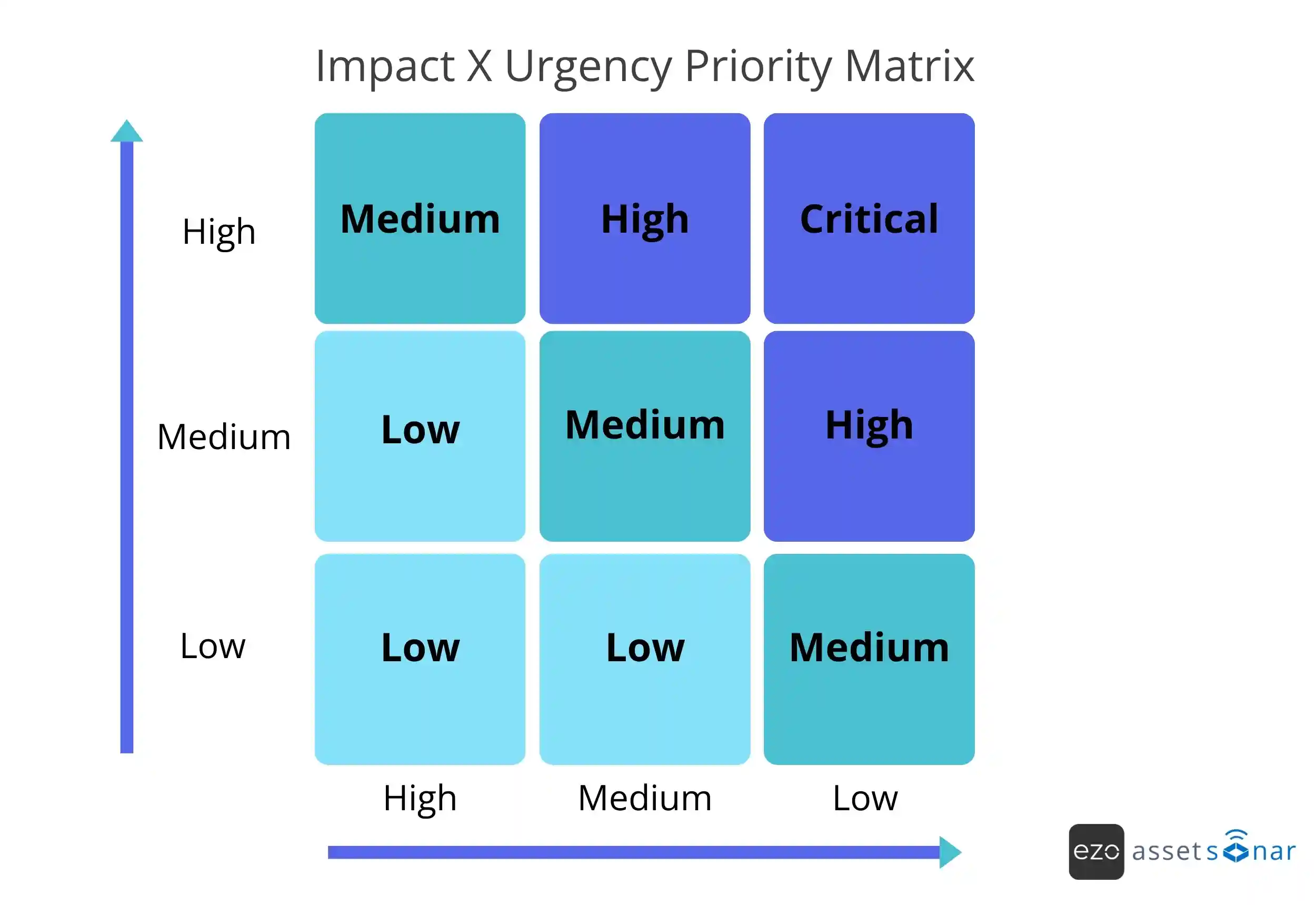
Priority is not about how important the issue feels to one requester. It is about the effect on the business.
How to build IT ticket categories that stay usable
A ticket categorization structure is only valuable if people can use it consistently. The goal is not to create the most detailed taxonomy possible. The goal is to create enough structure to support routing, reporting, and continuous improvement without slowing down intake.
1. Start with real ticket data
Do not build categories from a blank sheet. Start by reviewing recent tickets.
Look for:
- Common request types
- Recurring incidents
- Common misroutes
- Reassigned categories
- Services that generate frequent tickets
- Categories that users or agents misunderstand
This grounds your structure in operational reality instead of a generic template.
2. Use a shallow hierarchy
Most IT ticket category structures work best with two to four levels.
One level is usually too broad. Too many levels make intake slow and increase guessing.
A practical structure could look like this:
| Level | Example |
| Level 1 | Business Applications |
| Level 2 | Salesforce |
| Level 3 | Login issue |
| Level 4 | SSO |
Keep the top level stable and meaningful. Put details that change often lower in the hierarchy or in metadata.
3. Align categories to ownership
Categories should reflect how IT work is actually supported.
Common top-level categories include:
- End-User Computing
- Identity & Access
- Network
- Hardware
- Software
- Business Applications
- Collaboration and Communication
- Security
- Mobile Device Management
- Cloud Services
This enables accurate routing. VPN tickets can route to Network Operations. Access requests can route to IAM. Laptop issues can route to End-User Support.
4. Avoid symptom-based categories
Categories such as “slow,” “not working,” or “error” usually create messy reporting.
For example, these may all describe the same underlying issue:
- VPN slow
- VPN not connecting
- VPN intermittent
If each becomes a separate category, one recurring problem is split into several reporting buckets.
Symptoms should be captured in descriptions, tags, diagnostic fields, or analyst notes. Categories should describe the affected service, system, or component.
5. Treat “Other” as a signal
“Other” can be useful while a category structure is new, but it should not become a permanent dumping ground.
If a meaningful share of tickets falls into “Other,” review those tickets and identify patterns. Some may need new categories. Others may reveal unclear intake forms, poor user guidance, or a lack of ownership.
“Other” should expose gaps in the system, not hide them.
6. Put category changes under control
Categories are not just labels. They are part of your reporting history.
If categories change too often, trend data becomes difficult to compare. Mature teams review category changes deliberately, document why they are needed, and avoid casual edits that break reporting continuity.
How to prioritize IT tickets using impact and urgency
Most service desks do not struggle with prioritization because they lack priority labels. They struggle because priority is treated as a choice instead of a decision model.
Users may mark everything as urgent. Executives may escalate directly. Teams may prioritize whoever pushes hardest. That creates queue politics rather than consistent triage.
A stronger model prioritizes impact and urgency.
| Impact | Urgency | Likely priority |
| High | High | P1/Critical |
| High | Medium | P2/High |
| Medium | High | P2/High |
| Medium | Medium | P3/Medium |
| Low | Low | P4/Low |
The exact labels can vary by organization, but the principle should stay the same: priority should reflect business effect, not requester pressure.
Define impact clearly
Impact measures the scope and seriousness of the disruption.
Impact may consider:
- Number of users affected
- Criticality of the service
- Affected business function
- Revenue or operational risk
- Compliance or security exposure
- Location or department affected
For example, a VPN outage affecting hundreds of remote employees has a higher impact than a single user’s laptop accessory issue.
Define urgency clearly
Urgency measures how quickly the issue must be resolved before the impact becomes unacceptable.
Urgency may be considered:
- Business deadlines
- Operational dependencies
- Time-sensitive work
- Risk of escalation
- Customer-facing impact
- Payroll, finance, security, or executive deadlines
A payroll system issue on payroll processing day is more urgent than the same issue in a non-production test environment.
Do not let users fully control priority
Users should be able to describe urgency, but they should not fully determine the final priority.
A user can provide important context:
- “This affects the finance team.”
- “Payroll closes today.”
- “The whole branch cannot connect.”
- “This blocks a customer demo.”
The system or service desk should use that input, along with impact, urgency, service criticality, and asset context, to derive the final priority.
This keeps prioritization fair, explainable, and consistent.
P1 tickets vs major incidents
A P1 ticket and a major incident are related, but they are not the same thing.
A P1 is a priority level. A major incident is a coordinated response mode.
| P1 ticket | Major incident |
| High-priority work item | Coordinated response mode |
| May affect one critical user, asset, or service | Usually affects multiple users, services, locations, or business functions |
| Managed through ticket workflow | Managed through command, communication, and cross-functional coordination |
| Focuses on fast resolution | Focuses on response coordination, communication, recovery, and post-incident review |
A P1 laptop failure for a senior executive before a board meeting may require urgent handling, but not a major incident response.
A VPN outage affecting hundreds of employees may require major incident coordination due to its broader impact, communication needs, parallel workstreams, stakeholder updates, and post-incident review.
When a major incident is declared, the operating model should change. Teams may need:
- Incident Lead
- Technical Lead
- Communications Owner
- Stakeholder Liaison
- Scribe or post-incident review owner
- Problem management follow-up
The key distinction is coordination. Priority decides what gets attention first. Major incident management decides how the organization responds when normal ticket handling is no longer enough.
Routing, escalation, and SLA design
Categorization and prioritization define the decision. Routing, escalation, and SLAs turn that decision into action.
At a workflow level, the system should connect:
Classification → Category → Priority → Routing rule → SLA target → Escalation trigger
If one layer is weak, the service desk compensates with manual effort.
Routing should be rule-based
At low volume, manual routing may work. At scale, it slows the desk down.
Routine tickets should route based on structured inputs:
- If category = Network → VPN, route to Network Operations.
- If category = Identity & Access → Access Request, route to IAM.
- If classification = Change, route to the change approval workflow.
- If category = Hardware → Laptop, route to End-User Support.
The service desk should not act as a traffic controller for every routine issue. It should monitor exceptions, improve rules, and handle complex cases.
Escalation should be designed, not improvised
Escalation often becomes a reaction to failure:
- A ticket sits too long.
- A user complains.
- A manager intervenes.
- A wrong team reassigns it.
- A breach is about to happen.
Mature teams define escalation paths before tickets get stuck.
Common escalation types include:
| Escalation type | When it happens |
| Functional escalation | A specialist team or higher support tier is needed |
| Hierarchical escalation | Management or service owner visibility is required |
| SLA-based escalation | A response or resolution threshold is at risk |
| Major incident escalation | Normal ticket handling is no longer sufficient |
Track escalation patterns by category, team, SLA breach risk, and reassignment count. Frequent escalation may reveal category gaps, unclear ownership, or broken routing logic.
SLAs make priority enforceable
Priority without SLAs is only a label. SLAs turn priority into a measurable commitment.
A sample SLA model might look like this:
| Priority | Response target | Resolution target | Update cadence |
| P1 | 15 minutes | 4 hours | Every 30 minutes |
| P2 | 1 hour | 8 hours | Every 2 hours |
| P3 | 4 hours | 2 business days | Daily |
| P4 | 1 business day | 5 business days | As needed |
Without SLAs, priority is just a label. With SLAs, it becomes a commitment.
That commitment usually comes with more than one layer:
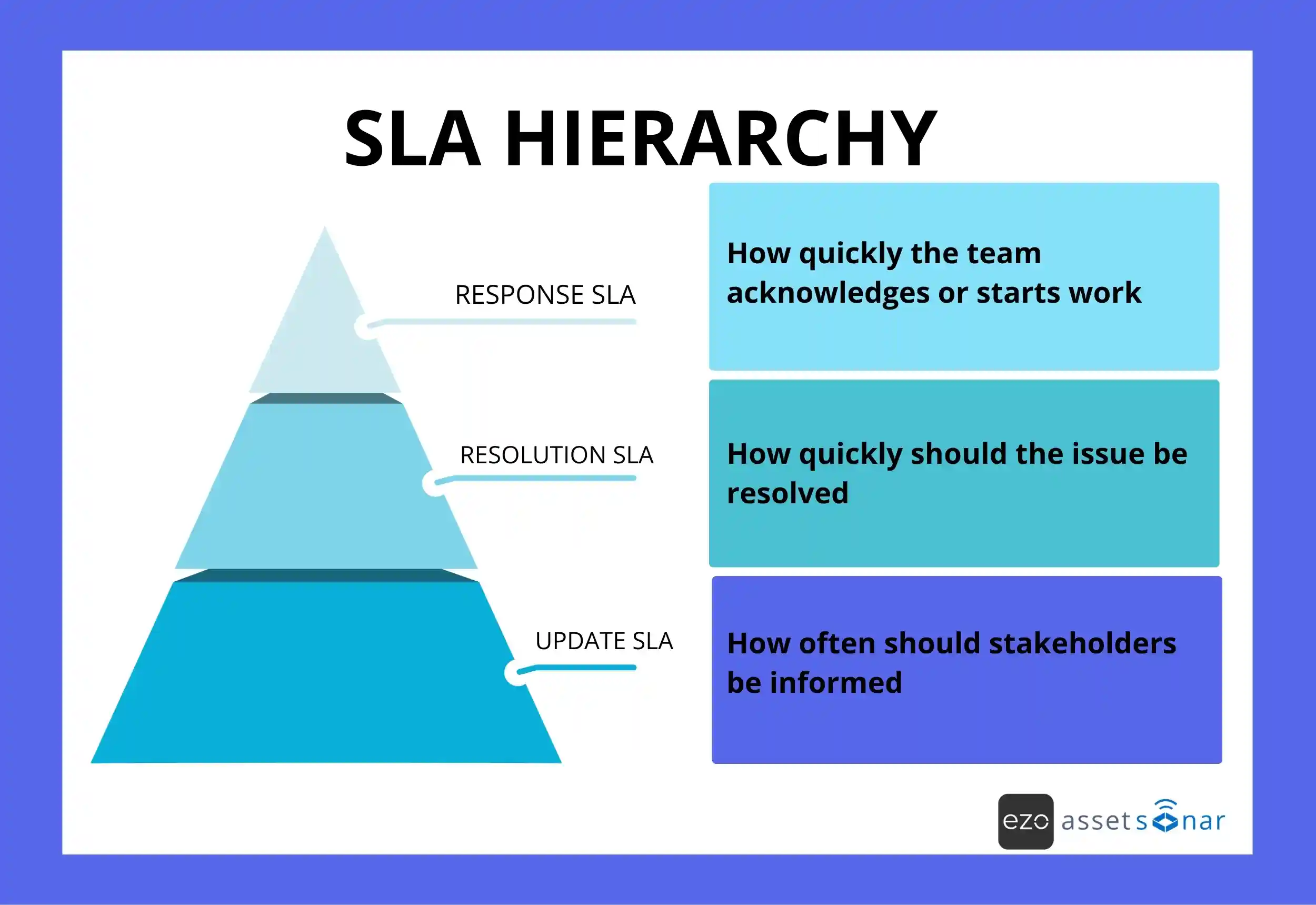
These values are examples. Actual SLA targets should reflect support hours, staffing, service criticality, vendor dependencies, and business risk.
A strong SLA model should answer:
- What does each priority level mean?
- What response time applies?
- What resolution target applies?
- Who owns the ticket at each stage?
- What happens before a breach?
- What happens after a breach?
- How often should stakeholders be updated?
Why tickets should be linked to assets, services, and CIs
Even well-categorized tickets can remain incomplete if they are disconnected from the assets, services, or configuration items they affect.
A ticket labeled “VPN is not working” provides limited context. A ticket linked to a VPN gateway, user location, affected department, recent change, and prior related incidents gives the service desk a stronger starting point.
Useful ticket context can include:
- Affected asset
- Affected service
- User and department
- Location
- Software or SaaS application
- Configuration item
- Recent changes
- Related incidents
- Ownership records
- Vendor or warranty information
This changes triage from guesswork to evidence.
Asset and service context improve priority
Impact is often guessed when the service desk does not know what the affected item supports.
For example:
- A server supporting payroll before a payroll deadline may require high priority.
- A server supporting a non-critical test environment may not.
- A laptop assigned to a field technician may have a different urgency than a spare device in storage.
- A SaaS app used by one team may carry lower impact than an identity service used across the company.
When tickets are linked to assets, services, and CIs, priority becomes more accurate because the system can see what is affected.
Context improves root cause analysis
Without asset or service linkage, recurring issues look isolated. With linkage, patterns become easier to detect.
You can start asking:
- Which assets generate the most incidents?
- Which services degrade repeatedly?
- Which software applications create the most access requests?
- Which locations see recurring network issues?
- Which categories are most often reassigned?
- Which incidents follow recent changes?
That is where triage becomes more than ticket handling. It becomes an operational feedback loop.
Turning service desk data into operational improvement
Once categorization, prioritization, routing, SLAs, and asset context are consistent, the service desk becomes a measurement system.
Reliable ticket data helps IT teams improve the system, not just close work.
Mature teams use triage data to:
- Improve problem management
Recurring incidents can be grouped, analyzed, and addressed at the source. - Reduce routing noise
Reassignment patterns can reveal unclear categories, poor ownership, or weak routing rules. - Refine categories
“Other” tickets and miscategorized tickets can guide taxonomy updates. - Improve SLA design
Breach patterns can show where targets, staffing, support hours, or escalation paths need adjustment. - Feed change management
Incidents linked to recent changes can help teams reduce future disruption. - Strengthen reporting
Leaders can see which services, assets, teams, and workflows create the most operational pressure.
The control loop looks like this:
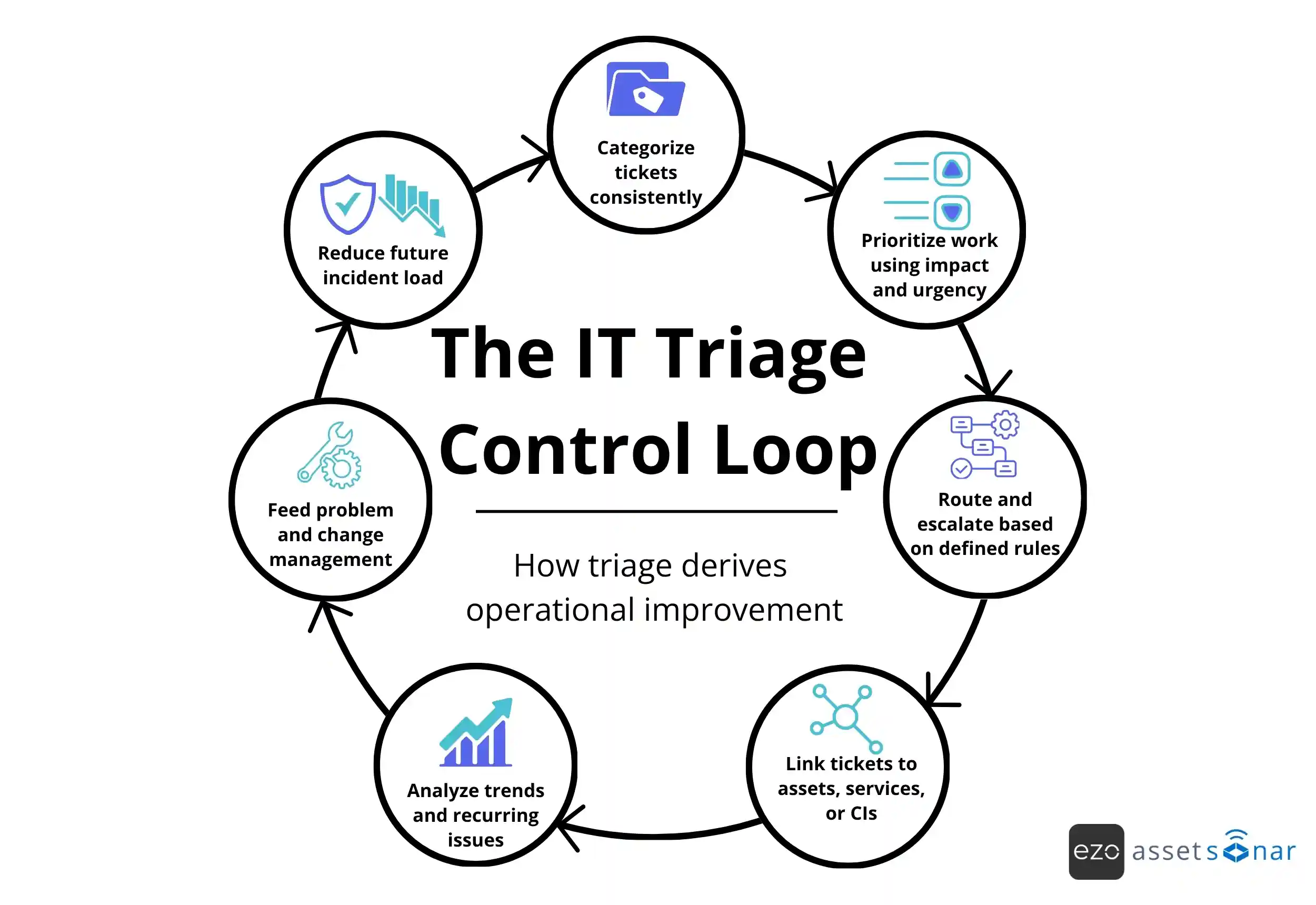
The goal is not just faster resolution. The goal is fewer repeat issues, clearer ownership, and better operational control.
How AssetSonar supports context-aware IT ticket triage
Scalable triage depends on context. IT teams need to know what the ticket is about, who is affected, what asset or service is involved, what priority applies, which SLA is active, and who should own the next step.
AssetSonar helps IT teams connect ticket workflows with the broader IT environment. Instead of managing tickets separately from assets, users, software, licenses, and lifecycle records, teams can use AssetSonar to bring service desk activity closer to the real IT context.
IT teams can connect tickets to users, devices, software, services, and lifecycle records, giving technicians more context before they act. Routing, escalation, and SLA workflows can be supported by structured ticket data, helping teams reduce manual triage and improve accountability.
This is especially valuable for mid-market and enterprise teams managing distributed employees, hybrid infrastructure, software access, hardware ownership, and service desk volume across multiple teams.
AssetSonar’s IT Graph gives teams a connected view of IT relationships, helping service desks move from isolated tickets to context-aware operations. When tickets, assets, users, software, and workflows are connected, triage becomes easier to govern, measure, and improve.
Practical self-check for your service desk
Use these questions to assess whether your triage model is ready to scale:
- Can your team clearly define classification, categorization, prioritization, impact, and urgency?
- Do agents and users understand how priority is determined?
- Are categories based on real ticket data?
- Are top-level categories stable and tied to ownership?
- Is “Other” reviewed regularly?
- Are routine tickets routed automatically?
- Are escalation paths defined before tickets breach?
- Are SLA targets tied to priority?
- Are tickets linked to affected assets, services, or CIs?
- Can you report on reassignment rates, recurring issues, and causes of SLA breaches?
- Do major incidents trigger a different response model than normal P1 tickets?
- Does ticket data feed problem management and change management?
If the answers are inconsistent, the issue is not just service desk effort. It is a triage design.
Conclusion
IT ticket categorization and prioritization are not back-office fields. They are the foundation of scalable service desk triage.
Categorization helps the system understand the work. Prioritization sequences that work based on impact and urgency. Routing, escalation, and SLAs turn those decisions into action. Asset and service context make the decisions more accurate. Reporting and problem management turn the data into improvement.
When these layers work together, IT teams move beyond queue survival. They build a service desk that can handle volume, protect SLAs, reduce manual sorting, and learn from recurring issues.
AssetSonar helps IT teams connect tickets, assets, users, software, SLAs, automations, and lifecycle context on a single platform, so service desk decisions are based on real IT context rather than fragmented queues.