
An IT service request form is not just an intake document. It is the first control point in the IT service workflow. When the form captures the right user, asset, software, approval, and urgency details upfront, IT teams can route work faster, apply the right SLA, reduce back-and-forth, and keep request fulfillment consistent.
Most IT service requests break before they reach the help desk because employees do not always know what information IT needs. They may send a quick Slack message, email a technician directly, or submit an ad hoc request without the affected device, the software name, the business reason, the required date, or approval details. The result is a ticket that looks simple on the surface but requires several follow-ups before anyone can act on it.
For lean IT teams, this creates avoidable friction. Technicians spend time clarifying the request, checking the asset history, determining whether the issue is recurring, and identifying who should approve or fulfill it. Employees wait longer for support, while IT loses visibility into request patterns, SLA risk, software demand, and asset-related issues.
A structured IT service request form solves this by turning scattered requests into complete, actionable tickets. Instead of forcing technicians to chase missing context, the form guides employees to provide the details needed to route, approve, prioritize, and fulfill the request correctly.
What is an IT service request form?
An IT service request form is a structured form that employees submit to request access, equipment, software, services, or standard changes from IT. Instead of sending a vague message like “I need Adobe installed” or “Can I get a new laptop?”, the employee submits a formal request with the details IT needs to process it.
The goal is to make request intake consistent. Every request should enter the IT queue with enough context for the team to understand who needs help, what is needed, why it is needed, when it is needed, whether approval is required, and which user, device, software, or system record is involved.
Service request forms are typically available through a self-service portal or service catalog. For example, an employee requesting software access may need to provide the software name, access level, business reason, department, license requirement, and manager approval. Once submitted, the form can trigger the right approval, routing, and fulfillment workflow.
Service request vs incident request form
A service request form and an incident request form may look similar, but they support different IT workflows. A service request form is used when an employee needs something new or standard, such as a laptop, software access, VPN access, a password reset, equipment replacement, or an application installation. These requests usually follow a predefined approval, fulfillment, and SLA process.
An incident request form is used when something is broken, degraded, or not working as expected. This includes issues such as a laptop crashing, software failing to load, a printer not working, or an application outage. Incidents usually require diagnosis, troubleshooting, escalation, and root cause analysis.
The distinction matters because service requests and incidents should not be routed, prioritized, approved, or measured the same way. A new software access request may require manager approval and a license check, while a recurring device crash may require technician investigation and an asset history review. When IT teams separate the two at intake, they can apply the right workflow from the start instead of treating every ticket like the same type of work.
What should an ideal IT service request form include?
An ideal IT service request form should capture enough information for IT to act without making the form difficult for employees to complete. The form should be specific to the request type, linked to the correct service catalog item, and designed around the workflow that follows submission.
Here are the core fields most IT service request forms should include:
| Field | Why it matters |
| Request type | Helps route the ticket to the right team or queue |
| Requester name | Identifies who submitted the request |
| Affected user | Clarifies who needs the service if the requester is submitting on someone else’s behalf |
| Department and location | Supports routing, inventory planning, approvals, and reporting |
| Asset tag or device name | Connects the request to the right device record and asset history |
| Software or system name | Helps IT check license availability, access rights, and ownership |
| Business reason | Helps approvers understand why the request is needed |
| Required date | Supports fulfillment planning and SLA assignment |
| Priority or urgency | Helps IT separate routine requests from time-sensitive work |
| Approver | Prevents delays when manager, finance, security, or app-owner approval is needed |
| Attachments or screenshots | Reduces clarification work for requests that need supporting context |
| Security or compliance impact | Helps IT escalate higher-risk requests when needed |
The best forms do not ask every question for every request. They use conditional fields so employees only see the questions relevant to their request. A software access request should ask for the access level and the required license. A hardware request should ask about device type, delivery location, and inventory availability. An offboarding request should ask about assigned assets, software access, admin rights, and asset return method.
Common types of IT service request forms
Different services need different forms because each request type has its own workflow, approval path, and fulfillment requirements.
| Service request type | What it means | Example form details to capture |
| New laptop request | An employee needs a company-issued device | Employee name, role, department, location, device type, required date |
| Software access request | A user needs access to a tool or application | Software name, access level, business reason, duration, and manager approval |
| Password reset | A user needs help regaining account access | Account or system name, identity verification, urgency |
| New employee onboarding | IT needs to prepare access, devices, and software for a new hire | New hire name, start date, role, manager, location, required apps, hardware needs |
| Equipment replacement | A user needs a replacement for damaged, outdated, or lost equipment | Existing asset tag, issue reason, replacement type, approval status |
| VPN access | A user needs secure remote access | User role, access duration, business reason, security approval |
| Email group access | A user needs to be added to a distribution list or shared inbox | Group name, access type, requester, and manager approval |
| Peripheral request | A user needs accessories such as a monitor, keyboard, mouse, or headset | Item type, quantity, location, business justification |
| Application installation | A user needs an approved app installed on their device | Device name, app name, operating system, license requirement |
| Asset transfer request | An asset needs to be reassigned from one user, team, or location to another | Current owner, new owner, asset tag, transfer date, approval |
A well-designed IT service request form captures accurate service details and connects them to the next step in the workflow. When the form is tied to users, assets, software, approvals, and SLAs, IT teams can route requests faster, reduce manual triage, and deliver a more reliable employee support experience.
Why IT managers need structured service request forms
IT managers need service requests to enter the queue with enough information for technicians to act quickly. When requests arrive through scattered channels or generic forms, IT teams lose time classifying work, chasing approvals, and identifying whether the request is tied to a user, asset, software license, or recurring issue.
A structured form helps IT managers standardize intake, improve workload visibility, and create a more predictable service delivery process.
1. Centralize requests and capture complete details
When requests do not enter through defined channels, important information gets lost. The team may need to clarify who submitted the request, what service is needed, who should approve it, whether the request is urgent, and whether it is tied to a specific device, application, or user.
A well-defined form reduces this back-and-forth. For example, a software access request form can ask for the software name, access level, duration, business justification, manager, and required date. A hardware request form can ask for device type, location, user role, inventory status, budget approval, and delivery deadline.
This gives technicians the context they need before the request reaches their queue.
2. Reduce manual triage
Without request-specific forms, IT teams spend too much time sorting and interpreting tickets. When a form is overly generic, a coordinator must manually review the request to determine whether it falls under hardware, software, patching, procurement, access management, or another team.
A complete form uses categories, required fields, and conditional questions to identify the request type at intake. Based on that information, the request can be routed to the right queue, technician, or approval workflow.
For example, a request marked as “software access” can go directly to the software admin or licensing team, while a “new laptop request” can go to hardware fulfillment. This keeps work moving without relying on manual sorting.
3. Apply the right SLA
Not every IT request should follow the same SLA. A password reset, a new laptop request, a software access request, and an onboarding request all have different levels of urgency and complexity.
A structured request form helps IT apply the correct SLA based on request type, priority, business impact, and required date. It also gives technicians better visibility into deadlines, enabling them to act before a breach occurs.
For IT managers, this improves control. They can see which request types are approaching breach, which approvals slow down fulfillment, and where SLA targets may need adjustment.
4. Connect requests to users, assets, and software
IT requests do not exist in isolation. A software request may depend on license availability, renewal cost, access level, and user role. A hardware request may depend on inventory, location, warranty status, and assigned user. An incident may require the technician to review previous tickets associated with the same device.
A good service request form connects the submitted details to the relevant user, asset, software, or system record. This helps technicians understand not just what was requested, but also the context surrounding the request.
For IT managers, this connection supports both service delivery and governance. The team can see how requests affect inventory, license usage, access rights, cost, and compliance.
5. Improve reporting and request planning
Structured request intake creates cleaner data. When requests have consistent fields, IT managers can identify patterns and make better planning decisions.
They can answer questions such as:
- Which requests consume the most time for a technician?
- Which departments generate the highest software demand?
- Which locations need the most hardware support?
- Where are approvals slowing down fulfillment?
- Which services should be automated?
- Which request types need better knowledge base articles?
- Where should IT allocate budget, inventory, or headcount?
This helps IT move from reactive support to better service planning.
Best practices for creating an IT service request form
An IT service request form should be easy for employees to use and specific enough for IT to act on. The goal is not to create a form for every possible scenario. The goal is to create forms for frequently requested items, items that require approvals, items that affect assets or licenses, or items that cause delays when information is missing.
1. Start with high-volume requests
IT teams should begin with the request types that consume the most time or require the most repeated clarification. These often include software access requests, hardware requests, password resets, onboarding and offboarding, peripheral requests, application installation, and asset transfers.
| Request type | What the form should capture | Why it matters |
| Software access requests | Software name, access level, business reason, department, manager approval, license availability, required date | Helps IT avoid overprovisioning, check available licenses, and route approvals correctly |
| Hardware requests | Device type, assigned user, location, delivery date, role, inventory status, and budget approval | Helps IT plan stock, assign assets correctly, and avoid fulfillment delays |
| Password resets | System or account name, user identity, urgency, verification details | Helps IT confirm the request quickly and reduce account security risks |
| New hire onboarding | New hire name, start date, role, manager, department, location, device needs, required apps, access groups | Helps IT prepare devices, accounts, and software before the employee’s first day |
| Offboarding requests | Last working day, assigned assets, software access, admin rights, license removal, and asset return method | Helps IT recover equipment, revoke access, reclaim licenses, and maintain audit trails |
| Peripheral requests | Item type, quantity, location, justification, user role, stock availability | Helps IT manage inventory and fulfill common equipment needs faster |
| Application installation requests | App name, device, operating system, license requirement, business reason | Helps IT confirm compatibility, licensing, and installation requirements |
| Asset transfer requests | Asset tag, current owner, new owner, transfer date, location, approval | Helps IT keep ownership records accurate |
High-volume request forms also make change management easier. Employees are more likely to use structured forms when they recognize the services listed in the portal. Technicians are more likely to support the process when it removes repetitive clarification work from their day.
2. Keep the form simple
A form should make it easier to submit a request, not harder. If the form is too long, confusing, or full of unnecessary fields, employees may revert to sending requests via email, chat, or direct messages.
Use plain language, readable field labels, and short instructions. Mark only the most important fields as mandatory. Use dropdowns, checkboxes, and conditional questions where possible so employees do not have to write long explanations for routine requests.
For example, instead of asking employees to describe the entire request in an open text box, the form can ask them to choose the request type, affected system, urgency, required date, and business reason. Free-text fields should be used where context is needed, not as the default for every answer.
3. Link forms to the service catalog
Once you have created the form, make sure that you link it to your service catalog. A service catalog doesn’t only serve as a request intake form. If every time a generic service request is created, IT teams have to manually check which request was created, what its type is, what approvals are needed, and which SLA setting applies to it.
The solution is to connect forms to each specific service catalog item so that tickets generated are related to those items and forms. Ideally, every group of items listed should have a corresponding form. Your ITSM tool’s automation engine can automatically create a corresponding ticket when a service request related to the form or device is created.
If all requests are handled through a single generic form, IT loses the ability to control how different IT services have distinct operational requirements. Tickets may be created, but the right process does not automatically follow. A connected form improves the employee experience as the workflows improve. They know exactly what service to choose and what form to fill out based on the request type.
4. Automate routing and approvals
The data collected through a form should not sit passively inside a ticket. It should help move the request forward.
For example, if an employee submits a laptop request, the form can capture department, location, role, device preference, required date, and manager. Based on those fields, the request can be routed to the hardware team, checked against available inventory, sent for approval if needed, and assigned the right SLA.
The workflow changes as the request type changes in the IT service request form. With automation, the need for manual steps reduces considerably. Technicians don’t have to manually check each ticket to determine who needs to approve the request and which workflow to follow next. This reduces the need for manual triage and ensures that the entire IT ticket lifecycle is followed, right from the ticket creation to request fulfillment.
5. Set priority and SLA rules
Your service request form should include a field specifying the request’s priority. You should be able to determine priority by simply making the priority field mandatory, so every employee confirms how urgent the request is. IT ticket categorization and priorization help identify and specify what the ticket is and why it needs immediate attention. Some questions that help users determine whether it’s urgent or not include:
- Is this blocking your work?
- How many users are affected?
- Is there a business deadline?
- Is there a security or compliance risk?
- When do you need this completed?
Based on the request’s priority or urgency, helpdesk teams can set SLA rules to ensure the most important requests receive priority. Instead of letting the requests sit in the queue for long, technicians can respond to time-sensitive requests and resolve requests faster.
For IT managers, SLA settings provide better visibility and control. They can see which requests are approaching breach, which request types are consistently delayed, and where the bottleneck sits. For example, if software requests often miss SLAs because approvals take too long, the issue may not be technician performance; it may be the approval workflow. If laptop requests miss their fulfillment timelines due to inventory unavailability, SLA data can support better procurement planning.
The most effective SLA setup combines three things: realistic timelines, clear priority rules, and visibility into risk. This helps IT teams respond faster where it matters, avoid overpromising on complex requests, and keep service delivery predictable.
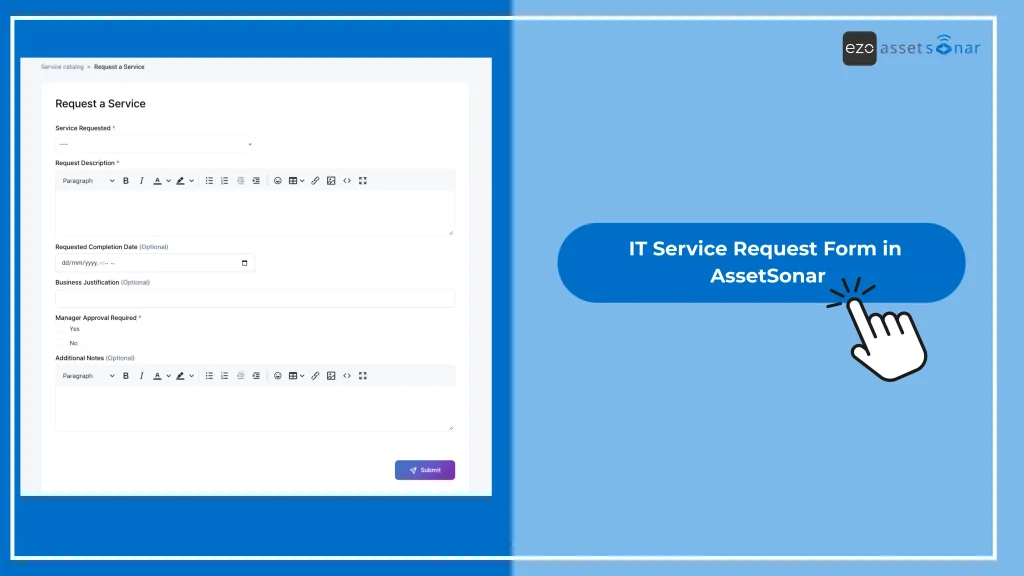
Here’s an example of an IT service request form you can use to receive service requests for software, particularly:
6. Review and improve forms regularly
Service request forms should not remain static forever. IT teams should review them regularly to see whether they are still capturing the right information.
A form may need improvement if technicians still ask the same follow-up questions, employees submit too many general requests, approvals are often delayed, or certain request types regularly miss SLAs.
Reviewing form performance helps IT identify where fields should be added, removed, made conditional, or linked to a different workflow. It also helps prevent form sprawl by indicating when multiple forms can be combined into a single broader service catalog item.
How AssetSonar supports asset-aware service request workflows
A service request form becomes more useful when it is connected to the IT context behind the request. Platforms like AssetSonar help IT teams manage service requests alongside users, assets, software, tickets, approvals, and lifecycle history, so that requests are not treated as isolated tickets.
For example, when an employee requests a replacement device, IT can link the request to the existing asset record, the assigned user, the location, the warranty details, and past tickets. When someone requests software access, IT can review the user, software, license, and approval context before fulfillment. When an asset transfer is requested, the ownership record can be updated as part of the workflow.
This asset-aware context helps IT teams reduce manual follow-up, route requests with better information, maintain cleaner records, and make service delivery more predictable. It also supports better reporting because requests are connected to the users, devices, software, and workflows they affect.
Building an IT service request form that moves work forward
An IT service request form isn’t just an information document that includes details of a request. It determines the structure, predictability, and quality of service delivery at an enterprise-level IT firm. It consolidates the information intake channel so requests come in only through one, structured source. It captures the right information up front, routes requests to the right team, applies the correct approval path, connects requests to users, assets, and software, and helps IT teams track SLAs more effectively.
For technicians, the real value of forms extends beyond information intake. It makes reporting easier as data is in a cleaner format and service workflows are straightforward.
An IT service request form, supported by an ITSM tool based on ITAM, should be simple and structured for technicians. It should help IT teams move away from reactive support toward more controlled request management, so employees can get work done sooner, backed by automated workflows and data management.





