
Mid-market IT teams have to deal with a high ticket volume. Things look structured on paper—tickets are assigned, worked on, and resolved.
But the flow breaks down as soon as the real work begins. Everything happens between the ticket resolution cycle. Tickets sit in queues longer than expected, no IT member has a clear ownership of the tickets, and SLA breaches become the norm. Over time, this becomes a recognized pattern across IT teams that everyone silently knows needs to be addressed. Dependence on manual checks for instant responses, confusion around responsibility, and unresolved tickets all signal one thing: a broken IT ticket lifecycle.
The problem is not that the ticket lifecycle is undefined. The steps for resolving a ticket are usually documented and standardized, with the IT team training helpdesk staff on handling requests. But the absence of a well-operating IT ecosystem becomes the real hurdle. Once tickets start moving, priorities change, dependencies emerge, and gaps become more visible. The IT lifecycle remains only on paper as it loses the discipline needed for effective operations. At this stage, helpdesk teams revert to the firefighting mode, losing control over the ticketing process.
In a bigger scheme of things, the aim of a healthy ticket lifecycle is not just to track requests. It’s meant to bring structure and accountability to the entire ticketing process, so backlogs do not pile up and administrative bottlenecks can be avoided.
What is IT ticket lifecycle management?
The IT ticket lifecycle is a structured process for managing an IT issue, request, or task from creation to resolution. Every stage of the lifecycle defines who is responsible for which equipment, who receives it, what gets escalated, and the priority for each. Ticket lifecycle is more than just ticket management; it defines the helpdesk workflow and serves as the operational backbone of service delivery, helping avoid ad hoc requests.
Every password reset, laptop issue, software access request, security incident, onboarding task, or hardware replacement moves through some version of a ticket lifecycle. Without a defined lifecycle, tickets can sit unassigned, get routed to the wrong person, breach SLAs, or close without enough context for future reference.
Structured IT ticket lifecycle management helps ensure consistent IT workflows and that every ticket follows a clear path from intake to resolution, while providing technicians, managers, and employees with visibility into status, ownership, and next steps. It helps answer questions like:
- Has the request been captured with enough detail?
- Is the ticket categorized correctly?
- Who is responsible for resolving it?
- What priority should it have?
- Is it at risk of breaching an SLA?
- Does it need approval or escalation?
- Was the issue actually resolved?
- Is the resolution documented for future use?
For instance, you may get a request for a laptop running slowly. In a basic service, the ticket may simply be assigned to a technician. But in a structured ticketing environment, the system you use to manage requests captures device details, links the employee to the asset, reports related incidents, and routes requests to the right technician. This level of structure is essential for managing a high volume of requests.
IT ticket lifecycle metrics IT managers should track
IT managers often struggle to determine which metrics to track to assess whether their IT ticket lifecycle is running smoothly. Here are some metrics:
| Metric | Short description | Example |
| First response time | Measures how long it takes for a technician to send the first human response after a ticket is created. It shows how quickly IT acknowledges the request. | A ticket is submitted at 9:00 AM, and a technician replies at 9:15 AM. First response time is 15 minutes. |
| Time to own | Measures how long it takes for a ticket to be accepted, assigned, or owned by a technician or team. It helps reveal delays before actual work begins. | A laptop issue is submitted at 10:00 AM, but is assigned to endpoint support at 11:30 AM. Time to own is 1.5 hours. |
| Time to resolve | Measures the total time from ticket creation to resolution. It helps IT managers understand how quickly issues are fixed or requests are fulfilled. | A VPN issue is opened Monday morning and resolved Monday afternoon. Time to resolve is 6 hours. |
| SLA breach rate | Tracks the percentage of tickets that miss agreed response or resolution targets. A high breach rate signals problems with workload, routing, or escalation. | Out of 100 tickets, 12 miss their resolution SLA. SLA breach rate is 12%. |
| Backlog volume | Shows how many unresolved tickets are still open at a given time. It helps managers see whether demand is outpacing team capacity. | The service desk has 240 open tickets at the end of the week, including 60 that are more than 7 days old. |
| Reopened ticket rate | Measures how often closed or resolved tickets are reopened. It can indicate weak validation, rushed closures, or unresolved root causes. | If 8 out of 100 closed tickets are reopened, the reopened ticket rate is 8%. |
| Escalation rate | Tracks how many tickets move from first-line support to another team, specialist, or higher support tier. It helps identify training gaps, complex issues, or routing problems. | If 30 out of 200 tickets are escalated to network or security teams, the escalation rate is 15%. |
| Ticket volume by category | Breaks down tickets by type, such as hardware, software, access, network, security, or onboarding/offboarding. It helps IT identify recurring demand and process gaps. | If 35% of monthly tickets are software access requests, IT may need to improve self-service or automation for approvals. |
| Pending ticket aging | Measures how long tickets remain in pending states such as Pending User, Pending Approval, or Pending Vendor. It helps prevent stalled tickets from hiding in the queue. | A hardware replacement ticket has been Pending Approval for six days, signaling the need for reminder or escalation rules. |
| Requester satisfaction (CSAT scores) | Measures how satisfied employees are with the support experience, often through CSAT surveys after ticket closure. It reflects whether IT is meeting user expectations, not just closing tickets. | After a ticket closes, the requester rates the support experience 4 out of 5 and leaves feedback about response quality. |
Tracking these metrics from time to time helps avoid delays and ensures the IT team performs consistently.
Steps involved in a typical IT ticket lifecycle
It’s critical to differentiate between the IT ticket lifecycle and the ticket workflow to understand your IT service processes. The ticket lifecycle particularly involves the stages a ticket passes through from creation to resolution. By contrast, the ticket workflow involves a specific set of rules, assignments, and automations that move the needle and determine how a ticket is resolved.
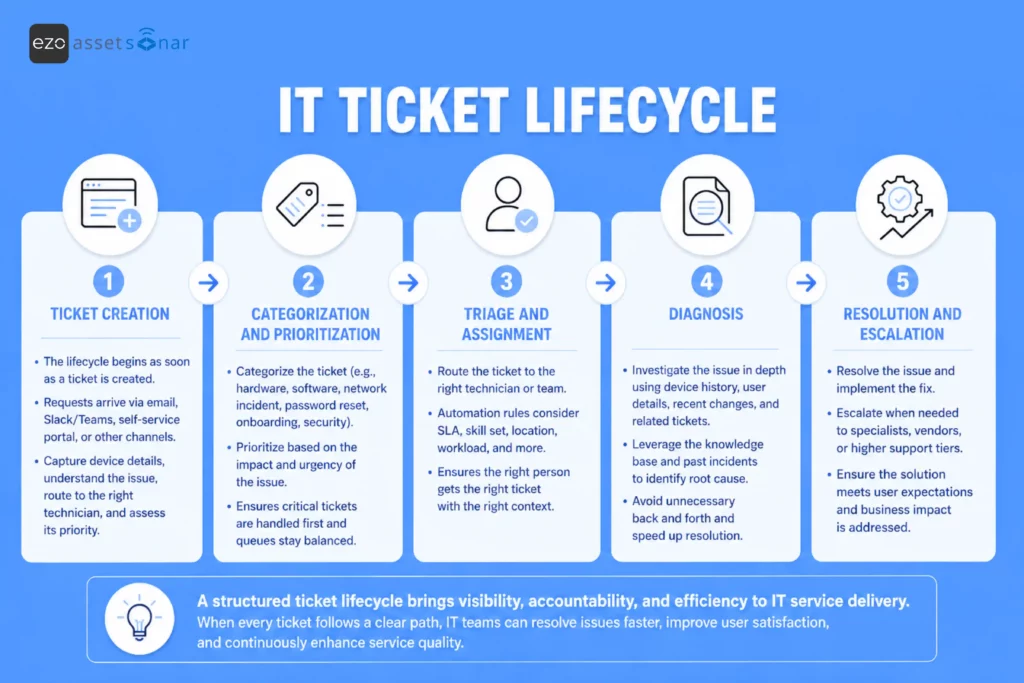
While every ticket lifecycle may differ depending on your business’s IT environment and the state of your ticket workflow, here are some steps that define a typical IT ticket lifecycle:
1. Ticket creation
The lifecycle begins as soon as a ticket is created. The process starts when a request arrives via channels such as Slack or Teams, email, or the self-service portal. The aim here is to capture device details, route the request to the appropriate technician, determine how the issue started, and assess its priority.
2. Categorization and prioritization
Once the ticket has been submitted, the next step is to categorize it by type. It could be categorized as a hardware, software, or network incident; a password reset; an onboarding task; or a security concern. It can then be prioritized depending on its impact on IT operations.
This ensures that not all tickets are added to the regular queue and that the most critical ones are handled urgently.
3. Triage and assignment
This is the most critical step, as the service issue must be reported to the right technician. In advanced IT environments, automation rules route tickets based on SLA requirements, skill type, location, and workload.
The aim is to assign the right personnel who can efficiently resolve the ticket without additional context.
4. Diagnosis
Any service issue reported needs to be evaluated in depth, informed by similar issues, and supported by a prebuilt knowledge base. This also includes assessing how the service request should be addressed. This may involve reviewing employee details, device history, recent changes, or related tickets.
For example, if an employee reports that a business application is not working, the technician may check whether the user has the correct license, whether the application was recently updated, whether similar incidents have been reported, or whether the affected device is missing a required patch.
At this stage, using the available ITSM knowledge base helps expedite ticket resolution by enabling technicians to avoid unnecessary back-and-forth.
5. Resolution and escalation
This stage involves simply resolving the issue. For an incident, this may mean fixing a device, restoring access, applying a patch, replacing hardware, or escalating the problem to another team. For a service request, it may mean provisioning software, approving access, shipping equipment, or completing an onboarding task.
If the issue is complex and requires advanced-level support, it may be expedited and escalated due to approaching SLA deadlines and missing information.
The IT ticket lifecycle strictly depends on your business type. In mature IT environments, the lifecycle extends beyond these stages as tickets require documentation, validation, and review. Ticket data is regularly reviewed to address repeat issues, so the resolution approach can be improved. Automations can be applied to create an IT catalog that handles recurring issues.
Common challenges involved in IT ticket lifecycle management
Despite having a ticketing system in place, your organization might still struggle, especially if tickets don’t follow a structured and controlled process. The result is the same: slower response times, delayed resolutions, overloaded technicians, and limited visibility for IT managers.
The following are some common challenges your IT teams may face when managing their ITSM workflows:
1. Tickets created with incomplete information
Sometimes tickets are created without sufficient information. The issue may be reported with vague details, such as “My laptop is broken” or “I need access to software.” While the issue may seem urgent to the user, it would require further evaluation by the service desk team. The team ends up spending more time finding out the root cause of the problem than actually working on it, wasting their time and effort.
They may need to confirm which device is affected, what error message appeared, when the issue started, whether the employee is remote or on-site, or what application or access level is required. For IT teams managing a high volume of requests, extensive back-and-forth can delay IT processes.
Example: An employee submits a ticket saying, “Need Adobe access.” Without a structured form, IT has to ask which Adobe product they need, whether it requires manager approval, what device it should be installed on, whether a license is available, and if the user belongs to an eligible department.
2. Inaccurate ticket routing
When requests are routed to the wrong personnel, the chances of the issue being resolved significantly decrease. Manual triage not only delays the ticket assignment process; it may also result in the ticket being assigned to the wrong team or department. For instance, a software update issue may be assigned to the IT team responsible for managing hardware. A hardware issue may be assigned to the software team. This adds to the complexity as issues are not resolved on time.
Every incorrect ticket assignment adds to delays, as the ticket must be rechecked, reassigned, and worked on again by another team. The ticket may appear active in the system, but if it is sitting with a team that lacks the right skills, access, or ownership, the actual resolution doesn’t move forward. If the right technician isn’t working on the ticket, SLA breaches become common.
Example: A new hire onboarding ticket is assigned only to the help desk, but the work also requires hardware allocation, software provisioning, manager approval, and identity access setup. Without clear routing rules, tasks get missed, and employees start without the tools they need.
3. Technicians lack user context
Sometimes technicians lack context, especially when tickets live in isolation, and they have to manually evaluate the issue across multiple systems. Most issues are connected to devices, users, and applications, and checking the details associated with each can be difficult.
This slows down the diagnosis, as the actual resolution takes longer than it should. For modern IT teams, context is everything. It’s the most accurate way to overcome information overload while ensuring you have the complete, necessary information to resolve the issue. A technician can resolve the issue without having to look for warranty details, check the needed software details at a glance, and get details if the issue is recurring.
Example: An employee reports that their laptop keeps crashing. If the technician can instantly see the device model, warranty status, recent patches, installed software, ownership history, and similar tickets, they can troubleshoot faster. Without that context, they may spend valuable time asking basic questions or repeating checks another technician has already done.
4. SLA risks are spotted too late
Proper SLA management determines when tickets are resolved and by whom. SLA management breaks down when IT teams do not define clear response and resolution timelines. Without set time limits, tickets stay open longer, priorities become unclear, and SLA breaches become more frequent.
When service desk teams cannot see which tickets are approaching a response or resolution deadline, they cannot intervene early. Technicians may continue working through tickets in queue order, unaware that a high-priority ticket is nearing breach. Escalations may happen only after the requester complains or after the SLA target has already been missed.
A strong ticket lifecycle ensures SLA requirements are met and deadlines are clearly visible in the queue, enabling priority tickets to be escalated.
Example: A priority-one ticket is created for a department-wide application outage. The ticket is assigned, but no one notices that the first-response SLA is about to breach because it is mixed into a busy queue. By the time the manager sees it, the SLA has already been missed, and the issue has escalated beyond IT.
5. Tickets keep re-opening as the issues persist
When the ticket lifecycle isn’t followed consistently, issues go unresolved, and the same ticket keeps reopening. This means the technicians keep returning to the same ticket multiple times before it is resolved.
Reopened tickets might also get stuck in the pending state, requiring approval or awaiting assignment to the right technician. Over time, these tickets keep adding to backlogs that never get resolved, increasing costs in the form of frustrated employees and delayed resolutions.
Example: An employee reports that their laptop keeps overheating and shutting down during video calls. IT cleans up startup apps, updates drivers, and moves the ticket to Pending User so the employee can test it. The user doesn’t respond, and there’s no follow-up rule. To clear the queue, the technician closes it with “drivers updated.” The next day, the employee reopens the ticket because the laptop shuts down again. The real issue was a failing battery or fan, but the ticket was closed without confirming the device was stable.
How modern ITSM tools support the ticket lifecycle
Lean IT teams need to manage tickets in a controlled, structured manner. Reliance on ITSM tools brings that structure to workflows, allowing helpdesk teams to resolve tickets in line with the IT ticket lifecycle.
Now, let’s understand how IT teams can overcome the challenges associated with ticket management and follow a structured framework to resolve service issues.
1. Capture tickets with complete asset context
Modern ITSM tools, like AssetSonar, don’t just serve as service platforms. True ticket support is achieved when ticket management is supported through ITAM-based functionalities, giving helpdesk teams complete access to ticket information. Every time the helpdesk teams get a request, it comes through valid channels or customized forms that require employees to fill in conditional fields. This way, they are bound to ensure that all the necessary information is logged into the system.
This helps tickets to be categorized, prioritized, and routed quickly while being backed by a complete asset context. It also reduces back-and-forth between employees and technicians, improves first-response quality, and prevents tickets from sitting idle due to missing key details.
An asset context built with thorough device details also helps identify recurring issues. Timely identification helps determine where automation workflows can be implemented to improve ticket management. ITAM-supported workflows reduce ticket volume as resolution relies less on manual effort.
2. Categorize and route tickets
Helpdesk teams can set up automations in an ITSM tool to classify tickets by category, urgency, priority, or affected service. It can then assign the right priority and route the ticket to the correct technician, queue, or team based on skills, availability, workload, location, or SLA rules.
This prevents routine requests from competing with business-critical incidents and ensures tickets are routed to the correct queue. For example, a password reset can go directly to the service desk, while a device failure affecting an executive or a network outage affecting a department can be prioritized and escalated more quickly.
By automating categorization, prioritization, and routing, IT teams reduce triage time, improve ownership, and keep the ticket lifecycle moving from intake to resolution.
3. Monitor SLA performance
With an ITSM tool that supports SLA settings, helpdesk teams can assign time frames for resolving tickets. Instead of manually tracking SLA breaches, teams can monitor SLA countdowns and identify approaching breaches.
An ITSM tool enables teams to track metrics like Time to Own and Time to Resolve. This helps technicians know exactly how much time they have to resolve an open ticket or send the first response to the requester, improving service time. Technicians can also set Business hours, so the SLA time frame accounts for them in performance tracking. This also helps manage the workload more effectively by considering which technicians are available to handle specific tickets.
Monitoring SLA performance further enables technicians to assess which tickets are high priority and require urgent attention, so they can be addressed first. If a deadline is approaching, teams can act early by reassigning, escalating, or prioritizing the ticket before the SLA is breached.
For modern IT teams, this turns SLA management from a reporting exercise into an active control system. AssetSonar keeps SLA performance visible throughout the ticket lifecycle, helping teams prevent missed commitments, reduce firefighting, and maintain a more reliable support experience.
4. Create a knowledge base
A knowledge base in an ITSM environment serves as the fuel driving efficient ticket management. If you are using an ITSM tool with an in-built AI-supported knowledge base, the AI agent can assist you in creating FAQs from the resolved tickets. You can connect tickets to relevant knowledge base articles and draw on your past resolutions and AI-based recommendations for future ones.
For basic queries, the self-service portal can be enriched with knowledge base articles, enabling employees to resolve queries on the spot. This includes the ability to find answers to an issue directly via the search bar on the self-service portal without submitting a ticket. For instance, queries like “How to reset my account password?” can be easily addressed with knowledge base articles.
Additionally, consistent knowledge base management enables faster, more effective resolution for technicians. When a ticket is opened, your ITSM tool can recommend related articles, similar incidents, or next steps based on the ticket details and connected IT context. That context may include the requester, the assigned device, the installed software, the asset history, the patch status, or previous service activity. This way, the knowledge base becomes an active part of the IT ticket lifecycle, supporting ITSM workflows.

5. Report with complete IT asset context
A ticket resolution remains incomplete unless the resolution is communicated to the requester on time. Technicians can turn ticket history into actionable reports by consolidating resolution details in one place. So, rather than closing reports with vague details like “resolved,” the reports are closed with complete resolution details, including what the issue was, what action was taken, which hardware or software tool was involved, links to knowledge base articles, and if any follow-up is required.
Over time, helpdesk teams can track ticket volumes, assess which issues were resolved and how, whether SLA timelines were met, and what types of tickets await resolution. This data informs future decisions on issue resolution and provides operational insights necessary to assess which types of issues are most frequently reported and resolved.
With reporting in mind, IT managers ensure they enforce a structure so that reporting is consistent and complete throughout the IT ticket lifecycle. They can identify where documentation is missing, whether resolution notes have been added, and which workflow is being followed to resolve tickets. With these aspects in mind, every resolution is smart and backed by intelligent workflows.
Conclusion: The way to structured IT service management
A healthy IT lifecycle isn’t just about marking a ticket “closed” or “resolved.” It involves actively structuring your processes to give technicians the context they need to resolve tickets with enhanced service control.
For mid-market IT teams, a lack of structure can turn into a serious problem as tickets keep piling up in the queue. Piling tickets make the ownership unclear, lead to SLA breaches, and delay incident management.
The goal is not simply to manage more tickets. It is to build an IT ticket lifecycle that reduces manual effort, prevents bottlenecks, improves service quality, and turns every resolved ticket into a source of operational insight. That is how IT teams create a more reliable, measurable, and scalable service management function.