Construction operations are highly complex in nature and require error-free, smart equipment management. On a construction site, equipment does not just sit idle. It’s either generating revenue, delaying a project due to unavailability, or adding to revenue drains.
Equipment needs to be constantly checked so Construction GMs know equipment availability, whether it needs to be replaced, or reallocated across branches. This is what GMs find the most difficult to do. Identify equipment availability, assess where it can be used most effectively, and allocate equipment wisely across projects.
Because the real problem isn’t visibility. It’s operational control across moving assets, crews, and job sites. Disorganized equipment slowly hampers your project’s growth and efficiency without you even realizing it, and considerably impacts your workflows.
For instance, a skid steer marked “available” but is actually out for maintenance. An extra excavator sits idle in the warehouse while the primary machine is overutilized. These are not just one-off instances; they are daily operational leaks that drain revenue.
And that’s why, as a Construction GM, you need an automated solution that can help bring all equipment information into a consolidated place that can help monitor, track, reallocate, assess, and better utilize your construction fleet.
Let’s help you understand the software best suited for Construction GMs and how they help manage equipment smarter and faster.
EZO vs Clue vs AlignOps: What software to choose for asset-first operations
1. EZO
EZO is construction-focused equipment management software that streamlines operational workflows and monitors equipment usage. EZO has an asset-first operations approach that focuses on equipment management, including maintenance management, lifecycle monitoring, dispatch management, and inventory control.
EZO is designed to manage the entire lifecycle of equipment from procurement to disposal, so every step it passes through is recorded. It is not just an “all-in-one” platform; it goes a step further by combining the functionalities of maintenance management in the form of EZO CMMS and helping Construction GMs monitor and maintain their construction fleet at the same time.
Here are some solution areas that EZO covers for smooth construction equipment management:
- Asset lifecycle and custody management: EZO manages equipment across its full lifecycle, from procurement to deployment, reassignment, and retirement, while maintaining clear ownership at every stage. Custody ownership ensures accountability across crews, subcontractors, and job sites, reducing loss, misuse, and disputes over responsibility.
- Multi-site operations and standardization: EZO enables construction teams to operate across multiple job sites, regions, and business units under a unified system. Users can manage equipment across multiple sites while maintaining a central equipment repository.
- Procurement and inventory planning: EZO connects equipment demand from job sites with procurement workflows, helping teams plan purchases based on real utilization and upcoming project needs. This reduces over-purchasing, avoids emergency rentals, and improves capital allocation across the fleet.
- Compliance, audits, and asset governance: EZO helps construction teams maintain compliance through structured equipment records, audit trails, and standardized processes. From inspection logs to asset histories, everything is documented, making audits faster and reducing operational risk.
- Workflow automation and alerts: EZO automates key operational workflows, such as approvals, lifecycle transitions, and maintenance triggers, so teams don’t rely on manual follow-ups. Alerts ensure that nothing slips through the cracks, from overdue returns to missed service schedules for your valuable construction fleet.
- Role-based access and operational control: EZO allows construction organizations to define access based on custom roles, regions, and responsibilities. This ensures the right teams have the right level of control, whether it’s site managers updating assets or leadership reviewing performance across projects.
- Request and dispatch management: EZO enables construction teams to coordinate equipment movement and demand through a centralized request and dispatch system. Site teams can submit equipment requests via the Request Portal, specifying requirements based on project needs, timelines, and locations. These requests are then routed through approval workflows and converted into actionable dispatch schedules and managed through the Dispatch Center.
AX Construction reports having achieved complete visibility into more than 2000 construction tools from its equipment yard to jobsites. They now comply with regulations more rigorously and stay updated with the expiry of their safety certificates with EZO’s custom fields.
Core wins for EZO
- End-to-end equipment control: EZO enables construction teams to manage equipment across its full lifecycle, while maintaining complete visibility into status, availability, and usage. This ensures teams are not just tracking assets, but actively controlling how equipment is utilized across projects.
- Project management: EZO offers projects as a separate module, so Construction GMs can manage multiple projects and log jobs to maintain a complete history.
- Utilization-driven scheduling and planning: EZO provides availability-based scheduling and reservation workflows that align equipment allocation with project timelines. By tracking utilization across job sites, teams can reduce idle equipment, avoid double-booking, and minimize unnecessary rentals, ensuring maximum return on existing assets.
- Maintenance and downtime prevention: EZO integrates preventive maintenance directly into operational workflows, allowing teams to schedule service and maintenance based on time or usage and receive automated alerts for upcoming maintenance. This ensures equipment remains job-ready, reducing unplanned downtime and preventing delays in project execution. You can also create maintenance checklists to attach to each piece of equipment for step-by-step maintenance.
- Field-first mobile operations: EZO equips field teams with mobile capabilities to scan equipment, update status, check items in and out, and log inspections directly from job sites. With offline functionality, teams can continue operations even in low-connectivity environments, ensuring accurate data capture at the point of activity.
- Financial and operational alignment: EZO connects equipment usage with financial workflows, enabling teams to track costs, ROI, and utilization alongside invoicing and payments. This ensures that operational activity is directly tied to financial outcomes, improving cost control and revenue visibility.
- Compliance and audit readiness: EZO maintains detailed asset histories, inspection records, maintenance logs, and custody trails to support compliance and audits. This reduces the time spent gathering data and ensures teams are always prepared for internal reviews or external audits.
- Reporting and decision support: EZO provides dashboards and reports on asset utilization, performance, and costs across projects. This enables construction leaders to make informed decisions on procurement, allocation, and fleet optimization without relying on manual data consolidation.
Weaknesses of EZO in the construction industry
- Limited contractor and subcontractor network management: EZO provides strong internal equipment control, but it is less focused on managing external contractor ecosystems, such as tracking third-party equipment, vendor performance, or subcontractor-driven workflows in complex construction environments.
- Less depth in predictive maintenance and IoT-driven insights: While EZO supports preventive maintenance and service alerts, it does not offer advanced predictive maintenance powered by AI-driven failure forecasting. Organizations looking for condition-based maintenance at scale may need complementary tools.
EZO pricing
EZO offers Essential, Advanced, and Premium pricing based on the type of features required by customers. You can also request custom pricing to get a combination of features. Here’s a breakdown of the pricing as per the plans:
- Essentials – $40/month: Covers up to 250 items with unlimited users and includes asset tracking, check-in/check-out, reservations, reports, and mobile app.
- Advanced – $55/month: Includes everything in Essentials. Adds RFID support, purchase orders, audits, custom fields, and advanced reporting.
- Premium – $65/month: Includes everything in Advanced. Adds request portal, GPS tracking, workflow automation, integrations, and utilization insights.
- Enterprise / Custom Plans – Custom pricing: Includes advanced workflows, dispatch, telematics, CMMS, and enterprise-level customization
EZO’s pricing is user-, location-, and module-based, so it varies based on the features and modules you use.
EZO review
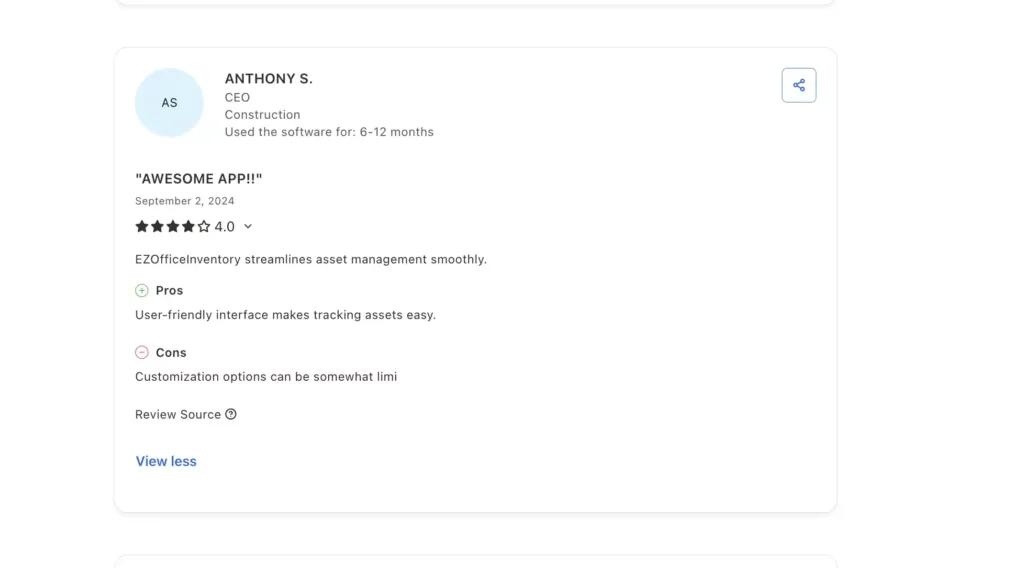
Source: Capterra
Conclusion
- Opt for EZO if: You want a unified system to manage construction equipment across its full lifecycle, covering visibility, scheduling, maintenance, and dispatch, while enabling multi-site operations and data-driven decision-making without relying on disconnected tools.
- Consider alternatives: If your operations require advanced fleet optimization or tightly integrated, construction-specific systems (e.g., BIM, project costing, or logistics-heavy routing), then EZO may need to be complemented by more specialized platforms.
Here’s a snapshot of what EZO can offer in terms of functionalities and value:
| Functionality Area | What EZO Offers | Operational Impact for Construction Teams |
| Asset Lifecycle & Custody Management | Tracks equipment from procurement → deployment → reassignment → retirement with clear ownership and custody tracking | Ensures accountability across crews and job sites, reducing loss, misuse, and disputes |
| Multi-Site Operations | Centralized system to manage equipment across multiple job sites, regions, and teams | Standardizes operations while maintaining visibility across distributed construction projects |
| Procurement & Inventory Planning | Connects asset demand with procurement workflows and inventory tracking | Reduces over-purchasing, avoids emergency rentals, and improves capital allocation |
| Request & Dispatch Management | Request Portal for demand capture + Dispatch Center for scheduling and movement of equipment | Replaces ad-hoc coordination with structured workflows for efficient equipment allocation |
| Utilization & Scheduling | Availability-based scheduling and reservation workflows with utilization tracking | Minimizes idle equipment, avoids double-booking, and improves ROI on assets |
| Maintenance Management (CMMS) | Preventive maintenance scheduling, service logs, alerts, and maintenance checklists | Keeps equipment job-ready, reduces downtime, and prevents project delays |
| Workflow Automation & Alerts | Automates approvals, lifecycle transitions, and maintenance triggers with real-time alerts | Eliminates manual follow-ups and ensures operational consistency |
| Field & Mobile Operations | Mobile app for scanning, check-in/out, inspections, and updates with offline capability | Enables real-time data capture directly from job sites, even in low connectivity |
| Financial & Operational Alignment | Tracks costs, utilization, invoicing, and payments alongside asset usage | Connects equipment operations with financial outcomes for better cost control |
| Compliance & Audit Readiness | Maintains asset histories, inspection logs, maintenance records, and audit trails | Ensures faster audits and reduces compliance risks |
| Reporting & Analytics | Dashboards and reports on utilization, performance, and costs across projects | Supports data-driven decisions for procurement, allocation, and optimization |
| Role-Based Access Control | Configurable access based on roles, regions, and responsibilities | Ensures the right level of control for site teams vs leadership |
| Project Management (Module) | Ability to manage projects and log jobs with historical tracking | Provides context for equipment usage across projects and timelines |
2. Clue
Clue is a construction heavy equipment management platform that provides users with visibility into their equipment and helps them assess its performance across projects. It simplifies equipment tracking, scheduling, and operational workflows by centralizing this information into a single place.
The aim is to automate manual processes and seamlessly manage construction equipment for heavy equipment managers and fleet teams. It gives users actionable insights into improving equipment utilization and scheduling to minimize idle time and costs. Clue offers a variety of solutions, including equipment utilization, equipment tracking, fleet management, dispatch management, and rental management.
Clue claims to offer 100% construction-based workflows with advanced telematics and GPS functionalities to suit the unique needs of construction businesses.
Some of the core capabilities that define Clue include:
- Equipment tracking and visibility: Clue provides location tracking of equipment across job sites, helping teams know where assets are and who is using them at any given time.
- Scheduling and allocation: Teams can assign equipment to projects, schedule usage, and track availability to avoid conflicts and double-booking.
- Check-in/check-out workflows: Enable teams to log equipment movements across locations, crews, and projects, ensuring accountability and traceability.
- Utilization insights: Offers basic reporting on equipment usage, helping teams identify idle assets and improve allocation decisions.
- Mobile-first operations: Field teams can update equipment status, locations, and assignments directly from job sites using mobile devices.
- Work order and maintenance operations (CMMS-lite): Clue includes work order management, preventive maintenance scheduling, and fault code tracking. Maintenance tasks can be created, assigned, and tracked in real time, ensuring that service workflows are structured and equipment stays operational.
- Crew and time tracking integration: Clue extends beyond equipment by capturing crew activity through digital timecards and jobsite tracking. This connects labor and equipment usage, giving a more complete picture of operational productivity.
- Inventory and parts management: Clue tracks parts and materials alongside equipment, enabling teams to manage stock levels, monitor usage, and align inventory with maintenance needs. This ensures critical parts are available when needed and reduces delays caused by stockouts.
Key wins for Clue
- Deep telematics integration: Captures data like engine hours, idle time, fuel usage, and fault codes, going beyond basic tracking.
- Unified fleet visibility: Brings heavy equipment, trucks, tools, and rentals into a single system (“single pane of glass”).
- Works with existing hardware: Integrates with major telematics providers (e.g., Samsara, Geotab, Trimble), avoiding hardware lock-in.
- Real-time utilization insights: Helps identify idle equipment, optimize usage, and reduce unnecessary rentals.
- Condition-based maintenance: Uses machine data and fault codes to trigger maintenance workflows, not just time-based schedules.
- Data-driven dispatch decisions: Enables smarter equipment allocation based on live availability and performance data.
- Built for heavy construction fleets: Designed specifically for mixed fleets and not just for generic equipment tracking.
- Faster time-to-value: Quick deployment with faster ROI compared to heavy ERP-style systems.
Areas where Clue falls short
- Limited customization and flexibility: Clue offers strong out-of-the-box workflows, but users report limited ability to fully customize dashboards, equipment types, and widgets to match specific operational needs.
- Maintenance depth still evolving: Clue supports maintenance and work orders, but its strength lies in telematics-driven insights rather than deep CMMS capabilities for complex maintenance planning and governance.
- Higher investment for smaller teams: Clue can represent a high cost, especially for smaller contractors or teams with simpler needs.
Clue pricing
Clue does not publicly display its pricing. Potential users need to reach out to the team via the form on the website to receive a custom quote based on their fleet size.
Clue review
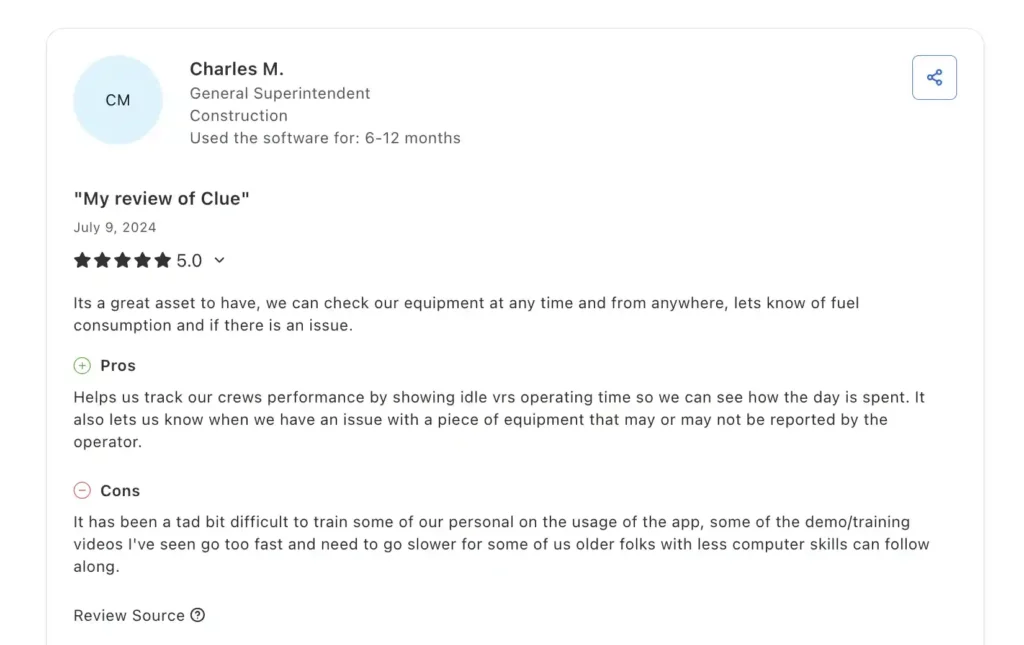
Source: Capterra
Conclusion
Opt for Clue if: You need deep fleet visibility powered by telematics that includes tracking not just where equipment is, but how it’s performing while optimizing utilization, maintenance, and cost efficiency across large or mixed construction fleets.
Consider alternatives if: You require end-to-end operational control across the equipment lifecycle (procurement, custody, financial workflows, and multi-site governance), or need broader workflow standardization beyond fleet intelligence.
The following table provides a quick overview of the main capabilities offered by Clue and how they impact construction teams.
| Functionality Area | What Clue Offers | Operational Impact for Construction Teams |
| Equipment Tracking & Telematics | Real-time GPS tracking with telematics data (engine hours, idle time, fuel usage, fault codes) | Provides deep visibility into both the location and performance of equipment across job sites |
| Fleet Visibility (Single Pane of Glass) | Consolidates data from heavy equipment, trucks, tools, and rentals into one platform | Eliminates the need for multiple systems, giving a unified operational view |
| Utilization & Performance Insights | Tracks equipment usage, idle time, and productivity metrics | Helps reduce underutilization, optimize fleet usage, and control costs |
| Scheduling & Allocation | Assigns equipment to jobs and timelines with availability tracking | Prevents double-booking and improves planning across projects |
| Dispatch Management | Dispatch workflows based on real-time equipment status and availability | Enables smarter, data-driven equipment allocation across job sites |
| Maintenance Management (CMMS-lite) | Preventive maintenance, work orders, fault-code-based alerts | Keeps equipment operational using condition-based triggers rather than just schedules |
| Digital Inspections & Compliance | Mobile inspections with checklists, photos, and issue tracking | Improves safety compliance and ensures consistent inspection workflows |
| Inventory & Parts Management | Tracks parts, materials, and inventory tied to maintenance workflows | Reduces downtime by ensuring the availability of critical parts |
| Crew & Time Tracking Integration | Tracks labor activity alongside equipment usage | Provides a more complete view of productivity across crews and assets |
| Field & Mobile Operations | Mobile-first platform for real-time updates from job sites | Ensures data reflects actual field activity without delays |
| Geo-fencing & Security | Geo-fences with alerts for unauthorized movement or usage | Enhances job site security and reduces the risk of theft or misuse |
| Alerts & Notifications | Real-time alerts for maintenance, usage, and equipment activity | Enables proactive decision-making and reduces operational delays |
| Integrations (Telematics & ERP) | Integrates with telematics providers (Samsara, Geotab, Trimble) and enterprise systems | Connects fleet data with broader operational and financial systems |
3. ToolWatch by AlignOps
ToolWatch by AlignOps is a construction equipment and inventory management software meant to reduce equipment loss by centralizing data. It’s a combination of functionalities from EZO and Clue, integrating operational workflows with asset tracking. It provides complete control over inventory management and warehouse operations.
ToolWatch helps manage tools and heavy construction equipment to maintain the quality of warehouse operations. Here’s what the tool offers:
- Warehouse and tool crib management: ToolWatch connects warehouse operations with field usage, enabling check-in/check-out workflows, inventory counts, and transfers between locations. This ensures accurate tracking of tools as they move from storage to job sites.
- Inventory and materials management: ToolWatch tracks consumables, spare parts, and materials alongside equipment. It helps manage stock levels, automate replenishment, and prevent delays caused by missing or overstocked inventory.
- Job costing and project allocation: ToolWatch links equipment and tool usage directly to projects, enabling teams to track costs against specific jobs. This provides visibility into actual equipment-related expenses and improves budget control.
- Maintenance and service management: ToolWatch supports preventive maintenance scheduling, work orders, and service history tracking. This ensures equipment remains operational and reduces downtime across projects.
- Request and fulfillment workflows: ToolWatch enables field teams to request tools and equipment, which are then processed through structured fulfillment workflows from warehouses or yards. This replaces informal coordination with standardized processes.
- Asset lifecycle management: ToolWatch tracks assets throughout their lifecycle from procurement and deployment to usage and retirement, ensuring complete historical records and better long-term planning.
Key areas where ToolWatch shines
- Tight integration between warehouse and field operations: ToolWatch connects back-office, warehouse, and field teams through mobile and cloud systems, ensuring seamless coordination of check-in/out, transfers, and asset movement.
- Job costing and financial visibility: ToolWatch links equipment and tool usage directly to projects, enabling accurate job costing, budget tracking, and cost recovery, something many asset tools don’t handle well.
- Integrated maintenance and lifecycle tracking: ToolWatch combines asset tracking with maintenance scheduling and lifecycle management, helping teams keep equipment operational and extend asset lifespan.
- Mobile-enabled field execution: With mobile access, field teams can scan assets, submit requests, and update statuses in real time, ensuring operational data reflects actual job-site activity.
- Integration with construction systems: ToolWatch integrates with construction project management and ERP systems (e.g., Procore, Autodesk, Sage), connecting equipment operations with broader project and financial workflows.
How ToolWatch may fall behind EZO and Clue
- User interface and usability limitations: ToolWatch’s interface can feel outdated and less intuitive, with users noting navigation challenges and a need for UI improvements.
- Performance and system lag issues: Some users report system lag or freezing when switching between modules (e.g., warehouse → jobsite), which can slow down operations.
- Limited flexibility and customization: ToolWatch can be rigid in certain workflows, with limited ability to edit transactions (e.g., transfers) or customize reports and dashboards.
ToolWatch pricing
ToolWatch offers Essential, Pro, and Enterprise plans, with features varying by plan. ToolWatch offers quote-based pricing with a usage-based and enterprise-oriented pricing model; prices are not publicly available as prices vary based on features and the number of tools or equipment.
ToolWatch review
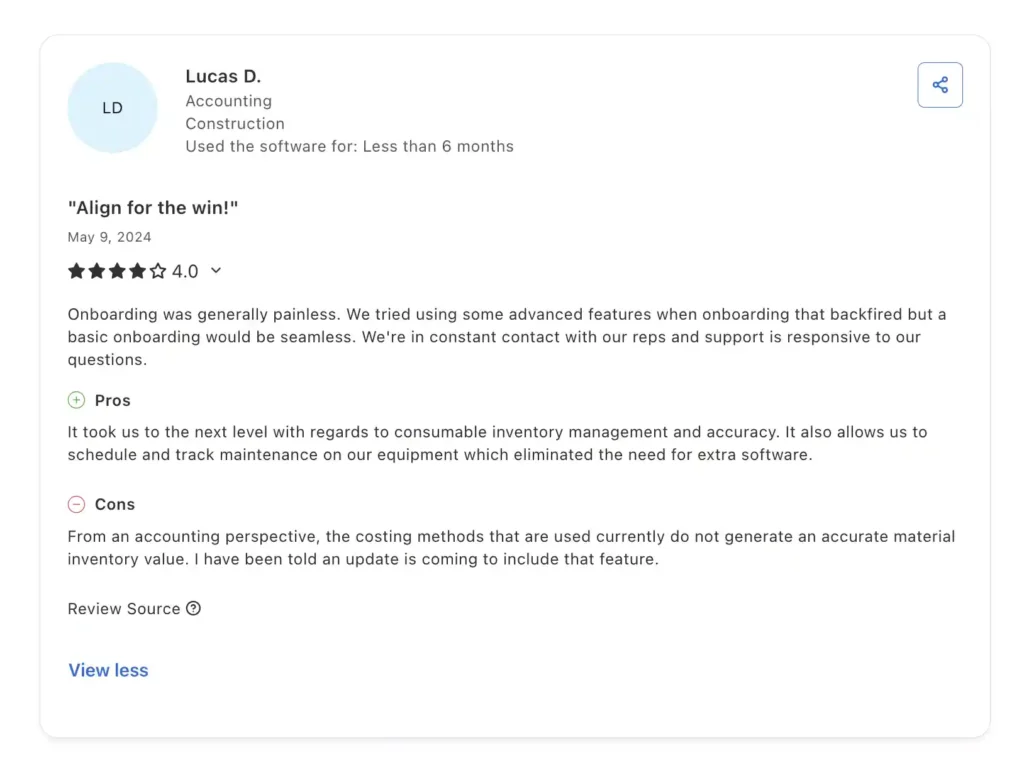
Source: Capterra
Conclusion:
Opt for ToolWatch if: You need strong control over tools, materials, and inventory across warehouses and job sites, along with job costing, especially for large construction operations managing high volumes of assets.
Consider alternatives if: You require deep telematics and real-time machine performance insights, or a more flexible, workflow-driven platform that covers full lifecycle operations (including dispatch, financial workflows, and governance) without heavy reliance on warehouse-centric processes.
| Functionality Area | What ToolWatch Offers | Operational Impact for Construction Teams |
| Equipment & Tool Tracking | Tracks tools, equipment, and materials across warehouses, job sites, and service centers using barcode, RFID, and GPS | Provides complete visibility into asset location and usage, reducing loss and misplacement |
| Warehouse & Tool Crib Management | Manages tool cribs, warehouses, and inventory workflow, including check-in/out, transfers, and audits | Ensures accurate tracking and control of assets moving between storage and job sites |
| Inventory & Materials Management | Tracks consumables, spare parts, and materials with stock monitoring and replenishment workflows | Prevents stockouts and over-ordering, improving operational efficiency |
| Job Costing & Project Allocation | Links tools and equipment usage directly to projects and budgets | Enables accurate tracking of equipment-related costs and improves financial control |
| Request & Fulfillment Workflows | Allows field teams to request tools and equipment, fulfilled through structured warehouse workflows | Replaces informal coordination with standardized request-to-fulfillment processes |
| Maintenance & Service Management | Supports preventive maintenance, work orders, and service history tracking | Keeps equipment operational and reduces downtime across projects |
| Asset Lifecycle Management | Tracks assets from procurement through usage to retirement | Provides complete historical records for better planning and asset utilization |
| Field & Mobile Operations | Mobile access for scanning, transfers, requests, and updates across field and warehouse teams | Enables real-time data capture and operational coordination on-site |
| Reporting & Analytics | Dashboards for inventory levels, utilization, transfers, and costs | Supports data-driven decisions across operations and resource planning |
| Compliance & Audit Readiness | Maintains asset histories, transaction logs, and audit trails | Simplifies audits and ensures compliance with operational standards |
| Integrations (Construction & ERP Systems) | Integrates with tools like Procore, Autodesk, Sage, and other enterprise systems | Connects equipment operations with project management and financial workflows |
| Role-Based Access & Control | Configurable permissions based on roles, locations, and responsibilities | Ensures proper control across warehouse staff, field teams, and leadership |
EZO vs Clue vs ToolWatch: An operational deep dive into construction equipment management software
EZO, Clue, and ToolWatch are three software programs that are designed to meet the growing equipment management needs of the construction industry. Here’s how they differ from each other in terms of features that are most needed by construction businesses:
| Capability | EZO | Clue | ToolWatch |
| End-to-end asset lifecycle management | ✅ | ❌ | ⚠️ |
| Real-time equipment tracking (GPS/telematics) | ⚠️ | ✅ | ⚠️ |
| Deep telematics & machine performance data | ❌ | ✅ | ❌ |
| Utilization & performance analytics | ✅ | ✅ | ⚠️ |
| Maintenance management (CMMS depth) | ✅ | ⚠️ | ⚠️ |
| Dispatch management & request workflows | ✅ | ⚠️ | ⚠️ |
| Warehouse & tool crib management | ⚠️ | ❌ | ✅ |
| Inventory & materials management | ⚠️ | ⚠️ | ✅ |
| Job costing & financial tracking | ⚠️ | ❌ | ✅ |
| Multi-site operational control | ✅ | ⚠️ | ✅ |
| Field mobility (mobile + offline workflows) | ✅ | ✅ | ✅ |
| Workflow automation & approvals | ✅ | ⚠️ | ⚠️ |
| Compliance & audit readiness | ✅ | ⚠️ | ✅ |
| Integration with the construction ecosystem (ERP, PM tools) | ⚠️ | ⚠️ | ✅ |
| Ease of use / fast deployment | ✅ | ✅ | ❌ |
The best software for you is the one that offers more than just the basic capabilities. Depending on the size of your construction business, you can choose software that best meets your criteria and aligns with your long-term equipment-tracking goals. We assessed the software on the basis of the following features:
- Asset lifecycle coverage: Ability to manage equipment from procurement to deployment, usage, reassignment, and retirement
- Equipment visibility and tracking depth: Level of real-time visibility, including GPS tracking, telematics, and data accuracy
- Utilization and performance insights: Capability to track usage, identify idle assets, and optimize equipment allocation
- Maintenance management depth: Support for preventive maintenance, work orders, service history, and condition-based triggers
- Dispatch and demand management: Ability to handle equipment requests, approvals, and movement across job sites
- Inventory and warehouse control: Effectiveness in managing tools, materials, stock levels, and warehouse workflows
- Financial and job costing alignment: Ability to link equipment usage with project costs, budgeting, and financial workflows
- Workflow automation and standardization: Ability to automate approvals, alerts, and operational processes
- Compliance and audit readiness: Support for asset histories, inspection logs, and audit trails
- Integration ecosystem: Compatibility with telematics providers, ERP systems, and construction management tools
- Ease of deployment and usability: Speed of implementation, learning curve, and day-to-day usability for teams
While these are some parameters you can use to assess which software best meets your needs, you should also consider the cost, your organizational goals, and budget to make the best decision. EZO fulfills all these criteria, as it is constantly evolving to provide features aligned with the evolving construction industry. Additionally, EZO offers exceptional customer success, with 24/7 support agents available by phone and email to answer any questions.
Think before you buy! Invest in software that helps you scale as the industry evolves and makes your job easier as a Construction GM. The right choice depends on your operational priority, control, intelligence, and inventory.


![[How-to] Manage Equipment Requests with the Dispatch Center in EZO](https://cdn.ezo.io/wp-content/uploads/2026/03/03081510/dispatch-center-in-EZO.jpg)