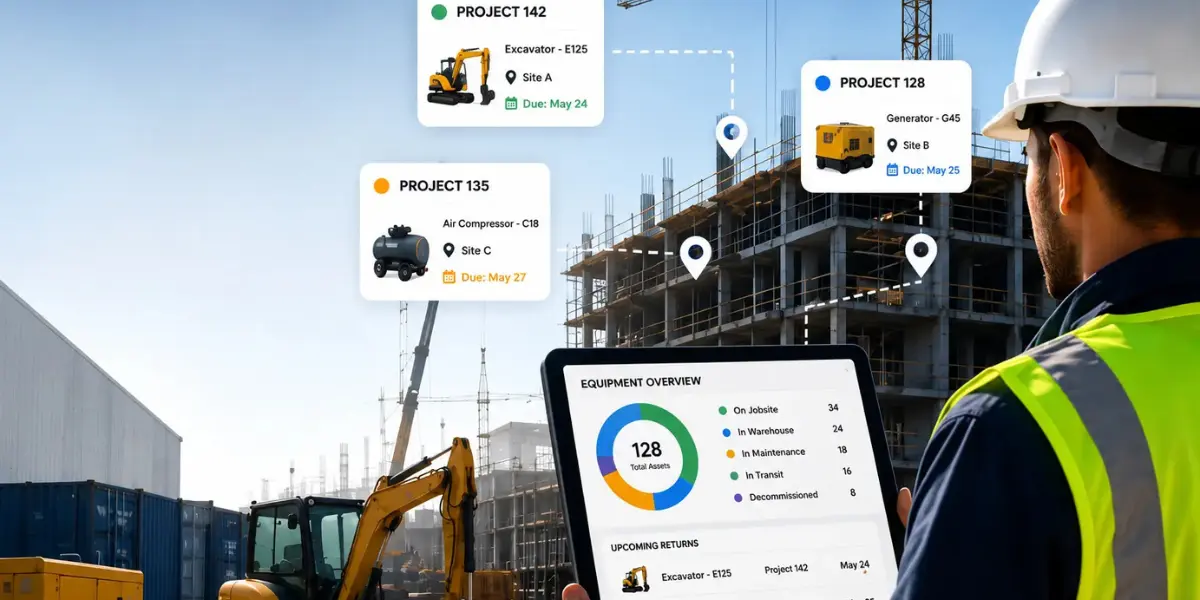
Introduction: The Visibility Challenge Facing Construction Warehouses
Project-level equipment visibility helps construction warehouses know exactly where equipment is, which project is using it, who is responsible for it, and when it will become available again. Without it, teams face scheduling conflicts, idle assets, duplicate purchases, weak forecasting, and project delays that quietly reduce profitability across the operation.
A project manager calls the warehouse on Friday afternoon.
“Do we have three generators available for the new site on Monday?”
The warehouse team believes they do. The spreadsheet says they do. The inventory count says they do.
Monday arrives. One generator is still deployed at another jobsite. One is undergoing maintenance. One was returned two weeks ago, but was never properly checked back into the system.
A project delay suddenly appears.
Except it did not appear suddenly at all. The delay was created weeks earlier when visibility disappeared.
Construction warehouses rarely struggle due to a lack of equipment. They struggle because they lack project-level equipment visibility: a reliable view of where equipment is, why it is there, who is accountable for it, and when it can be redeployed.
What is project-level equipment visibility?
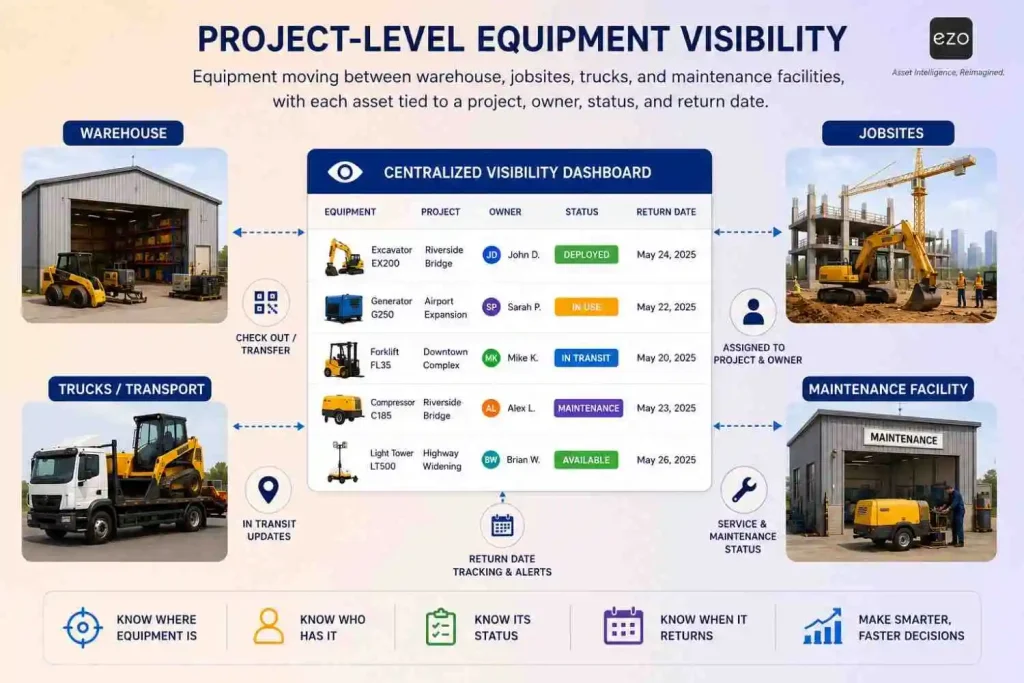
Project-level equipment visibility means knowing not only where equipment is located, but also which project is using it, who is responsible for it, how long it will remain there, and when it will become available again.
Many organizations stop at inventory visibility. They know what equipment they own.
Some go further and achieve location visibility. They know where the equipment is physically located.
But operational excellence requires something deeper: project visibility.
| Visibility level | What you know | What you still do not know |
| Inventory visibility | What equipment exists | Whether it is usable, reserved, idle, or assigned |
| Location visibility | Where equipment is located | Why it is there, who owns it, or when it returns |
| Project-level visibility | Which project is using it, who is responsible, and when it will be available | Very little, if workflows are kept current |
A compressor at “Site B” is not enough information. A compressor assigned to Project 142, checked out to a named foreman, due back Thursday, blocked from future reservations until inspection, and linked to a maintenance record, is usable operational intelligence.
That is the difference between asset awareness and equipment control.
Why do construction warehouses struggle with equipment visibility?
Construction warehouses struggle with visibility because equipment movement grows faster than manual tracking systems can support.
As construction organizations grow, equipment moves through increasingly complex workflows involving warehouses, jobsites, subcontractors, maintenance facilities, transport teams, and project managers. Every handoff introduces a chance for the record to drift away from reality.
This is not usually a people problem. It is a system-design problem.
Equipment moves faster than records
Equipment movement happens in the field. Record updates often happen later.
A forklift can leave a warehouse in minutes. A generator can move from one site to another before a spreadsheet owner has opened the file. A small tool can be handed from one crew to another without anyone treating the movement as a formal transaction.
Manual equipment tracking may appear workable at 50 assets, become fragile at 500 assets, and start breaking down at thousands of assets across locations.
Projects operate independently
Each project team is focused on delivering its own schedule.
A site supervisor may extend equipment usage for another week without realizing another project has already been planned around its return. A warehouse manager may see an asset as “checked out” but not know whether it is still critical to the project or simply sitting idle.
The result is information asymmetry. Each team possesses part of the truth, but nobody possesses the entire picture.
Warehouses become information bottlenecks
Warehouse managers often become the human search engine for equipment information.
Instead of planning capacity, improving utilization, or supporting procurement decisions, they spend time answering repeated questions:
- Where is the equipment?
- Who has it?
- Is it working?
- Is it reserved?
- When is it returning?
- Can another project use it next week?
When critical information lives within people rather than systems, visibility becomes fragile. It also becomes hard to scale.
Visibility fragments across systems
Many construction organizations manage equipment through a patchwork of spreadsheets, emails, phone calls, text messages, paper logs, maintenance systems, procurement records, and jobsite notes.
Each system contains part of the story. None contains the complete story.
This fragmentation mirrors a broader problem in construction data. A 2018 Construction Disconnected report by PlanGrid and FMI, later summarized by Autodesk in its article on the high cost of poor data and miscommunication in construction, found that poor project data and miscommunication were responsible for 48% of rework in U.S. construction, representing $31.3 billion in rework costs in 2018. While rework is not the same as equipment movement, the lesson is directly relevant: when project data is incomplete or fragmented, operational decisions become expensive.
Why do leaders mistake inventory awareness for operational control?
Leaders often mistake inventory awareness for operational control because “what do we own?” is easier to answer than “what can we confidently deploy?”
This creates the visibility illusion.
Leaders often know what equipment they own, how much they paid for it, and which warehouse or jobsite an asset was last assigned to.
But they often do not know whether that asset is actively in use, idle, reserved, blocked by maintenance, due for inspection, or needed more urgently by another project.
This matters because ownership does not create availability. Availability depends on status, custody, condition, location, project assignment, and expected return.
A company can own enough generators and still rent more. It can have enough lifts and still delay work. It can own enough tools and still buy duplicates.
The equipment was never missing. The information was.
What does poor project-level visibility actually cost?
Poor project-level visibility creates costs that rarely appear as one clean line item. Instead, they show up as delays, avoidable rentals, duplicate purchases, idle assets, overtime, and unreliable planning.
Construction already operates under significant productivity pressure. McKinsey Global Institute has estimated that if construction productivity caught up with the broader economy, the sector’s value added could increase by approximately $1.6 trillion globally. In that context, equipment visibility is not a back-office detail; it is a practical way for construction organizations to reduce friction in daily execution.
Project delays
Projects depend on equipment arriving at the right place at the right time.
When availability is uncertain, schedules become fragile. A single unavailable generator, excavator, compressor, lift, pump, or welding machine can delay downstream activities and create knock-on scheduling changes.
The visible problem is the delay. The root cause is usually earlier: a missed return, an unrecorded transfer, a maintenance hold, or a reservation conflict that was not surfaced in time.
Idle assets
Many organizations have equipment sitting unused at jobsites while another project urgently needs the same asset.
Without project-level visibility, idle assets stay hidden. With visibility, idle assets become redeployment opportunities.
This is especially important for construction warehouses because “available” is not the same as “physically present.” An asset may be offsite but unused, onsite but reserved, or returned but awaiting inspection.
Duplicate purchases and avoidable rentals
Teams often purchase or rent equipment because finding existing assets takes too long, current availability is unclear, or nobody wants to risk planning around unreliable data.
Over time, this leads to fleet bloat: more owned equipment, more storage pressure, more maintenance demand, and still not enough confidence.
Lower utilization rates
Equipment creates value only when it is being used productively.
Assets sitting idle generate costs without generating returns. Assets that cannot be found, reserved, inspected, or redeployed quickly also reduce utilization because they are operationally unavailable even when they physically exist.
Project-level construction equipment tracking gives leaders a better way to ask: “Are we getting enough work from the equipment we already own?”
Forecasting failures
Future planning depends on accurate current information.
When organizations cannot see how equipment is allocated across projects today, forecasting future demand becomes a matter of educated guessing. This weakens capital planning, maintenance planning, procurement, and project scheduling.
KPMG’s Global Construction Survey 2025/2026 describes a construction sector energized by opportunity but challenged by complexity, uncertainty, and risk. For construction executives, that combination makes reliable operational data even more important: the more complex the work becomes, the more expensive guesswork becomes.
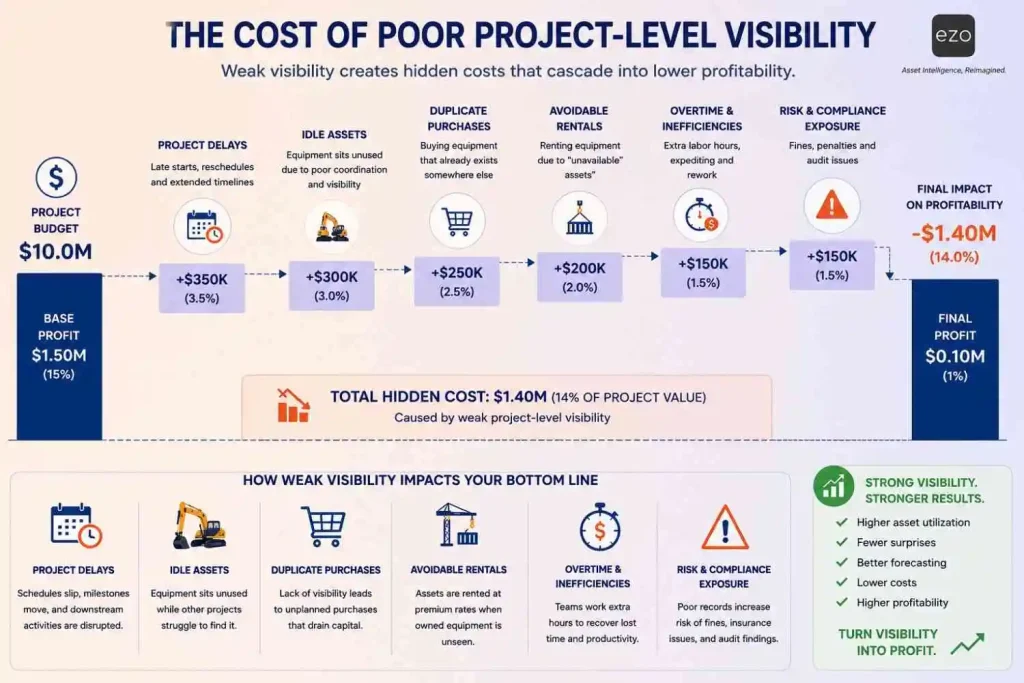
Why does project-level visibility improve equipment utilization?
Project-level visibility improves utilization by turning equipment from a static inventory item into a shared operational resource.
When allocation is visible across projects, warehouses can make smarter decisions about deployment, reservation, maintenance, and redeployment.
| Without project-level visibility | With project-level visibility |
| Equipment appears unavailable | Availability is clear by project, date, and status |
| Idle assets remain hidden | Idle assets become redeployment opportunities |
| Duplicate purchases increase | Existing capacity is checked first |
| Maintenance conflicts appear late | Maintenance status is visible before scheduling |
| Forecasting is unreliable | Planning becomes data-driven |
| Managers react to shortages | Managers anticipate conflicts |
A warehouse with project-level visibility can see that Project A has a compressor reserved until Friday, Project B needs it Monday, and maintenance requires a quick inspection between those dates. That gives the team time to plan transport, notify stakeholders, and avoid a last-minute rental.
Visibility does not simply help people find equipment. It helps them sequence work.
What should construction warehouses track beyond location?
Construction warehouses should track equipment by project, location, user, status, reservation, maintenance condition, movement history, and expected return date.
Location is only one layer of the operating picture.
A scalable visibility model should include asset identity, project assignment, custody, location, status, condition, checkout date, expected return date, reservation window, service history, movement history, and financial context such as purchase cost, rental substitute cost, depreciation, chargeback, or project allocation.
This is where construction asset management software becomes more valuable than a basic equipment tracking spreadsheet. A spreadsheet can list equipment. A system can connect equipment to a workflow.
How Can Construction Warehouses Build Up-to-Date Equipment Visibility?
Visibility improves when equipment movement becomes easier to capture than ignore.
People follow the path of least resistance. If tracking equipment requires extra effort, compliance falls. If tracking is embedded in the check-out, transfer, return, maintenance, and reservation workflows, adoption rises naturally.
Use QR codes, barcodes, or RFID tags for faster field updates
QR codes and barcodes reduce friction during equipment checkouts, transfers, audits, and returns. For some high-volume or no-line-of-sight workflows, RFID can also help teams capture movement more efficiently.
The goal is not tagging for its own sake. The goal is to make the correct update happen at the moment the equipment moves.
Assign every asset to a project, user, or team
Every deployable asset should have an accountable owner while it is outside the warehouse.
A project-based assignment answers the questions that spreadsheets often miss: why is the equipment there, who is responsible for it, and when should it come back?
Accountability improves when the system records key interactions, not just static inventory counts.
Use reservations to prevent future conflicts
Reservations allow warehouses to plan demand before conflicts emerge. This shifts equipment operations from “who shouted first?” to “what does the project schedule require?”
An equipment checkout software solution with reservation capabilities helps teams identify overlapping equipment needs, protect critical assets, and coordinate returns before project schedules are affected.
Connect maintenance status to availability
Equipment is not truly available if it is due for inspection, waiting for repair, or missing a service record.
That is why equipment maintenance tracking should be connected to project allocation. A returned generator may need to be inspected before it can be reserved again. A lift may be physically onsite but blocked from use because its certification is due.
Give field teams mobile access
Field teams should be able to update equipment status directly from jobsites.
Visibility breaks down when updates depend on returning to a desk. Mobile access helps teams scan assets, confirm checkouts, request equipment, report issues, and update status closer to the point of work.
What do customer stories reveal about equipment visibility at scale?
Customer stories show that visibility is most valuable when assets, projects, people, and workflows are connected within a single operating system.
Heroes Restoration is a disaster restoration company with mobile crews, trucks, tools, consumables, and expensive equipment moving quickly between emergency jobs. Before adopting dedicated asset tracking, the team relied on spreadsheets and dealt with lost or misplaced equipment.
In their case, a single missing piece of equipment could cost around $2,000. By using EZO, they could track stocked trucks as locations, scan equipment in and out, and improve accountability across mobile crews.
The lesson for construction warehouses is clear: when work is mobile, the “warehouse” is no longer just a building. It may include trucks, jobsite containers, temporary storage, subcontractor handoffs, and maintenance areas. Visibility has to follow the equipment wherever work happens.
Another example comes from Delft Imaging, a global health technology organization operating across 90+ countries. Although it is not a construction company, its scale problem is highly relevant: spreadsheets and fragmented records made it difficult to connect assets, warranty status, service history, and project data.
Delft Imaging structured each customer project as a core unit within EZO, connecting assets to service workflows and supporting decision-making. The company reported a 30-40% improvement in operational efficiency and an estimated 1,000-2,000 hours saved across roughly 10,000 support tickets.
The construction equivalent is linking every generator, pump, lift, tool set, safety asset, and consumable to the project context that determines its value.
How does visibility lead to predictability?
The ultimate value of visibility is not knowing where the equipment is today. It is knowing where the equipment will be tomorrow, whether it will be usable, and which project should get priority.
Many organizations view visibility as a tracking capability. High-performing organizations view visibility as a forecasting capability.
Once equipment allocation, movement, usage, maintenance, and return patterns become visible, organizations can forecast demand, schedule projects more confidently, reduce equipment conflicts, optimize utilization, reduce avoidable rentals, and improve analytics and AI-readiness.
The executive framework is simple:
Visibility → Predictability → Profitability
Visibility means knowing what exists, where it is, who has it, which project it supports, what condition it is in, and when it returns.
Predictability means using that information to plan reservations, maintenance, transport, procurement, and project schedules.
Profitability means higher utilization, lower equipment spend, fewer delays, fewer duplicate purchases, and more reliable delivery.
This is why project-level equipment visibility is not just a warehouse metric. It is a strategic operating capability.
What are the signs your construction warehouse has a visibility problem?
Most visibility problems reveal themselves long before organizations name them as visibility problems.
If any of the following sound familiar, visibility may already be limiting operational performance:
- Equipment location requires phone calls.
- Project managers frequently ask where assets are.
- Equipment appears available but is not usable.
- Assets are checked out without clear project ownership.
- Duplicate purchases or avoidable rentals occur.
- Utilization rates are unknown.
- Equipment sits idle at jobsites.
- Forecasting is unreliable.
- Maintenance status is disconnected from scheduling.
- Project schedules change because equipment is unavailable.
- Warehouse teams spend more time answering questions than planning operations.
- Leaders do not trust the asset data enough to make capital decisions.
The more items checked, the greater the visibility gap.
Executive takeaways
For construction leaders, the biggest visibility challenge is not asset tracking. It is understanding how assets support projects.
The organizations that outperform competitors are not necessarily the ones with the largest fleets. They are the ones that can answer critical operational questions faster:
- What equipment is available?
- Which project is using it?
- Who is responsible for it?
- Is it ready for use?
- When will it return?
- Can it be redeployed elsewhere?
- What will future projects require?
- Should we buy, rent, repair, or reallocate?
Construction warehouses do not lose efficiency because equipment disappears. They lose efficiency because visibility disappears.
When every piece of equipment is connected to a project, location, owner, condition, and timeline, construction teams can plan confidently, utilize assets effectively, and deliver projects more predictably.
Project-level equipment visibility is not merely a tracking capability. It is an operational capability. And for construction leaders, operational capability becomes a competitive advantage.
Ready to discover hidden capacity in your equipment fleet?
Many construction organizations already own the equipment they need. What they often lack is visibility into how that equipment is being used.
EZO construction equipment management software helps teams track equipment across jobsites, connect assets to projects, manage checkouts and reservations, support maintenance workflows, and create audit-supporting asset records.
Book a demo with EZO to see how project-level equipment visibility can help reduce delays, improve utilization, strengthen accountability, and make every asset easier to find, deploy, and manage across projects.