
Rental equipment can look available in the system and still be a poor candidate for the next booking. A machine may be approaching a service interval, waiting on an inspection, or already overdue for scheduled work. That is why rental equipment maintenance needs to be connected to availability, not managed as a separate back-office task.
The problem is not simply whether a maintenance reminder was sent. It is whether the equipment rental workflow can recognize that a unit should not be promised to a customer until the required work is complete.
Consider a machine with 487 operating hours and a service interval at 500. A three-day rental could push it beyond that threshold even though it is technically available today. Or a returned unit may have an open repair issue but still appear in the rentable pool.
A reliable process needs to do more than flag maintenance. It should determine when equipment becomes unavailable, prevent conflicting bookings, route the unit through service and inspection, and return it to the rental pool only when it is ready to go out again.
This guide explains how to build that maintenance-to-availability workflow, including when to use warnings versus hard blocks, how to handle existing reservations and extensions, and what equipment rental software should do when maintenance conflicts with demand.
What does it mean to block rental equipment for maintenance?
Blocking equipment for maintenance means changing its operational availability so it cannot be assigned, dispatched, or rented while required service, inspection, or repair is outstanding. The purpose is not simply to identify that maintenance is due. It is to make that information affect the rental workflow before the equipment is committed to a customer.
A useful maintenance process separates three things that are often treated as interchangeable: alerts, maintenance status, and rental availability.
The key distinction is simple:
| Control | What it does | Rental impact |
| Maintenance alert | Warns that work is approaching or overdue | May not change availability |
| Maintenance status | Shows where the unit is in the service process | Provides operational context |
| Availability rule | Determines whether the unit can be committed | Can restrict booking, allocation, or dispatch |
An alert informs the team. A status explains the condition. An availability rule determines what the rental team can do.
The goal is to connect all three without sidelining equipment earlier than necessary.
When should rental equipment become unavailable?
Equipment should become unavailable when continuing to offer it for rent would conflict with a defined service, inspection, or repair requirement. The trigger will vary by asset type and maintenance policy, so the decision should be based on the condition that actually determines readiness rather than on a single blanket rule.
1. Calendar-based maintenance becomes due
Some rental equipment maintenance schedules are tied to fixed dates rather than usage. Examples include annual inspections, quarterly servicing, seasonal preparation, or manufacturer-recommended service intervals.
In these cases, the important question is whether the equipment can complete the proposed rental before that date. A unit with an inspection due next Friday may still be suitable for a one-day rental on Monday, but not for a two-week booking that extends beyond the inspection deadline.
This is why scheduled maintenance should be evaluated against reservation dates rather than treated only as a calendar reminder.
2. Usage crosses a maintenance threshold
For equipment whose maintenance depends on hours, mileage, cycles, or another usage measure, current availability does not tell the whole story.
Consider a generator with 480 operating hours and a service interval at 500 hours. It may be fully operational when the reservation is created, but a rental expected to add 30 hours would take it beyond the service limit.
For usage-based maintenance scheduling, the relevant question becomes:
- Can the equipment complete the expected rental period without crossing its next maintenance threshold?
If the answer is no, the operator may need to service the unit before dispatch, assign another asset, or adjust the booking.
3. The equipment fails a return or pre-rental inspection
Not every maintenance requirement can be predicted through a schedule.
A returned asset may show signs of damage, abnormal wear, leaks, missing guards, tire issues, or another condition discovered during inspection. Similarly, a pre-rental check may uncover a problem shortly before dispatch.
When an equipment inspection identifies an issue that requires corrective action, the unit should move out of the rent-ready pool until that issue has been assessed and resolved.
This is particularly important because a completed rental does not automatically mean the equipment is ready for the next one.
4. An unresolved repair or damage issue remains open
Equipment should also remain unavailable when a known fault has not yet been resolved, even if the unit is not actively being worked on.
For example, a machine may be:
- waiting for a replacement part;
- scheduled with an external service provider;
- awaiting diagnostic work;
- pending approval for a repair; or
- waiting for a technician to complete follow-up work.
In each case, the maintenance task may be temporarily inactive while the underlying issue still affects readiness. Equipment maintenance tracking should therefore distinguish between work that is paused and equipment that has actually been cleared for rental.
5. Required service cannot be completed before the next booking
A maintenance conflict can occur even before equipment becomes technically overdue.
Suppose an asset is due for service tomorrow morning and has another rental scheduled that afternoon. If the maintenance team does not have enough time to complete the work, inspect the unit, and prepare it for dispatch, keeping the reservation against that asset creates an avoidable operational risk.
At that point, the rental team should treat the unit as unavailable for that booking and consider another asset, a revised pickup time, or an earlier maintenance slot.
The same principle applies to preventive maintenance for rental equipment more broadly: availability should account for the time required to complete the work, not just the date or meter reading at which maintenance officially becomes overdue.
Build a maintenance-to-availability status workflow
A useful status model should show more than whether a machine is simply “available” or “unavailable.” It should tell each team what stage the unit is in, what can happen next, and whether it can be committed to a customer.
| Status | Rentable? | What it means operationally |
| Ready | Yes | No known maintenance restriction applies |
| Maintenance due soon | Usually | Can be rented only if the planned use stays within the upcoming service window |
| Service due | Conditional / No | Maintenance needs to be completed or reviewed before the next commitment |
| Maintenance hold | No | Temporarily removed from circulation for planned service |
| Under repair | No | Corrective work is actively in progress |
| Waiting for parts | No | Work cannot be completed until required components arrive |
| Inspection required | No | Condition has not yet been verified after return, repair, or service |
| Service complete / QC pending | No | Technician work is finished, but final checks remain outstanding |
| Rent-ready | Yes | All required checks are complete, and the unit has been cleared for use |
The important transition is not work finished → available. It is release criteria met → rent-ready.
A 7-step workflow for blocking equipment due for service
The blocking process should be rule-based enough that maintenance conflicts are caught before they become dispatch problems. Therefore, a practical workflow looks like this:
Step 1: Define the maintenance threshold
Start by identifying what makes the next service event due for each equipment type. Depending on the asset, that trigger may be:
- a calendar date;
- operating hours;
- mileage;
- usage cycles;
- equipment condition; or
- a failed inspection.
The threshold itself should come from the applicable manufacturer guidance, internal maintenance plan, service contract, or inspection requirement rather than an arbitrary interval.
It also helps to define whether the trigger is merely informational or whether reaching it should stop the unit from being rented.
Step 2: Create a “due soon” warning period
Do not wait until the threshold is reached before surfacing the upcoming service requirement.
A due soon stage gives reservations and maintenance teams time to fit the work between bookings, source parts, assign a technician, or move the service forward if the next rental would create a conflict.
Crucially, “due soon” does not have to mean “unavailable.” A unit may still be suitable for a short booking if the expected use will keep it within its service limit.
This gives the operation two different signals:
- Due soon: plan around the approaching service event.
- Due: take the required action before further use.
Step 3: Compare the threshold with upcoming reservations
Before assigning a specific piece of equipment, check whether the planned rental would carry it past its next service point.
For usage-based equipment, this means looking beyond the current meter reading. A machine at 470 hours with service due at 500 hours may be acceptable for a light one-day job but unsuitable for a week-long rental expected to add 50 hours.
For date-based servicing, compare the reservation period with the scheduled service date.
The key question is:
- Can this unit complete the proposed rental and still remain within its maintenance requirements?
If not, resolve the conflict while there is still time to service the equipment, substitute another unit, or modify the reservation.
Step 4: Apply the maintenance hold
Once the predefined maintenance condition is reached, the system or operating process should place the unit on hold.
That hold should do more than change the appearance of the equipment record. It should affect the actions users can take by:
- removing the unit from current rentable inventory;
- preventing it from being assigned to a new order;
- stopping dispatch against the affected period; and
- displaying the reason for the restriction.
This reduces the chance that someone overlooks a maintenance flag during a busy reservation or checkout process.
Step 5: Create the maintenance task or work order
A blocked unit now needs a corresponding work order, not just an unavailable status.
The maintenance record should capture enough information to move the job to completion, such as:
- why the equipment was pulled from service;
- the maintenance or repair required;
- assigned technician or service provider;
- target completion date;
- required parts;
- current meter readings;
- labor or vendor details; and
- supporting notes, photos, or inspection findings.
Connecting the restriction to the work itself also makes it easier for rental staff to understand whether the unit is likely to return in an hour, a day, or much later and what the work order costs are going to be.
Step 6: Confirm that the rental equipment meets the release criteria
The point at which maintenance work ends should be defined in advance.
Depending on the equipment and type of service, release criteria might include:
- required work completed;
- functional testing passed;
- post-service inspection completed;
- reported defects resolved;
- updated hour, mileage, or usage readings; and
- required documentation entered.
This prevents equipment from returning to the fleet simply because a technician marked one task as complete while another readiness requirement remains outstanding.
Step 7: Return the equipment to rentable inventory
After the release criteria are satisfied, change the unit back to a rentable state and make it available for appropriate reservations.
Before doing so, check whether anything changed while the equipment was out of circulation. New bookings may have been created, another service interval may now be relevant, or the expected completion date may have shifted.
The completed workflow should leave a clear record of what happened:
maintenance trigger → warning → booking check → hold → service → verification → release
That creates a repeatable process in which maintenance requirements actively shape equipment rental decisions rather than being handled separately.
Hard blocks vs. warnings: Not every maintenance issue should behave the same way
A maintenance policy should reflect the severity and timing of the issue. Treating every upcoming service event as an automatic shutdown can unnecessarily reduce fleet utilization, while treating every issue as a warning can leave too much room for judgment at the point of booking.
A three-level policy makes the response proportionate to the risk.
Level 1: Warning
A warning is appropriate when maintenance is approaching, but the equipment can still complete certain rentals without breaching the service requirement.
For example, if a machine has 30 operating hours remaining before its next service, a short rental expected to use only 10 hours may still be acceptable.
At this level, the system should make the approaching requirement visible without automatically removing the unit from consideration. The warning gives staff enough context to judge whether the proposed rental fits within the remaining service window.
Typical warning conditions might include:
- service due within a defined number of hours or miles;
- an inspection date approaching;
- a recurring maintenance event coming up soon; or
- a component nearing its planned replacement interval.
The purpose is to support planning without removing usable equipment from circulation too early.
Level 2: Conditional block
A conditional block applies when the proposed rental itself creates the maintenance conflict.
For example, a unit may be serviceable today, but the requested booking extends past its inspection date or is expected to push it beyond its next hour-based service interval.
In that situation, the reservation should not proceed against that unit until the conflict is resolved.
Possible resolutions include:
- assigning another unit;
- completing the required service before pickup;
- changing the rental dates or duration; or
- using an authorized exception process where the maintenance policy permits one.
This level is especially useful because it evaluates maintenance in the context of a specific booking. The equipment is not necessarily unusable; it is simply unsuitable for that particular rental as currently planned.
Level 3: Hard block
A hard block should be reserved for conditions in which the equipment must not leave the operation until a defined issue has been resolved.
Examples include:
- a failed safety or readiness inspection;
- an active repair;
- mandatory maintenance that is already overdue;
- an unresolved fault affecting operation;
- required documentation or certification that has expired; or
- equipment that has been repaired but has not yet passed its final release check.
At this level, availability should not depend on whether a user notices a warning or decides the rental is probably acceptable. The unit remains restricted until the required release conditions are met.
Match the control to the maintenance condition
The practical distinction is simple:
- Warning: the equipment can still be rented within defined limits.
- Conditional block: the proposed booking conflicts with the maintenance requirement.
- Hard block: the equipment should not be rented at all in its current state.
This tiered approach protects maintenance requirements without automatically sidelining every unit the moment a service reminder appears.
How to control maintenance overrides
Overrides should be exceptions, not shortcuts.
Define:
- which users can approve them;
- which maintenance conditions can never be overridden;
- what reason must be recorded;
- whether a second approval is required for higher-risk exceptions; and
- how overrides will be reviewed later.
A scheduling warning may allow judgment if the unit will remain within its required limits. A failed required inspection or unresolved condition affecting safe operation should not be treated as a routine scheduling override.
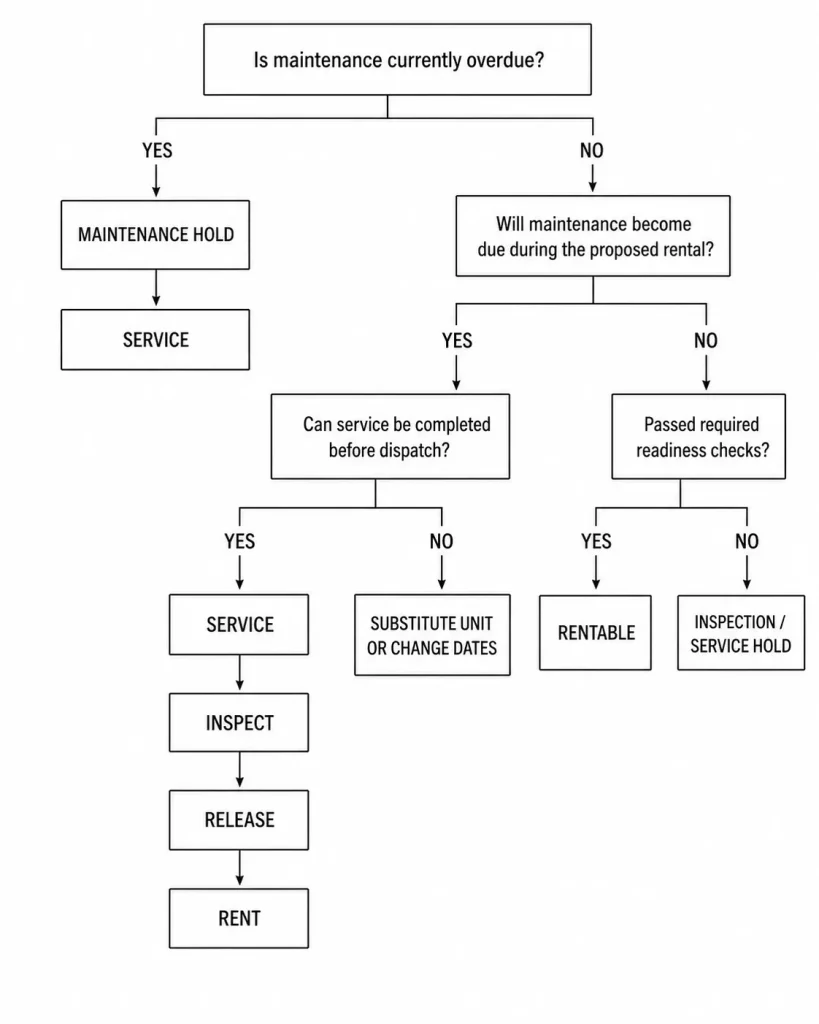
Maintenance lockout decision tree
A decision tree helps turn maintenance policy into a repeatable booking rule. Instead of leaving the outcome to manual judgment each time a reservation is created, the team can follow the same sequence of questions to decide whether a unit can be committed, serviced first, or withheld from the equipment rental schedule.
Use this decision sequence:
What equipment rental software should do when maintenance is due
Once maintenance and equipment rental activity are managed digitally, the software should do more than maintain a service calendar. It should carry maintenance information into the places where equipment is scheduled, assigned, and prepared for its next job.
How EZRentOut implements parts of this workflow
EZRentOut provides one example of how that connection can work inside an equipment rental management system.
| What the software should do | How it applies in EZRentOut |
| Schedule recurring work | Maintenance can be scheduled by time or usage, with return-based maintenance workflows also supported |
| Keep service activity attached to the unit | Work orders, service history, inspection records, parts, costs, and vendor information can remain associated with the equipment record |
| Reflect maintenance in availability | While an asset is in maintenance, it cannot be rented out during that maintenance period; non-overlapping future bookings may still be allowed. |
| Separate upcoming work from active work | Service events can be tracked as scheduled, pending, active, or completed |
| Show the maintenance queue | Teams can see equipment currently in service alongside upcoming and completed maintenance |
| Preserve a service history | Previous maintenance events remain available on the individual asset record |
EZRentOut currently supports scheduled, preventive, and usage- or time-based recurring maintenance and connects work orders and service history with rental equipment records. Its rental workflow also ties maintenance status to equipment availability rather than treating maintenance as an isolated record.
Keep the service record tied to the equipment
When a unit enters the maintenance process, the associated information should travel with that specific asset rather than being kept in a separate spreadsheet, calendar, or technician inbox.
In EZRentOut, service activity can be recorded against the asset itself. Work orders can include task ownership, deadlines, parts, costs, and vendor activity, while the Services area retains previous maintenance events.
This becomes particularly useful when the same unit develops a recurring problem. Instead of seeing only that it is currently unavailable, the maintenance team can review what was previously repaired, how often similar work has occurred, and what resources were used.
Let service state affect what the rental team sees
The equipment rental software of your choice should distinguish between maintenance that has been planned and maintenance that is actively affecting the unit.
EZRentOut, for example, uses service states including Pending, Active, and Completed for recurring service workflows. When a service becomes active, the asset is unavailable. Scheduled, pending, active, and completed events can also be viewed separately, giving the team context around whether work is approaching, underway, or finished.
That distinction keeps an upcoming service event from being treated the same way as equipment already in the shop. It also gives reservations staff more useful information than a generic “unavailable” label.
Bring return-triggered maintenance into the same workflow
Some maintenance needs only become apparent when equipment comes back.
Rental software can account for this by making the return itself part of the service process. In EZRentOut, Service Triage can be configured so selected equipment is automatically sent into maintenance after check-in for a defined period. After that period, the asset remains in maintenance until its status is manually changed back to available.
This can be useful for equipment that requires inspection, cleaning, testing, or routine turnaround work after every rental rather than at long calendar intervals.
Don’t confuse maintenance-overdue equipment with overdue rentals
The word overdue can refer to two very different problems in an equipment rental operation.
An overdue rental means the customer has kept the equipment beyond its expected return date. The issue is primarily one of return timing, availability forecasting, and potentially billing or follow-up.
Overdue maintenance means the equipment has passed a required service, inspection, or usage threshold. The issue is whether the unit should continue to be offered for rental before that requirement is addressed.
The distinction matters because the operational response is different:
- An overdue rental may still be working normally in the field but is no longer where the rental schedule expected it to be.
- An item with overdue maintenance may already be back at the yard but should not necessarily be sent out again.
EZRentOut reflects this distinction in its terminology. Its Availability of Overdue Items setting relates to equipment that has not been returned on time, while equipment placed in maintenance follows a separate availability workflow.
Keeping these two states separate helps teams avoid treating a late customer return as a service problem, or a missed service interval as simply another scheduling delay.
Metrics that show whether the rental equipment blocking workflow works
Uptime alone does not show whether a maintenance lockout process is working well. A fleet can report high utilization while still discovering service conflicts too late, holding equipment longer than necessary, or repeatedly overriding maintenance restrictions.
A better set of measures looks at how often the workflow prevents problems and how efficiently equipment moves through it.
| Metric | What it tells you |
| Preventive maintenance compliance | Whether scheduled work is being completed within the required interval |
| Overdue maintenance count | How many units have crossed a service threshold without completion |
| Maintenance-related booking conflicts | How often upcoming service interferes with an existing or proposed rental |
| Rental attempts blocked for maintenance | Whether maintenance restrictions are actually being encountered during booking or allocation |
| Average maintenance hold duration | How long equipment remains unavailable once it enters the maintenance process |
| Maintenance-to-rent-ready time | How quickly a unit returns to usable inventory after service begins or is completed |
| Repeat repair rate | How often the same unit returns with the same or a related issue |
| Maintenance-block override rate | How frequently users bypass a restriction to keep a rental moving |
Pay particular attention to maintenance-block override rate
A high override rate is often more informative than the number of blocks alone.
If users routinely bypass maintenance restrictions, the underlying problem may be elsewhere in the operation. For example:
- too few substitute units are available;
- service thresholds are poorly calibrated;
- maintenance work is taking longer than planned;
- booking teams are committing equipment too far ahead without checking service demand; or
- the override process has become an informal shortcut rather than an exception.
The goal should not necessarily be to drive overrides to zero. Some operations will have legitimate exceptions. What matters is whether each override is visible, explainable, and uncommon enough that the maintenance policy still functions as a real control.
Checklist: Is maintenance actually controlling rental equipment availability?
Before considering the workflow complete, test whether it can answer the questions that matter at the point of reservation, return, and dispatch.
- Can the team see when a unit is approaching its next service requirement?
- Does the booking process account for maintenance that may fall inside the requested rental period?
- Are failed inspections and unresolved repairs reflected in the unit’s availability?
- Can staff tell why a unit is unavailable without opening multiple records?
- Are future bookings reviewed again when rental dates are extended or changed?
- Is there a defined process for handling maintenance conflicts with existing reservations?
- Can only authorized users override a maintenance restriction?
- Are override reasons recorded for later review?
- Does completed service require a final readiness check before the unit returns to circulation?
- Can teams measure how often maintenance causes booking conflicts, holds, or overrides?
If several of these answers are “no,” the issue is probably not a lack of maintenance data. It is that the data is not influencing equipment rental decisions early enough.

![[How-to] Leverage Advanced Services and Maintenance in EZRentOut](https://cdn.ezo.io/wp-content/uploads/2016/12/18113152/Advanced-Service-and-maintenance.jpg)
![[How-to] Manage Work Orders in EZRentOut](https://cdn.ezo.io/wp-content/uploads/2018/02/05101010/Work-orders-scaled.png)
![[How-to] Service and Maintain Items in EZRentOut](https://cdn.ezo.io/wp-content/uploads/2015/05/18102704/Service-and-maintenance.jpg)




