Key Takeaways:
- Track allocation delay hours and the equipment readiness rate alongside MTBF and MTTR, not instead of them.
- Unplanned downtime, planned maintenance, and readiness delays need different fixes and should be tracked with different KPIs.
- A clean equipment record shows good condition only if check-in requires someone to report condition.
- A failed inspection should place equipment on a maintenance hold that only a named person can release.
- Records drift because updating them costs the person at the handoff, while the benefit reaches someone else later.
- High utilization within design limits is not misuse, and idle equipment can be deliberate reserve capacity.
- Prove results with timestamped downtime events recorded before and after rollout, using fixed KPI definitions.
Introduction
Digital equipment tracking reduces downtime by keeping each asset’s location, custody, condition, inspection results, and maintenance status in one current record. That record lets teams service equipment before failures develop, hold equipment that hasn’t passed inspection, and stop planning work around assets that are booked elsewhere or not ready.
A generator can have a clean maintenance history and still leave a crew idle for a morning. It was at the wrong site, booked to another crew, or waiting for an inspection sign-off nobody knew was pending. None of those mornings show up in mean time between failures (MTBF) or mean time to repair (MTTR), because the generator never failed. Reliability metrics measure the equipment. They do not measure whether the equipment was ready when someone needed it.
That gap is why this article separates two outcomes. Unplanned equipment downtime is time lost when equipment fails or cannot be used safely. Operational delay is time lost when equipment works but is unavailable, not ready, or in the wrong place. Digital tracking affects both, through different mechanisms, and each needs its own measure.
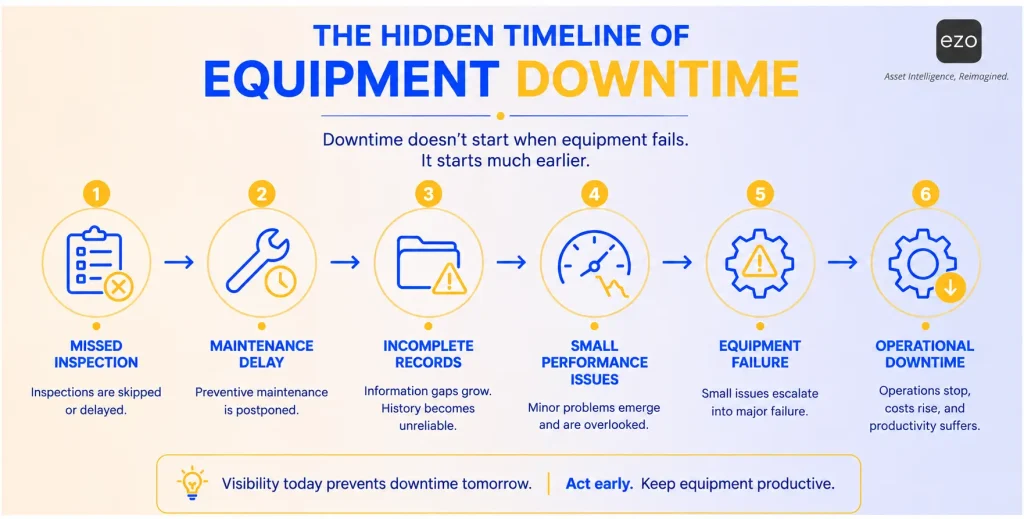
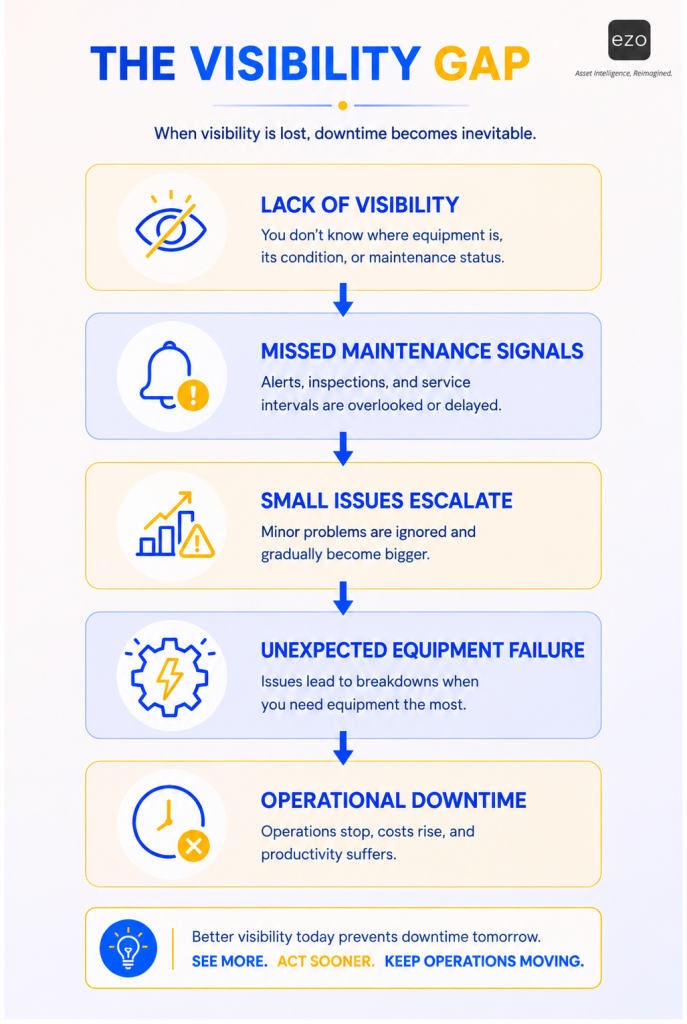
Both kinds of loss can start with small misses that happen well before work stops. An inspection is skipped. A service task slips past its due date. A compressor comes back damaged, and no one records it. A forklift is booked for one project while another team assumes it is still available. A generator passes its scheduled service interval and still goes out to the next job. The timeline below shows one way these misses can line up before a failure. It is one possible sequence, not the only path; what matters is that each step leaves a record someone could act on.
What is equipment downtime?
Equipment downtime is time when equipment cannot perform its intended work because it has failed, is being repaired, or has been taken out of service for maintenance. Downtime after an unexpected failure is unplanned downtime. Downtime for scheduled service, such as preventive maintenance, is planned downtime. Report them separately. Planned downtime is a cost the organization chooses and schedules; unplanned downtime is a cost it tries to avoid.
A second kind of loss can get counted as downtime even though nothing is broken. A generator sitting at the wrong site, a compressor reserved for another project, or a lift waiting for an inspection sign-off may all be mechanically sound, and the work still waits. These are readiness and allocation delays. They are real costs, and they need their own measures.
| Example | Category | KPI it affects |
| A vehicle breaks down and waits for a repair part | Unplanned downtime | MTBF, MTTR, availability |
| A pump is taken offline for scheduled service | Planned downtime | Preventive maintenance compliance |
| A lift is waiting for an inspection sign-off before use | Readiness delay | Equipment readiness rate, inspection completion rate |
| A generator is sitting idle at the wrong site | Allocation delay | Allocation delay hours |
| A compressor is booked for another project | Allocation delay | Allocation delay hours, utilization rate |
| A tool is marked available in a spreadsheet but has not been returned | Record accuracy failure that causes an allocation delay | Record accuracy, allocation delay hours |
Each recommendation in this article names the outcome it mainly affects: unplanned downtime, operational delay, or both.
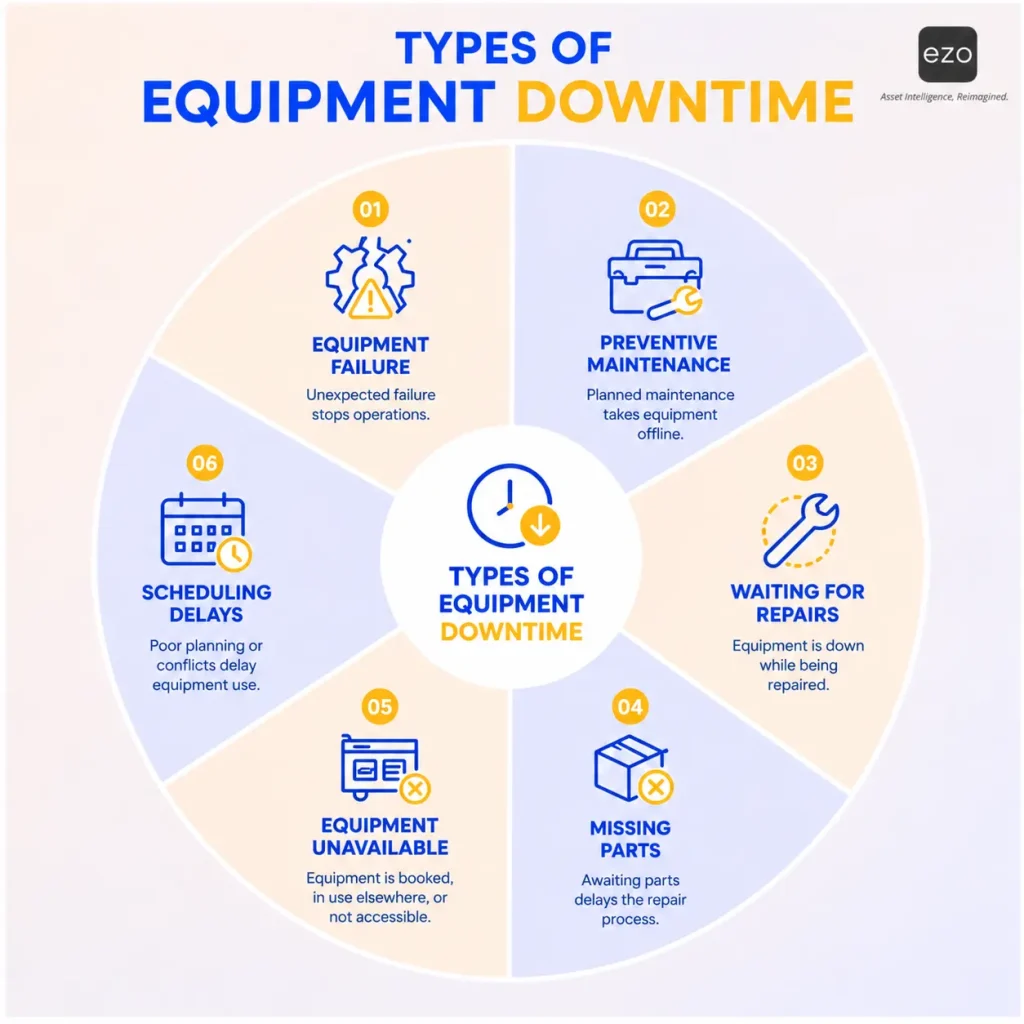
The infographic below groups six common reasons equipment cannot work. In these terms, equipment failure and waiting for repairs are unplanned downtime; preventive maintenance is planned downtime; missing parts can extend either; and equipment unavailable and scheduling delays are allocation problems rather than downtime.
Where preventable downtime begins
Warning signs that records should catch
Preventable equipment failures can be preceded by maintenance or condition warning signs. Some failures give no detectable warning, especially on equipment without condition monitoring, so the goal is to capture the signs that do exist.
The signs fall into two groups, and tracking affects them differently:
- Administrative signs: Overdue inspections, skipped or late preventive maintenance, incomplete service records, issues reported verbally instead of logged, and equipment deployed without anyone checking its service history.
- Physical condition signs: Leaks, unusual noise or vibration, abnormal meter readings, repeated minor repairs on the same component, and damage noticed when equipment is returned.
Tracking addresses administrative signs directly, because they are failures of recording and follow-up. Physical signs still depend on someone noticing them; tracking gives the observation a place to land, so a leak noticed on Tuesday is still visible on Friday to the person deciding whether the pump goes out again.
Consider that pump. If it misses one inspection, it may keep running without trouble. If it misses an inspection, runs past its service interval, comes back from the field with minor damage, and is redeployed without review, the chance of a failure during the next job rises, and that failure may stop a crew that was depending on it. No single miss caused the problem. The combination did, and each miss was a moment when a record could have triggered a review.
The visibility gap infographic shows one way that chain can develop when information is missing. Failures also come from wear, operator error, and manufacturing defects, so read it as a risk pathway, not a fixed sequence.
Why manual records fall behind
A well-run manual system can work for a small, stable equipment pool. Manual tracking becomes unreliable at scale: when the number of assets, the frequency of movement, or the number of sites grows faster than anyone can update a spreadsheet. Each handoff must be remembered and entered after the fact.
Workload, poor connectivity, and clumsy forms all contribute. So does an asymmetry that training alone does not change. The person who should update the record pays the cost now. Someone else gets the benefit later. The yard operator who logs a fuel leak at the end of a long shift gains little from the entry; the crew that takes the generator next week is the one that benefits. Behavioral economists describe a related tendency as present bias: people tend to favor immediate rewards over benefits that arrive later. Moving equipment to a job site, helping a customer, and restoring production all feel urgent. Updating maintenance records rarely does. Present bias also helps explain why informal equipment handoffs persist even in disciplined organizations: the convenience is immediate and the consequences are delayed.
Software does not remove that bias. Digital workflows can counteract some of its effects by putting the update inside the work itself: the check-in form asks for condition before the return is complete, the reminder arrives when service is due, and the inspection checklist is part of releasing the asset. When updating the record is how the task gets done, it stops competing for attention.
What happens when records lag
A spreadsheet may show where a forklift was assigned yesterday. It may not show that the forklift came back late, failed inspection, has an open service issue, or is already reserved for another team tomorrow. That gap produces five problems:
- Maintenance becomes reactive: Service schedules that rely on memory or calendar reminders are easy to miss, so problems surface only after equipment fails. Reactive maintenance affects more than the maintenance team: it can delay projects, add rental costs, and push crews onto backup equipment that suits the job less well.
- Availability becomes unreliable: A record may show an item as available when it is in the wrong place, damaged, or on a maintenance hold, so teams search for equipment, double-book it, rent or buy equipment the organization already owns, or wait for a manager to confirm status by phone.
- Utilization becomes uneven: Without usage data, some assets run past their service intervals while similar assets sit unused.
- Maintenance history becomes incomplete: Technicians lose the record of what failed before, which parts were replaced, and whether an issue keeps returning. Incomplete history increases diagnostic effort and makes recurring problems harder to spot.
- Handoffs create hidden risk: A technician mentions damage verbally. A warehouse worker updates a record after the shift ends. A project team returns equipment to the wrong location. A manager approves a checkout without seeing that service is overdue.
Seven ways digital tracking helps reduce downtime
1. Build a trusted operational record for each asset
Mainly affects: both outcomes.
Every tracked asset needs one operational record that maintenance, warehouse, operations, and field teams trust. That does not mean every piece of data lives in one system. Finance may keep the fixed asset register in an ERP, and a telematics platform may hold engine data. The operational record links to those systems, and each field has a named owner.
Start with a minimum viable record and add a field only when a decision depends on it:
- Minimum fields: Asset ID and tag, location, current custodian, status, last inspection result and date, next maintenance due date, and open issues.
- Common additions: Service and maintenance history, warranty details, meter readings, and utilization.
- Industry-specific fields: Calibration certificates, load ratings, or regulatory inspection dates, where they apply.
When someone asks whether an asset can go to the next job, the answer should come from this record, not from a chain of messages.
2. Record movement at check-out and check-in
Mainly affects: operational delay.
When a field crew checks out a generator, scanning its tag opens the asset record, and the checkout captures who has it, where it is going, and when it is due back. When it comes back, the check-in updates availability and can trigger an inspection if the return form records damage or the equipment is due for review. The scan identifies the asset; the attached transaction makes the record accurate.
That distinction has a consequence that is easy to miss. If check-in doesn’t ask about condition, a record with no reported damage tells you little. It may mean the generator came back in good shape, or it may mean nobody was asked. A clean record reliably indicates good condition only when someone was required to check. Keep the required entry short: a few condition choices and an optional photo. A long mandatory form at the yard gate invites rushed answers that look complete but aren’t.
The identification technology matters less than whether people use it at every handoff, but the differences between barcodes, QR codes, and RFID still decide which fits where:
Technology | How it is read | Best fit | Watch for |
| Barcode | Line-of-sight scan, one tag at a time | Low-cost tagging for tools and stock | Labels wear and need replacing |
| QR code | Line-of-sight scan with a phone camera | Field teams using mobile devices | Same line-of-sight limits as barcodes |
| RFID | Radio read, several tags at once, no line of sight | Bulk check-in, audits, and yard gates | Needs compatible tags and readers; metal and liquids can interfere |
| GPS or telematics | Device on the asset reports position or engine data | Vehicles and heavy equipment across large areas | Needs powered hardware and an integration |
RFID records an event each time a tag passes a reader. Fixed readers at gates or depots can provide near-real-time location for the zones they cover; outside reader range, the last read is the last known location.
3. Connect inspections to the asset record
Mainly affects: unplanned downtime.
Inspections are among the earliest chances to catch downtime risk. A digital inspection workflow lets teams record equipment condition, attach photos, note damage, and flag equipment for review before redeployment. This matters most for equipment that moves between warehouses, job sites, departments, or shifts, because each move is a chance for damage to go unrecorded.
When inspection results sit on the asset record, maintenance teams do not have to reconstruct what happened later. Structured maintenance inspection checklists also make results comparable: a pass or fail against the same criteria means more than a free-text note.
4. Schedule preventive maintenance with the right trigger
Mainly affects: unplanned downtime.
Preventive schedules work best when they match how the equipment actually wears. The three common triggers need different data:
| Trigger | Example | Data it needs | Works best when |
| Calendar | Service a backup generator every six months | Last service date | Wear depends on time more than use, or usage is not measured |
| Usage or meter | Service a vehicle every set number of miles | Reliable meter readings | Use varies widely between assets of the same type |
| Condition | Open a work order when a reading crosses a threshold | Inspection findings or sensor data | Failures show measurable symptoms before they happen |
Calendar schedules are simple, but they can over-service lightly used equipment and under-service heavily used equipment. Usage triggers fix that, provided someone records the readings; meter-based triggers are only as current as the last reading entered. Condition triggers need inspection discipline or sensors. Maintenance scheduling then turns whichever trigger fires into planned work.
Repair duration can depend as much on parts as on labor. A repair that waits a week for a seal kit turns a half-day job into a long outage. Linking spare-parts inventory to the maintenance schedule lets planners confirm parts are on hand before taking equipment offline, and reorder points for critical spares shorten the time between failure and return to service.
The system does not replace maintenance judgment. It shows what is due, what is overdue, and what should be pulled from circulation.
5. Hold equipment that is not ready, and release it deliberately
Mainly affects: both outcomes.
Physical presence does not make equipment available. A flag that someone can ignore is a suggestion, not a restriction. When an asset fails inspection, it needs a readiness gate:
1. Failed inspection: The inspector records the finding, and the asset moves to a maintenance hold.
2. Maintenance hold: The asset is marked unavailable for check-out or reservation, and a work order or service record is opened with a named owner.
3. Corrective work: A technician completes the repair and records parts used and time spent.
4. Review: A qualified reviewer, such as a maintenance supervisor, checks the work against written release criteria. A backup reviewer is named for when the primary reviewer is unavailable.
5. Authorized release: The reviewer releases the asset, and the record shows who released it and when.
6. Available for deployment: The asset returns to the available pool.
A gate adds a step, and a gate with one reviewer can hold a repaired asset longer than the repair took. Written release criteria and a named backup reviewer keep the hold from becoming its own source of delay.
How strictly a system enforces the hold depends on configuration. Some setups block check-out of equipment under maintenance; others only display the status and rely on people to respect it. Confirm which behavior your system supports before relying on it.
Status design matters as much as the gate. Common status labels describe different things, and some apply at the same time: an asset can be reserved for next week and under maintenance today. Separating the dimensions keeps the record honest:
| Dimension | Example values | Question it answers |
| Availability | Available, Reserved | Can someone book it? |
| Custody | Checked out, In transit, In storage | Who has it, and where? |
| Maintenance readiness | Awaiting inspection, Under maintenance, Awaiting parts, Cleared for deployment | Can it be used safely for its intended work? |
| Lifecycle | In service, Retired, Lost or missing | Is it still part of the fleet? |
A record can show that inspections are complete and the asset is cleared for deployment. A qualified person still makes the final safety determination for a specific job.
6. Use utilization data with context
Mainly affects: both outcomes.
Utilization needs a defined measure before it can guide decisions. Runtime hours, mileage, days deployed, and days reserved are four different numbers. Reservation data shows what was planned; measured usage shows what happened. Use the measure that matches the decision.
High utilization within design limits is not misuse. Wear depends on operating hours, load, environment, and maintenance, so compare each asset’s actual usage against its service interval, duty cycle, and condition rather than against its neighbors. If one compressor runs past its service interval while an identical unit sits idle, rebalancing their assignments may lengthen the time between failures on the busier one.
Idle equipment isn’t always waste, either. A backup generator, seasonal capacity, or a spare held because replacement lead times are long may be idle on purpose. Review low utilization alongside asset criticality and replacement lead time before selling or reassigning anything.
Reassignment has its own costs. Before moving equipment from an idle site to a busy one, check that it suits the job, how long transport takes, what the move costs, and whether the idle site has bookings of its own.
7. Review downtime patterns and find root causes
Mainly affects: unplanned downtime.
Digital tracking pays off when teams use the data to change decisions. Review recurring repairs, assets with a high MTTR, frequent emergency work, overdue preventive maintenance, and equipment with repeated availability conflicts.
Failure logs show what happened, not why. A lightweight method such as five whys turns a pattern into a cause. The hydraulic hose failed. It failed because it rubbed against a bracket. The bracket rubbed because someone refitted it incorrectly after the last repair. It was refitted wrong because the repair procedure did not specify the hose routing. The fix then lands on the procedure rather than on another hose. A list of common causes of equipment failure is a useful starting point.
Run this review on a schedule, and downtime reduction becomes continuous improvement rather than a one-time implementation.
Example: from equipment return to maintenance release
One scenario shows how the steps work together. A construction firm checks out a generator to a job site for two weeks.
1. Check-out: The site supervisor scans the generator’s tag. The checkout records the supervisor as the custodian, the job site as the location, and the return date.
2. Return: The generator comes back four days late. At check-in, the return form requires a condition entry, and the yard operator records a fuel leak and attaches a photo.
3. Hold: Because the condition entry reports damage, the generator moves to awaiting inspection and is no longer offered as available. With a spreadsheet, the late return would have left it showing as available, and the next crew would have taken a leaking generator.
4. Inspection and corrective work: A technician confirms a cracked fuel line, opens a work order, and finds the replacement part in stock. The record also shows the generator is 40 hours past its scheduled service, so the technician completes that service in the same visit.
5. Release: The maintenance supervisor reviews the work and releases the generator. The record shows the repair, the service, and who released it.
6. Next booking: The next crew reserves a generator that is cleared for deployment. The asset’s history now shows a fuel-system failure, which feeds the next root-cause review.
None of these steps is sophisticated. The leak was caught at the yard, not at the next job site, because every handoff left a record and the check-in asked.
How to implement digital equipment tracking
A phased rollout reduces risk and builds evidence before involving the whole fleet.
| Phase | What to do | Done when |
| 1. Select critical assets | Rank equipment by operational impact, safety exposure, replacement lead time, and failure history | A pilot list of high-priority assets is agreed |
| 2. Clean the records | Confirm each asset’s ID, location, custodian, and service dates against the physical equipment | Pilot records match a physical check |
| 3. Define readiness criteria | Write what “cleared for deployment” means for each equipment class | Maintenance and operations approve the criteria |
| 4. Configure workflows | Set up tags, check-out and check-in forms, inspection checklists, maintenance triggers, and the hold-and-release gate | Each workflow runs end to end in testing |
| 5. Run a pilot | Use the workflows at one or two sites for a defined period | Pilot measures are recorded weekly |
| 6. Train users | Train custodians, technicians, and approvers on their own steps, not the whole system | Each role completes its steps unaided |
| 7. Measure change and expand | Compare pilot results with the baseline and adjust before adding sites | Results meet the agreed success measures |
Agree on the pilot’s success measures before it starts, so the result is a measurement rather than an impression:
- Accuracy of availability records: The share of spot checks where the recorded status and location match the physical asset.
- Missed service tasks: Preventive maintenance tasks that passed their due date without completion.
- Time spent locating assets: Measured by sampling equipment requests during the pilot.
- Documented causes: The share of downtime events with a recorded cause.
The equipment intelligence maturity model
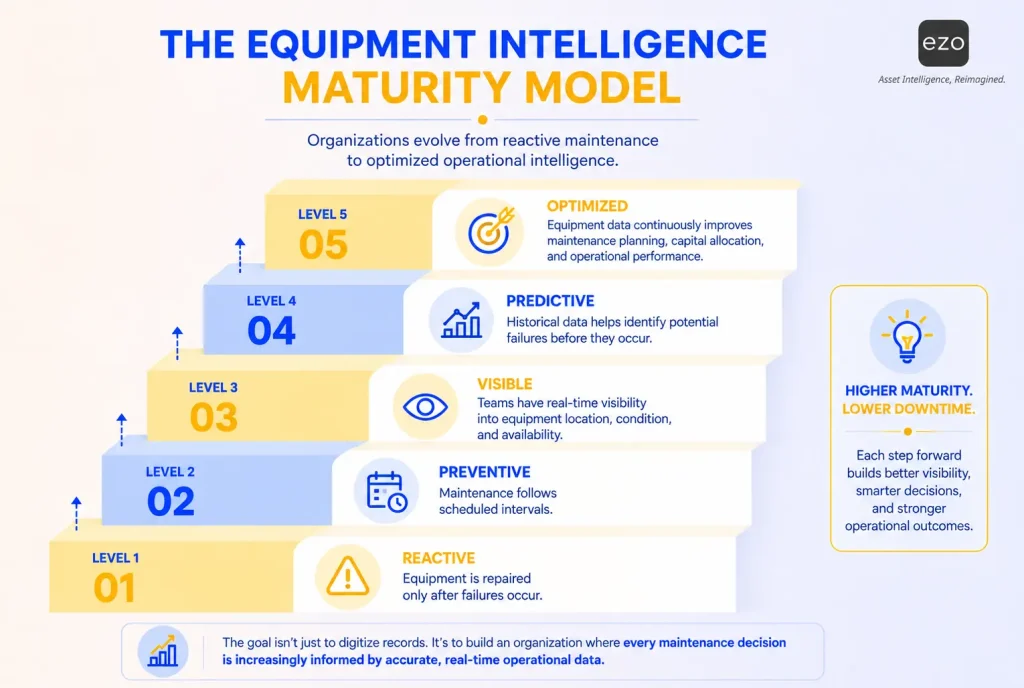
The model below is an illustrative framework developed for this article, not a validated maturity assessment. It describes capability categories, and organizations do not necessarily move through them in order; a team may track location well before its preventive maintenance is consistent.
| Level | Stage | What it looks like |
| Level 1 | Reactive | Equipment is repaired after failure. Records are incomplete or scattered. |
| Level 2 | Preventive | Maintenance follows scheduled intervals, but tracking may still be manual. |
| Level 3 | Visible | Teams can see equipment location, status, condition, and availability. |
| Level 4 | Predictive-ready | Historical maintenance and utilization data reveal failure patterns. |
| Level 5 | Optimized | Equipment data informs maintenance planning, utilization, budgeting, and replacement decisions. |
“Predictive-ready” is deliberately not “predictive.” Historical trend analysis, condition-based maintenance, and predictive maintenance are different, and each needs more data than the last. Trend analysis uses past failures to adjust schedules. Condition-based maintenance acts when an inspection finding or sensor reading crosses a threshold. Predictive maintenance uses condition data and analytics to estimate when a failure is likely. The infographic labels Level 4 “Predictive”; read it as predictive-ready.
How to measure downtime reduction
Maintenance history is not the same as a record of machine stoppages. To show that downtime fell, record each downtime event with the same minimum data:
- Asset ID: So each event attaches to the right equipment.
- Failure category: From a short, fixed list.
- Detection time: When the problem was found.
- Work start and work end: For the repair itself.
- Return-to-service time: When the asset was cleared for use.
- Delay reason: Waiting for parts, a technician, or approval.
- Operational impact: Such as a stopped crew or a rescheduled job.
Collect a baseline before rollout, ideally across at least one full maintenance cycle, then compare the same measures after implementation. Without timestamped events and fixed definitions, you can’t compare MTTR, MTBF, and availability over time.
The KPIs below use working definitions. Choose one definition for each, write it down, and keep it stable.
| KPI | How to calculate | Data it needs | Outcome it tracks |
| Equipment availability | Uptime divided by scheduled operating time | Downtime events with start and end times | Unplanned and planned downtime |
| Mean time between failures (MTBF) | Total operating time divided by number of failures | Operating hours and failure events | Reliability |
| Mean time to repair (MTTR) | Total repair time divided by number of repairs, using one defined start and end point | Work start and end, or detection and return to service | Repair speed |
| Preventive maintenance compliance | PM tasks completed within their tolerance window divided by PM tasks due | Work orders with due and completion dates | Maintenance discipline |
| Inspection completion rate | Inspections completed before deployment divided by deployments that required one | Inspection and checkout records | Both outcomes |
| Equipment readiness rate | Assets cleared for deployment divided by assets required, at a set checkpoint | Status records | Operational delay |
| Allocation delay hours | Hours that work waited for equipment that existed but was unavailable or not ready | Job delay logs linked to assets | Operational delay |
| Utilization rate | Measured usage (hours, miles, or days deployed) divided by planned or available capacity, on a stated basis | Meter readings or checkout durations | Both outcomes |
| Record accuracy | Spot checks where recorded status and location match the asset divided by all spot checks | Physical spot checks | Operational delay |
| Emergency work share | Unplanned work orders divided by all work orders | Work order type | Unplanned downtime |
| Repeat repair rate | Repairs on the same asset or component within a set window divided by all repairs | Repair history by component | Unplanned downtime |
Two rows in that table deserve attention because they measure losses reliability metrics cannot see. Allocation delay hours and the equipment readiness rate record time lost to equipment that worked but wasn’t ready or on site. A team that tracks only MTBF and MTTR can see both improve while crews wait more, because those waits happened to equipment that never failed. The maintenance KPIs guide covers reliability metrics; readiness measures need job-delay records, which sit outside maintenance work orders.
Equipment readiness and production availability are different measures. Readiness asks whether the asset was cleared for use when someone needed it. Availability asks how much of its scheduled time it could actually run.
These are recommended management KPIs. Some come directly from software reports, and others need a calculated or custom report built from work order and status data. The EZO EAM section below notes which of these appear in EZO EAM documentation.
Review the metrics together. A machine with high utilization, repeated repairs, and declining availability may warrant replacement or a capital-planning review rather than another repair.
What to look for in equipment tracking software
Start by matching the workflow to the tool category, because the terms overlap:
| Tool category | What it mainly does | Downtime workflows it supports |
| Equipment tracking software | Records location, custody, check-out and check-in, and status | Allocation delays, record accuracy |
| CMMS | Manages work orders, preventive maintenance schedules, and maintenance history | Unplanned downtime, repair speed |
| Enterprise asset management (EAM) | Combines tracking, maintenance, and lifecycle data across the asset’s life | Both outcomes, plus repair-or-replace decisions |
| Condition monitoring | Collects sensor data such as vibration, temperature, or pressure | Condition-based maintenance |
A basic tracking app may lack maintenance scheduling, work orders, or downtime event logging, and a CMMS may know little about where equipment is or who has it. Read how CMMS and EAM differ before deciding which category you need. Then group requirements by priority, and test each one in a demo with your own scenario rather than the vendor’s:
| Priority | Capability | Demo test |
| Must-have | Check-out and check-in with required fields | Check out an asset, then return it with damage; does the return record the condition? |
| Must-have | Status that can hold equipment | Put an asset on maintenance hold; can someone still reserve or check it out? |
| Must-have | Preventive maintenance scheduling | Create a schedule by date and by meter; what happens when a reading is entered late? |
| Must-have | Maintenance history per asset | Open an asset; can you see its last three repairs and the parts used? |
| Situational | RFID or GPS support | Run a bulk check-in with RFID, or view a GPS position for a vehicle |
| Situational | Offline mobile use | Turn off connectivity; which actions still work, and how does sync behave? |
| Advanced | Downtime event reporting and reliability metrics | Pull MTBF and MTTR for one asset class; how are start and end times defined? |
| Advanced | Integrations | Confirm how the system connects to ERP, telematics, or sensors |
The best system is not the one that collects the most data. It is the one that makes accurate updates the easiest path during daily work.
How EZO EAM supports equipment readiness
EZO EAM is the asset and equipment management platform from EZO. It combines equipment tracking with maintenance capabilities, including CMMS functionality, in one product.
| Capability | Plan availability | What it supports |
| Asset tracking and checkouts, barcode and QR labels, mobile app, reservations | All plans | Custody, location, and booking records |
| RFID and scanner support, audits, basic service records, custom fields | Advanced and above | Bulk scanning, record verification, and service logging |
| Utilization and ROI insights, GPS-integrated tracking, automations, custom substates | Premium and above | Usage review, location data, and detailed status design |
| CMMS add-on with preventive maintenance, work orders, and checklists | Premium as an add-on, or Enterprise | Scheduled maintenance and corrective work |
| Offline mobile mode, item relationships, telematics and usage intelligence | Enterprise | Offline work on assigned work orders and work logs, and parent-child equipment |
EZO EAM pricing is based on the number of items tracked, with unlimited users on each plan; the CMMS add-on is priced separately by admin user.
Applied to the generator scenario above, EZO EAM supports several of the steps directly:
- Check-in conditions: Quick check-in can require mandatory custom fields before an asset is checked in, so a condition entry can be part of every return.
- Maintenance status: Starting a service puts an asset into maintenance, and the service and maintenance workflow does not allow maintenance to start on an asset that is still checked out. Confirm during a demo whether your configuration blocks check-out or reservation of assets under maintenance, or only shows their status.
- Status design: Custom substates let teams define stages such as Undergoing Repair or Quality Inspection under a parent state such as Under Maintenance.
- Delay records: Teams can make custom fields mandatory on reservations, check-outs, and check-ins, which gives teams a place to record when work waited for equipment, the input that allocation delay hours need
- Availability view: The availability calendar shows items under maintenance separately from available and reserved items.
- Downtime reporting: EZO EAM product updates document an Asset Downtime Report that provides an overview of downtime incidents for an asset, plus asset diagnostics including total downtime, total uptime, and MTBF.
Limits worth knowing:
- Preventive maintenance compliance: EZO EAM documentation describes a Preventive Maintenance Coverage dashboard, which shows PM status. On-time PM compliance as defined in the KPI table may need a calculated or custom report.
- Predictive maintenance: EZO EAM documentation does not describe native predictive analytics. It describes meter readings, threshold triggers that can create work requests, and sensor data imported through a meters API.
- Offline use: The offline mobile app is an Enterprise capability, and its documented scope covers viewing assigned work orders and adding work logs.
The AX Construction case study from EZO describes the problem this article addresses. Before adopting EZO EAM, locating a tool for a job could take up to five phone calls across the firm’s 50 project sites. The firm now tracks more than 2,000 tools and pieces of heavy equipment from its yard to its job sites, uses recurring maintenance events, and aims for zero equipment downtime by ensuring no planned maintenance task is missed. The case study reports reduced equipment downtime but does not publish a measured figure.
The practical shift is from asking “Where is it?” to asking “Is it cleared for deployment, available on the dates we need, and suited to this job?”
Best practices and common mistakes
The seven steps above cover what to set up. These practices cover who owns each part and what tends to go wrong:
| Practice | Owner | Expected outcome | Common mistake |
| Name the right role at each handoff | Requester asks, custodian holds, technician repairs, approver releases, equipment owner decides on replacement | Every delay has an owner who can be asked about it | Assigning “the team” instead of a person |
| Make the record the transaction | Process owner | Updates happen during the work, not after the shift | Allowing check-in without a condition entry |
| Set exception alerts | Operations manager | Overdue returns, overdue service, and failed inspections reach someone the same day | Sending every alert to everyone, so no one acts |
| Reconcile records with physical equipment | Asset manager | Drift is found before it causes a wrong deployment | Auditing once a year, and only for finance |
| Use reports for planning | Leadership | Budget and replacement plans rest on actual repair and usage data | Reviewing reports only during audits |
Assigning custody at each handoff and running periodic asset audits are two controls that keep digital records from drifting as spreadsheets do. A digital record is still a claim about the equipment, and claims need checking.
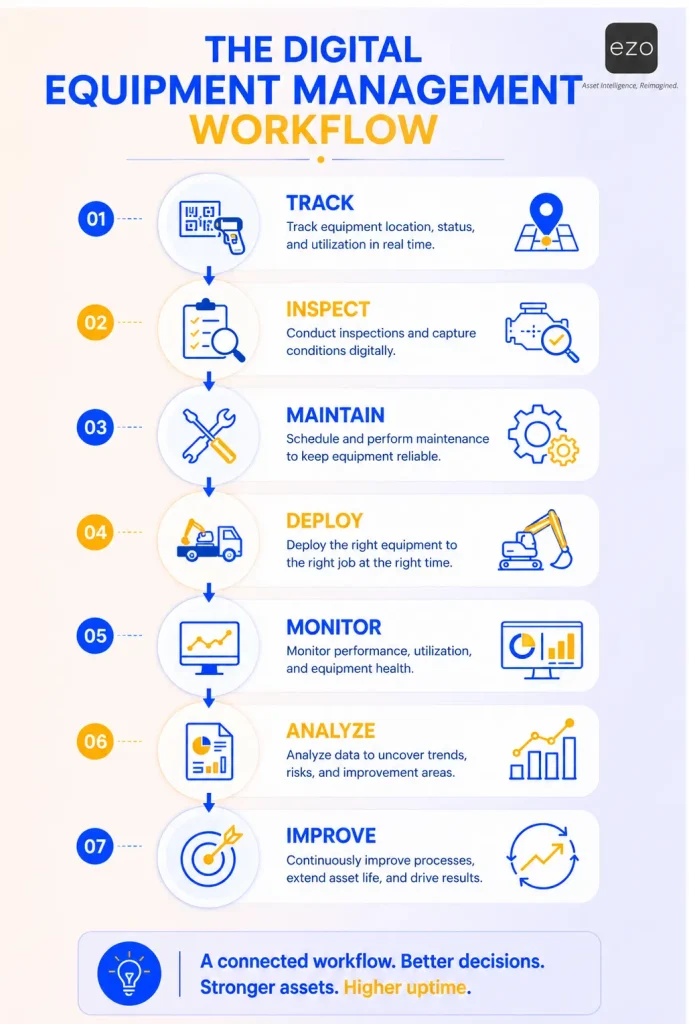
The workflow graphic below summarizes how tracking, inspection, maintenance, deployment, monitoring, analysis, and improvement connect.
How to start reducing preventable equipment downtime
Some equipment downtime is unavoidable. Preventable downtime can start with small signals that go unrecorded: a missed inspection, an incomplete service note, an undocumented transfer, or a piece of equipment marked available when it is not ready.
Digital equipment tracking catches more of those signals by recording them when they happen and connecting them to maintenance and availability decisions. It also makes visible a loss reliability metrics were never designed to see: the hours crews spend waiting for equipment that works but isn’t ready. Start with a short list of critical assets, define what “ready” means for each, put a hold-and-release gate on failed inspections, and measure downtime events and readiness delays before and after. The aim is better decisions about the equipment the business already owns.