Key Takeaways:
- Equipment records drift at scale when the person updating them pays the cost while someone else benefits later.
- Records stay current more reliably when updates happen inside actions people already take, such as scanning equipment at checkout.
- A mismatch between the asset register and a physical count shows what to investigate, not what happened.
- A scan only identifies an asset, while completed checkout, transfer, return, and service actions update its record.
- A recorded inspection alone cannot make equipment job-ready, so a qualified person must judge readiness.
- Recovered staff hours become savings only when you redeploy them to productive work or use them to avoid overtime or hiring.
- Clean, deduplicate, and spot-check asset records against physical counts before migration, or the new system inherits the old drift.
Introduction
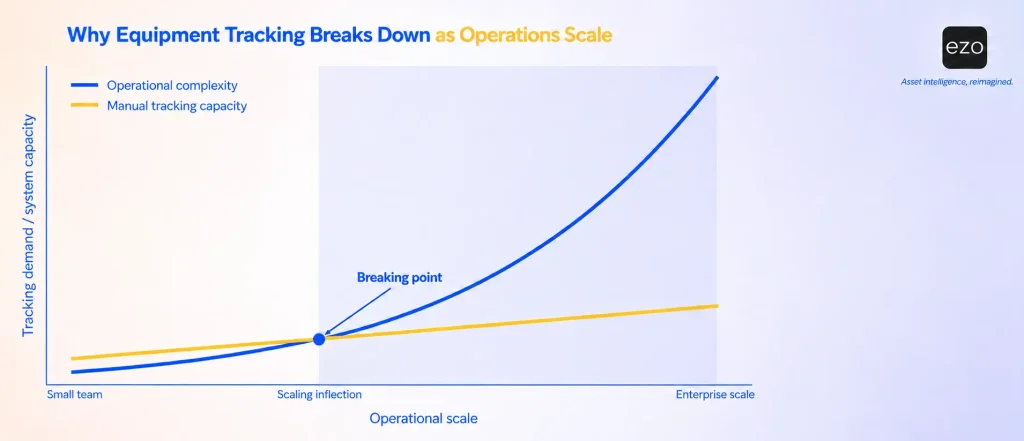
A generator shows as available in the asset register, but another site deployed it on Tuesday. That gap shows how equipment tracking breaks down as operations scale: transfers, handoffs, locations, and service events multiply faster than teams can record them in the moment. The register gradually stops describing where equipment is and starts describing where it was last recorded.
The usual explanation is discipline. This article argues for a narrower, more useful explanation: the person moving the equipment pays the cost of updating the record, someone else benefits later, and growth widens that gap. A record that depends on someone choosing to pay that cost later can drift even in a conscientious team.
This guide is for operations leaders in growing, multi-site, equipment-intensive organizations, with notes for finance and IT, whose decisions depend on the same records.
Symptoms and first responses at a glance
If you recognize one of these patterns, the response beside it is a reasonable first step.
- Answers about equipment arrive with caveats. Measure how long a verified answer takes, and check it against a physical count.
- Sites report conflicting availability. Make one register authoritative and record transfers at the handoff, not afterward.
- Teams rent or buy while owned units sit unused elsewhere. Check location, readiness, and commitments before approving any rental or purchase.
- Service history lives in separate logs. Tie inspections and service records to the asset, and block deployment of equipment with failed or overdue checks.
- Audits turn into reconstruction projects. Clean and verify inaccurate records before migrating them to any new system.
What breakdown looks like before anything goes missing
Equipment tracking breaks down when leaders stop trusting the asset data, even though the tracking process still exists.
The spreadsheet still opens, and managers still answer questions, but every answer now comes with a caveat. A generator appears available, but it has already been deployed. The register shows a compressor as ready for use, but it hasn’t recorded its failed inspection. A warehouse report shows enough units, but they are split across three sites and cannot reach the job in time. A department requests replacement equipment because nobody can confirm whether idle units are sitting at another location.
None of these is a missing asset. Each is an unrecorded event. The distinction matters because it changes the fix: a missing asset calls for a search, while an unrecorded event calls for changing when and how the record is updated.
Deterioration is often gradual, becoming visible when a decision or audit exposes a discrepancy. It can also be sudden, after an acquisition, a site opening, or the departure of the person who kept the spreadsheet current.
A diagnostic: Time to a verified answer
One way to test whether tracking is still under control is to time how long it takes to get a verified answer. Pick five questions leadership actually asks, such as “How many generators can we deploy by Friday?” Stop the clock only when you confirm the answer against a physical check or an updated record within the agreed window.
Record two numbers for each question: elapsed time and whether the answer survived the check. Measuring speed alone rewards confident guesses, because an unverified answer is always the quickest to give. Like any equipment KPI a team tracks, this one shapes behavior, so accuracy has to sit alongside speed.
When answers routinely require phone calls and spreadsheet reconciliation, decisions are resting on records the organization cannot vouch for.
Why records drift as operations grow
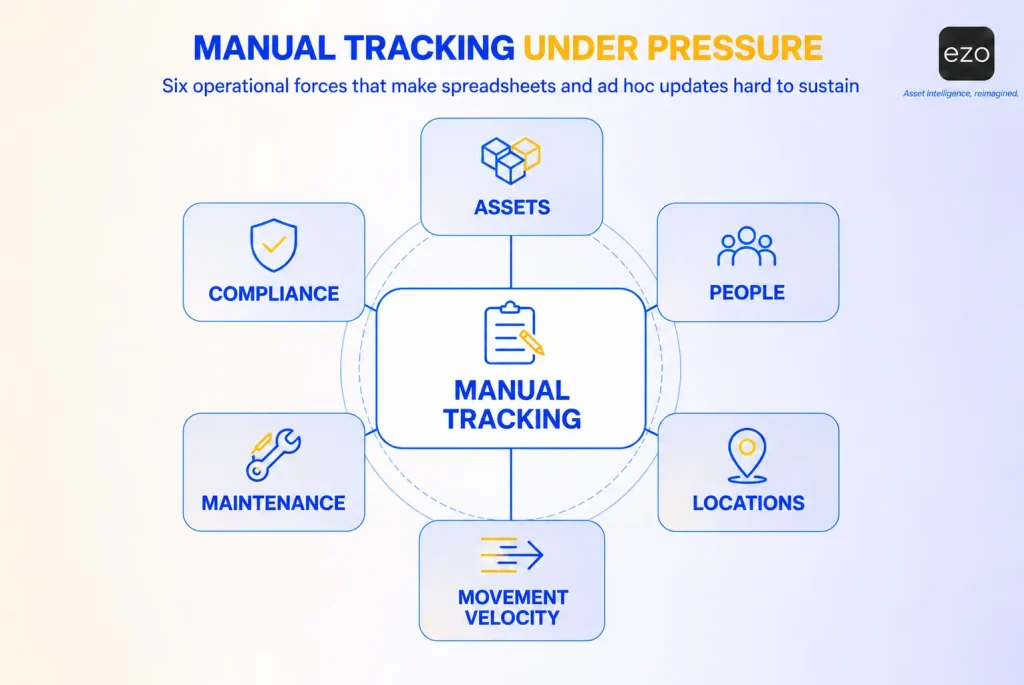
Records drift when the work that changes equipment status grows faster than the effort available to record each change as it happens. Scale does not make people careless. It changes the arithmetic of who pays for each update and when.
The cost of an update and its benefit land on different people
The technician moving a generator to a job site pays the cost of updating the record now: stopping, finding the entry, typing the change. The benefit arrives later and goes to someone else, such as the planner looking for available units next week or the auditor reconciling the register next quarter.
Given that trade-off, deferring the update is a reasonable choice in the moment. Moving equipment, serving a customer, or restoring operations is urgent, while updating a spreadsheet is not. Each deferral is defensible on its own. Together they produce a register that lags reality. The equipment manager knows what happened, but the record does not.
This is why reminders and training can fade. They ask the person already bearing the cost to absorb more. Records stay current more reliably when updating becomes part of an action the person already has to take, such as scanning an item to release it. The hidden costs of informal equipment handoffs accumulate precisely where that does not happen.
More assets make identity harder to keep
A short asset list can live in a spreadsheet because people can fill the gaps from memory. As the list grows, duplicate records appear, naming conventions drift, retired items stay active, and serial numbers are entered inconsistently. Some records become ghost assets: entries for equipment that no longer exists or can no longer be found.
Suppose the register lists 40 generators and a site sweep matches 37 of them. The obvious conclusion is that three are missing. But the sweep also finds two generators with no matching record. Those could be duplicates entered under different names, units bought and never registered, or units relabeled after repair. The count does not say which. A discrepancy tells you what to investigate, not what happened, and a standardized identifier is what makes the investigation possible.
More handoffs weaken custody
Every person who checks out, transfers, repairs, receives, ships, or disposes of equipment is another point where the record can fall out of step. Who had the asset last? When was it returned, and in what condition? Was the damage recorded? Was it moved to another site?
When custody depends on memory, email, or delayed updates, it becomes hard to establish responsibility. A recorded custody transfer at each handoff gives the organization a transaction history: who held the item, when, and where. That history supports accountability. It is not the same as a formal evidentiary chain of custody, which some regulated environments require and which needs its own controls.
More sites multiply the routes a record can fall behind on
Each new site adds its own transfers and also adds routes to and from every existing site. Five sites have 10 possible site-to-site routes; ten sites have 45. Not every route is used, but each one that is becomes a handoff where a record can lag.
When each site keeps its own list, leadership receives conflicting reports. One site shows equipment as available while another has already deployed it. Local knowledge remains useful at every site, but it cannot be the only source for decisions across sites. Effective equipment management across multiple locations depends on one register that every site updates.
Faster movement shortens the update window
Field deployments, emergency replacements, shared pools, and event kits all move equipment quickly. Records go stale when someone doesn’t record a transfer at handoff or within an agreed update window. Once people notice the record lagging, they stop relying on it and return to texts, calls, and personal spreadsheets, which only makes the lag worse. That feedback loop is the higher cost of a slow update: it teaches people to work around the record.
Readiness needs more than location
Location answers where equipment is. Operations also need to know whether it can be deployed. A machine may be physically available but overdue for service. A tool may be returned but damaged. A vehicle may be assigned but awaiting maintenance. A kit may be in storage but missing a required accessory.
A spreadsheet built to answer “where is it?” has no natural place for condition, service status, and downtime, so those fields are the first to lapse when the team is busy. A record can show that an inspection happened; it cannot by itself make equipment safe for a particular job. Someone qualified must judge readiness, record inspection results, and the process must prevent deploying equipment with a failed or overdue check.
Compliance and audit requirements expand
Auditors, safety teams, and finance may need evidence of ownership, inspections, custody, movement, and disposal. When that history is spread across spreadsheets and email, an audit becomes a reconstruction project.
Speed of retrieval and reliability are different properties: a report produced in minutes can still be incomplete or wrong. GAO guidance for auditors describes reliable data as applicable to the purpose and sufficiently complete and accurate, a useful standard here, too. Records support an audit when they are complete, traceable to the event that created them, and verified for the audit’s purpose. A maintained audit trail is what makes that traceability possible.
Where manual methods stop scaling
Each manual method works under some conditions and fails under others. The table shows where each one stops scaling and what scales better instead.
| Method | Works when | Breaks down when | What scales better |
|---|---|---|---|
| Spreadsheets | Asset volume is small, and movement is limited | Records go stale, duplicate, and resist reconciliation | One register with standard fields and lifecycle status |
| Sign-out sheets | One location manages shared equipment | Teams, shifts, and sites share the same pool | Scan-based checkout and check-in tied to users and timestamps |
| Email or chat requests | Informal coordination is enough | Requests get lost, and availability is unclear | Structured request and reservation workflows |
| Site-specific records | One manager oversees one site | Several sites report conflicting availability | A shared register across locations |
| Separate maintenance logs | Service volume is low | Service history and readiness fragment | Service records attached to each asset |
| Manual audits | Counts are simple and occasional | Audits need custody, condition, and service history | Scan-based audits backed by audit trails |
| Local knowledge | A small team knows the pool | Growth and turnover dilute memory | Named owners and recorded transactions |
What unreliable records cost
The cost of unreliable tracking is real, but it seldom appears on a single line item. A duplicate purchase lands in the capital budget, an emergency rental in a project budget, and a technician’s search time in payroll. A cost that appears on one report has an owner; a cost split across three budgets can go unowned, because nobody sees the total. Unreliable tracking can contribute to several of these problems, and each has its own path.
Capital: Rent, buy, or transfer
When teams cannot confirm availability, they buy defensively and rent at short notice. Reliable records do not make every rental unnecessary. Renting can still be the right call when the owned unit is unsuitable, too far away, committed to another job next week, or not ready. Reliable records change the decision: the team can compare a transfer against a rental on suitability, readiness, transport cost, timing, and existing commitments, rather than renting because nobody can confirm the alternative.
The same applies to equipment procurement. Knowing what the organization owns, what is idle, and what is committed is one essential input. A defensible purchase also weighs future demand, reliability, lifecycle cost, remaining useful life, and lead times. Underused equipment accumulates when asset utilization cannot be measured, because without usage data the case for redeploying has no evidence behind it, while the case for buying needs only a request.
Operations: hours that look like savings
Crews wait for equipment, technicians search for tools, and shared assets get double booked. The cost is easiest to see with an illustrative calculation. The assumptions below are not a benchmark.
Assume 15 technicians each spend 20 minutes a day confirming where equipment is and whether it is ready. Across 230 working days, that is 15 × 20 minutes × 230, or 1,150 hours a year. At a loaded labor rate of $50 an hour, that’s $57,500.
That figure is capacity, not cash. It becomes a saving only if the recovered hours go to billable or backlogged work, or avoid overtime or a hire. Treating recovered time as money already saved overstates the business case for tracking software.
Risk and finance
When the organization cannot show who had equipment, when it was serviced, and whether it was inspected, the exposure extends beyond operations. Incomplete maintenance history can create safety concerns, and gaps in custody records create audit exposure.
Finance has a related problem. An operational register and a fixed-asset register in the finance system can legitimately differ because each treats leased, borrowed, expensed, retired, and disposed items differently. A tracking system does not reconcile them automatically. Someone has to compare the two on a schedule and resolve each difference.
Data that feeds other systems
Asset records feed forecasting, reporting, maintenance planning, and procurement, so CIOs, CTOs, and operations care about their quality.
AI-generated recommendations become unreliable when they rely on incomplete or inaccurate asset records. Some tools can flag anomalies, but AI in asset management does not independently verify custody, condition, or completed work. Forecasts can still draw on project schedules, planned demand, and history, but inaccurate location and availability data weakens the deployment plan built on them.
Integration raises the same question in a different form: which system owns each field? If the ERP owns cost and the asset system owns location, updates should move in one direction, and the team needs to know what happens when a sync fails. EAM integrations work best when teams decide field ownership before building connectors.
Why the obvious fixes stall
Obvious fixes stall when they add work where updates are already deferred.
When tracking slips, organizations add spreadsheet tabs, reporting rules, a records coordinator, approval steps, and reminders. None of these is wrong in itself. Any system needs ownership, proportionate rules, training, and oversight, including digital ones. The distinction is between governance that makes the right action clear and administrative burden that makes it more expensive.
A system changes the balance in three ways. Some steps can be enforced, so an item under service shows as unavailable rather than relying on someone to mark it. Some steps stay human, such as scanning an item, noting its condition, or completing an inspection, but become faster because they happen in the action itself. Missed transactions become visible: an overdue checkout passes its expected return date, a transfer request waits for approval, or an audit finds an item where the record says it should not be.
From location tracking to equipment readiness
Equipment tracking, as this article uses the term, means keeping a reliable record of each item’s identity, location, custody, condition, and availability. Location is the part spreadsheets capture best. Scaling requires the harder parts: knowing whether an item is ready for a specific job and ensuring each step, from request to return, leaves a record as it happens.
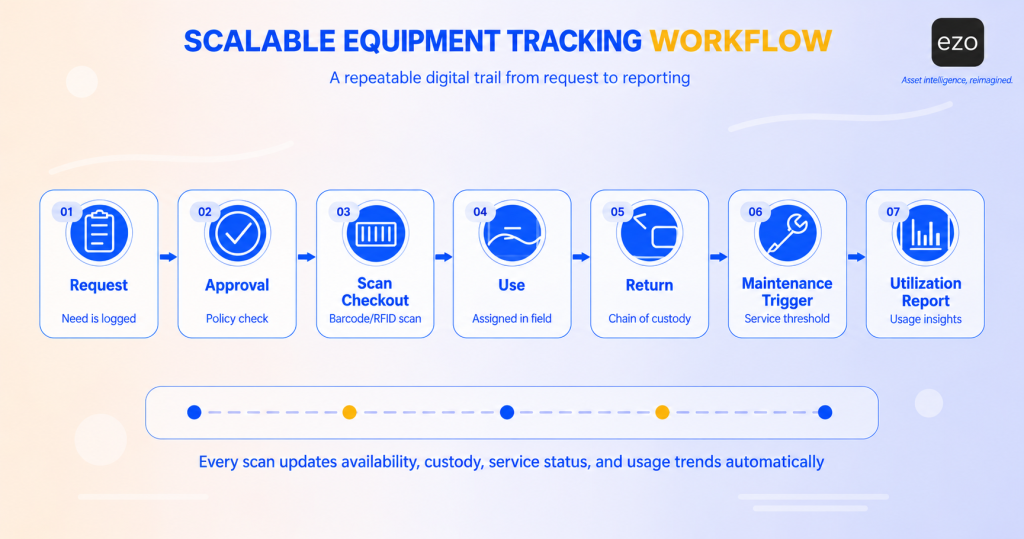
A workflow that keeps records current tends to follow this sequence:
- Request. A user requests equipment through structured request-and-reservation workflows rather than email.
- Approval. An approver checks eligibility: whether the requester may use this equipment for this job at this site.
- Readiness check. Before dispatch, the team confirms the item is not under service, has no failed or overdue inspections, and is not committed elsewhere. If it fails the check, the request moves to another unit or a rental decision.
- Scan and check out. The scan identifies the item, and the completed checkout records custody, time, and location.
- Transfer. Transfers between people or sites go through transfer requests that record who requested the change and who approved it.
- Return. A defined equipment return process captures condition, and damaged returns go straight to service.
- Maintenance loop. Service triggers on schedule, usage, condition, or reported damage at any point in the cycle. It ends with an authorized return-to-service decision, not just a closed ticket.
- Reporting. Utilization, overdue items, and service history come from the transactions above.
Scans identify assets; completed checkout, return, transfer, and service actions update the record.
A minimum record for each asset
Every tracked asset should carry, at minimum:
- A unique asset ID that never changes, and the serial number where one exists
- Category and model
- Current recorded location and the date it was last physically verified
- Custodian, meaning the person or team responsible for it now
- Lifecycle status, such as active, in service, retired, or disposed
- Condition, with last inspection date and result
Validation rules, duplicate checks, and a named owner for corrections keep this standard from drifting the way the spreadsheet did.
Roles and update triggers
An operating model needs owners, not just features. One workable allocation:
| Role | Owns | Updates when | Resolves |
|---|---|---|---|
| Custodian | Items in their hands | At checkout, transfer, and return | Condition notes and damage reports |
| Equipment manager | The register and its standards | When items are added, retired, or relabeled | Duplicates and location conflicts |
| Maintenance lead | Service and inspection records | When service starts, completes, or fails | Return-to-service decisions |
| Site leader | Site accuracy | After each scheduled site check | Unmatched items at the site |
| Finance | The fixed-asset register | On each reconciliation cycle | Differences between the two registers |
Exceptions the process must handle
Normal transactions are the easy part. The process also needs an owner and a response for an item not returned by its due date, a transfer request nobody approves, a label that will not scan, a damaged return, and a count that disagrees with the record. Assign each exception, escalate it after a set time, investigate it, and record the correction. Asking a custodian to confirm what they hold quickly resolves a discrepancy.
What to look for in a tracking system
A feature list cannot show how deep a capability goes. Scenario questions can, so each category below ends with one worth testing in a demonstration or trial.
Scanning. Barcodes and QR codes are read optically, one item at a time, with a phone camera or handheld scanner. RFID reads tags by radio, can read many at once, and needs compatible tags and readers integrated with the software (barcode vs. QR code vs. RFID covers the trade-offs). Test: can a technician check out a kit at the point of use in under a minute?
Availability and reservations. The system should show what is checked out, reserved, under service, and free, across sites. Test: does it prevent double booking, or does it only display one?
Maintenance and readiness. Service records, inspections, and schedules should live on the asset profile, and items under service should be unavailable for checkout. Test: can the system process a damaged return through to service without a side spreadsheet?
Permissions and accountability. Role permissions control who can see, edit, request, and approve records. They don’t physically lock equipment or verify an operator’s qualifications; those need separate controls. Test: Can you restrict users to one site’s equipment?
Utilization reporting. Utilization is typically calculated as actual operating hours divided by available hours. Checkout duration is a proxy: it shows equipment was out, not that it was running. Where the difference matters: meter or usage readings. Test: what exactly does the utilization report count?
History and evidence. Test: can you export the full transfer and service history of one item for an auditor?
Field conditions. Field sites have weak signal, shared devices, and damaged labels, and the offline mobile app’s scope varies. Test: what can users do with no connection, and how does the data sync afterward?
Integrations and volume. Test: which system owns each field, and can the system handle your expected asset and transaction volume?
How EZO EAM supports this model
EZO EAM keeps each asset’s location, custody, service, and audit history in one register, and its documented workflows map to the sequence above, within the plan and scope limits noted below. Capabilities vary by plan; we checked the notes below against the pricing page on October 5, 2026.
- Request and approval. Reservations and checkout are listed on every plan. The self-serve request portal is listed under Premium.
- Readiness. Starting a maintenance event makes an item unavailable for normal use, and you can’t start maintenance on an item that is checked out, so readiness stays tied to custody. Completing a service records cost, consumed inventory, and comments in the item’s service history. Advanced lists basic service records.
- Checkout, transfer, and return. Barcode and QR labels and the mobile app are listed on every plan. Advanced includes handheld scanner integration, RFID support (with an integrated reader), and custody transfer. Admins or authorized users approve or deny transfer requests, and the item’s history records who requested each one and who approved it.
- Maintenance loop. Preventive maintenance and work orders live in the CMMS capability within EZO EAM and can trigger work orders based on time intervals, usage readings, or condition thresholds. It is a paid add-on on Premium and included in Enterprise.
- Reporting. Checkout history can feed utilization calculations, with the proxy limitation described above.
In EZO’s published case study, Luca Donelli, market development manager at Donelli Corrosion Protection Services, says he believes the company cut outside equipment rentals by about 20% after adopting asset management software, once the team could see which equipment was available at each location. That is the customer’s own estimate, not a measured benchmark.
Points to evaluate:
- The offline mobile app is listed for Enterprise, and its documented offline scope is viewing work orders and adding work logs for up to 20 work orders. Test checkout in a dead zone rather than assuming it.
- The transfer-request documentation describes admin approval, not acceptance by the receiving site. Teams that need two-party confirmation should check whether and how to configure it.
- Utilization from checkout history measures time out, not running time.
- The full sequence spans several plans and one add-on, so price the plan that covers the workflow you need.
Before talking to anyone, review the documented capabilities and other customer case studies against the workflow you need to run.
A practical path off spreadsheets
The order of the work matters as much as the software: decide what you need, clean what you have, then test candidates against real work.
Define what the business needs to know
Start with the decisions the records must support:
- Which assets need individual tracking, and which can be tracked as kits or stock quantities?
- Which assets need service and inspection histories?
- Who owns each record at each stage?
- Which locations need shared visibility?
- Which reports must leadership be able to produce, and for which audits?
- Which workflows currently create the most manual effort?
The getting started guide covers how these answers translate into categories, fields, and locations.
Prepare the data before migration
Importing a drifted spreadsheet into a new system reproduces the drift elsewhere. Before migration, tag and identify each asset, physically verify a sample, merge duplicates, standardize location names, review lifecycle status so retired items don’t import as active, map old fields to new ones, and validate the import against a count. Asset auditing practices apply here as much as after go-live.
Shortlist, then run a representative pilot
Shortlist two or three systems against the requirements and the scenario questions above. Then configure a pilot on a scope that captures everyday transactions and real risk, such as one site’s shared field equipment. The single most painful category is not always the best pilot, because it may need specialist controls that hide whether routine transfers and returns work.
Name an owner, a duration, and acceptance criteria before the pilot starts. Include deliberate exceptions: a missing kit component, an item placed under service after approval, overlapping requests, a damaged return, and a scan in a low-signal area. Train pilot users, appoint a site owner, and track transaction time, because slow updates are likely to be deferred. The software evaluation and procurement process covers how to structure the shortlist.
Measure against a baseline
Measure for one period before the pilot and again during it. Each measure needs a definition, or it cannot be compared:
| Measure | Definition |
|---|---|
| Search time | Median minutes to locate and confirm an item, from a sample of requests |
| Record accuracy | Share of sampled records that match a physical check |
| Update timeliness | Share of transfers recorded within the agreed window |
| Overdue service | Share of assets past their service or inspection date |
| Maintenance on time | Share of scheduled maintenance completed by its due date |
| Rentals avoided | Rentals replaced by a transfer of an owned, ready unit |
Return on investment then follows a simple structure: attributable benefits minus total costs, divided by total costs, over a stated period. Total costs include subscription, hardware, setup, training, integration, and ongoing administration. Counting both “fewer rentals” and “better utilization” for the same unit double-counts one benefit. A useful reference for that discipline is how to verify changes in measured inventory, procurement, and maintenance.
Select and roll out
Select the system that met the acceptance criteria with the least effort per transaction, then roll out site by site, keeping the pilot owner involved. Retire the old spreadsheet on a set date, because two registers kept in parallel tend to drift apart.
Conclusion: Records stay accurate when updating is part of the work
Equipment tracking breaks down at scale when the cost of recording a change and the benefit of having it recorded fall on different people at different times, and growth multiplies those changes faster than goodwill can absorb them. The durable fix is to make the record a byproduct of the actions people already take and to give named owners the job of handling everything outside it.
The warehouse manager’s knowledge becomes more useful when shared records and repeatable processes support it. Reliable asset records help leaders deploy equipment, evaluate spending, and respond to discrepancies with confidence. The question isn’t whether the business tracks its equipment, but whether leadership would stake a capital plan or an audit on today’s records.