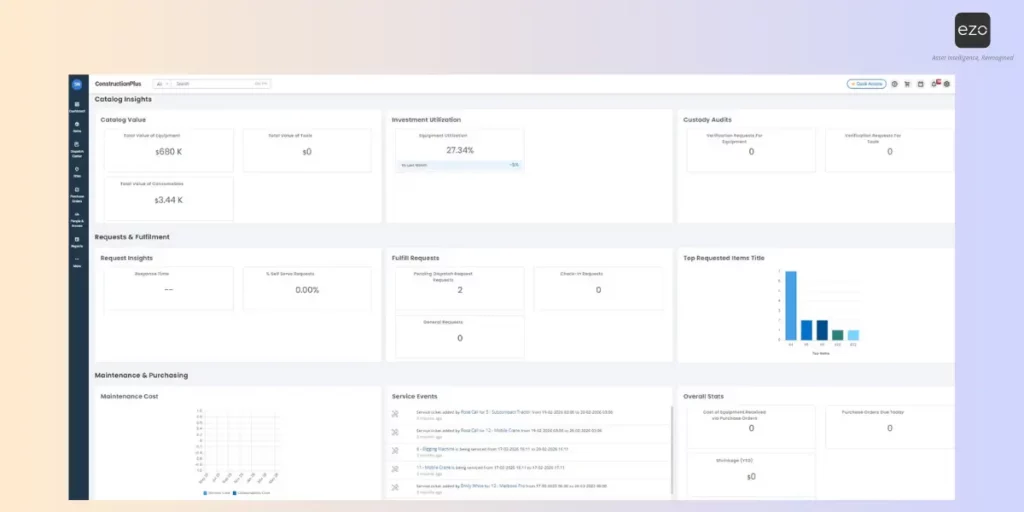
Enterprise asset management best practices help organizations keep equipment available, accountable, and ready for work. The most effective teams centralize asset data, standardize check-in/check-out, schedule preventive maintenance, track utilization, manage the full asset lifecycle, run regular audits, and use reporting to make smarter repair, replacement, and procurement decisions.
Introduction
Enterprise teams rarely struggle because they own too few assets. They struggle because hundreds or thousands of assets move among locations, departments, warehouses, job sites, labs, and field teams faster than manual systems can keep track of them.
The real challenge is not simply knowing what equipment exists. It is knowing whether equipment is available when teams need it, assigned to the right people, maintained on time, returned after use, and repaired or replaced before it causes avoidable downtime.
That is where enterprise asset management best practices matter. Strong enterprise asset management (EAM) is not built on one-time audits or isolated spreadsheets. It depends on repeatable workflows that keep asset data accurate as work happens. The right asset management system helps teams turn these best practices into daily operations instead of manual follow-ups.
What enterprise asset management best practices are really meant to solve
Enterprise asset management best practices are not just administrative rules. They exist to solve three operational problems: availability, accountability, and readiness.
- Availability means equipment is ready when a team needs it.
- Accountability means the organization knows who has what, where it is, and when it is due back.
- Readiness means assets are maintained, compliant, safe, and usable before they are put into service.
Without these controls, asset operations quickly become expensive. Poor visibility leads to duplicate purchases because teams assume missing equipment is unavailable. Manual tracking creates errors because asset status depends on delayed updates. Missing equipment slows down work, while unplanned downtime affects productivity, service delivery, and customer commitments.
At scale, EAM is less about “tracking things” and more about creating a reliable operating system for equipment.
Every best practice below supports one or more of these outcomes: keeping assets available, making users accountable, and ensuring equipment is ready for the next job.
Build a centralized asset register
A centralized asset register provides every asset with a single trusted record that all teams can rely on.
This should be the first enterprise asset management best practice because every other workflow depends on accurate asset data. If teams do not trust the register, they will create their own spreadsheets, lists, and shadow systems. That is how asset data becomes fragmented.
A strong asset register should include:
| Asset data field | Why it matters |
| Asset name and ID | Creates a unique record for tracking |
| Category and type | Helps standardize reporting and workflows |
| Location | Shows where the asset is stored or used |
| Owner or assignee | Improves accountability |
| Condition | Helps determine usability |
| Purchase date and warranty | Supports financial and repair decisions |
| Maintenance history | Shows reliability and service patterns |
| Lifecycle stage | Clarifies whether the asset is active, in repair, retired, or disposed |
For example, a construction company managing generators, tablets, safety equipment, and specialized tools across multiple job sites cannot rely on each site manager’s spreadsheet to know what is available. A centralized asset register provides operations with a single, live record for every item, including where it is stored, who last used it, when it was serviced, and whether it is ready for the next project. That prevents teams from buying duplicate equipment simply because another location’s inventory is invisible.
Teams should also standardize naming conventions, categories, and asset labels. QR codes, barcodes, RFID, and GPS can speed up asset identification, especially when equipment moves frequently.
Tools like EZO help teams maintain detailed asset records with location history, assignments, check-in/check-out activity, lifecycle management, reporting, analytics, and maintenance alerts. EZO is an EAM and CMMS solution designed to help organizations control enterprise assets, reduce downtime, and improve maintenance efficiency.
Use check-in and check-out workflows to improve accountability
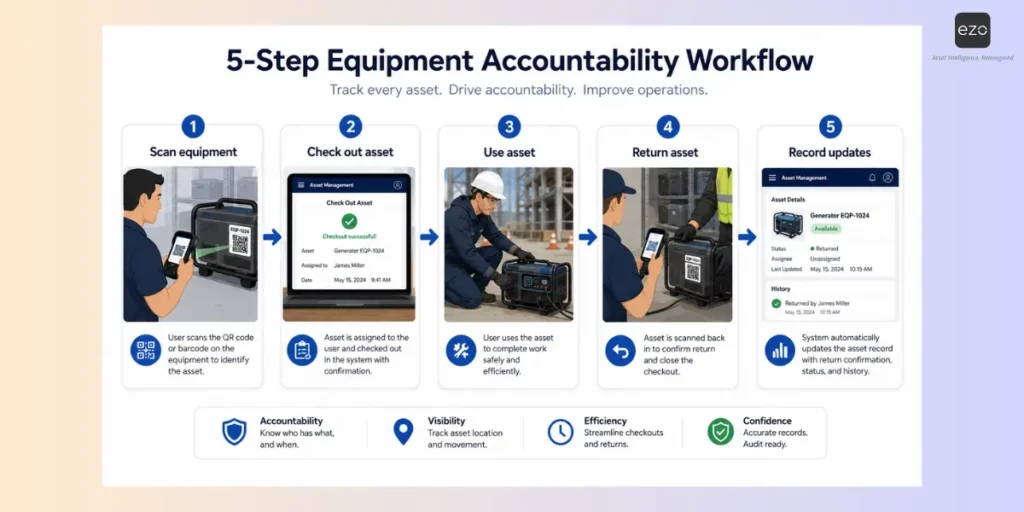
Asset accountability requires more than knowing where an asset “should” be. Teams need a repeatable workflow for assigning and returning equipment.
A check-in/check-out process records who has an asset, when they received it, where it is being used, and when it is expected to be returned. This matters for shared equipment, field kits, tools, laptops, machinery, medical devices, lab equipment, AV equipment, vehicles, and any asset that moves between users or locations.
Effective check-in/check-out workflows should help teams:
- Assign assets to users, teams, departments, projects, or locations
- Track expected return dates
- Record who checked out the asset and when
- Use barcode or QR code scanning for high-volume movement
- Set default return dates for repeatable use cases
- Make returns simple enough that users actually follow the process
For example, a university AV department may loan cameras, projectors, microphones, and recording kits to faculty, students, and event teams every week. Without a formal checkout process, equipment can sit in classrooms, be passed between users, or be returned without accessories. A check-in/check-out workflow records who borrowed each item, when it is due back, and whether all components were returned, making it easier to prevent loss and keep equipment available for the next reservation.
The goal is to reduce ambiguity. If an asset is overdue, missing, damaged, or unavailable, the system should show the last known owner and movement history.
EZO supports check-in/check-out workflows and quick checkout actions designed to reduce unnecessary clicks. Quick check-in workflows also help teams return items faster by scanning labels and updating records from the dashboard.
Keep equipment available with preventive maintenance
Preventive maintenance keeps equipment ready before failure disrupts work.
Unplanned downtime is not a minor maintenance issue. Siemens estimates that the world’s 500 largest companies lose almost $1.4 trillion annually due to unplanned downtime, equal to 11% of their revenues. That makes preventive maintenance a business continuity priority, not just an operations task.
In enterprise asset management, maintenance is not only a repair function. It is a readiness strategy. Teams need to know which assets are due for service, which assets are unsafe to use, and which assets are becoming unreliable over time.
A strong preventive maintenance workflow should include:
- Recurring maintenance schedules based on time, usage, or condition
- Alerts before service is due
- Maintenance history for every asset
- Service notes, inspection records, and repair outcomes
- Status controls that remove unsafe or unavailable assets from circulation
- Lifecycle insights that show when repair costs are becoming excessive
For example, a facilities team managing HVAC units, lifts, backup generators, and safety equipment across multiple buildings cannot wait for failures to decide what needs attention. Preventive maintenance helps them schedule inspections, log service history, and remove unsafe equipment from use before it disrupts operations. If one generator repeatedly fails inspection or incurs higher repair costs each quarter, the maintenance record also helps justify replacement before a critical outage occurs.
Enterprise asset management often overlaps with CMMS when the goal is to keep assets operational. IBM describes asset lifecycle management as a way to keep assets running throughout their lifespan while extending usefulness and improving efficiency.
The payoff can be significant. IBM cites Deloitte research showing that predictive maintenance can reduce facility downtime by 5–15% and increase labor productivity by 5–20%. For equipment-heavy teams, even a small reduction in downtime can free up capacity, reduce emergency repairs, and keep operations moving.
Maintenance history helps organizations identify which assets are reliable, which need replacement, and which pose a recurring risk of downtime.
EZO is positioned as an EAM and CMMS solution that helps organizations reduce downtime, improve maintenance efficiency, and support operational performance.
Track asset utilization, not just asset location
Knowing where equipment is located is useful. Knowing whether it is being used well is strategic.
Asset utilization data helps teams understand whether equipment is underused, overused, idle, or at risk. This is especially important when leaders are making procurement, budget, and replacement decisions.
Utilization tracking can help organizations:
- Identify underused equipment
- Move idle assets to teams that need them
- Spot overused assets before they fail
- Reduce duplicate purchases
- Support repair-versus-replace decisions
- Improve budget planning
- Understand department-level asset demand
For example, a healthcare organization may have infusion pumps, wheelchairs, diagnostic devices, and mobile workstations spread across multiple departments. One department may request new equipment because devices are hard to find, while another has the same assets sitting idle in storage. Utilization tracking helps managers see which assets are actively used, which are consistently unavailable, and which can be reallocated before approving new purchases.
This also helps teams identify overuse. If the same set of devices is constantly checked out, transferred, or serviced, managers can plan maintenance earlier, redistribute workload across similar assets, or justify additional purchases with usage data.
EZO’s content on enterprise asset management trends highlights real-time asset visibility and downtime reduction through predictive maintenance as important themes for asset-heavy organizations.
Standardize asset lifecycle management
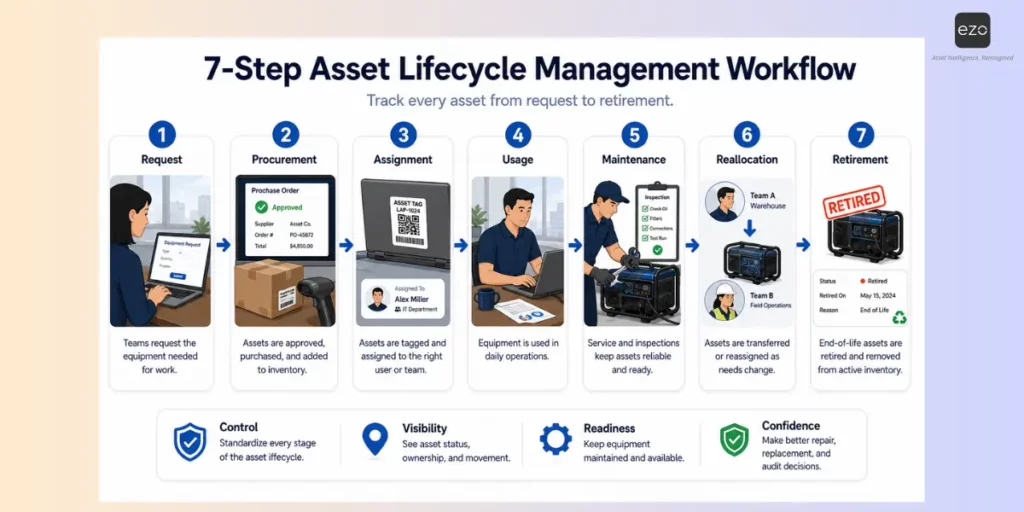
Asset lifecycle management gives every asset a clear path from request to retirement.
Without lifecycle rules, equipment can disappear between procurement, assignment, maintenance, transfer, and disposal. A standardized lifecycle creates control at every stage.
Common asset lifecycle stages include:
- Request
- Procurement
- Receiving
- Tagging
- Assignment
- Usage
- Maintenance
- Transfer
- Reallocation
- Retirement or disposal
For example, an enterprise IT team may request 200 laptops for new hires across multiple offices. Without lifecycle controls, some devices may be purchased but not tagged, assigned without ownership records, transferred between employees without updates, or kept in storage long after they should be retired. A standardized lifecycle ensures every laptop is approved, received, tagged, assigned, maintained, recovered during offboarding, and eventually retired from active inventory.
Each stage should have clear rules. Who approves new purchases? Who receives and tags assets? Who can assign equipment? When should assets be inspected? What triggers repair or replacement? How are retired assets removed from active inventory?
IBM notes that assets move through multiple lifecycle stages and require careful maintenance planning and management tactics to deliver value over time.
A platform like EZO helps teams turn lifecycle rules into repeatable workflows, so equipment does not disappear between procurement, assignment, maintenance, and retirement.
Run regular audits without slowing down operations
Regular audits help teams verify that asset records match physical reality.
For enterprise teams, audits should not be rare, disruptive events. They should be part of normal asset control. High-value, regulated, frequently moved, or mission-critical assets may require more frequent audits than low-risk equipment.
A strong audit process should help teams:
- Scan barcodes, QR codes, RFID tags, or asset labels
- Compare the expected location against the actual location
- Identify missing, misplaced, or mismatched assets
- Verify condition and ownership
- Record exceptions
- Use audit results to improve workflows
For example, a logistics company managing handheld scanners, tablets, forklifts, pallet jacks, and warehouse equipment across multiple facilities may need to verify asset records without pausing operations. Instead of shutting down work for a full manual count, teams can scan equipment by zone, compare actual locations against system records, flag mismatches, and investigate exceptions. This keeps audits focused and operationally light while improving record accuracy.
The most valuable audits do more than correct records. They reveal process gaps. If the same asset category is often missing, the issue may be weak return workflows. If location mismatches are common, teams may need better transfer rules. If maintenance records are incomplete, service teams may need simpler mobile updates.
EZO pricing information lists audits and RFID support in advanced plans, while higher tiers add automation, GPS integrations, and utilization analytics.
Connect asset management with team workflows
Enterprise asset management fails when asset data lives separately from how teams work.
Different teams need asset information for different reasons. Field teams need mobile access. Operations teams need dispatch and availability views. Finance needs purchase and lifecycle data. Maintenance teams need service history. Managers need reports. End users need simple request-and-return workflows.
The best EAM programs integrate asset data into the workflow rather than forcing users to update systems after the fact.
For example:
| Team | Asset workflow they need |
| Field teams | Check equipment in and out of job sites |
| Maintenance teams | View service history and log repairs |
| Finance teams | Track purchase, depreciation, and replacement data |
| Operations teams | See availability across locations |
| Managers | Monitor utilization, overdue assets, and loss trends |
| End users | Request, return, or reserve equipment easily |
For example, a construction services company may have field crews checking out tools, operations teams assigning equipment to job sites, maintenance teams servicing machinery, and finance teams tracking asset costs. If each team works from a separate system, asset records quickly fall out of sync with reality. Connecting asset management with daily workflows ensures a technician can log maintenance from the field, operations can see what is available before dispatching equipment, and finance can track lifecycle costs without chasing updates from multiple teams.
EZO content highlights mobile access for field teams, including the ability to check equipment in and out, update status, conduct inspections, and log maintenance from job sites. Its feature pages also emphasize web-based access to asset information from any device and location.
Use reporting to make better asset decisions
Reporting turns daily asset tracking into strategic decision-making.
Without reporting, teams may know where assets are but still struggle to answer bigger operational questions. Which assets are overdue? Which departments use equipment most heavily? Which assets break down often? Which locations need more inventory? Which assets should be repaired, replaced, or retired?
Useful EAM reports include:
- Asset availability reports
- Overdue asset reports
- Utilization reports
- Maintenance history
- Cost of ownership
- Loss and damage trends
- Department-level usage
- Upcoming maintenance
- Warranty and replacement timelines
For example, a facilities director managing equipment across offices, warehouses, and service locations may notice that one region reports frequent delays due to key assets being unavailable. Reporting can show whether the issue is caused by overdue returns, low visibility into utilization, repeated repairs, or an actual equipment shortage. Instead of approving new purchases by default, the team can use data to reallocate idle assets, adjust maintenance schedules, or replace unreliable equipment.
In our experience, the best reports are not just executive dashboards. They help frontline teams make faster decisions. A maintenance manager should know which equipment is due for service. A field supervisor should know what is available. A finance leader should know where capital is tied up in underused assets.
Why are enterprise asset management best practices hard to scale manually
Enterprise asset management best practices can start in spreadsheets, but they rarely scale well there.
As organizations grow, asset tracking becomes more complex. There are more assets, users, locations, movements, checkouts, returns, and maintenance schedules to manage. Spreadsheets require consistent manual updates, but enterprise asset operations are constantly changing.
This shift is already visible in the market. Grand View Research estimates that the global asset tracking market was valued at $24.14 billion in 2024 and is projected to reach $51.59 billion by 2030, driven by digitization and the demand for operational efficiency.
Manual systems often create problems such as:
- Delayed updates
- Inconsistent naming
- Duplicate asset records
- Limited audit trails
- No real-time visibility
- Missed maintenance dates
- Slow reporting
- Poor accountability
- High administrative effort
This is why EAM maturity depends on systems, not just policies. A policy says equipment must be returned. A workflow records the checkout, reminds the user, flags the overdue asset, updates the record upon return, and provides managers with visibility into what happened.
At enterprise scale, repeatability is what makes asset management reliable.
How EZO helps teams put EAM best practices into action
EZO helps teams operationalize enterprise asset management best practices by turning asset tracking, maintenance, audits, and reporting into structured workflows.
As an enterprise asset management software, EZO supports centralized asset tracking, location history, assignments, check-in/check-out workflows, lifecycle management, maintenance alerts, audits, reporting, and analytics. EZO describes the platform as an EAM and CMMS solution built to help organizations control enterprise assets, reduce downtime, improve maintenance efficiency, and support operational performance.
The platform helps teams:
- Create detailed asset records
- Track who has what, where, and when it is due back
- Manage checkouts and returns
- View asset location history
- Schedule and track maintenance
- Run audits with scanning workflows
- Monitor utilization and availability
- Support lifecycle management from procurement to retirement
- Enable field teams with mobile workflows
- Use automation, RFID, GPS integrations, and analytics in higher-tier plans
For enterprise teams, the value is not just having a database of equipment. It is having a system that keeps asset data accurate as work happens. When asset records, assignments, service history, and reports stay connected, teams can reduce downtime, prevent unnecessary purchases, improve accountability, and keep equipment ready for the next job.