
Key Takeaways:
- Informal handoffs persist because recording costs people time at the handoff, while someone else benefits later.
- An asset record tracks custodian, location, status, and readiness separately, and one unrecorded handoff can break any of them.
- A returned item is not automatically ready to use, so recording damage and removing equipment from circulation must be separate actions.
- Checkout duration measures possession, not operating time, so treating it as asset utilization can lead teams to buy capacity they already own.
- Verification time is a useful accountability diagnostic only when paired with sampled accuracy checks, because a fast answer can still be wrong.
- When the receiver records a custody transfer, and the sender remains custodian of record until then, the sender gains a reason to insist.
- In equipment procurement, a rental or purchase is avoidable only when someone wrongly believed suitable, available owned equipment was missing or unavailable.
Introduction
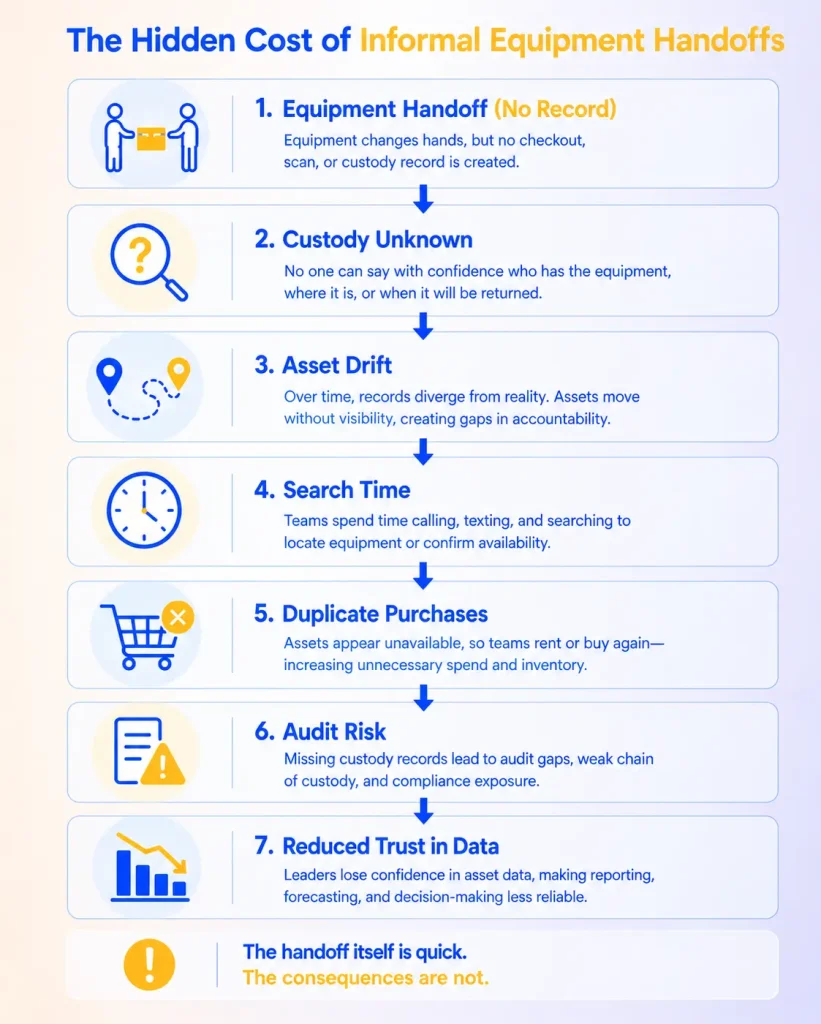
An informal equipment handoff is a change in who holds a piece of equipment that never makes it into the record, or makes it in too incompletely to be useful. The handoff takes seconds. Its cost appears later as search time, avoidable rentals, unresolved damage, and asset records describing a situation that no longer exists.
“Can I borrow this for a second?”
“Sure.”
Nothing about that exchange is careless. The person borrowing the meter gets it now, the person lending it avoids an administrative pause, and the work keeps moving. The cost of skipping the record does not land on either of them. It lands on whoever looks for the meter next week, the coordinator who promised it to another crew, or the technician who receives it without knowing it was dropped on Tuesday.
That asymmetry, where the benefit stays with the people in the room, and the cost arrives later for someone who wasn’t there, helps explain why informal handoffs persist on well-run teams and why a stricter rule on its own leaves the underlying incentive in place. This guide explains where the costs show up, how to estimate them, what a recorded handoff should include, and how to design one people will actually use in real work.
What is an informal equipment handoff?
An informal equipment handoff is any unrecorded change in custody, or one recorded too incompletely to tell someone else who has the item, where it is, and what state it is in.
What makes a handoff informal is the omission, not the activity. A technician lending a calibration tool to a coworker is a normal part of field work. It becomes informal when the custody record still names the first technician. The same applies to the other common cases:
- A technician lends a calibration tool to a coworker without updating the custody record.
- A warehouse employee hands a kit to a field crew without checking it out to the crew lead.
- A project manager moves a camera kit between job sites without recording the new location.
- A vehicle changes assigned drivers between shifts while its checkout records still name the morning driver.
- A meter goes to an outside calibration vendor with no record of who sent it or when it is due back.
- A laptop moves to another department without being reassigned.
These events are not all the same kind of change. Some change custody, some change only location, and some change both. Sending a meter to a calibration vendor changes custody because someone outside the organization is now responsible for it. Moving a toolbox from one storeroom to another changes only location because no one new is responsible for it. A courier carrying equipment between sites holds it temporarily without becoming a meaningful custodian; what matters is who dispatched it and who confirmed receipt. Teams that treat all three as one type of event tend to end up with records that are correct about one fact and wrong about another, which is common for equipment across multiple locations.
A formal handoff doesn’t require a scan, and it doesn’t always require a return date. You can check out a permanent reassignment indefinitely, and a manual desk entry still creates a record. The test is simpler than any field list: would the record let someone who was not present find the item and understand its state without asking the people involved?
Why informal handoffs persist on well-run teams
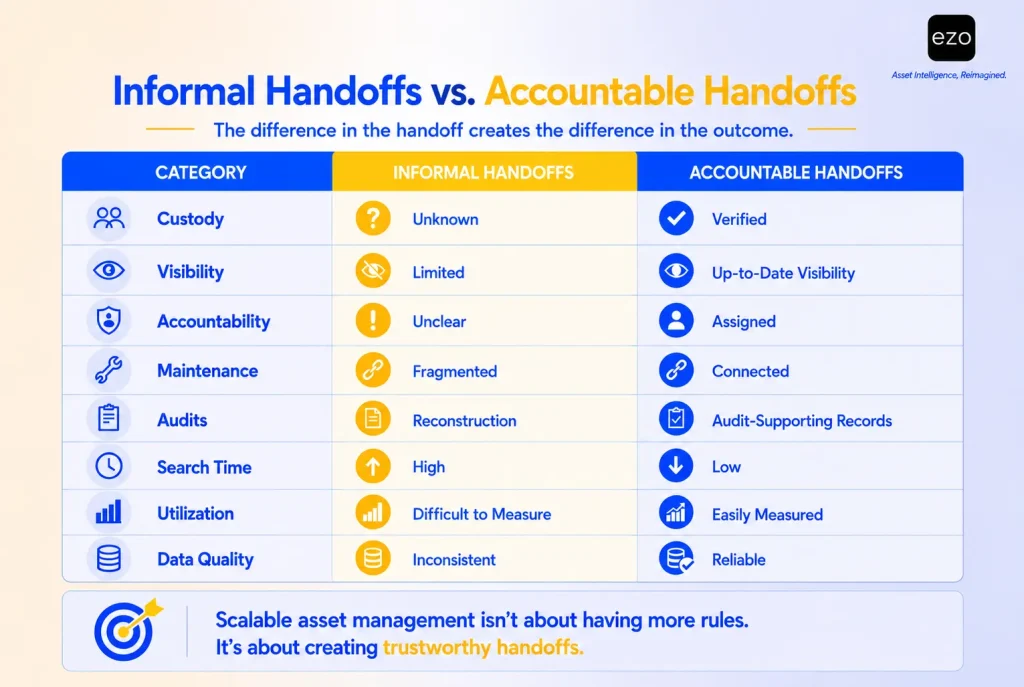
Informal handoffs persist on well-run teams because the person deciding whether to record a handoff pays the full cost and gets little of the benefit.
Consider who gains what. The two people at the handoff save a few minutes and feel that benefit immediately. The benefit of a complete record goes to someone else, later: the coordinator who needs to find the item, the next borrower who wants to make a reservation, the maintenance lead who needs to know it was dropped, or the finance team reviewing a rental invoice. When the cost of an action and its benefit fall on different people at different times, a reminder to “always sign equipment out” asks the person who bears the cost to act on behalf of someone who is not there. Rules like that depend on memory and discipline at the exact moment work is busiest.
Workflow friction makes this worse, and it is the cause most within a process owner’s control. If recording a handoff means walking back to a desk, the informal path wins more often. But friction is one cause among several, and each cause has a different remedy:
| Cause | What it looks like | Remedy |
| Workflow friction | Recording takes longer than the handoff itself | Shorter transaction, barcode or QR scanning, sensible defaults |
| No access | Staff have no account, device, or access permissions in the field | Accounts, roles, and mobile access for everyone who handles equipment |
| No training | Staff do not know which action to use | Short, task-specific training on asset management workflows |
| Unclear responsibility | Sender and receiver each assume the other recorded it | A named default owner for each transfer |
| Misaligned incentives | Crews are measured on finishing jobs, not on record quality | Measures that include record accuracy |
| Weak supervision or deliberate violation | Workarounds continue after the process is easy | Supervision and policy enforcement |
A faster workflow will not solve a responsibility problem, and training will not solve an access problem. The practical question, then, has two parts: “how do we make recording faster?” and “how do we give the person creating the record a reason to create it?” One answer appears later in this guide: the sender remains the custodian of record until the transfer is recorded, giving the sender a direct interest in ensuring it is.
Four records that drift apart: custodian, location, status, and readiness
An asset record makes at least four separate claims, and an informal handoff can leave any one of them wrong while the others stay right.
| Claim | What the record asserts | How an informal handoff breaks it |
| Custodian | Who is responsible for the item now | Still names the previous holder |
| Location | Where the item was last recorded | Shows the last entered site, not the current one |
| Status | Available, checked out, reserved, or in maintenance | Shows “checked out” to someone who no longer has it, or “available” while it sits in a truck |
| Readiness | Whether the item is fit to issue | Says nothing about damage or a missed inspection during the unrecorded period |
This guide calls the gap between any of these claims and reality a record mismatch. Teams often describe the problem as inaccurate records, but that label hides which claim is wrong, and the distinction matters because partial mismatches are harder to catch than total ones. An obviously out-of-date record prompts someone to check. A record that is right about location and wrong about custodian sends someone to the right site to ask the wrong person, and the search starts from false confidence. Strong custody verification practice therefore checks custodian and location separately rather than treating a match on one as a match on both.
Two more distinctions prevent common misreadings.
A recorded location is a claim, not a sighting. The record shows where the item was last recorded. It becomes more trustworthy when the last transaction or verification is recent, and less trustworthy the longer the item has gone without one.
Custody is not usage. A checked-out camera may sit unused in a truck all week. Checkout duration measures how long an item was allocated to someone, not how long it operated. Reading it as usage overstates demand and can push a team toward buying capacity it already owns. Operating time needs its own source, such as meter readings or telematics, before it informs asset utilization decisions.
Where the costs of informal equipment handoffs show up
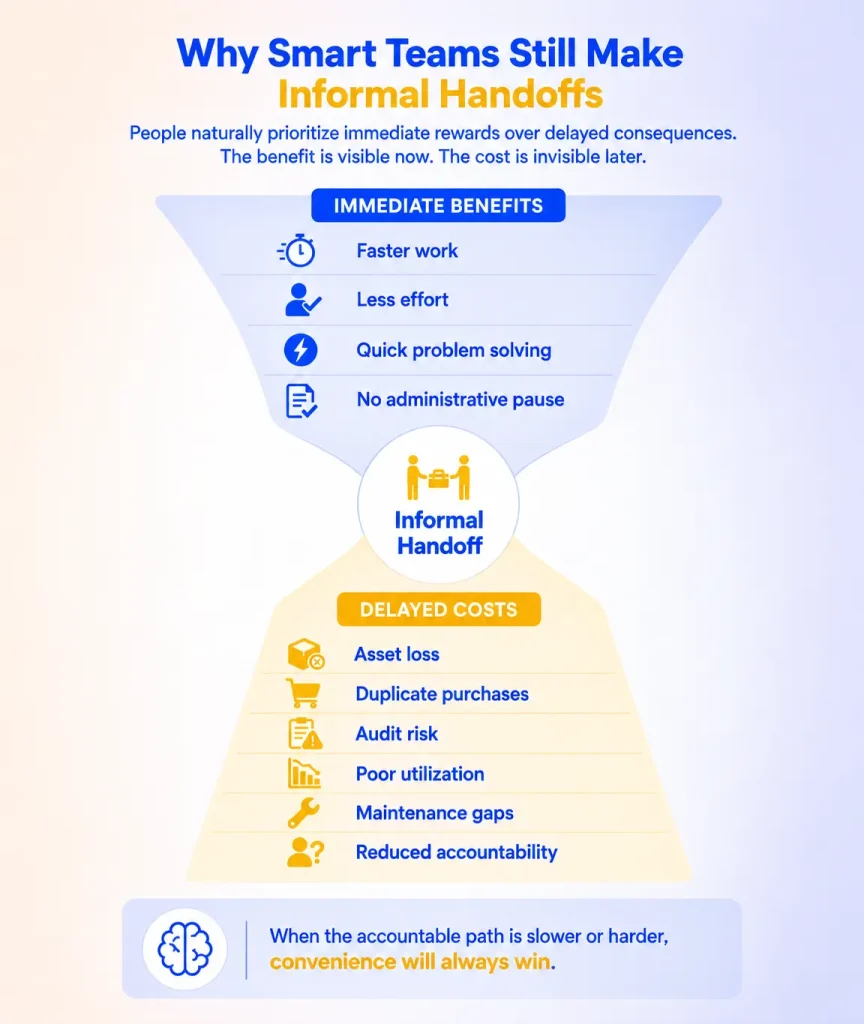
The costs of informal equipment handoffs don’t sit on a single budget line because they stem from one root cause, an incomplete record, and branch into several independent consequences.
| Consequence | How an incomplete record produces it | What it costs |
| Search and verification time | People call, text, check spreadsheets, or visit storage to find an item the record cannot locate | Labor time, delayed starts, idle crew time |
| Avoidable rentals and purchases | Suitable, available owned equipment is wrongly believed missing or unavailable | Rental fees, purchase price, extra carrying cost |
| Unresolved condition | Damage or a missed inspection during the unrecorded period is never routed to anyone | An item can be reissued before review; repairs become reactive |
| Booking conflicts | The item is promised to another job while it is still out with someone not on record | Rescheduled work, last-minute substitutions |
| Harder custody reconstruction | The item’s history has gaps where it changed hands | More manual effort in audits, investigations, and incident reviews |
Some of these consequences overlap. A search that ends in a rental appears in two rows, and the next section explains how to count it once.
Maintenance gaps come from routing, not erasure. An unrecorded custody change doesn’t delete an asset’s service history. The problem is that new information stops reaching the right people. A borrower who drops a meter, notices a frayed cable, or reaches an inspection due date has no record linking them to the item, so the observation is never routed to maintenance.
Condition risk is the consequence a monthly report cannot show. Workplace safety guidance draws a clear line between recording a fault and keeping faulty equipment out of use. The UK Health and Safety Executive says employers should have a procedure for reporting damaged or faulty equipment and should never let it be used, and OSHA’s Hand and Power Tools guidance says damaged tools should be removed from use and tagged. An informal handoff weakens both steps: nobody reports what happened during the unrecorded period, and nobody holds the item back.
Not every rental is waste. Owned equipment can be unsuitable for the job, too far away, already committed, or unavailable within the deadline. The avoidable cost is narrower: rentals and purchases made because people wrongly believed suitable, available owned equipment was missing or unavailable. Multiple identical units can be necessary capacity, so calling every extra unit a “duplicate” overstates the savings and ignores the lifecycle cost of owning it.
Why the cost grows with scale
Memory works as an asset management system only when transfers stay within one room and one shift. It becomes less dependable as transfers span more people, sites, and shifts, because each factor breaks memory in a specific way:
- More shifts mean the person who knows where the item went is often off shift when someone asks.
- More sites mean a physical check requires travel rather than a walk across the room.
- More shared equipment and reservations mean one missing item can break a chain of bookings, which is a recurring problem for rotating field crews.
- Larger crews mean a missing item idles several people rather than one.
Volume and interdependence act differently. More transfers increase incidents roughly in proportion to how often equipment moves. Interdependence raises the cost of each incident. The second effect is easier to underestimate, because it stays invisible until the missing item is the one three other jobs were waiting for. A single undocumented transfer of a highly critical asset can therefore cost more than dozens of transfers of low-value tools. The impact depends on the asset and the work it supports, and repeated undocumented transfers increase both the likelihood and the scope of disruption.
How to estimate the cost of informal handoffs
Estimate the cost of informal handoffs by pricing three measurable lines for one equipment category over a defined period, then removing double counting. Most inputs already exist in rental invoices and purchase orders. The figures below are illustrative inputs for one hypothetical month, not benchmarks; replace every one with your own data.
| Cost line | Illustrative inputs | Illustrative monthly cost |
| Search labor | 30 searches × 20 minutes × 1.5 people = 15 hours, at a $60 loaded hourly rate | $900 |
| Avoidable rentals | 3 rentals at $250 each, where suitable owned equipment was available but believed missing | $750 |
| Confirmed avoidable purchase | 1 replacement meter at $1,200, bought because the owned meter was believed lost, later found | $1,200 |
| Total | Sum of the three lines | $2,850 |
It is tempting to multiply $2,850 by 12 and report $34,200 a year. Two corrections make the number more honest.
First, remove double counting. If a crew waited two hours before renting, that wait is already in search labor. Adding a separate “project delay” line for the same event counts it twice. Count each event once, under the line where its cost actually landed, using the same discipline used in cost analysis by asset or work order.
Second, examine the purchase. Once you find the original meter, the organization owns two. If the team genuinely needed a second unit, part of that purchase was capacity, not waste. The avoidable cost is the portion the team would not otherwise have bought, plus any carrying cost for the surplus.
The revised conclusion is more useful than the original number. The estimate is a floor for the measurable part of the problem. The most serious potential consequence, a damaged item reissued before review, does not fit a monthly cost line at all, and it should be managed as a risk rather than priced as a cost. To collect real inputs, log every search for four weeks, including its duration and the number of people involved; add a reason code to each rental request; and count a purchase as avoidable only after the original item turns up. Teams that already track measured inventory, procurement, and maintenance changes can use the same discipline here.
Test a recorded handoff on your own equipment
The estimate shows what informal handoffs might cost. The fastest way to learn whether a recorded handoff fits your work is to run one with real equipment and real people.
Pick five assets that move often and label them with QR codes. Check each one out to a colleague with a return date and a location, scan it back in from the mobile app, and time each step. If the recorded path takes longer than the informal one, you will see exactly where.
A verification-time diagnostic for asset accountability
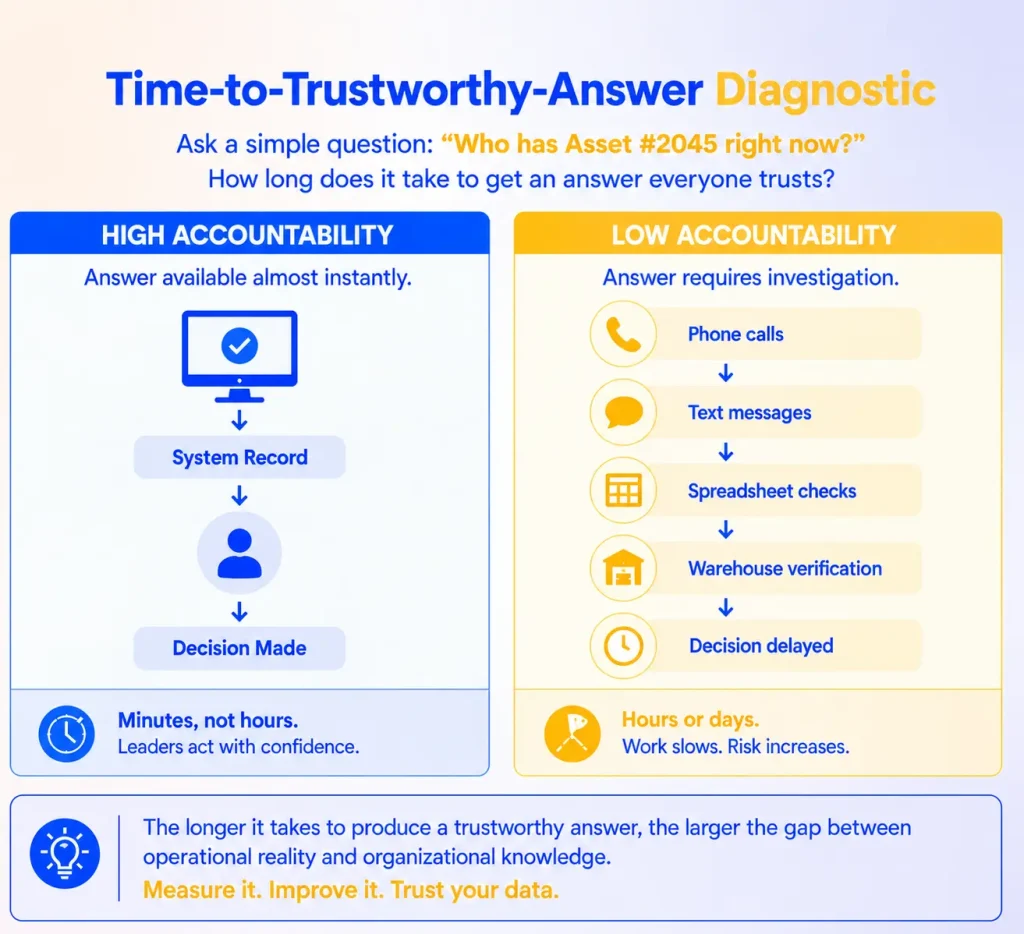
A useful internal measure of handoff accountability is the time needed to produce a verified answer to one question: who has this asset, and where is it? This is a diagnostic proposed in this guide, not an industry standard or a published framework.
“Verified” needs a definition, because people can agree on an outdated record. A verified answer includes four things:
- The recorded custodian, whether a person or a location.
- The recorded location.
- The time of the last transaction or verification.
- Any unresolved exceptions, such as an overdue return, a denied custody check, or an open damage report.
Imagine a COO asks, “Who has our thermal imaging camera right now?” Where records hold, a coordinator can answer from the equipment register and say when the item was last confirmed. Where they do not, the answer requires calls, messages, spreadsheet checks, and a walk to the storeroom.
Time alone can mislead in both directions. An answer can arrive instantly and be wrong because the record is stale and no one checks it. An answer can take an hour and be right, because the person asking lacked access or the request was unusual. Long verification times can indicate record or workflow problems, but they don’t prove them. Pair it with sampled accuracy, the same logic behind asset audit and verification practices: choose 20 assets, time how long it takes to verify each answer, then check each one physically.
| Speed of answer | Record matches reality | Record does not match reality |
| Answer is fast | Records are working | The most dangerous case: confident and stale |
| Answer is slow | Access, search, or process friction | Records and process both need work |
The fast-and-wrong cell is the reason accuracy must be sampled rather than assumed. A team that measures only speed rewards quick answers, not correct ones.
For context, ISO 55000:2024 sets out asset management vocabulary, an overview, and principles. It does not define this diagnostic, and EZO’s overview of asset management principles explains how those principles apply to everyday records. The diagnostic is a practical way to check whether an organization’s records are good enough to support decisions based on them.
What an accountable equipment handoff record contains
An accountable handoff record links one uniquely identified asset to a new custodian, a time, and a return expectation, then adds conditional checks only where the asset’s risk requires them.
The baseline has to start with identity. “Who has it, where is it, and when is it due back” means little unless the transaction is attached to the correct record, so every handoff begins by identifying the item through its asset tags or identification number.
| Field | When it is required | Why it matters |
| Asset ID | Every handoff | Links the transaction to one specific item |
| New custodian (person or location) | Every handoff | Establishes responsibility |
| Time of transfer | Every handoff (system-recorded) | Anchors the history |
| Return expectation | Every loan; “indefinite” for permanent assignment | Separates loans from reassignments |
| Condition at handoff | Assets where damage affects safety or function | Supports the release-to-use decision |
| Destination and confirmed receipt | Items moving between sites or leaving the organization | Separates where an item is going from where it is |
| Approval | High-value, scarce, or certified equipment, sometimes through multi-tier approvals | Applies control where the risk justifies it |
| Kit contents | Kits and bundles | Shows what should come back |
| Photo, e-signatures, or note | Optional evidence where useful | Supports later review |
A well-configured system should fill some fields automatically: the previous custodian, the timestamp, and the user who recorded the change. Staff should never have to type what the system already knows.
Decide who records each transfer. Writing down both names does not decide who must act. Use a default rule:
- The receiver records the transfer because they are present, have the item, and need the record to show they hold it.
- The sender confirms it by not leaving until the record shows the new custodian. Until it does, the sender remains the custodian of record, giving them a direct reason to insist.
- An escalation owner, usually the equipment coordinator, resolves any transfer still unrecorded by a defined deadline, such as the end of the shift.
Record dispatch and receipt separately. When equipment moves between locations, the destination and current location are separate facts. Record who dispatched the item and when, then update the confirmed location when someone receives it. Updating the location at dispatch creates a new mismatch for every hour the item spends in transit.
One asset, five handoffs: a worked example
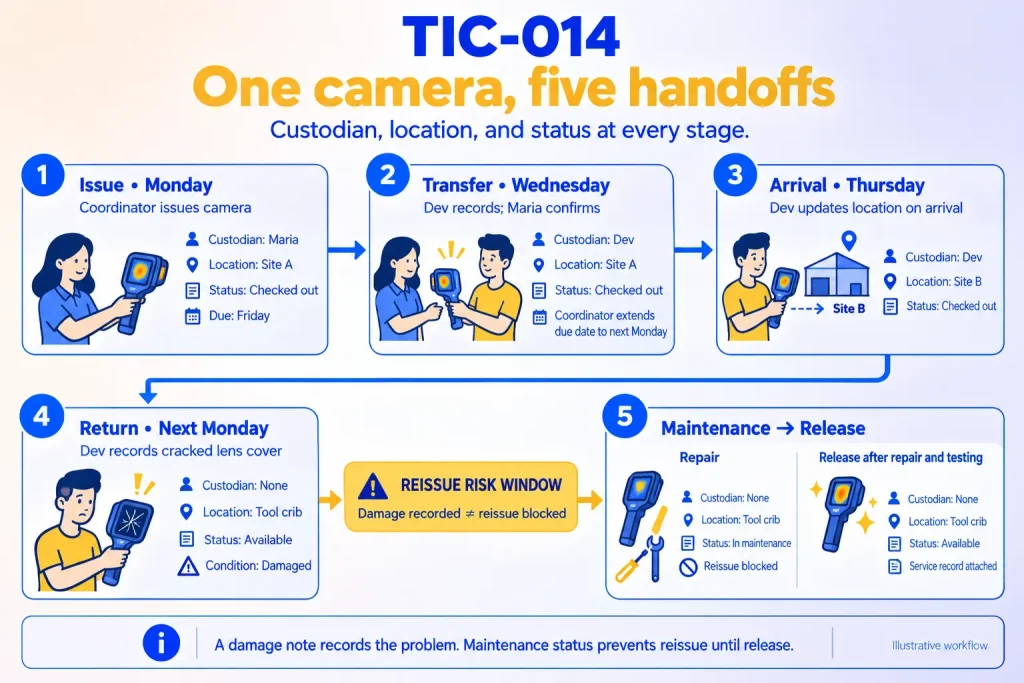
The clearest way to see what a recorded handoff changes is to follow one asset through a week. A thermal imaging camera, asset TIC-014, moves through five events.
| Step | What happens | Who acts | Record after the step |
| 1. Issue (Monday) | The coordinator checks the camera out to Maria for Site A, due Friday | Coordinator | Custodian: Maria. Location: Site A. Status: checked out. Due: Friday |
| 2. Direct transfer (Wednesday) | Maria hands the camera to Dev at Site A. Dev records the custody transfer; Maria waits until the record shows Dev. The transfer changes the custodian and location, not the return date, so the coordinator extends the checkout because Dev needs the camera longer | Dev records, Maria confirms, coordinator extends | Custodian: Dev. Location: Site A. Status: checked out. Due: next Monday |
| 3. Move (Thursday) | Dev takes the camera to Site B and updates the location on arrival, not on departure | Dev | Custodian: Dev. Location: Site B. Status: checked out |
| 4. Return (next Monday) | Dev checks the camera in at the tool crib. The check-in form requires a condition entry, and Dev records a cracked lens cover | Dev | Custodian: none. Location: tool crib. Status: available. Condition: cracked lens cover |
| 5. Review and release | The coordinator moves the camera into maintenance during the same visit. The maintenance lead replaces the cover, tests the camera, and completes the service record | Coordinator, maintenance lead | Status: in maintenance, then available. Service record attached |
Step 2 is the transfer that would have been informal. Without it, the record would show Maria holding the camera at Site A while Dev used it at Site B, and Friday’s overdue alert would go to the wrong person.
Step 4 is where most of the risk sits. Between check-in and the start of service, the camera is recorded as available with a damage note attached. Whether the next borrower receives a damaged camera depends on whether anyone reads the note. That window is why recording damage and controlling availability must be two separate actions, done by named people, ideally in the same sitting. A note gives the next user context; it does not stop the next user from receiving the item. Routing damage straight into work orders shortens that window.
Equipment handoff checklist
Use this checklist when equipment changes custody, especially for shared, high-value, high-movement, or condition-sensitive assets.
Before the item moves
- Confirm the asset ID matches the item in hand.
- Check whether the item has open reservations, is overdue, or is in maintenance.
- Confirm the recipient is authorized to use certified or safety-sensitive equipment.
- For kits, confirm the components against the expected contents.
At the handoff
- The receiver records the transfer, and the sender waits until the record shows the new custodian.
- Record the new custodian or location, and confirm or extend the due date.
- Record condition at handoff for condition-sensitive assets.
- For moves between sites, record the dispatch and update the location on receipt.
At return
- Check the item in and verify kit components.
- Record condition. Where the asset requires it, use a required field rather than an optional note.
- If the item is damaged, incomplete, or due for inspection, remove it from available circulation and route it to the designated inspection or repair owner. Follow maintenance inspection checklists where they apply.
- A named role decides when the item is released for use again.
Every week
- Review overdue items, denied custody checks, transfers past the recording deadline, and missing components.
How to handle exceptions without losing the record
A handoff process that works only under ideal conditions will fail the first time conditions aren’t ideal. Each exception needs a temporary method, a reconciliation deadline, and an owner.
No signal or no device. Record the handoff on a paper log or a message to the equipment coordinator with the asset ID, both names, the time, and the location. The receiver enters it in the system by a defined deadline, such as the end of the shift, and the coordinator follows up on anything still missing.
Damaged or unreadable label. Identify the item by its identification number or serial number instead of skipping the record, and flag the label for replacement.
Urgent transfer. Complete the handoff, then record it within the same shift. Urgency can justify delaying the record; it cannot justify skipping it.
Item cannot be found. Start from the last recorded custodian, location, reservation, and service event, then ask the likely holders. If the item remains missing past a defined period, the escalation owner records it as missing or unavailable so no one plans work around it, and the organization resolves it under its own policy. Keep the last known custody history intact; it is the evidence for whatever happens next, including retiring the asset if it is written off.
Equipment leaving the organization. For contractors, clients, and repair vendors, record the authorized recipient and company, along with dispatch and receipt evidence, the expected return date, condition at handoff, and the internal person responsible for follow-up. For remote employees, a structured equipment return process should include return instructions, shipment tracking, receipt confirmation, condition review, and closure of the custody record.
How to start without adding friction
You do not need to change every handoff at once. Start where informal movement causes the most disruption, prove the process there, and expand.
- Pick one high-movement category. Choose equipment that moves often and causes delays when it cannot be found, such as meters, scanners, cameras, test equipment, or field tools.
- Reconcile the baseline first. Run an inventory audit on the pilot assets before changing the workflow, and confirm the current custodian, location, identity, and open loans for every pilot asset. A new process can’t fix records that were wrong from day one.
- Define one minimum record. Use the baseline fields from the record table, then list which assets add condition checks, approvals, or kit verification.
- Name the owners. Use the role table below so every decision has a person attached.
- Decide what to simplify and what stays required. Simplify data entry: scanning, defaults, prefilled locations, and bulk actions. Keep the controls the asset’s risk requires: approval for scarce or high-value items, an inspection hold after reported damage, and authorized-user checks for certified equipment. A hybrid model works well here, with self-checkout for routine items and approval for critical ones, supported by role-based access.
- Set up access and training. Confirm every person who handles pilot equipment has an account, the right permissions, a device that can scan, readable labels, short training on the three or four actions they will use, and a named person to ask for help.
- Measure from a baseline. Collect the measures in the next section for several weeks before the change, then compare.
| Role | Decision they own | Question to ask each month |
| Equipment coordinator or tool crib lead | Issue, return, release to use, escalations | Which transfers are still unrecorded past the deadline? |
| Field supervisor or crew lead | Whether crews record transfers during work | Which transfers did my crew make without a record? |
| Maintenance lead | Inspection holds and repair and service history | Did anything come back damaged and go out again before review? |
| Operations leader | Pilot scope and exception policy | Is verification time falling for critical assets? |
| Finance or procurement | Rental and purchase approvals | Are avoidable rentals and purchases declining? |
| IT or system administrator | Accounts, permissions, and devices | Does everyone who handles equipment have working access? |
A policy says what should happen. A usable workflow helps employees follow it consistently, and the owners above make sure someone notices when they don’t.
How to measure handoff accountability
Measure handoff accountability with a small set of defined asset management metrics, each with a denominator, a baseline, and a review owner. Without definitions, “how often do audits match the record?” produces numbers you can’t compare month to month.
| Metric | Definition | Denominator |
| Median verification time | Time from question to a verified answer for sampled assets | Assets sampled in the period |
| Sampled record-match rate | Sampled assets whose recorded custodian and location both match a physical check | Assets sampled in the period |
| Overdue-return rate | Checked-out items past their due date | Items checked out with a due date |
| Required condition-record completion | Returns with the required condition field completed | Returns of assets that require it |
| Unrecorded transfers found | Cases where the actual holder differs from the recorded custodian | Assets checked through audits or custody verification |
| Confirmed avoidable rentals and purchases | Rentals and purchases later shown to be avoidable | All equipment rentals and purchases in the category |
Unrecorded transfers cannot be counted from transaction reports, because they never entered the system. They surface through sampled checks, custody audit responses, audit discrepancies, and incident reports, so the measure is only as good as the sampling behind it.
Every metric is also an incentive. If a pilot is judged on the number of checkouts, checkouts will rise whether or not records improve. If it is judged on condition-field completion, the field may fill with “OK” without anyone inspecting the item. Pair completion metrics with spot checks, and give the sampled record-match rate the most weight, because it measures the outcome rather than the activity. Custom reports can track most of these from transaction data; the sampled measures need a person and a short monthly routine.
How EZO EAM supports accountable equipment handoffs
EZO EAM is EZO’s enterprise asset management platform. Its handoff capabilities are grouped below by the handoff stage they support. Plan notes reflect the EZO EAM pricing page as of October 2026, and packaging changes over time, so confirm current pricing before you buy.
Plan the handoff
Reservations and availability. Teams can reserve equipment in advance and view upcoming demand on an availability calendar. Reservations help reduce booking conflicts when admins approve them, and availability records stay current.
Requests and approvals. The Request Portal lets staff submit reservation, check-in, and general requests that admins review, approve, route, or reject before fulfillment. A submitted request does not secure an item until it is approved. Requests and multi-tier approvals are on the Premium plan.
A setting to configure deliberately. EZO EAM offers an “availability of overdue items” setting. When enabled, an overdue item is treated as available for new reservations after its due date, even though it hasn’t been returned. That can help planners who expect late returns, but it can also produce the booking conflict the reservation was meant to prevent.
Issue or transfer the item
Check out to a member or a location. You can check items out to a person or, for teams that manage equipment by room or site, to a location. Location checkout is limited to admins and custom roles with baseline admin permissions. Team-based access controls (Advanced) govern who can see and act on items; they do not make a team the custodian.
Custody transfer. A checked-out item can move directly from one custodian to another without first being checked in. Without arbitration, staff users can transfer custody directly to themselves. With arbitration enabled, they request the transfer and the account owner approves or denies it. The documented transfer form asks for a location and a signature, and staff can take custody of several checked-out items at once. If the custodian checks an item in while a transfer request is pending, the request is canceled. Custody transfer is on the Advanced plan and above.
Location transfer requests. Staff can request that items move between locations, and admins or approvers approve or deny the transfer requests from the Fulfillment Center. Confirm this workflow’s plan availability with EZO before relying on it.
Identifying the item. Every plan includes barcode and QR code labels and the mobile app, so staff can scan QR codes with a phone camera rather than a dedicated scanner. RFID support starts on Advanced, and EZO’s hardware recommendations state that it currently integrates only with the TSL 1128 UHF RFID reader. A scan identifies the item; the person still selects the action, confirms the recipient and required fields, and completes the transaction.
Kits. EZO EAM separates bundles and packages. Packages move as one unit and are checked out, checked in, and reserved together; bundles are flexible groupings whose selection can change. Both start on the Advanced plan.
Return and review the item
Check-in. Staff can check in several items by scanning them, and EZO EAM suggests the rest of a bundle when they check in one item. Custom fields can be displayed on check-in and checkout forms, so a team can capture condition on return; custom fields start on the Advanced plan.
Moving an item into maintenance. Starting a service event changes the item’s status to maintenance, which makes it unavailable for checkout. Service cannot be started while an item is checked out, so the sequence is check-in first, then service, ideally in the same visit as in step 5 of the worked example. Basic service records start on the Advanced plan. Preventive maintenance, work orders, and technician management sit in EZO EAM’s CMMS capability, which requires the CMMS add-on (priced by admin user) or the Custom Enterprise plan.
Due-date alerts. Email alerts can notify admins ahead of a due check-in, on the due date, and repeatedly while an item stays overdue.
Verify and report
Custody audits. Admins can ask custodians to verify that they hold an item. Custodians respond “verified” or “denied,” record condition (good, damaged, broken, or other), and give a reason for any denial (lost, stolen, or other). Custody audits start on the Advanced plan.
Location audits. Location audits treat two groups differently. You can verify, deny, or flag items present at the location. Checked-out items trigger a custody request to their custodian when the audit starts. Location audits are on the Premium plan.
History and reports. Each item keeps an audit trail of its transactions, and reports and dashboards summarize checkouts, overdue items, and maintenance activity. Utilization insights are on Premium. Telematics and usage intelligence, which measure operating time rather than custody, are on Custom Enterprise.
Points to evaluate
- The offline mobile app is on the Custom Enterprise plan, and its documentation describes work-order logging, not offline custody transfers.
- RFID integration is documented for one reader, the TSL 1128.
- The documented custody transfer form asks for a location and a signature, not a return date. Review the item’s return date after each transfer, and extend the checkout if the new custodian needs it longer.
- Location transfer requests document requested, approved, and denied states, but no in-transit state.
- The bundle documentation does not describe partial returns, so verify components at check-in.
- Checkout records measure custody, not operating time.
EZO EAM is not a replacement for an ERP, a finance system, a safety program, or a compliance platform. It holds the operational records those functions often depend on: custody, availability, condition, maintenance, and asset history.
A customer example
AGAR, which manages IT equipment, event furniture, and props across a warehouse and event venues, replaced spreadsheet tracking with EZO EAM. Staff can browse and reserve equipment, and reserved equipment “will be held for them.” One team member said the change “definitely saves us a few hours a week” in warehouse trips. Those results describe AGAR’s operation rather than a general benchmark; the full story is in the AGAR case study.
The handoff is where the record either holds or drifts
A person who skips the record during a busy shift doesn’t need to be careless for the record to fail. A cost structure in which recording costs them time now and benefits someone else later is enough. Telling them to try harder leaves that structure in place.
Changing the structure works better. Make the recorded path short enough to use during real work. Give the sender a reason to insist on the record. Keep approvals and inspection holds where the asset’s risk requires them, and separate “returned” from “ready to use” every time. Then measure whether the record matches reality, not how many transactions it contains.
Review the custody transfer and audit documentation in the EZO EAM knowledge base, then test the workflow on a handful of your own assets before speaking to anyone.