


The kind of rental equipment management software you use can make or break your rental operations. The type of software you go for depends on the nature of your rental operations and the rental industry.
InTempo is a widely known equipment rental management software (ERP) that helps manage and optimize rental fleet and operations. Its features are targeted toward heavy equipment rentals, construction gear, tools, and specialized rental equipment.
InTempo is a well-established platform that serves the needs of several industries through its diverse range of modules, including rentals, maintenance, equipment lifecycle management, customer portal, reporting and analytics, and other core functions. However, it may not meet the functional needs of all types of rental businesses, including small-to-medium-sized rental companies that don’t require advanced features, as well as enterprises seeking more complex solutions.
This blog aims to provide an overview of the nitty-gritty of InTempo and to explore alternative rental asset management software, such as EZRentOut, and how they take precedence over InTempo. Let’s dive deeper into the analysis.
A deep dive into InTempo and why rental businesses choose it
InTempo is not just another generic ERP; it is specifically designed for equipment and tool rental businesses that need tailored solutions to manage their rental operations smoothly. You can manage your rental equipment, track its maintenance and lifecycle, and analyze its usage from a single place with reports. So, no constant tab and system is switching because you can get clear insights into your rental operations, avoiding data silos.
The table below outlines the industries InTempo serves and the types of equipment it helps manage:
| Industry | Description |
| Construction equipment rental | Heavy machinery like excavators, loaders, cranes, aerial platforms, trucks, etc. |
| Industrial equipment rental | Specialized industrial tools and machinery, e.g., hydraulic equipment, welding gear, vacuums, and jacking systems. |
| Aerial and access rental | Aerial work platforms, boom lifts, scissor lifts, telehandlers, and other access/lift equipment. |
| Party and event rental | Tents, staging, décor, linens; items for events, parties, and related rental operations. |
| Audio-visual (AV) rental | Sound systems, lighting gear, projectors, and other AV-type rental inventory. |
| Specialty rental | Niche or custom inventory: portable toilets, scaffolding, safety equipment, furniture, medical gear, and more. |
| General rental | Tools, general-purpose assets, and equipment that don’t fall into more specialized verticals. |
Here’s why rental businesses should choose InTempo:
- Integrated end-to-end platform: You can manage contracts, invoices, quotes, maintenance, and reporting from one place. This ensures data consolidation and data accessibility to all stakeholders.
- Offers scalability: InTempo is a cloud-based platform, which means customers can manage a wide variety of equipment without having to upgrade the system themselves. If their business grows, they can simply choose a top-tier plan for the software and leave the updates to InTempo.
- Robust maintenance module: Customers can utilize a comprehensive set of maintenance features, including work orders, service tracking, recording usage hours with meter readings, and scheduling inspections.
- Asset lifecycle management: Customers can track the entire lifecycle of equipment from procurement to disposal, hassle-free. This helps foresee replacement needs and avoid excessive operational costs.
- Strong customer support: InTempo highlights their customer care: as they say, “industry veterans” support users, and they are dedicated to helping customers follow best practices.
The following table provides a solution overview of InTempo and the features that each solution offers:
| Category | Feature | Available in InTempo | Relevance for Construction Rentals |
| Inventory management | Real-time equipment availability | ✅ Yes | Ensures contractors always see accurate availability for time-sensitive jobs |
| Categorization by asset type (earthmoving, power, pumps, etc.) | ✅ Yes | Helps rental teams quickly assign job-relevant equipment | |
| Serialized asset tracking | ✅ Yes | Essential for tracking individual units, compliance, and maintenance history | |
| Multi-location fleet visibility | ✅ Yes | Supports yard-to-yard transfers and monitoring assets across branches | |
| Order management | Advanced reservations and jobsite delivery scheduling | ✅ Yes | Aligns delivery routes with construction project timelines |
| Partial returns and multi-phase project scheduling | ✅ Yes | Handles staggered returns typical on large construction jobs | |
| Long-term contracts and recurring rentals | ✅ Yes | Useful for multi-month construction projects with ongoing billing cycles | |
| Job-site notes, customer instructions, and custom fields | ✅ Yes | Allows teams to capture project-specific requirements | |
| Customer management | Contractor accounts and history tracking | ✅ Yes | Speeds up reordering for repeat contractors |
| Digital signatures for contracts, terms, and waivers | ✅ Yes | Adds legal protection for high-risk, high-value equipment | |
| Customer portal for reservations and contract access | ❌ Basic | Portal exists, but is limited in customization and real-time features | |
| Invoicing and payments | Integrated credit/debit card processing | ✅ Yes | Enables faster payments and reduces A/R delays |
| Security deposits, surcharges, and tax configuration | ✅ Yes | Handles complex billing needs for different project types | |
| Maintenance and service | Preventive maintenance scheduling (time, meter, or usage-based) | ✅ Yes | Ensures heavy machinery stays compliant and reduces breakdowns on job sites |
| Work order creation and technician assignment | ✅ Yes | Helps track labor, parts, and service tasks for high-value assets | |
| Maintenance cost tracking | ✅ Yes | Lets teams see which assets are becoming too expensive to keep in rotation | |
| Dispatch and logistics | Route planning and delivery scheduling | ✅ Yes | Supports timely drop-offs/pickups for construction crews |
| Driver communication (SMS/email updates) | ✅ Yes | Keeps contractors informed about delivery timelines | |
| Load optimization (via InTempo CTX) | ❌ Partial | Available only through specific modules; not fully native | |
| Asset lifecycle management | Depreciation tracking | ✅ Yes | Helps determine when equipment should be replaced or sold |
| Lifecycle cost analysis | ❌ Partial | Some visibility exists, but not full asset lifecycle forecasting | |
| Integrations | Native integrations with OEM telematics (e.g., Geotab, ZTR) | ❌ Partial | Integration is possible, but not plug-and-play like modern SaaS tools |
| API access for custom workflows | ❌ Limited | Some access exists but not as flexible as open API platforms | |
| E-commerce / online ordering | Customer portal for reservations | ❌ Basic | InTempo’s customer portal has a relatively simpler UX, making it less competitive for businesses that prefer a modern, self-service experience |
| Field and mobile Use | Mobile app for check-in/out, inspections, photos | ✅ Yes | Enables on-site verification, reducing damage disputes |
| Offline access in the mobile app | ❌ No | Requires internet for most field operations | |
| User Access and control | Role-based permissions | ✅ Yes | Enables controlled access for sales teams, yard staff, and technicians |
| Detailed audit logs | ❌ Partial | Some tracking exists, but not as granular as newer SaaS platforms | |
| Security and compliance | Asset history for compliance checks | ✅ Yes | Necessary for safety inspections and regulatory audits |
Features InTempo has to offer
Here’s a breakdown of the features InTempo offers that help it make one of the rental industry leaders:
- ROI analysis: You can assess which assets are underperforming, aiding in decisions about selling or retiring equipment.
- Dispatch and route management: You can get real-time insights into the routes drivers are taking to deliver rentals and regularly receive order updates via email or SMS. InTempo CTX (Connected Transport) uses AI for route optimization, load optimization, and improved scheduling.
- Data analysis and reporting: InTempo provides powerful BI dashboards with a “drag-and-drop” interface for creating custom KPIs. It also offers reliable report scheduling tools that make exporting to PDF and CSV formats easy.
- Mobile application: InTempo’s mobile app allows staff to perform check-ins and check-outs, capture equipment condition with photos and signatures, and conduct inspections directly from a tablet or phone.
- Depreciation calculation: You can monitor your equipment closely by calculating depreciation and accurately noting its salvage value to ensure precise revenue reporting.
Why rental businesses go for solutions other than InTempo
However, not every rental equipment management software is perfect, and the same is true for InTempo. The following reasons make it unsuitable for many rental companies:
- High learning curve: Some rental teams find InTempo’s interface complex, requiring more training time than modern, intuitive rental platforms.
- Cost considerations: Medium-sized or growing rental companies may seek more affordable solutions with simpler pricing or fewer add-on costs.
- Limited flexibility for smaller fleets: Rental businesses with smaller or mixed fleets sometimes feel InTempo is built more for large, multi-branch operators and want a lighter, more agile system.
- Customization constraints: Some rental companies want deeper workflow customization, configuration freedom, or self-serve automation tools that InTempo doesn’t fully offer.
- Faster deployment: If companies want a plug-and-play system they can implement quickly, they may choose a solution with shorter deployment cycles.
- Global or multi-currency support: International rental businesses may look for alternatives offering stronger multi-currency, multi-language, or global compliance features.
While InTempo works best for rental businesses aiming to scale and utilize multiple features in a single platform, it might not be appropriate for enterprises managing operations on a more complex level. For construction rental companies seeking agility, scalability, and cost savings, evaluating multiple platforms can be the first step toward more intelligent and efficient rental management.
Top factors to consider before switching from InTempo
If you are considering switching from InTempo to one of its alternatives, consider the following factors to determine if your decision is correct.
1. Operational efficiency
- Can the system simplify your daily rental workflows without adding extra steps?
- Does it handle complex scheduling, dispatch, and asset allocation in a way that fits your team’s workflow?
- How easily can you monitor equipment utilization and maintenance across all locations?
2. Cost and ROI
- Will switching reduce operational overhead or subscription costs compared to InTempo?
- Does the software help identify underutilized assets and maximize rental revenue?
- Are there hidden costs for add-on modules, integrations, or support?
3. User experience and training
- Is the interface intuitive enough for your staff to adopt quickly?
- Does it provide mobile access for field teams, inspections, or on-site check-ins?
- Can your team generate item reports and dashboards without relying heavily on IT?
4. Integrations and Data Management
- Can the system easily integrate with your accounting or CRM tools? Such as QuickBooks, Xero, Sage, and Avalara.
- How flexible is data import/export for inventory, contracts, or historical records?
- Does it allow seamless multi-location synchronization and reporting?
5. Growth and scalability
- Can the platform handle expansion into new regions or branches without operational friction?
- Will it support a growing fleet or new asset categories without major reconfiguration?
- Does it offer flexibility to adjust workflows, pricing rules, or custom fields as your business evolves?
Top InTempo alternatives to consider
Here’s a comprehensive list of rental equipment management software options to consider as alternatives to InTempo for ROI, scalability, and user-friendliness.
1. EZRentOut
EZRentOut is a one-of-a-kind rental equipment management software that helps mid-enterprise-level rental businesses optimize, consolidate, and automate rental operations. It simplifies your rental workflows by offering a broad range of solutions, including equipment lifecycle management, maintenance management, payment processing, online rentals, long-term and short-term rentals, customer management, and reporting.
The list of its solutions does not end here! EZRentOut caters to several industries, including construction, AV Media, healthcare, transportation, and oil and gas, being at the top.
Here’s what it offers:
| Solution / Module | Key Features |
| Order and Invoicing | • B2B and B2C customer management • Order creation, conflict-free bookings, and order verification • Custom invoice templates and consolidated invoicing • Recurring / lease orders and sub-renting • Discounts, coupons, and late fee management |
| Equipment and Inventory Management | • Asset lifecycle tracking and advanced service and maintenance • Low-stock alerts and purchase order management • Barcode / QR scanning and bulk/serialized tracking • Location tracking and vendor management • Grouping / sub-grouping of assets |
| Maintenance / Service | • Work order creation and technician assignment • Scheduled preventive maintenance • Service cost tracking • “Service Workshop” module for repair management |
| Webstore / E-Commerce | • Fully configurable online rental store • Branded URL and customer portal • AI-powered item recommendations • Cart and checkout functionality • Custom web pages for promotions |
| Customer Management | • Detailed B2B customer management, customer profiles, and company hierarchy • Multiple payment methods and custom fields • Real-time interaction and communication history |
| Reporting and Analytics | • Pre-built and custom reports • Dashboards with key metrics • Export data to CSV / PDF • History audit trail for orders, assets, and work orders |
| User / Role Management | • Custom roles and permissions • LDAP / SSO support (Google, Azure) • Staff performance tracking |
| Location and Multi-Store | • Track inventory across multiple locations • Proximity-based ordering • Multi-branch workflow management |
| Notifications and Alerts | • B2B and B2C customer management • Order creation, conflict-free bookings, and order verification • Custom invoice templates and consolidated invoicing • Recurring / lease orders and sub-renting • Discounts, coupons, and late fee management |
Strengths of EZRentOut
1. Order and invoicing
EZRentOut streamlines rental workflows, supporting one-time, recurring, and long-term rentals. Its flexible invoicing features include custom templates, consolidated billing, sub-renting, discounts, and automated late fees, reducing manual effort and ensuring precise financial management.
2. Equipment and Inventory Management
The platform offers comprehensive asset lifecycle tracking, serialized and bulk asset management, and multi-location visibility. Barcode/QR code scanning, asset grouping, and vendor management streamline inventory oversight, while preventive maintenance scheduling ensures maximum uptime and optimal fleet utilization.
3. Maintenance and service
EZRentOut’s Service Workshop module allows businesses to create and assign work orders, monitor service costs, and schedule preventive maintenance. This helps reduce equipment downtime and enables efficient planning for repairs and replacements.
4. Webstore
The platform enables a branded online rental store, letting customers browse, reserve, and pay for rentals. AI-powered recommendations suggest complementary items, while custom pages and promotions enhance the user experience and drive additional revenue.
5. Reporting and analytics
Custom dashboards and pre-built reports provide insights into utilization, revenue, and operational KPIs. Audit logs, historical data tracking, and export options support data-driven decision-making and operational transparency.
Leuder Construction reports that EZRentOut has 100% more reports than the software they initially used, and to them, it equates to “hitting a gold mine,” as they can now manage all their equipment reports more seamlessly and transparently than ever.
6. User and Role Management
Role-based access ensures employees see only what they need. SSO/LDAP support and performance tracking allow secure logins and oversight of staff productivity.
7. Multi-location and branch Management
Track inventory across multiple branches, allocate assets based on proximity, and maintain centralized oversight. This improves operational efficiency and ensures optimal asset use across locations.
8. Customer service and support
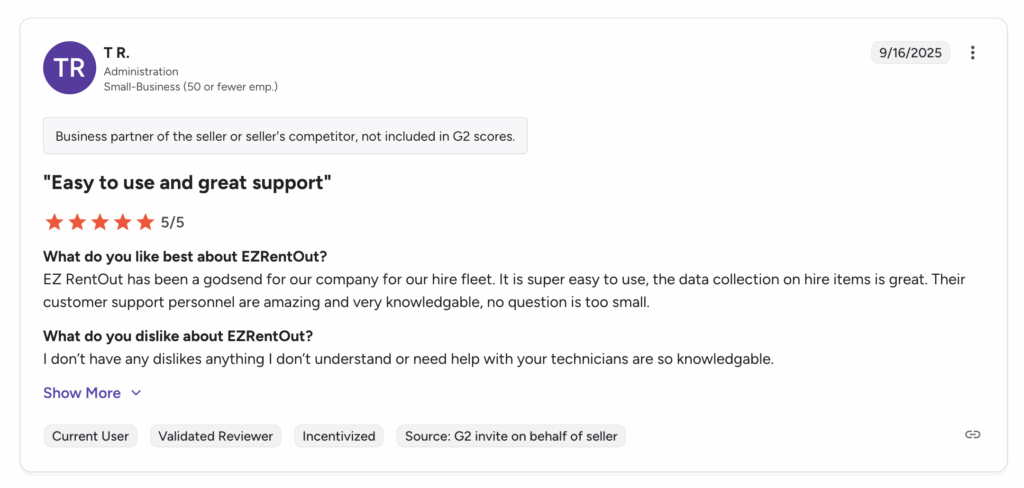
EZRentOut offers dedicated customer support through email, live chat, and phone, along with quick onboarding help. Clients commend its proactive support team, extensive knowledge base, and useful tutorials, which help businesses start quickly and fix issues with minimal downtime.
Holly at Bear Spray Shack says the customer support team at EZRentOut is exceptional, responding within minutes and going above and beyond to help their clients.
EZRentOut vs InTempo: Who does it better?
Here’s how EZRentOut does better than InTempo:
1. Ease of use and accessibility
EZRentOut: User-friendly, mobile-compatible interface built for quick adoption by staff at all levels. Field teams can check in/out assets, log inspections, and update orders directly from tablets or smartphones.
InTempo: More advanced interface with greater complexity, often requiring training and longer setup time for field staff.
2. Rapid deployment and onboarding
EZRentOut: Faster implementation through guided onboarding, templates, and step-by-step tutorials. Perfect for mid to enterprise-level rental businesses seeking immediate results.
InTempo: Implementation may take longer due to more complex configuration requirements and enterprise-level customization.
3. Customer-Facing online store
EZRentOut: Branded rental webstore with real-time inventory, AI-powered item recommendations, and self-service customer portals. Lowers administrative workload and enhances customer experience.
InTempo: Limited built-in webstore capabilities; often requires third-party integrations for online reservations.
4. Flexible rental and contract options
EZRentOut: Supports recurring rentals, partial returns, bundled rentals, and sub-renting. Serialized and bulk asset tracking ensures accurate management of complex rental histories.
InTempo: Strong rental management, but less flexible for recurring/sub-rented orders and complex bundled arrangements.
5. Multi-Location Management
EZRentOut: Provides real-time inventory visibility across multiple branches with proximity-based allocation for faster delivery and better asset utilization.
InTempo: Multi-location functionality exists but is less intuitive and requires more manual configuration.
6. Cost-effectiveness
EZRentOut: Competitive pricing for medium to enterprise-level rental businesses with most core features. Minimal hidden costs for modules or add-ons.
InTempo: The Enterprise pricing model may be less accessible to smaller businesses; additional modules can significantly increase total cost.
7. Responsive customer support
EZRentOut: Multi-channel support, including email, chat, and phone, with strong onboarding support, detailed knowledge base, and responsive troubleshooting.
InTempo: Support is solid but more enterprise-focused, which can lead to slower response times for smaller clients.
8. Integration flexibility
EZRentOut: Supports accounting (QuickBooks, Xero), CRM, telematics, and website integrations. Easier to connect with existing business tools.
InTempo: Integration options exist but can require custom configuration, increasing implementation complexity and cost.
Why EZRentOut lags behind InTempo
- Advanced route and dispatch optimization: InTempo offers AI-powered route planning and load optimization via its CTX (Connected Transport) system, helping delivery teams minimize travel time and fuel costs. Whereas, EZRentOut lacks built-in AI-based route optimization, and field teams rely on manual scheduling or third-party tools for complex deliveries.
- Enterprise-Level BI and analytics: InTempo provides highly advanced and customizable business intelligence dashboards with drag-and-drop KPI creation and scheduled reporting for multiple stakeholders. EZRentOut, on the other hand, has strong reporting but less sophisticated features.
Reviews
Source: G2
2. Renterra
Renterra is an all-in-one rental operating system designed to meet the needs of rental businesses. Just like InTempo and EZRentOut, it brings rental asset management, customer management, maintenance management, and reporting under one roof, giving a holistic experience to its users. Renterra offers a cloud platform and a user-friendly mobile app with features such as on-field inspections and meter readings to facilitate warehouse teams.
One of its users defines Renterra as, “It’s the whole ERP system, and it’s seamless. It also has an app for field use. Renterra has been incredible.”
Reasons to choose Renterra over InTempo
- Faster onboarding for SMBs: Renterra’s modern architecture and guided implementation help smaller to medium-sized rental businesses get started quickly. In contrast, InTempo’s enterprise-grade deployment can take longer and require more configuration.
- Simplified recurring rentals: Renterra supports subscription-style rentals (long-term or recurring contracts), making lease-type billing easier to manage. InTempo also supports long-term rentals, but its setup for flexible recurring agreements tends to be more complex.
- Transparent pricing and invoice Management: Renterra offers modern invoicing, real-time price calculation, and clear payment links for customers (email/SMS). InTempo’s invoicing is comprehensive, but for some businesses, the cost and complexity of its advanced billing modules may be higher.
- Scalable reporting for growth: Renterra provides easy-to-configure dashboards for utilization, asset performance, and maintenance. While InTempo’s BI is more powerful for enterprise organizations, Renterra delivers the analytics needed without requiring a full-time data science team.
Areas where Renterra falls behind
- Complex contracting and billing options: InTempo supports a wide range of billing methods (e.g., 28-day and custom cycles) and complex contract scenarios. Renterra’s contract and billing workflows are simpler and may not handle very complex enterprise-contracting requirements as smoothly.
- Multi-Branch / Location Complexity: Although Renterra handles multi-location to a degree, InTempo is designed for large, multi-branch, or even national operations with strong branch-level visibility and consolidated management.
- Industry-Specific Modules: InTempo provides specialized modules tailored for heavy equipment or construction businesses (e.g., lifecycle tracking and depreciation), making it better suited for industrial rental operations. Renterra’s simpler design may be limiting for businesses needing highly tailored workflows.
Renterra vs InTempo
The following table draws a comparison between Renterra and InTempo:
| Renterra vs InTempo Comparison | ||
| Feature | Renterra | InTempo |
| Inventory / Fleet management | – Serialized, bulk, parts, and sale item tracking – ROI, utilization, and maintenance history per item – Live calendar view of inventory availability | – Real-time multi‑location inventory tracking- Detailed lifecycle tracking (e.g. cost, meter, depreciation)- Asset scheduling and transfer between branches |
| Customer management (CRM) | – Auto-build customer profiles from quotes/orders- Store critical customer data like insurance, driver’s license, and credit limits – Flags expired documents (insurance/license) to prevent inactive or risky rentals | – Robust customer profile management, including hierarchies and contract history- Customer portal for contract review and self-service- Enterprise-level approvals and credit control |
| Invoicing and payments | – Branded invoices are automatically created – Supports credit card, ACH, and payment links via email / SMS – Payment status tracking and aging dashboard | – Flexible billing cycles (daily, weekly, 28-day, custom)- Integrated payment processing (credit card, cards-on-file)- Security deposits, surcharges, and custom tax handling |
| Dispatch and inspection | – Drag‑and‑drop scheduling for deliveries/pick-ups – Mobile inspections (pre- & post-rental) with photos via mobile devices | – Dispatch & routing module to optimize deliveries- Mobile app for field staff to capture conditions, signatures, and inspections- Notifications to customers for delivery status |
| Maintenance and service | – Schedule preventive maintenance and repair work orders – Track service history and costs | – Maintenance module for work orders, PM scheduling, parts usage- Telematics integration for meter-based maintenance – Deep service analytics and cost tracking |
| Online Store / e‑Commerce | – Branded storefront where customers can view and reserve live inventory – Digital contract signing via email/mobile | – Customer portal for reservations and contracts- Web-based quote-to-order workflows- Self-service for customers to manage orders and rentals |
| Reporting and analytics | – Dashboards for revenue, utilization, maintenance, and customer activity – Exportable data for deeper analysis | – Advanced BI dashboards with KPI creation – Scheduled reporting and custom report builder- Enterprise analytics (branch-level, utilization, financial) |
| Scalability and Location Management | – Built‑in workflows for damage claims, rental protection, and insurance tracking | – Condition inspections with photos and signatures- Damage tracking and repair cost allocation- Insurance/substrate management through contracts |
| Scalability and location Management | – Supports multiple locations and branch-level inventory | – Designed for multi-branch or regional operations- Inventory transfers and centralized operation management |
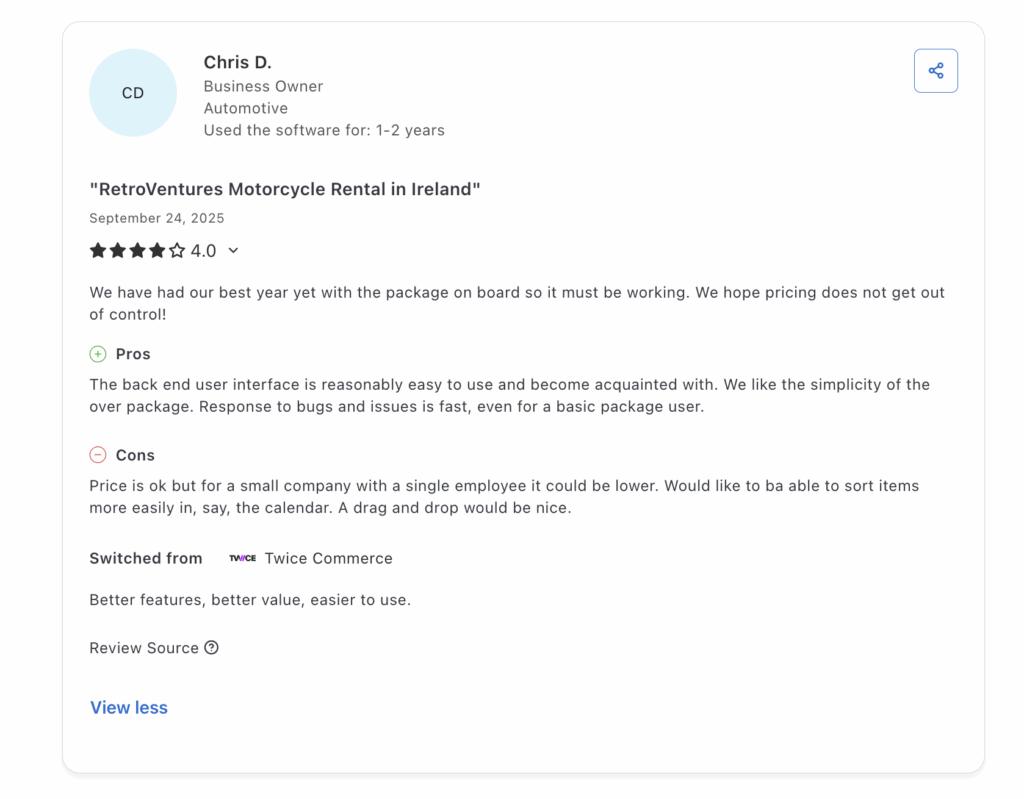
3. Booqable
Booqable is a cloud-based rental asset management software that helps rental businesses manage their physical assets efficiently. It provides tools for inventory tracking, order management, pricing, invoicing, online booking, and customer relationship management, along with mobile apps and website integration. It enables rental businesses to manage their fleet, streamline operations, and handle customer interactions on a single platform.
It automates manual workflows, making it easier for businesses to schedule rentals and streamline operations.
Why should you choose Booqable over InTempo?
- User-friendly and intuitive interface: Booqable provides a highly intuitive, web-based interface that is easy for staff to learn and reduces onboarding time. InTempo offers extensive functionality through its ERP-style interface, but the learning curve and complexity can be higher.
- Flexible pricing and deposit handling: Booqable allows hourly, daily, and weekly pricing models, with surcharges, discounts, and customizable security deposits. InTempo supports complex billing cycles and enterprise-level rate structures, though configuration can be more involved.
- Automated onventory and order management: Booqable automates inventory updates, prevents double-bookings, and provides calendar visibility for streamlined operations. InTempo delivers advanced inventory control, multi-location visibility, and lifecycle integration with accounting and maintenance.
Ways InTempo is doing better than Booqable
- Enterprise-scale functionality: InTempo delivers full ERP-level capabilities, including accounting, asset depreciation, and financial reporting. Booqable is lighter, making it easier for small teams but less suited to complex, large-scale operations.
- Scalable user permissions and security: InTempo offers detailed role-based permissions, audit logs, and advanced access controls. Booqable provides basic user roles that may not meet enterprise security requirements.
- High customization and configuration: InTempo can be tailored with custom fields, workflows, and business rules to fit specialized rental operations. Booqable offers limited customization options, focusing on standard workflows.
Booqable vs InTempo
The following highlights some ways Booqable and InTempo differ from each other in terms of functionality:
| Booqable vs InTempo Comparison | ||
| Feature | Booqable | InTempo |
| Inventory management | Track bulk & serialized inventory; QR / barcode scanning; product bundles; buffer time | Real-time inventory across locations; lifecycle tracking (cost, meter, transfers) |
| Pricing and billing | Flexible pricing (hour, day, week), surcharges, coupons, security deposits | Advanced billing options: 14+ billing methods (28-day, custom, etc.), price agreements |
| Order and operations | Create/manage orders, track pickups/returns, order statuses, and notes | Quote/reservation/contract support, add-ons, inspections, book rates |
| Documents and contracts | Custom templates, quotes, contracts, e-signatures, invoices, and packing slips | Contract & quote generation, document management, integration with order flow |
| Payments | Accepts credit card / PayPal; pre-authorizations; partial payments; security deposits | Integrated payments + cards-on-file; supports complex financials |
| Customer management (CRM) | Customer profiles, order history, custom fields, email templates | Customer data, contract history, credit control, enterprise CRM integration |
| Mobile app | iOS & Android app: barcode scan, order creation, e-sign, payment links | Mobile app for field inspections, condition reporting, and inventory operations |
| Maintenance and service | (Limited) — not its primary strength | Work orders, preventive maintenance scheduling, and meter-based service |
| Reporting and analytics | Basic reporting: revenue, utilization, order history | Advanced BI dashboards, KPI tracking, scheduled & custom reporting |
Reviews
Source: Capterra
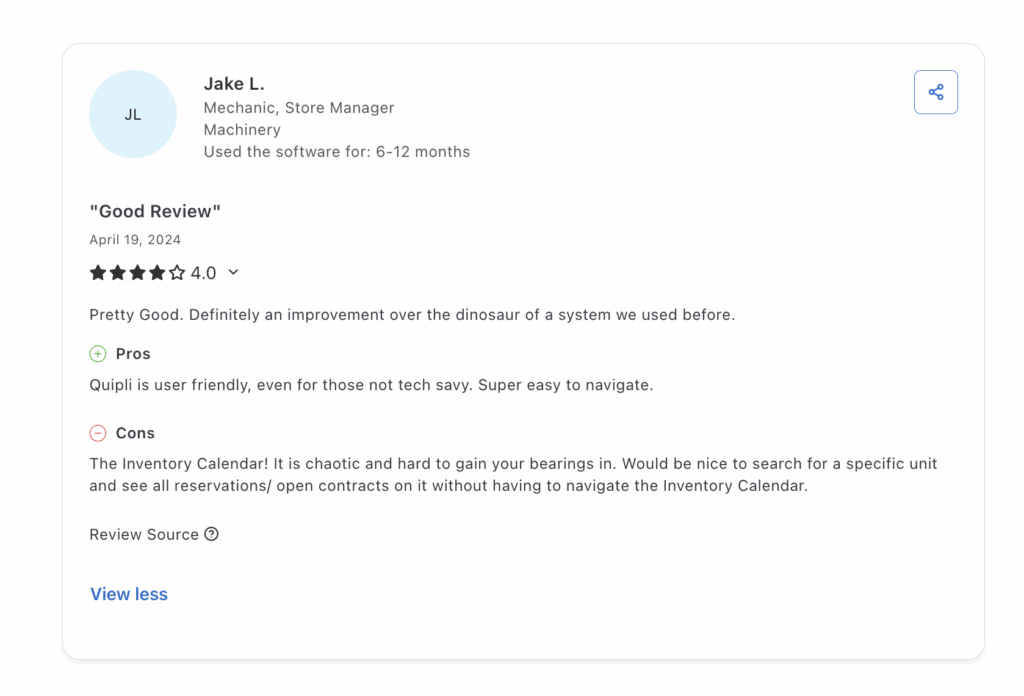
4. Quipli
Quipli is a cloud-based solution built especially to meet the needs of rental businesses offering heavy equipment gear to general tools. It provides a consolidated view of equipment and inventory, along with their live status, to show whether they are rented out, available, or undergoing maintenance.
Similarly, automated equipment scheduling connects product availability, the online storefront, and inventory, reducing manual steps and errors.
With strong POS, online booking, maintenance, and accounting integrations, businesses can streamline operations, reduce manual work, and scale efficiently with Quipli.
Why should you choose Quipli over InTempo
- Flexible pricing and deposit handling: Quipli supports hourly, daily, weekly, and custom pricing models, along with surcharges, discounts, and fully customizable security deposits. InTempo also supports complex billing cycles and enterprise-level rate structures, but setting up these contracts often takes more time and requires more technical configuration.
- Intuitive online booking and customer Portal: Quipli provides a modern, customer-facing portal where clients can browse inventory, book, pay, and sign contracts online. InTempo offers booking and portal capabilities, but its interface is more enterprise-focused and less streamlined for customer self-service.
- Built-in POS and checkout System: Quipli includes a fully integrated POS system that connects with reservations, inventory, and payments, streamlining in-store checkouts. InTempo provides billing and invoicing, but lacks a lightweight, dedicated POS system designed for quick on-site rentals.
- Reporting and analytics for quick insights: Quipli provides dashboards and utilization reports to easily monitor asset performance and profitability. InTempo offers advanced BI dashboards, but setting up custom KPIs and reports can require more time and expertise.
Reasons to go for InTempo instead of Quipli
- Comprehensive ERP-level functionality: InTempo provides a full enterprise-grade solution covering rental operations, maintenance, dispatch, and business intelligence. Quipli focuses on rental workflows but lacks deep ERP-style accounting and financial control.
- Robust accounting and financial management: InTempo offers in-platform general ledger, accounts payable/receivable, and fixed-asset management for centralized financial oversight. Quipli supports invoicing and basic payments but relies heavily on external accounting systems for advanced financial control.
- Professional implementation: InTempo provides expert professional services, structured onboarding, and long-term strategic guidance. Quipli offers support suited for SMBs but lacks the enterprise-level advisory and implementation services.
Quipli vs InTempo
The following table provides a detailed overview of how Quipli and InTempo differ from each other:
| Quipli vs InTempo Comparison | ||
| Feature | Quipli | InTempo |
| Inventory management | Real-time availability calendar, location status, dynamic PO tracking, unit-level visibility | Multi-location inventory, serialized assets, cycle counts, lifecycle cost tracking |
| Booking and reservations | Online storefront and self-service customer portal for reservations 24/7 | Quote, reservation, and contract workflows with deep integration into operations |
| POS / Checkout | Fully integrated POS with in-store checkout, QR/barcode scanning, and e-signatures | Mobile app support for field check-in/out, inspections, and condition reporting |
| Billing and payments | Automated billing with cycle billing, integration with accounting and payment systems, and detailed transaction reporting | Supports 14+ billing methods (e.g., 28-day cycle), complex rate structures, and cards-on-file |
| Service and maintenance | Work order creation, repair tracking, “soft down” vs “hard down,” and maintenance export | Full maintenance module with preventive service, parts tracking, and detailed cost history |
| Dispatch and logistics | Visual scheduling calendar for pickups and deliveries, with inventory sync | Advanced dispatch tools, route planning, real-time driver tracking, and delivery optimizations |
| Customer portal and website | Mobile-friendly self-service portal, contract signing, document uploads, and integrated storefront | Customer portal with 24/7 access and integration with delivery status and contract history |
| Reporting and analytics | Utilization, revenue, cost-per-asset reports, and custom report export options | Highly configurable BI dashboards, KPI tracking, scheduled exports, and detailed analytics |
Review
Source: Capterra
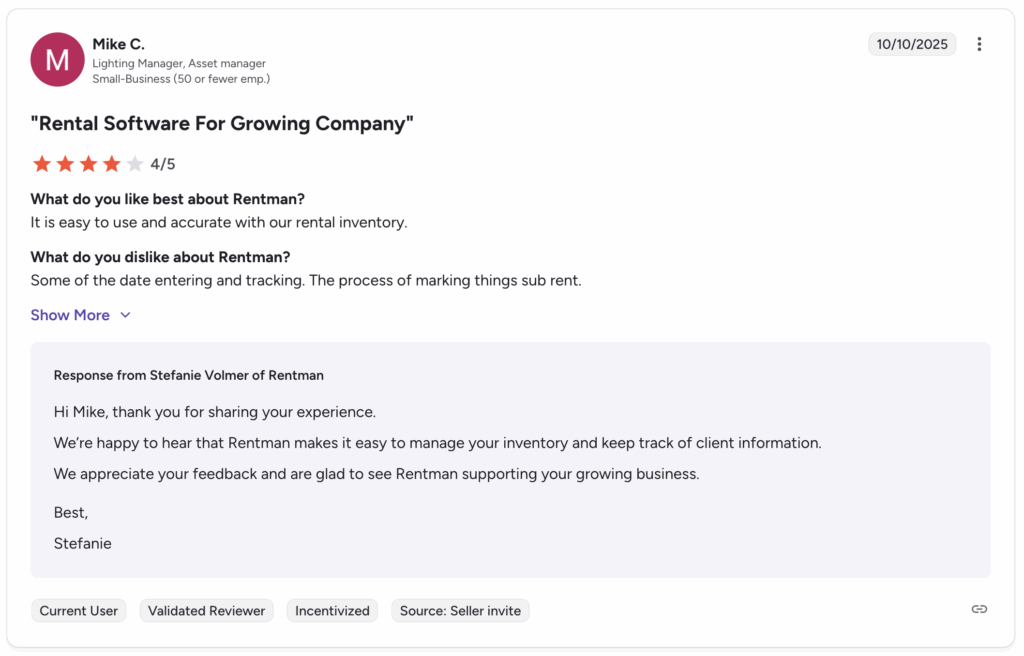
5. RentMan
RentMan is a cloud-based rental equipment management and ERP system targeted to meet the rental needs of the AV and media equipment business. It helps centralize inventory tracking, plan for equipment in advance, and consolidate project management in one place.
By scheduling calendars and workflows to improve coordination, rental businesses can significantly streamline their operations.
Ways RentMan is better than InTempo
- Project-based workflows: Rentman is designed for project- and event-centric rentals, allowing planners to schedule gear and crew across multiple projects efficiently. InTempo supports rental scheduling but is more asset-focused and less tailored for complex, project-based timelines.
- Flexible quoting and invoicing: Rentman enables editing quotes, e-signatures, order conversion, and last-minute rental additions. InTempo also supports complex invoicing, but creating or modifying quotes often requires more steps and a formal workflow setup.
- Streamlined inspections and repairs: RentMan enables its users to initiate different types of inspections, whereas InTempo restricts you by offering only preventive maintenance and work orders, and provides fewer opportunities for event-focused inspections.
- Financial insights: Rentman integrates with accounting tools like QuickBooks and Xero to track costs, project profitability, and margins in real time. InTempo provides ERP-level financial tracking, but small- to mid-size teams may find it too heavy and complex for project-level financial insights.
Why should you not go for RentMan?
- Industry limitations: Rentman is highly optimized for AV, event production, and project-based rentals. Businesses in heavy construction, industrial equipment, or large-scale general rental may find that Rentman lacks features tailored for high-value, heavy, or long-term asset management.
- Limited multi-location operations: Rentman supports multiple locations and role-based access, but businesses with multi-branch operations that require centralized control may find its capabilities less robust than those of enterprise-focused solutions.
The following highlights how RentMan and InTempo are different from each other in terms of functionality:
RentMan vs InTempo
| RentMan vs InTempo Comparison | ||
| Feature | Rentman | InTempo |
| Project and event planning | Timeline-driven scheduler that lets you allocate gear and crew across multiple events seamlessly | Contract-focused scheduling with detailed enterprise workflows; less intuitive for event-specific planning |
| Equipment bundling and kits | Lets you group multiple items into kits for rentals, simplifying complex orders | Supports asset grouping, but mainly for serialized inventory; limited flexibility for kit-based rentals |
| Quick onboarding and user access | Role-based access for planners, crew, and freelancers; easy setup for temporary staff | Enterprise-level user management; setup can be more complex and time-consuming |
| On-the-go operations | Mobile-friendly interface for check-ins, inspections, and packing lists in the field | Mobile app exists for inspections and check-ins, butit is less intuitive for multi-resource field workflows |
| Dynamic financial adjustments | Ad-hoc invoicing, deposit adjustments, and last-minute project billing | Advanced billing options with recurring cycles and complex rate structures; more setup required |
| Maintenance and condition tracking | Track defects, repairs, and inspection status for each item, with cost allocation to projects | Strong preventive maintenance and repair tracking, but less flexible for project-specific needs |
| Transport and logistics planning | Plan deliveries with transport cost estimation, route planning, and crew assignment | Advanced dispatch tools and route optimization, but more suited for large-scale industrial logistics |
| Client engagement | Branded self-service portal with document uploads, project visibility, and online approvals | Customer portal for contracts and order tracking, geared toward enterprise accounts |
| Data insights and forecasting | Project-level reports, utilization analysis, revenue tracking, and forecasting | BI dashboards with detailed KPIs and cross-branch analytics; less project-specific forecasting |
| Industry fit | Excellent for AV, event production, and media rental companies | Excels in heavy equipment, industrial, and multi-industry enterprise rental operations |
Review
Source: G2
6. Current RMS
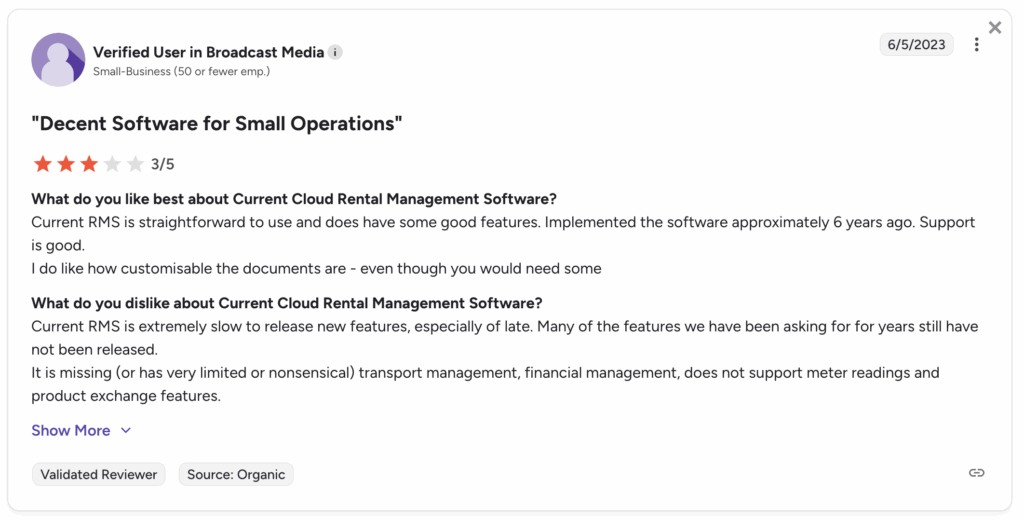
As an equipment management software, Current RMS is designed for AV, events, and production rental businesses. It centralizes inventory, project scheduling, quoting, invoicing, and reporting into a single platform, helping rental companies streamline operations and improve resource utilization.
Reasons why you should choose Current RMS over InTempo
- Kit bundling and grouping equipment: Current RMS allows bundling multiple items into kits for rentals, making it easier to manage complex orders and event setups. InTempo supports asset grouping but is less flexible for kit-based or project-specific workflows.
- Client-facing self-service portal: Current RMS provides a branded portal for customers to book, approve quotes, and manage rentals online, enhancing the client experience. InTempo has a portal as well, but it is more focused on enterprise-level contract access and less on self-service usability for event clients.
- Simplified quoting and invoicing: With Current RMS, you can quickly generate quotes, capture e-signatures, convert quotes to orders, and adjust invoices for deposits or last-minute changes. InTempo offers enterprise-level invoicing and contract management, but setup and modifications can be more complex.
- Project-centric workflows: The current RMS is designed for AV, events, and production rental companies, with project-based scheduling that lets you efficiently assign equipment and staff across multiple events. InTempo, while robust for enterprise rental operations, is more asset- and contract-focused, which may be less intuitive for project-driven businesses.
Reasons to choose InTempo over Current RMS
- Integrated rental ERP and accounting: InTempo provides a complete enterprise rental ERP that consolidates operations, maintenance, asset lifecycle management, and accounting in a single platform. Current RMS offers basic accounting integration but lacks a comprehensive in-platform ERP, which results in less centralized enterprise-level financial management.
- Advanced asset lifecycle management: InTempo tracks equipment from purchase to retirement, including usage, maintenance, depreciation, and disposal planning. This enables companies to make informed decisions about selling or retiring assets based on ROI and utilization. Current RMS, in contrast, focuses on project-level asset tracking and kits but does not provide deep lifecycle insights or multiple depreciation methods for each asset.
- Scalability and multi-location support: InTempo is built for multi-branch operations with inventory transfers, centralized data management, and consistent oversight across locations. Current RMS works well for single or smaller-scale operations but may not scale efficiently for large, multi-location enterprises.
The following highlights how Current RMS and InTempo are different from each other in terms of functionality:
Current RMS vs InTempo
| Current RMS vs InTempo Comparison | ||
| Feature | Current RMS | InTempo |
| Project-focused resource allocation | Let’s teams assign gear, staff, and rooms to specific events or projects, making multi-event planning simpler | Focuses on asset-centric allocation across contracts and branches rather than project-specific workflows |
| Kit and accessory management | Easily link accessories and supplementary items to main rentals for quick checkout | Handles accessories mainly through serialized asset management; less flexible for dynamic kit creation |
| Onboarding speed | Simple setup with intuitive interface for small teams; fast adoption for event staff | Enterprise-level configuration with deep customization; longer onboarding for complex operations |
| Field mobility | Mobile web interface for quick check-ins, packing lists, and status updates at event sites | Mobile app designed for inspections, check-ins, and heavy equipment tracking; less suited for rapid event workflows |
| Flexible quoting | Generate quotes with dynamic pricing, optional items, and instant approvals | Supports multi-level quotes tied to contracts, rates, and billing cycles; more rigid for ad-hoc pricing |
| Maintenance tracking | Track usage, inspections, and repair history per project | Enterprise preventive maintenance with cost tracking, lifecycle analytics, and parts management |
| Scheduling visualization | Drag-and-drop visual calendar for events, resources, and deadlines | Advanced Gantt-style scheduling and route optimization for complex multi-location operations |
| Customer self-service | Online portal for clients to request bookings, approve quotes, and track project progress | Customer portal for enterprise accounts; focuses on contracts, invoices, and order history |
| Insights and analytics | Event-level revenue, utilization, and asset performance reports | Multi-location BI dashboards, KPI tracking, and scheduled reporting for strategic decision-making |
| Ideal industry | AV, media, and live event rental companies | Heavy equipment, industrial rental, and multi-industry enterprises with large fleets |
Review
Source: G2
Conclusion: Choosing the right rental equipment software for your business
Whatever system you choose will impact your operations and profitability in the long run. The industry you operate in is a significant factor in determining which system best suits your needs. InTempo is known for its asset lifecycle management and advanced reporting, making it an ideal fit for enterprise-level businesses. At the same time, small- to medium-sized rental companies might find their onboarding processes time-consuming and complex.
Choose a software that is within your budget, meets your requirements, and is easy to implement into your rental workflows. Get a free trial for EZRentOut today and try for yourself if it helps elevate your rental operations.






