
In construction equipment management, a single scheduling mistake translates into a ripple effect in no time. Last-minute delays, equipment failure on the jobsite, project stalls, and crews sitting idle escalate costs faster than you can imagine. For Construction General Managers, relying on manual spreadsheets to track equipment availability and maintenance schedules can be a real issue.
Without clear operational visibility, it becomes difficult to answer critical questions like “Where is the equipment located?” “What equipment is available for rent?” “What’s the current equipment utilization rate?” and “Is the equipment in transit or under maintenance?”
Construction projects usually span months and years. You might be renting equipment to multiple contractors, and managing their data without consolidating is not easy. Assessing equipment availability to determine the number of potential orders can be nearly impossible without a single source of truth that guides you on equipment location, count, and usage.
Modern rental equipment management software makes this process simple and straightforward. Every time your equipment is rented out, the availability calendar updates automatically, enabling you to commit equipment to more projects more wisely.
This blog elaborates on the top construction equipment rental software that can help prevent scheduling errors and ensure equipment is available to your customers on time. Let’s also explore the main features software must have for smoother, more efficient construction rental management.
Top features to look for in a construction equipment rental software
Here are some factors that determine the quality, value, and efficiency of the equipment rental software you choose. A robust construction equipment rental software should have the ability to:
1. Track equipment visibility
One of the most critical features of any rental equipment management software is the ability to check where equipment is located, what its quantity is, whether it’s reserved, and which projects it has been allocated to. A live availability dashboard prevents teams from accidentally assigning the same machine to multiple projects. With timely tracking, Construction Rental GMs can:
- Instantly verify whether equipment is available for upcoming jobs
- See equipment currently in transit or on rent
- Prevent scheduling conflicts before they happen
This visibility is essential when multiple teams are scheduling equipment simultaneously.
2. Smart scheduling and reservation management
The ever-evolving needs of construction projects cannot be met until your booking team knows which equipment is reserved and what’s out on project sites. With the data available in time, teams only rent out equipment that’s readily available and in stock. Data is updated at the backend, and the equipment count is updated so the dashboard reflects its true count. This helps Construction Rental GMs know which pieces of equipment are sitting idle so they can be reallocated.
The rental systems offer automated scheduling engines that detect booking conflicts and prevent overlapping reservations.
Key capabilities include:
- Calendar-based equipment reservations
- Automatic conflict detection
- Reservation approvals and booking rules
- Alerts when a piece of equipment is already reserved
This eliminates manual scheduling errors that often lead to double-bookings and waste resources.
3. Preventive maintenance scheduling
Construction equipment needs to be maintained regularly to prevent extensive and long-term damage. The system you choose must enable you to schedule inspections before and after a piece of equipment is rented out. Equipment that unexpectedly breaks down can cause serious delays on the job site. Maintenance scheduling ensures equipment is automatically blocked for service when needed.
The best rental equipment systems allow you to:
- Set preventive maintenance schedules
- Trigger service alerts after certain usage hours
- Automatically block equipment during repairs
This ensures that only operational equipment is available for booking.
4. Multi-location equipment management
Construction rental businesses might operate from various locations, requiring them to provide equipment to multiple projects. Equipment rented to each project needs to be tracked so you know how many and what pieces of equipment have been allocated to each site. This allows managers to:
- See equipment availability at every location
- Transfer equipment between sites
- Avoid committing the same asset from different branches
Without this visibility, cross-location scheduling conflicts are common. Multi-location equipment management solves this by giving Construction Rental GMs and operations teams a single, unified view of their entire fleet, regardless of where the equipment is physically located.
5. Reporting and analytics
For Construction Rental General Managers overseeing large fleets, decisions cannot rely on assumptions or fragmented data. Instead, they need clear insights into how equipment is performing across projects, locations, and rental periods. So, construction rental businesses rely heavily on statistical reports to assess whether their rentals are generating revenue. Rental dashboards make access to insights like revenue per project or equipment, and the total value of rental equipment easy and straightforward.
Moreover, the rental system helps calculate these numbers automatically, enabling GMs to make wiser decisions. Here are some metrics you can calculate with the help of a rental equipment software:
- Revenue per equipment: Understand which machines generate the highest rental income and which assets may be underperforming.
- Revenue per project or customer: Identify the most profitable jobs and clients to prioritize future contracts.
- Equipment utilization rates: Track how often equipment is rented versus sitting idle, helping improve fleet efficiency.
- Fleet value and asset depreciation: Monitor the total value of rental equipment and track depreciation over time for better financial planning.
- Maintenance and repair costs: Analyze how much is spent maintaining each asset to determine whether it’s still cost-effective to keep it in the fleet.
- Booking trends and demand patterns: Identify peak rental periods and seasonal demand to plan equipment availability accordingly.
- Downtime and availability reports: Detect equipment that spends excessive time under maintenance or waiting to be deployed.
This data is helpful in making strategic decisions that rely on analytical data.
6. Sub-rental management
Several construction rental businesses do not own their entire fleet. Contractors may face project delays; projects may require excavators, lifts, and cranes as they progress. Without a system in place, rental businesses may fail to keep a comprehensive record of equipment procured from other vendors to meet project needs and address delays.
Sub-rental management in rental equipment software helps address this challenge by enabling companies to rent equipment from external vendors or partner rental businesses while still managing everything in a single system.
Instead of tracking external rentals through emails or spreadsheets, the software logs sub-rented equipment alongside owned assets. This ensures construction maintains full visibility into which equipment is deployed on a project, even if it comes from a third-party supplier.
Sub-rentals help ensure you meet project deadlines while retaining your long-term clients. No equipment is double-booked, as you can sub-rent a new piece of equipment rather than providing an already committed piece to an ongoing project.
Top 7 construction equipment rental software for Construction Rental GMs
Here’s a list of software that Construction Rental GMs can consider while looking for software to optimize and streamline their operations.
1. EZRentOut
EZRentOut is a well-structured equipment rental software built to meet the needs of construction rental companies. The software solution has a large construction client base and provides customizable features that meet the specific needs of construction companies.
John Thompson, Warehouse Manager at Leuder Construction, stated that EZRentOut was the easiest software the company had ever used and helped reduce costs and save time on projects worth more than $50 million.
For construction rental companies, software must do more than just track equipment. It needs to support complex equipment scheduling, ensure jobsite coordination, and manage equipment availability across multiple locations.
Some features offered by EZRentOut include:
- Equipment tracking: The system records each piece of equipment’s location, usage history, and rental status, helping teams quickly identify where equipment is deployed and when it will become available. This visibility prevents lost equipment, reduces idle time, and improves fleet utilization. You can locate and manage equipment and transfer it across locations.
- Availability calendar and booking system: Check equipment availability with a consolidated calendar showing the exact quantity of equipment available. EZRentOut includes a visual availability calendar that allows teams to instantly see which equipment is booked, due for return, or ready for deployment. This ensures scheduling decisions are made with complete visibility into asset availability.
- Service and maintenance management: EZRentOut includes built-in maintenance management tools, such as a service workshop, that allow teams to schedule service, log repairs, and track equipment health directly within the rental system.
- Mobile access for field teams: EZRentOut offers a mobile app that enables users to manage equipment on the go. Construction Rental GMs can manage rentals, check equipment in or out, and update work orders from the field. The app offers offline workflows so you can manage equipment even without an internet connection. The data syncs automatically as soon as you are back online.
- Sub-rental management: You can manage sub-rental equipment just like internal assets, while maintaining complete operational visibility. You can track the location of the sub-rented equipment, its procurement cost, and the rental charges. The rental profit is also logged in EZRentOut, so you know exactly how profitable the sub-rental is.
- Automated invoicing and billing options: Construction rental companies often deal with complex pricing structures, including long-term rentals, project-based pricing, and customer-specific rates. EZRentOut automates invoicing and pricing rules, enabling businesses to generate accurate bills without manual calculations. This includes tax rate calculation, contract management, customer-level discounts and coupons, and late fee or damage charges.
- Reporting and utilization analytics: Construction Rental GMs heavily rely on comprehensive utilization and analytical reports to assess how each piece of equipment is performing. Managers can analyze trends and identify opportunities to improve fleet utilization or adjust pricing strategies. Reporting insights typically include equipment utilization rates, revenue per equipment, maintenance costs, and rental patterns. GMs can also generate custom reports that reflect revenue generated by specific projects and equipment performance.
- Bundles and kits management: Construction equipment is frequently rented or deployed in groups rather than as individual items. For example, a concrete job might require mixers, power tools, safety gear, and attachments. EZRentOut allows businesses to create equipment bundles or kits, enabling teams to rent or allocate multiple related items as a single unit.
- Barcode and QR-based equipment accountability: Construction sites can be chaotic environments where tools and equipment frequently move between teams and locations. EZRentOut supports barcode and QR code labeling, allowing crews to scan equipment during check-in and check-out. Equipment scanning streamlines the equipment check-in and check-out process.
- Webstore management: EZRentOut offers customized templates for website management, allowing businesses to rent equipment online. Users can browse through rental catalogs and assess what equipment best suits their needs. The pre-built construction templates in EZRentOut make it easier for you to list equipment for rent by category.
- Integrations: You can integrate with external platforms that cater to accounting, payments, analytics, and more. This includes accounting integrations like Avalara, QuickBooks, Xero, and Sage. Payment gateways include Stripe and Square.
Pros of EZRentOut
- Built-in customer management system: Tracks client leads, deals, and client interactions within the same platform, linking all customer-related data to rentals. Supports B2B workflows with contractor-specific pricing, recurring rentals, and long-term contracts.
- Customer self-service portal: Allows construction clients to view current and past orders, invoices, and rental history. Reduces administrative workload by letting customers handle routine tasks like booking or checking equipment availability independently. Improves transparency and speeds up communication between rental teams and contractors.
- Centralized rental records and analytics: Provides a 360-degree view of each customer’s interactions, rental history, and financial transactions. Enables better decision-making regarding pricing, contract renewals, and fleet allocation.
- Automated notifications and reminders: Send alerts for upcoming bookings, overdue returns, and pending payments. Keeps both staff and clients informed about critical milestones, helping avoid scheduling conflicts or miscommunications.
Cons of EZRentOut
- Limited CRM sophistication: While effective for rental operations, EZRentOut’s CRM is not as advanced as other dedicated platforms. It lacks features like multi-channel marketing, lead scoring, and deep analytics, which may be needed for construction teams relying on heavy marketing.
- Initial setup and customization required: Configuring custom fields, pricing rules, and contract templates can take time before workflows run smoothly.
- Basic online storefront features: EZRentOut’s customer portal is effective for rental management but lacks advanced e-commerce functionalities compared to platforms built for online retail or marketplace operations.
EZRentOut pricing
- Essential ($89/month): Core rental features, bookings, mobile access, unlimited assets, QR/barcode scanning. Ideal for small fleets.
- Growth ($399/month): Adds availability calendar, webstore, custom reports, and payment integrations. Good for growing construction businesses.
- Premium ($499/month): Includes all Growth features plus maintenance tracking, sub-rentals, recurring orders, customer management, and accounting integrations. Best for large fleets.
- Enterprise(Custom Pricing): Tailored solutions for multi-location operations, advanced integrations, and priority support.
You can also sign up for a 7-day free trial for EZRentOut and test if the workflows enable you to manage your construction fleet.
EZRentOut review
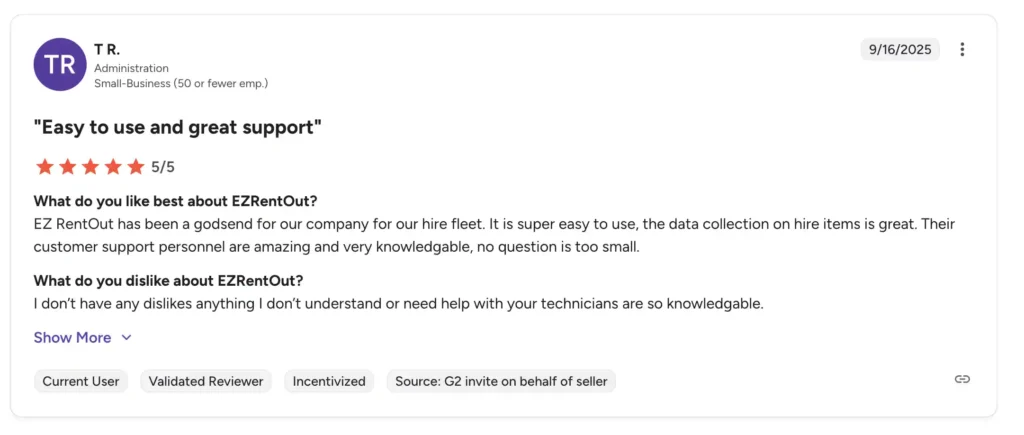
Source: G2
EZRentOut rating
The following table elaborates on the core areas where EZRentOut shines and fulfills the needs of Construction Rental GMs:
| Criteria | EZRentOut Rating |
| Equipment Discovery & Inventory Visibility | High – Provides real-time visibility into equipment availability, location, and rental status across warehouses and job sites. Barcode and QR code tracking improve accuracy and help prevent equipment misplacement. |
| Data Accuracy & Asset Records | High – Maintains detailed equipment records, including rental history, maintenance logs, and utilization metrics, giving managers a clear view of fleet performance. |
| Asset Lifecycle Management | High – Tracks assets from procurement and deployment to maintenance and retirement. Helps construction companies monitor equipment usage, costs, and long-term value. |
| Contract & Rental Management | High – Supports reservations, rental contracts, customer-specific pricing, long-term rentals, and recurring orders, making it suitable for construction project workflows. |
| Maintenance & Service Management | High – Includes built-in maintenance management tools with service workshops, repair logs, and preventive maintenance scheduling to reduce equipment downtime. |
| Automation & Workflow Management | High – Automates workflows such as rental bookings, invoicing, alerts, and asset transfers, reducing manual coordination between warehouse and field teams. |
| Reporting & Operational Analytics | High – Offers utilization reports, revenue tracking, maintenance cost analysis, and custom reporting dashboards that help Construction Rental GMs optimize fleet usage. |
| Scalability & Ease of Use | High – Designed with a modern interface that is easy to learn, while still supporting multi-location operations and growing rental fleets. |
| Integrations (Accounting, Payment, CRM) | High – Integrates with payment gateways, accounting tools, and other business platforms to streamline operations. |
2. Renterra
Renterra is an all‑in‑one rental management platform designed to simplify and streamline rental operations for equipment businesses, including construction rental companies. Unlike some tools that piece together booking, billing, and customer engagement, Renterra brings these capabilities into a single system, with a strong emphasis on front‑end workflows, real‑time operations, and customer conversions.
Here are some features Renterra provides that can simplify the job of Construction Rental GMs:
- End-to-end lifecycle management: Renterra offers capabilities to manage the entire equipment lifecycle. From creating orders to managing contracts and generating invoices, you can stay updated with the most recent status of the equipment and its availability.
- Inventory tracking: The platform gives visibility into what’s out, available, or ready to rent across all locations, helping Construction Rental GMs avoid double‑bookings and jobsite delays.
- Integrated online storefront: Renterra provides a professional, inventory‑synced storefront that customers can browse to place reservations or check out, delivering a modern customer experience for construction rental companies.
- Quotes, contracts, and digital signatures: You can generate branded quotes by text or email and collect legally binding signatures digitally, reducing admin time and accelerating order approvals.
- AI‑powered marketing tools: Renterra includes an integrated marketing suite that uses AI to launch targeted ad campaigns and email marketing, helping rental companies attract repeat customers and grow revenue.
- Mobile access: With full cloud access and mobile support, dispatchers, foremen, and field teams can manage workflows from any device, speeding up operations and communication.
Pros of Renterra
- End-to-end rental workflows with quotes, contracts, and payments: Manages the entire rental lifecycle within one platform, from sending quotes and contracts to processing payments and managing returns. This reduces the need for multiple tools and helps streamline order processing.
- Strong dispatch, inspection, and field capabilities: Includes scheduling and dispatch tools that help teams coordinate equipment deliveries, pickups, and inspections. The mobile-friendly interface allows field teams to update orders, conduct inspections, and manage workflows from job sites.
- Accounting and QuickBooks integration: Integrates with accounting platforms such as QuickBooks, automatically syncing financial data, invoices, and transactions. This simplifies bookkeeping and gives managers clearer visibility into rental revenue and financial performance.
Cons of Renterra
- No published tiered pricing: Renterra does not publicly list standard pricing plans. Businesses typically need to request a custom quote based on their fleet size, locations, and operational requirements.
- Limited transparency around pricing: Because pricing is customized, companies cannot easily compare costs with other rental platforms without speaking to the sales team.
- Some operational features may be less specialized: While Renterra offers strong front-end workflows and financial tools, some capabilities, such as advanced maintenance tracking or barcode-based equipment management, may not be as extensive as those of specialized equipment tracking platforms.
Renterra pricing
- Custom pricing (quote required): Renterra does not publish fixed pricing tiers online; instead, costs depend on your business size, number of locations, and equipment footprint. You need to contact the vendor for a tailored quote.
- No free trial: Unlike some rental platforms, Renterra typically does not offer a free trial, though demos and onboarding support are available.
Renterra rating
Here’s where Renterra stands in terms of capabilities and functionalities:
| Criteria | Renterra Rating |
| Equipment Discovery & Inventory Visibility | Moderate–High – Provides real-time inventory visibility through its rental management system and online storefront, helping teams track equipment availability and bookings. |
| Data Accuracy & Asset Records | Moderate – Maintains asset records and rental history, though asset tracking depth may not be as extensive as platforms focused heavily on fleet lifecycle management. |
| Asset Lifecycle Management | Moderate – Tracks rental workflows and equipment status but focuses more on operational processes rather than full lifecycle management. |
| Contract & Rental Management | High – Strong rental workflow capabilities, including quotes, contracts, order management, and integrated payments that streamline the rental process. |
| Maintenance & Service Management | Moderate – Provides basic maintenance tracking capabilities but may require integrations or additional workflows for advanced service management. |
| Automation & Workflow Management | High – Automates rental workflows such as order processing, invoicing, contract generation, and online booking management. |
| Reporting & Operational Analytics | Moderate – Offers reporting tools for operational and financial performance, though analytics may be less detailed compared to enterprise rental ERP systems. |
| Scalability & Ease of Use | High – Modern interface and cloud architecture make it relatively easy to adopt and scale for growing rental businesses. |
| Integrations (Accounting, Payments, Website, CRM) | High – Integrates with accounting platforms like QuickBooks and supports online storefront integrations for digital rental workflows. |
3. Point of Rental Software
Point of Rental is a rental management software designed specifically for equipment rental businesses, including companies in the construction industry. The platform has been widely adopted by rental companies that manage large fleets, multiple branches, and complex operational workflows. Point of Rental focuses on comprehensive operational control, detailed reporting, and industry-specific workflows that support large rental businesses.
For construction rental companies, software must handle more than basic equipment tracking. It must support fleet availability management, dispatch coordination, maintenance tracking, and financial reporting while keeping operations synchronized across multiple locations.
Some key features offered by Point of Rental include:
- Comprehensive equipment tracking: Point of Rental allows Construction Rental GMs to monitor equipment status, location, and rental history. Managers can quickly determine whether equipment is available, reserved, under maintenance, or deployed on a jobsite. This visibility helps prevent scheduling conflicts and ensures better fleet utilization across projects.
- Advanced availability and reservation management: The system provides scheduling tools that enable rental teams to manage reservations, check equipment availability, and prevent double bookings. A centralized availability view helps teams allocate equipment efficiently across multiple projects and locations.
- Maintenance and service tracking: Point of Rental includes built-in maintenance tools that help track service schedules, log repairs, and maintain a detailed service history for each asset. Preventive maintenance scheduling ensures equipment is serviced regularly, helping reduce unexpected breakdowns and project delays.
- Mobile access for field teams: Point of Rental offers mobile capabilities that allow staff to manage rental orders, check equipment in or out, and update records directly from the field. This improves communication between warehouse teams, dispatchers, and jobsite crews.
- Contract management and invoicing: Rental businesses can generate contracts, track customer agreements, and automate billing processes. The system supports flexible pricing structures such as long-term rentals, customer-specific rates, and project-based billing.
Strengths of Point of Rental
- Highly specialized for the heavy equipment rental industry: Designed specifically for rental companies, with features tailored to fleet management, equipment scheduling, and rental operations.
- Strong reporting and analytics tools: Offers detailed reporting capabilities that help Construction Rental GMs track utilization, revenue trends, and operational performance.
Cons of Point of Rental
- Complex implementation: Because of its extensive feature set, the system can require significant setup and training before teams become fully comfortable using it.
- Higher cost for smaller businesses: Point of Rental is typically better suited to mid-sized to large rental companies, and its pricing may be less accessible to smaller fleets.
- User interface can feel outdated: Some users report that the interface is less modern compared to newer rental management platforms.
Point of Rental pricing
- Custom pricing: Point of Rental does not publicly list standard pricing tiers. Costs typically depend on the deployment type (cloud or on-premises), the number of users, and the modules selected.
- Multiple product options: The platform offers Essentials, Elite, and Enterprise, each designed for businesses of different sizes and operational complexity.
- Demo available: Businesses can request a product demo to evaluate whether the platform meets their operational needs before committing.
Point of Rental review
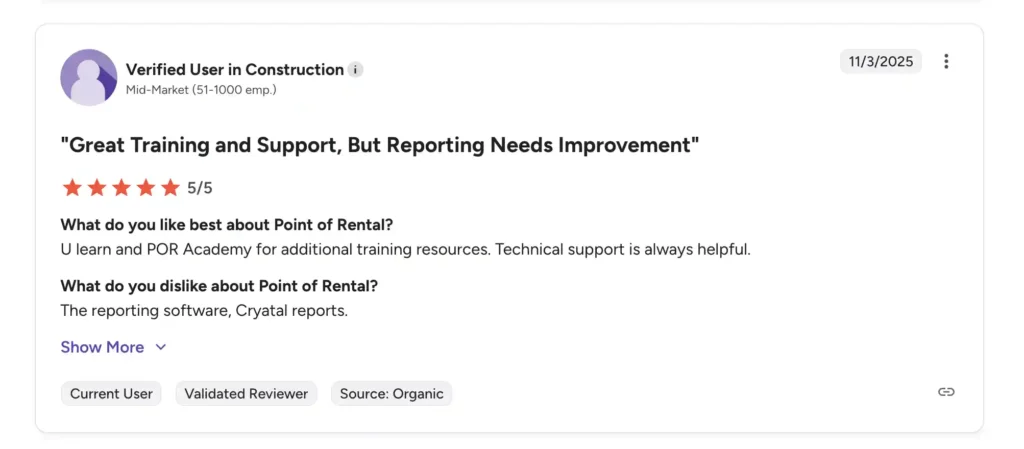
Source: G2
Point of Rental rating
The following table explains how Point of Rental wins over other systems:
| Criteria | Point of Rental Rating |
| Equipment Discovery & Inventory Visibility | High – Provides centralized, real-time visibility of equipment status, locations, and reservations across multiple branches. Prevents double-bookings and ensures assets are deployed efficiently. |
| Data Accuracy & Asset Records | High – Maintains detailed equipment records including rental history, maintenance logs, utilization metrics, and depreciation data, giving GMs confidence in operational decision-making. |
| Asset Lifecycle Management | High – Tracks assets from acquisition and deployment to maintenance and retirement, ensuring long-term fleet management and strategic planning. |
| Contract & Rental Management | High – Supports complex reservation workflows, long-term rentals, customer-specific pricing, deposits, and billing adjustments — ideal for construction projects with variable timelines. |
| Maintenance & Service Management | High – Includes preventive maintenance scheduling, service logging, and repair tracking to reduce unplanned downtime and ensure jobsite reliability. |
| Automation & Workflow Management | Moderate–High – Automates key processes such as rental confirmations, invoicing, alerts, and status updates. Advanced workflow customization is possible but may require configuration. |
| Reporting & Operational Analytics | Moderate — Point of Rental provides reporting tools for tracking key metrics like fleet utilization, revenue, and customer data but lacks deep analytical capabilities seen in larger ERP systems. |
| Scalability & Ease of Use | High — With a modern, cloud-based interface, the platform is easy to set up and scale as businesses grow, making it ideal for small to mid-sized rental operations. |
| Integrations (Accounting, Payments, Website, CRM) | High — Seamlessly integrates with QuickBooks for accounting, and supports integrations with various CRMs and online storefronts, enabling smooth rental operations and customer management. |
4. Texada
Texada is a comprehensive rental management platform built specifically for heavy equipment rental businesses and dealerships. Unlike general construction equipment rental tools, Texada focuses heavily on large-fleet operations, equipment lifecycle management, and financial control, making it a strong option for construction rental companies managing excavators, loaders, cranes, and other high-value equipment.
Here are some solutions offered by Texada, amongst others:
- Rental scheduling and booking management: Construction projects often require equipment to be deployed across multiple sites simultaneously. Texada centralizes booking management, so rental teams can easily schedule equipment, adjust reservations, and allocate assets across locations.
- Preventive maintenance and service management: Unexpected equipment failures can halt construction work and damage customer relationships. Texada includes maintenance scheduling and service tracking tools that allow businesses to log repairs, track service history, and receive automated alerts for upcoming maintenance tasks.
- Automated rental accounting: Texada integrates rental operations with financial processes, enabling businesses to automate invoicing, track accounts receivable and payable, and generate financial reports.
- Analytics and fleet utilization insights: Construction Rental GMs need detailed performance insights to determine whether equipment investments are profitable. Texada provides analytics dashboards that track fleet utilization, revenue generation, and operational performance.
- Multi-location fleet management: For construction rental businesses operating across several yards or branches, Texada provides a centralized system for managing equipment across locations. Managers can track assets, transfer equipment between branches, and monitor availability across the entire fleet from a single dashboard.
Pros of Texada
- Purpose-built for heavy equipment rental businesses: Designed specifically for companies renting large construction machinery rather than general inventory management.
- Strong financial and accounting capabilities: Integrated accounting and financial reporting help streamline billing, payments, and financial analysis.
- Advanced fleet lifecycle management: Tracks equipment from procurement and rentals to maintenance and retirement.
- Scalable for large rental operations: Suitable for companies managing multiple branches and large fleets.
Cons of Texada
- Complex system for smaller fleets: The platform’s extensive features may be more than smaller rental companies require.
- Implementation and training requirements: Because Texada integrates multiple business functions, setup and onboarding may take longer than simpler rental tools.
Texada pricing
Texada does not publicly display its pricing. Potential users need to request custom requests based on their fleet size and number of users.
Texada review

Source: G2
Texada rating
Here’s the scorecard ranking Texada for its various functions:
| Criteria | Texada Rating |
| Equipment Discovery & Inventory Visibility | High – Provides strong fleet visibility across branches, with real-time equipment tracking and status monitoring. Ideal for heavy equipment rental companies managing large fleets. |
| Data Accuracy & Asset Records | High – Maintains detailed equipment data, including utilization, service history, and financial records, to support operational decision-making. |
| Asset Lifecycle Management | High – Offers full lifecycle management capabilities, tracking equipment from acquisition and rental deployment to service management and disposal. |
| Contract & Rental Management | High – Supports complex rental workflows, including quotes, contracts, scheduling, and billing adjustments required in large construction projects. |
| Maintenance & Service Management | High – Includes advanced service management tools for preventive maintenance, repair tracking, and technician workflows to keep equipment operational. |
| Automation & Workflow Management | Moderate–High – Automates several operational workflows, though configuration and customization may require more setup compared to newer SaaS platforms. |
| Reporting & Operational Analytics | High – Offers powerful analytics and reporting tools that help Construction Rental GMs evaluate fleet utilization, financial performance, and operational efficiency. |
| Scalability & Ease of Use | Moderate – Extremely scalable for large equipment rental businesses, but the platform can be complex for smaller teams due to its enterprise-level capabilities. |
| Integrations (ERP, Accounting, CRM) | High – Integrates with enterprise ERP systems, accounting platforms, and business applications used in heavy equipment rental operations. |
5. Wynne Systems (RentalMan)
Wynne Systems’ RentalMan is a rental ERP platform designed for large construction equipment rental companies and heavy equipment fleets. The system is suitable for construction rental businesses that manage complex operations across multiple locations and large equipment fleets.
For Construction Rental GMs, the main priority is maintaining high equipment utilization, operational visibility, and accurate financial control across the fleet. RentalMan supports these goals by integrating rental workflows, fleet management, logistics, maintenance, and accounting into a single platform.
The following are some solutions RentalMan offers:
- Advanced rental scheduling and contract management: Construction equipment rentals often involve complex contracts with changing durations, pricing models, and project conditions. RentalMan supports reservations, contract creation, and billing adjustments while allowing businesses to handle changes without rewriting contracts or issuing manual credits.
- Integrated maintenance and service management: Unexpected equipment breakdowns can cause costly job-site delays. RentalMan offers maintenance tracking tools that help service teams log repairs, track parts and labor costs, and schedule preventive maintenance.
- Equipment sourcing and availability optimization: RentalMan includes tools like IntelliSource, which help rental coordinators quickly identify available equipment across branches or nearby locations. The system can flag scheduling conflicts, suggest alternative equipment options, and locate the nearest available asset to fulfill rental orders.
- Mobile tools for yard and field teams: RentalMan’s MobileLink solution allows yard staff and field teams to manage equipment through mobile devices. Crews can scan barcodes to identify equipment, perform check-ins and check-outs, and capture images for documentation.
- Reporting and operational analytics: Construction Rental GMs rely heavily on reporting to evaluate fleet performance and profitability. RentalMan includes reporting tools that provide insights into equipment utilization, revenue per asset, and operational efficiency.
Pros of RentalMan
- Designed for enterprise rental operations: Built to support large fleets, complex workflows, and multi-branch construction rental companies.
- Deep ERP functionality: Combines rental operations, accounting, maintenance, and logistics within a single platform.
- Highly scalable for large organizations: Suitable for national or multinational rental companies managing extensive fleets.
Cons of RentalMan
- Complex implementation process: The system’s enterprise-level capabilities may require longer onboarding and staff training.
- Less suitable for small fleets: Smaller construction rental companies may find the platform too complex or expensive for their needs. It’s built particularly for ERP-level organizations.
- Older interface compared to newer platforms: Some users report that the interface feels less modern than that of newer cloud-first rental solutions.
RentalMan pricing
RentalMan does not publish public pricing tiers. Pricing is typically customized based on fleet size, number of branches, and required modules, since the platform is designed primarily for enterprise-level rental businesses. Companies usually request a demo or consultation to receive a tailored quote.
RentalMan rating
The following table explains where RentalMan stands in terms of its functionalities:
| Criteria | RentalMan Rating |
| Equipment Discovery & Inventory Visibility | High – Provides centralized visibility into equipment status, availability, and location across multiple branches. Enables rental teams to track assets in real time and avoid scheduling conflicts. |
| Data Accuracy & Asset Records | High – Maintains detailed equipment records, including rental history, maintenance logs, depreciation, and utilization data to ensure accurate operational insights. |
| Asset Lifecycle Management | High – Tracks the complete lifecycle of rental equipment from procurement and deployment to maintenance, resale, or retirement, helping businesses manage long-term fleet investments. |
| Contract & Rental Management | High – Supports complex rental contracts, reservations, and billing adjustments for long-term construction projects and evolving rental timelines. |
| Maintenance & Service Management | High – Includes preventive maintenance scheduling, repair tracking, and service history logging to reduce equipment downtime and improve fleet reliability. |
| Automation & Workflow Management | Moderate – Automates core rental workflows such as billing, contract updates, and equipment scheduling, though customization may require configuration or additional modules. |
| Reporting & Operational Analytics | High – Provides detailed reports on fleet utilization, revenue per asset, and operational performance to help Construction Rental GMs make informed fleet and pricing decisions. |
| Scalability & Ease of Use | Moderate – Highly scalable for enterprise rental businesses, but the system can be complex and may require training and onboarding for teams. |
| Integrations (Accounting, ERP, Dispatch Systems) | High – Integrates with accounting systems and other enterprise platforms to support data sharing across operations and finance. |
6. MCS Rental Software
MCS (MCS Rental Software) is a cloud-based rental management platform designed for equipment rental companies across industries, including construction, infrastructure, and heavy equipment rentals. The platform focuses on streamlining rental workflows, improving equipment utilization, and providing operational visibility across rental fleets.
For Construction Rental GMs, managing a rental fleet means coordinating equipment availability, ensuring timely deliveries to jobsites, and minimizing downtime due to maintenance issues. MCS addresses these challenges by providing a centralized system for equipment tracking, scheduling, financial management, and reporting, helping rental teams operate more efficiently while keeping projects on schedule.
Solutions offered by MCS Rental Software include:
- Resource planning and equipment allocation: MCS includes planning tools that help rental teams allocate equipment and resources to specific projects. Managers can plan future equipment demand, reserve equipment for upcoming projects, and ensure the right assets are available when needed.
- Delivery route planning and logistics coordination: Construction rental operations often involve moving heavy equipment across multiple locations. MCS includes route planning tools that help teams schedule deliveries and pickups efficiently.
- Customer relationship management for rental clients: MCS includes built-in customer management tools that allow businesses to track client details, rental history, and communication records. Rental teams can maintain a centralized record of contractor interactions, helping them provide better service and manage long-term customer relationships.
- Equipment inspection and condition tracking: The system enables teams to conduct inspections before and after rentals. Staff can record equipment condition, capture photos, and log inspection results, creating a documented record that helps prevent disputes related to equipment damage.
- Financial forecasting and revenue monitoring: MCS includes tools that help managers track expected rental revenue and monitor financial performance. By analyzing rental trends and revenue forecasts, Construction Rental GMs can better plan equipment investments and pricing strategies.
Pros of MCS Rental Software
- Strong logistics and delivery planning capabilities: Helps rental businesses coordinate equipment transportation efficiently across job sites.
- Comprehensive digital documentation workflows: Reduce paperwork through digital contracts, inspection forms, and e-signatures.
- Effective resource planning tools: Allows teams to plan equipment allocation for future projects and avoid last-minute shortages.
- Supports multi-location operations: Enables centralized management of rental operations across multiple depots.
Cons of MCS Rental Software
- Initial setup can require configuration: Businesses may need to customize workflows and modules to match their operational processes.
- Learning curve for new users: Teams transitioning from manual or legacy systems may require training during onboarding.
- Limited publicly available pricing details: Pricing is typically provided through custom quotes.
MCS Rental Software pricing
MCS Rental Software does not publicly display its pricing. Users need to obtain custom quotes to assess whether the software fits their budget or not.
MCS Rental Software rating
Here’s how MCS Rental Software performs and the assigned ratings:
| Criteria | MCS Rental Software Rating |
| Equipment Discovery & Inventory Visibility | High – Provides centralized equipment tracking with real-time visibility into asset status, reservations, and availability across depots. Managers can quickly see where equipment is deployed and whether it is available for upcoming rentals. |
| Data Accuracy & Asset Records | High – Maintains detailed asset records, including equipment history, service logs, and usage data. This centralized database helps teams maintain accurate records and improve decision-making about fleet investments. |
| Asset Lifecycle Management | Moderate–High – Tracks equipment throughout its lifecycle with asset tracking, maintenance records, and audit trails. While strong for operational tracking, deeper financial lifecycle modeling may require additional configuration. |
| Contract & Rental Management | High – Supports rental reservations, contract management, customer portals, and online equipment catalogs. Businesses can manage bookings, quotations, and invoices through a centralized system. |
| Maintenance & Service Management | High – Provides preventive maintenance scheduling, work order tracking, and access to equipment service histories. Technicians can review repair logs and maintenance records to reduce repeat issues and downtime. |
| Automation & Workflow Management | Moderate–High – Automates several operational workflows, including invoicing, dispatch coordination, and task assignments. Action management tools allow teams to track tasks and resolve issues quickly. |
| Reporting & Operational Analytics | High – Includes business intelligence and reporting tools that help managers analyze equipment utilization, revenue trends, and operational performance. These insights help optimize fleet usage and pricing strategies. |
| Scalability & Ease of Use | Moderate – Highly configurable and suitable for multi-location rental businesses, but the platform may require training due to its operational depth and customization options. |
| Integrations (Accounting, CRM, and Dispatch) | Moderate–High – Supports integrations with accounting systems, and customer portals to connect rental operations with finance and field operations. |
7. Rentrax
Managing a construction equipment rental business is a constant balancing act for GMs. From tracking high-value assets across multiple job sites to preventing scheduling conflicts and ensuring timely deliveries, every decision affects project timelines and profitability.
Rentrax is a cloud-based rental management platform designed to help Construction Rental GMs tackle these challenges by providing centralized visibility, automated workflows, and operational control over their fleets.
- Equipment availability: Construction projects depend on having the right equipment at the right time. Rentrax provides a centralized availability calendar that shows which assets are currently rented, returning, or ready for deployment.
- Maintenance and equipment tracking: Unexpected breakdowns can halt a construction project and cost thousands of dollars in delays. Rentrax includes equipment usage tracking and maintenance logs, enabling GMs to schedule preventive maintenance and track repairs efficiently.
- Automated billing and invoicing: Construction rentals often involve complex contracts, multiple job sites, and long-term agreements. Rentrax supports automated billing, recurring invoices, and flexible payment options, reducing administrative work for teams and ensuring that revenue is captured accurately.
- Multi-location and field management: Construction rental operations often span multiple depots or sites. Rentrax allows GMs to track inventory across locations and coordinate equipment transfers between branches.
- Reporting and operational insights: For Construction Rental GMs, data-driven decisions are crucial. Rentrax provides reports on utilization rates, revenue per asset, and jobsite allocation, helping managers identify underutilized equipment, forecast demand for upcoming projects, and make informed fleet investment decisions.
Pros of Rentrax
- Reduces scheduling conflicts: Centralized bookings and availability calendars prevent double-bookings across projects.
- Improves fleet uptime: Preventive maintenance and usage tracking keep equipment operational.
- Simplifies billing and contracts: Automated invoicing and recurring orders reduce administrative overhead.
- Enhances visibility across sites: Multi-location tracking and mobile access allow GMs to coordinate resources efficiently.
Cons of Rentrax
- Not as deeply specialized for heavy equipment fleets: Rentrax is a general rental management platform used across multiple industries (AV, events, tools, outdoor gear), so some heavy construction‑specific workflows, like detailed engine‑hour tracking or jobsite logistics planning, are less robust than in platforms built specifically for construction equipment rental.
- Customization can be time-consuming: Rentrax is not the easiest software to use if a construction GM needs to tweak it as per their needs. Customization requires additional setup and configuration, which can significantly increase onboarding time.
Rentrax pricing
- Usage-Based Model: You pay based on how much your business uses the software. All features are included in every plan.
- Starter: $29/month. For smaller fleets with limited rentals.
- Growth: $99/month: For growing operations with moderate rental volume.
- Advanced: $249/month: For larger fleets with higher transaction volume.
- Premium: $599/month: For high-volume, multi-location operations.
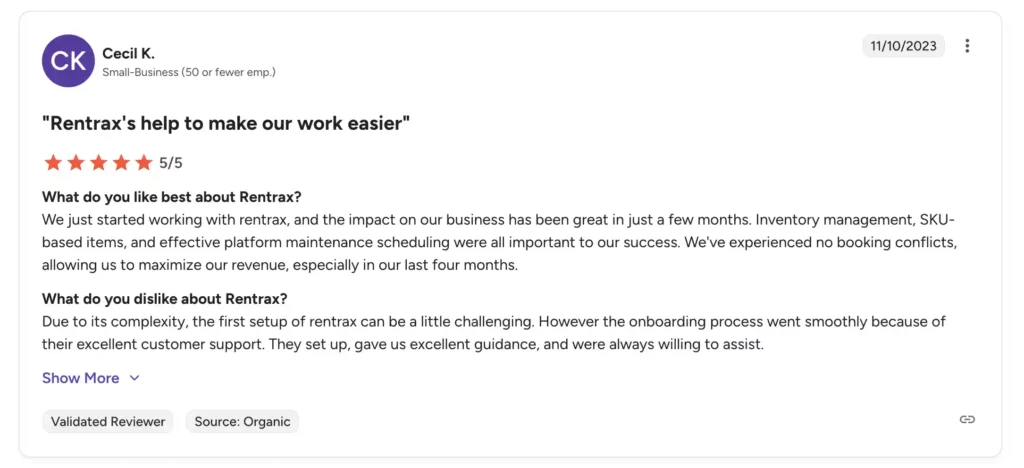
Rentrax review
Source: G2
Rentrax rating
Here’s a table evaluating how Rentrax performs in terms of its capabilities:
| Criteria | Rentrax Rating | Notes for Construction Rental GMs |
| Equipment Discovery & Inventory Visibility | High | Centralized equipment tracking with an availability calendar prevents double-bookings and ensures fleet readiness. |
| Data Accuracy & Asset Records | Moderate–High | Maintains rental and usage records, but detailed heavy-equipment and operational metrics are limited. |
| Asset Lifecycle Management | Moderate | Supports basic maintenance logs and tracking, but lacks advanced preventive maintenance automation. |
| Contract & Rental Management | High | Handles quotes, contracts, deposits, recurring rentals, and online booking workflows efficiently. |
| Maintenance & Service Management | Moderate | Maintenance reminders and usage logs are included, but they are less robust than those of enterprise-focused solutions. |
| Automation & Workflow Management | High | Automates billing, notifications, and rental confirmations, helping teams reduce manual administrative work. |
| Reporting & Operational Analytics | Moderate | Provides standard rental and revenue reports; limited advanced analytics for fleet ROI or multi-site performance. |
| Scalability & Ease of Use | High | Cloud-based platform with mobile access; easy for small-to-medium fleets, though complex workflows may require training. |
| Integrations (Accounting, CRM, Dispatch) | Moderate | Supports basic accounting and customer management integrations; fewer advanced ERP or accounting integrations compared with enterprise systems. |
What software fits the needs of Construction Rental GMs the best
Here’s a comparison table highlighting how the above-mentioned software compare to each other and fulfill the needs of Construction Rental GMs:
| Software | Best For | Key Strengths | Potential Limitations | Pricing Model |
| EZRentOut | Mid-sized to enterprise-level construction rental businesses | Strong equipment tracking, availability calendar, barcode/QR scanning, maintenance tracking, and automated invoicing. Easy-to-use interface and fast implementation. | Advanced dispatch logistics and yard management features may require integration with additional tools. | Transparent subscription pricing with tiered plans and a free trial. |
| Point of Rental | Growing rental companies managing multiple workflows | Comprehensive rental management including contracts, reservations, inventory tracking, billing, and reporting. Suitable for rental businesses expanding operations. | Can become complex for smaller teams and may require training during onboarding. | Custom pricing depending on deployment and modules. |
| Texada | Mid-to-large heavy equipment rental businesses | Full equipment lifecycle management, preventive maintenance automation, financial reporting, and centralized fleet visibility across branches. Helps improve fleet utilization and reduce downtime. | Implementation can be time-consuming and may require role-based training due to feature depth. | Quote-based subscription with implementation fees. |
| Wynne Systems (RentalMan) | Enterprise-level construction rental operations | ERP-level platform with deep fleet lifecycle management, integrated accounting, and logistics coordination across large fleets. | Complex implementation and higher cost may make it less suitable for smaller rental businesses. | Enterprise custom pricing. |
| Renterra | Rental companies prioritizing digital storefronts | Strong online booking workflows, integrated payments, order management, and a modern cloud interface designed for streamlined rental transactions. | Asset lifecycle management and advanced maintenance capabilities may be lighter compared to enterprise platforms. | Custom quote pricing. |
| MCS Rental Software | Multi-depot construction rental companies | Advanced workshop management, inspection checklists, logistics coordination, fleet reporting dashboards, and strong multi-location capabilities. | Requires configuration and training due to operational depth. | Custom pricing based on modules and users. |
| Rentrax | Rental companies focused on financial control | Strong billing accuracy, contract compliance, revenue reporting, and branch-level financial management for high-value equipment fleets. | Interface complexity and limited predictive maintenance capabilities compared to newer platforms. | License-based pricing with implementation costs. |
Conclusion: Choosing an optimal construction equipment management software
The decision to go for a specific construction equipment management software can be tough, but not impossible. You need to be mindful of a few factors, including cost, budget, business needs, your construction fleet size, and the number of users.
While most software might meet your needs, it still might not suit your workflows unless you try it yourself. Getting free demos of your top picks can help you decide whether the system is suitable for your workflows. EZRentOut works well for rapidly scaling construction rental companies that need a consolidated system to manage complex equipment across multiple projects and sites. Try the software before making a purchase decision and see how you can transform your construction rental operations.