
Why request management automation matters
IT request management breaks down when every routine request depends on manual coordination. A software access request, laptop replacement, onboarding task, or hardware issue may look simple, but IT still has to confirm ownership, check approvals, verify inventory or licenses, assign the right technician, update the requester, and close the loop.
At low volume, this feels manageable. At scale, it creates bottlenecks. Tickets sit in queues, approvals disappear into email or chat, technicians search across disconnected systems, and employees keep asking for status updates.
That is why request management automation needs to go beyond basic ticket routing. The strongest workflows combine structured intake, approval logic, fulfillment tasks, SLA alerts, requester updates, and real-time context from users, assets, software, and licenses.
When these elements work together, IT teams can move from manually coordinating every request to managing repeatable service workflows with more control and visibility.
What is request management automation?
Request management automation uses workflows, rules, approvals, routing logic, notifications, and self-service forms to move IT service requests from intake to fulfillment with less manual effort.
Service request management typically covers routine employee requests, such as software access, equipment, password support, hardware replacement, onboarding and offboarding, and information requests. Because these requests are often repeatable, they are well-suited for structured workflows and automation.
The goal is not to remove IT judgment; rather, to remove repetitive coordination work.
Instead of asking technicians to manually read every request, identify the right approver, assign the right team, check asset details, and send every update, automation handles the predictable steps.
Common examples include:
- Routing software access requests to the right approver
- Checking laptop requests against available inventory
- Breaking onboarding requests into assigned tasks
- Deflecting password reset requests through self-service
- Linking hardware replacement requests to assigned assets
- Sending status updates automatically
- Triggering SLA timers based on request type and priority
In short, request management automation turns disconnected tickets into repeatable service workflows.
Why manual request management creates IT bottlenecks
Manual request management creates bottlenecks because every request depends on someone remembering the next step. Even simple requests can require technicians to gather context, chase approvals, check asset availability, verify software entitlements, update multiple systems, and manually inform the requester.
The most common bottlenecks include:
- Unstructured intake: Requests come through email, Slack, Teams, walk-ups, or incomplete forms, making them harder to categorize and prioritize.
- Manual triage: Technicians spend time reading, interpreting, and assigning tickets instead of resolving them.
- Approval delays: Requests stall when managers, finance, security, or department heads do not respond quickly.
- Disconnected asset and software data: IT cannot fulfill requests quickly if device ownership, inventory, license availability, or user history live outside the ticket.
- Repeated status follow-ups: Requesters ask for updates because the system does not proactively communicate progress.
- Inconsistent fulfillment: The same request is handled differently depending on who receives it.
Automation helps by turning common request patterns into repeatable workflows.
7 ways to automate the process of request management
1. Standardize request intake with a self-service portal
The first step in automating request management is to control how requests enter the system. If employees submit requests through scattered channels, IT has little structure to automate.
A self-service portal provides employees with a single place to submit requests via structured forms. Each form should capture the information needed to route, approve, and fulfill the request without unnecessary back-and-forth.
Common request forms can include:
- Software access
- New device request
- Hardware replacement
- Password or access issue
- Employee onboarding
- Employee offboarding
- Peripheral request
- Application support
- Procurement request
A service catalog also helps employees understand which IT services are available and what information they need to provide. It supports guided request forms with built-in routing, approvals, and automation.
For example, instead of sending a Slack message for a new monitor, an employee can select “Peripheral Request” in the portal. The form captures the location, device preference, requester, and business need, then routes the request to the right IT queue.
Once the form is submitted, automation can assign the category, priority, SLA, approver, technician group, and fulfillment workflow.
2. Use request templates for repeatable workflows
Many IT requests follow the same pattern. A standard laptop, software access, or onboarding request should not require IT to rebuild the process every time.
Request templates allow IT teams to predefine the workflow before the request reaches the queue.
A strong request template should include:
- Required information
- Default category and priority
- Approver rules
- Assigned team or technician
- Task checklist
- SLA policy
- Requester notifications
- Closure criteria
For example, a new laptop request template can ask for role, location, device type, department, start date, and manager approval. Once approved, it can trigger inventory checks, device assignment, shipping or pickup tasks, and requester notifications.
Templates reduce variation and help junior technicians follow the same process as experienced IT staff. They also make it easier to measure request performance because the workflow is consistent each time.
3. Automate ticket routing and assignment
Manual assignment is one of the most common causes of service desk delays. Requests sit in a queue until someone reads them, interprets the issue, and decides who should handle them.
Routing automation assigns requests based on predefined rules, such as:
- Request type
- Department
- Location
- Priority
- Requester role
- Asset category
- Software application
- Technician workload
- Support group
- SLA policy
For example, a software access request for the Finance team can be routed to the finance application owner for approval, then to the IT technician responsible for provisioning. A broken laptop request from a remote employee can be routed to Endpoint Support with the user’s assigned device already linked.
This works best when routing is based on real operational context, not only on ticket keywords.
4. Automate approvals to prevent request delays
Approvals are necessary for governance, but they should not become the reason requests stall.
With automation, the right person is notified at the right time based on request type, cost, department, software risk, role, or asset category. This helps IT avoid manually chasing stakeholders through email or chat.
| Request type | Possible approval path |
| New hardware | Manager or Department Head |
| High-cost equipment | Finance and IT |
| Privileged access | Security or System Owner |
| Paid software | Department Head, Finance, or Application Owner |
| Device replacement | IT Admin or Asset Manager |
| Onboarding or offboarding | HR and IT |
For example, if an employee requests a paid SaaS license, the workflow can first check whether a license is already available. If a license is available, the request can move to the application owner for approval. If not, it can trigger procurement approval from Finance and IT before fulfillment.
The goal is not to remove control. The goal is to maintain governance without turning every approval into a manual delay.
5. Connect requests to asset, user, and software context
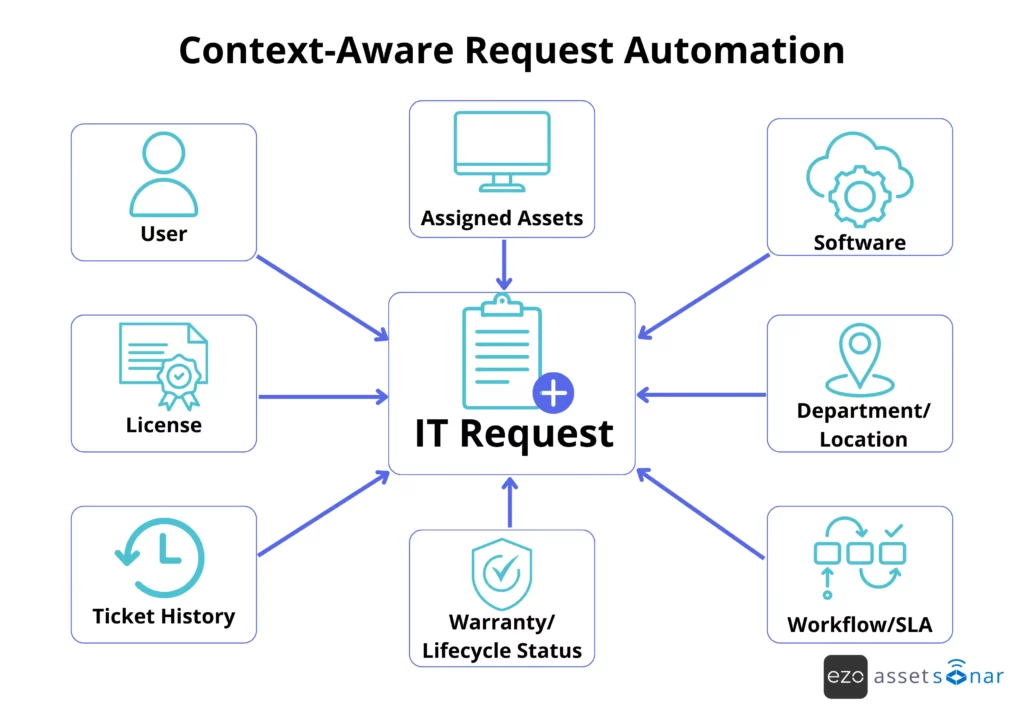
Asset, user, and software context are what separate basic request routing from stronger request automation.
Most request management systems can move tickets through queues. Fewer can connect requests to the operational data needed to fulfill them.
When technicians receive a request, they need context such as:
- Who the requester is
- Which department or location does the requester belong to
- Which assets are assigned to the requester
- Which software does the requester already use
- Whether licenses or inventory are available
- Whether the device is under warranty
- Whether related incidents or past requests exist
Without this context, technicians waste time checking other systems or asking follow-up questions.
For example, a technician handling a laptop issue should be able to see the assigned device, owner, warranty status, software history, and past tickets without having to search across separate systems.
When request management is connected to ITAM, SAM, CMDB, and user data, automation becomes more effective. Instead of only routing tickets from one queue to another, the system can use real operational context to support faster approvals, cleaner fulfillment, better asset decisions, and more accurate ticket records.
The diagram below shows how a connected IT context turns a request from a standalone ticket into a workflow that can be routed, approved, and fulfilled with less manual lookup.
6. Automate fulfillment tasks for common requests
Once a request is approved, fulfillment should not rely on someone manually creating every task.
Automation can break a request down into the correct sequence of actions and assign each task to the appropriate owner. This turns request management from simple ticket tracking into operational execution.
For onboarding, automation can trigger tasks for device assignment, software setup, SaaS access, accessories, handover scheduling, and manager notification.
Alternatively, for offboarding, automation can support asset recovery, access removal, license reclamation, custody updates, wipe or lock tasks, HR/security notifications, and final verification.
Similarly, for software requests, automation can check license availability, route the request for approval, assign the license, create an installation task, update the software record, and notify the requester. This is where software asset management becomes important. It helps organizations control software usage, reduce licensing risk, prevent software hoarding, and make better decisions before buying more licenses.
The value of automated fulfillment lies in consistency. IT can ensure the same fulfillment steps happen every time, in the right order, without relying on the technician’s memory.
7. Automate requester updates, SLA alerts, and escalations
A major source of IT workload comes from status-check messages. Employees ask for updates because they cannot see where the request stands, who owns it, or when it is likely to be completed.
Automated communication reduces that noise. IT teams can automate notifications for the following events:
- Tickets being received, approved, assigned, or closed
- SLA breaches
- Escalations needed
- Fulfillment updates
- Requester feedback surveys
For example, if a hardware replacement request is nearing its SLA breach, the system can alert the assigned technician, notify the requester of the delay, and escalate the ticket to the service desk lead.
SLA automation is especially useful because it helps teams spot delays before they become missed commitments. Automated alerts and escalations help teams act before request delays turn into SLA breaches.
Requesters get visibility without interrupting technicians. IT leaders get better control over backlog, SLA health, and recurring bottlenecks.
How to know which request management processes to automate first
IT teams should not automate every request at once. The best starting point is a request type that is frequent, repeatable, low-risk, and easy to standardize.
Start with requests that are:
- High volume
- Low complexity
- Repeatable
- Approval-heavy
- Frequently delayed
- Dependent on asset or software data
- Common across departments
- Prone to status follow-ups
Use the matrix below to separate quick automation wins from request types that need more standardization, review, or human judgment before they are automated.
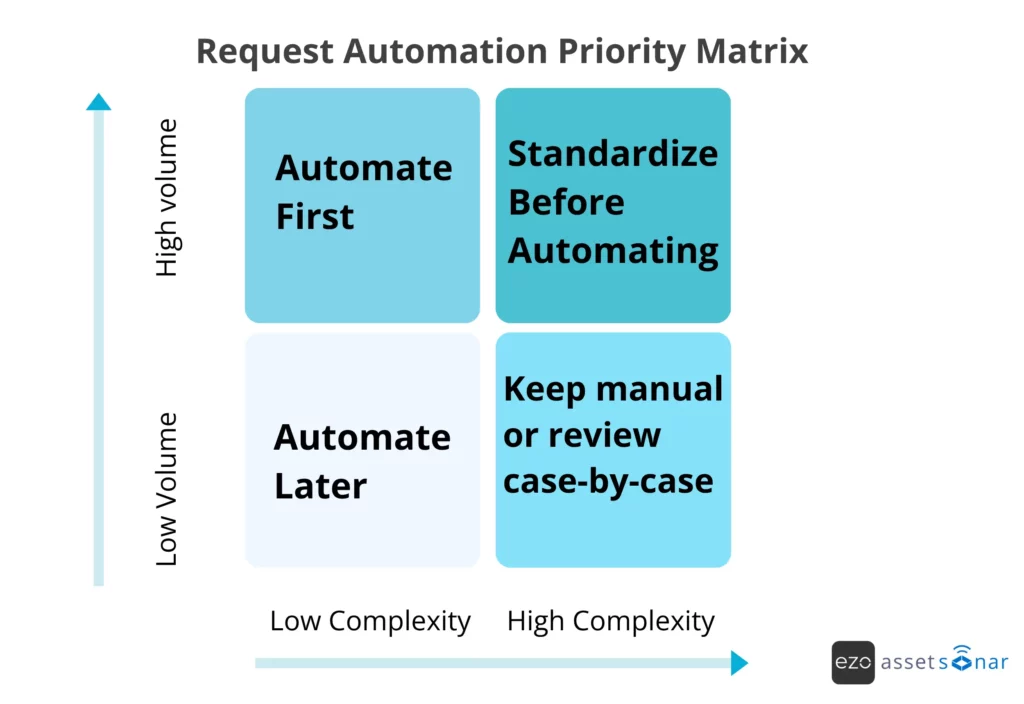
IT teams should start with repetitive, manual, and high-impact tasks such as ticket routing and auto-assignment. These workflows are easier to standardize and can show value quickly.
| Request type | Automation potential | Why |
| Password or access requests | High | Repetitive, frequent, and often easy to standardize |
| Software access requests | High | Can be routed through predefined approval and license checks |
| Laptop and peripheral requests | High | Can be tied to inventory, approval, and assignment workflows |
| Employee onboarding | High | Repeatable multi-step workflow across assets, software, and access |
| Employee offboarding | High | Requires consistent asset recovery, access removal, and license reclamation processes |
| Hardware replacement | Medium to high | Can be automated when asset condition, warranty, and inventory data are available |
| Standard procurement requests | Medium | Usually needs approval logic and budget visibility |
| Privileged access requests | Medium to low | Should include stricter review and security approval |
| Custom or exception-heavy requests | Low | Better handled manually until patterns become clear |
The goal is to remove repetitive work first. Once the process is stable, IT can expand automation into more complex request categories.
How request management automation reduces IT bottlenecks
Request automation reduces bottlenecks by giving each common request a clearer path from intake to resolution.
Instead of relying on manual coordination at every step, IT teams can define rules for how requests should be routed, who should approve them, what data should be verified, which tasks should be triggered, and when stakeholders should be notified.
| Bottleneck | Request management example | Automation fix |
| Intake bottleneck | Employees submit requests through email, Slack, Teams, or walk-ups. | Self-service portal and structured request forms |
| Triage bottleneck | Agents manually read and assign every request. | Automated categorization and routing |
| Approval bottleneck | Requests wait for approval from the manager, finance, or security. | Approval workflows, reminders, and escalations |
| Fulfillment bottleneck | Technicians manually recreate the same tasks. | Request templates and fulfillment workflows to standardize processes |
| Context bottleneck | IT checks separate tools for device, user, or software details. | Asset-aware tickets and connected IT data |
| Communication bottleneck | Employees repeatedly ask for updates. | Automated requester notifications |
| SLA bottleneck | Requests breach SLAs before anyone notices. | SLA timers, alerts, and escalation rules |
| Reporting bottleneck | The leadership team cannot see where requests are delayed. | Dashboards for volume, backlog, approval time, and SLA health |
Look for automation opportunities in workflows that involve manual data entry, multiple handoffs, high error rates, rules-based tasks, or compliance implications.
Common mistakes to avoid when automating request management
Automation works best when the process is already clear. If IT automates an unclear workflow, the confusion simply moves faster.
| Mistake | Impact | Better approach |
| Automating broken processes | Unclear ownership and approval rules quickly create confusion. | Define request ownership, approval paths, and closure criteria first. |
| Using too many request forms | Employees may struggle to find the right form. | Start with high-volume request categories and expand gradually. |
| Automating without context | Technicians still need manual lookups for assets, licenses, or users. | Connect workflows to ITAM, SAM, CMDB, and user data. |
| Ignoring the requester’s experience | Complex forms push users back to email or chat. | Keep forms simple and use conditional fields where possible. |
| Not reporting on bottlenecks | IT cannot see whether automation is improving service. | Track request volume, delays, SLA breaches, reassignment, and automation success. |
| Automating every request too early | Complex edge cases can create risk or incorrect routing. | Start with repeatable, low-risk workflows. |
| Treating automation as a one-time setup | Rules become outdated as teams and services change. | Review request patterns, SLA breaches, and approval delays regularly. |
Request automation is not only about speed. It is also about control, governance, and continuous improvement.
What metrics should IT teams track after automating request management?
Request automation should improve speed, consistency, visibility, and the requester experience. To know whether it is working, IT teams need to track the right metrics.
The following metrics can help IT teams evaluate the effectiveness of their automation efforts and identify areas for improvement.
- Request volume by category: Helps identify which request types create the most workload for the IT team.
- Average time to first response: Measures how quickly IT acknowledges incoming requests.
- Average fulfillment time: Shows how long it takes to complete common requests from submission to resolution.
- Approval cycle time: Highlights where approval delays occur and how long approvals take.
- SLA breach rate: Indicates the percentage of requests that were not completed within agreed service levels.
- Reassignment rate: Reveals whether routing rules are accurately directing requests to the right teams or technicians.
- Backlog age: Tracks how long requests remain unresolved in the queue.
- Self-service deflection rate: Measures how many requests are resolved without technician involvement through self-service resources.
- Automation success rate: Shows how many automated workflows are completed without requiring manual intervention or correction.
- Requester satisfaction: Reflects how satisfied employees are with the request management experience.
- Average time to close: Measures how long it takes for requests to be formally closed after resolution, including confirmation, documentation, or final status updates.
For service request performance, CSAT reflects requester satisfaction, while time to first response, time to resolution, and time to close indicate how quickly IT acknowledges, resolves, and closes requests.
These metrics help IT leaders see which workflows are improving, which requests still get stuck, and where automation should be refined next.
How AssetSonar helps automate request management
AssetSonar helps IT teams automate request management by connecting service requests to the broader IT environment. Instead of treating each request as a standalone ticket, teams can route, approve, fulfill, and track work using context from users, assets, software, licenses, tickets, contracts, and configuration items.
This matters because many request delays are not caused by the ticket itself. They happen because IT has to look elsewhere to answer basic fulfillment questions, such as:
- Who owns the device?
- Is a laptop available?
- Does the requester already have a license?
- Is manager approval required?
- Has this asset had similar issues before?
- Which workflow should happen next?
AssetSonar’s request management capabilities support structured service catalog requests, dynamic forms, asset-aware tickets, automated routing, approval workflows, SLA tracking, knowledge base support, and automation across ITSM and ITAM workflows.
Its integration ecosystem also supports common IT operations tools, including Intune and Jamf for device discovery, as well as Jira and Zendesk for linking with service desk workflows.
Key capabilities include:
- Self-service portal
- Structured request catalog
- Request templates
- Automated routing and assignment
- Approval workflows
- SLA rules and escalations
- Asset-aware tickets
- Software and license context
- Offboarding and onboarding workflows
- Knowledge base and AI-assisted self-service
- Automation rules across ITSM and ITAM
- IT Graph connecting users, assets, software, tickets, and workflows
This is useful for teams that already use Jira or Zendesk for tickets but need a stronger ITAM context behind those workflows. AssetSonar helps connect service activity to asset records, enabling technicians to link requests to devices, users, software, custody, and history rather than managing ticket and inventory data separately.
AssetSonar’s self-service portal also helps employees submit guided requests, view request status, and find relevant answers without repeatedly following up with IT.
In short, AssetSonar automates request management on top of real IT context. Every request can be connected to the user, device, software, license, approval, and workflow behind it, helping IT teams reduce manual triage, prevent fulfillment delays, and resolve requests faster.
Conclusion: Move from manual request handling to context-aware automation
Request management bottlenecks usually come from manual handoffs, missing context, inconsistent workflows, and delayed communication.
Automation helps IT teams standardize intake, route work faster, reduce approval delays, fulfill requests consistently, and keep requesters informed. But the strongest automation occurs when request management is connected to the rest of IT operations.
When requests are connected to assets, users, software, licenses, approvals, and workflows, IT teams can stop managing tickets in isolation and start delivering service with full operational context.