
Equipment management for teams across multiple locations means controlling how equipment is requested, approved, moved, used, maintained, returned, and reported across every warehouse, job site, facility, vehicle, and department. As operations scale, teams need a single connected system for visibility, custody, fulfillment, maintenance, and reporting so equipment stays available, accountable, and ready for work.
Introduction
Equipment management becomes more complex when operations expand beyond a single site.
At a small scale, a warehouse manager may know where everything is. A field supervisor may remember which crew has which tool. It is also easier for them to keep track of missing tools. A spreadsheet may be “good enough” because asset movement is slow, the team is small, and most handoffs happen within view.
However, this changes the moment you start moving your equipment across multiple locations.
A generator may leave one warehouse for a field job, return to a different location, sit idle because its status was never updated, and then get rented again because no one can confirm it is available. A lift may be marked ready in a spreadsheet, even though a technician flagged it for service. A sales team may promise equipment to one client while operations has already assigned it to another event.
The issue is not that people stop caring. The issue is that manual equipment tracking cannot keep up with the complexity of multi-location operations.
For executives and operations leaders, the real question is not “where is this one asset?” It is: “Can we trust our equipment data enough to make decisions across every site, crew, project, and customer commitment?”
That is where multi-location equipment management becomes a strategic operating problem. Teams need more than a list of equipment. They need a connected workflow that makes every request easier to approve, fulfill, dispatch, track, maintain, and prove.
What does equipment management across multiple locations mean?
Equipment management across multiple locations means maintaining a single reliable view of equipment availability, location, custody, condition, maintenance status, and movement history across every place where assets are stored, used, transferred, repaired, or returned.
This includes equipment in warehouses, facilities, vehicles, job sites, campuses, client locations, regional offices, storage rooms, and field depots.
A complete multi-location equipment management process usually covers:
- Equipment records
- Location tracking
- User, team, or department custody
- Request intake
- Approval routing
- Fulfillment and dispatch
- Check-in/check-out
- Transfers and returns
- Condition updates
- Preventive maintenance
- Service history
- Utilization reporting
- Audit and accountability records
For example, a field team may request a generator for a job on Monday. The request needs approval from a regional manager. The warehouse team needs to confirm that the generator is available, ready for use, and assigned to the right job site. Once dispatched, the receiving crew needs to confirm custody. After the job, the generator may return with a condition issue that triggers maintenance before it can be assigned again.
Without a connected equipment management system, each step can live in a different place: a text, an email, a spreadsheet, a paper form, or someone’s memory. With the right system, the request, approval, dispatch, custody, return, and service history stay connected to the equipment record.
That is the difference between tracking equipment and managing equipment operations.
Why does equipment management break down as the number of locations increases?
Equipment management breaks down across multiple locations because each new site adds more assets, users, handoffs, movement, and chances for records to fall out of sync.
The problem is structural. Manual systems scale linearly: every new asset, movement, or update requires more human effort. But operational complexity scales much faster. Once equipment moves across multiple teams, locations, jobs, and workflows, the gap between reality and the record widens on its own.
More assets and more variety
A single-site team may track a small set of shared tools. A multi-location organization may manage machinery, vehicles, safety equipment, facility assets, field kits, client-owned inventory, consumables, and high-value reusable equipment. The more varied the inventory, the harder it is to keep records clean without structure.
More locations and conflicting records
Each site may maintain its own spreadsheet, storage area, naming conventions, and checkout habits. One location may mark an item returned, while another still shows it assigned. Leadership may think the organization has a single inventory picture, but each site is working from a different version of the truth.
More people and handoff gaps
Equipment may pass between warehouse staff, drivers, supervisors, field crews, technicians, clients, contractors, and department leads. Every handoff is a point where custody can be lost if the transfer is not recorded.
Higher movement velocity
Equipment may be checked out, transferred, repaired, reserved, returned, or reassigned within hours or days. If the record depends on someone updating a spreadsheet later, the system is already behind.
Maintenance adds operational complexity
Knowing where the equipment is does not mean it is ready to use. Teams also need to know whether an item is damaged, overdue for inspection, unavailable, under maintenance, or safe to dispatch.
Reporting pressure increases
Executives need trustworthy data for utilization, procurement, downtime, loss prevention, compliance, and capital planning. If asset data requires constant cleanup before it can be used, it is not an operating system. It is an after-the-fact reconciliation exercise.
The breaking point is rarely dramatic. The spreadsheet still opens. The team still tries to update it. But the data slowly becomes less trustworthy until every decision needs a caveat.
What are the biggest challenges in multi-location equipment management?
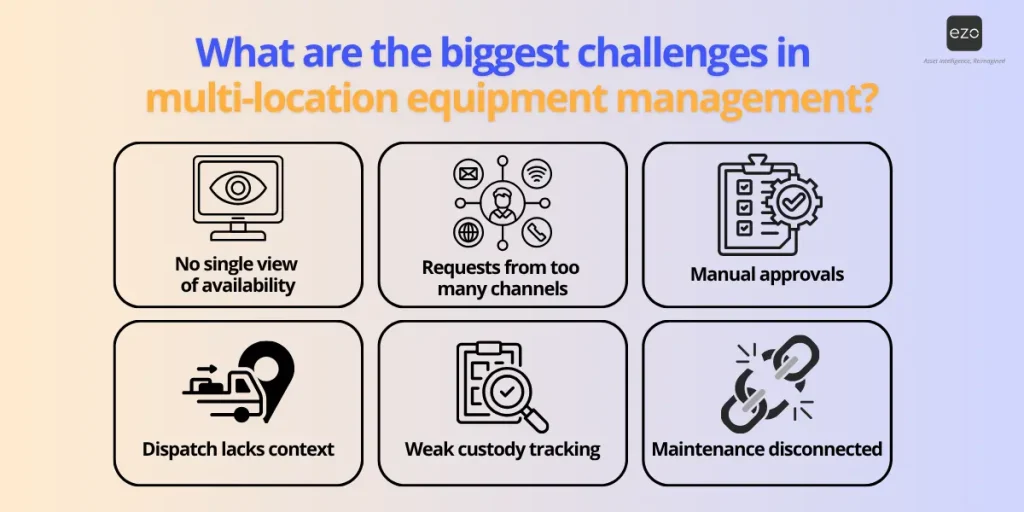
The biggest challenges are not only tracking errors. They are operational delays caused by unclear availability, unstructured requests, slow approvals, weak custody, late maintenance updates, and disconnected reporting.
No single view of availability
Many teams know what they own, but not what is available right now.
Equipment may be reserved for a future job, checked out to another crew, sitting idle at a different site, waiting for repair, in transit, or returned but not updated. When availability is unclear, teams either delay work, overbuy, or spend time calling around to confirm what the system should already know.
In multi-location operations, this becomes a daily problem. A team may buy or rent equipment not because they lack assets, but because they lack confidence in the inventory record.
Requests arrive through too many channels
Equipment requests often arrive through email, phone calls, text messages, chat tools, spreadsheets, paper forms, or verbal conversations.
That creates inconsistent intake. One request may include the job site, required date, item type, quantity, and priority. Another may simply say, “Can you send the lift tomorrow?” The fulfillment team then has to chase missing details before they can act.
This slows the process and increases the risk of sending the wrong equipment, missing the deadline, or fulfilling the loudest request instead of the most urgent one.
Approvals happen outside the system
When approvals happen manually, they are hard to track.
A manager may approve a request over text. A team lead may confirm verbally. A department head may approve an equipment movement in an email thread. But the warehouse or operations team may not know whether the request is cleared, who approved it, or whether it requires another sign-off.
This creates risk because equipment can move without a clear approval trail. It also creates delays because fulfillment teams wait while people manually chase approvals.
Dispatch teams lack context
A fulfillment team needs more than an item name.
They need to know who requested the equipment, where it is going, when it is needed, what job it supports, whether the asset is available, whether substitutions are allowed, and whether there are condition or maintenance requirements.
Without that context, dispatch becomes guesswork. Teams pick based on habit, memory, or whatever is closest rather than on what is best for the job.
Custody is unclear after handoff
Once equipment leaves a warehouse, accountability can quickly become unclear.
Who received it? When was it handed off? Which site did it go to? What condition was it in? Was it transferred to another crew? Was it returned on time?
Without custody records, teams struggle to resolve issues related to missing equipment, late returns, damage claims, billing disputes, and questions about internal accountability.
Maintenance is disconnected from availability
A spreadsheet may show that a piece of equipment is available, even if it is damaged, overdue for inspection, or waiting on parts.
This is one of the most expensive gaps in multi-location equipment management. If maintenance data is disconnected from availability, teams may dispatch equipment that is not ready for use. That can create downtime, safety risk, job delays, and last-minute replacements.
Teams overbuy because they cannot trust the inventory
When teams cannot see what is idle, available, or returning soon, they buy or rent more equipment as a workaround.
Over time, this creates a bloated asset base. Some equipment sits unused, while other sites continue to purchase more. Finance sees a major trend in rising spend, but operations still feel under-equipped because the real issue is visibility, not necessarily supply.
What is the executive cost of poor multi-location equipment management?
Poor equipment management creates hidden costs across capital, operations, risk, and decision-making. The impact often appears as duplicate purchases, downtime, job delays, audit stress, and unreliable data.
Capital waste
Poor equipment visibility leads to unnecessary purchases and rentals.
If one location cannot see that another site has idle equipment, the organization may spend money on assets it already owns. If returned equipment is not updated quickly, teams may buy replacements. If utilization data is unreliable, procurement decisions become guesswork.
This is not just “wasted money.” It is capital inefficiency. Equipment that should be producing value sits idle while spending on new equipment continues.
Operational delays
Equipment gaps slow frontline work.
Crews keep waiting for tools. Maintenance teams continue searching for assets. Warehouse teams keep chasing missing details. Field operations delay jobs because the right item is not ready at the right location.
For asset-heavy teams, equipment availability is directly tied to throughput. When equipment management fails, the business not only loses visibility but also time.
Risk and accountability gaps
Multi-location equipment movement creates risk when custody is unclear.
If equipment is damaged, lost, returned late, or sent to the wrong location, teams need a reliable record of what happened. Without that record, disputes become difficult to resolve. The organization may absorb costs because it cannot prove who had the asset, when it moved, or what condition it was in.
For regulated or safety-sensitive environments, the risk is even higher. Equipment condition, inspection history, and service records may be needed for audits, safety reviews, or internal investigations.
Reactive maintenance
When maintenance is disconnected from equipment movement, teams often find issues too late.
A machine may fail during use because recurring service was missed. A vehicle may be assigned even though an inspection is overdue. A tool may be returned damaged, but placed back into circulation because the condition update was never recorded.
This shifts maintenance from planned uptime to emergency response.
Data blindness
Leadership cannot optimize what it cannot measure.
If equipment data is incomplete, stale, or inconsistent across locations, every report becomes questionable. Which assets are underused? Which locations are overbuying? Which equipment categories create the most downtime? Which sites have the most overdue returns? Which items should be replaced?
Bad equipment data also weakens analytics and AI initiatives. If the underlying asset record is unreliable, forecasts, dashboards, and automation built on top of it will be unreliable too.
Why spreadsheets and manual tracking fail across multiple locations
Spreadsheets fail because they rely on people to remember to update them after every movement, handoff, return, repair, and status change. As locations and asset movement increase, the manual effort required to keep records accurate grows faster than the team can keep up with.
Spreadsheets are not always bad. They can work for small, stable teams with limited movement. But multi-location operations are not stable. Equipment moves constantly, and every move changes the truth.
A spreadsheet can list assets, but it usually struggles to manage:
- Live availability
- Custody changes
- Multi-step approvals
- Dispatch queues
- Handoff confirmation
- Photos and documents
- Condition updates
- Preventive maintenance
- Overdue returns
- Location-level demand
- Utilization reporting
The result is a system that depends on cleanup. Teams update records after the fact, reconcile them before audits, and explain why reports may not fully match reality.
For example, a crew returns a lift to Site A, but the spreadsheet still shows it assigned to Site B. Another team rents a replacement because they cannot see that the lift is back. Finance sees the rental cost. Operations see a delay. The root cause is outdated equipment data.
The obvious fixes often fail, too. Adding more spreadsheet tabs does not solve the problem. Assigning one person to “own the tracker” still creates a bottleneck. Creating stricter rules only works if the system makes those rules easy to follow.
The goal should not be tighter manual tracking. The goal should be to remove the manual step wherever possible.
What should multi-location equipment management software include?
Multi-location equipment management software should integrate equipment records, location tracking, requests, approvals, fulfillment, custody, condition, maintenance, and reporting into a single system.
The right platform should not only tell teams what exists. It should help them act on that information.
Centralized equipment records
Every item should have one reliable record.
That record should include location, status, assigned user or team, serial number, purchase details, photos, documents, warranty information, service history, and lifecycle data.
This gives teams one place to check before making a decision. Instead of searching old files, asking a warehouse manager, or checking local spreadsheets, users can start from the equipment record.
Real-time location and custody tracking
Teams should know where the equipment is and who is responsible for it.
Equipment location tracking shows where an asset sits. Custody tracking shows who has it, which team is using it, and when the responsibility changed. Together, they create accountability across warehouses, sites, vehicles, and field teams.
This is especially important when equipment moves frequently or is shared across crews.
Request intake portal
A request portal provides employees, clients, or field teams with a structured way to request equipment.
Instead of sending incomplete texts or emails, requesters can provide the details that fulfillment teams need: item type, quantity, location, required date, job context, priority, and supporting notes.
Structured intake reduces back-and-forth and helps operations prioritize requests more clearly.
Multi-tier approval routing
Ensure equipment moves only after the right approvals.
Automatically route requests to the appropriate approvers based on location, asset type, department, project, value, or custom business rules. With automated routing from one approver to the next, organizations can reduce unauthorized transfers, standardize approval workflows across multiple sites, and maintain a complete audit trail of every decision.
Fulfillment and dispatch queue
Approved requests should land in a managed fulfillment queue.
The fulfillment team should be able to see priority, requester details, site, required date, asset availability, approval status, and next action in one place. This helps operators work through requests in an organized way rather than reacting to the most recent message.
A dispatch-ready queue is what turns equipment management from recordkeeping into operational execution.
Check-in/check-out and returns
Teams need a consistent process for issuing equipment and returning it.
Check-in / check-out workflows help track when equipment leaves, who receives it, when it is due back, and whether it is returned. This helps reduce missing assets, late returns, and unclear responsibility.
For multi-location teams, returns are just as important as dispatch. Equipment that comes back without being updated may remain invisible to the next team that needs it.
Maintenance and condition tracking
Equipment management software should show whether an item is ready for use.
Condition and maintenance data should be connected to the asset record so teams can see whether equipment is damaged, under repair, overdue for inspection, or unavailable.
This helps prevent teams from dispatching equipment that is not fit for work.
Mobile access and scanning
Field and warehouse teams should not need to return to a desk to update equipment records.
Mobile access, QR codes, barcodes, or RFID workflows can help teams scan equipment, update custody, confirm returns, capture photos, and check status from the floor, in a truck, in a warehouse, or at a job site.
The easier it is to update records, the more accurate the system becomes.
Utilization and reporting
Managers need reports that help them act.
Useful reports include equipment utilization, idle assets, overdue returns, location-level demand, downtime, maintenance trends, fulfillment delays, purchase patterns, and missing equipment.
These reports help leadership make better decisions about buying, reallocating, repairing, or retiring equipment.
How EZO helps teams manage equipment across multiple locations
EZO helps multi-location teams manage equipment from request to approval, fulfillment, dispatch, return, maintenance, and reporting in a single connected workflow.
The value is not only that EZO tracks equipment. It helps teams coordinate the work around equipment movement.
Centralize visibility across sites
EZO helps teams maintain one shared view of equipment across warehouses, facilities, job sites, vehicles, departments, and field locations.
Teams can see what exists, where it is, who has it, whether it is available, and its status. This reduces the need to call around or reconcile local spreadsheets before making a decision.
Structure request intake
With EZO, equipment requests can move through a structured portal instead of scattered texts, emails, and verbal updates.
That means requesters can provide the details needed for fulfillment upfront: what they need, when they need it, where it is going, and why it is needed.
For operations teams, structured intake reduces missing context. For requesters, it provides a clearer way to request equipment and track requests.
Route approvals before equipment moves
EZO helps route equipment requests to the right approvers before fulfillment begins.
This matters in multi-location operations because not every request should follow the same path. A high-value asset may require different approval than a routine tool. A regional request may need a local manager review. A client-facing order may need account team visibility.
Approval routing helps reduce missed sign-offs and gives teams a record of who approved the request.
Fulfill requests from one queue
EZO helps approved requests move into a fulfillment workflow where operators can see what needs action.
Instead of manually piecing together requester details, asset records, availability, location, and job context, teams can work from a more complete view. This helps reduce information hunting and makes the fulfillment process more repeatable.
For busy warehouse or operations teams, this is often where the biggest time savings appear.
Track custody and handoffs
EZO helps teams record who requested, approved, dispatched, received, returned, or transferred equipment.
That custody trail creates accountability. If equipment goes missing, returns late, or comes back damaged, the team has a clearer record to review.
For organizations that move equipment between sites, custody tracking is essential because the asset may change hands several times before it returns.
Keep maintenance tied to availability
EZO helps connect maintenance, inspections, condition status, and service history to the equipment record.
That means teams can see whether an item is ready, unavailable, damaged, under maintenance, or due for service before dispatch. This reduces the risk of sending equipment that cannot be used safely or reliably.
Maintenance data becomes part of the fulfillment decision, not a separate record that teams check too late.
Support field teams with mobile access
EZO supports mobile workflows, enabling field and warehouse teams to update equipment records in both settings.
Teams can scan items, update status, confirm movement, add photos, check asset details, and record actions on the floor or in the field. This helps keep records up to date without forcing users to return to a workstation.
Improve decisions with reporting
EZO helps operations leaders review utilization, demand, overdue returns, maintenance activity, location-level performance, and equipment movement.
This gives leadership a clearer view of where equipment is being used, where delays happen, which assets are idle, and where purchasing or redistribution decisions may be needed.
What does a better multi-location equipment workflow look like?
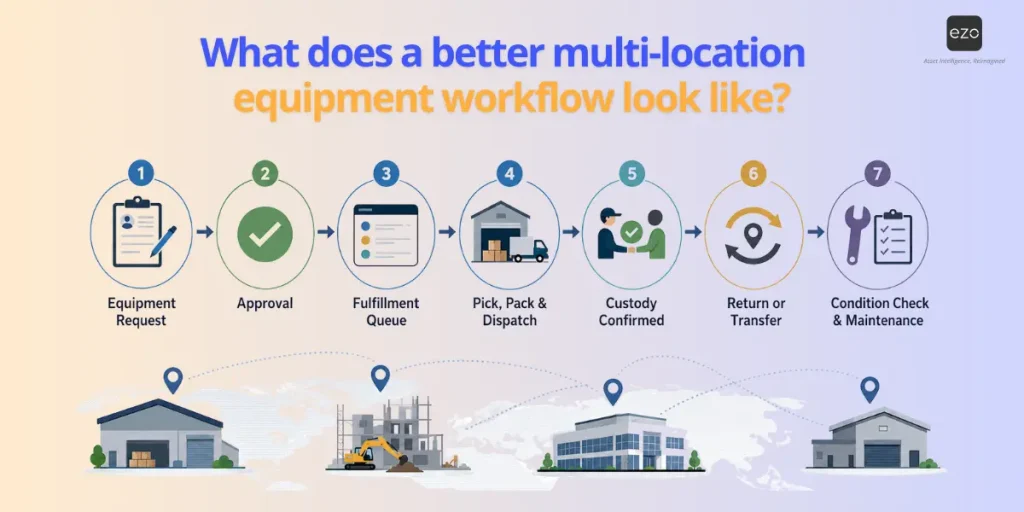
A better workflow turns every equipment need into a structured request, an approved action, a fulfillment task, a custody record, and an updated asset history.
Here is what that can look like in practice.
Step 1: A team submits an equipment request
A field team, department, or client submits a request through a structured portal.
The request includes location, required date, equipment type, quantity, job details, and priority. The fulfillment team does not need to chase basic information before acting.
Step 2: The request is routed for approval
The request is routed to the appropriate approver based on predefined rules.
This could depend on asset type, cost, job, location, department, or role. The goal is to reduce informal approvals and ensure the right people review the request before equipment is moved.
Step 3: The approved request enters the fulfillment queue
Once approved, the request becomes visible to the operations or warehouse team.
The team can see what is needed, where it is going, when it is due, and what equipment may be available. This turns the request into a dispatch-ready task.
Step 4: Equipment is picked, packed, and dispatched
The fulfillment team prepares the equipment, updates its status, and records its movement.
Labels, item records, photos, and supporting documents help teams select the right asset and reduce mistakes.
Step 5: Custody is confirmed
The receiving user or team confirms receipt.
That handoff creates a clearer record of who has the equipment, when they received it, and where it is being used.
Step 6: Equipment is returned or transferred
When the job ends, equipment is checked back in, transferred, or assigned to another location.
The system updates availability so the next team can use accurate information.
Step 7: Condition and maintenance are updated
If equipment is returned damaged or requires inspection, the record is updated, and maintenance can be triggered.
This closes the loop, so the asset is not treated as available until it is ready.
Which industries need multi-location equipment management?
Any organization that moves equipment across sites, users, warehouses, vehicles, or jobs needs multi-location equipment management.
Construction and field services
Construction and field service teams rely on tools, machinery, vehicles, safety equipment, and job-specific assets. If equipment is late, missing, or unavailable, crews can quickly lose productive time.
Multi-location equipment management helps these teams coordinate requests, dispatch, custody, and returns across job sites and regional warehouses.
Facilities and maintenance
Facilities teams manage equipment across buildings, campuses, service areas, and storage locations.
They need visibility into where equipment is, whether it is available, and whether it is ready for use. Maintenance history and condition status also matter because many assets support daily building operations.
Events and experiential businesses
Event teams manage assets that are constantly stored, shipped, installed, returned, repaired, and reused.
For these teams, equipment management is tied directly to client delivery. Teams need to know what is available, what is reserved, what is returning, and what can be prepared for the next event.
Utilities and infrastructure
Utilities and infrastructure teams often manage distributed crews, regional depots, vehicles, tools, and specialized equipment.
They need reliable visibility across regions so crews can access the right equipment without unnecessary delays or duplicate purchases.
Education and universities
Universities and schools often share equipment across departments, labs, media teams, athletics, facilities, and campuses.
Multi-location equipment management helps standardize checkout, reservations, custody, and returns across many different user groups.
Healthcare and public sector
Healthcare and public sector teams need accountability for equipment moving across departments, facilities, service locations, and field teams.
They may also need stronger reporting for audits, safety checks, maintenance, and asset availability.
How do you know you have outgrown manual equipment tracking?
You have outgrown manual tracking when equipment data takes too long to trust, too many people need to verify it, or too many decisions depend on records that may be outdated.
Common warning signs include:
- You cannot produce a current equipment picture on demand
- Equipment requests arrive through too many channels
- Teams overbuy because they cannot find existing equipment
- Approvals happen outside the system
- Dispatchers rely on memory or manual checks
- Equipment moves without clear custody records
- Returns are late, missing, or undocumented
- Damaged equipment is discovered during fulfillment
- Maintenance records are disconnected from availability
- Leadership cannot trust utilization reports
- Site-level records disagree with each other
- Audits require manual reconstruction
- Field teams keep their own shadow lists
- Equipment status is updated only after someone asks
- Important asset knowledge lives with individuals, not systems
The key metric is time-to-trustworthy-answer.
How quickly can the organization answer: what we own, where it is, who has it, what condition it is in, and whether it can be used?
If the answer requires calls, cleanup, caveats, and manual reconciliation, the system has already reached its limit.
Best practices for managing equipment across multiple locations
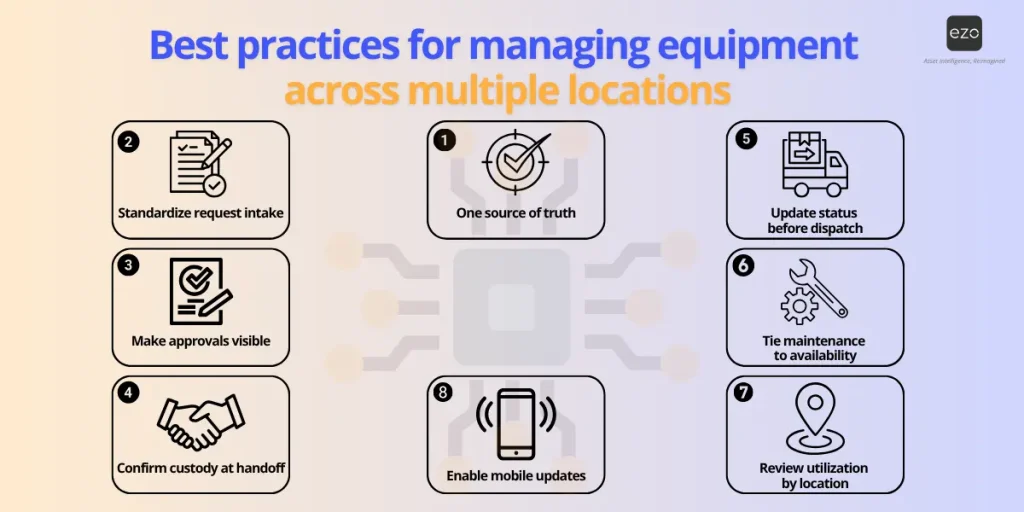
The best way to manage equipment across locations is to standardize how equipment is requested, approved, fulfilled, moved, maintained, and reported.
Create one source of truth
Avoid site-level spreadsheets that disagree with each other.
Every asset should have one reliable record that teams can trust across locations. That record should include location, status, custody, condition, documents, and history.
Standardize request intake
Use a portal or structured form so every request includes the context needed for approval and fulfillment.
This helps reduce missing information, duplicate requests, and manual back-and-forth.
Make approvals visible
Avoid informal approvals that leave no audit trail.
Approval workflows help teams know who approved the request, when it was approved, and whether it is ready for fulfillment.
Confirm custody at handoff
Record who received equipment, when, where, and in what condition.
Custody confirmation helps reduce disputes, missing assets, and accountability gaps.
Update equipment status before dispatch
Do not dispatch equipment that is damaged, unavailable, reserved, or under maintenance.
Status should be part of the fulfillment decision, not a separate check that happens too late.
Tie maintenance to availability
Make condition and service status part of the asset record.
If equipment is overdue for inspection or under repair, teams should know before assigning it to another job.
Review utilization by location
Use reports to identify idle equipment, over-demanded items, overdue returns, and overbuying patterns.
This helps teams move equipment to where it is needed rather than buying more by default.
Make record updates easy
The best process is the one users can follow during real work.
Mobile access, scanning, labels, and simple workflows reduce friction, making teams more likely to keep records up to date.
Final takeaway
Equipment management across multiple locations is not just an inventory problem. It is a coordination problem.
Teams need to know what they own, where it is, who needs it, who approved it, whether it is available, whether it is ready for use, and what happened after it moved.
As operations scale, manual tracking breaks down because it depends on people to maintain records across too many assets, sites, handoffs, and workflows. The result is not only missing equipment. It is delayed jobs, duplicate purchases, weak custody, reactive maintenance, and reporting that leadership cannot fully trust.
EZO helps multi-location teams bring structure to the process by consolidating equipment records, requests, approvals, fulfillment, custody, maintenance, and reporting into a single workflow.
The goal is not only to track equipment. It is to make every equipment movement easier to request, approve, fulfill, maintain, and prove.