Why hardware lifecycle management has become harder to ignore
Enterprise IT teams now manage hardware across offices, remote employees, hybrid work setups, storage rooms, repair workflows, and disposal vendors. That makes hardware lifecycle management more complex than simply tracking laptops, desktops, servers, and peripherals in a spreadsheet.
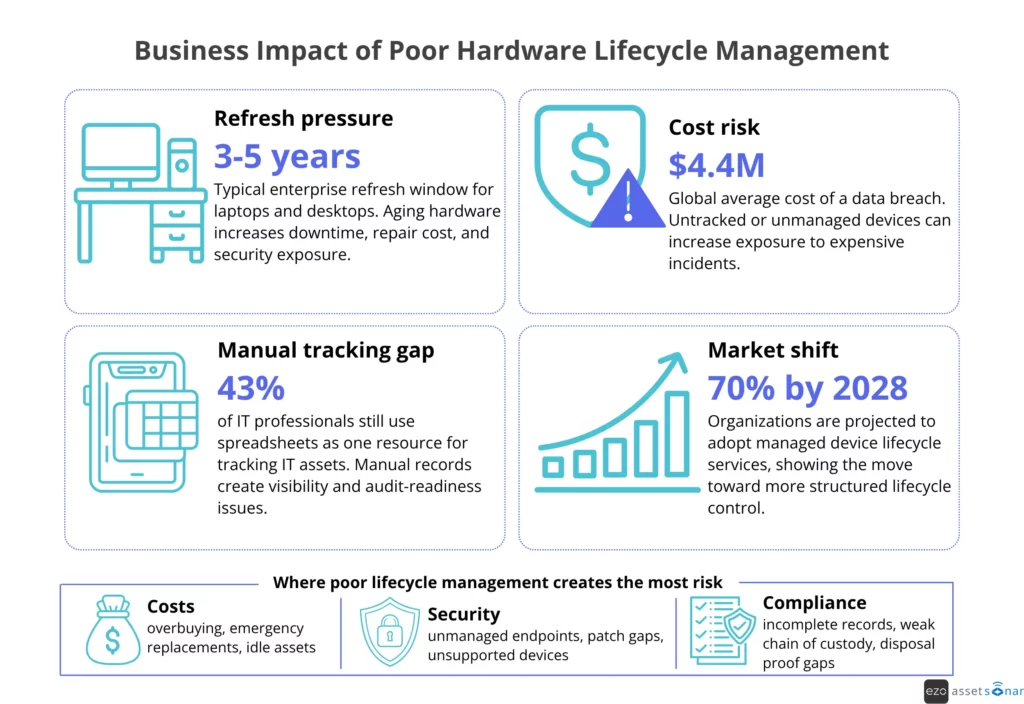
The pressure is growing. The Texas Department of Information Resources notes that desktop computers commonly follow a 4–5 year lifecycle, while laptops are often closer to 3–4 years.
IBM reported the global average cost of a data breach at USD 4.4 million in 2025, making unmanaged or untracked devices a serious risk. Gartner’s 2025 Market Guide, as summarized by Firstbase, projects that adoption of managed device lifecycle services will reach 70% of organizations by 2028.
As these pressures grow, IT leaders need a clearer way to evaluate what tools and processes actually support the full hardware lifecycle. For IT managers, IT directors, and operations leaders, this article explains the modern tool stack, lifecycle stages, maturity levels, common challenges, ROI, and the capabilities enterprise teams need in 2026.
What Does the Modern Enterprise Hardware Lifecycle Stack Include?
A modern enterprise hardware lifecycle stack usually includes ITAM or HAM as the system of record, supported by MDM/UEM, ITSM, CMDB, procurement, endpoint security, analytics, and ITAD workflows. Each layer contributes a different signal: ownership, configuration, support history, cost, risk, or evidence of disposal.
No single tool owns every lifecycle decision. ITAM may show who owns a laptop and where it sits in the lifecycle. MDM may show whether the device is encrypted and compliant. ITSM may show repeated performance tickets. Procurement may show purchase terms, vendor records, and warranty context. Combined, these signals help IT decide whether to repair, redeploy, replace, or retire the asset.
| Layer | Primary role in hardware lifecycle management |
| ITAM/HAM platform | Tracks hardware ownership, cost, condition, lifecycle status, warranty, location, and audit history |
| MDM/UEM | Manages device configuration, compliance, patching, enrollment, remote lock, and remote wipe |
| ITSM | Connects hardware to service requests, incidents, repairs, approvals, and SLAs |
| CMDB | Links hardware to services, dependencies, users, locations, and business impact |
| Procurement/ERP | Manages purchase orders, approvals, vendor terms, invoices, and asset acquisition data |
| Endpoint security | Tracks encryption, vulnerabilities, patch status, device risk, and compliance signals |
| ITAD/disposal | Manages data wiping, resale, recycling, destruction, chain of custody, and disposal proof |
| Analytics/reporting | Supports refresh planning, cost analysis, audit readiness, and lifecycle performance tracking |
No single tool owns every lifecycle decision. ITAM may show who owns a laptop, MDM may show whether it is encrypted, ITSM may show repeated performance tickets, and procurement may show warranty status. Combined, these signals help IT decide whether to repair, redeploy, replace, or retire the asset.
What Is Hardware Lifecycle Management, and Why Does It Matter More Than Ever?
Hardware lifecycle management is the process of managing physical IT assets from planning and procurement through deployment, maintenance, refresh, redeployment, and secure disposal.
Computer hardware lifecycle management includes laptops, desktops, servers, peripherals, and networking equipment, with clear visibility into ownership, support, security, compliance, and cost across every phase of use.
It matters more today because devices move across more users, locations, systems, and vendors. Without a structured lifecycle process, IT teams lose visibility into what exists, who owns it, whether it is secure, and when it should be repaired, reused, or retired.
NIST Cybersecurity Framework 2.0 includes asset inventory as part of the Identify function. Its ID.AM-01 category calls for accurate, detailed, and up-to-date inventories of enterprise assets, including end-user devices, network devices, IoT devices, and servers.
This is also why spreadsheet-based tracking creates risk. Ivanti survey data found that 43% of IT professionals used spreadsheets to track IT assets, indicating that manual tracking persists even as asset environments become more complex.
The main drivers are clear:
| Driver | Why it matters |
| Remote and hybrid work | Devices are harder to track when employees work across locations |
| Aging hardware | Older devices can increase downtime, repair costs, and security exposure |
| Incomplete records | Missing ownership, location, and warranty data weakens audits |
| Manual tracking | Spreadsheets create errors, delays, and duplicate records |
| Compliance pressure | Teams need proof of ownership, data wiping, disposal, and audit history |
| Budget pressure | Poor visibility leads to overbuying, emergency purchases, and idle assets |
Most business laptops and desktops are refreshed within a few years. As mentioned earlier, desktop PCs may have a lifecycle of up to five years, while laptop lifecycles are often shorter, around three to four years.
That does not mean every device should be replaced on a fixed date. It means IT teams need data to make better decisions. A device may be safe to redeploy. It may need repair. It may be under warranty. Or it may create more risk than value.
The infographic below summarizes how poor hardware lifecycle management can affect cost, security, and compliance.
What Are the Key Stages of Hardware Lifecycle Management?
Effective hardware lifecycle management follows a structured process from procurement to retirement. Each stage needs clear ownership, accurate asset records, and timely updates so IT can make better decisions about purchasing, deployment, support, refresh, redeployment, and disposal.
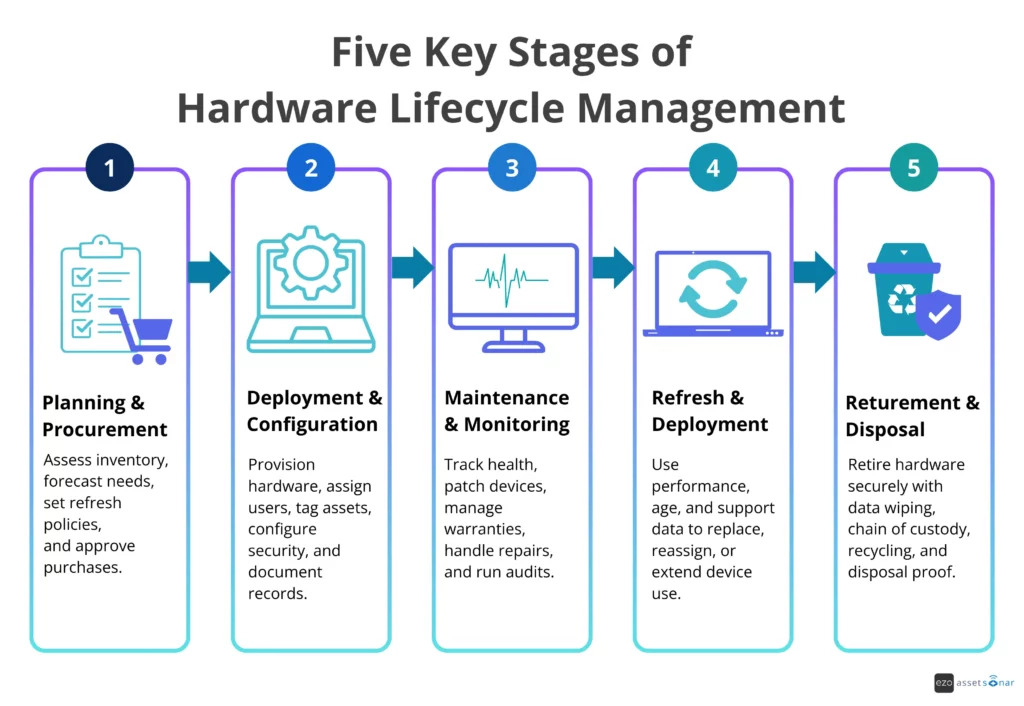
Enterprise IT teams usually manage hardware through five main stages:
- Planning and procurement
- Deployment and configuration
- Maintenance and monitoring
- Refresh and redeployment
- Retirement and disposal
Each stage creates data that affects the next one. If asset records are incomplete during procurement, deployment becomes harder. If deployment data is missing, support teams lack context. If maintenance history is not tracked, refresh decisions become guesswork.
Planning and procurement
Planning and procurement define what hardware the business needs, how much to buy, when to buy it, and whether existing devices can be reused first.
Enterprise IT teams usually review current inventory, device age, warranty status, repair history, upcoming refresh cycles, employee growth, vendor terms, and department requirements before approving purchases. The goal is budget predictability: avoid underbuying, which causes urgent purchases, and overbuying, which creates idle stock.
A strong planning process answers questions such as:
- What devices are due for refresh?
- Which teams need new hardware?
- Which devices can be redeployed?
- What is still under warranty?
- Which vendor terms affect the total cost of ownership?
Deployment and configuration
Deployment is where hardware enters active use. This stage includes device imaging, configuration, security setup, asset tagging, user assignment, and documentation.
For enterprise teams, deployment should not be treated solely as a handoff. It is the moment when the asset record becomes operational.
At a minimum, IT teams should capture:
- asset tag
- serial number
- device type
- assigned user
- department
- location
- warranty date
- purchase cost
- configuration details
- security status
- lifecycle status
Endpoint tools also matter here. Microsoft’s Intune documentation describes the managed device lifecycle as moving from enrollment through configuration and protection to retirement when the device is no longer required.
This is why deployment needs to connect with ITAM, MDM, identity, and HR workflows. When an employee joins, receives a laptop, changes roles, or leaves the company, the asset record should reflect these changes.
For example, when a new employee joins, HR can trigger a device request; ITSM can manage the task; procurement can check stock availability; ITAM can assign the asset; and MDM can apply the appropriate configuration. This keeps ownership, location, warranty, lifecycle status, and security context accurate from day one.
This prevents a common issue: hardware being handed over before ownership, configuration, and support context are properly recorded.
Maintenance and monitoring
Maintenance and monitoring keep hardware reliable, secure, and cost-effective during active use. IT teams track warranty coverage, repairs, patching, inspections, device health, incident history, and audit results to identify assets that need attention before they create downtime or risk.
This stage includes warranty tracking, repairs, patching, inspections, device health monitoring, incident history, and support records. It also includes regular audits to confirm that hardware records match real-world assets.
Enterprise IT teams should track both technical and operational signals. A device may still power on, but it may be slow, unsupported, frequently repaired, or missing security updates. That makes it a lifecycle risk.
Maintenance data should answer:
- Is the device still healthy?
- Is it patched and compliant?
- Is it still under warranty?
- How often has it needed repair?
- Is it causing repeated tickets?
- Is it assigned to the right user?
- Is it still approved for network access?
Refresh and redeployment
Refresh decisions should be based on lifecycle economics, not guesswork. IT teams need to decide whether an asset still delivers value, should be reassigned, needs repair, or should be replaced.
Enterprise teams usually refresh devices based on age, performance, warranty status, repair cost, operating system support, security requirements, and business needs. Some devices should be replaced. Others can be upgraded, reassigned, or kept in service.
Redeployment is often overlooked. Many organizations buy new hardware while usable devices sit in storage. A good hardware lifecycle management process helps IT teams identify idle assets and redeploy them before approving new purchases.
Refresh and redeployment data should include:
- device age and warranty status
- repair history and performance issues
- user or department needs
- lifecycle status and redeployment value
- end-of-life or end-of-support risk
For instance, a laptop has three performance-related tickets in two months. Its warranty expires in 45 days. Endpoint data also shows that the device cannot support the next operating system update. Instead of approving another repair, IT flags the laptop for refresh and assigns a replacement before the device creates more downtime.
Retirement and disposal
Retirement is the final stage of the hardware lifecycle. The main goal at this stage is evidence. IT teams need proof that the asset was removed from active use, sanitized correctly, and disposed of through an approved process.
When hardware is no longer in active use, IT teams must decommission it properly. That includes removing it from active inventory, wiping data, revoking access, updating records, managing resale or recycling, complying with e-waste requirements for approved disposal channels, and retaining proof of disposal.
NIST SP 800-88 Rev. 1 defines media sanitization as a process that renders access to target data infeasible for a given level of effort. It advises organizations to make sanitization decisions based on the information’s confidentiality category, not just its media type.
For enterprise teams, secure disposal should include:
- data wiping or destruction
- chain-of-custody records
- ITAD vendor documentation
- certificate of sanitization
- recycling, resale, or e-waste disposal records
- removal from endpoint management tools
- lifecycle status update
- audit trail
This stage is not just about getting rid of old hardware. It is about proving that the hardware was retired securely and responsibly.
For example, when a remote employee leaves, HR can trigger offboarding, ITSM can create a retrieval task, MDM can lock or wipe the device if needed, and ITAM can update the asset status after return, redeployment, resale, recycling, or destruction. ITAD or endpoint tools may perform parts of the disposal or wiping process, while the ITAM record should retain the final lifecycle status, chain of custody, disposal documentation, and sanitization proof.
The timeline below shows how hardware moves through each major stage of the hardware lifecycle, from procurement to secure disposal.
How Do Enterprise IT Teams Manage Hardware Lifecycle Today?
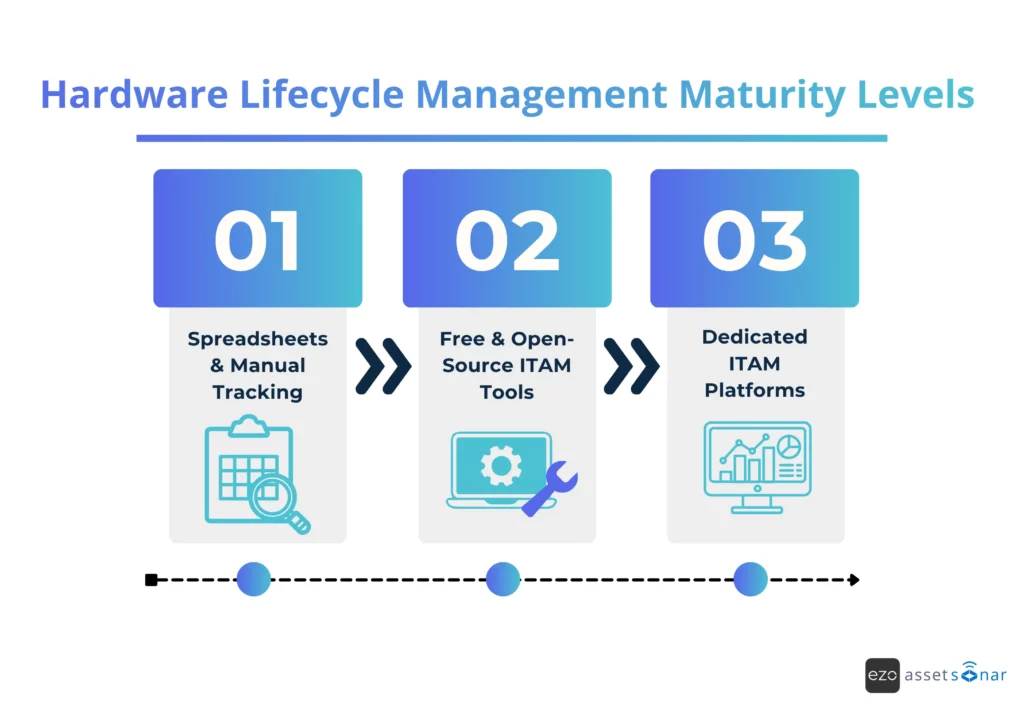
Enterprise IT teams manage hardware lifecycle through a maturity path. Smaller or early-stage teams may start with spreadsheets; growing teams may use free or open-source ITAM tools; mature teams move to dedicated ITAM or HAM platforms; and advanced enterprises connect ITAM with MDM, ITSM, procurement, security, and disposal workflows.
The key difference is not just the tool. It is the level of lifecycle control. In practice, hardware lifecycle issues rarely stem from a single missing system.
They usually come from disconnected handoffs between IT, procurement, HR, finance, security, and disposal vendors. As maturity increases, teams move from recording assets after the fact to using connected data for deployment, support, refresh, and disposal decisions.
This creates a maturity spectrum.
Level 1: Spreadsheets and manual tracking
Many teams start with spreadsheets because they are simple and familiar. A spreadsheet can track asset name, serial number, owner, location, purchase date, warranty date, and status.
This may work for a small team with limited devices. It does not scale well in enterprise environments.
The main limitations are:
- no real-time updates
- high risk of human error
- duplicate or outdated records
- weak audit trail
- no automated warranty alerts
- poor remote asset tracking
- no direct ITSM or MDM integration
- limited reporting
- no workflow automation
Spreadsheets also break down during employee onboarding and offboarding. A device may be issued but not recorded. A laptop may be returned, but it may not be marked available. A former employee may still appear as the owner.
The trigger for moving away from spreadsheets is usually pain. Teams start missing assets. Audits become harder. Procurement buys devices that already exist. Support teams lack context. Security teams cannot confirm which devices are active or compliant.
Spreadsheets answer the question, “What did we record?” They do not always answer, “What is true right now?”
Level 2: Free and open-source ITAM tools
Some teams move from spreadsheets to free or open-source ITAM tools. These tools can help with basic inventory management, asset assignment, asset tagging, check-in/check-out, and simple reporting.
This is a useful step for growing teams. It gives them more structure than a spreadsheet and helps establish better asset discipline.
However, open-source tools can still leave gaps for enterprise teams. They may require more manual setup, hosting, maintenance, and configuration. They may also lack deeper automation, support, advanced reporting, AI insights, and enterprise-grade integrations.
Common limitations include:
- limited workflow automation
- manual maintenance burden
- fewer native integrations
- limited compliance reporting
- less support for complex approval flows
- weaker mobile or field workflows
- no deep connection to ITSM, MDM, CMDB, or procurement systems unless custom-built
Open-source tools can work well for basic hardware records. They are less effective when IT teams need end-to-end lifecycle control across many locations, departments, and systems.
Level 3: Dedicated ITAM and HAM platforms
Mature IT teams use hardware asset management and IT asset management platforms to create a reliable system of record for hardware assets. These platforms centralize ownership, location, cost, configuration, lifecycle status, maintenance history, and reporting, enabling IT teams to manage assets with greater control.
A dedicated ITAM or HAM platform usually supports:
- centralized hardware inventory
- asset tagging
- barcode, QR code, or RFID tracking
- user and department assignment
- location tracking
- warranty records
- contract records
- purchase history
- check-in/check-out workflows
- audit history
- maintenance records
- lifecycle status tracking
- reporting dashboards
- role-based access
- integrations with other IT systems
AssetSonar fits into this layer as an ITAM and HAM platform for teams that need centralized hardware records, ownership tracking, lifecycle status, audits, maintenance history, contract and warranty context, and reporting. It helps IT teams maintain a more reliable record of what they own, who has it, where it is, what condition it is in, and what lifecycle action should happen next.
The biggest benefit is control. IT teams can stop asking where assets are, who has them, and when they need attention. The platform gives them one reliable place to manage those answers while still working alongside MDM, ITSM, procurement, endpoint security, and ITAD systems.
The diagram below shows how enterprise teams typically mature from manual tracking to dedicated ITAM platforms.
What tools do enterprise IT teams actually use for hardware lifecycle management?
Enterprise IT teams usually use several tools for hardware lifecycle management because each tool handles a different part of the lifecycle. ITAM or HAM serves as the system of record, while MDM/UEM, ITSM, CMDB, procurement, security, and ITAD systems provide control, context, risk signals, and evidence of disposal.
The important point is this: hardware lifecycle management is not one feature. It is a connected operating model.
ITAM and HAM Platforms
Teams use them to track:
- asset name
- asset tag
- serial number
- category
- assigned user
- department
- location
- purchase cost
- vendor
- warranty
- condition
- lifecycle status
- maintenance history
- disposal status
These platforms answer the core lifecycle questions: what the organization owns, where each asset is, who has it, what it costs, whether it is supported, and what should happen next.
MDM and UEM Tools
MDM and UEM tools manage devices after deployment. They help IT teams configure, secure, update, and retire endpoints.
Microsoft Intune, for example, supports device lifecycle actions from enrollment and configuration to protection, remote actions, and retirement.
MDM and UEM tools help with:
- device enrollment
- policy enforcement
- configuration profiles
- patch management
- compliance checks
- encryption status
- remote lock
- remote wipe
- app deployment
- device retirement
These tools do not replace ITAM. They complement it. MDM tells IT whether a device is controlled and compliant. ITAM tells IT who owns it, what it costs, where it is, and where it sits in the lifecycle.
ITSM Systems
ITSM systems connect hardware to work.
They manage service requests, incidents, repairs, approvals, and SLAs. For hardware lifecycle management, this matters because many lifecycle events happen through tickets.
Examples include:
- new laptop request
- device replacement
- repair request
- lost device report
- accessory request
- onboarding hardware request
- offboarding retrieval task
- warranty repair
- disposal approval
When ITSM and ITAM are connected, support teams get better context. They can see the user, device history, warranty status, and previous tickets before taking action.
This helps reduce repeat issues. It also helps teams identify devices that should be repaired, refreshed, or retired.
CMDBs
A CMDB connects hardware to services, systems, users, and business impact.
This is useful for larger enterprises where hardware supports critical services. A server, network device, or endpoint may affect more than one user. It may support a business process, a department, an application, or a location.
A CMDB helps IT teams understand:
- which services depend on which hardware
- which users or departments are affected
- which assets are business-critical
- which incidents have a higher impact
- which hardware creates operational risk
For example, a failing laptop assigned to one user is one type of issue. A failing network device supporting a warehouse is a different issue. CMDB context helps IT prioritize correctly.
Procurement and ERP Systems
Procurement and ERP systems manage the financial side of hardware.
They track purchase orders, approvals, vendor contracts, invoices, budgets, and payment records. This data should connect to ITAM so IT teams can understand the full cost and ownership history of each asset.
Procurement data is useful for:
- budget planning
- vendor management
- warranty validation
- contract renewal
- purchase approval
- depreciation tracking
- cost allocation
- audit reporting
Without procurement integration, IT teams may know that an asset exists but not what it costs, who approved it, or what warranty terms apply.
Endpoint Security and Patch Management Tools
Endpoint security tools help teams understand whether hardware is secure enough to stay in service.
They track signals such as:
- encryption status
- antivirus or EDR status
- patch level
- vulnerability exposure
- operating system support
- device compliance
- threat activity
This matters because hardware lifecycle decisions are not only financial. They are also security decisions.
An old device may still function. But if it cannot support current patches, security tools, or operating system requirements, it may need to be replaced.
ITAD, Data Wiping, and Disposal Workflows
IT asset disposition, or ITAD, closes the hardware lifecycle.
This stage includes data wiping, recycling, resale, destruction, and documentation. NIST’s media sanitization guidance supports organizations in choosing proper sanitization methods based on the sensitivity of the data stored on each device.
Enterprise IT teams should track:
- disposal approval
- data wiping method
- certificate of sanitization
- chain of custody
- vendor handoff
- recycling or resale outcome
- final lifecycle status
- audit record
What Challenges Do Enterprise IT Teams Face with Hardware Lifecycle Management?
The biggest hardware lifecycle challenges are incomplete visibility, shadow IT, delayed refresh decisions, weak offboarding, fragmented data, and incomplete disposal records. These gaps make it harder for enterprise IT teams to control cost, security, compliance, and hardware availability across distributed environments.
Weak Offboarding and Retrieval Workflows
Offboarding is one of the most common failure points.
When an employee leaves, IT must retrieve devices, revoke access, wipe data if needed, and update asset records. If HR, ITAM, MDM, and ITSM are not connected, devices can remain assigned to former employees.
A remote employee may leave the company with a laptop still assigned to them because HR has closed the employee record, but no retrieval task has been created for IT.
This leads to lost assets and data exposure.
Incomplete Asset Visibility
A device may be shipped to a remote employee, moved between offices, stored in a local IT closet, sent for repair, or returned during offboarding. If the asset record is not updated, the organization loses visibility.
In practice, IT may approve a new laptop purchase because a usable returned device is sitting in storage but still marked as assigned in the asset record.
This challenge also affects security. NIST CSF 2.0’s asset inventory outcome calls for accurate, up-to-date records of enterprise assets, including end-user, network, IoT, and server devices. Without that inventory, teams cannot reliably secure, patch, recover, or retire hardware.
Shadow IT and Untracked Assets
Hardware can enter the organization outside standard procurement workflows.
A department may buy devices directly. A team may use unapproved peripherals. A manager may purchase hardware through a corporate card. These assets may never enter the ITAM system.
A business team may buy tablets for field staff directly from a vendor, but IT may not know they exist, enroll them in MDM, or include them in audits.
Untracked assets create security and compliance risk. IT cannot secure what it cannot see.
Delayed Refresh Cycles
Refresh cycles often get delayed due to budget constraints. That may save money in the short term, but it can increase repair costs, support tickets, downtime, and security exposure.
In many cases, a laptop that is repeatedly repaired after warranty expiry may cost more in support time and downtime than replacing it during a planned refresh cycle.
A better approach is to refresh based on lifecycle data. Teams should consider age, warranty, repair frequency, performance, endpoint compliance, and business need.
Compliance and Audit Gaps
Audits require proof of ownership, location, repair history, wiping, and disposal. A strong hardware lifecycle process captures this evidence as work is done, rather than forcing IT teams to reconstruct records later.
During an audit, IT may know that old devices were recycled, but without sanitization certificates or chain-of-custody records, the team cannot prove they were retired securely.
What Is the ROI of Effective Hardware Lifecycle Management?
Effective hardware lifecycle management improves ROI by reducing unnecessary purchases, redeploying usable assets, optimizing warranty use, reducing support waste, closing audit gaps, and helping IT make refresh decisions before hardware becomes expensive or risky to maintain.
A simple way to frame ROI is:
Hardware lifecycle ROI = avoided purchases + redeployed asset value + reduced repair waste + warranty savings + lower audit/disposal risk + reduced IT labor
This frames hardware lifecycle management as a business case, not just an inventory exercise.
The ROI usually comes from six areas:
| ROI area | How hardware lifecycle management helps |
| Lower procurement cost | Reduces duplicate purchases and improves redeployment |
| Fewer emergency replacements | Uses refresh planning before devices fail |
| Better warranty use | Helps teams repair covered devices instead of paying unnecessarily |
| Less downtime | Tracks device health, age, tickets, and maintenance needs |
| Stronger compliance | Keeps records for audits, disposal, and data wiping |
| Faster IT work | Reduces manual tracking, searching, and reconciliation |
Poor lifecycle visibility causes overbuying, underuse, emergency purchasing, and avoidable support costs. AssetSonar helps teams use centralized asset records, audits, maintenance history, and lifecycle status to reduce manual reconciliation, improve device accountability, and make refresh planning more predictable.
Hardware lifecycle management does not prevent every breach, but it supports basic controls that reduce exposure: accurate device inventory, encryption visibility, unmanaged-device detection, secure retirement, and disposal documentation.
Useful KPIs include:
- asset record accuracy
- percentage of devices assigned to active users
- average deployment time
- device recovery rate
- warranty coverage rate
- repair cost per device
- idle device percentage
- refresh backlog
- assets nearing the end of support
- disposal documentation completion rate
These KPIs help IT leaders move from reactive support to proactive lifecycle planning.
What Does a Modern Hardware Lifecycle Management Approach Look Like in 2026?
In 2026, modern hardware lifecycle management is connected, automated, and decision-driven. Leading IT teams combine asset records, endpoint data, service workflows, procurement context, security signals, and evidence of disposal to manage hardware proactively rather than react after devices fail, disappear, or become unsupported.
The modern approach is not just about tracking assets. It is about connecting hardware data to action.
Automated Discovery Replaces Static Inventory
Static inventory becomes outdated as devices move, users change roles, and hardware is repaired, reassigned, lost, or retired. Automated discovery helps teams identify devices, update records, and reduce manual reconciliation.
Lifecycle Workflows Connect IT, Procurement, and Finance
Hardware lifecycle decisions involve more than IT.
Procurement manages purchasing. Finance tracks cost and depreciation. HR triggers onboarding and offboarding. Security checks compliance. IT handles deployment, support, and retirement.
Modern hardware lifecycle management connects these teams through workflows, including mobile-friendly updates for distributed and field IT teams that need to scan asset tags, confirm custody, update locations, and record maintenance or disposal actions away from a desk.
For example, HR can trigger onboarding or offboarding; ITSM can manage the request; procurement can approve or source hardware; ITAM can track ownership; MDM can secure the device; and ITAD can document final disposal.
AI and Analytics Improve Refresh Planning
AI should not be used as a vague buzzword. Its value is in pattern detection and decision support.
In hardware lifecycle management, analytics and, where available, AI-assisted insights can help identify:
- devices with repeated incidents
- assets nearing warranty expiration
- hardware with high repair costs
- underused or idle devices
- refresh candidates
- missing asset data
- abnormal device activity
- risky assets without compliance signals
This helps IT teams act earlier. It also helps leaders forecast budget needs with more confidence. The goal is not to let AI decide when to retire hardware on its own. The goal is to give IT better signals for repair, refresh, redeployment, and retirement decisions.
Compliance Is Built Into the Workflow
Modern lifecycle management captures compliance evidence during normal operations, including purchase records, ownership history, maintenance logs, access changes, data-wiping records, and disposal certificates. This makes audits easier because IT does not have to chase records after the fact.
Managed Device Lifecycle Services Are Growing
Device lifecycle management is also becoming more service-driven. According to Firstbase’s summary of Gartner’s 2025 Market Guide for Managed Device Life Cycle Services, adoption of managed device lifecycle services is projected to reach 70% of organizations by 2028, rising from fewer than 35% today.
This reflects a broader trend. Enterprises want more support for procurement, deployment, redeployment, retrieval, repair, and retirement. Some teams manage this in-house. Others use vendors. Many use a hybrid model.
Hardware Lifecycle Management Readiness Checklist
Enterprise teams can assess their hardware lifecycle maturity by checking whether they can answer key operational questions without manual follow-up. These hardware lifecycle management best practices help reveal visibility, workflow, and ownership gaps before they create cost, security, or audit issues.
Lifecycle gaps usually appear when teams make decisions in disconnected systems: IT deploys devices without complete ownership records, support fixes devices without repair history, and security flags risky endpoints without lifecycle context.
If your team is deciding what to use for hardware lifecycle management, start by identifying which lifecycle questions you cannot answer quickly today.
- Do all hardware assets have assigned owners?
- Can IT see device age, condition, warranty, and lifecycle status?
- Can procurement check the available inventory before buying new hardware?
- Are onboarding and offboarding workflows connected to asset records?
- Are repairs, incidents, and maintenance tasks linked to asset history?
- Can IT identify idle, lost, or underused devices?
- Are refresh decisions based on age, warranty, performance, and support history?
- Are EOL and EOS risks tracked before devices become unsupported?
- Are retired assets wiped, recycled, resold, or destroyed with proper documentation?
- Can IT produce audit-ready reports without rebuilding records manually?
- Are ITAM, MDM, ITSM, procurement, and security tools connected or at least aligned?
- Can leadership see lifecycle KPIs such as deployment time, recovery rate, warranty exposure, and refresh backlog?
A strong hardware lifecycle process should make these answers easy to find. If teams depend on tribal knowledge, email threads, or spreadsheet reconciliation, the process is not mature enough for enterprise scale.
How Should Enterprise Teams Choose the Right Hardware Lifecycle Management Approach?
Enterprise teams should choose a hardware lifecycle management approach based on asset volume, location complexity, compliance needs, integration requirements, and workflow maturity. The right approach should help IT track hardware, integrate lifecycle data, automate workflows, support audits, and simplify repair, refresh, redeployment, and disposal decisions.
In other words, what to use for hardware lifecycle management depends on whether the team needs basic inventory management, dedicated ITAM, or a connected lifecycle stack spanning IT, procurement, security, and finance.
A small team may only need basic inventory control. A large enterprise needs more. It needs role-based access, automated workflows, integrations, reporting, audit trails, and lifecycle visibility across locations.
Use this selection framework:
| If your team needs | Look for |
| Basic inventory control | Asset assignment, check-in/check-out, asset tags, and location records |
| Enterprise visibility | Automated discovery, dashboards, lifecycle status, and role-based access |
| Better support workflows | ITSM integration and ticket-to-asset linking |
| Stronger compliance | Audit trails, disposal records, warranty history, and access logs |
| Lower hardware spend | Utilization reports, redeployment data, and refresh planning |
| Remote device control | MDM/UEM and endpoint security integrations |
| Better procurement control | Purchase orders, vendor records, warranty terms, and approval workflows |
| Secure disposal | ITAD records, data wiping proof, and chain-of-custody tracking |
The best approach is rarely “buy a tool and stop there.” Enterprise teams should define the lifecycle process first. Then they should choose tools that support that process.
Start with these questions:
- How many hardware assets do we manage?
- Where are they located?
- Who owns lifecycle decisions?
- What systems already hold asset data?
- Which lifecycle stages are most broken?
- Do we need automated discovery?
- Do we need ITSM, MDM, or procurement integrations?
- What audit evidence do we need?
- How do we handle disposal today?
The answers will show whether the organization needs a basic inventory tool, a dedicated ITAM platform, or a connected hardware lifecycle stack.
What Should Enterprise Teams Avoid?
Enterprise teams should avoid tools that store only asset records and do not support lifecycle actions. Hardware lifecycle management requires ownership, movement history, warranty context, maintenance records, ticket links, refresh planning, and secure disposal documentation.
Avoid solutions that:
- track assets but do not support lifecycle status
- cannot connect assets to users, tickets, locations, or departments
- lack warranty, maintenance, or disposal history
- require heavy manual updates for every asset movement
- cannot support audits or role-based reporting
- do not integrate with ITSM, MDM, procurement, or security workflows
- make it hard to identify idle, aging, or unsupported hardware
The right approach should help IT teams make better decisions, not just store asset records.
Moving From Reactive Hardware Tracking to Strategic Lifecycle Control
Enterprise hardware lifecycle management has moved beyond static inventory. In 2026, IT teams need connected visibility across asset records, endpoint control, service workflows, procurement data, warranty tracking, compliance records, and secure disposal processes.
The right maturity path depends on scale. Smaller teams may start with spreadsheets or basic inventory tools. Still, growing enterprise teams need dedicated ITAM or HAM platforms that integrate hardware ownership, support history, refresh planning, and evidence of retirement.
If your team is deciding what to use for hardware lifecycle management, start by identifying where lifecycle control breaks down today: procurement, deployment, maintenance, refresh, redeployment, or disposal. For teams ready to move beyond manual tracking, AssetSonar centralizes hardware records, lifecycle status, ownership, audits, maintenance history, procurement context, and retirement workflows on a single connected platform.
For teams ready to move beyond manual tracking, AssetSonar centralizes hardware records, ownership, lifecycle status, audits, maintenance history, contract and warranty context, and reporting in a single connected ITAM platform. It gives IT teams the asset context they need to reduce manual reconciliation, improve accountability, and make better hardware lifecycle decisions.