Most organizations know what equipment they own. The harder question is whether they can quickly say where a specific asset is, who has it, whether it is available, and what condition it is in.
Asset inventory management is the ongoing process of recording, tracking, verifying, and updating information about physical assets throughout their lifecycle. It keeps asset identity, location, custody, status, condition, maintenance history, and retirement records up to date as equipment is acquired, assigned, moved, serviced, audited, and retired.
Building an asset list and keeping it accurate are different problems. Creating the initial record is relatively straightforward; maintaining its accuracy as assets move through day-to-day operations requires ongoing discipline.
For inventory managers, the goal is not simply to know what the organization owns. It is to maintain an asset inventory that matches each asset’s current location, custody, status, and condition.
What is asset inventory management?
In practice, the scope includes the physical assets an organization owns, manages, or controls, as well as the operational information needed to keep those records useful over time. That can include equipment identity, location, custody, availability, condition, maintenance context, and lifecycle history.
An asset inventory may contain equipment such as:
- Machinery
- Vehicles
- Power tools
- Test equipment
- Furniture
- Medical devices
- AV equipment
- Facilities equipment
- Computers and other physical devices
The inventory record identifies each asset and captures the information needed to manage it, such as its location, who has custody of it, whether it is available, and what has happened to it over time.
Asset inventory vs. asset inventory management
These terms are related but not identical.
An asset inventory is a dataset or register that contains information about physical assets.
Asset inventory management is the ongoing operating process that keeps that dataset accurate.
A register may indicate that a generator belongs to Warehouse A. Asset inventory management records that it was transferred to Site B, assigned to a crew, sent for maintenance, returned to service, and eventually retired.
That distinction separates a static list from a usable operational system of record.
Asset inventory vs. asset register vs. asset tracking
Asset inventory, asset register, and asset tracking are closely related terms, and organizations may use them differently. The useful distinction is in what each term emphasizes.
| Term | Practical meaning |
| Asset inventory | The set of physical assets currently in scope, together with information such as identity, location, custody, status, and availability |
| Asset register | A structured record used to maintain asset information for operational, governance, financial, or reporting purposes |
| Asset tracking | The processes and technologies used to record changes in asset identity, location, custody, status, and movement |
| Asset inventory management | The broader operating discipline that keeps asset information accurate as assets are acquired, assigned, moved, maintained, audited, and retired |
Asset inventory and asset register are often used interchangeably. Where an organization distinguishes them, “inventory” typically emphasizes the assets currently in scope and their operational state, while “register” emphasizes the structured record used to maintain and govern that information.
Asset tracking is one part of asset inventory management. Scanning an asset, recording a transfer, or updating custody helps keep the record current, but accurate asset inventory also depends on governance, audits, maintenance updates, lifecycle controls, and clear data ownership.
Asset inventory vs. traditional inventory management
One common source of confusion is treating all physical resources as the same type of inventory, even though individually tracked assets, reusable stock, and consumables require different management models.
An individually tracked vehicle requires a different management model from a box of replacement filters.
A useful distinction is:
| Item type | Example | How is it managed |
| Individually tracked asset | Vehicle, laptop, camera, power tool | Each item has its own identity, location, custody, status, and history |
| Reusable stock | Standard patch cables, basic adapters, reusable storage bins | Managed by quantity when individual unit history is not required |
| Consumable inventory | Lubricants, fasteners, cleaning supplies | Quantity decreases as stock is consumed |
EZO EAM applies this distinction through three item types: Assets for individually tracked equipment, Asset Stock for reusable items managed by quantity, and Inventory for consumable stock. Other asset and inventory systems may use terms such as serialized assets, non-serialized or bulk items, and consumable inventory for similar tracking models.
Terminology may differ across systems, but the underlying principle is the same: individually tracked assets require a different control model than reusable bulk items and consumables.
What information should an asset inventory contain?
An effective asset inventory needs enough information to support operational decisions without becoming overloaded with fields nobody maintains.
At minimum, consider capturing:
| Information | Why it matters |
| Asset ID | Gives each asset a unique identity |
| Asset name | Helps users quickly identify and search for the correct asset |
| Category | Groups similar equipment |
| Serial number | Helps confirm physical identity |
| Manufacturer/model | Supports servicing and replacement |
| Location | Shows where the asset is expected to be |
| Custodian | Shows who is responsible for it |
| Department/team | Adds organizational context |
| Status | Distinguishes available, checked out, under maintenance, retired, etc. |
| Condition | Supports maintenance prioritization, safety checks, and repair or replacement decisions |
| Purchase date | Supports lifecycle decisions |
| Purchase cost | Adds financial context |
| Warranty | Helps manage repairs and service |
| Maintenance history | Shows what work has been performed |
| Documents | Keeps manuals, certificates, warranty files, photos, and other supporting records linked to the asset |
| Retirement status | Prevents disposed equipment from remaining active |
Organizations may also need custom fields for project numbers, calibration dates, inspection requirements, funding sources, asset criticality, or other operational information.
The objective is not to capture every possible field. Each field should help someone identify, locate, maintain, govern, audit, or make a decision about the asset.
The asset inventory management lifecycle
Effective asset control should follow equipment from acquisition through retirement, preserving its identity and history through changes in location, custody, condition, and status.
A useful framework is:
Acquire and register → Tag → Assign → Move → Maintain → Audit → Retire
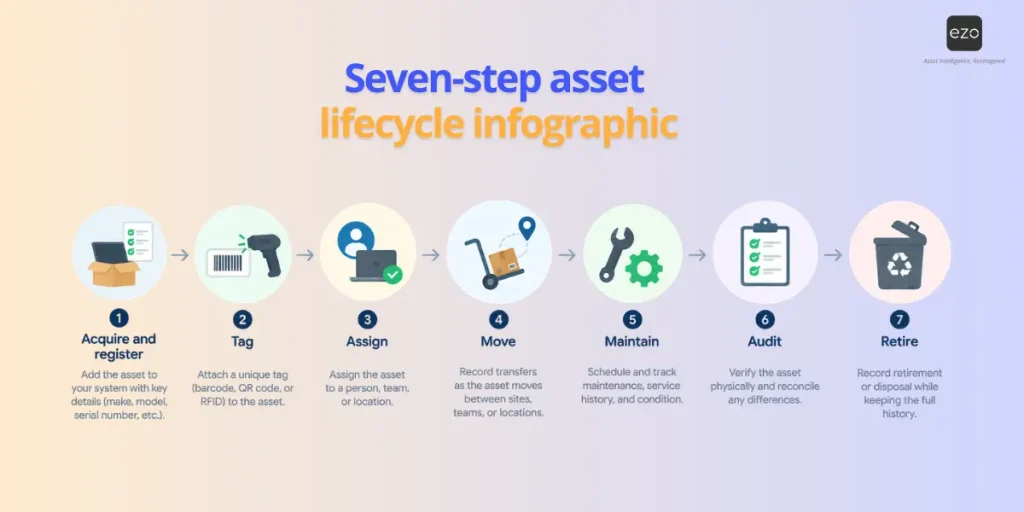
1. Acquire and register
Asset control should begin as equipment is acquired or received. Create or confirm the asset record using information such as supplier, purchase order, acquisition date, cost, manufacturer, model, and warranty, where applicable. In PO-driven, pre-tagged, or drop-shipped workflows, you may create the digital record before the physical asset arrives. The key is to ensure the asset enters service with a valid record and identifier already in place.
2. Identify and tag the asset
Connect each physical asset to its digital record using an appropriate identifier, such as a 1D barcode, a QR code, an RFID tag, or a manufacturer’s serial number.
When designing the tagging process, consider:
- Environment: Use label materials and adhesives suited to heat, moisture, chemicals, abrasion, or outdoor exposure where required.
- Placement: Apply tags in a consistent, accessible location that does not interfere with operation, maintenance, or safety.
- Scan distance and label size: Make sure the code can be read reliably in the environment where staff will use it.
- Human-readable identifiers: Include an asset ID or other readable reference so the asset can still be identified if the code is damaged or cannot be scanned.
- Tracking method: Use individual tags where unit-level custody, maintenance, inspection, or lifecycle history matters; quantity-based tracking may be more appropriate for interchangeable items.
The tag should make the correct record easy to retrieve, but tagging alone does not keep the inventory accurate. You still need to record location, custody, status, and lifecycle changes as they occur.
3. Assign location and custody
Determine where the asset belongs and who is responsible for it.
These are different concepts.
A tool may belong to a warehouse while being temporarily checked out to a technician. A vehicle may belong to one operating site but be assigned to another team.
Maintaining both location and custody provides a clearer record than relying on either alone.
4. Record movement
Assets rarely remain where they were first registered.
They may be:
- Checked out
- Returned
- Transferred between sites
- Assigned to projects
- Moved between warehouses
- Sent to contractors
- Sent to repair vendors
These movements should update the existing record rather than create new asset copies.
5. Connect maintenance and condition
Maintenance changes an asset’s operational state.
The inventory record should make it possible to understand:
- Whether the equipment is under maintenance
- What services have been completed
- When future maintenance is due
- What repairs have occurred
- What downtime has been recorded
- What documentation is associated with the service
This prevents the asset inventory from reporting equipment as operational when maintenance records indicate otherwise.
6. Audit and reconcile
Regularly compare the system record against physical reality.
An audit can confirm:
- The asset exists
- It is in the expected location
- The identifier matches
- The custodian is correct
- Its status is accurate
- Its condition has been recorded appropriately
Audit discrepancies then become data-quality issues to investigate rather than simply numbers to count.
7. Retire the asset
Retirement marks the end of an asset’s operational lifecycle, but the record should not simply disappear when the equipment leaves service.
A retirement process should capture:
- Reason for retirement — such as end of useful life, damage, obsolescence, loss, or replacement
- Disposition method — sale, donation, recycling, destruction, return to vendor, or another approved route
- Retirement date and approvals
- Final location or recipient, where relevant
- Supporting documentation, such as disposal certificates, transfer records, sale documentation, or photos
- Financial reconciliation, where the asset also exists in a fixed-asset or accounting system
Once retired, the asset should no longer appear as available for operational use, but its historical record should remain accessible in accordance with the organization’s financial, contractual, regulatory, donor, or internal data-retention requirements.
Why do asset inventories become inaccurate?
Creating an initial asset inventory is relatively straightforward. The harder part is keeping it accurate as equipment changes location, custody, status, condition, and lifecycle stage.
Common causes of inaccurate records include:
- Transfers that are never recorded
- Informal handoffs between employees or teams
- Missing checkout or return records
- Assets moved between sites without a location update
- Duplicate records created during imports
- Inconsistent naming or classification
- New purchases that never enter the asset register
- Assets sent for maintenance without a status update
- Retired or disposed equipment remaining active
- Multiple spreadsheets or local systems are becoming competing records
These gaps create a difference between what the system says and what is physically happening.
| The system record says | Operational reality |
| The asset is at Site A | It was transferred to Site B |
| Available | Checked out to a technician |
| Active | Already retired or disposed |
| Two asset records exist | Only one physical asset exists |
| Ready for use | Currently under maintenance |
| Assigned to Employee A | Handed to Employee B without an update |
The longer these discrepancies remain unresolved, the harder it becomes to locate equipment, complete audits, understand availability, and make reliable purchasing or lifecycle decisions.
Why asset inventory management matters
Accurate asset records help teams understand not only what equipment exists, but also where it is, who is responsible for it, whether it is available, and what has happened to it throughout its lifecycle.
Effective asset inventory management can help organizations:
- Locate equipment faster by maintaining current location and custody records.
- Improve utilization by identifying idle or underused assets for reassignment.
- Avoid unnecessary purchases by showing whether suitable equipment already exists elsewhere in the organization.
- Strengthen accountability by preserving checkout, custody, and movement history.
- Simplify audit reconciliation by providing teams with a current record to compare against physical equipment.
- Add maintenance context to availability so that equipment under repair or awaiting service is not treated as ready for use.
- Support lifecycle decisions with acquisition, movement, maintenance, utilization, and retirement history.
These benefits depend on the quality of the underlying data. A static asset list loses value quickly if operational changes are not consistently reflected in the record.
How to keep asset inventory accurate
Accuracy depends on making asset updates part of everyday workflows rather than relying on periodic cleanup.
Define authoritative data sources
Maintain a single, consistent asset identity, and clearly define which system owns each type of information.
For example, procurement may own purchasing data, finance may own book value and depreciation, maintenance systems may own service activity, and HR may provide employee information used for custody.
Teams should define:
- Which system creates the asset record
- Which system owns each important field
- How often is the connected data updated
- How changes move between systems
- Which source takes precedence when information conflicts
This reduces the risk of different teams maintaining competing versions of the same asset.
Standardize the data model
Use consistent rules for:
- Asset names
- Categories
- Locations
- Statuses
- Custody
- Required identifiers
- Retirement states
For example, “New York Warehouse,” “NY Warehouse,” and “NYC WH” should not be treated as three separate values representing the same location.
Standardization does not mean collecting every possible field. Each field creates an ongoing maintenance obligation, so teams should prioritize information that supports identification, custody, maintenance, audits, financial context, or lifecycle decisions.
Capture changes when they happen
Asset records are most reliable when updates occur as part of the activity that caused the change.
For example:
- Record a checkout when you issue equipment.
- Update custody when an asset changes hands.
- Record a transfer when equipment moves between sites.
- Change its status when it enters maintenance.
- Record its return when it becomes available again.
- Retire the asset when it permanently leaves service.
Asset tags can make equipment easier to identify, but tagging alone does not keep the inventory accurate. The underlying record still needs updating when location, custody, status, or lifecycle state changes.
Define ownership and permissions
Central governance and local operational updates should work together.
A central asset or inventory manager can define:
- Naming and classification rules
- Location structures
- Required fields
- Status definitions
- Audit policies
- User roles and permissions
Operational teams should then record the events they perform. Procurement can record acquisitions, warehouse teams can record receiving and transfers, technicians can update custody changes, and maintenance teams can update service status.
Permissions should allow users to update the information relevant to their role without giving everyone access to controlled fields, record deletion, lifecycle history, or organization-wide settings.
Preserve custody, movement, and lifecycle history
A current location only tells you where the asset is recorded now. Inventory managers also need to understand how it got there.
Preserve history for events such as:
- Checkouts and returns
- Employee assignments
- Site transfers
- Contractor custody
- Maintenance handoffs
- Retirement or disposal
This makes discrepancies easier to investigate and provides a clearer chain of accountability.
Monitor exceptions between audits
Do not wait for the next full audit to discover data-quality problems.
Regularly review exceptions such as:
- Assets with no known custodian
- Assets that have not been verified within the required period
- Overdue checkouts
- Unexpected locations
- Duplicate asset records or identifiers
- Assets marked available while under maintenance
- Retired equipment still appearing in active workflows
Exception monitoring helps teams address smaller problems before they become large reconciliation exercises.
Use automation where the rules are clear
Automation can reduce repetitive updates, route approvals, and help enforce standard processes.
Use it where the trigger and expected action are predictable. Keep human review for situations that require judgment, such as unusual transfers, audit discrepancies, condition assessments, or retirement decisions.
EZO EAM’s Workflow Automation Engine can support configurable workflows across asset, purchase order, and work order processes using triggers, conditions, actions, and branching logic.
How to manage asset inventory across multiple locations
Multi-site operations introduce an additional challenge: the asset inventory must remain consistent without impeding local teams’ work.
A good multi-location model should answer:
- Which site owns the asset?
- Where is it physically located?
- Who currently has custody?
- Is it available to another team?
- Has it been transferred permanently or temporarily?
- Does its historical record move with it?
Use structured location hierarchies rather than free-text location fields.
For example:
Region → Site → Building → Warehouse → Storeroom
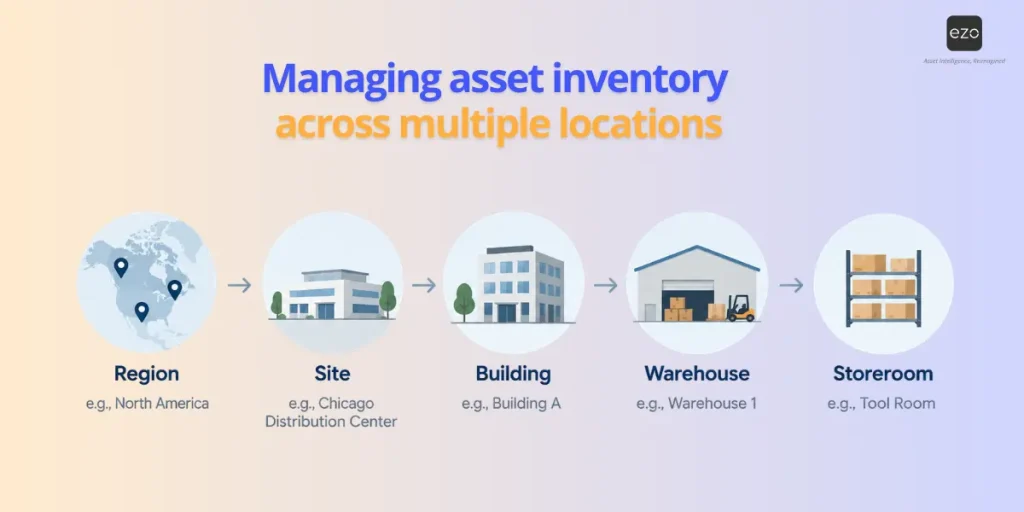
This makes reporting more consistent and allows organizations to compare or aggregate asset information at different levels.
Transfers should also preserve the same asset identity and lifecycle history. Moving equipment from one site to another should not make it appear as a newly acquired asset.
How should shared and off-site assets be managed?
Shared equipment requires stronger custody controls because ownership is organizational while possession changes frequently.
Keep one permanent asset identity while recording:
- Current custodian
- Checkout date
- Expected return
- Location
- Reservation where applicable
- Transfer history
The same principle applies when assets leave the organization’s facilities.
Assets may temporarily leave the organization’s facilities for customer sites, contractors, repair vendors, remote workers, or temporary projects. They should remain visible in the asset inventory throughout that period.
The custody or external location may change, but the asset should not disappear from the operational record.
Auditing and reconciling physical assets
An asset audit should do more than count equipment.
It should answer:
Does the physical asset match the information we currently trust in the system?
A useful reconciliation workflow is:
Expected record → Physical verification → Identify exception → Investigate → Correct record → Preserve audit history
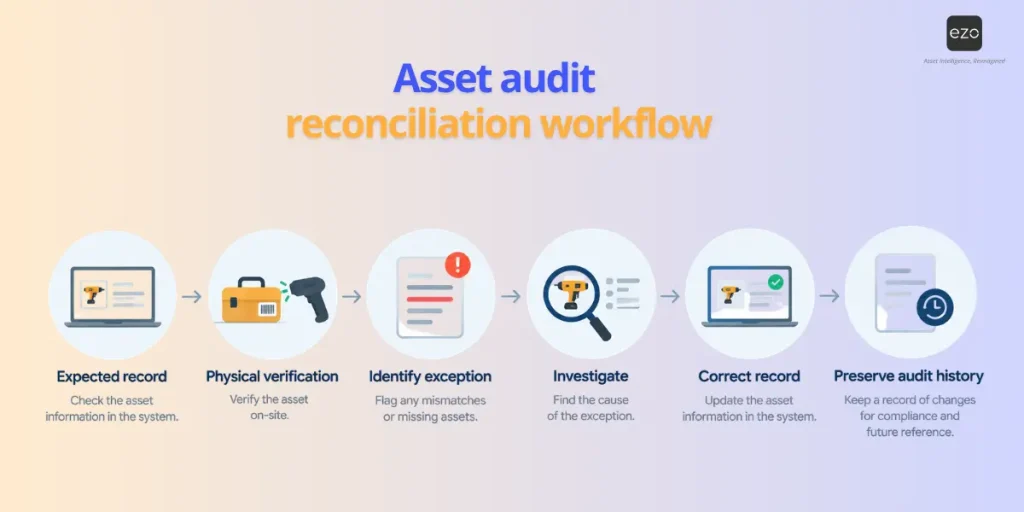
What should an asset audit verify?
Depending on the asset type:
- Presence
- Location
- Asset tag
- Serial number
- Custodian
- Status
- Condition
- Quantity for stock items
What should happen when something does not match?
Do not immediately overwrite the record.
First determine whether:
- A transfer was never entered
- The asset is checked out
- It was sent for maintenance
- It was retired
- The wrong asset was scanned
- The record is a duplicate
- The asset is genuinely missing
Repeated discrepancies often indicate a broken workflow rather than isolated data-entry errors.
EZO EAM supports location and custody audits with Verified, Denied, and Flagged outcomes. During location audits, scanning can also identify items recorded at the wrong location or outside the audit scope.
Asset inventory management in practice: WCS Cambodia
Wildlife Conservation Society (WCS) Cambodia manages equipment across a head office and multiple field sites. Before using EZO EAM, its teams relied on Excel files for asset information. WCS uses QR codes and mobile scanners to identify equipment, while field staff use EZO EAM’s mobile app to access asset information during inventory audits and when working away from their laptops. Custom reports also help the organization prepare asset information for donor audits and reconcile operational records with financial data.
How often should assets be audited?
There is no universal frequency.
Audit frequency should reflect:
- Asset value
- Movement frequency
- Loss risk
- Regulatory requirements
- Number of locations
- Custody changes
- Operational criticality
High-movement tools may need more frequent verification than fixed plant equipment.
Instead of relying entirely on one annual audit, organizations can combine:
- Periodic location audits
- Cycle audits
- Custody verification
- Risk-based audits
- Exception-driven reviews
This catches smaller discrepancies before they compound.
Barcode vs. QR code vs. RFID vs. GPS and IoT
Asset-tracking technologies solve different problems and should not be treated as interchangeable.
| Technology | Primary purpose | Key consideration |
| 1D barcode | Identifies an individual asset using an encoded value | Requires optical line of sight; generally carries less data than a 2D code and can be scanned with compatible handheld scanners or mobile devices |
| QR code (2D barcode) | Identifies an asset and can encode more information, including a link to its digital record | Requires optical line of sight; commonly readable with smartphone cameras and 2D imaging scanners |
| RFID | Identifies tagged assets, including multiple items without direct line of sight in suitable environments | Requires compatible tags and readers; performance depends on tag type, materials, environment, and hardware |
| GPS/telematics | Provides device-reported location and, in some cases, movement or usage data for equipped mobile assets | Requires installed hardware, connectivity, and appropriate reporting configuration |
| IoT sensors and beacons | Capture condition, usage, presence, proximity, or location signals depending on the technology | Can enrich asset records with telemetry but should complement, not replace, the asset’s master identity and lifecycle record |
A QR code is a type of 2D barcode, so the distinction is more accurately between 1D and 2D optical identification.
Both require the code to be visible when scanned, while RFID can identify tagged assets without direct line of sight in suitable environments. GPS, telematics, IoT sensors, and beacons serve a different role by adding location, usage, condition, presence, or proximity data to the asset record.
Which asset accuracy and control metrics should you track
The most useful metrics show whether asset records match physical reality and whether teams can reliably locate, verify, and control equipment.
| Metric | How to calculate or measure it | Why it matters |
| Asset inventory accuracy | Verified assets whose key record fields match ÷ total assets verified × 100 | Shows how closely the system reflects the physical asset base |
| Verification coverage | Assets physically verified within the required period ÷ total in-scope assets × 100 | Shows how much of the asset inventory has been recently validated |
| Missing or unlocated asset rate | Assets that cannot be reconciled to an expected location or custodian ÷ total in-scope assets × 100 | Highlights asset-control and reconciliation gaps |
| Custody exception rate | Assets with missing, overdue, or unresolved custody assignments ÷ assets requiring custody × 100 | Shows where accountability records need attention |
| Audit completion rate | Audits completed within the scheduled period ÷ audits scheduled for that period × 100 | Measures whether planned verification activity is being completed |
| Idle asset rate | Assets with no recorded checkout, reservation, or usage event during a defined period ÷ eligible assets × 100 | Helps identify equipment that may be available for reassignment |
| Asset utilization rate | Recorded active-use time ÷ available operating time × 100, where reliable usage data exists | Helps identify heavily used and underused assets |
| Time to locate equipment | Median time between an asset request or search and confirmed physical retrieval | Shows how efficiently teams can find equipment when needed |
Not every organization needs every metric. Inventory managers should choose measures based on how assets are used, how frequently they move, and what data the organization can capture reliably.
Asset inventory management vs. fixed asset accounting
The same physical asset may exist in both an operational asset system and a financial system, but each set of records answers different questions.
| Asset inventory management | Fixed asset accounting |
| Where is the asset? | What is its book value? |
| Who has it? | How is it depreciated? |
| Is it available? | Was it capitalized? |
| What condition is it in? | What is its useful life? |
| What maintenance occurred? | What financial disposal treatment applies? |
| Has it moved? | What ledger/account owns it? |
The two systems don’t need to duplicate every field.
Instead, define:
- Which system owns operational data.
- Which system owns financial data.
- Which identifier connects the records.
- How important changes are reconciled.
When spreadsheets stop being enough
Spreadsheets are not inherently poor asset management tools.
For a small, stable asset base with limited movement and one or two administrators, a spreadsheet may work perfectly well.
Problems tend to appear when the asset inventory becomes operational rather than static.
Signs include:
- Multiple locations
- Frequent transfers
- Shared equipment
- Many custodians
- Several users editing records
- Regular maintenance
- Barcode or QR workflows
- Recurring audits
- Different access permissions
- Several spreadsheet versions
- A need for complete movement history
The core issue is not spreadsheet size alone.
It is whether multiple people need to update changing asset information while preserving a consistent history and system of record.
What should asset inventory management software do?
The right software should support both the day-to-day workflows that keep asset records accurate and the controls needed to manage them at scale.
Core asset records
Look for capabilities that establish and preserve a reliable asset record:
- Unique asset records to give tracked equipment a persistent identity individually
- Structured locations to organize assets across sites, buildings, warehouses, and other location hierarchies
- Custody and assignments to show who is currently responsible for equipment
- Retirement controls to remove assets from active operations without losing lifecycle history
Operational workflows
The system should support the events that change an asset’s operational state:
- Check-in and checkout for temporary equipment use
- Transfers between teams, custodians, and locations
- Maintenance history so service activity remains connected to the asset
- Purchasing and receiving context to connect acquisition with asset creation where relevant
Capture and verification
For distributed or high-movement environments, evaluate how easily teams can update and verify records where the work happens:
- Barcode, QR code, or RFID support for asset identification and physical verification
- Mobile access for field updates
- Offline capability, where unreliable connectivity is a concern
- Audit workflows to compare physical assets against expected records and investigate discrepancies
Administration, reporting, and integration
As the asset base grows, governance and system connectivity become more important:
- Permissions to control who can view or change specific records and fields
- Bulk imports and updates for migrations and large-scale record maintenance
- Reporting and utilization analysis to identify asset location, usage, and data-quality gaps
- APIs and integrations to connect asset information with surrounding business systems
The right mix depends on the size of the asset base, how frequently equipment moves, the number of locations and users involved, and whether asset data needs to connect with maintenance, finance, procurement, or other operational systems.
How to implement asset inventory management
The lifecycle above describes what should happen to each asset from acquisition through retirement. The steps below explain how to implement the data standards, workflows, roles, and controls to consistently support that lifecycle.
Step 1: Define the scope
Start by deciding which physical items belong in the asset inventory and how to manage each type.
Determine whether you need to track:
- Machinery and production equipment
- Vehicles
- Tools and test equipment
- Facilities equipment
- Shared devices
- Reusable stock
- Consumable inventory
Items that require their own custody, maintenance, inspection, or lifecycle history should generally be individually tracked. Interchangeable items may be better managed by quantity.
Step 2: Establish ownership and data standards
Define who owns the asset management process and which teams are responsible for maintaining different types of information.
Set standards for:
- Asset names and categories
- Locations
- Statuses
- Required fields
- Unique identifiers
- Custody rules
- Retirement states
Where multiple systems contribute asset information, also establish which source is authoritative for each data domain.
Step 3: Clean and validate existing records
Do not move inaccurate source data into the new process unchanged.
Before migration:
- Remove duplicate records
- Standardize naming
- Confirm serial numbers and identifiers
- Map old locations to the new structure
- Resolve unknown custodians
- Identify retired or disposed assets
- Check completion of required fields
Set basic acceptance criteria so the team knows when the starting dataset is ready to use.
Step 4: Identify and physically verify assets
Connect each in-scope asset to the correct digital record using an appropriate identifier, such as a barcode, QR code, RFID tag, or manufacturer serial number.
Where practical, physically verify the starting inventory rather than assuming legacy records are correct.
This establishes a reliable baseline before everyday movement begins.
Step 5: Configure the workflows that change asset records
Define what should happen when an asset is:
- Received
- Assigned
- Checked out or returned
- Transferred
- Sent for maintenance
- Moved to another site
- Audited
- Retired
The objective is to make record updates part of the operational workflow, not a separate administrative task done later.
Step 6: Configure roles and permissions
Give users sufficient access to record the events they are responsible for, without granting every user control over master data.
For example, warehouse teams may record receiving and transfers, technicians may update custody or service activity, and asset administrators may control taxonomy, audit rules, and retirement.
Step 7: Pilot before a wider rollout
Test the process with a representative location, team, or subset of assets before expanding it.
Use the pilot to validate:
- Asset taxonomy
- Import quality
- Tags and scanning
- Permissions
- Checkout and transfer workflows
- Audit procedures
- Reporting
Resolve problems before applying the model across the full asset base.
Step 8: Train users and monitor data quality
Train each role on the asset actions they are expected to perform, and establish a clear audit cadence after go-live.
Monitor exceptions such as:
- Missing or unverified assets
- Unknown custody
- Overdue checkouts
- Duplicate records
- Unexpected locations
- Assets with stale statuses
Use these findings to improve the underlying process rather than treating every discrepancy as an isolated data-entry error.
How EZO EAM supports asset inventory management
EZO EAM supports physical asset operations by separating individually managed equipment from reusable stock and consumable inventory while keeping them within the same operating environment.
Organizations can maintain individual asset records with location, status, custody, and history; manage quantity-based Asset Stock and Inventory; and support operational workflows, including checkouts, transfers, purchasing, maintenance, reporting, and audits. EZO EAM also supports CSV-based bulk imports and updates for Assets, Asset Stock, and Inventory.
Location and custody audits can help teams verify whether recorded information still matches the physical equipment, while configurable automations can support selected asset and purchase order workflows.
The important distinction remains the same: Assets, Asset Stock, and Inventory should not be treated as interchangeable item types. Their tracking model should match how the organization actually uses them.
Build an asset inventory that stays accurate
An asset inventory is useful only as long as it reflects reality.
Modern asset inventory management therefore goes beyond creating a list of equipment. It requires clear asset identities, consistent location and custody records, controlled movement, maintenance context, regular verification, lifecycle history, and defined responsibility for keeping information up to date.
The strongest systems make those updates part of everyday operations rather than a cleanup exercise before the next audit.