EZO EAM vs Limble
Control the Asset Lifecycle, Not Just Maintenance
We're Trusted by the Best




EZO EAM vs Limble: Head-to-Head Comparison
|
Table Header
|
||
|---|---|---|
|
Primary Orientation |
Complete Asset Lifecycle Management with Native CMMS Built-In |
Maintenance-first CMMS |
|
Work Order Management |
✔ |
✔ |
|
Preventive Maintenance |
✔ |
✔ |
|
Asset Checkout & Custody |
✔ Asset, stock, and cart history |
⚠️ Tool checkout; Enterprise only |
|
Reservations & Availability |
✔ Advance booking and calendar |
❌ |
|
Asset Lifecycle Breadth |
✔ Full asset lifecycle tracking |
⚠️ Retirement & capital depreciation on Enterprise |
|
Equipment Request-to-Issue |
✔ End-to-end equipment workflow |
⚠️ Work & purchase requests |
|
Multi-Location Management |
✔ Available on mid-tier |
⚠️ Enterprise tier |
|
Parts & Inventory |
✔ |
✔ |
|
Mobile App |
✔ |
✔ |
|
Reporting & Analytics |
✔ Custom asset and usage reports |
⚠️ No advanced reports on entry |
|
User Access |
✔ Broad access; features by plan |
⚠️ Technician licenses; requesters free |
|
Best Fit |
Multi-site control across compliance, mobility, and asset lifecycles |
Mobile-first CMMS for local maintenance shops |
|
Table Header
|
|
|---|---|
|
Primary Orientation |
|
|
Complete Asset Lifecycle Management with Native CMMS Built-In |
Maintenance-first CMMS |
|
Work Order Management |
|
|
✔ |
✔ |
|
Preventive Maintenance |
|
|
✔ |
✔ |
|
Asset Checkout & Custody |
|
|
✔ Asset, stock, and cart history |
⚠️ Tool checkout; Enterprise only |
|
Reservations & Availability |
|
|
✔ Advance booking and calendar |
❌ |
|
Asset Lifecycle Breadth |
|
|
✔ Full asset lifecycle tracking |
⚠️ Retirement & capital depreciation on Enterprise |
|
Equipment Request-to-Issue |
|
|
✔ End-to-end equipment workflow |
⚠️ Work & purchase requests |
|
Multi-Location Management |
|
|
✔ Available on mid-tier |
⚠️ Enterprise tier |
|
Parts & Inventory |
|
|
✔ |
✔ |
|
Mobile App |
|
|
✔ |
✔ |
|
Reporting & Analytics |
|
|
✔ Custom asset and usage reports |
⚠️ No advanced reports on entry |
|
User Access |
|
|
✔ Broad access; features by plan |
⚠️ Technician licenses; requesters free |
|
Best Fit |
|
|
Multi-site control across compliance, mobility, and asset lifecycles |
Mobile-first CMMS for local maintenance shops |
Legend:
✔ = Explicitly offered
❌ = Not offered or documented
⚠️ = Supported, but narrower in scope or context

Why EZO EAM?
Limble is a strong choice for maintenance teams seeking a focused, mobile-first CMMS with a well-regarded technician experience. The difference becomes more important when maintenance is only one part of the asset lifecycle.
EZO EAM integrates maintenance with custody, availability, reservations, transfers, compliance, and retirement into a single system. Teams can see who is responsible for each asset, whether it is ready for its next job, and what must happen before it changes hands or locations. Choose EZO EAM when you need to manage both the work performed and the assets that support it.
What We Bring to the Table
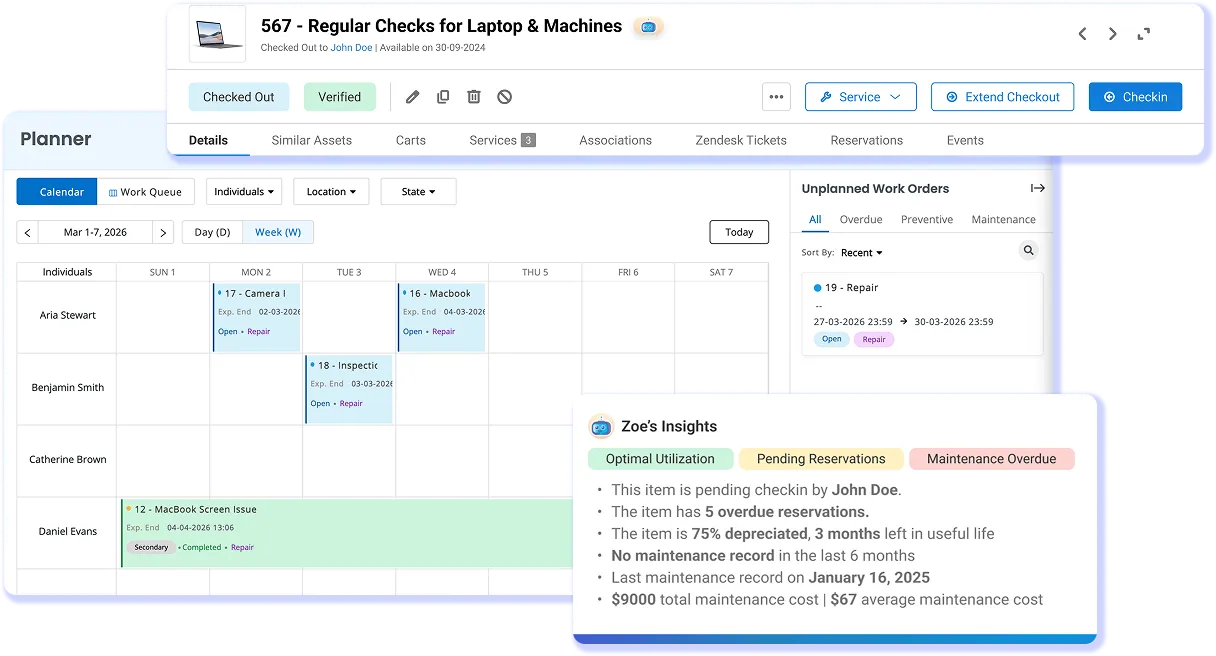
Operate the Asset, Not Just Maintain It
An asset has a working life before and after maintenance. It is acquired, assigned, used, serviced, moved between teams or sites, and eventually retired. When that history is split across systems, teams see individual events but not the full story of the equipment.
EZO EAM keeps that timeline on the asset record. Teams can follow equipment from acquisition through use and maintenance to retirement, making it easier to understand where an asset has been, how it has been used, and what should happen next.
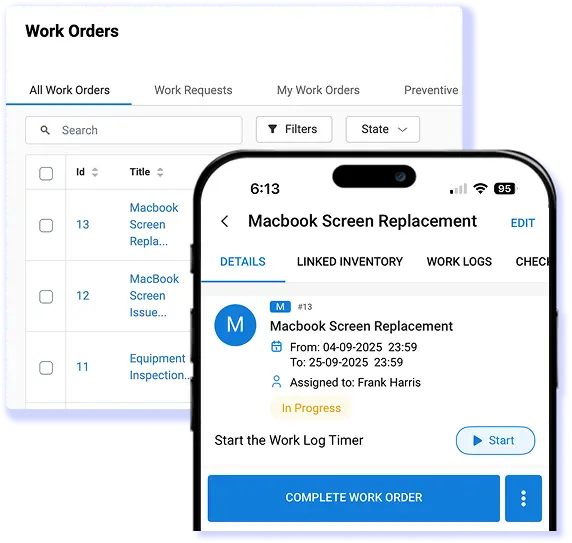
Asset Context Built Into Every Work Order
A technician needs more than the maintenance task itself. They may also need to know where the equipment is, who currently has it, whether another team expects it next, and whether it should remain out of service.
EZO keeps that operational context connected to the asset and its maintenance activity. Teams can make repair and return-to-service decisions with a clearer view of what is happening around the equipment, instead of checking separate records before every handoff.

A Vendor for the Long Run
Software becomes part of your workflow for years, so the vendor matters as much as the feature set. For nearly two decades, EZO has helped businesses find practical ways to manage their assets and maintenance. That experience shapes an honest, consultative approach focused on finding the right fit rather than simply selling software.
Transparent pricing and a fully functional 14-day free trial let teams evaluate EZO with confidence. From day one, a dedicated Customer Success Manager supports implementation, adoption, and regular reviews as business needs evolve.
Our Customers Tell Their Stories


Network Administrator
Enterprise (> 1000 emp.)


Mid-Market (51-1000 emp.)


Global Outsourcing Engineer
Enterprise(> 1000 emp.)

Proven by Teams. Recognized by Experts.



Manage the Asset and Every Job Around It
Frequently Asked Questions
Limble is primarily a maintenance-first computerized maintenance management system (CMMS), while EZO EAM connects maintenance with broader equipment operations. EZO EAM supports work orders, preventive maintenance, checklists, parts, and labor, while keeping that activity connected to custody, checkout, transfers, reservations, availability, inventory, and lifecycle records. Limble also manages assets and provides tool checkout, so the distinction is not simply maintenance versus asset tracking. The key difference is scope: EZO EAM is designed for teams that need to know what is happening around an asset before, during, and after maintenance, not only what maintenance work was performed.
EZO EAM is the stronger fit when maintenance must stay connected to how equipment is assigned, moved, reserved, checked out, returned, and accounted for. Operations teams can combine work orders and preventive maintenance with custody transfers, location tracking, reservations, availability, inventory, and lifecycle history. Limble is a strong option when the main objective is a focused, technician-friendly maintenance system centered on preventive maintenance and work orders. The distinction is therefore one of fit rather than an absolute winner: EZO EAM is designed for broader equipment operations, while Limble is particularly well suited to teams whose primary operating workflow is maintenance.
EZO EAM provides the broader workflow when equipment regularly changes hands or locations. Teams can check out equipment, transfer custody, assign items to locations, retain movement history, and reserve assets for future work, all while keeping these activities tied to the asset record. EZO EAM supports one assignee at a time, and recurring reservations require an add-on. Limble also supports tool checkout and custody through its Tools feature. EZO EAM’s distinction is how custody connects with reservations, availability, movement, maintenance, and the wider asset record.
Both EZO EAM and Limble support core maintenance workflows, including work orders and preventive maintenance. EZO EAM also supports checklists, work logs, and parts and labor associated with maintenance activity, with availability depending on the EZO EAM package selected. Limble’s maintenance execution and technician experience are genuine strengths. EZO EAM differentiates through the operational context around that work by connecting maintenance with custody, location, reservations, availability, and lifecycle records. This makes EZO EAM a stronger fit when maintenance is one part of a wider equipment operation.
Yes. EZO EAM supports future asset reservations and an availability calendar, so teams can see upcoming commitments before assigning equipment to another job, location, or crew. Reservations remain linked to the equipment record, along with custody and maintenance activity, and recurring reservations are available as an add-on. Limble’s Tools functionality supports real-time requests, approvals, checkouts, check-ins, and usage history for tools. The advanced equipment reservations are the cleaner difference between the two products rather than the checkout itself. That distinction matters when an operations team needs to plan future equipment demand, not simply record who currently holds a tool.
EZO EAM and Limble structure access differently. EZO EAM supports broad participation across asset and equipment workflows, while the maintenance capabilities available depend on the EZO EAM package selected. Limble uses paid licenses for technician users while allowing work requesters to submit maintenance requests without technician licenses. For larger teams, the comparison should account for the number of people managing maintenance, requesting or handling equipment, the volume of assets managed, and the level of maintenance functionality required.
Limble is known for straightforward technician adoption and a focused mobile maintenance experience. EZO EAM covers a broader operating scope by enabling teams to connect maintenance with custody, reservations, requests, locations, inventory, and other equipment workflows. This can require more configuration when several operational processes need to work together. EZO provides a functional 14-day free trial with no credit card required, giving teams a way to test these workflows before committing. Implementation time varies with the volume of data, number of locations, permission structures, integrations, and workflows being configured.
EZO EAM is designed to complement an enterprise resource planning (ERP) system rather than replace it. Its API can support connections between EZO EAM and other business systems, enabling relevant asset, maintenance, purchasing, inventory, and location data to move between workflows. EZO’s current API documentation applies a fair-use limit of 60 requests per minute. For a specific ERP, the connection may use an available integration or a custom API setup, depending on the system and workflow involved. Teams can define which records need to move, in which direction, and how often they need to synchronize.
Yes. EZO EAM supports structured data imports through Excel and CSV files, with a 1,000-record-per-file limit. Assisted migration is also available for larger or more complex datasets that require additional mapping and transfer support. There is no published one-click Limble migration path, so the migration scope depends on which assets, work orders, maintenance records, fields, and historical data need to move. Mapping the source data to the appropriate EZO EAM records helps preserve the operational history needed after the switch.
Both products support operations involving multiple locations, but EZO EAM connects location management to a broader equipment workflow. EZO EAM supports location-based item quantities, equipment movement, reservations, custody records, and inventory thresholds, so teams can manage both where equipment is and how it is being used. Limble also allows assets to be moved between locations, while its Regions feature for organizing multiple locations is documented for Enterprise customers. That makes the decision less about whether either product can represent more than one site and more about the workflow required across those sites: maintenance-centered location management in Limble versus maintenance connected with custody, availability, inventory, and movement in EZO EAM.
