EZO EAM vs Cheqroom
Connect Checkout to the Full Asset Lifecycle
EZO EAM goes beyond checkout by connecting scheduling and reservations to inventory, kits, depreciation, procurement, and maintenance in one system, with a mobile app that captures data via simple scans.
Trusted by Operations Teams Everywhere





EZO EAM vs Cheqroom: Head-to-Head Comparison
|
Table Header
|
||
|---|---|---|
|
Primary Orientation |
Connected asset operations |
Equipment checkout and reservations |
|
Barcode & QR Scanning |
✔ |
✔ |
|
Checkouts, Kits & Carts |
✔ |
✔ |
|
Reservations |
✔ |
✔ |
|
Self-Service Requests |
✔ |
✔ |
|
Approvals |
✔ |
⚠️ Limited approval workflows |
|
Maintenance Management |
✔ |
⚠️ Work orders; limited maintenance |
|
Depreciation Tracking |
✔ |
⚠️ Available on select plans |
|
Procurement & Multi-Currency |
✔ |
⚠️ Multi-currency not documented |
|
Batch Management |
✔ |
❌ |
|
Multi-Location Management |
✔ |
⚠️ Location capacity varies by plan |
|
Custody & Item History |
✔ |
✔ |
|
Custom Fields & Reporting |
✔ |
✔ |
|
Unified Fulfillment Queue |
✔ |
❌ |
|
Mobile Scanning |
✔ |
✔ |
|
Best Fit |
Multi-site asset operations |
AV equipment checkout teams |
|
Table Header
|
|
|---|---|
|
Primary Orientation |
|
|
Connected asset operations |
Equipment checkout and reservations |
|
Barcode & QR Scanning |
|
|
✔ |
✔ |
|
Checkouts, Kits & Carts |
|
|
✔ |
✔ |
|
Reservations |
|
|
✔ |
✔ |
|
Self-Service Requests |
|
|
✔ |
✔ |
|
Approvals |
|
|
✔ |
⚠️ Limited approval workflows |
|
Maintenance Management |
|
|
✔ |
⚠️ Work orders; limited maintenance |
|
Depreciation Tracking |
|
|
✔ |
⚠️ Available on select plans |
|
Procurement & Multi-Currency |
|
|
✔ |
⚠️ Multi-currency not documented |
|
Batch Management |
|
|
✔ |
❌ |
|
Multi-Location Management |
|
|
✔ |
⚠️ Location capacity varies by plan |
|
Custody & Item History |
|
|
✔ |
✔ |
|
Custom Fields & Reporting |
|
|
✔ |
✔ |
|
Unified Fulfillment Queue |
|
|
✔ |
❌ |
|
Mobile Scanning |
|
|
✔ |
✔ |
|
Best Fit |
|
|
Multi-site asset operations |
AV equipment checkout teams |
Legend:
✔ = Explicitly offered
❌ = Not offered or documented
⚠️ = Supported, but narrower in scope or context

Why EZO EAM?
Cheqroom is well suited to teams focused on reservations, checkouts, kits, and mobile equipment. Its additional modules also support maintenance and configurable requests.
EZO EAM serves teams that need to connect checkout with the wider asset lifecycle. It brings individually tracked assets, reusable stock, and consumables into workflows for purchasing, depreciation, locations, custody, reservations, and maintenance. That breadth matters when one operations team must issue equipment, replenish supporting stock, arrange repairs, and account for assets over time.
Choose EZO EAM when those activities need to work together within a single enterprise asset management system.
What We Bring to the Table
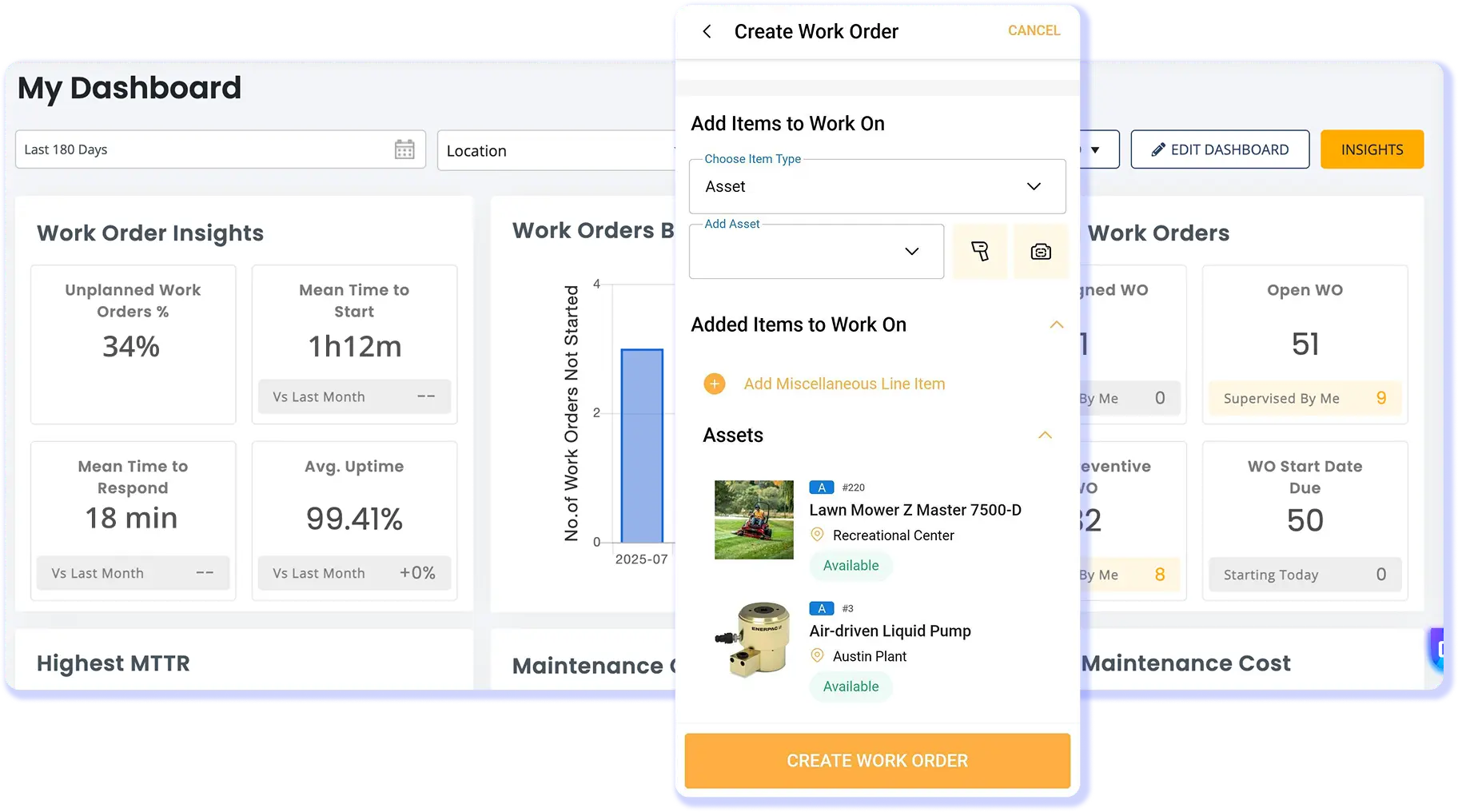
Maintain Your Gear in the Same System that Checks it Out
Equipment availability depends on more than whether an item has been returned. A unit may be back on the shelf but still need inspection, repair, or preventive maintenance before it should go out again. When checkout and maintenance live in separate systems, that readiness check becomes an additional manual step.
EZO EAM keeps maintenance tied to the equipment record. Work orders, preventive maintenance, checklists, and service history can sit alongside day-to-day asset activity, helping teams make better decisions about when equipment is ready to return to use. Maintenance capabilities are available based on the EZO EAM package selected.
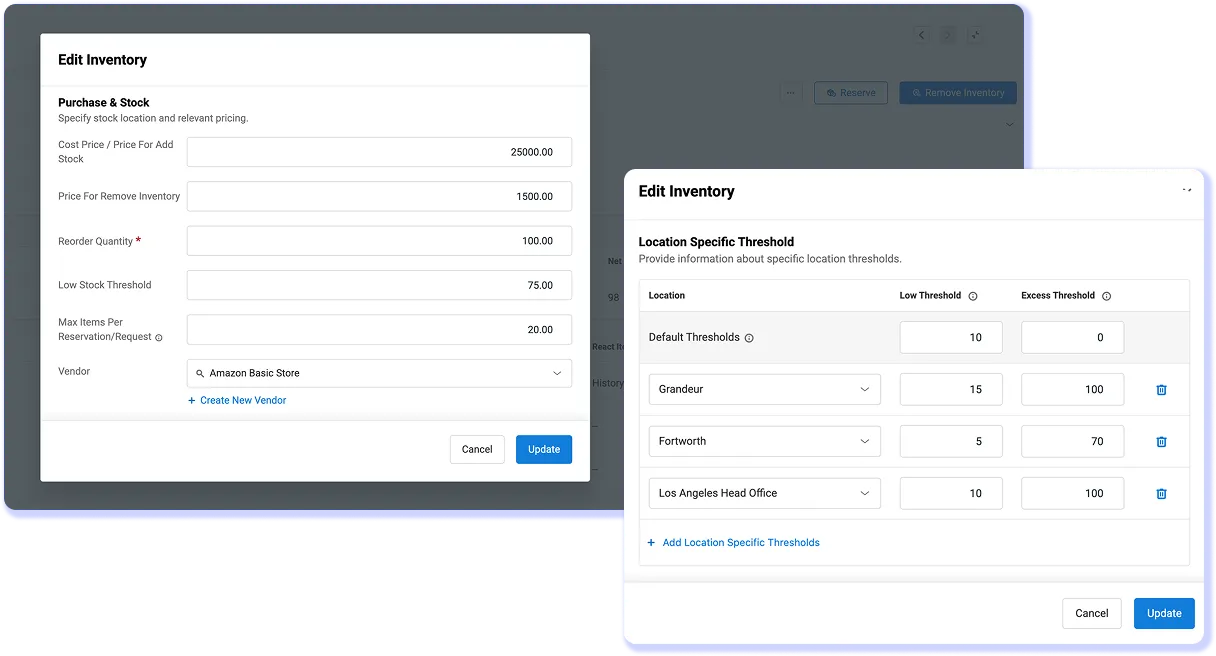
Bring Purchase & Depreciation Into the Same Equipment Record
Buying equipment should not create a second record that Operations has to reconcile later. EZO EAM supports purchase orders, receiving, and approvals within the same platform used to manage the equipment after it arrives. Multi-currency purchasing is also available based on the package.
That gives Operations and Procurement a clearer handoff from purchase to use. The item being ordered, received, assigned, and later depreciated can remain tied to the same operational record, rather than being reconstructed across purchasing spreadsheets and equipment systems.
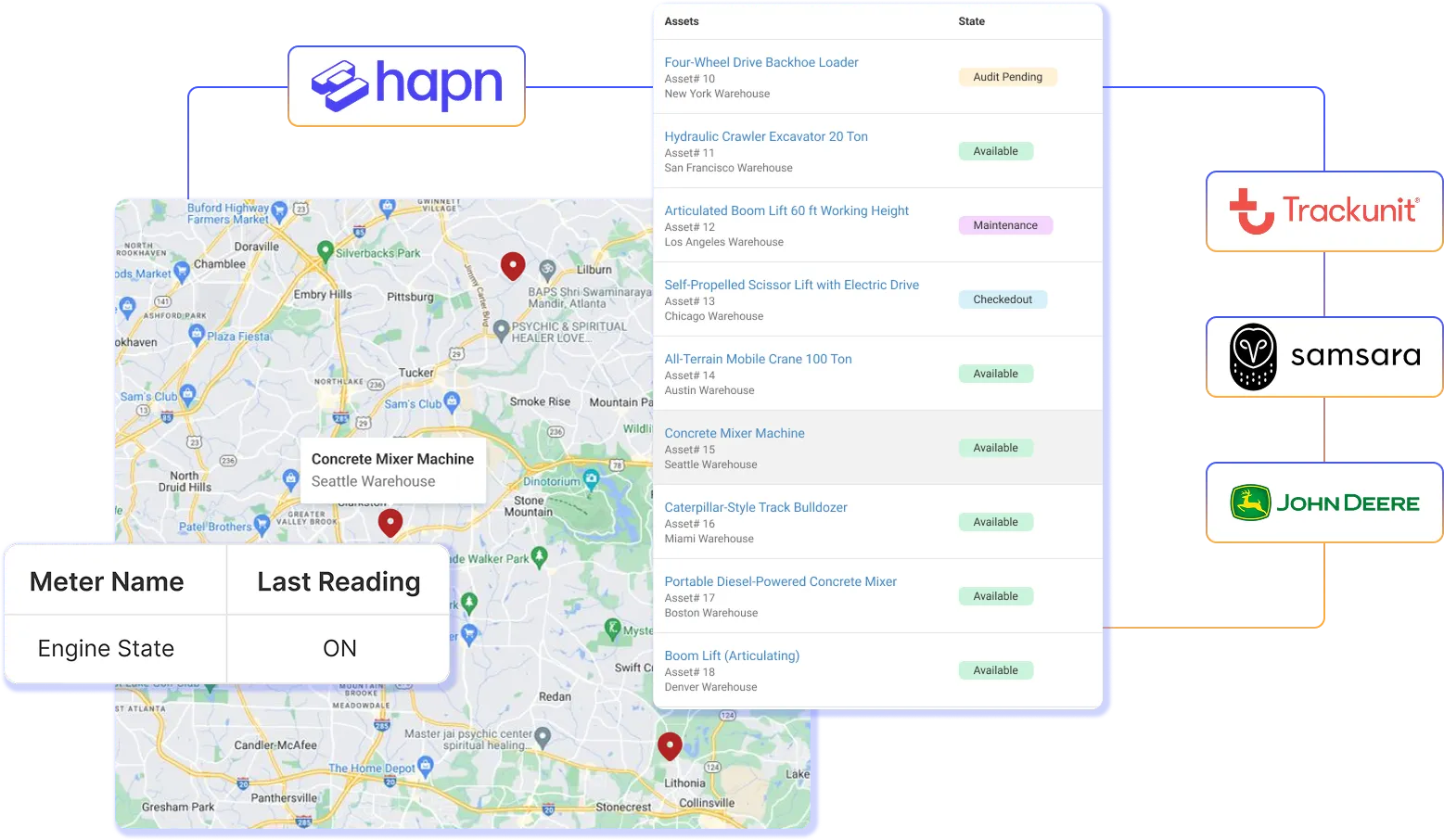
Run Equipment Across More Sites
As operations expand, teams need more than a list of equipment. They need to know which site holds each item, how much stock is available, who is responsible, and what happened when equipment moved.
EZO EAM connects those details through nested locations, location-level quantities, roles and scopes, batch operations, and cross-site reporting. Site teams can manage the equipment and stock in their care, while central teams retain a consolidated view of availability, custody, and movement across the operation. Equipment history stays connected to the asset as it moves between locations.
Our Customers Tell Their Stories

We’ve been using EZOfficeInventory specifically to track our site tools, and it has proven to be an invaluable asset. This software has simplified our tool management, enabling us to track the exact location and availability of our tools in real-time across different sites. The check-in/check-out process is quick and easy, which means our team spends less time looking for equipment and more time on the job.

Construction Coordinator
Mid-Market (51-1000 emp.)



Asset Management and Configuration Tech.
Mid-Market (51-1000 emp.)


Global Outsourcing Engineer
Enterprise(> 1000 emp.)

Proven by Teams. Recognized by Experts.


Bring Your Equipment Operations Together
Move beyond disconnected equipment workflows. See how EZO EAM can support checkout, maintenance, and purchasing as part of one connected operation.
Frequently Asked Questions
EZO EAM and Cheqroom both support equipment checkout and broader operational workflows, but they structure those operations differently. EZO EAM uses an enterprise asset management model that integrates assets, reusable stock, inventory, purchasing, depreciation, locations, and maintenance, while Cheqroom remains strongest in checkout, reservations, kits, and mobile gear management.
Cheqroom also offers Maintenance Management and Operations Management as add-ons, so the comparison is no longer simply asset operations versus checkout. EZO EAM is better suited to teams that want asset, stock, purchasing, maintenance, and lifecycle processes managed within the same EAM environment.
Cheqroom is a better fit when an AV, media, broadcast, or production team’s main workflows are equipment reservations, kits, mobile scanning, checkouts, and returns. EZO EAM becomes more relevant when those equipment workflows also need to connect with reusable stock, consumables, purchasing, depreciation, maintenance, or a larger multi-site operation.
Cheqroom’s gear management workflows make it particularly well suited to checkout-intensive production environments. EZO EAM provides a broader operating structure for teams responsible for equipment beyond the booking and checkout process, especially when multiple departments, item types, or lifecycle processes need to work together.
Both EZO EAM and Cheqroom support work orders and preventive maintenance. EZO EAM provides maintenance capabilities including work orders, preventive maintenance, checklists, work planning, and service records, while Cheqroom’s Maintenance Management add-on includes work orders, recurring preventive maintenance and calibration, inspections, assignments, service history, and equipment-readiness workflows.
Therefore, there is substantial overlap in core maintenance functionality. EZO EAM’s maintenance capabilities vary by the selected package, whereas Cheqroom packages Maintenance Management as an add-on. The better fit depends on the required maintenance processes and how closely they need to connect with inventory, purchasing, locations, and other equipment operations.
EZO EAM’s core pricing is based primarily on the number of items tracked, with unlimited users subject to fair-use terms. Cheqroom’s current public pricing is structured around administrators and workspaces, and includes unlimited regular users and items. Both platforms package some additional operational capabilities separately or in higher plans.
For a larger rollout, the cost comparison should therefore include more than headline subscription prices. EZO buyers need to account for item volume and required packages, while Cheqroom buyers need to consider administrator counts, workspaces, locations, and add-ons such as Maintenance Management and Operations Management.
Both EZO EAM and Cheqroom support multi-location equipment operations, but their location packaging differs. EZO EAM includes multi-location support in Essential and unlimited locations in Advanced, while Cheqroom offers a varying number of locations by plan and unlimited locations through its custom E.L.A. offering.
EZO EAM also connects locations with inventory quantities, custody transfers, reservations, access controls, and cross-location reporting. Cheqroom can also support multiple independent workspaces on Enterprise. For growing operations, the key difference lies in how locations are packaged and how equipment, inventory, permissions, and workflows need to move between them.
EZO EAM is structured to manage three distinct resource types within a single environment: Assets for individually tracked equipment, Asset Stock for reusable items managed in quantities, and Inventory for consumables. Cheqroom also supports individual items, bulk items, and consumables, with Consumable Management available as an add-on on applicable plans.
EZO EAM becomes particularly relevant when the operation needs different controls for serialized equipment, reusable quantities, and consumable stock while keeping them connected with location, purchasing, and other asset-management workflows. The distinction lies in how each platform structures mixed equipment and inventory operations, not in whether Cheqroom can track stock.
Both platforms support structured requests, but organize their workflows differently. EZO EAM uses its Request Portal, multi-tier approvals, and Fulfillment Center to move equipment requests through review and fulfillment, while Cheqroom combines equipment bookings with configurable operational requests through its Booking Portal and Operations Management add-on.
Cheqroom’s operational requests can cover equipment, maintenance, procurement, facilities, and other processes. EZO’s Fulfillment Center provides a centralized workflow for processing equipment requests and approvals. The key difference lies in the structure of request intake and fulfillment, not in the presence or absence of request management functionality.
Both EZO EAM and Cheqroom can connect equipment operations with external business systems through APIs and integrations. EZO EAM provides a REST API and integrations including QuickBooks Online, Zapier, identity providers, Jira, and Zendesk, while Cheqroom supports API access, webhooks, Zapier, Slack, and external finance workflows.
EZO’s API currently has a published fair-use limit of 60 requests per minute, and its QuickBooks Online integration can connect purchasing- and maintenance-related financial activity to accounting workflows. Neither platform should be positioned as an ERP replacement. Instead, each can connect operational equipment data with the organization’s existing systems of record.
Yes. EZO EAM supports structured Excel and CSV imports with field mapping for assets, Asset Stock, Inventory, members, locations, custom fields, and other records. You can also export Cheqroom data to Excel or CSV, providing a practical way to transfer core equipment data into EZO EAM.
Standard EZO imports accept up to 1,000 records or a 10 MB file at a time. Scope more complex migration requirements separately, especially if the organization wants to retain historical reservations, checkouts, maintenance records, custom fields, or attachments. There is no documented one-click Cheqroom-to-EZO migration path in the materials referenced for this page.
Cheqroom can require less configuration when a team’s primary workflows are equipment reservations, kits, checkouts, and returns. EZO EAM covers a broader set of asset, inventory, purchasing, approval, location, and maintenance workflows, so a multi-department rollout may require more configuration of data, permissions, and operational processes.
Cheqroom provides mobile reservation and checkout workflows, along with onboarding resources. EZO offers a 14-day free trial with no credit card required, so teams can test their workflows before committing. For larger deployments, implementation effort for either platform will depend on data volume, locations, permissions, integrations, and the capabilities being configured.
