EZO Intelligent Asset Fulfillment
Asset Fulfillment
Move Equipment Requests From Intake to Dispatch

Dispatch Delays Start Before Equipment Moves
Requests Arrive Without Context
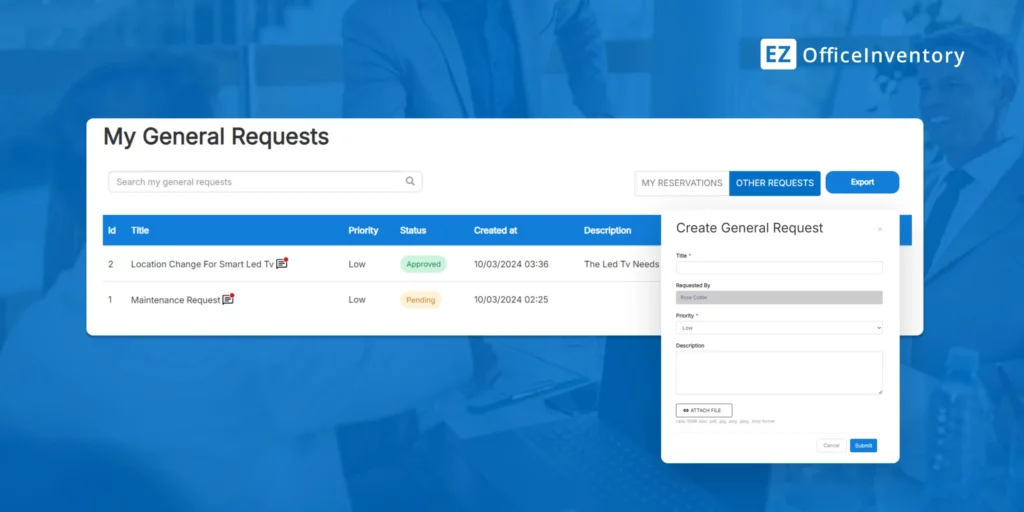
Equipment requests arrive through texts, emails, or conversations without item, site, date, or requester details, leaving operators to chase context before acting.
Approvals Stall Out of Sight
Scattered approval messages leave operators unsure who owns the next decision or what remains pending, forcing them to rebuild the approval path for later reviews.
Dispatch Depends on Memory
Without a managed queue, operators react to the latest or loudest request, increasing the risk of delays, dispatching to the wrong site, and unverified handoffs.
Put Every Approved Request Into Motion
Asset records show what equipment a team owns, but they do not manage the work of moving it. The EZO Fulfillment Engine connects request intake, approvals, and fulfillment into a single workflow.
Requester and equipment details carry over to the Fulfillment Center, where operators can review context, track status, and act from a single shared queue rather than scattered across inboxes or disconnected records.

Watch an Equipment Request Move From Request Intake to Verified Handoff
Fulfillment That Keeps Every Site Moving
70%
Requests Routed Via Portal
80%
Say Portal Requests Are Easier
90%
Cut Turnaround Below One Day
Manage Equipment Requests From One Queue
REQUEST PORTAL
Capture Complete Requests From the Start


APPROVAL ROUTING
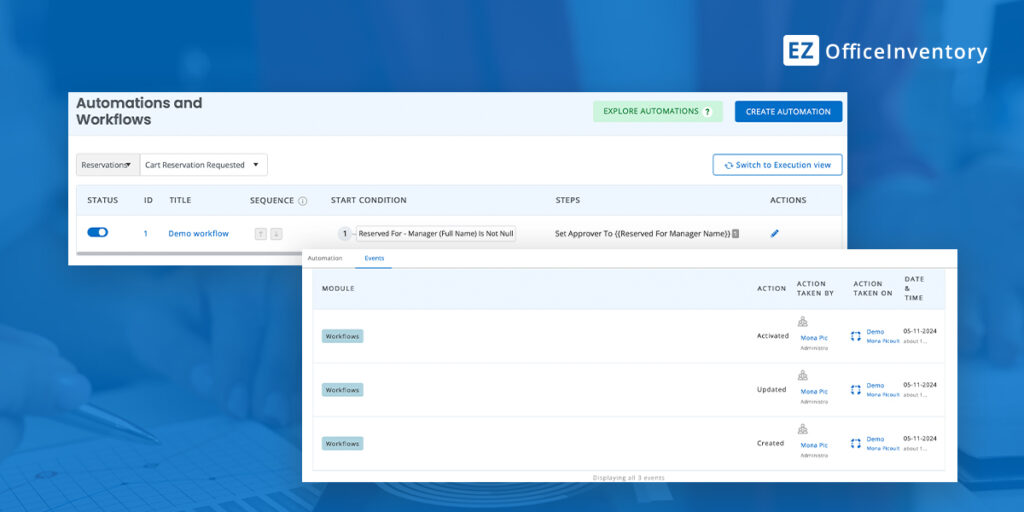
Route Requests Through Required Approvals
FULFILLMENT CENTER
Act on Requests From a Shared Queue


CUSTODY HISTORY
Preserve a Record of Every Handoff
Stop Managing Requests Across Inboxes
CUSTOMER STORY
Foster Display Group Cuts Fulfillment Time to 20 Minutes
Foster Display Group relied on spreadsheets, Google Docs, pack lists, paper records, and employee knowledge to manage event inventory. Before teams could pick and pack an order, they often had to search old files, walk the warehouse, or ask colleagues where items were located.
EZO EAM brought request details, visual item records, availability, carts, labels, and supporting documents into a connected fulfillment workflow. Warehouse teams can now start with clearer order context and match items using consistent records, rather than manually reconstructing each request.
EZO helped Foster Display Group:
- Prepare orders from structured request details
- Find items faster using visual records and search
- Reduce client follow-ups through the Request Portal
- Support warehouse work through mobile access
2 hours to ~20 minutes
~50%
~2,000
Integrations That Connect Every Fulfillment Step
- Service desk workflows — Zendesk, Jira
- User directories and SSO — Google Workspace, Okta, OneLogin, Microsoft Entra ID
- Workflow automation — Zapier
- Documents and data backup — OneDrive, Dropbox
- Purchasing and accounting — QuickBooks Online
- Scanning and label printing — Supported barcode scanners and printers
Frequently Asked Questions
Yes. EZO EAM connects structured request intake, approval routing, and fulfillment into a single workflow. Employees or clients can submit equipment requests through the Request Portal, including relevant item and requester details. Requests then follow the configured approval path before appearing in the Fulfillment Center for action. Operators can review request status and available context before reserving, approving, denying, checking out, or otherwise processing supported requests. Because those actions remain connected to the original request and asset records, teams do not have to coordinate fulfillment through separate emails, spreadsheets, and verbal follow-ups.
Yes. EZO EAM supports configurable, multi-tier approval workflows that ensure a request passes through the required approval path before fulfillment. Requests can be routed through sequential approval levels, including routing to the requester’s manager where that workflow is configured. Operators can distinguish between pending and approved requests before equipment is issued, rather than checking separate messages to confirm authorization. Buyers should validate their exact routing logic, approval hierarchy, and exception requirements during implementation, as the available configuration must align with the organization’s approval policy and account setup.
The EZO Fulfillment Center provides a shared operating view for supported request types, including reservations, check-ins and checkouts, custody transfers, transfer requests, purchases, work orders, services, and general requests. Available tabs and actions depend on the modules, settings, and permissions enabled in the organization’s EZO EAM account. Operators can filter requests by type, state, item, requester, or time period and use the relevant action available for that workflow. This allows teams to manage more than reservation requests without maintaining a separate queue for every operational process.
Yes. EZO EAM can support equipment requests, reservations, checkouts, custody transfers, and returns across multiple locations. Request and asset records can retain location context so operators can see where equipment is assigned and where a request must be fulfilled. Location-based access controls can also restrict users to relevant items or locations. This is useful for organizations managing shared equipment across warehouses, facilities, departments, labs, event sites, or field teams. EZO EAM coordinates the asset workflow; buyers needing carrier management, transportation planning, or warehouse route optimization should evaluate those requirements separately.
EZO EAM keeps supported checkouts, custody transfers, and check-ins linked to the asset record. Teams can review who received the equipment, where it was assigned, and when custody changed, without having to reconstruct the handoff from emails or paper records. Mobile scanning, item labels, and checkout or return actions help operators record physical movements as they occur. The resulting history can support inventory reviews, billing questions, damage claims, and accountability checks. EZO EAM records actions completed in the system; it does not automatically infer an unrecorded physical handoff.
Yes. EZO EAM provides a Request Portal where authorized employees or clients can browse available items, review item information, build carts, and submit structured requests. Depending on the configured workflow, requesters can also view their reservations, checked-out items, and available return actions. This gives operations teams a consistent intake channel rather than accepting requests via email, messaging apps, or conversations. Access, visible items, and available actions depend on portal configuration, user permissions, locations, and the modules enabled in the account.
Yes. EZO EAM offers integrations that can support different parts of the fulfillment workflow. Jira and Zendesk connect service tickets with relevant equipment context. Google Workspace, Okta, OneLogin, and Microsoft Entra ID support user access or directory workflows. OneDrive and Dropbox support document storage or backup, while Zapier can create selected users, fixed assets, or inventory records from third-party triggers. QuickBooks Online can synchronize supported purchasing and accounting data. Integration behavior varies by connector, so buyers should confirm the required data direction, synchronization frequency, permissions, and plan availability for each system.
EZO EAM manages the asset workflow around requests, approvals, reservations, checkouts, custody transfers, and returns. It is not a transportation management system or a warehouse execution platform for carrier selection, vehicle routing, freight optimization, or automated pick-path planning. Physical movements must also be recorded through supported actions such as scanning, checkout, transfer, or check-in; the platform cannot confirm an unrecorded handoff. Continuous equipment location requires compatible GPS or real-time location system hardware and infrastructure. Buyers should test their approval rules, request types, permissions, scanning process, and location model during evaluation.