EZO EAM vs eMaint
Maintenance is one step. Own the whole loop
We're Trusted by the Best





EZO EAM vs eMaint: Head-to-Head Comparison
|
Table Header
|
||
|---|---|---|
|
Primary Orientation |
EAM with native CMMS available |
Maintenance, reliability & EAM |
|
Asset tracking |
✔ |
✔ |
|
Asset custody and checkout |
✔ Checkouts, transfers & custody |
⚠️ Transfer & assignment features |
|
Reservations and availability |
✔ Core planning capability |
⚠️ Not a primary differentiator |
|
Parts and inventory |
✔ |
✔ |
|
Work orders |
✔ Extra add-on through CMMS |
✔ |
|
Preventive maintenance |
✔ |
✔ |
|
Condition-based maintenance |
⚠️ Available by maintenance
configuration |
✔ |
|
Calibration |
⚠️ Validate specific requirements |
✔ |
|
Purchasing |
✔ Available on select plans |
✔ |
|
Mobile and offline |
⚠️ Offline scope limited |
✔ |
|
GPS and telematics |
⚠️ Through platform integrations |
⚠️ Integration-dependent |
|
Reporting |
✔ |
✔ |
|
Pricing model |
Item-based, unlimited users |
Per user, with stated minimums |
|
Table Header
|
|
|---|---|
|
Primary Orientation |
|
|
EAM with native CMMS available |
Maintenance, reliability & EAM |
|
Asset tracking |
|
|
✔ |
✔ |
|
Asset custody and checkout |
|
|
✔ Checkouts, transfers & custody |
⚠️ Transfer & assignment features |
|
Reservations and availability |
|
|
✔ Core planning capability |
⚠️ Not a primary differentiator |
|
Parts and inventory |
|
|
✔ |
✔ |
|
Work orders |
|
|
✔ Extra add-on through CMMS |
✔ |
|
Preventive maintenance |
|
|
✔ |
✔ |
|
Condition-based maintenance |
|
|
⚠️ Available by maintenance
configuration |
✔ |
|
Calibration |
|
|
⚠️ Validate specific requirements |
✔ |
|
Purchasing |
|
|
✔ Available on select plans |
✔ |
|
Mobile and offline |
|
|
⚠️ Offline scope limited |
✔ |
|
GPS and telematics |
|
|
⚠️ Through platform integrations |
⚠️ Integration-dependent |
|
Reporting |
|
|
✔ |
✔ |
|
Pricing model |
|
|
Item-based, unlimited users |
Per user, with stated minimums |
Legend:
✔ = Explicitly offered
❌ = Not offered or documented
⚠️ = Supported, but narrower in scope or context

Why EZO EAM?
Most teams run maintenance in one system and everything else in another. The CMMS holds the repair record. A spreadsheet tracks who has the asset and where it went. The operations manager becomes the link between them, and a simple question takes three tabs and a phone call.
EZO EAM keeps that loop on one record. A request is raised, an asset is assigned, it is moved to a site, maintenance is logged against it, and it is reviewed before being returned to service. It works alongside your ERP and reliability program rather than replacing either. eMaint remains the stronger choice for regulated, calibration-heavy work. EZO EAM fits organizations that need complete asset lifecycle management with native CMMS capabilities built in.
What We Bring to the Table

The Full Loop on One Asset Record
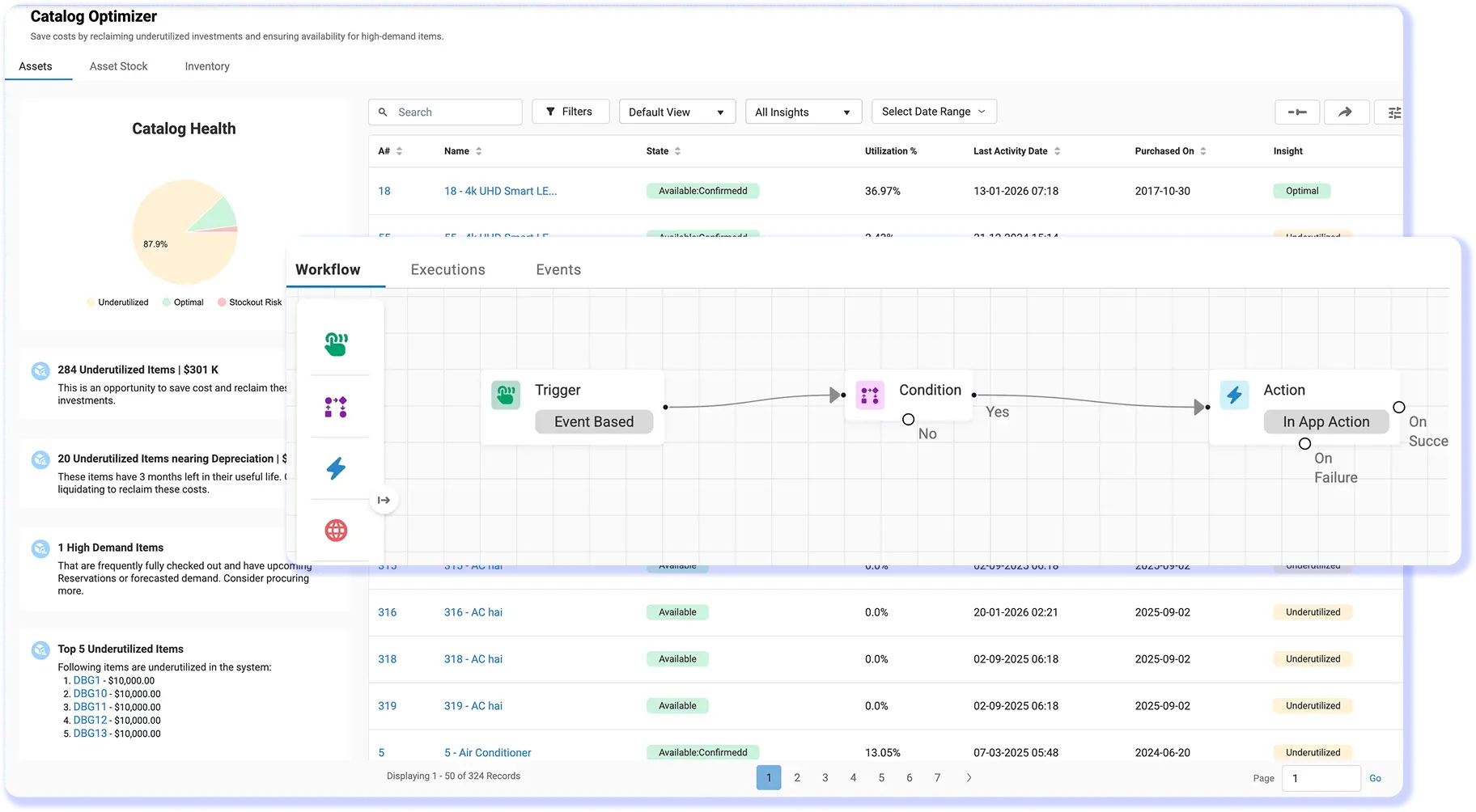
A work order tells you what was repaired. It does not, however, tell you who had the asset when it failed, whether it is reserved next Tuesday, or which site it is standing on right now.
In EZO EAM, all of it sits on one record. Work orders, preventive maintenance, checklists, and work logs live next to checkout history, transfers, reservations, and the availability calendar. A technician opening a job can see the condition in which it was returned and the job it came off of. A supervisor can prevent equipment from being assigned to the next job until the work is signed off. The repair history and operational history are no longer two separate stories about the same asset.
Ready To Run, Not Just Configurable
Configurability is a real strength, and it comes with a real cost. A highly configurable platform requires workflow design, governance, data standards, and an owner to keep all three up to date.
EZO EAM starts with ready-to-use workflows instead. Self-service onboarding, guided imports, and a working 14-day trial let a team run a real scenario before signing anything. Raise a request, issue the asset with custody, reserve it, log a work order against it, then read the item trail. Teams with dedicated maintenance or reliability teams may prefer the configurable route. Teams without one rarely have the capacity to sustain it and would rather spend that effort on the equipment than the platform.
One Door In, One Approval Queue
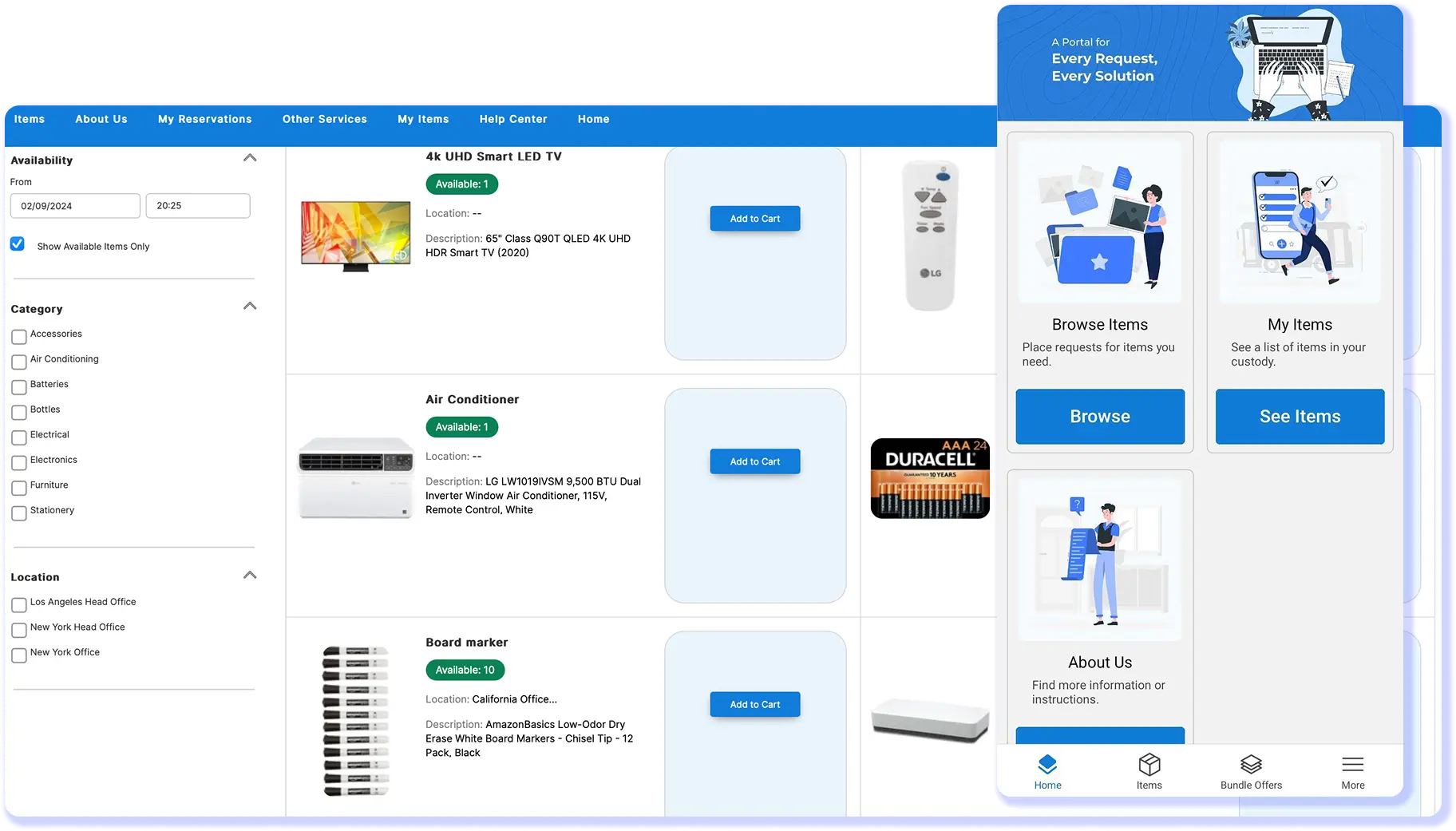
Every unlogged request is a phone call, a message, or a walk to somebody’s desk. None of them leave a record, and none of them can be prioritized against the work already in the queue.
The Request Portal gives the field one door in. Requesters submit what they need without logging in, and the Fulfillment Center holds all requests in a single approval queue, where a coordinator can approve, reject, or route them. Around 70 percent of requests on EZO are raised through self-service rather than created by an admin. That is a coordinator’s week handed back, and a durable record of what was asked for, by whom, when it was approved, and what was issued against it.
Our Customers Tell Their Stories


Civil Engineer
Mid-Market (51-1000 emp.)


Fleet Manager
Mid-Market (51-1000 emp.)


Network Administrator
Enterprise (> 1000 emp.)
Proven by Teams. Recognized by Experts.



Put Every Asset Workflow On One Record
Frequently Asked Questions
EZO EAM is a stronger fit when maintenance must remain connected to equipment requests, reservations, checkouts, custody, transfers, inventory, and availability. EZO EAM keeps these activities connected to the asset record alongside work orders and preventive maintenance. eMaint is more maintenance- and reliability-centered, with deeper documented capabilities for calibration, condition-based maintenance, reliability reporting, electronic signatures, and regulated workflows. The practical distinction is scope: EZO EAM suits teams managing the wider operational journey of equipment, while eMaint is better suited to organizations whose primary requirement is a specialized maintenance and reliability system.
Both EZO EAM and eMaint support work orders and preventive maintenance. EZO EAM can manage work requests, technician assignments, work logs, checklists, parts used on jobs, scheduling, and recurring maintenance, with full CMMS functionality available through its CMMS packaging or Custom Enterprise. EZO EAM can also trigger maintenance from time, usage, condition thresholds, or connected IoT data. eMaint provides recurring work orders, PM checklists, procedures, completion controls, scheduling, time and cost tracking, and other maintenance-specific controls. The difference is that EZO EAM connects maintenance to broader equipment operations, while work order and reliability management sit at the center of eMaint.
Both platforms support condition-driven maintenance, but their approaches differ. EZO EAM documents automated work-order triggers based on time intervals, usage readings, condition thresholds, and IoT integrations, ensuring that the resulting maintenance activity remains connected to the asset’s broader operational record. eMaint supports condition-based maintenance triggers and integrates closely with Fluke condition-monitoring technology. Fluke sensors can feed vibration and temperature readings into eMaint and trigger prioritized work orders when configured thresholds are crossed. For teams already building a sensor-led reliability program around Fluke technology, eMaint has the deeper documented ecosystem; EZO EAM is useful when condition-triggered maintenance needs to remain connected to equipment operations.
eMaint has the strongest documented offering for calibration-heavy, regulated maintenance. It supports calibration schedules, calibration work orders, target test points, tolerances, standards and tools, certificates, calibration labels, traceability, electronic signatures, and audit trails. eMaint also provides controls designed to support regulated environments, including workflows aligned with FDA 21 CFR Part 11 requirements. EZO EAM supports maintenance histories, digital checklists, work orders, approvals, and inspection records, but its current public documentation does not show an equivalent specialist calibration workflow. Organizations where calibration traceability or validated maintenance processes are central requirements should treat this as a significant differentiator during evaluation.
EZO EAM provides dedicated operational workflows for equipment custody. Teams can check assets in and out, transfer them between people or locations, record handoffs, and maintain custody history against the asset record. EZO EAM’s broader workflow also connects requests, approvals, dispatch, receipt, return, and maintenance so managers can see who has equipment and what happened to it between jobs. eMaint supports asset records, location management, and transfers between locations, but its public product positioning centers more heavily on maintenance and reliability than equipment checkout and custody workflows. For organizations where equipment frequently changes hands between crews, sites, or projects, this distinction is important.
Yes. EZO EAM includes equipment reservation workflows designed around future availability. Its Availability Calendar shows whether Assets or Asset Stock are available, reserved, checked out, or under maintenance, helping teams avoid booking equipment that cannot be issued. Users can reserve equipment in advance, filter availability by location and time, and use recurring reservations when that add-on is enabled. eMaint provides resource scheduling and work-request functionality, but the public eMaint materials reviewed do not present an equivalent equipment-reservation and availability workflow as a primary capability. EZO EAM therefore has a clearer fit when shared equipment must be booked for future jobs before it is checked out.
Both platforms manage parts and inventory, but EZO EAM covers a broader mix of operational item types. EZO can track serialized assets, reusable bulk items, and consumable inventory by location. Parts can also be associated with maintenance work, while low-stock thresholds support replenishment workflows. eMaint provides maintenance-focused inventory functionality, including parts forecasting, cycle counts, requisitions, multiple-location inventory, tool crib management, parts consumption reporting, and global inventory capabilities on the appropriate plan. EZO EAM is particularly relevant when tools, equipment, reusable stock, and consumables need to share the same operational location structure; eMaint offers deeper functionality for maintenance storeroom and reliability workflows.
EZO EAM extends requests beyond maintenance work. Its Request Portal lets end users request equipment or other items, while the Request Management Center and multi-tier approvals allow administrators to review, route, approve, and fulfill those requests before equipment is dispatched or checked out. eMaint provides several maintenance-request channels, including requester logins, QR codes, email submissions, web forms, and request-only portal access, and its work order workflows can route maintenance activity for approval. The distinction is what happens after the request: EZO EAM connects requests to equipment allocation and custody, while eMaint primarily turns requests into maintenance work that must be scheduled and completed.
