Disclosure: This guide is published by EZO, which makes EZO EAM, one of the ten platforms compared below. We have tried to keep the comparison auditable: the inclusion criteria and sourcing are set out in “How did we select these eMaint alternatives?”, every customer-rating figure comes from the same review platform, eMaint’s own strengths are stated in full, and this guide says plainly where keeping eMaint is the better decision.
The best eMaint alternatives in 2026 are EZO EAM, MaintainX, UpKeep, Limble CMMS, Fiix, Fracttal One, IBM Maximo, Maintenance Connection, Prometheus Group, and Infor EAM (now Octave Attune EAM, formerly HxGN EAM). The right choice depends on maintenance complexity, asset scope, mobile workflows, inventory, integrations, team size, and plans for multi-site growth.
Introduction
Choosing a CMMS or Enterprise Asset Management platform is rarely about the longest feature list. It’s about finding a platform that matches how your organization actually operates today, and how it expects to operate three to five years from now.
For many organizations, eMaint has become that platform. It has earned its reputation through configurable maintenance workflows, preventive and condition-based maintenance, asset records, multi-location inventory, calibration management, advanced reporting, offline mobile work, and enterprise integrations. It remains a powerful system, particularly in regulated environments and mature reliability programs.
Yet growth changes operational priorities.
A manufacturer expanding from one plant to six doesn’t simply create more work orders. It creates more assets, technicians, locations, inventory, purchasing decisions, equipment movement, and far greater operational complexity.
In most of these situations, teams evaluating eMaint alternatives aren’t looking for less functionality. They’re looking for a different balance between maintenance execution, asset visibility, technician adoption, implementation effort, and pricing.
This guide takes an operations-first approach: a fair baseline for what eMaint does today, valid reasons teams look elsewhere, when staying put is the better call, ten alternatives evaluated against identical criteria, and migration guidance you can act on.
What is eMaint, and where does it fit?
eMaint is a configurable CMMS and EAM platform built for established maintenance, reliability, regulated, and multi-site operations. It combines work management with asset performance and multi-location inventory. It also covers calibration, condition monitoring, advanced reporting, offline mobile work, and enterprise integrations.
Before evaluating alternatives, it’s worth understanding what eMaint already does well.
eMaint has long positioned itself as a reliability platform rather than a work order tool. It is part of Fluke Reliability, which sits within Fortive, an industrial technology holding company. That relationship is why its condition monitoring and calibration capabilities integrate closely with Fluke sensors. Its strength is helping teams build standardized, repeatable, highly configurable programs that scale across facilities.
One of the biggest mistakes buyers make is assuming that switching software will automatically solve operational problems. Many organizations struggle not because their CMMS lacks functionality, but because it no longer aligns with evolving priorities, or perhaps because their own configuration has grown unmanageable.
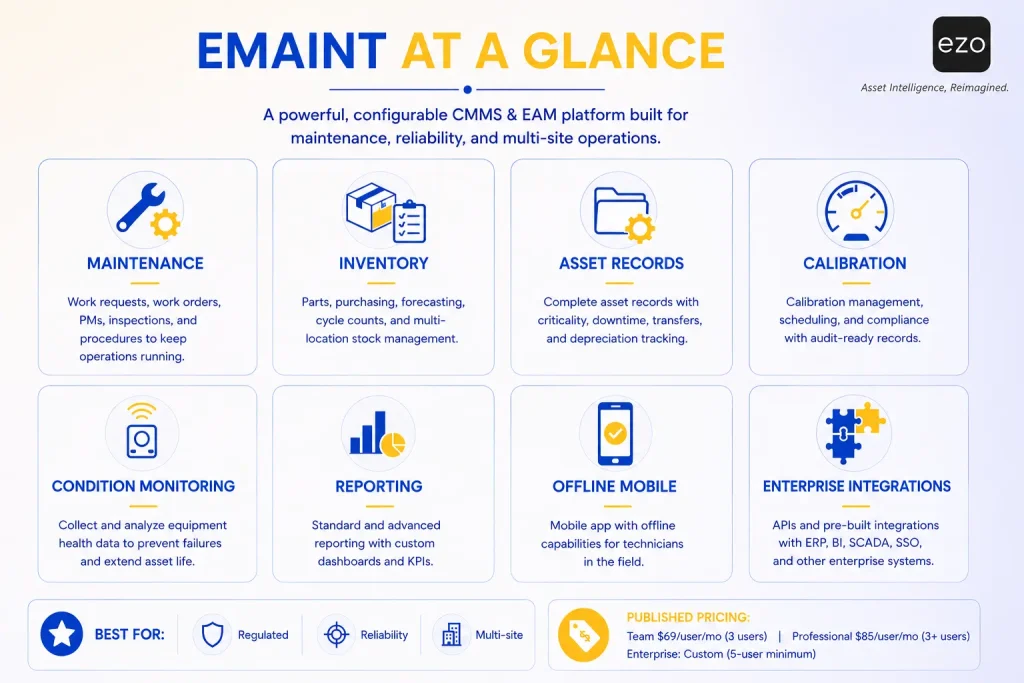
| Area | eMaint position |
|---|---|
| Primary orientation | Maintenance, reliability, and asset management |
| Work management | Work requests, work orders, PMs, inspections, procedures |
| Asset capabilities | Asset records, criticality, downtime, transfers, depreciation tracking |
| Inventory | Parts, purchasing, forecasting, cycle counts, multi-location stock |
| Mobile | Mobile application with offline work |
| Reporting | Standard and advanced reporting, custom dashboards |
| Specialist capabilities | Calibration, condition monitoring, electronic signatures |
| Enterprise | Multi-site, SSO, APIs, ERP, BI, and SCADA integrations |
| Published pricing | Team $69/user/month (3 users); Professional $85/user/month (3+ users); Enterprise custom, five-user minimum. |
| Strongest fit | Mature reliability and regulated operations |
eMaint is the only platform in this guide with a published-pricing row, because it is the baseline every alternative is measured against. Comparable pricing detail for each alternative appears in its profile below.
This breadth explains why organizations evaluating alternatives usually aren’t looking for “more features”. They’re looking for software whose strengths match their own priorities. For instance, a manufacturer emphasizing predictive maintenance prioritizes industrial integrations; a university managing shared assets values reservations and custody; and a field service business prioritizes technician adoption over configurability.
The question isn’t whether eMaint is capable.
The real question is whether its design philosophy aligns with the operational problems you’re trying to solve today.
Why do growing operations teams look for eMaint alternatives?
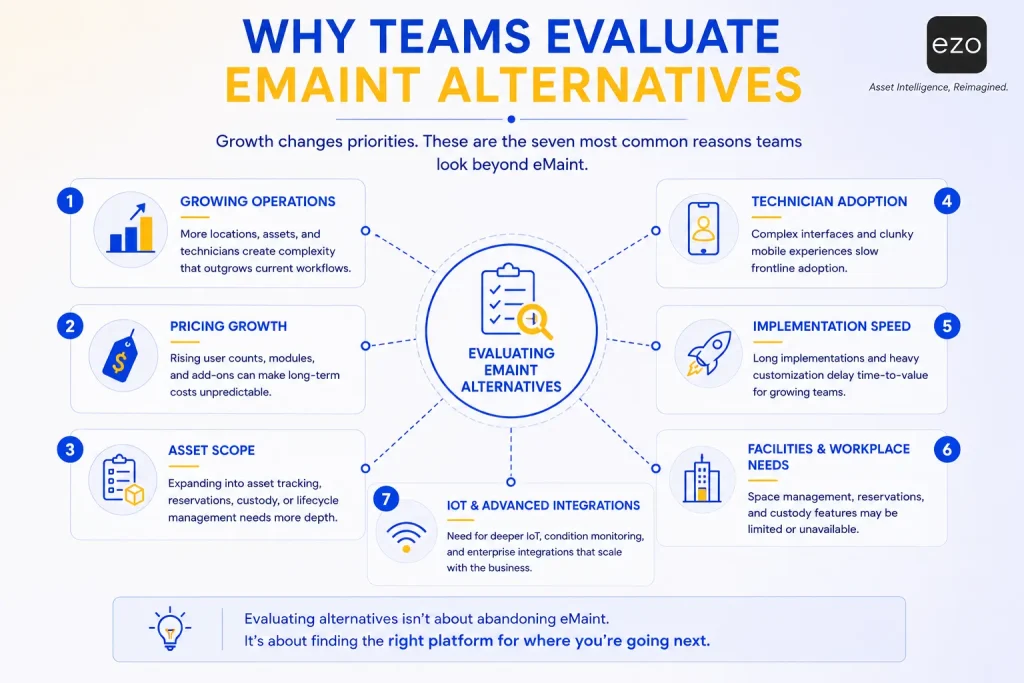
Teams usually evaluate eMaint alternatives because they need a different balance of pricing, usability, implementation effort, asset scope, industry fit, or frontline adoption; not because eMaint lacks core maintenance functionality.
Maintenance software rarely fails overnight.
More often, organizations simply outgrow the assumptions they made when they selected it.
Below are the seven reasons that come up most consistently.
1. Per-user licensing compounds as headcount grows
For many organizations, software costs don’t rise because the platform gets more expensive. They rise because the organization gets larger.
As programs mature, more people need access: technicians, planners, supervisors, reliability engineers, contractors, requesters, and site administrators. What looked reasonable at three sites can look very different at ten.
This doesn’t make per-user pricing a poor model. Smaller teams often find it appropriate. But growing operations should model licensing across a three- to five-year horizon and compare plans that only contain equivalent functionality.
Key takeaway: Compare platforms based on your expected team size several years out, not your current headcount.
2. Maintenance has become only one part of asset operations
Many organizations implement a CMMS to manage maintenance activity. Over time, operations become far more interconnected, and teams start asking questions that a mere work order cannot answer: where the asset is right now, who is responsible for it, whether it is available or already checked out, how heavily it is being used, and whether it should be replaced rather than repaired.
These questions shift the conversation from maintenance management toward broader asset operations.
Maintenance tells you what happened to an asset. Broader asset operations tell you where it is, who has it, how it’s being used, and whether it should still be part of your operation.
That distinction becomes more valuable with every department, facility, and region you add. It is also among the most common reasons teams start comparing EAM platforms alongside traditional CMMS tools.
3. Technician adoption becomes the real bottleneck
The most sophisticated maintenance platform in the world creates little value if technicians avoid using it.
When work orders sit incomplete, inspections go unrecorded, or parts usage never makes it into the system, the instinctive assumption is that the software lacks capability.
In practice, the issue is usually adoption.
People follow the path of least resistance. Every additional screen, required field, and approval step introduces friction. Individually these look trivial. Together they create enough resistance for technicians to fall back on notebooks and verbal updates.
A platform with fewer features but far higher adoption often delivers more value than a powerful one frontline teams avoid.
However, low adoption is not automatically a product defect. Weak onboarding, confusing statuses, and inconsistent management expectations produce identical symptoms. Diagnose before you replace.
4. Implementation speed can outweigh configurability depending on maturity
Configuration flexibility is one of eMaint’s genuine strengths.
But flexibility comes with responsibility. Highly configurable systems need workflow design, governance policies, administrator ownership, data standards, and ongoing upkeep.
Organizations with dedicated maintenance-excellence teams welcome that. Leaner and often scaling teams often want faster deployment, guided imports, ready-to-use workflows, shorter learning curves, and fewer administrative dependencies.
Neither approach is objectively better. It’s a question of organizational maturity.
The best maintenance software isn’t necessarily the most configurable. It’s the one your organization can implement, govern, and sustain.
5. Facilities work requires different context than industrial maintenance
Not every organization maintains production equipment.
Facilities teams manage buildings, campuses, utilities, HVAC, public spaces, and government infrastructure. They frequently need public request portals, building maps, space information, vendor coordination, and capital planning.
Industrial maintenance optimizes for uptime. Facilities maintenance software optimizes for occupant experience, building performance, and long-term infrastructure planning. As organizations move between these models, different platforms start to fit better.
6. IoT and condition monitoring become strategic
Maintenance has been shifting from reacting to failures toward anticipating them.
Sensors, programmable logic controllers (PLCs), and supervisory control and data acquisition (SCADA) systems now let organizations monitor equipment continuously rather than relying only on calendar schedules.
Instead of asking “When should we inspect this machine?”, teams increasingly ask “What is this machine telling us right now?”
That changes the requirement: sensor connectivity, condition triggers, automated work creation, and remote monitoring. One distinction worth keeping straight: a calendar-based preventive maintenance (PM) schedule is not predictive maintenance, and a threshold alert is not artificial intelligence (AI). Ask vendors which they actually deliver.
7. Configuration complexity has outgrown operational simplicity
Ironically, one of the most common reasons organizations replace maintenance software has little to do with the software.
Systems accumulate complexity such as additional approval workflows, custom fields, unused reports, duplicate PM schedules, and obsolete statuses.
What begins as thoughtful customization becomes administrative overhead quickly. Eventually, users spend more time navigating the system than maintaining assets.
You can call it configuration debt i.e. the operational equivalent of technical debt. Every customization solved a real problem once; years later, many outlive the needs that created them.
Replacing software without addressing configuration debt rarely solves anything. It relocates the problem into a new interface.
When should you keep eMaint instead of switching?
eMaint may remain the right choice when your organization actively uses its calibration, condition monitoring, reliability, inventory, advanced reporting, or Fluke capabilities, and has enough internal ownership to govern the platform properly.
When teams begin researching alternatives, the conversation usually starts with software. It should start with strategy.
Switching platforms is one of the most disruptive projects an operations team can undertake. Asset records, PM schedules, work order history, spare parts inventory, permissions, integrations, dashboards, and technician habits all have to be rebuilt, validated, and re-adopted. If the underlying problems stay the same, migration relocates them rather than solving them.
So the first question shouldn’t be:
“Which software is better?”
It should be:
“Is software actually the problem?”
Keep eMaint if:
1. Reliability is a competitive advantage
Some organizations don’t simply perform maintenance, they compete on maintenance excellence.
Pharmaceuticals, aerospace, utilities, heavy manufacturing, food processing, and healthcare and life sciences often depend on reliability-centered maintenance, condition monitoring, calibration, compliance documentation, failure analysis, and audit trails. These workflows require consistency and traceability. If you’ve already invested years configuring eMaint around validated processes, replacing it may introduce more risk than value.
2. Your existing processes already work
If your team can confidently answer yes to most of the following, replacement may create unnecessary disruption:
- Are PM schedules consistently completed?
- Are technicians comfortable using the system?
- Are work orders closed accurately and is history reliable?
- Can leadership monitor key performance indicators (KPIs) without manual reporting?
- Are integrations functioning as expected?
Operational performance depends far more on disciplined processes than on marginal differences between platforms.
3. Your integrations are business-critical
Maintenance platforms rarely operate alone. They exchange data with enterprise resource planning (ERP), procurement, accounting, business intelligence (BI), SCADA, Internet of Things (IoT) platforms, identity providers, and warehouse systems: connections that take months to plan, build, test, and validate. Replacing the CMMS doesn’t just mean learning new software; it often means rebuilding the digital infrastructure around maintenance.
Migration costs extend well beyond licensing.
4. You’re solving the wrong problem
One of the most valuable exercises a maintenance leader can run is separating symptoms from root causes. As reason 3 above notes, low adoption is not automatically a product defect, hence, diagnose before you replace.
| Symptom | Likely root cause |
|---|---|
| Technicians don’t complete work orders | Training, workflow design, mobile usability, management expectations |
| PMs are frequently overdue | Resource planning, staffing, unrealistic scheduling |
| Inventory records are inaccurate | Stockroom governance, inconsistent receiving |
| Reports are unreliable | Inconsistent data entry, incomplete asset hierarchies |
| Users say the system is too complicated | Years of accumulated customization |
None of these automatically require a new platform.
The best maintenance systems amplify good processes. They rarely create them.
The eMaint replacement readiness score
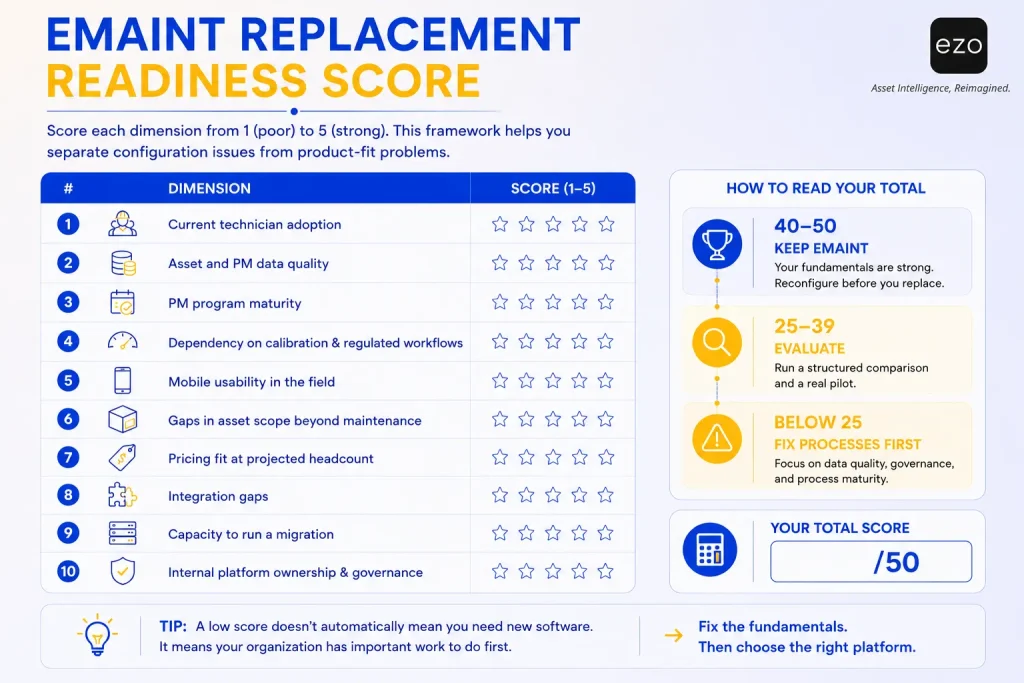
Score each item from 1 (poor) to 5 (strong). This is our editorial framework, not an industry standard. In the migrations we have reviewed, it reliably separates configuration problems from product-fit problems.
Use the scorecard below to evaluate whether your organization should optimize its current eMaint implementation, begin comparing alternatives, or improve internal processes before considering a migration.
| # | Dimension | Score (1–5) |
| 1 | Current technician adoption | _____ |
| 2 | Asset and PM data quality | _____ |
| 3 | PM program maturity | _____ |
| 4 | Dependency on calibration and regulated workflows | _____ |
| 5 | Mobile usability in the field | _____ |
| 6 | Gaps in asset scope beyond maintenance | _____ |
| 7 | Pricing fit at projected headcount | _____ |
| 8 | Integration gaps | _____ |
| 9 | Capacity to run a migration | _____ |
| 10 | Internal platform ownership | _____ |
How to read your total: ten items, each scored 1–5, for a total between 10 and 50.
- 40–50: Your fundamentals are strong. Reconfigure before you replace; you’ll likely recreate the same environment at higher cost.
- 25–39: Run a structured comparison and a real pilot. There is a genuine fit question here.
- 10–24: Fix data quality, governance, and process first. New software will inherit these problems.
What should you look for in an eMaint alternative?
The right alternative preserves the maintenance controls you depend on while improving the specific workflows creating cost, adoption, visibility, or scalability problems. Evaluate asset scope, mobile usability, inventory, reporting, integrations, implementation effort, and total cost of ownership, not feature counts.
Most organizations keep the same CMMS or EAM for years, embedded in planning, technician workflows, inventory, procurement, reporting, compliance, and capital planning. Switching costs are high. Evaluate accordingly.
1. Work order management. Look past “Does it support work orders?” to how efficiently work moves from request to completion: prioritization, assignment, multi-asset work, checklists, photos, labor and cost capture, approvals, and completion controls. The best work order system isn’t the one with the most options, it’s the one technicians actually use.
2. Preventive and condition-based maintenance. Every platform advertises PM. Verify calendar, meter, usage, and condition triggers, plus seasonal and nested PMs, automatic work creation, and inspection follow-up. Match capability to your strategy rather than buying the most advanced engine available. In regulated environments, test calibration schedules, tolerances, certificates and electronic signatures rather than assuming standard inspections cover them.
3. Asset tracking and lifecycle records. This is often the sharpest line between a CMMS and an EAM. Maintenance records answer what was done, when, and at what cost. Lifecycle records also answer where the asset is, who holds it, whether it’s available, how heavily it’s used, and whether it should be repaired or replaced.
4. Parts and inventory. Delays are more often caused by missing parts than missing technicians. Assess stock by location, minimum thresholds, parts reservations, consumption, cycle counts, purchase orders, vendors, and direct work order linkage.
5. Mobile and offline work. Maintenance doesn’t happen at a desk, so evaluate mobile CMMS software the way technicians will. Have technicians, not managers, complete a real work order during the trial: asset lookup, photos, checklists, meter readings, parts usage, signatures, barcode scanning, and synchronization after an offline period.
6. Reporting and analytics. Any multi-site CMMS should roll results up as easily as it drills down. Compare backlog, PM compliance, downtime, mean time to repair (MTTR), mean time between failures (MTBF), labor, parts, maintenance cost, asset utilization, and cross-site results. A report that surfaces recurring failures before they become production problems beats a dozen dashboards nobody opens.
7. Automation and AI. Distinguish scheduled notifications, rule-based workflows, condition triggers, predictive analytics, generative assistance, and natural language search. These are not the same capabilities, and each depends on the quality of the underlying data.
8. Integrations. Don’t stop at “Yes, we have an API.” An application programming interface (API) is only as useful as what it moves, so ask which systems have native connectors, what data flows, whether sync is bidirectional, how often it updates, and what customization is required.
9. Implementation and support. Evaluate data migration, onboarding, training, configuration assistance, sandbox access, support responsiveness, and regional availability. A lighter platform with outstanding onboarding often outperforms a heavier one your team never fully deploys.
10. Total cost of ownership. Model full users, limited users, requesters, sites, assets, implementation, migration, integrations, premium support, AI, IoT, training, and contractual annual increases. The cheapest subscription rarely produces the lowest three-year cost.
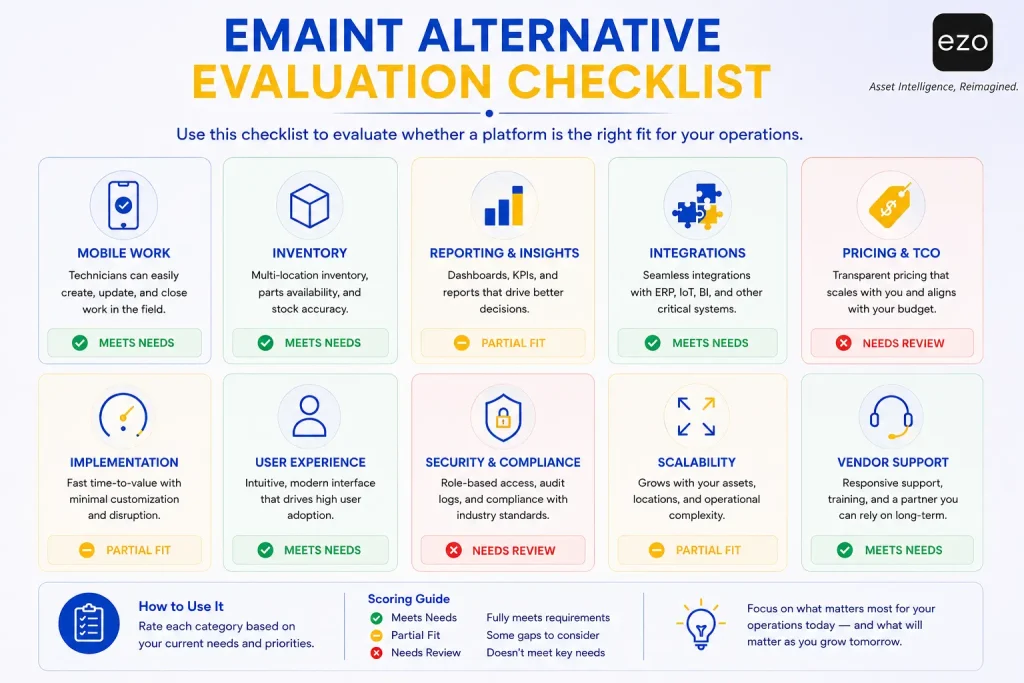
The evaluation checklist
Use this during trials. The red flag column matters more than the feature list.
| Criterion | What to test | Red flag |
|---|---|---|
| Mobile adoption | Complete a real work order in the field | Demo only shows manager screens |
| PM capability | Rebuild one representative PM | Only simple calendar recurrence available |
| Asset scope | Follow an asset from receipt to retirement | Asset record contains maintenance only |
| Custody | Transfer equipment between users | Location changes without accountability |
| Inventory | Consume a part and replenish it | Parts stay disconnected from work |
| Reporting | Build a cross-site KPI dashboard | Custom reporting requires vendor development |
| Offline mode | Complete and sync real work | Offline access is view-only |
| Integrations | Confirm fields, direction, and frequency | Vendor only confirms an API exists |
| Security and access control | Configure roles and enforce SSO | Permissions are all-or-nothing, or SSO is Enterprise-only |
| Pricing | Calculate three-year cost at projected headcount | Required features sit behind unclear add-ons |
| Migration | Review field and history mapping | Vendor discusses imports but not validation |
The maintenance-to-operations gap test
Before shortlisting anything, ask whether your current platform can answer these ten questions without a spreadsheet:
- What is the asset?
- Where is it?
- Who has it?
- Is it available?
- Is it reserved?
- Is it operational?
- What maintenance is due?
- Are the required parts in stock?
- How is it being used?
- Should it be repaired, transferred, replaced, or retired?
Questions 1, 6, 7, and 8 test maintenance depth. Questions 2, 3, 4, 5, 9, and 10 test asset-operations scope. If you answer the maintenance questions well but struggle with the asset-operations questions, your problem isn’t maintenance depth, it’s asset scope, and that changes which alternatives belong on your list.
The same-workflow vendor test
Feature matrices flatter every vendor. Scenarios don’t. Give every shortlisted vendor the identical scenario and make them run it live:
A critical asset is reserved, checked out, returned damaged, placed under maintenance, repaired using stocked parts, transferred to another site, and returned to availability.
Then score each on: systems used, mobile steps, custody accuracy, asset-state accuracy, inventory update, maintenance cost capture, reporting, and which plan tier the workflow required.
Run this once and most shortlists rank themselves.
How did we select these eMaint alternatives?
These ten platforms were selected for their ability to support growing maintenance and operations teams across work management, asset records, inventory, mobile execution, reporting, integrations, and multi-site scalability.
We screened the current field of eMaint competitors, avoided ranking by feature count, and assessed every platform against the same ten criteria.
We have not scored the platforms numerically, so no weighted totals are published here. The ordering below reflects breadth of fit for growing operations teams, not a composite score.
The criteria, and the relative priority we gave each of them, are set out below.
| Criterion | Relative priority |
|---|---|
| Core maintenance functionality | Highest |
| Asset management scope | High |
| Mobile and technician usability | High |
| Inventory and procurement | Moderate |
| Multi-site scalability | Moderate |
| Reporting and analytics | Moderate |
| Automation and AI | Supporting |
| Integrations and APIs | Supporting |
| Pricing accessibility | Supporting |
| Implementation and support | Supporting |
Methodology and sources
We sourced data from official product pages, official pricing pages, product documentation, current release notes, and G2 profiles. Prices and ratings are linked to their source where a public source exists, with the date it was checked. Where sentiment is described, it reflects recurring review themes rather than isolated feedback.
Every vendor profile below follows the same structure: quick verdict, what it does, key capabilities, why teams choose it over eMaint, best fit, trade-offs, pricing, customer sentiment, and bottom line. Prometheus Group is included as a specialist ERP-layer entrant rather than a like-for-like ranked alternative, so it is not assessed on customer review sentiment.
eMaint alternatives at a glance
| Platform | Best for | Primary orientation | Main differentiator | Main consideration |
|---|---|---|---|---|
| EZO EAM | Connected asset and maintenance operations | EAM with CMMS capabilities | Tracking, custody, reservations, maintenance, inventory, full asset lifecycle management | Advanced maintenance depends on selected plan tier |
| MaintainX | Frontline-heavy operations | Mobile CMMS and EAM | Procedures, collaboration, mobile adoption, AI | Deeper functions require Premium or Enterprise |
| UpKeep | Mobile maintenance teams | Maintenance and asset operations | Mobile-first work, Nova AI, enterprise growth path | Offline and enterprise controls sit in higher plans |
| Limble CMMS | PM-focused teams | Cloud CMMS | Accessible PM setup, onboarding, support | Quote-based pricing; validate advanced scope |
| Fiix | Manufacturing | Industrial CMMS | Rockwell ecosystem, asset hierarchy, parts, analytics | Advanced functions require higher tiers |
| Fracttal One | Connected global operations | Intelligent CMMS and EAM | IoT, automation, AI, regional support | Pricing and integrations require scoping |
| IBM Maximo | Very large asset portfolios | Enterprise EAM suite | Lifecycle depth, reliability, industry breadth | Implementation effort and AppPoints governance |
| Maintenance Connection | Mid-sized maintenance organizations | Configurable CMMS | Balanced maintenance, inventory, reporting | Validate mobile and enterprise scalability |
| Prometheus Group | SAP and Oracle enterprises | ERP-extending maintenance suite | Planning, scheduling, shutdowns and turnarounds, ERP-native execution | Assumes an existing enterprise ERP |
| Octave Attune EAM | Enterprise lifecycle management | Enterprise EAM | Lifecycle, compliance, industry editions, digital twin | Naming has changed twice; heavier implementation |
Customer ratings
One review platform, applied consistently. Mixing platforms across vendors produces apples-to-oranges comparisons, so every score below comes from G2, with review volume shown because a 4.8 from 60 reviewers and a 4.8 from 1,500 are not equivalent evidence.
| Platform | G2 score | G2 reviews | Profile |
|---|---|---|---|
| eMaint (baseline) | 4.5/5 | 289 | Read reviews |
| EZO | 4.4/5 | 392 | Read reviews |
| MaintainX | 4.8/5 | 1,545 | Read reviews |
| UpKeep | 4.5/5 | 1,092 | Read reviews |
| Limble | 4.8/5 | 686 | Read reviews |
| Fiix | 4.6/5 | 476 | Read reviews |
| Fracttal One | 4.6/5 | 601 | Read reviews |
| IBM Maximo Application Suite | 4.4/5 | 631 | Read reviews |
| Accruent Maintenance Connection | 4.4/5 | 73 | Read reviews |
| Prometheus Group | Insufficient volume | — | — |
| Octave Attune EAM | 4.3/5 | 62 | Read reviews |
G2 scores and review counts Checked August 4, 2026. EZO’s G2 profile is listed as “EZO.” Prometheus Group has too few G2 reviews for a meaningful score. Scores move weekly.
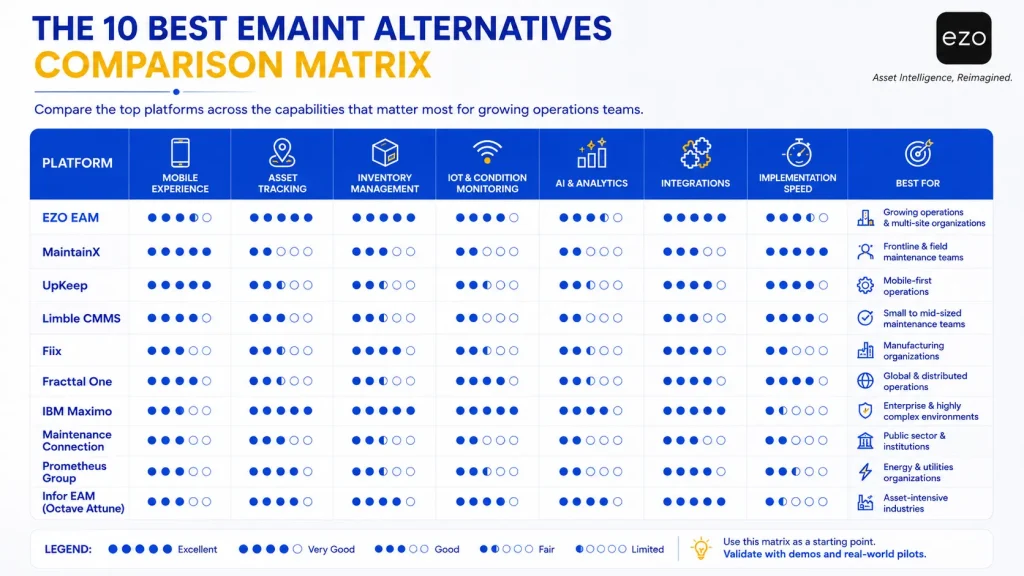
The 10 best eMaint alternatives for growing operations teams
Before exploring each platform individually, the comparison matrix below provides a high-level overview of how the leading eMaint alternatives compare across the capabilities that matter most to growing operations teams.matrix below provides a high-level overview of how the leading eMaint alternatives compare across the capabilities that matter most to growing operations teams.
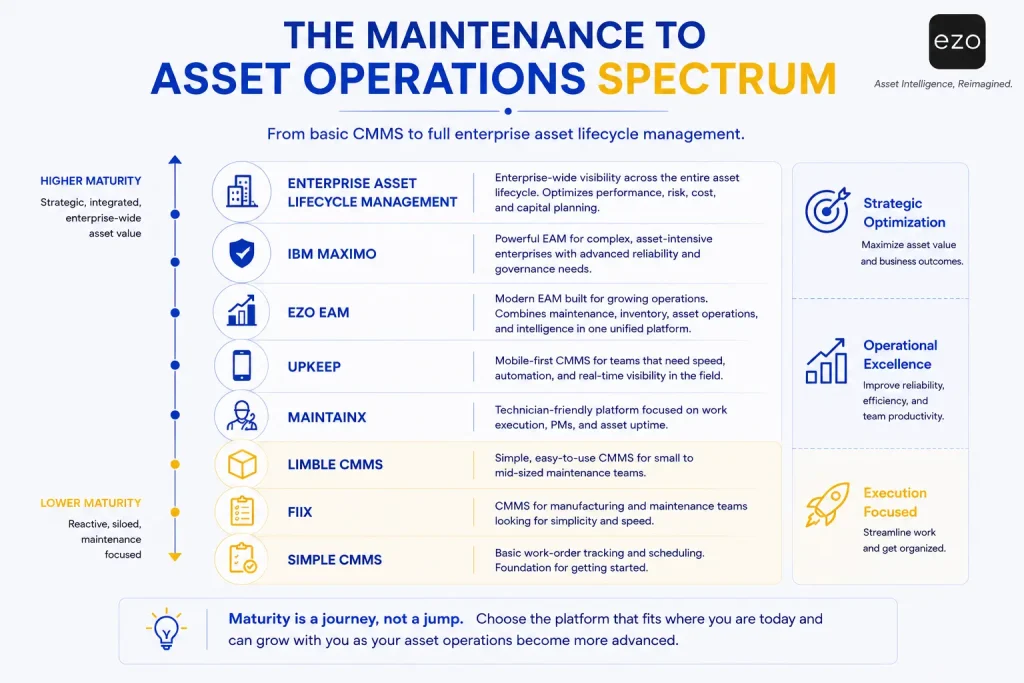
While comparison tables highlight feature differences, they don’t always show where each platform fits strategically. The spectrum below illustrates how the leading eMaint alternatives range from maintenance-focused CMMS solutions to broader enterprise asset management platforms, helping organizations choose software that matches their operational maturity and long-term asset management goals.
1. EZO EAM: Best for connected asset and maintenance operations
EZO EAM is the strongest fit for growing teams that need CMMS functionality connected with asset tracking, custody, availability, reservations, inventory, procurement, utilization, and lifecycle management.
Every maintenance platform reflects a philosophy. Some begin with maintenance and extend outward into asset management. Others begin with the asset and treat maintenance as one stage of its life.
EZO EAM belongs firmly in the second category. Instead of placing the work order at the center, it places the asset there. Maintenance history, technician activity, parts usage, procurement, location changes, custody, utilization, and retirement all resolve back to the same asset record.
Key capabilities:
- CMMS capabilities: work requests, work orders, preventive maintenance, inspections, checklists, technician assignment, work planning, service history, parts used, labor and cost capture, automated alerts, and maintenance reporting.
- Connected asset operations: a centralized asset register, barcode, QR and RFID scanning, GPS location visibility, check-in and checkout, custody history, reservations and availability, transfers, audits, utilization reporting, dispatch and telematics (both plan-dependent), and retirement.
- Inventory and procurement: spare parts, reusable stock, consumables, stock by location, purchase orders, vendors, and requisition workflows.
Why teams choose EZO EAM over eMaint:
- Asset movement and custody matter as much as maintenance.
- Equipment needs reservations and availability controls, not just service schedules.
- Assets, reusable stock, and consumables are managed together.
- Broad user participation is required without licensing every participant.
- Procurement, maintenance, utilization, and retirement should share one record.
- A wider operational layer is needed without deploying a full ERP suite.
Best fit: multi-site equipment operations, manufacturing, construction, warehousing, healthcare equipment, education, government, audiovisual (AV) and production, and field-service teams.
Trade-offs:
- Teams relying on specialist Fluke calibration workflows should validate equivalence before migrating.
- Advanced maintenance, offline work, dispatch, and telematics depend on the selected plan tier.
- Deep ERP accounting still requires integration; EZO EAM does not replace financial systems.
- Broader asset visibility introduces governance responsibility: teams must define asset statuses, ownership, and lifecycle policy before rollout.
Pricing: EZO publishes item-based pricing for Essential, Advanced, Premium, and custom Enterprise plans. At the currently displayed 300-item level, monthly pricing is $63.55 for Essential, $85.51 for Advanced, and $100.88 for Premium. These plans include unlimited users, subject to EZO’s fair-usage policy. Full CMMS capabilities are available as a separately priced Premium add-on charged by admin user or are included with Enterprise. Confirm tracked item volume, CMMS admin users, and required features when calculating total cost.
Customer sentiment (G2: 4.4/5, 392 reviews). Frequently praised for connected asset and maintenance workflows, asset visibility, inventory management, interface usability, flexible reporting, faster equipment accountability. Common criticisms include teams with highly specialized industrial reliability requirements should validate advanced maintenance workflows during evaluation, and teams arriving from maintenance-only systems usually need some process redesign to realize the lifecycle benefits.
Bottom line: Choose EZO EAM when maintaining equipment is no longer enough. You also need to know where assets are, who has them, whether they’re available, how they’re used, and when they should be retired.
Ready to evaluate your options?
Choosing the right asset management platform isn’t just about replacing eMaint, it’s about finding a solution that fits your workflows today and scales with your operations tomorrow.
2. MaintainX: Best for frontline adoption and digital procedures
MaintainX is one of the strongest eMaint alternatives where technician adoption, frontline collaboration, and mobile execution matter more than extensive configuration.
Many maintenance implementations don’t fail on features.
They fail because technicians don’t use them.
MaintainX was built around that problem. It starts with the technician rather than the administrator, so maintenance becomes part of the shift rather than paperwork at the end of it.
Key capabilities:
- Work order & maintenance management: Unlimited work orders, recurring maintenance, digital procedures and SOPs, and meter-based maintenance (Premium or Enterprise).
- Communication & collaboration: Real-time messaging and resource planning (Premium or Enterprise).
- Inventory & procurement: Parts inventory and purchase orders (Premium or Enterprise).
- Tracking & analytics: Time and cost tracking, advanced analytics, and asset-health insights.
- Integrations & automation: REST API and IoT integrations (Premium or Enterprise).
- AI & intelligence: MaintainX Copilot, its AI assistant.
- Enterprise controls: SSO and multi-site controls (Premium or Enterprise).
Why teams choose it over eMaint:
- Frontline usability is the primary objective.
- Procedures and maintenance should live in one interface.
- Real-time team communication belongs alongside the work order.
- Rapid rollout matters more than deep configuration.
Best fit: manufacturing, food and beverage, distribution, hospitality, facilities management, multi-site retail, and healthcare.
Trade-offs:
- Advanced asset and enterprise functionality requires Premium or Enterprise.
- Per-user cost grows as frontline adoption succeeds.
- Equipment reservations and custody are not central to its positioning.
Pricing: Basic free; Essential approximately $20/user/month billed annually; Premium approximately $65/user/month; Enterprise custom. Inventory, purchase orders, API access, meter-based PM, IoT, resource planning, and multi-site governance appear progressively in Premium and Enterprise, so compare equivalent functionality rather than entry prices.
Customer sentiment (G2: 4.8/5, 1,545 reviews). Frequently praised for mobile app quality, fast technician onboarding, intuitive interface, messaging, digital procedures, responsive support. Common criticisms include cost scales with licensed users, and enterprise governance and reporting sit in higher tiers.
Bottom line: Choose MaintainX if your biggest problem isn’t maintenance capability, it’s getting technicians to engage with the system at all.
3. UpKeep: Best for mobile-first maintenance and scalable asset operations
UpKeep is a strong eMaint alternative for teams that want mobile-first execution, accessible entry pricing, AI assistance, and a clear progression toward enterprise automation and governance.
For decades most CMMS platforms were designed from the desktop outward. Managers configured work orders in an office; technicians adapted.
UpKeep reversed that. As a mobile CMMS, UpKeep starts with the technician holding a phone.
Key capabilities:
- Work order & maintenance management: Work orders, preventive maintenance, custom checklists, and unlimited locations.
- Cost & workforce management: Parts and costing, time and labor, and downtime and reliability tracking.
- Procurement: Purchase orders (custom-priced tiers).
- Asset & request management: Asset lifecycle tracking and an external request portal.
- Mobile & AI: Offline mobile work (Professional and above) and Nova AI, UpKeep’s AI assistant.
- Integrations & enterprise controls: APIs (custom-priced tiers), SSO, and custom roles and dashboards.
Why teams choose it over eMaint:
- Mobile execution is the primary requirement, not a companion feature.
- Published entry pricing is lower and easier to pilot.
- AI assistance is wanted early rather than at enterprise scale.
- Unlimited requesters lower the barrier to participation.
Best fit: manufacturing, warehousing, construction, property management, field services, and utilities.
Trade-offs:
- Offline work is introduced at Professional.
- Enterprise integrations, governance, POs, and APIs move into custom-priced tiers.
- Custody and reservations are not primary differentiators.
Pricing: Essential approximately $24/user/month; Premium approximately $55/user/month; Professional and Enterprise custom.
Customer sentiment (G2: 4.5/5, 1,092 reviews). Frequently praised for mobile experience, modern interface, quick implementation, fast technician adoption, responsive support. Common criticisms include cost rises as higher-tier capabilities become necessary, and buyers needing full lifecycle management should compare against broader EAM platforms.
Bottom line: Choose UpKeep if you want maintenance software built around how technicians actually work on a phone, in the field, across multiple sites.
4. Limble CMMS: Best for straightforward preventive maintenance adoption
Limble is a strong eMaint alternative for teams that want approachable preventive maintenance, work requests, parts, purchasing, and mobile access with guided onboarding and minimal enterprise administration.
Every maintenance organization eventually reaches the point where reactive work is unsustainable, but not every organization is ready for a highly configurable enterprise platform. Many simply need a system technicians can learn quickly, managers can administer easily, and leadership can be trusted.
Limble competes on exactly that.
Key capabilities:
- Work & maintenance management: Work requests, work orders, preventive maintenance, and digital checklists.
- Asset & workforce management: Assets and locations, technician assignment, and mobile access.
- Inventory & procurement: Spare parts, vendors, and purchasing.
- Reporting & implementation: Dashboards and structured onboarding.
Why teams choose it over eMaint:
- PM setup needs to be simpler and faster to sustain.
- Day-to-day administration should not require a dedicated CMMS administrator.
- The organization is formalizing maintenance for the first time.
- Advanced calibration and reliability engineering aren’t required.
Best fit: light manufacturing, warehousing, food processing, property management, education, and mid-sized industrial operations.
Trade-offs:
- Pricing is quote-based; no public price list.
- Custody, equipment booking, and broader lifecycle management are not areas of emphasis.
- Enterprise customization and advanced integrations should be validated in a demo.
Pricing: quote-based; no public price list. Subscriptions generally include software updates and support, with self-service onboarding on some plans and customer-success-led implementation on higher tiers. Compare total implementation cost, not subscription alone.
Customer sentiment (G2: 4.8/5, 686 reviews). Frequently praised for intuitive interface, easy PM setup, customer support, smooth onboarding, fast deployment. Common criticisms include limited pricing transparency, and enterprise customization depth should be verified.
Bottom line: Choose Limble if your objective is a disciplined preventive maintenance program without an implementation project attached to it.
5. Fiix: Best for manufacturing and Rockwell Automation environments
Fiix is a strong eMaint alternative for manufacturers that need asset hierarchies, preventive maintenance, parts and purchasing, offline mobile work, multi-site reporting, and integration with industrial systems.
For a manufacturer, maintenance is fundamentally about production continuity. Every unexpected failure slips schedules, dents productivity, creates quality risk, delays deliveries, and erodes overall equipment effectiveness (OEE).
Fiix is built around that reality, and its position inside the Rockwell Automation ecosystem reinforces it.
Key capabilities:
- Maintenance management: Work orders, preventive and corrective maintenance, scheduling, and downtime tracking.
- Asset & site management: Manufacturing asset hierarchy and multi-site management (Professional and above).
- Inventory & procurement: Inventory, purchasing, and requests for quotation (RFQs) (Professional and above).
- Reporting & analytics: Custom reporting and Fiix Foresight predictive analytics.
- AI & integrations: Fiix MAX (add-on module), Integration Hub (Enterprise), APIs, and SSO (Enterprise)
Why teams choose it over eMaint:
- Rockwell Automation is already strategically important.
- Manufacturing asset hierarchy and failure propagation are central to planning.
- Industrial maintenance matters more than custody or booking workflows.
- Multi-site maintenance is needed without Fluke-specific requirements.
Best fit: manufacturing, food and beverage, automotive, chemicals, and industrial processing.
Trade-offs:
- Multi-site management, advanced analytics, and AI insights arrive in higher tiers.
- Fiix MAX and selected integrations may be additional purchases.
- Broader lifecycle and equipment-booking workflows may require complementary systems.
Pricing: Free plan; Basic approximately $45/user/month; Professional approximately $75/user/month; Enterprise custom. Professional introduces multi-site management, purchasing, advanced analytics, and AI insights; Enterprise adds workflows, integrations, audit controls, and SSO. Checked July 2026.
Customer sentiment (G2: 4.6/5, 476 reviews). Frequently praised for manufacturing focus, asset hierarchy, PM capability, reporting, usability, Rockwell integration. Common criticisms include advanced functionality requiring higher tiers, and AI and selected integrations may carry additional cost.
Bottom line: Choose Fiix if maintenance performance is measured in production uptime and your plant is standardizing on Rockwell technology.
6. Fracttal One: Best for IoT-connected and distributed maintenance
Fracttal One is a strong eMaint alternative for organizations that want maintenance, asset records, automation, IoT monitoring, AI assistance, and ERP integration across distributed or international operations.
Traditional preventive maintenance assumes equipment should be serviced on a schedule: every month, quarter, and 500 operating hours.
Those schedules work, but they assume every asset ages at the same rate, which equipment under different operating conditions rarely does.
Fracttal One is built for teams moving from “Has six months passed?” to “Has this asset shown signs that maintenance is actually required?”
Key capabilities:
- Maintenance management: Time-, usage-, event-, and meter-based maintenance, work orders, and workflow automation.
- Asset & inventory management: Asset records, inventory, and distributed asset management.
- AI & analytics: AI assistance and Fracttal Sense.
- Integrations & connectivity: ERP and cloud integrations, PLC, OPC (Open Platform Communications), and SCADA connectivity.
- Implementation & support: Regional onboarding and localized support.
Why teams choose it over eMaint:
- IoT and remote condition monitoring are strategic, not experimental.
- Operations span regions, languages, and time zones.
- The business wants a modern cloud EAM without an ERP program.
- Automated condition-based work creation is a priority.
Best fit: utilities, energy, mining, transportation, telecommunications, water management, and distributed asset networks.
Trade-offs:
- Pricing is quote-based and requires consultation.
- IoT hardware, sensors, and industrial integrations need separate scoping and budget.
- Enterprise permissions and governance models should be tested during evaluation.
Pricing: custom and quote-based, depending on scope, asset count, integrations, and deployment complexity. Budget for IoT implementation, integration work, regional deployment, and training alongside subscription. Checked July 2026.
Customer sentiment (G2: 4.6/5, 601 reviews). Frequently praised for modern cloud interface, IoT capability, automation, mobile access, managing distributed assets, regional support. Common criticisms include pricing that requires consultation, and full value depends on actually connecting devices and data sources.
Bottom line: Choose Fracttal One if your maintenance strategy is moving from preventive toward genuinely condition-based work driven by connected equipment.
7. IBM Maximo: Best for large enterprise asset management
IBM Maximo Application Suite is best suited to large, asset-intensive enterprises that need complete lifecycle management, advanced reliability, and enterprise-wide governance, and have the resources to implement and administer it.
Where most cloud-native CMMS products optimize for time-to-value, Maximo optimizes for depth across very large asset portfolios. It extends past maintenance into asset planning, procurement, compliance, risk, and capital planning.
Key capabilities:
- Work & asset management: Enterprise work and asset management, asset hierarchies at scale, and mobile work.
- Condition & reliability management: Condition and predictive monitoring, plus health and reliability applications.
- Inventory & procurement: Inventory and procurement management.
- Integrations & governance: Deep ERP integration and enterprise governance.
- Industry solutions: Industry-specific solutions.
Why teams choose it over eMaint:
- Asset management is an enterprise-wide strategic capability, not a maintenance function.
- Reliability engineering and predictive maintenance are formally staffed.
- Multi-site governance spans regions and business units.
- Deep ERP integration is mandatory.
Best fit: utilities, energy, oil and gas, transportation, aviation, government infrastructure, and very large manufacturers.
Trade-offs:
- Implementation timelines, costs, and administrative expertise all exceed mid-market CMMS norms.
- AppPoints licensing (IBM’s consumption-based licensing credits) is flexible but needs active governance; pools sized on headcount rather than concurrency tend to be oversized.
- Smaller organizations frequently find its capabilities exceed their requirements.
Pricing: credit-based AppPoints licensing across client-managed and SaaS deployments, with SaaS tiers spanning Essentials, Standard, and Premium. Third-party listings have placed the SaaS Essentials tier at roughly $3,150 per month for a limited user count and one production environment; IBM does not publish a flat per-user rate. Real cost depends on AppPoint consumption, add-on applications, and implementation. Checked July 2026.
Customer sentiment (G2: 4.4/5, 631 reviews). Frequently praised for functional depth, configurability, industry coverage, reliability and compliance capability. Common criticisms include implementation effort, administrative overhead, and licensing complexity.
Bottom line: Choose IBM Maximo if you manage one of the largest asset portfolios in your industry and can staff the governance it requires.
8. Maintenance Connection: Best for mid-sized maintenance organizations
Maintenance Connection is a solid eMaint alternative for organizations that want a configurable CMMS with dependable maintenance, inventory, and reporting capability without moving into full enterprise EAM complexity.
One detail worth knowing: Maintenance Connection is an Accruent product. Accruent, like Fluke Reliability, which publishes eMaint, is part of Fortive, an industrial technology holding company. Switching between them changes the product, not the vendor family. That has practical implications for contract negotiation, roadmap exposure, and procurement leverage that most comparison articles never mention.
Key capabilities:
- Maintenance management: Work orders, preventive maintenance, mobile maintenance, and request portals.
- Asset management: Asset records and hierarchies, with multi-site support.
- Inventory & procurement: Spare-parts inventory and purchasing.
- Reporting & deployment: Dashboards and cloud or on-premises deployment.
Why teams choose it over eMaint:
- Administration should be simpler than a heavily configured reliability platform.
- Maintenance, inventory, and reporting need to be dependable rather than exhaustive.
- Multi-site support is required without enterprise-scale governance.
- The organization has outgrown spreadsheets but not into enterprise EAM.
Best fit: manufacturing, healthcare, education, municipal organizations, commercial facilities, and mid-sized industrial companies.
Trade-offs:
- Mobile experience should be tested directly by technicians.
- Enterprise scalability and reporting customization should be validated against your requirements.
- Shared corporate ownership with eMaint reduces the strategic diversification a switch might otherwise provide.
Pricing: quote-based; no public price list. Enterprise pricing and implementation are quoted separately. Verify tiers and minimums with Accruent directly.
Customer sentiment (G2: 4.4/5, 73 reviews). Frequently praised for configurability, inventory capability, reporting, stability. Common criticisms include interface modernity and mobile depth relative to newer cloud-native competitors.
Bottom line: Choose Maintenance Connection for dependable mid-market maintenance management while recognizing that it is a sibling product to eMaint rather than a departure from it.
9. Prometheus Group: Best for SAP and Oracle-centric enterprises
Prometheus Group is best suited to organizations already invested in SAP or Oracle that want stronger maintenance planning, scheduling, and execution without replacing their enterprise ecosystem.
Unlike most vendors here, Prometheus Group doesn’t primarily sell a standalone CMMS. It sells the layer that makes an existing enterprise maintenance ecosystem work harder: better planning and scheduling, mobile execution against ERP data, shutdown and turnaround management, permitting and safety, master data governance, and reliability analytics.
Key capabilities:
- Planning & maintenance: Planning and scheduling, mobile EAM, and asset performance management.
- Shutdown & contractor management: Shutdown, turnaround, and outage (STO) management, plus contractor management.
- Permitting & data: Electronic permitting and master data as a service.
- Analytics & integrations: Analytics built around SAP and Oracle environments.
Why teams choose it over eMaint:
- SAP or Oracle is the system of record and will remain so.
- Turnaround and outage planning is a major cost center.
- Reliability-centered maintenance is formally practiced.
- The goal is to improve execution, not migrate platforms.
Best fit: oil and gas, chemicals, utilities, mining, heavy manufacturing, and other asset-intensive enterprises with mature ERP footprints.
Trade-offs:
- Organizations without SAP or Oracle will find the value proposition much weaker.
- It assumes an existing enterprise maintenance ecosystem rather than serving as a first CMMS.
- Commercial engagements are quote-based and typically sized for large enterprises.
Pricing: quote-based and modular, scoped by product set, user population, and ERP environment. SelectHub, a software-selection research firm, puts typical entry commitments near $100,000 annually, which is consistent with its enterprise positioning. Model implementation and master data work alongside licensing.
Customer sentiment (too few G2 reviews for a meaningful score). Vendor-stated and analyst-reported strengths include SAP-native execution, planning and scheduling depth, turnaround management, domain expertise. Commonly reported constraints are enterprise-scale cost and implementation, and limited relevance outside ERP-centric environments.
Bottom line: Choose Prometheus Group if you already run SAP or Oracle and want to improve maintenance execution while preserving your ERP strategy.
10. Infor EAM (now Octave Attune EAM): Best for enterprise asset lifecycle management
Infor EAM is a strong eMaint alternative for organizations needing enterprise-grade asset lifecycle management across manufacturing, healthcare, transportation, public infrastructure, and facilities, but buyers should know the product has changed hands and names twice.
This one needs a naming note before anything else, because it causes real confusion in RFPs.
Note: Infor sold its global EAM business to Hexagon in October 2021, and the product was rebranded HxGN EAM. In May 2026, Hexagon completed the spin-off of its software divisions into an independent company, Octave, and the product is now marketed as Octave Attune EAM. The platform, code base, and installed base carried through each transition. Only the owner and the name changed. If you are searching for “Infor EAM,” you are looking at the right product under a third name.
Key capabilities:
- Work & asset management: Enterprise work and asset management, asset hierarchies, and risk calculation.
- Maintenance & calibration: Preventive and condition-based maintenance, plus built-in calibration.
- Procurement & inventory: Requisitions, purchase orders, and inventory optimization.
- Compliance & industry solutions: Compliance records and industry-specific editions.
- Digital & AI capabilities: Mobile access, AI assistance, and digital twin capability.
Why teams choose it over eMaint:
- Enterprise asset governance spans far beyond the maintenance department.
- Large multi-site, multi-country deployments are the norm.
- Compliance management and long-term lifecycle planning drive the business case.
- Capital planning depends on maintenance and condition data.
Best fit: healthcare, transportation, manufacturing, government, utilities, facilities, and public infrastructure.
Trade-offs:
- Implementation and configuration effort exceeds lighter cloud CMMS platforms.
- The double rebrand means documentation, partner material, and search results are inconsistent, therefore budget your time for due diligence.
- Roadmap ownership has changed recently; ask directly about release cadence and support commitments under Octave.
Pricing: quote-based, scoped by users, assets, modules, and deployment model. SelectHub’s listing places entry commitments around $7,000 per month. Octave does not publish list pricing.
Customer sentiment (G2: 4.3/5, 62 reviews). Frequently praised for lifecycle breadth, industry editions, configurability, strength in utilities and public infrastructure. Common criticisms include implementation effort, and uncertainty created by successive ownership changes.
Bottom line: Choose Octave Attune EAM if you need enterprise-wide governance of assets across their full lifecycle, and confirm the current support and roadmap position in writing.
Which eMaint alternative is best for your operations team?
The best eMaint alternative depends on whether your primary need is broader asset control, frontline adoption, mobile execution, manufacturing reliability, IoT connectivity, ERP-native planning, or enterprise lifecycle governance.
| If your priority is… | Start with | Also consider |
|---|---|---|
| Maintenance connected to custody, reservations, and lifecycle | EZO EAM | Octave Attune EAM |
| Frontline technician adoption | MaintainX | UpKeep, Limble |
| Mobile-first execution in the field | UpKeep | MaintainX, EZO EAM |
| Getting a PM program running quickly | Limble CMMS | MaintainX, Maintenance Connection |
| Manufacturing reliability and production uptime | Fiix | Fracttal One, EZO EAM |
| IoT and condition-based maintenance | Fracttal One | Fiix, UpKeep |
| Enterprise governance at very large scale | IBM Maximo | Octave Attune EAM, Prometheus Group |
| Dependable mid-market maintenance | Maintenance Connection | Limble, Fiix |
| Improving maintenance inside SAP or Oracle | Prometheus Group | IBM Maximo |
| Full lifecycle and capital planning | Octave Attune EAM | IBM Maximo, EZO EAM |
| Regulated, calibration-heavy maintenance | Octave Attune EAM | Retain eMaint, see “When should you keep eMaint instead of switching?” |
| Broad participation without licensing everyone | EZO EAM | MaintainX |
Most buyers run two or three head-to-head comparisons from this list. The most common pairings are eMaint vs MaintainX, eMaint vs UpKeep, eMaint vs Limble, and eMaint vs Fiix. Whichever pairing you land on, do not label any platform “cheapest” without modeling required features, plan tier, and projected user count over three years.
The operations-growth maturity ladder
Most teams don’t need the most advanced platform available. They need the one that matches the stage they’re actually at.
| Stage | Main requirement | Common fits |
|---|---|---|
| 1 | Digital work orders replacing paper | MaintainX, UpKeep |
| 2 | Structured PMs, parts, and reporting | Limble, Fiix, Maintenance Connection, eMaint |
| 3 | Maintenance plus custody, availability, and lifecycle | EZO EAM, eMaint |
| 4 | Connected, condition-based maintenance | Fracttal One |
| 5 | Regulated reliability and calibration | Octave Attune EAM; retain eMaint if already deployed |
| 6 | Enterprise-wide asset governance | IBM Maximo, Octave Attune EAM, Prometheus Group |
The stages overlap in practice, and several platforms credibly serve more than one, eMaint, for example, fits anywhere from stage 2 to stage 5 depending on regulatory intensity.
Buying two stages ahead is a common cause of failed implementations.
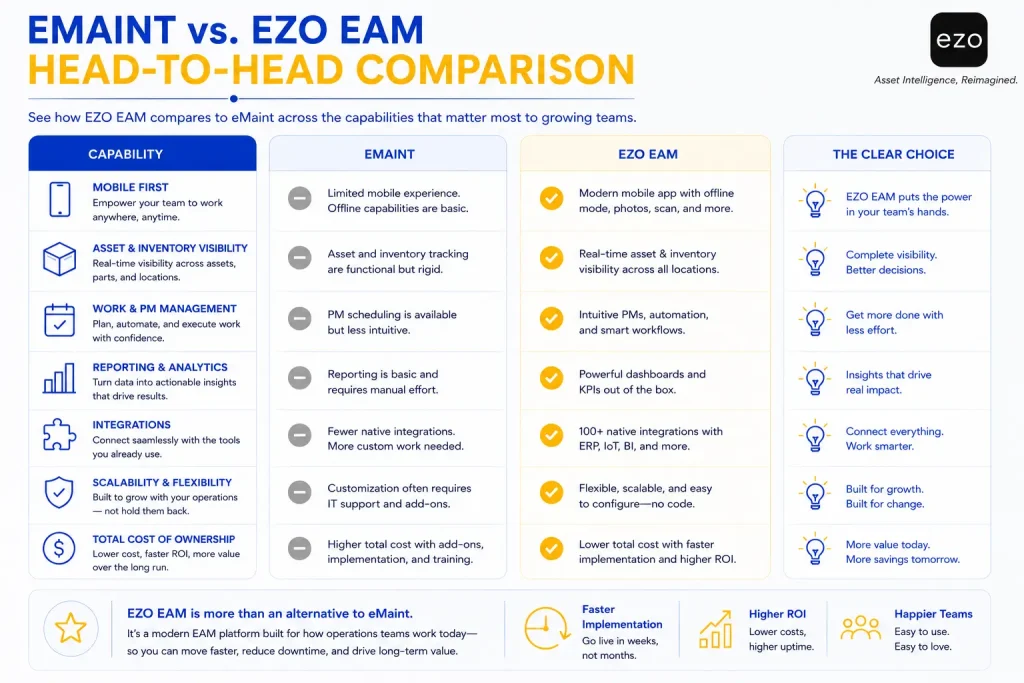
eMaint vs EZO EAM: How do they compare?
eMaint is centered on configurable maintenance, reliability, calibration, and regulated workflows. EZO EAM includes CMMS capabilities but extends further into equipment custody, reservations, checkout, availability, wider inventory, procurement, utilization, and operational lifecycle management cycle management.
| Area | eMaint | EZO EAM |
|---|---|---|
| Primary orientation | Maintenance, reliability, and EAM | Connected asset and equipment operations |
| Work orders | Yes | Yes, through CMMS capabilities within EZO EAM |
| Preventive maintenance | Yes | Yes |
| Condition-based maintenance | Yes | Available according to maintenance configuration |
| Calibration | Core specialist strength | Validate specific requirements |
| Mobile and offline work | Yes | Available by plan |
| Asset tracking | Yes | Core platform capability |
| Asset custody | Transfer and assignment features | Checkouts, handoffs, transfers, custody history |
| Reservations | Not a primary differentiator | Core operational capability |
| Availability calendar | Validate workflow | Core planning capability |
| Parts inventory | Yes | Parts, reusable stock, and consumables |
| Purchasing | Yes | Available by plan |
| GPS and telematics | Integration dependent | Available through platform integrations |
| Reporting | Standard and advanced | Custom, scheduled, utilization, inventory, and lifecycle |
| Pricing model | Primarily per user | Primarily item-based, unlimited users under published terms |
Recommendation: eMaint is stronger on calibration and condition monitoring; EZO EAM is stronger on custody, reservations and lifecycle. Choose which gap costs you more. Choose eMaint where advanced reliability, calibration, condition monitoring, and Fluke expertise are central to how the business operates. Choose EZO EAM where maintenance needs to stay connected to who has an asset, whether it’s available, where it’s moving, and how it’s used across its life. How do you migrate from eMaint to another platform?
Migrating from eMaint requires mapping assets, locations, work orders, PM rules, parts, users, reports, custom fields, calibration records, and integrations into the replacement system, then validating them before cutover.
Treat an eMaint replacement as an operational transformation, not a software installation.
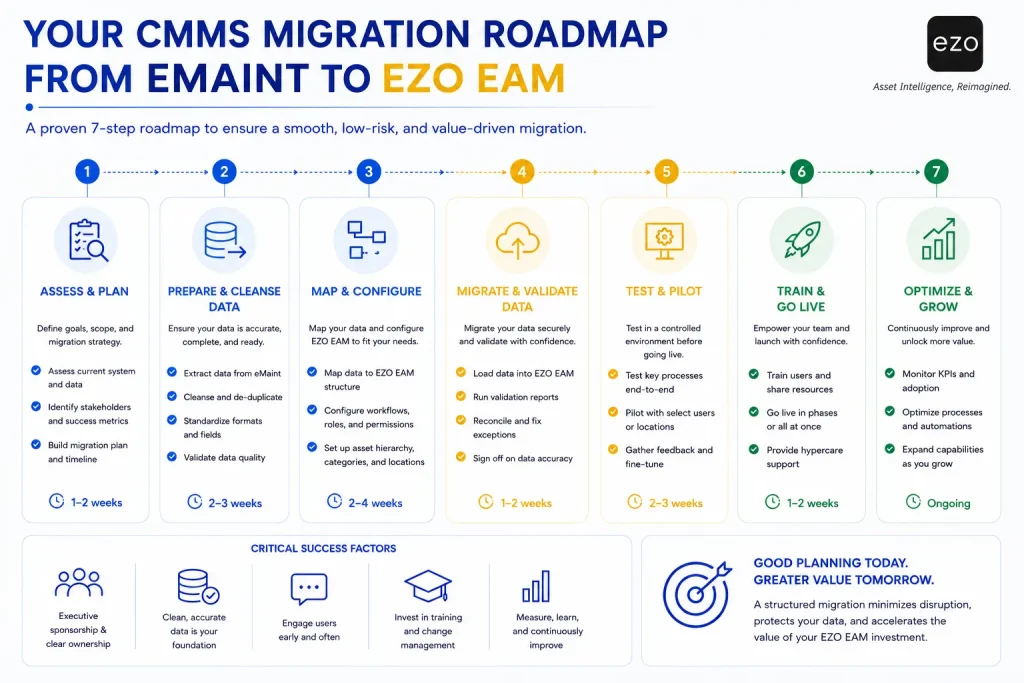
Step 1: Define the switching objective. Pick measurable goals: lower total cost, better technician adoption, broader asset tracking, easier administration, equipment reservations, improved mobile work, or better IoT connectivity. Vague objectives produce vague outcomes.
Step 2: Audit the current configuration. Assets, locations, users, work orders, PMs, parts, purchase orders, calibration records, reports, procedures, custom fields, integrations, and attachments.
Step 3: Decide what to migrate. Separate active operational data, required compliance history, financially relevant history, archive-only records, duplicates, and anything that should be rebuilt rather than moved.
Step 4: Clean the records. Resolve duplicate assets, invalid locations, retired equipment, obsolete PMs, duplicate parts, unused statuses, and inconsistent custom fields. Migrating mess reproduces mess.
Step 5: Map fields and workflows. Assign an owner to every element.
| eMaint element | Replacement equivalent | Treatment | Owner |
|---|---|---|---|
| Asset ID | Asset identification field | Import and validate | Asset manager |
| Location hierarchy | New location structure | Clean and rebuild | Operations |
| Work-order status | New workflow status | Map | Maintenance manager |
| PM schedule | PM template | Rebuild and test | Planner |
| Part | Inventory record | Reconcile quantities | Storeroom lead |
| Calibration record | Compliance or specialist record | Validate individually | Quality lead |
| Custom field | Structured field or note | Keep, merge, or retire | Administrator |
| Report | Dashboard or report | Rebuild selectively | Management |
Step 6: Pilot real workflows. Submit a request, create a work order, assign a technician, work offline, consume a part, complete an inspection, return the asset to service, transfer custody, and generate a cross-site report.
Step 7: Validate integrations, ERP, procurement, SSO, BI, SCADA, IoT, APIs, and request portals, confirming fields, direction, and frequency, not just connectivity.
Step 8: Plan the cutover. Define the final export, data freeze, treatment of open work, PM activation, user access, reporting validation, support coverage, archive access, and contract termination.
Do not cancel your eMaint contract until PMs, reports, and compliance records are validated in the new system. For a fuller playbook, see our CMMS migration guide.
What mistakes should teams avoid when replacing eMaint?
The most common mistake is assuming a simpler interface or lower entry price will automatically produce better maintenance results.
- Replacing eMaint when reconfiguration would have solved the problem.
- Ignoring calibration and regulated-workflow requirements.
- Choosing by entry price alone.
- Comparing plans that don’t contain equivalent functionality.
- Migrating every historical record instead of cleaning first.
- Rebuilding customizations that no longer serve a business need.
- Excluding technicians from evaluation and testing.
- Ignoring offline mobile behavior until after go-live.
- Underestimating integration work.
- Buying AI capability without reliable underlying data.
- Choosing broad EAM functionality the team has no capacity to govern.
- Canceling eMaint before validating PMs, reports, and compliance records.
- Failing to assign a long-term platform owner after implementation.
Technology alone does not improve maintenance performance. Governance, standardized workflows, and consistent adoption do.
Final recommendation
Evaluating alternatives to eMaint isn’t about finding software with more features. It’s about finding software that reflects the way your teams already work and the way they intend to grow.
The fit table above maps the shortlist: Maximo, Octave Attune EAM, and Prometheus Group for enterprise governance; MaintainX, UpKeep, and Limble for technician adoption; Fracttal One for IoT; Fiix for manufacturing uptime.
And if your organization has reached the point where maintenance, asset tracking, custody, inventory, procurement, utilization, and lifecycle decisions all have to work together, EZO EAM stands out as the strongest fit on this list. By bringing maintenance management into the wider asset lifecycle, it lets growing operations teams move beyond managing work orders toward managing the full operational journey of their physical assets.
One last piece of advice: run the same-workflow test before you sign anything. Vendors compete well on feature matrices. They differentiate on scenarios.
Ready to test this on your own workflows? Schedule a free EZO EAM demo.
Not shortlisting EZO EAM? Use the evaluation checklist above as your trial scorecard, it works the same way whichever platform you are testing.