
A CMMS primarily organizes maintenance work, which includes work orders, preventive maintenance, technician scheduling, and spare parts. An EAM system manages the broader asset lifecycle, from acquisition and utilization through maintenance, cost analysis, and retirement. The choice between them depends on whether you need maintenance execution or organization-wide lifecycle control.
Introduction
Maintenance requests are piling up, asset records are scattered across spreadsheets and email, and leadership wants tighter control over downtime, costs, and asset decisions. At that point, most teams face the same question: do we need maintenance software, or something that manages the whole asset lifecycle?
CMMS and EAM software overlap heavily, and the main difference between them is operational scope, not sophistication. Neither category is automatically “better,” and modern cloud platforms increasingly blend capabilities from both. The right choice depends on the decisions you need the software to support. This guide covers the definitions, a side-by-side comparison, user and workflow differences, selection criteria, the signals that you’re outgrowing maintenance-only tools, and where EZO EAM and EZO CMMS fit.
What is the main difference between CMMS and EAM?
A CMMS focuses on executing and improving maintenance work. An EAM manages assets across a broader lifecycle, connecting maintenance with acquisition, utilization, cost, contracts, risk, and retirement. In short: a CMMS keeps equipment running; an EAM decides whether an asset is still worth keeping.
IBM frames the distinction the same way: a CMMS centralizes and automates maintenance processes, while an EAM optimizes an asset’s performance from acquisition through end of life. The clearest way to see the difference is to look at the questions each system is built to answer.
A CMMS answers day-to-day maintenance questions:
- What needs to be repaired or inspected?
- When is preventive maintenance due?
- Which technician should perform the work?
- What parts are required, and are they in stock?
- How long did the work take, and is the backlog growing?
- How often is this asset failing?
An EAM answers lifecycle and portfolio questions:
- What assets does the organization own, and where are they?
- What is their current condition and utilization?
- What has each asset cost across its lifetime?
- Should an asset be repaired, replaced, transferred, or retired?
- Which warranties, contracts, risks, and compliance requirements apply?
- How should capital and operating budgets be allocated?
CMMS vs EAM at a glance
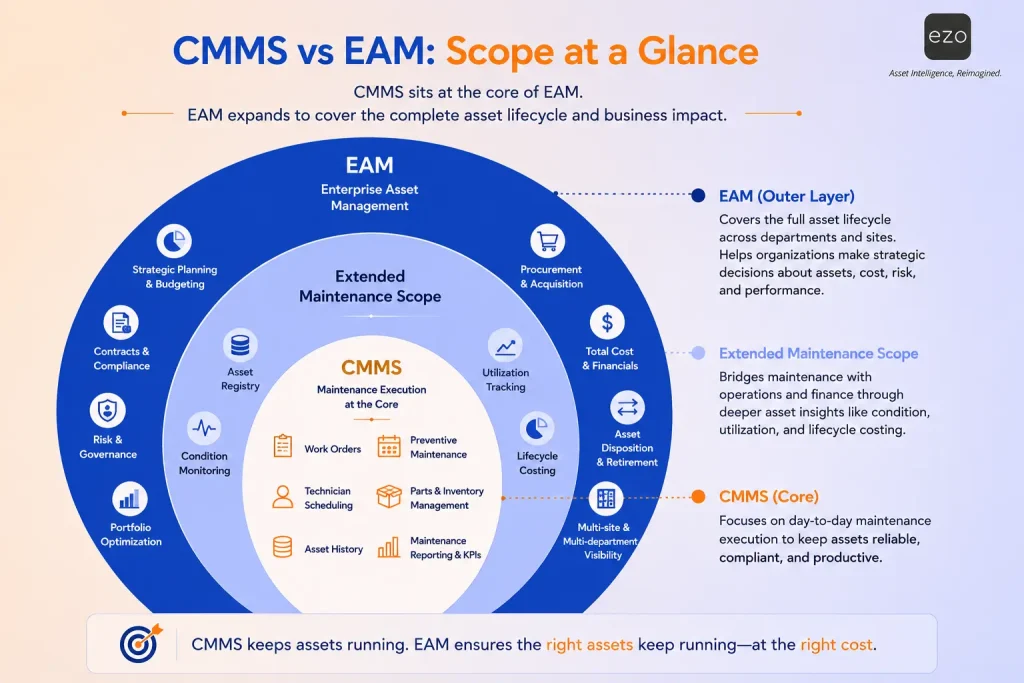
| Area | CMMS | EAM |
|---|---|---|
| Primary focus | Maintenance execution | Complete asset lifecycle |
| Main objective | Keep equipment operational | Optimize asset value, performance, and cost |
| Typical users | Maintenance managers, planners, technicians | Asset managers, operations, finance, procurement, maintenance |
| Core workflows | Work orders, inspections, PM schedules, parts | Acquisition, tracking, maintenance, costs, contracts, retirement |
| Time horizon | Daily and short-to-medium-term maintenance | Operational and long-term lifecycle planning |
| Financial depth | Maintenance labor, parts, and repair costs | Broader lifecycle and total cost information |
| Organizational scope | Primarily maintenance teams | Multiple departments and sites |
| Implementation | Usually narrower and faster | Often broader and more integration-dependent |
| Best fit | Maintenance process control | Cross-functional asset governance |
What is a CMMS?
A computerized maintenance management system (CMMS) centralizes maintenance information and helps teams plan, assign, complete, and analyze work performed on equipment, facilities, and other physical assets. Its purpose is to make maintenance proactive and documented rather than reactive and reliant on tribal knowledge.
A CMMS moves maintenance teams from paper forms to digital work orders, from reactive repairs to scheduled preventive maintenance, from individual knowledge to documented asset histories, from unplanned parts requests to controlled inventory, and from manual status checks to dashboards and alerts.
Core CMMS Capabilities
- Work request intake
- Work order creation and assignment
- Preventive maintenance scheduling
- Maintenance checklists
- Technician scheduling
- Labor and parts tracking
- Spare parts inventory
- Equipment maintenance history
- Meter-based and condition-based maintenance
- Mobile work execution
- Maintenance dashboards
- KPIs such as MTTR, MTBF, backlog, and completion rates
Who uses a CMMS?
Maintenance technicians, planners, and supervisors are the primary users, alongside facilities teams, reliability engineers, contractors and service providers, and operations staff who submit work requests. Each interacts differently, but all work toward the same goal: reliable, available, and well-documented equipment.
What are the business outcomes of using a CMMS?
Organizations typically see faster maintenance response, less reactive repair, more consistent preventive maintenance, clearer accountability for open work, better visibility into labor and parts usage, and more complete maintenance records, which together produce improved equipment reliability and operational efficiency.
What is an EAM system?
Enterprise asset management (EAM) software coordinates the complete lifecycle of physical assets, connecting maintenance activity with acquisition, deployment, utilization, cost, condition, compliance, and retirement. It includes maintenance, but extends into planning, procurement, asset performance, and enterprise decision-making. This lifecycle orientation mirrors recognized asset-management frameworks such as the ISO 55000 series of standards.
Core EAM capabilities
- Centralized asset registry and asset hierarchies
- Procurement and purchase orders
- Asset deployment, location tracking, and custody records
- Maintenance management
- Asset utilization and availability tracking
- Contracts and warranties
- Inspections, audits, and compliance documentation
- Asset condition monitoring
- Lifecycle cost analysis and total cost of ownership
- Capital planning and replacement decisions
- Asset recovery and retirement
- Multi-site reporting
- ERP, procurement, and financial integrations
Who uses an EAM tool?
Asset managers, operations directors, facilities leadership, maintenance teams, procurement, finance, compliance and risk teams, sustainability teams, and executive leadership all draw on the same asset data from enterprise asset management software.
What “Enterprise” really means in EAM
“Enterprise” refers to the breadth of the asset management scope and the number of business functions connected, not simply headcount or revenue. A mid-sized organization may need EAM capabilities when it has high-value equipment, multiple sites, complex custody or transfers, strict audit requirements, expensive downtime, long asset lifecycles, or significant procurement and replacement decisions.
How are CMMS and EAM similar?
Both CMMS and EAM systems help organizations improve asset reliability, centralize asset information, reduce downtime, document maintenance, and make better operational decisions. Their shared foundation is why the terms are so often used interchangeably.
Common ground includes asset records, work orders, preventive maintenance, maintenance history, parts and inventory, mobile access, dashboards and reports, equipment condition data, document storage, alerts and notifications, workflow automation, and APIs and integrations.
The categories blur for several reasons. EAM platforms normally include maintenance functionality, while modern CMMS products have expanded well beyond simple work orders. Additionally, SaaS platforms are increasingly modular, and buyers often use the terms interchangeably, meaning vendor positioning doesn’t always reflect actual product scope
CMMS vs EAM: How do their features compare?
The biggest functional differences usually appear outside maintenance, in procurement, financial context, asset deployment, contract management, lifecycle planning, and retirement. Inside maintenance, the two categories look very similar.
| Capability | Typical CMMS scope | Typical EAM scope | Why it matters |
|---|---|---|---|
| Asset registry | Maintenance-relevant equipment | Organization-wide asset records | Determines cross-departmental data accessibility, reporting accuracy, and governance. |
| Work orders | Core capability | Core maintenance capability | Controls maintenance execution |
| Preventive maintenance | Core capability | Part of lifecycle management | Reduces unexpected failures |
| Predictive maintenance | Advanced platforms | Often part of asset performance | Uses condition data to anticipate work |
| Parts inventory | Maintenance parts | Broader supply/asset inventory | Prevents maintenance delays |
| Procurement | Parts/maintenance purchasing | Asset + parts procurement | Links buying to asset records |
| Contracts & warranties | May be limited | Frequently included | Supports renewals and claims |
| Asset custody & transfers | Varies | Broader capability | Key for mobile, multi-site assets |
| Asset utilization | Maintenance availability | Portfolio-level utilization | Informs redeployment and buying |
| Lifecycle cost | Repair/maintenance cost | Acquisition-to-retirement cost | Improves repair-vs-replace calls |
| Financial integration | Usually limited | Broader ERP/finance integration | Supports enterprise reporting |
| Compliance | Maintenance records | Broader regulatory/lifecycle | Improves audit readiness |
| Asset retirement | May record disposal | Formal retirement workflows | Preserves complete history |
| Multi-site management | Common in modern tools | Common requirement | Enables consolidated control |
| Primary decision level | Maintenance operations | Operational + strategic | Shapes the software’s audience |
Three quick scenarios show how this plays out:
- Maintenance-led (CMMS). A school district needs to receive repair requests, assign technicians, schedule HVAC inspections, and track spare parts. That’s a maintenance-execution problem.
- Lifecycle-led (EAM). A construction company procures equipment, tracks it across sites, monitors utilization and maintenance, calculates ownership cost, and decides when to replace it. That needs broader EAM capabilities.
- Blended. A healthcare network needs preventive maintenance, work orders, asset availability, custody, compliance histories, and multi-location reporting, which is often best served by a platform combining both scopes.
What are the benefits and limitations of a CMMS?
A CMMS gives focused, accessible control over maintenance operations, but it may not cover the financial, procurement, governance, and lifecycle requirements associated with enterprise asset management.
Benefits: faster implementation, a clear maintenance focus, strong technician adoption, lower process complexity, better preventive maintenance compliance, centralized work histories, improved maintenance reporting, mobile access for field teams, and an easy transition from spreadsheets or paper.
Potential limitations: asset data may stay maintenance-specific; procurement and finance may keep separate records; lifecycle-cost visibility may be incomplete; asset transfers and custody may be limited; capital planning may require other systems; cross-department reporting may stay fragmented; and asset retirement may not be formally managed.
These are category-level tendencies, not universal limitations. The actual boundary depends on the specific product you evaluate.
What are the benefits and limitations of an EAM system?
An EAM provides a connected view of asset performance, cost, condition, and lifecycle decisions, but its wider scope can demand more data preparation, integrations, governance, and organizational change.
Benefits: complete lifecycle visibility, cross-functional asset data, better repair-versus-replace decisions, improved capital planning, stronger multi-site governance, more comprehensive compliance records, better procurement and warranty control, broader total-cost-of-ownership analysis, and standardized asset processes across departments.
Potential limitations: more complex implementation, greater data-migration effort, more stakeholder involvement, higher integration dependency, longer training, the risk of buying unused functionality, lower technician adoption where workflows get too complex, and potential overlap with ERP, procurement, and finance systems.
Feature breadth pays off only when the organization has clear process ownership, reliable asset data, defined workflows, stakeholder participation, and the ability to act on lifecycle insights.
When should you choose a CMMS?
Choose a CMMS when the immediate problem is maintenance execution: controlling work requests, scheduling preventive maintenance, coordinating technicians, tracking spare parts, and reducing downtime.
Strong CMMS-fit signals:
- Maintenance requests arrive by email, phone, or paper
- Preventive maintenance is frequently missed
- Technicians lack mobile access to asset histories
- Management can’t see the work-order backlog
- Parts availability regularly delays repairs
- Maintenance reporting is manual
- Mainly the maintenance team will use the platform
- Reliable lifecycle records already live in another system
- Fast adoption matters more than deep enterprise integration
Common use cases: school and university facilities, hospital maintenance departments, commercial building operations, manufacturing maintenance teams, local government facilities, property management, hospitality, and service/repair contractors.
When should you choose an EAM system?
Choose an EAM when asset decisions extend beyond maintenance and require coordination across procurement, operations, finance, compliance, and long-term planning.
Strong EAM-fit signals:
- Assets move regularly between sites, projects, or departments
- Procurement can’t see existing availability before buying
- Repair, operating, and replacement costs are disconnected
- Leadership needs total-cost-of-ownership information
- Departments keep conflicting asset records
- Warranties and contracts are hard to monitor
- Compliance requires a complete lifecycle history
- Asset utilization drives capital purchases
- You manage large or geographically distributed portfolios
- Retirement and disposal need formal controls
Common use cases: construction equipment operations, utilities and infrastructure, transportation fleets, multi-site manufacturing, healthcare networks, government agencies, energy operations, warehousing and logistics, and large educational systems.
Can a modern platform provide both CMMS and EAM capabilities?
Yes. Modern asset platforms increasingly combine maintenance execution with asset tracking, inventory, procurement context, utilization, reporting, and lifecycle records. Evaluate actual workflows rather than relying on category labels.
Convergence is happening because modern cloud platforms are modular. A single asset record can now support both maintenance and lifecycle workflows, while mobile tools serve technicians and operational users alike. Furthermore, APIs connect specialist applications, allowing maintenance data to inform procurement and utilization to shape maintenance priorities.
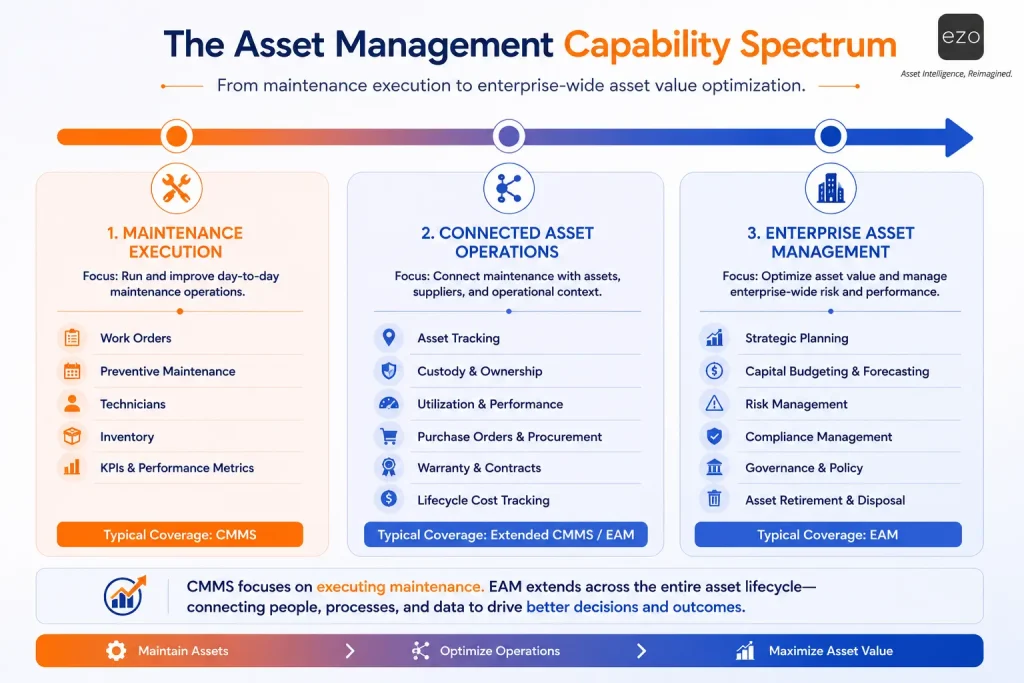
A more useful way to think about it is a spectrum rather than two boxes:
- Maintenance execution:
- work orders
- PM scheduling
- Technicians
- parts
- maintenance KPIs
- Connected asset operations:
- asset tracking
- custody
- utilization
- purchasing
- warranties
- lifecycle costs
- Enterprise lifecycle management:
- planning
- governance
- risk
- financial integration
- retirement
Place your requirements along that spectrum instead of forcing your organization into one category.
How does EZO support maintenance and asset lifecycle management?
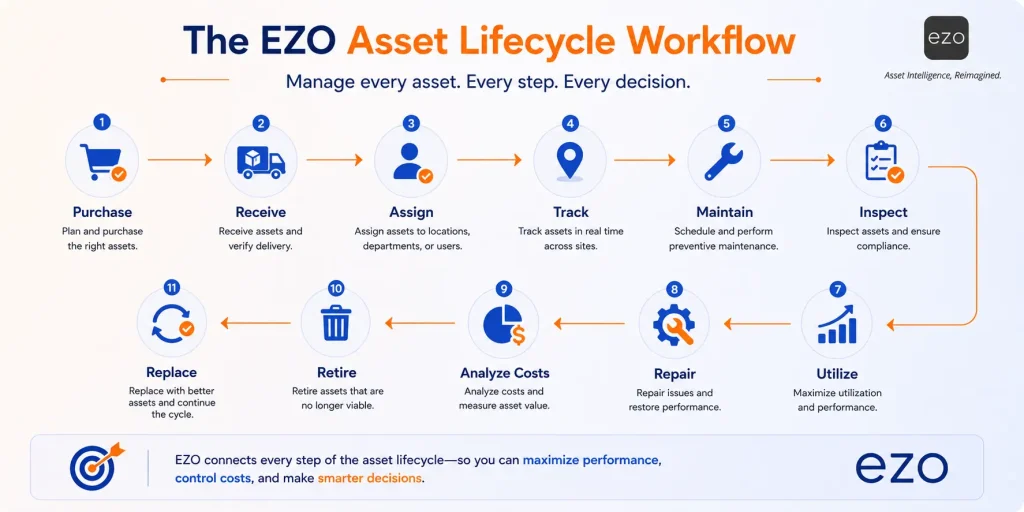
EZO supports broader asset operations, which involves asset tracking, procurement-to-retirement records, inventory, maintenance history, and lifetime costs, while EZO CMMS focuses more directly on work orders, preventive maintenance, parts, technician workflows, and maintenance analytics.
Use EZO for connected asset operations
For teams that need visibility beyond maintenance, EZO’s asset platform brings together asset lifecycle records, asset tracking, custody and availability, location management, inventory and consumables, purchase orders and vendor information, maintenance histories, lifetime-cost records, audits and reporting, and contracts and renewals.
Use EZO CMMS for maintenance execution
For maintenance-first teams, EZO CMMS centers work requests and work order management, preventive maintenance, technician planning, work-order checklists, parts and inventory, purchase-order-to-work-order linkage, maintenance dashboards, custom reports, mobile access, and maintenance KPIs. It supports recurring and scheduled preventive maintenance, and lets parts and purchasing information be associated with work orders.
EZO as a flexible path
You don’t always have to choose between an isolated maintenance tool and a heavyweight legacy EAM deployment. EZO lets teams connect day-to-day maintenance with the asset records, inventory, costs, and lifecycle context needed for broader operational control, starting where the pain is today and expanding as requirements grow.
How do you decide between CMMS and EAM?
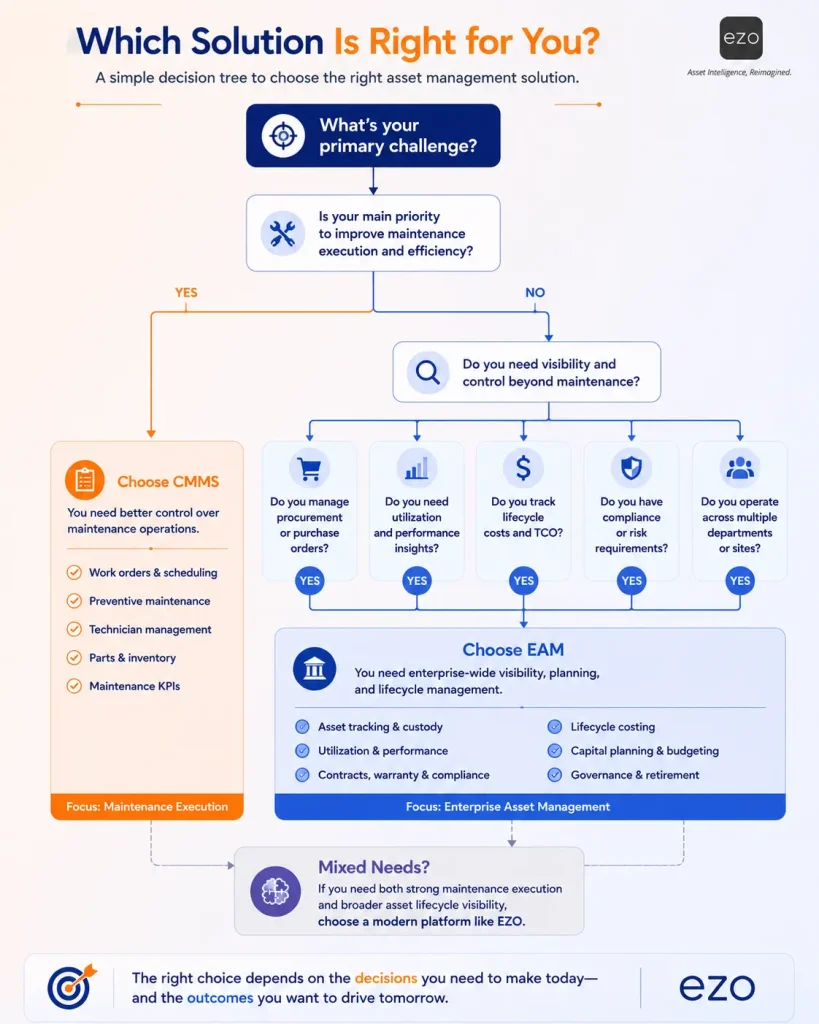
The right choice depends on the breadth of decisions the system must support, the departments using it, the maturity of your asset data, and the implementation complexity your team can realistically absorb. Work through six questions.
- What is the primary problem?
- Missed maintenance and uncontrolled work: CMMS.
- Fragmented lifecycle information: EAM.
- Both: a blended platform.
- Who needs to use the system?
- Maintenance team only: a CMMS may suffice.
- Maintenance plus operations, procurement, finance, and compliance: EAM scope.
- Which lifecycle stages must be managed?
- Installation through active maintenance: CMMS.
- Acquisition through retirement: EAM.
- What cost information is required?
- Labor, parts, and work-order costs: CMMS
- Acquisition, ownership, utilization, and replacement: EAM.
- How many systems must connect?
- Limited maintenance integrations: CMMS.
- ERP, procurement, finance, IoT, and cross-site reporting: EAM.
- How much complexity can you absorb?
- Rapid rollout and technician adoption are priorities: focused CMMS.
- You can support data governance and cross-functional change: EAM.
| Your requirement | Specialist EAM |
|---|---|
| Digitize work orders and preventive maintenance | CMMS |
| Reduce reactive repairs | CMMS |
| Track technicians, parts, and maintenance backlog | CMMS |
| Control the complete asset lifecycle | EAM |
| Connect procurement, utilization, maintenance, and retirement | EAM |
| Standardize asset governance across departments | EAM |
| Start with maintenance but keep room to expand | Modern combined platform |
| Avoid a heavyweight enterprise rollout | Configurable SaaS platform |
| Need deep ERP financial accounting | Validate specialist EAM requirements |
Scope, not size
Software choice should follow operational scope, not employee count:
| Organization | Asset environment | Likely need |
|---|---|---|
| Large corporate office | Limited facility assets, simple maintenance | CMMS |
| Mid-sized construction company | Mobile equipment, procurement, transfers, utilization, costs | EAM capabilities |
| Hospital network | Maintenance, compliance, custody, availability, multiple sites | Combined scope |
| Single manufacturing plant | Complex maintenance, centralized ownership | Advanced CMMS |
| Distributed public agency | Procurement, maintenance, transfers, audits, retirement | EAM |
The cost of choosing the wrong scope
| Implementation Mistake | Likely consequence |
|---|---|
| CMMS where EAM is needed | Continued lifecycle-data silos |
| EAM where CMMS is sufficient | Complexity, low adoption, unused features |
| No mobile workflow | Delayed or incomplete field updates |
| No parts integration | Work delays and emergency purchasing |
| No asset governance | Duplicate and conflicting records |
| No expansion path | Expensive software replacement later |
A role-based lens helps too: maintenance managers care about work completion, backlog, and reliability; operations directors about uptime and productivity; asset managers about lifecycle, condition, and utilization; finance about total cost, replacement, and procurement; compliance about inspection history and auditability; and technicians about mobile usability and work context.
What should you compare when evaluating CMMS and EAM software?
Evaluate the workflows a platform can actually support, not merely whether the vendor calls itself a CMMS or an EAM provider. Test against your real processes.
Asset records: Can it track all relevant asset types and hierarchies? Can teams store documents, images, warranties, and custom fields? Can it track ownership, custody, and location?
Maintenance: Are work requests easy to submit? Can recurring and meter-based maintenance be automated? Can tasks be prioritized, assigned, reviewed, and audited? Can parts and costs be tied to work orders? Does the mobile experience work for technicians?
Lifecycle operations: Can it support procurement and receipt? Can assets be transferred between locations? Can teams monitor availability and utilization? Can repair/replacement decisions use historical costs? Can assets be retired with a complete record?
Reporting: Does it report downtime, backlog, MTTR, and other maintenance KPIs such as PM compliance? Can reports combine maintenance and asset data? Are dashboards role-configurable? Can reports be scheduled or exported?
Integrations: Does it connect to procurement, accounting, ERP, identity, IoT, or BI tools? Are APIs available? How is data synchronized, and which system is the source of truth?
Implementation and adoption: How long will configuration and migration take? Does the vendor provide onboarding? Can technicians work with minimal training? Can the system expand without a replacement? Are workflows configurable without heavy development?
What mistakes should buyers avoid?
The most common mistake is buying by software label instead of mapping your actual workflows, data, users, and decisions. Watch for these:
- Choosing EAM only because the organization is large. A big company can still have a narrow maintenance requirement.
- Choosing CMMS only because it’s easier to implement. A focused rollout is valuable, but it can create a new silo where lifecycle control is already needed.
- Comparing feature lists without testing workflows. A feature may exist but require extra screens, manual exports, or separate modules.
- Ignoring technician adoption. The broadest system delivers little value if field teams can’t easily update work.
- Migrating unreliable data without cleanup. Poor naming, duplicates, and missing ownership limit either system.
- Assuming all EAM platforms have identical financial capabilities. Some focus on operational asset management; others go deep on ERP and accounting.
- Treating implementation as IT-only. Maintenance, operations, procurement, finance, and compliance may all need to define the future workflow.
CMMS or EAM: Which should you choose?
Choose a CMMS when maintenance execution is the principal need. Choose an EAM when you must connect maintenance with the complete operational and financial lifecycle of your assets. Consider a modern combined platform when you need strong maintenance workflows today without creating another disconnected asset-data silo.
A few takeaways to keep in mind: a CMMS is not simply an inferior EAM, and an EAM is not automatically right for every enterprise. Actual workflows matter more than category names, so define your current needs and your likely future scope, and remember that adoption, configuration, and integration matter as much as raw feature breadth.
EZO connects asset tracking, inventory, lifecycle records, and maintenance information, while EZO CMMS gives maintenance teams structured control over work orders, preventive maintenance, parts, and operational performance, so you can start where you need to and expand from there.
See EZO in Action, or, if maintenance execution is your immediate priority, Explore EZO CMMS.