EZO EAM Preventive Maintenance
Preventive Maintenance
Preventive Maintenance Software for On-Time Work
Why Recurring Maintenance Keeps Falling Through the Cracks
Preventive maintenance can fail even when a team knows it needs doing. It fails when the schedule, the technician, and the record live in different places.
The Preventive Maintenance Program Depends on One Person
When the person who tracks recurring services is away or leaves, the schedule goes with them. Deferred preventive maintenance quietly becomes skipped preventive maintenance, and reactive work fills the gap.
Calendar and Meter, Never Aligned
Calendar intervals sit in a shared inbox. Runtime, mileage, and cycle counts live elsewhere. Nothing reconciles the two, so assets get serviced too early or too late.
Checklists Stay Off the Record
The technician photographs the paper checklist and moves on. When someone asks what was checked, who checked it, and what was found, the answer sits in a phone gallery.
Maintenance Readiness, Built Into the Asset Record
Without a system, preventive maintenance is a coordination exercise: intervals live in a spreadsheet, reminders sit in a calendar, and checklists get filed after the fact.
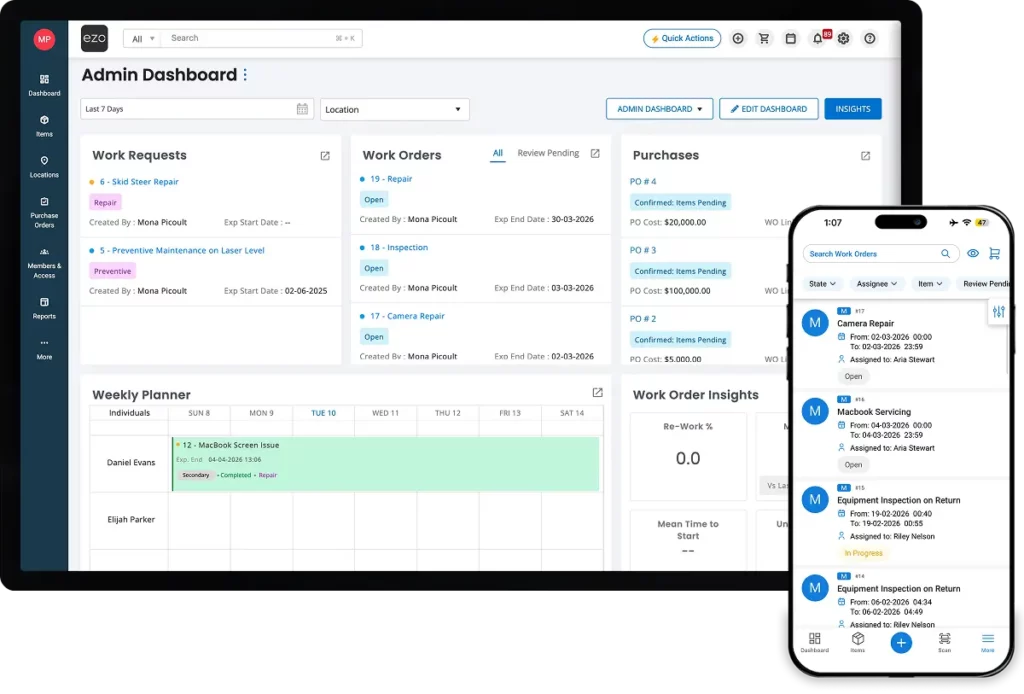
EZO EAM connects the schedule, the work order, and the asset record. A time- or meter-based trigger generates a work order with its checklist, parts, and assignee, and the closed record updates the asset’s service history, downtime, and cost.

Watch a Recurring Preventive Maintenance Run From Trigger to Closed Work Order
What Operations Teams See With EZO EAM
75%
Improvement in Operational Efficiency
50+
Project Sites Get Recurring Services
3+ hrs
Saved Every Day
How Preventive Maintenance Runs in EZO EAM
PREVENTIVE MAINTENANCE SCHEDULER
Set Up Recurring Maintenance Around the Asset

RECURRING WORK ORDERS
Give Every Preventive Maintenance a Work Order With Everything Technicians Need
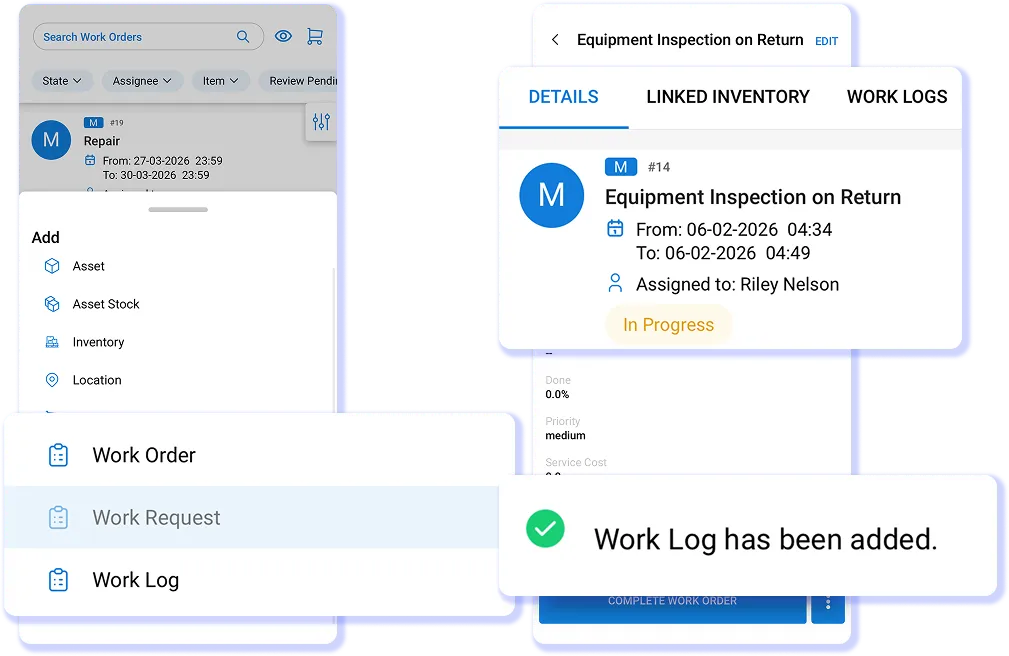
Recurring preventive maintenance generates a work order with its checklist, required parts, and assigned technician already attached. Add supervisors or reviewers when a job needs extra oversight. Substates such as Awaiting Parts show why work has paused, while configured start and due dates make it clear when each task should begin and finish on site.
CHECKLISTS AND INSPECTIONS
Make Checklists Part of Your Work

MAINTENANCE HISTORY AND DOWNTIME
Keep the Maintenance Record With the Asset
Closing a preventive maintenance work order keeps the service event on the asset record, alongside logged labor time, parts used, and downtime intervals. The Asset Downtime Report shows total downtime, total uptime, and MTBF by asset. Costs can be recorded against a Cost Center, but system-generated preventive maintenance work orders do not receive one by default; assign one when needed.
Stop Chasing Preventive Maintenance Across Three Systems
CUSTOMER STORY
75% More Efficient With Work Orders Tied to the Asset
PSI Repair Services repairs, remanufactures, and engineers electronics, hydraulics, and mechanical components across 16 locations. As the business grew, teams rebuilt asset details, work orders, and reports by hand.
With EZO’s help, PSI connected EZO EAM work orders to its Epicor ERP through an EZO-built API integration and imported more than 16,000 assets. Ten key fields now refresh three times daily, keeping repair records up to date as jobs progress. Reports that once took over an hour now take under seven minutes, and PSI reports an overall efficiency improvement of more than 75%.
EZO EAM helped PSI Repair Services
- Track each repair stage against the asset.
- Sync ERP data without duplicate entry.
- Replace manual reporting with custom reports.
- Keep service history ready for the next repair.
75%+
improvement in operational efficiency
16,000+
assets imported into EZO EAM
Under 7 min
to build reports that used to take over an hour
On cost, Brian Upchurch, RAC Division Manager at PSI Repair Services, expects that once PSI is past its third year with EZO, the team will be “saving around 20% per year over what we were paying with the previous company.”
The Systems Your Preventive Maintenance Program Connects With
- Asset condition — Monnit via Meters API
- Accounting — QuickBooks Online
- Service desk — Jira, Zendesk
- Technician access — Okta, Google Workspace, OneLogin, Ping, Delinea
- Asset scanning — Barcode, QR, RFID
- Custom connections — EZO EAM API
Frequently Asked Questions
Preventive maintenance is planned service performed at fixed intervals, either by time (weekly, monthly, annually) or by usage (runtime hours, mileage, cycles), so the asset is serviced before it fails. In EZO EAM’s maintenance management module, you configure a preventive maintenance on the asset or asset group, including its trigger, checklist, parts, and technician. The closed record becomes part of the asset’s maintenance history. Our guide to corrective vs preventive maintenance covers when each approach is appropriate.
Preventive maintenance runs on a defined time or usage interval. Condition-based maintenance starts when a reading crosses a threshold; EZO EAM supports this by ingesting temperature, humidity, vibration, or runtime data from Monnit sensors through the Meters API. Predictive maintenance uses models to forecast failure. EZO EAM does not currently ship predictive analytics, so programs that depend on machine learning failure prediction would pair it with a separate tool.
Yes. You configure a meter against an asset group with a threshold, and a qualifying reading triggers the maintenance work order, so service can follow mileage, runtime hours, cycles, or pressure rather than the calendar. Meters are set at the asset-group level, not per asset, and you enter readings manually or ingest them through the Meters API. Meter-based triggering is available on select plans; see pricing for the plans that include it. Our preventive maintenance checklist guide walks through setting meter thresholds.
EZO EAM supports event-based alerts for scheduled work, including creation, due, and completion dates, as well as extensions, with customizable notification templates. Escalation inside the work order is a manual mention that brings another technician or supervisor into the job. EZO EAM does not currently provide a rule-based escalation engine, so there is no native rule that says “if this preventive maintenance is untouched for four hours, notify the plant manager.”
Can preventive maintenance checklists be marked mandatory, and can technicians edit them mid-job?
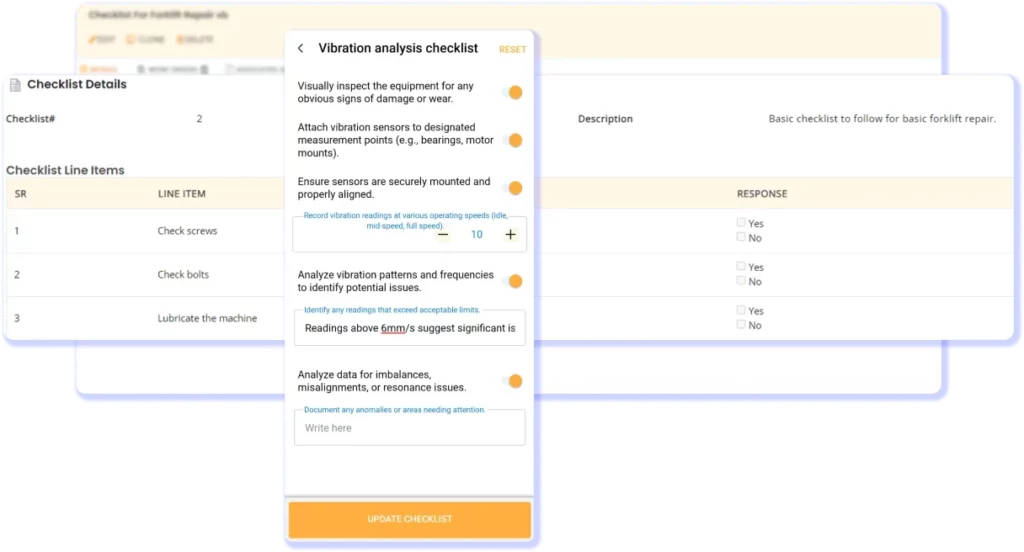
Yes to both. You can mark individual items as mandatory, preventing completion until they are done. Checklists remain editable while the work is live, so a technician can record what they actually found. Edits are tracked. Group-level checklists apply across an asset group, and Global Library templates give teams a starting point. Technicians need checklist permission in their role, and only the Primary Assignee can complete checklists offline.
EZO EAM pulls linked inventory into the generated work order, and the Add Inventory view shows available quantity at the technician’s location before a part is committed. It creates consumption records against the work order and captures labor time from the timer. System-generated preventive maintenance work orders do not receive a Cost Center by default, so cost attribution needs configuring. EZO EAM does not currently ship min/max rules, reorder-point triggering, or spare-parts forecasting.
The Asset Downtime Report shows total downtime, Total Uptime, and MTBF per asset, and work order dashboards show what is open, in progress, pending review, or overdue. EZO EAM surfaces preventive maintenance coverage, showing which assets have preventive maintenance scheduled against them. It does not currently provide a native on-time preventive maintenance compliance KPI. Our maintenance scheduling guide covers the metrics teams typically track alongside it.
Not necessarily. The mobile app supports offline execution for the Primary Assignee on a work order. When planning offline work, note that the cache holds up to 20 work orders per technician; it syncs once at the technician’s first login of the day, so work assigned after that sync is not visible until the next sync; and RFID scanning is currently iOS-only. Secondary assignees need to be online to record their portion.
EZO EAM is built to sit alongside the ERP as the maintenance execution and asset history layer rather than to replace it. A QuickBooks Online connector syncs completed work orders as expenses, and ERP integrations connect to the EZO API. PSI Repair Services uses a custom Epicor integration built by EZO’s team that covers 10 fields and refreshes 3 times daily; it is a reference case rather than an out-of-the-box connector. Our explainer on CMMS vs EAM covers where each system fits.
That depends on your asset data, the number of sites involved, and how many preventive maintenance templates you need to configure. What is defined is the on-ramp: import assets from a spreadsheet or a WMS/ERP export, load preventive maintenance templates from the Global Library, and configure one recurring preventive maintenance end-to-end during the free trial. You can stage multi-site rollouts by site rather than switching them on everywhere at once. The knowledge base covers setup step by step.