Disclosure: EZO publishes EZO EAM, which is included in this comparison. We evaluated every platform using the same multi-plant criteria and linked capability claims to publicly available product information where possible.
The best platform depends on what a manufacturer is actually trying to standardize. EZO EAM suits broader asset lifecycle management with CMMS as an add-on, and comparatively lightweight administration. IFS Ultimo fits configurable industrial EAM. eMaint and Fiix suit maintenance-led standardization. Limble and MaintainX emphasize rapid frontline adoption. IBM Maximo Application Suite fits complex enterprise governance, reliability, and integration requirements.
Last reviewed: September 1, 2026. All vendor capability and pricing checks were performed on this date.
Introduction
Manufacturers rarely end up with fragmented plant operations by choice; they inherit them. Consider a manufacturer where an acquisition brings four facilities running a legacy CMMS nobody wants to touch, two older plants run on spreadsheets, and one site bought its own maintenance tool because corporate IT had a three-year queue. Each decision was locally rational. Collectively they produce an organization that cannot answer a simple question: which of our plants maintains the same equipment best, and why?
The intuitive fix is to put every facility on one platform. That is a common first step for organizations pursuing single-platform consolidation, and it is where most evaluations stop. It is also why so many multi-plant rollouts deliver a consolidated dashboard nobody trusts. Shared software alone does not guarantee shared definitions.
This comparison evaluates seven platforms for standardizing multi-plant operations, deliberately spanning full-lifecycle EAM suites and maintenance-first CMMS platforms, since the buyer’s actual requirement may not call for full EAM. It measures each against what determines whether standardization holds: multi-site governance, asset structures, workflow and failure-code controls, inventory, cross-plant reporting, integrations, rollout effort, and total cost, with particular attention to which pricing tier each capability sits in, since that detail routinely changes the budget substantially.
It is written for operations VPs, maintenance directors, reliability leaders, plant managers, and asset managers at mid-market and enterprise manufacturers who need cross-plant consistency without a large software administration team to sustain it.
What this covers: standardization across six operational layers, EAM vs. CMMS, all seven profiles with plan-level gating, two capability tables, a rollout framework, vendor-demo questions, and multi-plant TCO.
EAM platforms for multi-plant operations at a glance
Read this alongside the plan-gating notes in the vendor profiles, because several capabilities that matter most for cross-plant maintenance standardization sit in a vendor’s top tier.
| Platform | Product Type | Multi-Site Governance | Maintenance Standards | Cross-Plant Reporting | Implementation Model | Best Fit |
|---|---|---|---|---|---|---|
| EZO EAM | Full-lifecycle EAM with native CMMS | Nested locations, location and group access control; custom roles from Premium | PM, work orders, checklists, custom naming standards | Consolidated asset and maintenance reporting | Item-based SaaS; 15-day free trial | Manufacturers wanting lifecycle plus maintenance without heavy administration |
| IFS Ultimo | EAM | Multi-company structure in all editions; currencies and time zones from Premium | PM, job plans, maintenance routes, workflows | Dashboards plus Power BI and Tableau | SaaS, three editions; price on request | Manufacturers wanting configurable industrial EAM |
| eMaint | Maintenance-first EAM/CMMS | Global multi-site operations at Enterprise | PM, checklists, advanced procedures, shared task library | Multi-site reporting and analytics | SaaS, two tiers; implementation priced separately | Maintenance-led multi-site programs |
| Fiix | Maintenance-first CMMS | Multi-site management from Professional; audit trail at Enterprise | PM, tasks, inspections; failure codes at Enterprise | Advanced analytics and custom reports from Professional | Per-user SaaS; no setup fees | Rockwell-aligned plants standardizing maintenance execution |
| Limble | CMMS | Multiple locations and regions at Enterprise only | PM templates, procedures, asset templates at Enterprise | Multi-location reporting at Enterprise | SaaS; quote-based calculator | Rapid technician adoption, single-site first |
| MaintainX | Frontline maintenance platform | Multi-site management tools at Enterprise only | Procedures, inspections, global procedures at Enterprise | Global reporting at Enterprise | Per-user SaaS; ~3-week single-site onboarding | Frontline procedures and mobile execution at scale |
| IBM Maximo Application Suite | Enterprise EAM suite | Four-level enterprise, set, organization, and site architecture | System-level job plans, site-level work management | Enterprise reporting and analytics | SaaS or client-managed; AppPoints licensing | Complex global asset, reliability, and integration environments |
What does standardizing multi-plant operations actually mean?
Standardizing multi-plant operations means making equivalent assets, maintenance events, costs, failures, inventory records, and KPIs comparable across facilities while still allowing justified local differences.
That distinction matters because standardization is usually reduced to one procurement question:
Can all of our plants use the same system?
Imagine two plants running identical production lines on the same EAM, both with a preventive maintenance schedule called “Monthly Motor Inspection.”
At Plant A, technicians record vibration readings, inspection results, failure codes, labor hours, and parts consumed. At Plant B, technicians mark the work order complete.
Technically, both plants are standardized. Operationally, they are not.
The difference lies in what the organization has decided a maintenance event means, and what information must exist before that event can be closed.
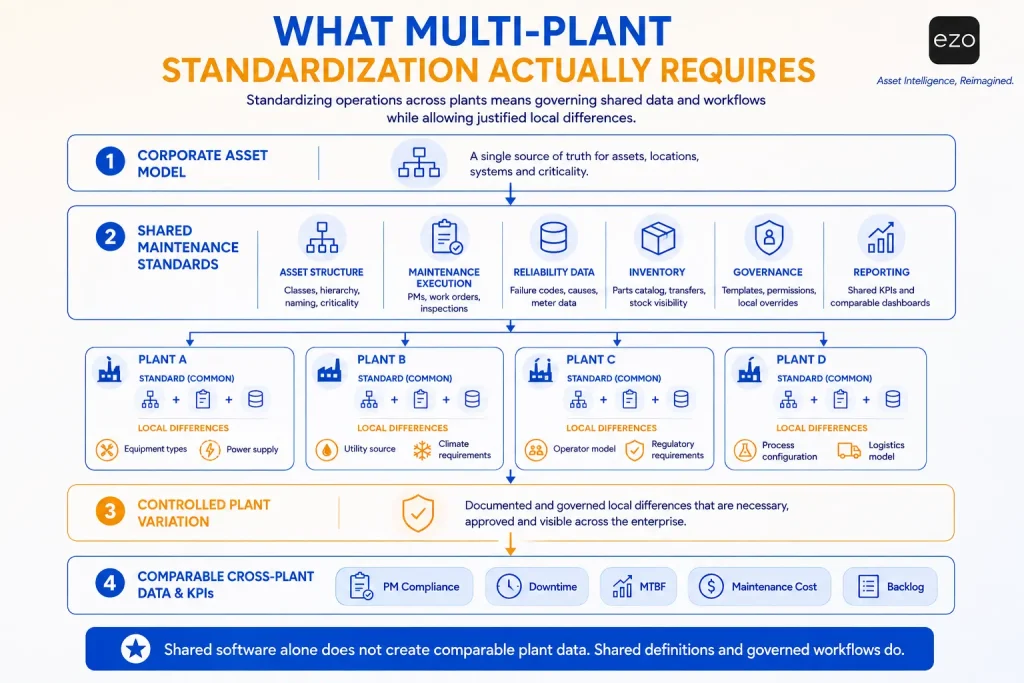
Standardization therefore operates across at least six layers.
1. Asset structure
Plants need common asset classes, naming conventions, criticality ratings, and defined relationships between plant, line, system, equipment, and component. A structured location hierarchy running region to site to facility to sublocation is the backbone. If one plant calls a machine a “compressor” and another classifies the equivalent unit as “air system equipment,” corporate reporting degrades on day one.
2. Maintenance execution
Shared PM schedules, job plans, inspections, work-order priorities, statuses, and completion requirements create a common operating language. Technicians do not have to work identically. Equivalent maintenance events do have to produce equivalent records.
3. Reliability data
Failure, cause, and remedy codes matter disproportionately. Free-text descriptions help the technician; free text alone makes reliable cross-plant aggregation difficult for the analyst. A standardized failure taxonomy lets a reliability leader ask whether the same equipment class fails for the same reasons across seven plants.
4. Inventory
A shared parts catalog, consistent reorder rules, and cross-site stock visibility reveal when one facility holds a component another urgently needs. The value is not simply better inventory management. It is reducing information asymmetry between plants.
5. Governance
Corporate teams need to set standards without turning every plant into a centrally administered bureaucracy. That requires permissions, templates, audit history, and controlled overrides.
6. Reporting
Plants need common KPI definitions. If each facility calculates PM compliance, downtime, MTBF, maintenance cost, or backlog differently, a corporate dashboard produces the appearance of comparability without the substance.
This is why multi-plant EAM is as much a governance problem as a software-selection problem. The best system is not the one that makes every plant identical. It is the one that makes the important things comparable while letting what genuinely needs to differ remain different.
Why does using the same EAM still produce incomparable plant data?
A shared EAM produces comparable results only when plants capture the same operational events using consistent definitions, fields, classifications, and completion requirements.
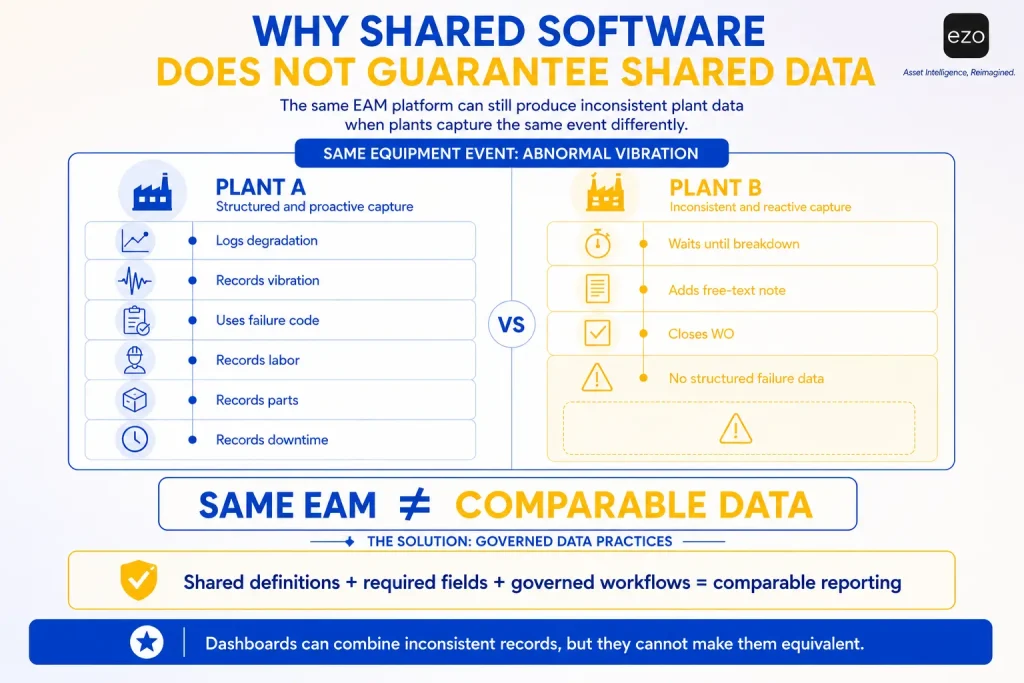
Consider a machine that begins vibrating abnormally at 10:00 a.m.
At Plant A, a technician notices the vibration and logs a degradation event. At Plant B, nobody records anything until the machine stops at 2:00 p.m. The EAM now contains two very different “failures.”
The software did not create the inconsistency. The organization’s definitions did.
Plants define failure differently
One facility records a failure when equipment begins operating outside acceptable parameters. Another records it only once production stops. Both are valid locally. They answer different questions.
Asset names drift
The same pump may appear as P-104, Pump 104, Process Pump, Cooling Pump, or CP-104. Someone who knows the plant recognizes the relationship instantly. A cross-plant analysis cannot reliably group them without a mapping exercise or a controlled taxonomy.
Work order closure standards differ
One plant requires photographs, readings, failure codes, parts consumed, and technician notes. Another treats work as complete when the technician clicks Close. The resulting PM compliance numbers can produce superficially similar figures while representing completely different levels of evidence.
Check this against the software rather than assuming it. Fiix documents work order completion controls and failure codes as Enterprise-tier capabilities, so the mechanism most directly responsible for consistent closure evidence is absent from its lower plans.
Free text destroys analytical consistency
“Bearing issue,” “bad bearing,” “bearing worn,” and “bearing failure” describe the same problem. Without a structured failure code, the organization interprets language after the fact, usually in a spreadsheet months later.
Dashboards can hide the problem
A consolidated dashboard feels objective because the numbers sit together. But aggregation is not equivalence. A dashboard combines inconsistent data efficiently. It cannot make inconsistent definitions consistent.
A number inside a dashboard feels more authoritative than the messy operational process that produced it, regardless of how that number was actually calculated. For multi-plant EAM, that creates a genuine hazard:
The organization may automate the production of misleading comparisons.
Evaluate whether the platform governs data capture and controlled variation, not simply whether it supports multiple locations.
EAM vs. CMMS: which does a multi-plant manufacturer need?
A CMMS may be sufficient when the objective is standardized maintenance execution; a full EAM is more appropriate when the organization also needs broader asset lifecycle, financial, inventory, governance, and cross-functional control.
| Requirement | CMMS | Full EAM |
|---|---|---|
| Work orders and PM | Core capability | Core capability |
| Asset lifecycle records | Usually narrower | Broader |
| Asset financial data | Limited or integrated | More commonly supported |
| Enterprise hierarchy | Varies | Typically deeper |
| Inventory and procurement | Varies | Usually broader |
| Risk and compliance | Often maintenance-focused | Broader asset governance |
| ERP and enterprise integration | Available but variable | Usually more extensive |
| Implementation burden | Often lower | Usually higher |
A CMMS, or computerized maintenance management system, organizes maintenance work: work orders, preventive maintenance, inspections, repairs, labor, and parts. EAM, or enterprise asset management, takes a broader view of the physical asset lifecycle, from acquisition and operation through maintenance, cost management, custody, transfer, compliance, and retirement.
That does not make EAM automatically better.
If five plants mainly need preventive maintenance to become more consistent, a large enterprise platform creates a different problem: the governance system becomes harder to operate than the maintenance problem it was meant to solve. Implementation capacity is therefore a selection criterion, not a footnote.
The right platform is not the one with the most functionality. It is the one whose functional breadth matches the organization’s ability to govern it.
The shortlist below therefore includes both maintenance-first platforms and broader EAM systems, and keeps the product category visible throughout, because comparing a frontline maintenance platform against an enterprise EAM without naming the difference creates false equivalence. For the wider category view, our guide to the best enterprise asset management software covers adjacent options.
How we selected the best multi-plant EAM platforms
The ranking reflects fit for lean multi-plant standardization, not overall market dominance.
We evaluated each platform against the questions a manufacturer should ask before a multi-site rollout.
| Criterion | What We Evaluated |
|---|---|
| Multi-site structure | Organization, region, plant, facility, line, location, and asset relationships |
| Standardization controls | Reusable PMs, job plans, inspections, forms, workflows, and failure codes |
| Governance | Corporate templates, inherited settings, local overrides, permissions, and change history |
| Data consistency | Required fields, asset classes, naming controls, validation, and bulk imports |
| Maintenance execution | Calendar PM, meter triggers, work orders, inspections, approvals, and scheduling |
| Inventory | Storerooms, shared parts catalogs, transfers, reservations, and purchasing |
| Reporting | Consolidated dashboards, plant filtering, shared KPIs, exports, and BI connections |
| Mobile execution | Mobile application and offline capability, evaluated separately |
| Integrations | ERP/API and IoT/condition-data integrations, evaluated separately |
| Enterprise readiness | Security, SSO, audit history, localization, and data controls |
| Implementation burden | Migration, configuration, training, professional services, and administration |
| Commercial fit | Pricing model, required modules, support, implementation, and likely TCO |
| Evidence quality | Official documentation, customer examples, reviews, and current product information |
We applied an evidence hierarchy: official documentation first, then product and security pages, current pricing or licensing information, and customer case studies. Reviews and forum discussion were background context only, not cited evidence; every specific capability or pricing claim traces to a named official vendor source.
One check mattered more than the rest: which plan each capability actually sits in.
A note on the numbering: it is not a scored ranking or a point system. Platforms are sequenced by category breadth, full-lifecycle EAM first, then maintenance-first platforms, then enterprise-governance suites. The right choice depends on the operating requirements in the decision table further down, not on list position.
Vendor feature pages communicate what a product can do. Pricing pages communicate what you get. Those are not the same document, and for multi-plant buyers the gap is expensive. Every tier stated below was verified against the vendor’s current pricing, editions, or official product documentation rather than inferred from a general feature page.
Two convenient inferences were also excluded. A mobile app does not automatically mean offline functionality, and an IoT integration does not automatically constitute predictive maintenance. Both are treated as separate capabilities throughout, and neither is credited to a platform without documentation.
The 7 best EAM platforms for standardizing multi-plant operations
Each platform below is assessed with the same questions: what it standardizes, how it handles multiple sites, where maintenance fits in the wider asset lifecycle, how it treats integrations and implementation, and where its scope becomes a limitation across several plants.
1. EZO EAM: best for complete asset lifecycle management with native CMMS
Verdict: EZO EAM fits manufacturers that want asset lifecycle management, maintenance, inventory, location control, and reporting in one system without adopting the administrative model of a heavyweight enterprise suite.
Product category: Full-lifecycle EAM with native CMMS.
The differentiator is not that EZO EAM can manage maintenance. EZO organizes maintenance within a broader lifecycle record spanning location, custody, availability, cost, inventory, and lifecycle stage, rather than positioning maintenance as the primary organizing layer. Maintenance-first platforms increasingly cover parts of this too, as the eMaint and Fiix profiles below show.
Multi-Plant Structure
EZO supports nested location hierarchies through parent and child associations, mapping onto a region, site, facility, and sublocation model. Locations can be bulk imported, which matters when an acquired plant arrives as a spreadsheet. Access control runs in simple or advanced mode, with advanced allowing arbitration settings by group, location, or both, and custom roles tuning permissions beyond the predefined set. This supports centralized governance with local execution.
Standardization Controls
Custom fields and advanced roles and permissions begin at Premium. Custom naming standards and custom substates are also Premium capabilities, which matters here because naming control is one of the lower-complexity interventions available for cross-plant comparability. Multi-tier approval and the request portal arrive at the same tier.
Maintenance, Inventory, and Lifecycle
Maintenance capabilities include preventive maintenance, work orders, technician management, AI-powered checklists, work order automations, and a work planner. One commercial distinction matters: basic service records begin at Advanced, but full CMMS functionality comes through CMMS packaging on Premium or is included with Custom Enterprise. Custody and stock transfers and custody audits begin at Advanced; location audits at Premium.
Integrations and Enterprise Readiness
API access begins at Advanced. LDAP and SAML, Zendesk, Jira, QuickBooks Online, and Google Workspace integrations begin at Premium; telematics and custom integrations are Enterprise. Offline mode for the mobile app is Enterprise, which matters for plants with poor floor coverage and should be scoped rather than assumed.
Pricing and Implementation
EZO publishes item-based pricing, with starting prices shown at the 100-tracked-item level: $48 for Essential, $58 for Advanced, and $65 for Premium per month, with Custom Enterprise quoted separately. Pricing is item-based rather than per-user, with user counts subject to EZO’s fair-use policy, which permits up to twice as many users as tracked items. The CMMS add-on is charged by the admin user only. For a manufacturer with many requesters and operators but few maintenance administrators, that behaves differently from per-seat licensing, though the fair-use limit should still be factored into any quote. A 15-day free trial is available.
Potential Limitation
Organizations needing deep reliability-centered maintenance, failure modes and effects analysis, linear asset management, or advanced APM will need integrations or a heavier platform. EZO does not replace an ERP for financial accounting.
Best fit: Mid-market and enterprise manufacturers wanting lifecycle control, maintenance, inventory, and multi-location visibility under item-based rather than per-user licensing.
2. IFS Ultimo: best for configurable industrial EAM
Verdict: IFS Ultimo suits manufacturers wanting configurable industrial EAM with predefined industry solutions and a SaaS model that scales in complexity as the program matures.
Product category: EAM.
Ultimo’s strength is the balance between predefined functionality and configurability. IFS reports more than 2,300 customers across over 40 countries, delivered in three prepackaged editions.
Editions and What They Gate
IFS describes Professional as its out-of-the-box edition, positioned as essential functionality with minimal setup. Premium targets growing organizations, adding advanced functions and extensive integration to systems such as ERP. Enterprise offers the complete platform across all industries, asset types, and users.
The multi-plant detail is easy to miss. All editions support a multi-company structure and multiple languages. But multiple currencies and time zones are available only on Premium and Enterprise. That may be irrelevant for a manufacturer operating in one currency and one time zone. For one standardizing across regions or currencies, it moves the entry point.
Maintenance and Industrial Operations
Published capability covers preventive maintenance, work-order management, maintenance planning, cost registration, meters, job planning, and maintenance routes. Planning spans short-term views such as the periodical maintenance planner, job planner, and Kanban, alongside longer-horizon forecast, asset planner, and stop planner views. Dashboards cover corrective and preventive maintenance, costs, budgets, availability, and trends, with connections to BI tools including Power BI and Tableau.
Pricing
Price on request across all three editions. Third-party sites publish starting figures; those should not substitute for a quote scoped to your site count, user mix, and required modules.
Potential Limitation
The configurability that makes Ultimo attractive also generates governance work. A configurable system does not produce standardized operations by itself. The organization still has to decide which configurations are corporate standards and which are legitimate local variations, then defend that line.
Best fit: Manufacturers seeking configurable industrial EAM with predefined industry capabilities and an upgrade path that tracks their own maturity.
3. eMaint: best for maintenance-led multi-site standardization
Verdict: eMaint is strongest when the immediate objective is standardizing maintenance execution, reliability workflows, inventory, and reporting across sites rather than the entire asset lifecycle.
Product category: Maintenance-first EAM/CMMS. eMaint is part of Fluke Reliability.
Professional vs. Enterprise for Multi-Site Operations
eMaint now publishes two plans: Professional (three-user minimum) and Enterprise (five-user minimum). Professional is substantial: work orders, PM, checklists, meter readings, downtime and asset performance tracking, parts inventory, forecasting and cycle counts, purchasing, multi-location inventory, asset transfers, advanced reporting, condition-based triggers and monitoring, workflow automation, advanced procedures, e-signatures, calibrations, a shared task library, and offline mobile.
Enterprise is where multi-plant governance lives: global multi-site operations, global inventory, SSO, API integrations across ERP, BI, SCADA and 1,000+ apps, prebuilt connectors, unlimited request-only portal licenses, and the eMaint AI suite.
For a multi-plant buyer that reads cleanly: maintenance depth arrives early, and cross-plant governance is the reason to buy Enterprise.
Standardization Controls
The shared task library, advanced procedures, inspection checks, custom approval processes, custom work order statuses and fields, and failure codes are the controls that make maintenance events comparable rather than merely visible. Root cause analysis and MTBF reporting support the reliability side.
Pricing and Implementation
eMaint does not publish per-user prices; plans are quoted, with features available à la carte beyond the standard tiers. Professional and Enterprise are billed as prepaid annual commitments; implementation ranges from self-service to advanced, priced separately. Pricing is fixed for the contract term but may change at renewal, worth negotiating on a multi-year rollout.
Potential Limitation
Organizations wanting broad asset acquisition, custody, and financial lifecycle governance should map exactly where eMaint’s maintenance-first model ends and other systems begin. Our eMaint alternatives comparison goes deeper on that boundary.
Best fit: Manufacturers whose first priority is maintenance standardization, reliability workflows, parts management, and cross-site reporting, with a budget for Enterprise.
4. Fiix: best for cloud maintenance with industrial integration options
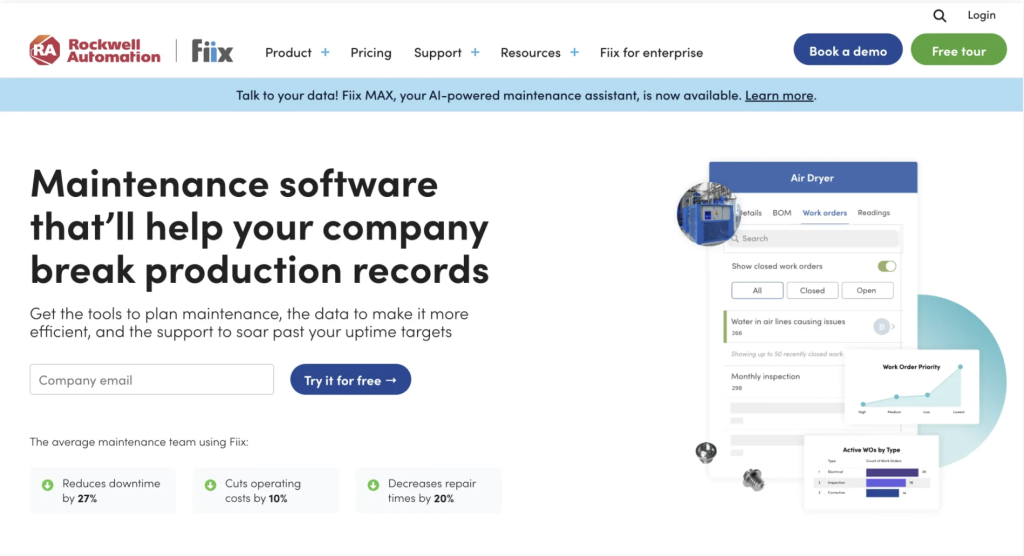
Verdict: Fiix suits manufacturers wanting cloud-based maintenance standardization with mobile execution and a route into industrial control data, particularly inside a Rockwell Automation environment.
Product category: Maintenance-first CMMS. Fiix is a Rockwell Automation company, acquired in December 2020.
Fiix reports 4,500+ teams in over 100 countries.
Where the Multi-Plant Capabilities Sit
Fiix publishes per-user pricing: Free, Basic $45/user/month, Professional $75, custom Enterprise, and its tier map is unusually explicit.
Multi-site management, asset criticality, rotating assets, cycle counts, purchasing and RFQs, nested PMs, multi-asset work orders, advanced analytics, and Fiix Foresight all begin at Professional. Meter readings, by contrast, are on every plan including Free.
Failure codes, work order completion controls, condition-based maintenance triggers, customizable interface, custom workflows, audit trail, database export, and single sign-on are Enterprise capabilities, and the Integration Hub, custom API integrations, app exchange, SSO, and custom workflows carry extra cost.
Failure codes, completion controls, and an audit trail are three important governance controls for cross-plant comparability, and they are also the three sitting furthest up the price list.
Industrial Integration
The Rockwell relationship is a genuine differentiator through FactoryTalk Optix, which connects asset signals to the CMMS for condition-based maintenance. Fiix also publishes Fiix Asset Risk Predictor and the Fiix MAX AI assistant, the latter a paid add-on on Professional and Enterprise. When scoping, separate core CMMS functionality, ERP and API connectivity, IoT connectivity, and actual condition-based workflows. A sensor integration is not, by itself, predictive maintenance.
Implementation and Pricing Notes
Fiix states no setup or hardware fees, with monthly or annual billing. Our EZO vs. Fiix comparison sets the two side by side.
Potential Limitation
Fiix is a maintenance platform, not a lifecycle equivalent to the broader enterprise suites. Asset acquisition, custody, and financial lifecycle sit outside its scope. The more immediate constraint for a multi-plant buyer is commercial: the governance controls that make cross-plant data comparable are concentrated in the top tier and its paid add-ons.
Best fit: Manufacturers prioritizing maintenance execution and cloud deployment, especially plants already running Rockwell control infrastructure.
5. Limble: best for rapid maintenance adoption across plants
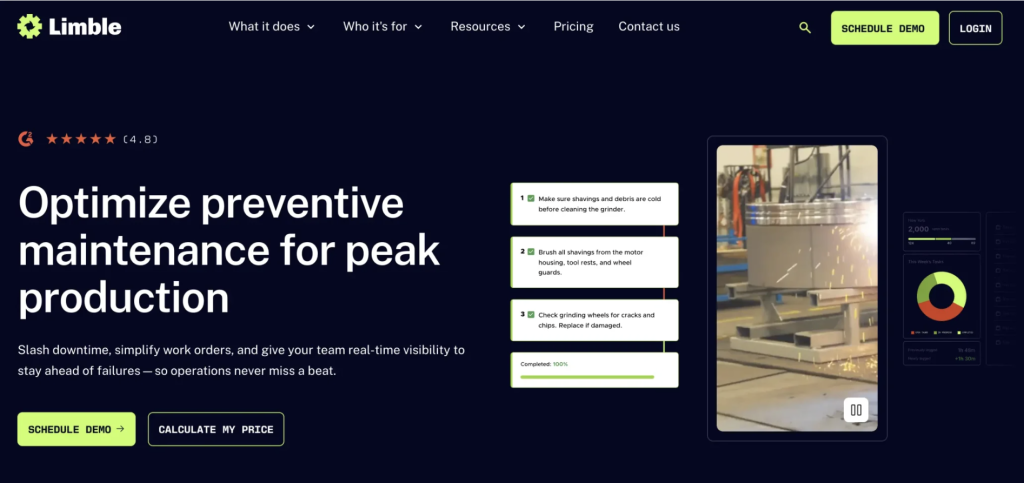
Verdict: Limble is a strong candidate when technician adoption, standardized templates, and fast deployment matter more than deep enterprise asset governance, provided the multi-location requirement is budgeted correctly.
Product category: CMMS.
The Adoption Advantage
Maintenance software has an unusual dependency: dashboard quality depends on whether technicians actually record work. Usability is therefore not a preference; it is a data-integrity control. A cumbersome system means minimized data entry and a gap between what happened on the floor and what leadership sees. Limble’s technician-oriented design speaks directly to that risk.
The Plan Reality for Multi-Plant Buyers
Limble publishes three plans: Standard, Premium+, and Enterprise, quoted through a price calculator rather than a published rate card.
Standard and Premium+ are documented as single location. Multiple locations and regions, multi-location reporting, transfer of parts between locations, custom roles, custom approval processes, custom escalation notifications, inventory cycle counts, asset templates, capital depreciation tracking, resource planning, and 21 CFR compliance are all Enterprise capabilities.
That reframes a common recommendation. Limble’s asset templates, which standardize asset information across locations, are often cited as a cross-plant strength. They are, but they sit in Enterprise, as does the multi-location capability they’d be used across. A multi-plant manufacturer is buying Enterprise from day one.
Maintenance, Mobile, and Integrations
Standard covers unlimited work orders, PMs, assets, asset hierarchies, custom fields, an AI-powered PM builder, downtime reporting (MTBF, MTTR), and custom dashboards. Premium+ adds offline mode, unlimited spare parts, vendor and purchase order management, meter-based scheduling, and open REST API access. IoT and ERP integrations start at Premium+, extra cost may apply. Limble publishes a 99.99% uptime SLA and SOC 2 Type II compliance.
Potential Limitation
Ease of configuration should not be mistaken for governance depth. A system can be easy to configure and still require real organizational discipline to stop seven plants configuring it seven different ways.
Best fit: Plants where technician adoption and fast deployment come first, in organizations that can fund Enterprise for genuine multi-location operation.
6. MaintainX: best for frontline procedures and mobile execution
Verdict: MaintainX is most relevant when the challenge is getting frontline teams across many facilities to execute the same procedures, inspections, and work orders consistently.
Product category: Frontline maintenance platform, now marketed with an explicit EAM offering.
Ownership note: Autodesk announced an agreement to acquire MaintainX on May 28, 2026, in an all-cash transaction valued at approximately $3.6 billion, and completed the acquisition on August 3, 2026. MaintainX now sits within Autodesk Operations Solutions. For a multi-year multi-plant commitment, ask about roadmap continuity, support structure, contract terms, and integration priorities under the new owner. That is not a reason to exclude the platform. It is a reason to put those questions in the contract rather than the demo.
Multi-Plant Capabilities and Their Tier
MaintainX publishes four plans: Basic free, Essential $20/user/month annual, Premium $65, custom Enterprise. Requester accounts are free on every plan, which changes the arithmetic in plants with high operator-to-technician ratios.
The cross-site capabilities most relevant here are concentrated in Enterprise: multi-site management and reporting, global procedures, parts, assets, and reporting, custom permissions, escalation protocols, root cause analysis, asset health insights, IoT sensor integrations, custom ERP integrations, SSO, and Report Builder. MaintainX states directly that Enterprise is what allows multiple plants to be managed within one platform.
A Real Multi-Plant Rollout
MaintainX publishes a case study on US LBM, where a manufacturing operations manager supported more than 60 plants grown through acquisition, some running their own CMMS and others relying on institutional knowledge. In this vendor-published account, he rolled out three to five sites at a time, focused first on assets, procedures, and work orders, locked down asset naming conventions to protect global reporting, and deliberately left procedures adaptable so plants could improve and share them. His advice was to roll out in waves and standardize only what you must, an example of standardization with controlled variation from a practitioner rather than a vendor pitch.
Implementation, Security, and Integrations
MaintainX states that implementing one site takes about three weeks for the average customer, with structured onboarding on Premium and Enterprise. It reports SOC 2, ISO 27001, and GDPR compliance and a 99.9% uptime SLA. REST API access begins at Premium. OT data connectors (Ignition, Kepware, MQTT) and custom ERP integrations carry extra cost. Our EZO vs. MaintainX page covers the lifecycle difference.
Potential Limitation
Lifecycle and financial depth remain narrower than the enterprise suites. Straight-line depreciation exists, but capital planning and asset governance are not the platform’s center of gravity.
Best fit: Organizations where consistent frontline execution, procedures, inspections, and mobile adoption are the primary standardization objectives.
7. IBM Maximo Application Suite: best for complex enterprise asset environments
Verdict: IBM Maximo Application Suite is the deepest enterprise-governance option in this shortlist, for organizations requiring extensive asset governance, reliability, inventory, integration, and asset performance management.
Product category: Enterprise EAM suite.
The Multi-Site Architecture
Maximo’s multi-site model is the most explicit here, and close to a reference design for corporate governance with plant-level autonomy. Data sits at one of four levels: enterprise or system, set, organization, and site. An enterprise contains multiple organizations, each organization contains multiple sites, and each site inherits settings from its organization.
The consequence is precise. Job plans are system-level records, so a corporate job plan is genuinely shared. Assets, locations, and work orders are site-level records, so plants keep operational separation. Item and company sets can be shared across organizations or held separately. Data separation happens at site level; data sharing at organization, set, or system level. That is configuration inheritance implemented as architecture rather than convention.
There is a nuance that rarely appears in vendor material. Maximo supports moving an asset between sites through a formal transfer action, but that decommissions the source record and creates a new one at the destination. No live record spans two sites, and no work order can either. Model that transfer workflow before committing to a site structure, since it is difficult to change later.
Maintenance, Reliability, and AI
Maximo supports work orders, predefined workflows, scheduling and approvals, failure codes, job plans, asset history, mobile execution, and offline work. The suite adds asset performance management, condition monitoring, predictive capability, and IoT as distinct components. IBM announced Maximo Application Suite 9.2 on June 25, 2026, introducing Condition Insight, which combines work orders, inspections, meter readings, and reliability strategies to flag patterns and recommend next actions.
Pricing and Deployment
Maximo uses a credit-based licensing model called AppPoints, available as SaaS or client-managed. IBM publishes starting SaaS figures, for example its Maintenance package starting under $40,000 per year. We have not projected a multi-plant total, since full cost depends on components licensed, deployment model, user mix, and implementation partner to a degree that makes one estimate misleading.
Potential Limitation
Maximo’s greatest strength is also its exposure for a lean team. Enterprise capability creates enterprise governance requirements: the more sophisticated the hierarchy, workflow, integration, and reliability stack, the more implementation expertise and ongoing administration it demands. That does not make Maximo a poor choice. It means it should not be selected because it has the largest feature set.
Best fit: Large, asset-intensive organizations with the reliability engineering and administration capacity to operate deep enterprise governance.
Detailed multi-plant capability comparison
Plan gating is stated wherever it changes the buying decision.
Table 1: core EAM and governance
| Platform | Asset Lifecycle | Site Hierarchy | Shared Templates | Local Overrides | Site Permissions | Inventory |
|---|---|---|---|---|---|---|
| EZO EAM | Native | Native, nested locations | Native; naming standards at Premium | Configurable | Native; custom roles at Premium | Native |
| IFS Ultimo | Native | Native, multi-company all editions | Configurable | Configurable | Native | Native |
| eMaint | Broad maintenance asset management | Native; global multi-site at Enterprise | Native, shared task library | Configurable | Native | Native; global inventory at Enterprise |
| Fiix | Maintenance-focused | Multi-site from Professional | Configurable | Limited; custom workflows at Enterprise | Native | Native; cycle counts from Professional |
| Limble | Maintenance-focused | Multi-location at Enterprise only | Native; asset templates at Enterprise | Configurable; custom roles at Enterprise | Native; custom roles at Enterprise | Native, from Premium+ |
| MaintainX | Maintenance-focused | Multi-site at Enterprise only | Native; global procedures at Enterprise | Configurable | Role-based; custom permissions at Enterprise | Native, from Premium |
| IBM Maximo | Native, broad | Deep enterprise, organization, and site hierarchy | Native, system-level job plans | Native, inherited with overrides | Native | Native |
Table 2: execution, reliability, and integration
| Platform | Calendar PM | Meter Triggers | Mobile App | Offline | ERP/API | IoT and Condition Data |
|---|---|---|---|---|---|---|
| EZO EAM | Native, CMMS packaging | Supported in CMMS packaging | Native | Custom Enterprise plan | API from Advanced; custom at Custom Enterprise | Integration |
| IFS Ultimo | Native | Native, meters documented | Available, Ultimo Go app | Available via Ultimo Go+; entitlement should be confirmed | Integration; extensive from Premium | Integration |
| eMaint | Native | Native | Native | Native, offline work mode | Native API at Enterprise | Integration; Fluke condition monitoring |
| Fiix | Native | Native, all plans | Native | Native | Enterprise only; Integration Hub, ERP and custom API integrations, extra cost | Integration; FactoryTalk Optix |
| Limble | Native | Premium+ | Native | Premium+ | REST API from Premium+, extra cost may apply | Integration from Premium+, extra cost may apply |
| MaintainX | Native | Premium | Native | Native | REST API from Premium; custom ERP at Enterprise | Enterprise; OT connectors carry extra cost |
| IBM Maximo | Native | Native | Native | Native | Enterprise integration | Native, module, or integration depending on component |
Legend:
Native = built into the core product, with any plan gating noted.
Configurable = achievable through setup rather than a separate module. Integration = requires connecting to an external system.
Limited = partially supported, with a stated gap.
Role-based = governed by permissions rather than a plan tier.
Available = offered, tier not otherwise specified.
Not publicly verified = no vendor documentation found either way.
None of these describe whether every deployment includes the capability, only where it lives. Offline capability is separated from mobile availability throughout. IoT connectivity is not treated as equivalent to predictive or APM functionality. Plan names reflect each vendor’s published tiers as of September 1, 2026.
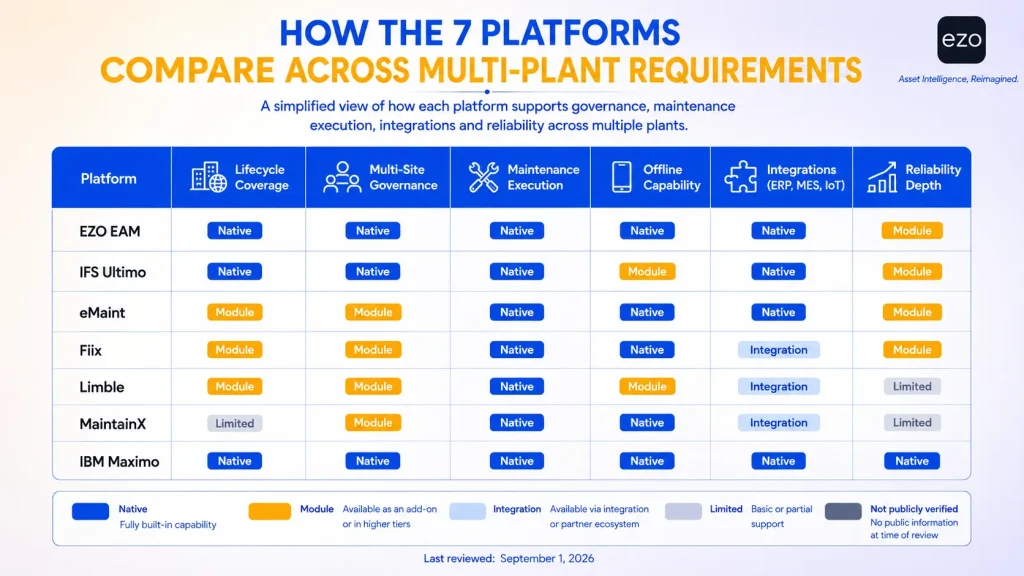
Which platform fits your multi-plant operating model?
The right platform depends on what the organization is trying to standardize first, and on how much governance it can realistically operate.
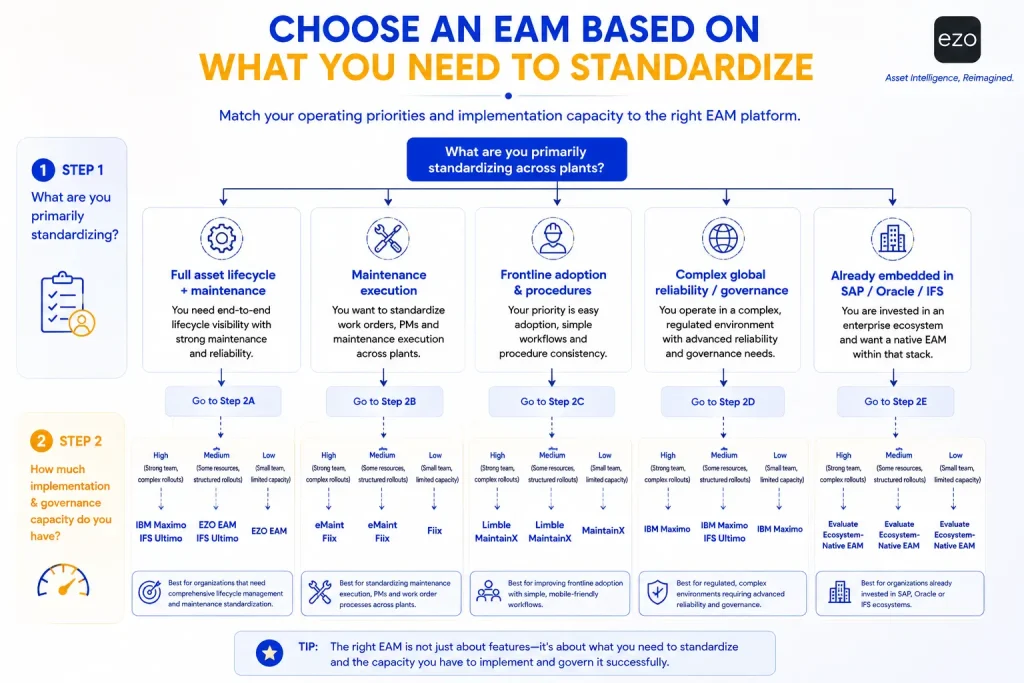
| Operating Requirement | Shortlist Direction |
|---|---|
| Full lifecycle plus native maintenance | EZO EAM, IFS Ultimo, or IBM Maximo depending on required lifecycle and reliability depth |
| Configurable industrial EAM | IFS Ultimo |
| Maintenance-led standardization | eMaint or Fiix |
| Fast technician adoption | Limble or MaintainX |
| Complex global governance and reliability | IBM Maximo Application Suite |
| Existing SAP, Oracle, or IFS ecosystem | Evaluate the matching enterprise suite |
The final row deserves more attention than it usually gets. If a manufacturer already operates deeply inside SAP, Oracle, or IFS, the incremental value of an unrelated EAM platform must be weighed against integration and data-governance cost. SAP S/4HANA Asset Management connects maintenance with materials management, production, HR, and controlling. Oracle Fusion Cloud Maintenance sits inside a broader supply-chain environment. IFS Cloud EAM is a separate, more deeply ERP-embedded option under the same IFS umbrella, not an upgrade tier above Ultimo; evaluate it on its own terms for larger or more integration-heavy environments.
Three options deserve mention outside the core seven, held separate since each competes on a different axis rather than failing to qualify. Octave Attune EAM, formerly HxGN EAM and Infor EAM before that, fits asset-intensive industrial and infrastructure operations; Hexagon’s software division spun off as Octave and the product was renamed in 2026, so ask standard ownership-transition questions. UpKeep suits smaller teams prioritizing mobile simplicity, covered in our EZO vs. UpKeep comparison. Fracttal One is worth evaluating where IoT and condition data are central.
Five starting questions narrow the field quickly, though they don’t replace the fuller 13-criterion methodology above:
- How broad does the asset lifecycle need to be?
- How deep does reliability management need to go?
- How complex are the required integrations?
- How much implementation capacity does the organization actually have?
- How much governance is genuinely necessary, rather than theoretically desirable?
How can a lean team roll out EAM across multiple plants?
A lean team should standardize the data model and maintenance event definitions first, test them in two contrasting plants, and only then scale across the network in waves.
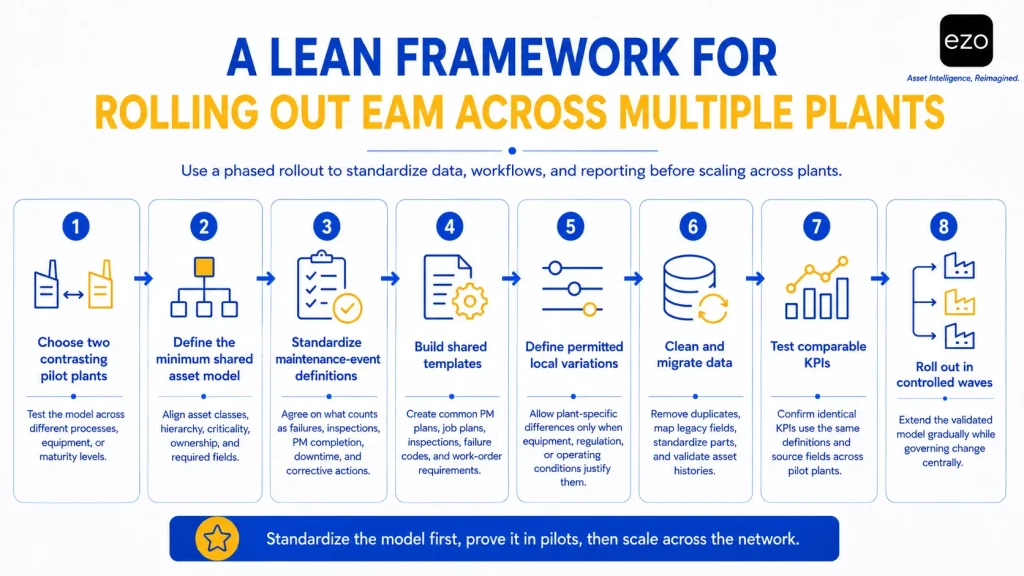
Trying to implement every plant at once creates a convincing illusion of progress. Start with two contrasting pilot plants. Why two? Because one plant can make a standard look successful purely because the standard was designed around it. A second, genuinely different facility exposes whether the model is transferable.
1. Select two contrasting pilot plants
Choose facilities that differ in process, equipment, data maturity, or maintenance culture. The goal isn’t two similar plants; it’s testing whether the model survives variation.
2. Define the minimum shared asset model
Agree on asset classes, naming conventions, hierarchy, criticality, ownership, required fields, and location structures. But do not standardize a field merely because the software allows it. Every required field carries a behavioral cost for the technician entering it. This is where friction cost matters: a field producing genuine cross-plant insight is worth the extra seconds; a field nobody ever queries is bureaucracy with a database column.
3. Standardize maintenance events
Define what the organization means by failure, inspection, PM completion, downtime, corrective action, and deferred maintenance. This matters more than standardizing the interface, and it is the step most often skipped because it produces no software artifact.
4. Build shared templates
Create common PM plans, job plans, inspections, failure codes, work-order requirements, and completion evidence. Confirm during procurement that your platform supports these at the tier you are buying, because as the profiles show, templates and failure codes are frequently gated.
5. Document permitted variations
Not every difference is a defect. A plant in a different regulatory environment legitimately needs different inspections. A plant running different equipment needs a different PM schedule.
Standardize by default; vary by reason.
That is more defensible than either “every plant must be identical” or “every plant configures what it likes,” and it gives plant managers a route to request an exception rather than quietly build one.
6. Clean and migrate data
Before importing legacy systems, remove duplicates, normalize fields, standardize parts, map old classifications, and validate asset histories. A bad migration does not merely move bad data. It gives it a new home and a fresh coat of credibility.
7. Test comparable reporting
Take two equivalent assets in the pilot plants: do they share an asset class, generate the same PM record, use the same failure codes and downtime fields, and support the same KPI from the same source fields? If not, the rollout isn’t ready, however good the dashboard looks.
8. Roll out in controlled waves
Once the model holds in the pilot plants, extend it. One published MaintainX rollout used waves of three to five sites, with each wave refining the process for the next; size waves to your own site complexity and resourcing rather than treating that figure as a fixed rule. Corporate should control changes to shared definitions while plants retain operational ownership of the work.
Software can enforce rules. It cannot decide which rules the organization should have.
What should you ask vendors to demonstrate?
Do not ask vendors for their feature list. Ask them to reproduce your multi-plant operating model live, in a sandbox, with two sites configured.
A useful demonstration should include these twelve scenarios:
- Create a corporate preventive-maintenance template.
- Apply it to equivalent assets at two different plants.
- Introduce one legitimate local variation and show how it is approved and recorded.
- Restrict a plant manager to the appropriate operational records.
- Give regional leadership consolidated visibility across both plants.
- Update a shared failure-code library and show the change propagating.
- Transfer a spare part between plant storerooms.
- Compare PM compliance and downtime across the two plants.
- Show who changed a template or asset record, and when.
- Import an acquired plant’s asset register and identify duplicates.
- Export or connect data to an ERP or BI platform.
- State exactly what required additional modules, professional services, integrations, or custom development.
The last item changes procurement outcomes. Buyers habitually ask:
“Can the platform do this?”
A better question is:
“What tier, what modules, and what services would it take for us to do this across seven plants?”
The first tests product capability. The second tests organizational and commercial fit, and given how consistently multi-site governance sits in top-tier plans across this category, it is the question that determines your real budget.
How should manufacturers calculate multi-plant EAM cost?
Multi-plant EAM cost should be calculated as total cost of ownership at the tier that actually supports multi-site governance, not at the entry price.
At minimum, include required products and modules; user, technician, asset, or site fees; implementation services; data migration; integrations; training; mobile devices and scanning hardware; administrator time; ongoing configuration; support tiers; and data-export or contract-exit requirements. Two structural points deserve attention.
First, licensing models differ more than headline prices. Per-user pricing scales with headcount; item-based pricing scales with tracked-item volume, and on EZO specifically, bulk stock also carries a separate stock-unit cap layered on top. A plant with many occasional users behaves differently under per-user licensing than under an item-based model, though EZO’s fair-use limits should still be factored into the quote. Check whether requester accounts are free, as they are on MaintainX across all plans.
Second, the multi-site tier is the real starting price. If multi-location capability sits in a vendor’s Enterprise plan, the published entry rate is not the number to budget against.
There is also a common trap. Buyers tend to overweight visible upfront costs and underweight recurring friction.
For example, a hypothetical $50,000 implementation line item is easy to see. The three hours per week spent reconciling plant reports for the next five years never reaches the procurement spreadsheet. A cheaper subscription becomes expensive if the organization spends years maintaining workarounds; higher licensing can be cheaper if it removes administrative effort. TCO should include administrative labor and ongoing governance, not simply licensing.
Final verdict
There is no universally best EAM platform for multi-plant manufacturing. EZO EAM is compelling for manufacturers wanting broader asset lifecycle management, native maintenance, inventory and location visibility, and item-based rather than per-user licensing. IFS Ultimo sits between that and heavier enterprise EAM, a configurable industrial platform for manufacturers who want predefined industry solutions with room to scale into deeper integration as the program matures. Maintenance-first platforms such as eMaint, Fiix, Limble, and MaintainX align better when standardized execution and frontline adoption are the immediate priorities, provided you budget for the tier where multi-site governance actually lives. IBM Maximo Application Suite fits when reliability depth, enterprise governance, and integration complexity justify a heavier implementation model.
The underlying decision is not simply EAM vs. CMMS. It is how much standardization the organization needs, how much variation it must preserve, and how much governance it can realistically operate.