The best UpKeep alternatives at a glance
Disclosure. EZO publishes this guide, and EZO EAM, one of the ten platforms compared, is our product. We designed the scoring method and we link to our own commercial pages. Scores reflect our editorial reading of published vendor documentation, not hands-on testing. Our weighting prioritizes lifecycle, custody, and reservations; re-weight it for your own priorities and the ranking changes. Verify anything decision-critical directly with each vendor.
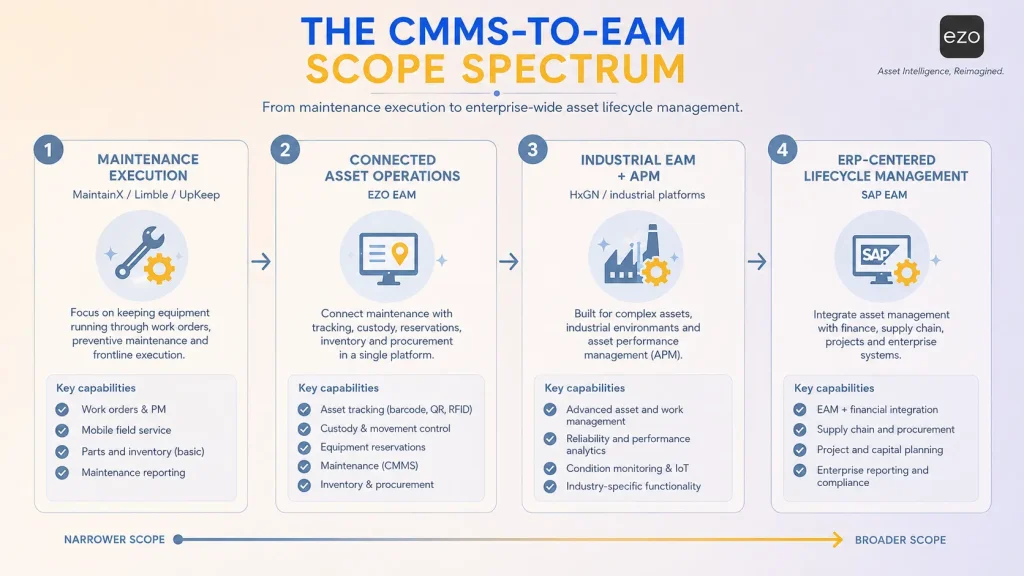
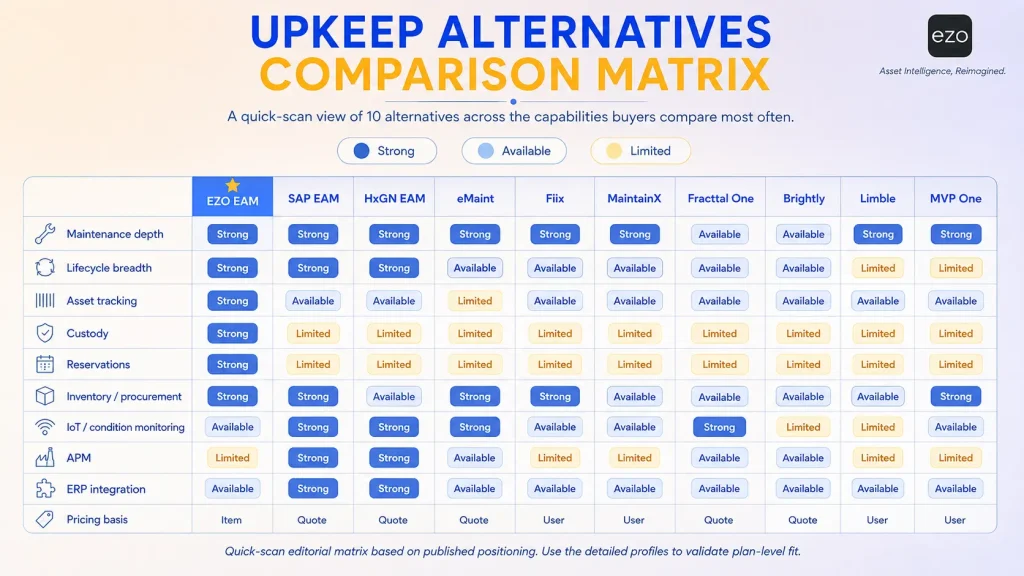
The best UpKeep alternatives for enterprise asset management are EZO EAM, SAP Enterprise Asset Management, HxGN EAM, eMaint, Fiix, MaintainX, Fracttal One, Brightly Asset Essentials, Limble, and MVP One. They fall into two groups: broader EAM platforms that extend into lifecycle, custody, and reservations, and maintenance-first platforms that compete with UpKeep on execution depth. The right platform therefore depends less on replacing UpKeep and more on which operational challenge you are solving: deeper lifecycle management, industrial reliability, ERP integration, asset tracking, equipment reservations, or enterprise-wide visibility.
UpKeep remains an excellent platform for maintenance-centric organizations. But as operational complexity grows, many enterprises evaluate alternatives that extend beyond maintenance into broader asset management.
Introduction
Every growing organization eventually reaches a point where maintaining assets is no longer its greatest operational challenge. Understanding them is.
In the early stages of growth, maintenance management software is often sufficient. Teams need a reliable way to create work orders, schedule preventive maintenance, track repairs, and manage spare parts. This is precisely where UpKeep excels: its mobile-first approach, preventive maintenance workflows, AI-assisted capabilities, and enterprise controls have made it one of the most recognized maintenance platforms in the market.
Yet growth rarely increases complexity in a single dimension. As companies expand across facilities, manage thousands of assets, coordinate distributed workforces, and connect operational data with finance and supply chain systems, they begin asking different questions.
Not simply “How do we maintain this asset?” but:
“Where is it?” “Who is responsible for it?” “Has it already been reserved for another project?” “Should we continue repairing it or replace it altogether?”
These questions signal a shift. Maintenance is no longer the primary concern; operational visibility becomes the competitive advantage.
Most organizations searching for UpKeep alternatives are not leaving because it lacks enterprise functionality. UpKeep sells four tiers (Essential $24 per user per month, Premium $55, Professional and Enterprise on quote), and the upper two go well beyond basic maintenance. Professional adds offline mobile, an external request portal, full analytics, asset lifecycle tracking, and signature capture. Enterprise adds multi-site governance, workflow automation, integrations, and API access.
That tier structure matters more than it first appears: the capabilities most enterprises are shopping for sit at the quote-only Enterprise tier, so the honest comparison is rarely against UpKeep’s published rates.
Enterprises evaluate alternatives not because these capabilities are missing, but because different platforms emphasize different layers of asset management.
Some platforms specialize in industrial reliability. Others integrate deeply with ERP. Some prioritize frontline adoption. Others extend maintenance into procurement, custody, reservations, and retirement decisions.
Selecting enterprise asset management software is therefore no longer about comparing feature lists. It is about selecting an operational philosophy.
An organization focused on preventive maintenance needs a very different platform than one managing shared equipment across dozens of facilities. A manufacturer inside the SAP ecosystem has different requirements than a university tracking laptops, lab instruments, and facilities assets.
Platforms cannot be ranked meaningfully without specifying the buyer’s priorities. This guide specifies its priorities in the weighting, and shows you how to change them. This guide examines where UpKeep fits, why organizations look elsewhere, when staying put is better, and which platform suits which environment.
How we selected these ten. Platforms had to be actively sold in August 2026, positioned for multi-user organizational maintenance or asset management, and plausibly evaluated by a team leaving UpKeep. We excluded consumer tools and platforms without published capability documentation. Considered but not profiled: IBM Maximo and IFS Cloud EAM (multi-decade infrastructure programs with dedicated implementation partners, a different procurement); Oracle and Infor EAM (ERP-embedded, as SAP is); Asset Panda, MPulse, eWorkOrders (narrower segments). Each may be right under conditions this guide does not cover.
How we scored these platforms
Reminder: EZO publishes this guide and EZO EAM is our product. We built the scale below.
Two scales, because one scale cannot fairly compare both kinds of product. A platform built for maintenance depth and one built for lifecycle breadth are not competing on the same axis. Scoring them together ranks maintenance-first tools low for lacking capabilities they were never designed to have, and says nothing about whether they beat UpKeep at the job UpKeep actually does. So each platform is scored on the scale that matches what it is.
Scoring rubric (0–3), applied to both scales:
| Score | Meaning |
|---|---|
| 0 | Not found in the vendor’s published documentation as of August 2026 |
| 1 | Third-party integration or partner-delivered only |
| 2 | First-party but separately licensed, or native with material scope limits |
| 3 | Native and included in the plan tier being compared |
A 0 records what we could not verify in published material. It is not a claim that a capability does not exist; it may be undocumented, renamed, enterprise-only, or partner-delivered. Where a 0 is decision-critical, confirm with the vendor.
Scale A: broader EAM platforms
For organizations whose constraint is lifecycle breadth. Weights reflect what separates an EAM platform from a maintenance platform.
| Criterion | Weightage | EZO EAM | SAP EAM | HxGN EAM | UpKeep (ref) |
|---|---|---|---|---|---|
| Full asset lifecycle coverage | 20% | 3 | 3 | 3 | 2 |
| Asset tracking and custody | 15% | 3 | 1 | 1 | 1 |
| Availability and reservations | 15% | 3 | 1 | 1 | 0 |
| Integration architecture | 12% | 1 | 3 | 3 | 2 |
| Inventory and procurement | 10% | 3 | 3 | 2 | 2 |
| Asset performance and capital planning | 10% | 0 | 3 | 3 | 1 |
| Enterprise CMMS depth | 8% | 2 | 3 | 3 | 3 |
| Mobile experience | 5% | 2 | 2 | 2 | 3 |
| Pricing transparency | 5% | 3 | 0 | 0 | 2 |
| Weighted total | 2.33 | 2.20 | 2.10 | 1.58 |
These weights encode this guide’s argument, and they are what puts EZO EAM first. Half the weight sits on lifecycle, custody, and reservations. EZO EAM scores 1 on integration and 0 on asset performance management, where SAP EAM and HxGN EAM both score 3. Weight those two above custody and reservations and either overtakes EZO EAM. The three are within 0.23 of each other; the ranking is a function of the weighting, not a verdict.
Scale B: maintenance-first alternatives
For organizations whose constraint is maintenance execution. Different criteria, different weights, UpKeep shown for reference.
| Criterion | Weightage | MaintainX | Limble CMMS | Fiix | eMaint | MVP One | Fracttal One | Brightly | UpKeep (ref) |
|---|---|---|---|---|---|---|---|---|---|
| Maintenance execution depth | 25% | 3 | 3 | 3 | 3 | 3 | 2 | 2 | 3 |
| Reliability and compliance | 15% | 2 | 2 | 2 | 3 | 2 | 3 | 2 | 2 |
| Inventory and purchasing | 15% | 2 | 2 | 3 | 3 | 3 | 2 | 2 | 2 |
| Mobile and offline execution | 15% | 3 | 3 | 2 | 2 | 3 | 3 | 2 | 3 |
| Integration architecture | 10% | 2 | 2 | 3 | 2 | 2 | 2 | 1 | 2 |
| Implementation speed | 10% | 3 | 3 | 2 | 1 | 1 | 2 | 2 | 3 |
| Pricing transparency | 10% | 3 | 3 | 2 | 2 | 2 | 0 | 0 | 2 |
| Weighted total | 2.60 | 2.60 | 2.50 | 2.45 | 2.45 | 2.10 | 1.70 | 2.50 |
Read this scale against the incumbent. UpKeep scores 2.50 on maintenance criteria, competitive with everything here. MaintainX and Limble edge it on implementation speed and pricing transparency; Fiix matches it and adds integration depth; eMaint and MVP One trade implementation speed for reliability and parts depth; Brightly scores lowest because it is built for facilities, not industrial maintenance.
Say the quiet part. On Scale A, eMaint, MaintainX, Limble, and Brightly would all score at or below UpKeep. That is not a criticism of those products; it is what happens when you measure a maintenance platform on a lifecycle scale, and it is exactly why they are scored here instead.
If you are on UpKeep and your problem is maintenance, most of Scale B is a lateral move. That is the honest reading, and it is why the Gap test comes before the comparison. Switching within Scale B makes sense for a specific reason (calibration, Rockwell integration, offline execution, adoption), not for a general upgrade.
MaintainX and Limble tie at 2.60. Where totals tie we order alphabetically rather than inventing a tie-break.
Scores are our editorial assessment against published vendor documentation and pricing pages, checked August 2026.
What is UpKeep, and where does it fit?
UpKeep is an AI-enabled maintenance and asset operations platform centered on maintenance execution, preventive maintenance, work orders, inspections, asset records, mobile technicians, inventory management, and reliability. It sells four tiers: Essential ($24 per user per month), Premium ($55), and Professional and Enterprise on quote. Asset lifecycle tracking and offline mobile arrive at Professional; multi-site governance, workflow automation, integrations, and API access arrive at Enterprise.
Many discussions of UpKeep alternatives begin with a false assumption: that UpKeep is “just a CMMS.” That characterization is no longer accurate.
The boundaries between CMMS and EAM have blurred, and UpKeep has evolved with them. Its upper tiers support enterprise maintenance across multiple facilities with automation, integrations, governance controls, and APIs, which is more than sufficient for mature maintenance programs, provided the budget reaches the tier where those capabilities live.
However, maintenance represents only one component of enterprise asset management, and that is the most important idea to grasp before evaluating any replacement.
Imagine an organization managing several thousand assets across warehouses, regional offices, plants, and field teams. An asset may hold several operational states at once. It can be fully functional from a maintenance perspective yet already reserved for another project, assigned to a different employee, in transit between facilities, or blocked because a required attachment is unavailable.
None of these are maintenance failures. They are operational coordination problems.
This is where enterprise asset management extends beyond maintenance. Instead of asking whether an asset is working, organizations ask whether it is available, accountable, properly allocated, and positioned to generate value.
The question is no longer whether UpKeep can manage maintenance. It is whether the organization now needs a broader operating system for the complete asset lifecycle.
Why do enterprises look for UpKeep alternatives?
Enterprises typically evaluate UpKeep alternatives not because UpKeep lacks enterprise maintenance capabilities, but because their operational requirements extend beyond maintenance into broader enterprise asset management. As organizations scale, they often require deeper lifecycle visibility, equipment custody, reservations, procurement workflows, ERP integration, asset performance management, and financial planning that align with their evolving operational model.
Comparing enterprise asset management software purely through a maintenance lens often leads organizations toward the wrong decision.
Maintenance is an activity. Enterprise asset management is an operating philosophy. The difference sounds semantic but changes how organizations think about physical assets. A maintenance-first organization asks “How do we keep this equipment operational?” An asset-centric one asks “How do we maximize the value this asset creates across its lifecycle?”
The second question includes maintenance but adds procurement, utilization, availability, inventory, ownership, financial performance, and retirement planning. Knowing where you sit on that spectrum is the first step.
Equipment availability depends on more than maintenance status
A common misconception is that an operational asset is automatically an available asset.
Imagine a construction company mobilizing for a major project. The excavator has passed inspection, no PM is due, mechanically everything is ready. Yet it cannot be deployed: it is already reserved by another project, or checked out by another regional office, or a required attachment has not arrived.
From a maintenance perspective the asset is perfectly healthy. Operationally it is unavailable.
Maintenance software answers “Can this asset operate?” Enterprise asset management asks “Can this asset actually be used right now?” That difference is why reservations, custody, inventory dependencies, and asset movement become valuable at scale.
The gap test: is this a maintenance problem or an operations problem?
Most organizations that switch platforms diagnose the wrong problem. Before shortlisting anything, take the last ten operational failures your team logged (missed deadlines, idle crews, duplicate purchases, equipment that could not be found) and sort each one into a column.
| Column A: Maintenance failure | Column B: Coordination failure |
|---|---|
| Equipment broke down unexpectedly | Equipment was working but already reserved |
| PM was skipped or completed late | Nobody knew who had the asset |
| Repair took longer than planned | Asset was in transit between sites |
| Wrong part was stocked | Part existed, but at another location |
| Technician lacked service history | A required accessory was missing |
| Recurring fault was never root-caused | Two teams bought the same equipment |
If seven or more land in Column A, you have a maintenance execution problem. A broader EAM platform will not solve it and will probably make it worse by adding governance overhead to a team that needs focus. Fix the process, then optimize your existing platform.
If four or more land in Column B, you have a coordination problem. No amount of maintenance sophistication will address it, because none of these failures involve a broken asset. This is the case for evaluating alternatives.
If the split is roughly even, you likely have a data problem underneath both, usually an asset register that no longer matches reality. Fix that first, or you will carry it into the new system.
When should an enterprise keep UpKeep?
Not every organization searching for UpKeep alternatives should replace UpKeep. If technicians actively use the platform, preventive maintenance workflows are standardized, reporting supports operational decisions, integrations function reliably, and the organization does not require broader asset lifecycle capabilities, optimizing the existing UpKeep deployment is often a better investment than replacing it altogether.
Comparison guides usually assume the reader has already decided to migrate. That assumption drives unnecessary technology projects.
A common and expensive mistake is confusing operational symptoms with software limitations. Sometimes the software no longer fits. Sometimes it works exactly as intended while the organization’s processes do not. Before evaluating any replacement, work out whether your platform has reached its limits, or whether you have reached the limits of your implementation.
Technology rarely solves process problems
Organizations blame software when operations become inefficient. Records are incomplete, reports are hard to generate, inventory accuracy declines, leadership stops trusting the data. The intuitive conclusion is “We need better software.”
Yet the same platform produces very different outcomes across two organizations with nearly identical requirements, because enterprise software amplifies processes rather than replacing them. If work orders are inconsistently completed, a new platform does not improve technician discipline. If asset hierarchies are poorly designed, every future report relies on bad data regardless of what generates it.
Migrating without redesigning processes creates the illusion of transformation while preserving the problem. Only a genuine capability gap justifies migration.
Keep UpKeep when maintenance remains the primary priority
UpKeep’s strength has consistently been maintenance execution. For organizations whose success depends primarily on preventive maintenance, work orders, inspections, technician productivity, and mobile execution, that remains an excellent strategic position.
Migration should therefore answer one question: has your operational model fundamentally changed? If maintenance is still the primary challenge, a broader platform adds complexity without proportional value. Every additional workflow requires governance. Every integration requires administration. Every module demands adoption.
Sometimes operational simplicity is itself a competitive advantage.
The UpKeep replacement readiness score
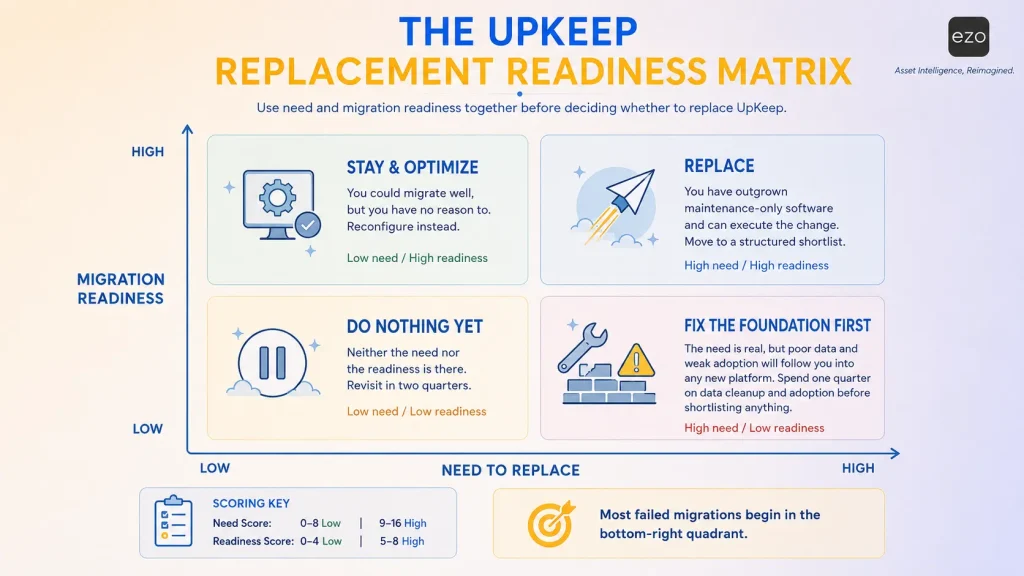
Two questions get confused in most migration decisions: do we need to replace this? and can we pull it off? They need separate scores, because high need plus low readiness is what produces failed migrations. Score each 0, 1, or 2.
Part A: Need Score (out of 16). Higher means replace.
- Do you need to know who currently holds an asset, not just whether it works? (0 never, 1 sometimes, 2 daily)
- Do teams reserve or book shared equipment in advance? (0 no, 1 informally, 2 formally)
- Do assets move between locations, sites, or entities? (0 rarely, 1 occasionally, 2 constantly)
- Do you track costs from procurement through disposal, not just maintenance spend? (0 no, 1 partially, 2 required)
- Do you need capabilities gated behind a tier you have declined to buy? (0 no, 1 one, 2 several)
- Does licensing cost scale badly against your user mix? (0 fine, 1 strained, 2 blocking)
- Are you running parallel spreadsheets or a second system to cover gaps? (0 no, 1 one, 2 two or more)
- Do you need an integration your current plan does not support? (0 no, 1 one, 2 several)
Part B: Readiness Score (out of 8). Higher means you can execute.
- Is your asset register accurate today? (0 unreliable, 1 partly, 2 accurate)
- Is technician adoption strong? (0 poor, 1 mixed, 2 strong)
- Do you have an internal owner with the capacity to run a migration? (0 no, 1 partly, 2 yes)
- Can you name the specific measurable outcome migration must produce? (0 no, 1 vaguely, 2 yes)
Plot yourself on both axes.
| Low need (0–8) | High need (9–16) | |
|---|---|---|
| High readiness (5–8) | Stay and optimize. You could migrate well, but you have no reason to. Reconfigure instead; the criteria below will tell you whether that is realistic. | Replace. You have outgrown maintenance-only software and you can execute the change. Move to the Same-Asset test to shortlist. |
| Low readiness (0–4) | Do nothing yet. Neither the need nor the capability is there. Revisit in two quarters. | Fix the foundation first. This is the dangerous quadrant. The need is real, but poor data and weak adoption will follow you into any new platform and get blamed on it. Spend one quarter on data cleanup and adoption before you shortlist anything. |
That bottom-right quadrant is where most failed migrations start. The need is genuine, so the project gets approved, and the same unreliable register and disengaged technicians produce the same outcomes in more expensive software.
What should you look for in an UpKeep alternative?
The best UpKeep alternative is not the platform with the longest feature list. It is the one that preserves the maintenance capabilities you already depend on while solving what UpKeep no longer addresses deeply enough. Before comparing vendors, define the specific capability you need to improve: lifecycle management, asset tracking, inventory control, ERP integration, industrial reliability, or connected operations.
Choosing enterprise software is difficult not because there are too few options but because there are too many. Every vendor promises AI. Every platform advertises preventive maintenance. Every website claims enterprise scalability.
As categories mature, products converge. Rather than asking “Which platform has more functionality?” ask “Which platform helps us make better decisions over the next five to ten years?” Below are the nine dimensions that matter most.
1. Full asset lifecycle coverage
Maintenance begins only after an asset already exists. Enterprise asset management begins long before that.
Follow one physical asset from purchase to retirement and ask whether the platform supports procurement, receipt, commissioning, deployment, assignment, preventive and corrective maintenance, utilization tracking, transfers between locations, financial history, and disposal.
Many products excel once maintenance begins. Far fewer maintain continuity across the whole lifecycle, and that continuity matters because a maintenance decision influences utilization, utilization influences replacement planning, replacement planning influences procurement, and procurement influences capital allocation.
2. Enterprise-grade CMMS capabilities
A broader EAM platform should never require sacrificing maintenance quality. Organizations evaluating UpKeep CMMS alternatives should ensure that any replacement preserves the operational capabilities maintenance teams already depend upon.
At a minimum, evaluate:
- Work requests
- Work orders
- Preventive maintenance
- Meter-based maintenance
- Condition-based maintenance
- Inspections
- Digital checklists
- Technician scheduling
- Parts consumption
- Downtime tracking
- Maintenance costs
- Complete service history
The question is not whether these features exist but whether technicians can complete them naturally under real operating conditions. A sophisticated feature buried behind complexity delivers less value than a simple workflow teams actually adopt.
3. Asset tracking and chain of custody
Knowing an asset exists differs from knowing where it is. Knowing where it is differs from knowing who currently has it. High-performing organizations expect every asset interaction to leave a traceable record. Evaluate whether the platform supports:
- Barcode and QR code tracking
- RFID
- GPS and telematics integrations
- Assigned custodians
- Check-in and check-out workflows
- Transfer history
- Location hierarchy
- Audit trails
- Employee offboarding and asset recovery
These capabilities become increasingly valuable as organizations operate across multiple facilities, field teams, contractors, and shared equipment pools.
Maintenance tells you whether an asset works. Custody tells you whether anyone can actually find it.
4. Equipment availability and reservations
An operational asset may still be unavailable because it is reserved, assigned elsewhere, awaiting return, or committed to another project. Evaluate whether a platform supports:
- Availability calendars
- Equipment reservations
- Conflict prevention
- Fulfillment workflows
- Dispatch
- Project allocation
- Expected return dates
- Maintenance-aware scheduling
Perfectly maintained equipment produces no value if nobody knows when it becomes available. This capability more than any other distinguishes broader EAM platforms from maintenance-first tools.
5. Inventory and procurement
Maintenance and inventory are interconnected, yet many organizations manage them separately. The result is familiar: technicians complete work orders only to find parts unavailable, purchase orders drift from maintenance planning, and inventory records lose accuracy.
The strongest EAM software connects the two directly. Examine how platforms manage:
- Spare parts
- Consumables
- Reusable stock
- Multi-location inventory
- Stock thresholds
- Parts reservations
- Purchase orders
- Requisitions
- Vendors
- Cost tracking
- Work-order linkage
The objective extends beyond inventory visibility. It is operational continuity. When those workflows remain disconnected, organizations frequently optimize individual departments while reducing overall efficiency.
6. Asset performance and capital planning
As organizations mature, leadership asks which assets create the greatest value, which should be replaced, and which consume capital without producing returns. Answering that requires capabilities beyond maintenance. Evaluate whether the platform supports:
- Asset health scoring
- Condition monitoring
- Reliability analysis
- Failure prediction
- Risk prioritization
- Remaining useful life
- Capital planning
- Repair-versus-replace modeling
Organizations operating large asset portfolios increasingly compete through capital allocation as much as maintenance execution. Software should help leaders make better investment decisions, not simply record historical activity.
7. Mobile experience
Enterprise software succeeds or fails in the field. Executive dashboards impress during demonstrations; technician workflows determine adoption.
Rather than evaluating screenshots, ask technicians to do real work. Can they locate assets quickly, complete work orders, scan barcodes, capture photos, perform inspections, record meter readings, consume inventory, collect signatures, and keep working offline?
The goal is not aesthetics but operational friction: every additional click, repeated thousands of times, becomes a cost. The best mobile experience is the one technicians willingly use every day.
8. Integration architecture
Asset information influences finance, procurement, supply chain, business intelligence, IoT, GIS, telematics, and identity management.
Do not just ask whether integrations exist. Ask how they are implemented, how often data syncs, which direction it flows, and who owns governance. Check specifically for ERP, finance, procurement, GIS, SCADA, IoT, telematics, APIs, webhooks, BI, and single sign-on.
9. Total cost of ownership
The Three-Year Total Cost of Ownership Worksheet
Per-user pricing is the smallest line in most EAM budgets. Fill this in for every shortlisted vendor before comparing anything else.
| Line item | Year 1 | Year 2 | Year 3 | Notes |
|---|---|---|---|---|
| Paid licenses × rate | Count only seats that require payment | |||
| Free seat types | 0 | 0 | 0 | Requester/view-only tiers change the maths |
| Tier upgrade to reach required features | The gated capability, not the headline plan | |||
| Additional sites or entities | Per-site fees, or separate deployments | |||
| Implementation and configuration | 0 | 0 | ||
| Data migration and cleanup | 0 | 0 | Scope from your own record counts, not a vendor estimate | |
| Integration build | Build cost plus annual maintenance | |||
| Hardware: scanners, tags, sensors | ||||
| Add-on modules: AI, IoT, analytics | ||||
| Training and retraining | Include turnover | |||
| Annual escalation | N/A | Check your contract; ask to lock the rate on multi-year terms | ||
| Total |
Where licensing models actually diverge. This is the line item most comparisons miss entirely, and it can swing three-year cost by an order of magnitude.
UpKeep charges per user: $24 Essential, $55 Premium, quote-only above. Admin, Technical, and Limited Technical seats need paid licences; Requester and View-Only are free and unlimited. EZO charges per item tracked with unlimited users under fair usage, from $63.55/month, with the CMMS add-on priced per admin user. MaintainX and Limble are per user. Most enterprise platforms here publish nothing.
A rough example: forty technicians and a modest asset base puts UpKeep Premium near $26,400 a year in licences before add-ons, while an item-priced platform is largely indifferent to headcount. Reverse it (five technicians, 30,000 assets) and per-user wins comfortably.
Neither model is better. They reward opposite shapes of organization. Work out which shape you are before comparing a single feature.
Three costs that never appear in a pricing comparison: the productivity dip during cutover, the parallel-running period where you pay for both systems, and the internal hours your own team spends on the project.
The same-asset test: run every demo against one asset
Vendor demonstrations are built around the vendor’s strongest workflow. Take control of the script: pick one real asset (your most awkward one, shared across teams, moved between sites, expensive to replace) and make every vendor run the identical eight steps.
| # | Step | What you are actually testing |
|---|---|---|
| 1 | Create the asset with your real fields, categories, and hierarchy | Whether your data model survives contact with theirs |
| 2 | Assign it a custodian, then transfer to another person | Custody as a first-class record, or an afterthought |
| 3 | Reserve it for a date three weeks out | Reservations exist at all, and prevent conflicts |
| 4 | Raise a PM while the reservation stands | Whether scheduling is maintenance-aware |
| 5 | Consume a part from a second location | Multi-location inventory, or a single stockroom |
| 6 | Move the asset to another site | Transfer history, or just an overwritten location field |
| 7 | Pull lifetime cost: purchase, maintenance, parts, downtime | Whether financial history is connected or fragmented |
| 8 | Retire it and confirm the audit trail survives | Whether disposal is a real lifecycle stage |
Score each step 0–2: 0 = cannot do it, 1 = possible with workaround or configuration, 2 = native and obvious.
Two rules make this work. Run the steps in order: the sequence exposes whether workflows connect, and a platform can pass steps 3 and 4 individually yet fail when a reservation and a PM collide. And require the vendor to drive live in their own product, not present slides. Anything scoring 0 or 1 on steps 2, 3, or 6 is a maintenance platform, whatever the marketing says.
The 10 best UpKeep alternatives compared
Each platform is scored on the scale that matches what it is: Scale A for lifecycle breadth, Scale B for maintenance depth.
The EAM complexity ladder: find your rung before you shortlist
Platforms sit at different rungs, and a rung is not a quality grade. Buying well above your current rung is a common and costly mistake in this category.
| Rung | Your situation | What you need | Where to look |
|---|---|---|---|
| 1. Digitizing | Spreadsheets or paper; single site; first system | Fast deployment, minimal admin | Limble, MaintainX |
| 2. Maturing | PM program running; adoption solid; one to three sites | Deeper maintenance, reporting | UpKeep, Fiix, MaintainX |
| 3. Regulated or reliability-led | Compliance, calibration, or reliability engineering is the constraint | Specialist maintenance depth | eMaint, Fiix, MVP One |
| 4. Coordinating | Multiple sites; shared equipment; custody and availability now matter | Connected lifecycle operations | EZO EAM |
| 5. Industrial or infrastructure | Decades-long asset lives; GIS, capital planning, ERP-embedded | Strategic asset management | HxGN EAM, SAP EAM |
Two rules. Moving more than one rung needs a specific justification: the governance overhead of a rung-5 platform will stall a rung-2 organization, so a two-rung move should be a decision rather than a default. And the ladder is not a maturity ranking: a rung-3 pharmaceutical manufacturer is not less sophisticated than a rung-4 university, just differently constrained.
| Platform | Best For | Key Strength | Pricing basis | G2 rating |
|---|---|---|---|---|
| EZO EAM | Complete asset lifecycle visibility | Connected asset operations, custody, reservations, lifecycle | Per item; unlimited users, from $63.55/mo | Not enough G2 volume |
| SAP Enterprise Asset Management | Large enterprises already using SAP | Deep ERP integration at enterprise scale | Quote only | Not enough G2 volume |
| HxGN EAM | Asset-intensive industries | Reliability engineering, GIS, industrial APM | Quote only | Not enough G2 volume |
| eMaint | Regulated and reliability-led maintenance | Calibration, compliance, condition monitoring | Team / Professional / Enterprise; rates not published on vendor site | 4.5 (~265) |
| Fiix | Manufacturing scaling maintenance | Production assets and Rockwell integrations | From ~$45/user/mo | 4.6 (~475) |
| MaintainX | Frontline operations | Mobile experience and technician adoption | Per user; free tier | 4.8 (~1,425) |
| Fracttal One | Connected maintenance operations | IoT-enabled and predictive analytics | Quote only | 4.6 (~600) |
| Brightly Asset Essentials | Education, government, public sector | Facilities management and compliance | Quote only | 4.2 (~240) |
| Limble CMMS | Growing maintenance teams | Implementation speed and usability | From ~$28/user/mo | 4.8 (~670) |
| MVP One | Industrial maintenance depth | Work orders, parts, purchasing, OEE, offline execution | From $20/named user/mo | 4.7 (~100) |
| UpKeep (incumbent) | Maintenance-first organizations | Maintenance execution and mobile | $24 / $55 / quote / quote | 4.5 (~1,075) |
** Checked August 2026. “Not enough G2 volume” means too few reviews under that listing to quote responsibly, not a negative signal. Each profile repeats these figures in context.**
Broader EAM platforms
Three platforms extend beyond maintenance into lifecycle, custody, and reservations. Ordered by Scale A score.
1. EZO EAM
EZO EAM is our own product. Its trade-offs are stated at greater length than any competitor’s, deliberately.
Best for connected asset operations: lifecycle, custody, and reservations
Scale A score: 2.33
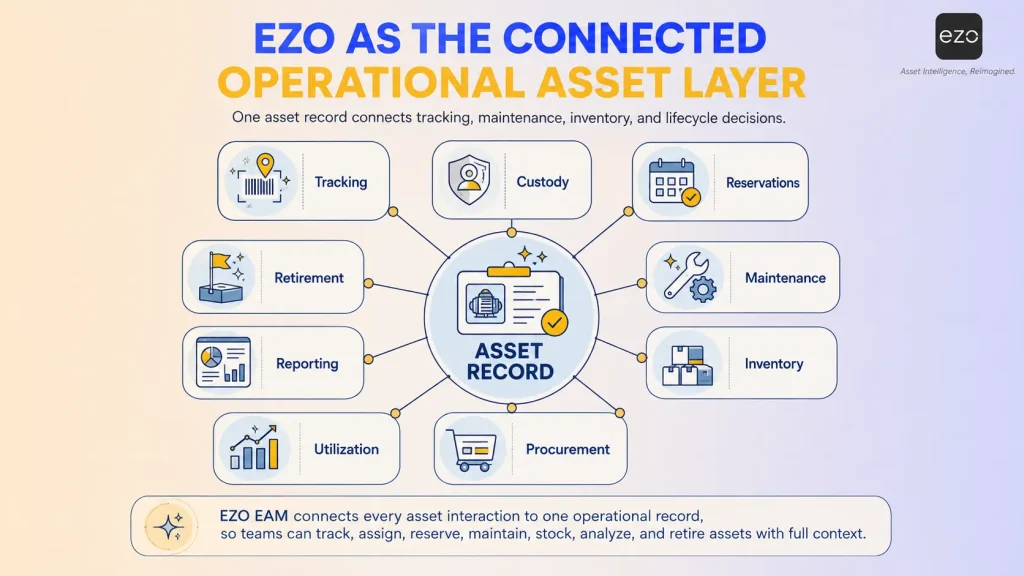
EZO EAM treats every physical asset as part of a connected operational ecosystem rather than a maintenance record, extending visibility across the full lifecycle to where an asset is, who has it, whether it is reserved, how often it is used, and how inventory supports it.
What EZO EAM does
Complete lifecycle management; barcode, QR, and RFID tracking; check-in/check-out with full custody chain; equipment reservations and availability calendars; assignments and multi-tier approvals; multi-location inventory; purchase orders and vendor management; mobile asset management; utilization and depreciation reporting; compliance documentation; custom dashboards. Preventive maintenance, work orders, and technician management are EZO EAM’s CMMS capabilities, licensed as an add-on.
Basic service records come with the Advanced plan, but the full CMMS functionality within the EAM platform (preventive schedules, work orders, technician assignment, work order automation) is licensed as an add-on priced per admin user, and included at Enterprise. Price it in from the start rather than discover it later.
Why choose EZO EAM instead of UpKeep?
Because custody, reservations, and procurement-to-disposal lifecycle are the constraint rather than work order throughput. Maintenance connects with inventory, inventory with procurement, procurement with asset records, and asset records with assignments, reservations, and utilization: the continuity that produces the Scale A lifecycle score.
Best for
- Manufacturing
- Engineering
- Government agencies
- Construction
- Energy and utilities
Trade-offs
CMMS capability is licensed as an add-on. Priced per admin user on top of the platform, or included at Enterprise. If maintenance is your primary workload, a Scale B platform will likely cost less and fit better.
No native ERP, GIS, or SCADA connectors. The published integration set covers service desk, identity, storage, GPS and telematics, and Zapier, not SAP, Oracle, Dynamics, Esri, or SCADA. Integration is possible via API and Zapier, so this is “not native” rather than impossible, but teams needing maintenance data in an ERP should look at SAP EAM or HxGN EAM.
Offline mobile is Enterprise-tier only. Remote sites, basements, and plant floors with poor coverage need Enterprise, not Premium.
No asset performance management layer. Condition monitoring, failure prediction, remaining useful life, and capital planning are not in the published documentation, hence the Scale A score of 0 on that criterion. If capital allocation across a long-lived portfolio is your constraint, look at HxGN EAM.
Delivery is cloud SaaS, with private cloud at Enterprise. EZO does not publish a self-hosted option.
Deployment, pricing and rating. Cloud SaaS; private cloud at Enterprise. Per item tracked, unlimited users, from $63.55/month; CMMS add-on per admin user. G2 rating not quoted: insufficient volume.
Our verdict
EZO EAM tops Scale A because the three heaviest-weighted criteria (lifecycle, custody, reservations) are what it was built for. It sits 0.13 ahead of SAP EAM and 0.23 ahead of HxGN EAM, both of which beat it on integration and asset performance. A narrow win on a scale we built is not a verdict.
The structural difference is worth more than any feature row: EZO charges by items tracked with unlimited users under fair usage, from $63.55 per month, where UpKeep and most competitors charge per user. Many occasional participants favor EZO; a small team with a very large asset base favors per-user.
2. SAP Enterprise Asset Management
Best for large enterprises already operating within the SAP environment
Scale A score: 2.20
If EZO EAM represents connected operational visibility, SAP Enterprise Asset Management represents organizational integration.
Rather than functioning primarily as maintenance software, SAP treats maintenance as one component of a far larger ecosystem spanning finance, procurement, supply chain, manufacturing, inventory, compliance, and capital planning.
For organizations already running SAP ERP, that is the whole advantage: maintenance decisions flow into financial reporting, procurement stays synchronized, depreciation aligns with accounting records. It dramatically reduces data duplication at the cost of far greater implementation complexity. SAP is chosen not because it is simplest but because enterprise-wide integration matters more than simplicity.
Strengths
Native SAP ERP integration, enterprise-scale governance, asset lifecycle management, financial and procurement integration, regulatory compliance, global deployment support, and advanced planning.
Trade-offs
SAP requires substantially greater implementation resources than any other platform here. Configuration complexity, consulting requirements, change management, and implementation timelines should all be evaluated before adoption. It suits very large enterprises already invested in the SAP ecosystem, not organizations simply seeking a stronger maintenance platform.
Best for
- Global manufacturers
- Utilities
- Oil and gas
- Mining
- Transportation
- Infrastructure
- Large public sector organizations
- Existing SAP ERP customers
Deployment, pricing and rating. Cloud and on-premise, within the S/4HANA estate. Quote only. G2 rating not quoted: insufficient volume.
Our verdict
SAP EAM is not the best UpKeep alternative for every organization. But for enterprises already running SAP across finance, procurement, and operations, its ecosystem integration creates advantages standalone platforms cannot replicate.
3. HxGN EAM
Best for industrial infrastructure and reliability-driven operations
Scale A score: 2.10
If enterprise asset management exists on a spectrum, HxGN EAM occupies one of its most sophisticated ends.
Unlike platforms built around technician productivity, HxGN approaches asset management through the lens of industrial operations, assuming you manage critical infrastructure where failures interrupt transportation networks or utility services rather than just costing money. Maintaining assets is only part of the objective; optimizing reliability is the priority. Where UpKeep provides robust maintenance workflows, HxGN extends into asset performance management, engineering visualization, GIS, condition monitoring, and investment planning.
What HxGN EAM does
- Enterprise asset management
- Asset performance management
- Asset investment planning
- Digital Work mobile application
- GIS and Esri integration
- CAD and BIM visualization
- Reliability and condition monitoring
- Integration middleware
- Flexible cloud deployment
- Enterprise-grade configuration
Its most distinctive capability is contextual asset visualization. Rather than treating an asset as a standalone record, HxGN lets infrastructure managers see equipment alongside maps, engineering drawings, GIS layers, and facility layouts, which is substantially richer in operational context than a record view provides.
Why choose HxGN instead of UpKeep?
The answer depends less on maintenance sophistication and more on operational complexity. Organizations generally consider HxGN when they need:
- GIS-integrated infrastructure management
- Industrial engineering context
- Reliability-centered maintenance strategies
- Asset investment planning
- Condition monitoring
- Enterprise visualization
- Complex industrial integrations
Notice that very few of these capabilities relate directly to creating better work orders. Instead, they improve strategic decision-making across entire infrastructure portfolios.
Maintenance software optimizes execution. Industrial EAM platforms optimize infrastructure.
Best for
Utilities, rail and transportation, mining, oil and gas, manufacturing, public infrastructure, and government asset portfolios: environments where assets have operational lifespans measured in decades rather than years.
Trade-offs
That sophistication introduces complexity: longer implementation timelines, greater configuration effort, more formal governance, higher administrative overhead, and enterprise pricing. For organizations simply seeking stronger preventive maintenance, it is unnecessary weight.
Deployment, pricing and rating. Flexible cloud deployment. Quote only, enterprise-tiered. G2 rating not quoted: insufficient volume.
Our verdict
HxGN EAM is not designed to replace maintenance software but to elevate maintenance into a broader industrial asset strategy. For organizations managing critical infrastructure where reliability, visualization, and long-term investment drive advantage, it is among the strongest platforms available.
Maintenance-first alternatives
Seven platforms competing with UpKeep on maintenance execution rather than lifecycle breadth. Ordered by Scale B score; MaintainX and Limble tie and are listed alphabetically.
4. MaintainX
Best for frontline teams and operational execution
Scale B score: 2.60
Enterprise asset management focuses on technology. Successful implementations depend on something simpler: people actually using it. However sophisticated a platform becomes, it creates little value if technicians avoid it because the software interrupts daily work.
That is the philosophy behind MaintainX. Rather than starting with enterprise architecture it starts with the frontline worker, and every design decision emphasizes speed, simplicity, collaboration, and execution.
What MaintainX does
- Work orders
- Preventive maintenance
- Inspection checklists
- Standard operating procedures
- Asset management
- Inventory management
- Purchase orders
- Digital forms
- Messaging and communication
- AI-powered assistance
- Analytics and dashboards
- Mobile-first workflows
Unlike most CMMS platforms, MaintainX builds communication between technicians, supervisors, and production staff directly into daily workflows rather than treating maintenance as an isolated department.
Why choose MaintainX instead of UpKeep?
Organizations evaluate MaintainX for faster technician adoption, simpler mobile workflows, digital SOPs, and reduced training. Where work-order completion is inconsistent, usability itself becomes the strategic advantage.
Best for
- Manufacturing
- Food processing
- Warehousing
- Distribution
- Hospitality
- Facilities management
- Operations teams seeking rapid digitization
Trade-offs
Organizations requiring highly sophisticated enterprise asset lifecycle management, engineering visualization, capital planning, or deeply integrated ERP environments may eventually require broader enterprise asset management capabilities.
MaintainX excels because it deliberately focuses on operational execution rather than becoming an all-encompassing enterprise platform.
Deployment, pricing and rating. Cloud SaaS, mobile-first. Per user, free entry tier. G2 4.8, ~1,425 reviews.
Our verdict
MaintainX demonstrates an important lesson: enterprise software should not merely support operational processes, it should encourage operational behavior.
5. Limble CMMS
Best for fast implementation and growing maintenance teams
Scale B score: 2.60
Enterprise software rewards comprehensiveness; organizations reward momentum. A platform reaching organization-wide adoption in weeks may deliver more improvement than a more powerful one requiring months of change management.
That is where Limble built its reputation, reducing friction rather than competing on features: rapid deployment, intuitive workflows, mobile usability, straightforward administration. It suits organizations moving off spreadsheets, paper, or first-generation systems.
What Limble does
- Preventive maintenance
- Corrective maintenance
- Work orders
- Asset management
- Spare parts inventory
- Purchase orders
- Vendor management
- QR code asset tracking
- Mobile application
- Custom dashboards
- Reporting
- APIs
- AI-assisted workflows
The interface stays intentionally approachable, letting teams become productive without long implementation projects or training programs.
Why choose Limble instead of UpKeep?
Organizations evaluate Limble for faster implementation, easier adoption, and lower administrative complexity. It suits teams that have outgrown manual processes but not yet reached the complexity requiring a full EAM ecosystem.
Best for
- Mid-sized manufacturers
- Distribution centers
- Facilities management
- Healthcare facilities
- Property management
- Food production
- Organizations beginning digital maintenance transformation
Trade-offs
Limble intentionally prioritizes usability over enterprise breadth. Organizations requiring extensive asset lifecycle management, ERP-centric operations, engineering visualization, capital planning, or sophisticated reservation workflows may eventually require broader enterprise asset management capabilities.
Its strength lies in simplifying maintenance rather than expanding every aspect of enterprise operations.
Deployment, pricing and rating. Cloud SaaS. From ~$28/user/month. G2 4.8, ~670 reviews.
Our verdict
Limble has the shortest path from purchase to working PM program in this comparison, and the widest feature set at its entry tier. That is the specific claim, and it is what the Scale B implementation and pricing cells reflect.
6. Fiix
Best for manufacturing and the Rockwell Automation ecosystem
Scale B score: 2.50
Manufacturing evaluates asset management differently, because the environment revolves around production continuity: downtime affects output, output affects customer commitments, commitments affect revenue. Manufacturers therefore seek platforms tightly integrated with production rather than broader asset management. This is where Fiix excels.
Acquired by Rockwell Automation in 2020 and now positioned within Rockwell’s broader maintenance software portfolio, Fiix combines modern CMMS functionality with manufacturing-focused workflows. Its emphasis on production assets, rotating equipment, purchasing, inventory, and industrial integrations makes it one of the strongest UpKeep alternatives for manufacturing.
What Fiix does
- Work orders
- Preventive maintenance
- Asset hierarchy
- Downtime tracking
- Meter readings
- Rotating assets
- Parts inventory
- Purchasing
- RFQs
- Multi-site reporting
- AI-powered insights
- Integration Hub
- APIs
- Audit trails
- Single Sign-On
Why choose Fiix instead of UpKeep?
Organizations prefer Fiix when manufacturing asset hierarchies need sophistication, production downtime drives decisions, Rockwell integrations matter, or purchasing must stay tied to maintenance.
Best for
- Manufacturing
- Food and beverage
- Automotive
- Industrial production
- Rockwell Automation environments
- Multi-site manufacturing operations
Trade-offs
Organizations should carefully evaluate pricing across larger deployments because advanced capabilities become available primarily within higher-tier plans.
Likewise, companies seeking extensive procurement-to-retirement lifecycle management, custody workflows, or equipment reservation capabilities may require additional connected systems beyond Fiix itself.
Deployment, pricing and rating. Cloud-native SaaS. From ~$45/user/month; advanced capability in higher tiers. G2 4.6, ~475 reviews.
Our verdict
Fiix has the deepest Rockwell Automation integration path of any platform here, and the strongest integration architecture score on Scale B. If your plant floor already runs Rockwell, that is a concrete advantage no other option on this list offers.
7. eMaint
Best for configurable reliability and regulated maintenance
Scale B score: 2.45
Not every enterprise needs broader operational asset management. Some need deeper maintenance excellence. Where EZO EAM expands horizontally across the lifecycle, eMaint expands vertically into maintenance sophistication.
Highly regulated industries need more than PM schedules: calibration, electronic signatures, condition-based maintenance, compliance documentation, detailed analytics. That has made eMaint one of the most respected UpKeep competitors where maintenance quality is the priority.
What eMaint does
- Work orders
- Preventive maintenance
- Meter readings
- Condition-based maintenance
- Calibration management
- Parts inventory
- Projects
- Workflow automation
- Advanced analytics
- Electronic signatures
- Offline mobile execution
- ERP and SCADA integrations
- AI capabilities
Its integration with the broader Fluke Reliability ecosystem also makes it particularly attractive for organizations already using Fluke hardware, sensors, and reliability services.
Why choose eMaint instead of UpKeep?
Organizations generally evaluate eMaint when:
- Regulatory compliance is mission critical.
- Calibration workflows require specialized functionality.
- Maintenance processes demand extensive customization.
- Reliability engineering drives operational strategy.
- Existing Fluke investments should remain integrated.
Rather than broadening asset operations, eMaint refines maintenance itself: specialization that often creates more value than adding unrelated workflows.
Best for
- Pharmaceutical manufacturing
- Food and beverage production
- Regulated manufacturing
- Industrial processing
- Multi-site maintenance organizations
- Reliability-centered maintenance teams
Trade-offs
eMaint’s greatest strength also defines its limitations. Organizations primarily seeking equipment reservations, chain of custody, asset tracking, procurement workflows, or broader operational coordination may discover that eMaint intentionally prioritizes maintenance over wider enterprise asset operations.
Configuration complexity should also be expected as organizations implement more sophisticated reliability workflows.
Deployment, pricing and rating. Cloud SaaS with offline mobile. Three published tiers (Team, Professional, Enterprise), with rates quoted rather than published; API access and multi-site are Enterprise-gated, five-user minimum. G2 4.5, ~265 reviews.
Our verdict
eMaint is the only platform here with calibration management and electronic signatures as first-class capabilities, which is why it scores 3 on reliability and compliance. In a validated environment that single row outweighs its slower implementation.
8. MVP One
Best for industrial maintenance depth and offline work order execution
Scale B score: 2.45
MVP One sits close to eMaint and Fiix: a maintenance-first CMMS that extended into enterprise asset management, rather than an operations platform that added maintenance.
Its origins are in plant maintenance and it still shows: work orders, spare parts, purchasing, labor, uptime, with analytics over the top. What differentiates it is execution in low-connectivity environments: MVP One built its reputation on paperless work orders that work online and offline, which matters more on a plant floor than feature comparisons acknowledge.
What MVP One does
- Work order management, online and offline
- Preventive and condition-based maintenance
- Asset management and equipment history
- Spare parts inventory and purchasing
- Labor and skills-based task assignment
- Overall equipment effectiveness (OEE) tracking
- Maintenance cost and budget analytics
- Custom reporting with scheduled distribution
- Mobile CMMS across multiple sites
- ERP, HR, and business intelligence integrations
Its strongest capabilities emerge in multi-site industrial operations where execution and parts availability drive uptime.
Why choose MVP One instead of UpKeep?
Organizations evaluate MVP One for deeper purchasing and parts workflows tied to maintenance, skills-based labor assignment, OEE alongside maintenance data, and offline execution.
Best for Manufacturing, food and beverage, automotive, and multi-site industrial maintenance organizations
Trade-offs
MVP One is a maintenance platform, not an asset operations platform. Teams needing custody, reservations, or procurement-to-disposal tracking will find the same gaps as in other maintenance-first tools, and its heavier configuration suits nobody wanting to be live in two weeks.
Deployment, pricing and rating. Cloud SaaS, online and offline mobile. From $20/named user/month. G2 4.7, ~100 reviews.
Our verdict
MVP One is strong where maintenance execution and parts availability are the constraint, particularly in plants with unreliable connectivity. It competes with eMaint and Fiix rather than the broader lifecycle platforms. Choose on ecosystem fit: Fluke for eMaint, Rockwell for Fiix, neither for MVP One.
9. Fracttal One
Best for IoT-enabled asset management and predictive maintenance
Scale B score: 2.10
If traditional maintenance software helps organizations respond to problems, connected platforms try to prevent them. Maintenance is evolving from reactive decision-making toward continuous operational intelligence, and Fracttal One sits squarely in that transition, combining asset management with IoT connectivity, real-time monitoring, predictive analytics, and mobile-first workflows rather than relying on scheduled intervals alone.
What Fracttal One does
- Asset management
- Preventive maintenance
- Predictive maintenance
- IoT integration
- QR code asset tracking
- Work orders
- Mobile maintenance
- Inventory management
- Analytics
- Dashboards
- APIs
- AI-powered recommendations
Its cloud-native architecture makes deployment straightforward compared with legacy enterprise platforms.
Why choose Fracttal instead of UpKeep?
Organizations evaluate Fracttal for IoT-enabled maintenance, predictive analytics, and cloud-first deployment across distributed operations. As real-time data accumulates, maintenance decisions become informed by equipment behavior rather than fixed schedules.
Best for
- Utilities
- Manufacturing
- Healthcare
- Transportation
- Logistics
- Multi-site operations
- Organizations investing in connected infrastructure
Trade-offs
Organizations should carefully evaluate whether predictive maintenance capabilities align with their current operational maturity. Sensor-driven maintenance creates the greatest value when supported by reliable operational processes and sufficient data quality. Without those foundations, sophisticated analytics often produce less value than expected.
Deployment, pricing and rating. Cloud-native SaaS. Quote only. G2 4.6, ~600 reviews.
Our verdict
Fracttal One represents where enterprise maintenance is heading: rather than documenting equipment history, it continuously interprets operational data to improve future decisions.
10. Brightly Asset Essentials
Best for education, government, and public infrastructure
Scale B score: 1.70
Not every enterprise manages factories. Many manage campuses, schools, hospitals, and municipal buildings, where facilities must stay compliant, budgets are tight, and teams support thousands of distributed assets across departments. Brightly Asset Essentials serves precisely these sectors, focusing on facilities management, compliance, work orders, preventive maintenance, budgeting, and long-term public asset stewardship rather than heavy industrial reliability.
What Brightly Asset Essentials does
- Preventive maintenance
- Work orders
- Asset management
- Facilities management
- Capital planning
- Compliance
- Inventory
- Mobile maintenance
- Reporting
- Budget management
- Dashboards
Its emphasis on facilities and public asset management differentiates it from industrially-designed platforms.
Why choose Brightly instead of UpKeep?
Organizations evaluate Brightly for campus-wide asset management, facilities operations, government compliance, capital planning, and budget forecasting: requirements that differ substantially from manufacturing.
Best for
- Universities
- School districts
- Local government
- Municipal facilities
- Healthcare campuses
- Public sector organizations
Trade-offs
Organizations operating highly complex industrial environments may require more specialized reliability engineering capabilities than Brightly is designed to provide.
Likewise, organizations managing highly dynamic equipment reservations or sophisticated asset custody workflows should carefully evaluate operational fit.
Deployment, pricing and rating. Cloud SaaS. Quote only. G2 4.2, ~240 reviews.
Our verdict
Brightly is built around the things campus and municipal teams are measured on (compliance records, budget cycles, and distributed facilities) rather than plant uptime. It scores lowest on Scale B precisely because that scale rewards industrial maintenance depth; for a school district, that is the wrong scale.
UpKeep vs EZO EAM
The most common head-to-head in this comparison, and the two products are genuinely different rather than competing versions of the same thing. They also sit on different scales: UpKeep scores 2.50 on Scale B, EZO EAM 2.33 on Scale A. Those numbers are not comparable, which is the point.
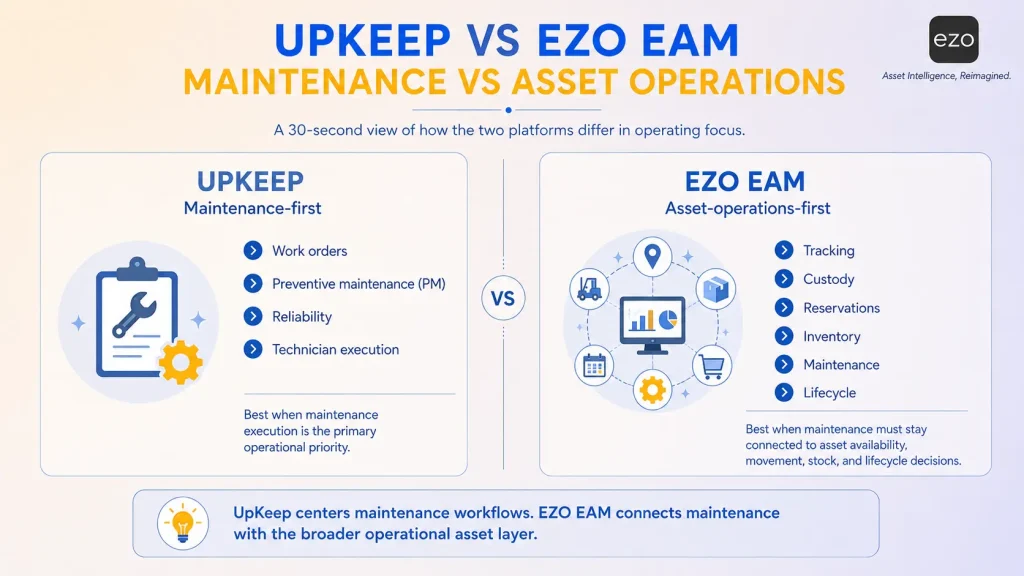
| UpKeep | EZO EAM | |
|---|---|---|
| Orientation | Maintenance execution | Connected asset operations |
| Core question answered | Can this asset operate? | Can this asset be used right now? |
| Maintenance depth | Native and included | Native; full CMMS is a licensed add-on |
| Asset tracking | Asset records and barcode scanning | Barcode, QR, and RFID with movement history |
| Chain of custody | Not found in published documentation | Native: custodians, check-in/out, transfer history |
| Reservations and availability | Not found in published documentation | Native: booking calendars, conflict prevention |
| Inventory | Native from Premium, with costing | Native, multi-location, linked to procurement |
| Lifecycle scope | Asset lifecycle tracking from Professional | Procurement through disposal |
| Multi-site governance | Enterprise tier | Included from Advanced |
| Integrations and API | Enterprise tier | API from Advanced; no native ERP, GIS, or SCADA |
| Mobile | Mobile-first; offline from Professional | Scanning-led; offline from Enterprise |
| Pricing basis | Per user: $24 Essential, $55 Premium, Professional and Enterprise on quote | Per item tracked: from $63.55/month, unlimited users |
| Free seat types | Unlimited requester and view-only | All users included under fair usage; CMMS add-on per admin user |
| G2 rating | 4.5, ~1,090 reviews | Insufficient volume under this listing |
| Best fit | Maintenance is the primary challenge | Maintenance is one of several coordination challenges |
The honest summary. If your work orders are the problem, UpKeep is the better product and switching is a downgrade dressed as an upgrade. Its maintenance execution and mobile experience are stronger than most platforms here, including ours on those two dimensions, and maintenance is bundled into its platform where EZO EAM licenses CMMS capability as an add-on.
The case for EZO EAM begins where custody, reservations, and lifecycle scope begin. Two economics points matter. Multi-site governance, workflow automation, and API access all sit at UpKeep’s quote-only Enterprise tier, so organizations needing them are comparing an Enterprise quote against alternatives, not the published rates. And the two prices are on opposite axes: per user versus per item.
Condensed. The full head-to-head comparison is available at EZO vs UpKeep.
Which platform fits your organization?
Need a lifecycle, custody, and reservations connected? EZO EAM. Already running SAP across finance and operations? SAP EAM. Industrial reliability, GIS, and engineering context? HxGN EAM.
On the maintenance side: eMaint for calibration and validated environments, Fiix for Rockwell plants, MVP One for offline execution and parts depth, MaintainX or Limble when adoption speed is the constraint, Fracttal One for IoT-led maintenance, Brightly for campuses and municipalities.
If none of those describe a problem you actually have, stay on UpKeep.
A CMMS-to-EAM migration framework
The generic version of this advice (define success, clean data, standardize, train, measure) appears in every enterprise software article ever written. This version works at field level instead. It is built from standard CMMS entities rather than a single vendor’s schema, so it applies whether you are leaving UpKeep or another platform; build your own field list from your actual export before scoping the project.
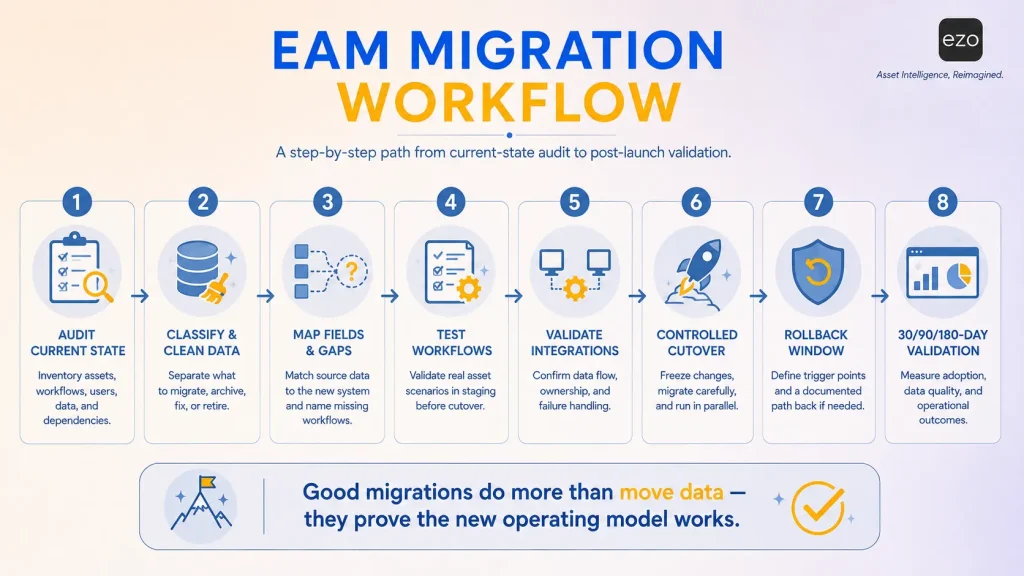
Step 1: Inventory what you actually have
Before exporting anything, count what you have: total assets and how many were touched in the last twelve months; active versus orphaned PM schedules; work orders by status, including the ones stuck open for years; parts records showing zero movement; custom fields populated on more than half of records; active integrations and their owners; and attachment volume.
That last one derails more migrations than anything else, because attachments frequently do not transfer with structured data and become a separate project.
Step 2: Classify before you clean
Before you classify anything: confirm your records-retention schedule, active legal holds, and regulatory retention requirements for each asset class and jurisdiction, and have legal, compliance, and records management approve the disposition plan in writing. In regulated environments (pharmaceutical, food and beverage, healthcare, utilities, government), maintenance records are frequently required evidence. This step is not optional.
With approval in hand, sort every asset record into four buckets: migrate as-is, migrate after cleanup, archive (readable, not imported), and review for approved disposal under the retention policy.
There is no “delete” bucket. Deciding disposition before export is cheaper than deciding during reconciliation, but disposition is a governance decision, not a data-cleanup one.
Step 3: Map fields, and name the gaps
This is the step that is almost always skipped and almost always causes the overrun. Build the table below from your actual export, and pay attention to the right-hand column: the gaps are the migration.
| Typical CMMS source concept | Typical EAM target | Common gap |
|---|---|---|
| Asset | Asset | Usually clean |
| Location | Location hierarchy | Flat locations must be restructured into a hierarchy |
| Asset custom fields | Custom fields or attributes | Field-type mismatches; character limits |
| Work order | Work order | Status taxonomies rarely align; needs a mapping table |
| Work order status | Status | Custom statuses often have no equivalent |
| PM schedule | PM schedule | Trigger logic (calendar vs meter) frequently differs |
| Meter reading | Meter | Reading history may not transfer, only current value |
| Checklist/procedure | Procedure library | Often rebuilt manually |
| Part/inventory | Inventory item | Single-location stock must be assigned to locations |
| Purchase order | Purchase order | May not exist on your tier; check before assuming |
| Vendor | Vendor | Usually clean |
| User and role | User and role | Permission models rarely map one-to-one |
| Requester (free seat) | Requester or equivalent | Confirm the target has an equivalent free tier |
| Attachment | Document | Frequently a separate migration |
| None | Custodian | No source field. New data collection required. |
| None | Reservation | No source field. New workflow. |
| None | Transfer history | Cannot be backfilled. Starts at go-live. |
The three bolded rows are the point. The capabilities you are migrating for have no source data, which means they are a data collection project, not a migration task. Plan them separately and staff them separately.
Exact export field names vary by vendor, plan, and configuration. Map yours against this structure rather than assuming a one-to-one match.
Step 4: Run the same-asset workflow test in staging
Run all eight steps from the Same-Asset Test in the configured new system before cutover. Any step needing a workaround in staging will need one forever.
Step 5: Validate integrations against live data
Test each integration in both directions with production-shaped data, not samples. Confirm which system is authoritative for each shared field, and establish who gets paged when the sync fails at 2am.
Step 6: Controlled cutover
Freeze new work order creation in the source system and complete or migrate open work orders. For closed history, define retention requirements by asset class, jurisdiction, warranty term, and audit obligation before deciding what to migrate live, what to archive readably, and what to leave in the read-only source system. Closed work orders are routinely evidence for regulatory audits, warranty claims, and incident investigations; “we do not need it live” and “we do not need it” are different questions.
Run parallel for one full PM cycle, not one calendar month; a quarterly PM will not surface a problem in thirty days. Keep read-only source access for a defined period, and put that period in the contract before you cancel.
Step 7: Define rollback criteria before go-live, in writing
Name the conditions that trigger reverting: PM compliance below a stated threshold, work order completion falling for a set number of consecutive weeks, an integration failing validation. Name who decides, and by when.
Almost nobody does this, and it is the cheapest insurance in the project. Agreeing criteria under pressure at week three is how organizations end up living with a bad migration, because reverting starts to feel like an admission of failure.
Step 8: Measure against Step 1
Re-run the Step 1 counts at 30, 90, and 180 days against the outcome your readiness score named. Track PM compliance, work order completion, MTBF, MTTR, utilization, inventory accuracy, equipment availability, and adoption by role.
Five mistakes that sink these projects
Choosing software before defining strategy. The question is not which platform has the most features but which capability matters most.
Migrating poor data. Software cannot turn inaccurate information into reliable insight.
Ignoring frontline adoption. Executives purchase software. Technicians determine whether it succeeds.
Underestimating organizational change. Timelines must account for behavioral adaptation, not just technical deployment.
Measuring implementation instead of business value. Completing migration is not success. Improving performance is.
Conclusion
Enterprise asset management is not ultimately about software. It is about operational philosophy.
Every platform here approaches physical assets differently, optimizing maintenance, industrial reliability, enterprise integration, or simplicity. Understanding those philosophies matters more than comparing features, because software changes and operational strategy evolves far more slowly.
For organizations whose primary objective remains maintenance execution, UpKeep continues to represent a strong solution. Migration should never occur simply because alternatives exist.
Where maintenance has become one component of a broader operational ecosystem, EZO EAM provides the strongest overall balance among the platforms compared here, not because of any single feature, but because maintenance, inventory, procurement, reservations, custody, and lifecycle data reinforce one another.
Organizations rarely create competitive advantage by maintaining assets more efficiently. They create it by understanding those assets more completely.
Not simply better maintenance. Better decisions.
Start with the diagnosis, not the demo. Run the Gap Test and the Readiness Score before you book anything; both take under ten minutes and will tell you whether you should be shortlisting at all.
If the Gap Test put you in Column B and custody, reservations, and lifecycle scope are your constraint, see how EZO EAM handles them or read the direct UpKeep comparison. EZO EAM is our product; the trade-offs are in the profile above.