
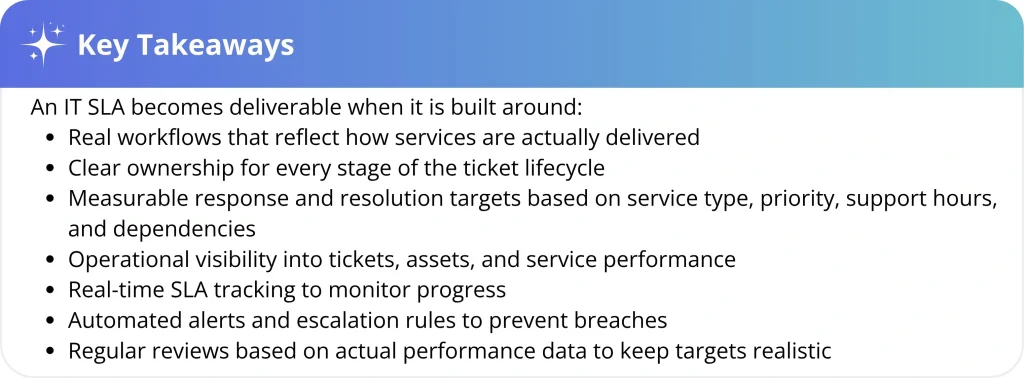
Delivering consistent IT service requires more than ad hoc processes. A service level agreement (SLA) is meant to turn service commitments into clear response times, resolution targets, ownership rules, and measurable expectations.
However, many SLAs fail because they are designed without an understanding of workflows, dependencies, and capacity, undermining trust in the process.
This guide explains how IT teams can design realistic SLAs, track the right metrics, prevent breaches, and build service commitments that users can trust and IT teams can consistently deliver.
The SLA problem no one talks about in enterprise IT
In mid-market and enterprise IT, SLA failure is often a design problem, not an effort problem. Targets are set before teams define ownership, escalation paths, dependency boundaries, and realistic performance baselines. As a result, the SLA may exist in reports but fail to guide daily service delivery.
A useful SLA connects the promise to the system behind it: routing, monitoring, escalation, staffing, automation, and ownership.
Without those support structures, SLA targets become pressure points instead of reliable service commitments.
What an SLA actually is in IT
An SLA is a formal commitment that defines what services will be delivered, how performance will be measured, and what happens if expectations are not met.
A workable SLA should clarify the service scope, expected performance level, measurement method, ownership, escalation path, and conditions that affect the SLA clock, such as business hours, holidays, pause rules, and blackout windows, to ensure clarity and accountabilitynd accountability.
Some SLAs govern external relationships between a vendor and a customer. Others exist inside the organization, defining the expectations between IT and the business units it supports.
Regardless of who signs it, a reliable SLA usually includes:
- Service scope and description
- Support hours and channels
- SLA statuses
- Measurable targets such as availability, response time, or resolution time
- Priority levels and escalation rules
- Responsibility boundaries and dependencies
- Reporting cadence
- Review schedules
These elements are what turn an SLA from a policy document into something teams can actually run operations against, such as support hours and escalation rules.
SLA vs SLO vs OLA vs KPI: What each one means
Many SLA conversations become confusing because teams use SLA, SLO, OLA, and KPI interchangeably. These terms are connected, but they do not mean the same thing.
| Term | What it means | Who uses it | Example |
| SLA | The service commitment made to a user, business unit, or customer | IT and the requester or customer | P1 incident response within 15 minutes |
| SLO | An internal service objective used to support and protect the SLA | IT service owner and operation teams | Resolve 95% of P2 tickets within the target |
| OLA | The internal agreement between teams that support the SLA | Service desk, infrastructure, security, endpoint, application, and other internal support teams | Endpoint support owns escalated device issues within 1 hour |
| KPI | A performance metric used to monitor service trends | IT leaders and service owners | SLA compliance rate, breach rate, MTTR, reassignment rate |
In short, the SLA is the user-facing promise; the SLO is the internal target that protects that promise; the OLA defines how internal teams support delivery; and KPIs measure performance over time. When these layers are clearly separated, teams can distinguish among a commitment, an operational target, a responsibility, and a metric.
When these layers align, SLA performance becomes easier to manage, measure, and improve, helping teams feel capable and effective in their roles.
Why SLAs matter more as organizations scale
As organizations scale, informal support stops working. More teams, tools, vendors, and stakeholders create more handoffs, which means IT needs shared rules for prioritization, response, ownership, and escalation.
SLAs help standardize those expectations so every team understands which services matter most, how quickly work should move, and what happens when demand exceeds capacity.
This is why SLAs should connect to the service catalog and service level management process. The catalog defines what IT offers, while service level management defines how performance is measured and improved.
The main types of SLAs IT teams use
Not every SLA serves the same purpose. Some apply to a specific service, some to a customer group, and others to vendors or internal teams.
| SLA type | What it means | IT example |
| Customer-based SLA | Applies to a specific customer, department, or user group | Executive support receives faster response targets |
| Service-based SLA | Applies to one service for all eligible users | Password reset requests follow the same response and resolution targets |
| Multi-level SLA | Uses different rules by service, priority, user group, or support tier | P1 incidents follow 24/7 support, while routine requests follow business hours |
| Internal SLA | Defines service commitments between IT and an internal business team or employee. | IT provides a new employee’s laptop within one business day of receiving an approved request. |
| Vendor SLA | Defines service expectations from an external provider | A cloud vendor commits to a specific uptime or support response target |
Most IT teams should start with a simple SLA model that reflects real service differences without creating too many policies to manage.
Why SLAs fail in real IT environments
SLA failures usually come from a few recurring design gaps: weak baselines, unclear measurement rules, unmanaged dependencies, poor visibility, inconsistent prioritization, and outdated targets.
- Targets are set without baselines
Many SLA targets are created without historical performance data. There are no baseline response times, ticket volumes, resolution trends, or breach patterns.
Without historical performance data, SLA targets become assumptions rather than informed commitments. Before defining targets, IT teams should review:
- Average first response time
- Average resolution time
- Ticket volume by service
- Ticket volume by priority
- SLA breach by category
- Approval delays
- Reassignment rate
- After-hours ticket volume
- Vendor-dependent tickets
- Backlog age
Reliable targets start with real operational data.
- Ambiguous measurement definitions
Even well-designed SLAs can fail when teams measure them differently. The SLA should define the measurement window, clock start, valid response, resolution criteria, exclusions, and pause conditions so performance is not open to interpretation.
Without clear formulas and agreed definitions, disputes are inevitable.
- Promises that ignore dependencies
SLAs become unreliable when they promise outcomes that depend on systems, vendors, or architecture outside the IT team’s control. Any dependency that affects delivery should be documented before the target is finalized.
Modern IT environments are deeply interconnected. A service might rely on cloud infrastructure, identity providers, networking layers, APIs, and third-party integrations. If critical dependencies fail, the service may experience degraded performance or complete outage, depending on redundancy and failover design.
- Poor visibility into assets and services
Poor visibility slows SLA performance because teams lose time identifying the affected user, device, software, service, owner, warranty status, or dependency. When this context is missing, the SLA clock keeps running while technicians search for basic information.
- Priority models that collapse under pressure
SLA performance also suffers when priority rules are ignored. If every request becomes urgent, teams respond to the loudest issue instead of the most business-critical one.
- SLAs that never evolve with the service
SLA targets should change when services, workloads, dependencies, or business expectations change. Otherwise, teams may be measured against commitments that no longer match operational reality.
Common SLA metrics and what they actually measure
SLA metrics should help IT understand where service delivery is working and where it is breaking down.
| SLA metric | What it measures | Why it matters |
| First response time | How quickly IT acknowledges or starts work on a ticket | Shows whether users receive timely engagement |
| Time to own | How quickly a ticket is assigned to the right owner | Reveals IT ticket routing and assignment delays |
| Resolution time | How long it takes to resolve the issue or fulfill the request fully | Shows whether IT is delivering the outcome on time |
| Update frequency | How often IT updates the requester | Improves user experience during longer tickets |
| Uptime or availability | Whether a service is available during the agreed period | Useful for infrastructure, applications, and cloud services |
| SLA compliance rate | Percentage of tickets completed within SLA | Shows whether the team is meeting commitments |
| SLA breach rate | Percentage or count of missed targets | Helps identify recurring problem areas |
| MTTR | Average time to recover or resolve | Shows how quickly the team restores service |
| CSAT after resolution | User satisfaction after ticket closure | Shows whether SLA compliance matches user experience |
Response time and resolution time should not be treated as the same thing. A ticket can also be resolved quickly after sitting unassigned for too long, but that still represents a routing failure.
This is why Time to Own is useful. It shows whether the ticket reaches the right person early enough.
Good SLA metrics do not only show whether a team was late. They show where the delay happened.
How to build deliverable SLAs as an operational discipline
A deliverable SLA isn’t created by writing better language. Rather, it’s created by designing an operational model that can actually support the promise.
The most reliable approach is to treat the SLA as the top layer of a service management stack. First, define the services. Then, define how performance will be measured, followed by building the workflows, tooling, and governance that allow the commitment to be delivered consistently.
When organizations approach SLAs this way, a few design patterns show up repeatedly:
- Anchor SLAs to services, not “IT”
SLAs work best when they are attached to specific services. Password resets, laptop provisioning, access requests, and production outages all have different urgency, complexity, and risk profiles. A single generic IT SLA cannot reflect those differences.
A service catalog serves as the starting point, where each service has a defined scope, expectations, and service targets.
This prevents a common anti-pattern: a single generic SLA that becomes meaningless the moment real operational complexity arises.
- Separate response time from resolution time
Another practical design choice is separating response from resolution.
These two activities represent very different parts of the workflow. Response time answers a simple question: How quickly does IT acknowledge the request and begin engagement? Resolution time, on the other hand, answers a much harder question: How long does it take to fully restore or deliver the service?
Splitting these timers helps teams manage expectations more realistically. It also allows organizations to define clear support calendars by specifying whether targets apply during business hours, extended support windows, or full 24/7 coverage.
Without that separation, SLA targets quickly become unrealistic.
- Use impact and urgency to protect capacity
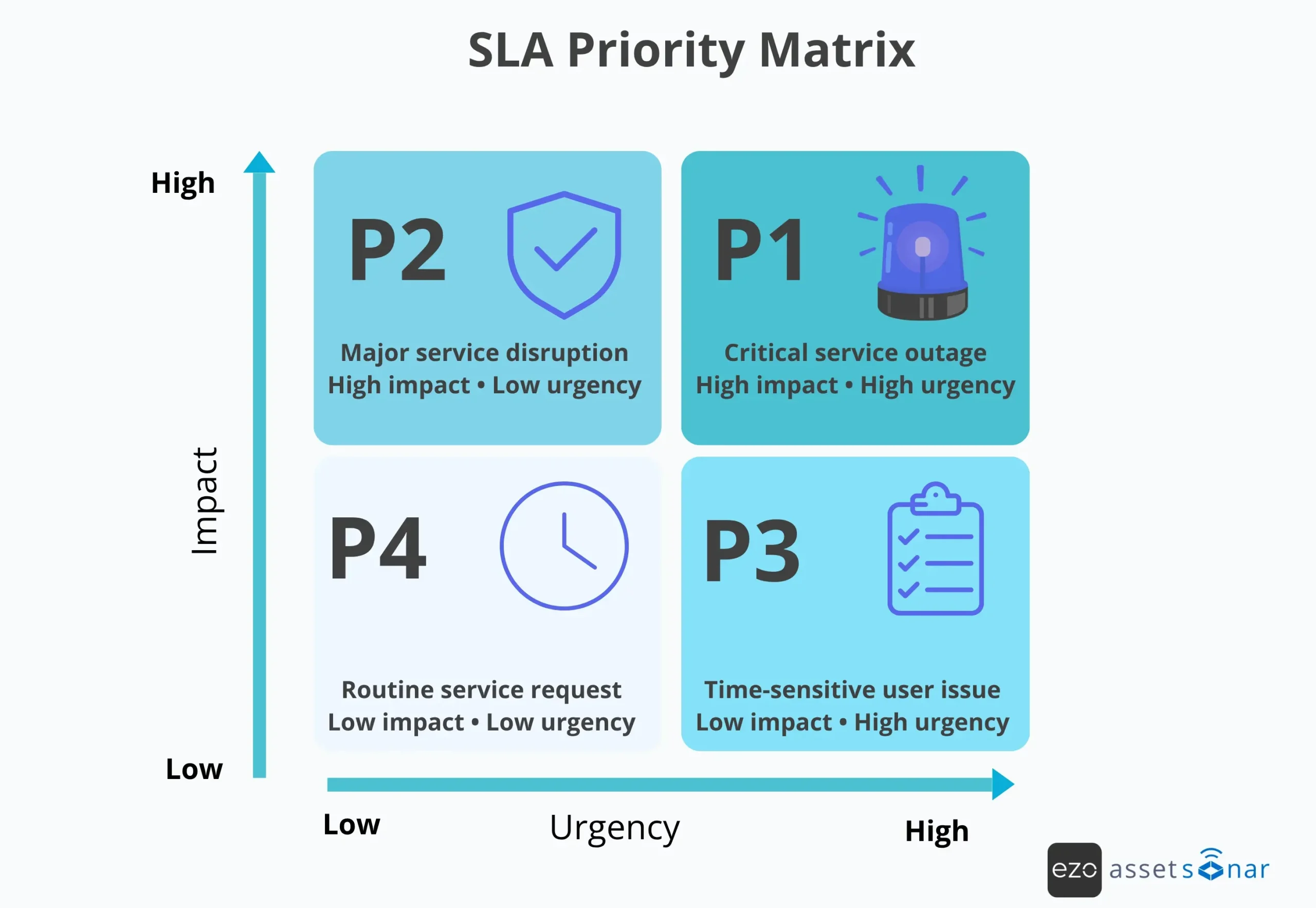
Healthy SLA models assign priority through impact and urgency. Impact shows how widely the business is affected, while urgency shows how quickly action is needed. Together, they help IT apply the right SLA target before work begins.
The matrix below shows how impact and urgency can be combined to assign the right priority level before SLA targets are applied.
For example:
| Priority | Typical Impact | Typical Urgency | Example Initial Response |
| Critical | Broad business outage | Immediate | 15 minutes |
| High | Major service degradation | High | 1 hour |
| Medium | Limited operational impact | Moderate | 4 hours |
| Low | Minor issue or single-user impact | Low | Next business day |
The goal isn’t complexity; it’s making sure the most important work gets attention first.
- Define dependency boundaries and “stop-the-clock” conditions
To keep SLA reporting consistent, teams should define when the clock starts and pauses, what counts as a valid response, and when work is considered resolved. They should also document exclusions such as requester delays, approvals, vendor actions, and scheduled maintenance.
Clear measurement rules reduce disputes and improve trust in SLA reporting.
- Set targets using real data
Once baseline data is available, teams can set targets that reflect current operating conditions. Start with attainable commitments, monitor performance, and adjust targets as ticket volume, staffing, dependencies, and service complexity change.
- Create a buffer between internal targets and external promises
Another reliability principle is separating internal objectives from external commitments.
Externally, the organization publishes the SLA. This is the promise made to users or customers.
Internally, teams operate against service level objectives. These targets are usually stricter than the SLA itself.
Buffer = SLA target − SLO target (e.g., 1 hour − 30 minutes = 30 minutes of protective buffer).
This buffer protects the promise. If the internal system occasionally misses its objective, the external commitment can still be met.
Reliability engineering formalizes this idea through the concept of error budgets. Instead of demanding perfection, teams manage a controlled level of acceptable failure while protecting overall reliability.
- Turn SLAs into operational signals
An SLA only becomes useful when it is connected to monitoring and alerting.
Service objectives should translate into actionable signals for IT techs/engineers. When reliability metrics approach the threshold, the system should notify the team responsible for protecting the service.
This is especially important for incident management and service request workflows where delays can compound quickly. For example, if a P1 incident is close to breaching its response target, the system should alert the assignee, notify the team lead, or trigger an escalation before the deadline is missed. The same logic applies to access requests, software approvals, hardware provisioning, and onboarding tasks. SLA tracking is most useful when it not only records missed targets but also actively warns teams when work is approaching risk.
This is where tooling, automation, and observability platforms play a critical role. They convert service objectives into real-time awareness of system health.
- Improve visibility into services and dependencies
Visibility turns SLA targets into deliverable commitments. Teams need a clear view of the services, assets, users, systems, and dependencies involved so they can assess impact, troubleshoot faster, and avoid wasting SLA time searching for context.
A CMDB, ITAM platform, or service inventory can centralize this context by showing how assets, applications, users, and services are connected.
When incidents occur, visibility improves troubleshooting, impact assessment, and decision-making.
At scale, SLAs become part of an operational system where services are defined, performance is measured, dependencies are understood, and workflows are designed to support consistent delivery.
How SLAs work across the IT ticket lifecycle
An SLA should live inside the ticket workflow, not outside it.
Once a ticket enters the service desk, the SLA should guide each step from intake to resolution and reporting, and be an active part of the IT ticket lifecycle.
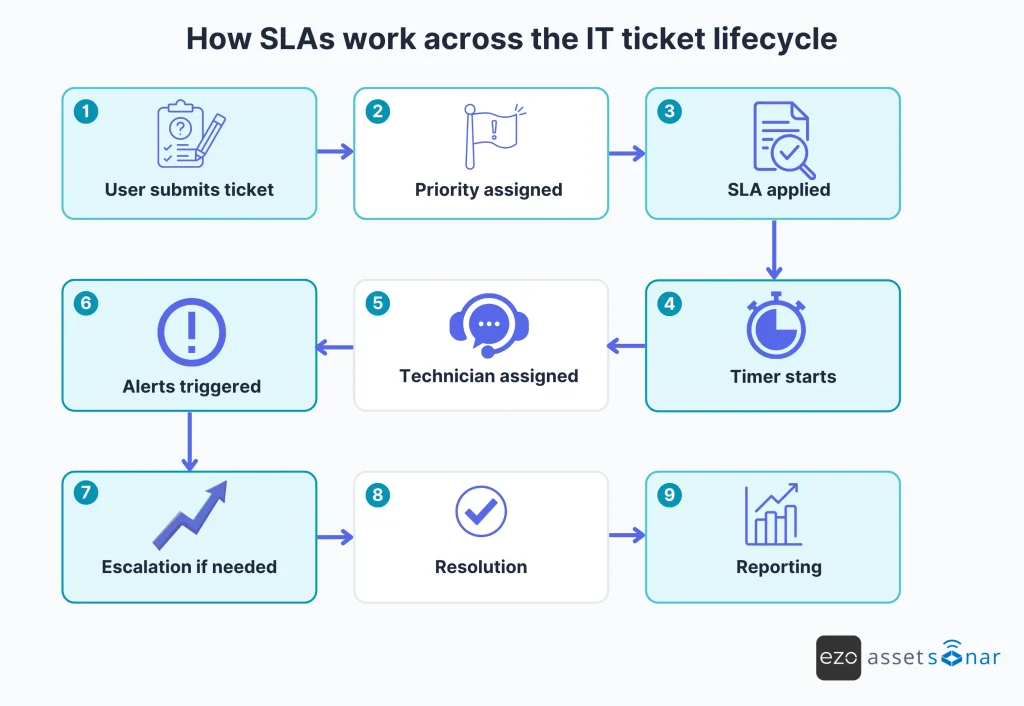
In practice, the lifecycle should look like this:
- A user submits a ticket or service request
- The ticket is categorized by service type
- Priority is assigned based on impact and urgency
- The correct SLA policy is applied
- The time starts based on the selected calendar
- The ticket is assigned to the right technician or queue
- Alerts warn the teams before a breach
- Escalation rules trigger if the ticket is at risk
- The ticket is resolved or fulfilled
- SLA performance is reported and reviewed
This is where automation becomes important. In SLA-driven workflows, the system should not wait for a technician or manager to manually check whether a deadline is approaching. It should surface at-risk tickets, notify the right owner, and trigger the next escalation path before the SLA is missed. That is what turns SLA management from passive tracking into active service control.
This makes the SLA part of daily service execution, not just a deadline attached to the ticket.
How to keep SLAs operational over time
SLA reports should help teams identify risks early, understand recurring delays, and determine whether targets still align with current workloads and dependencies.
| Metric | What it reveals | What to look for |
| SLA compliance rate | Whether teams are meeting agreed targets | A steady decline may show capacity issues or unrealistic targets |
| Breach rate by service | Which services miss targets most often | Repeated breaches may point to weak process design |
| Mean time to respond | How quickly does IT establish engagement | Slow response may indicate routing or ownership delays |
| Mean time to resolve | How long does it take to restore or fulfill the service | Long resolution times may reveal vendor, approval, or escalation bottlenecks |
| Time to own | How quickly do tickets reach the right owner | Delays here often mean tickets are sitting in the wrong queue |
| Approval delay | Whether business approvals are slowing fulfillment | Useful for software, access, IT procurement, and onboarding requests |
| CSAT after resolution | Whether users are satisfied with the outcome | Helps show whether meeting the SLA also created a good experience |
A useful SLA dashboard should answer three questions:
- Which tickets are at risk of breaching right now?
- Which services are missing targets repeatedly?
- What is causing the delay: ownership, approvals, vendors, capacity, or unclear priorities?
This makes SLA reporting more actionable. Instead of simply showing that a target was missed, the dashboard helps teams understand why it was missed and what needs to change.
Governance that keeps SLAs realistic
SLA governance keeps commitments aligned with how services actually operate.
A practical governance rhythm includes:
- Regular SLA reviews
- Breach session analysis
- Shared ownership across teams
- Vendor and OLA reviews
- Service catalog alignment
- Dependency reviews
- Transparent reporting with business stakeholders
Quarterly reviews are often enough for most services, but high-impact or frequently breached services may need closer monitoring.
Transparent reporting also improves the conversation around SLAs. Without visibility, SLA reviews can turn into blame. With visibility, they become a discussion about workload, process design, staffing, and service improvement.
The goal is not to make SLA reporting heavier. It is to keep service commitments aligned with how IT work actually gets done.
How AssetSonar helps IT teams manage SLAs
Managing SLAs should not require constant manual oversight. AssetSonar helps IT teams build SLA commitments directly into everyday service desk workflows, so targets are tracked, monitored, and escalated automatically.
AssetSonar can apply SLA policies based on ticket details such as:
- Priority
- Category
- Department
- Requester group
- Service type
Teams can define response and resolution targets, measure them against business-hour calendars, and automate actions such as timer tracking, notifications, escalations, and breach warnings.
This is especially useful for incident management, access requests, service requests, hardware provisioning, and offboarding workflows, where delays often happen before anyone manually checks the queue. Instead of waiting for a breach to appear in a report, teams can identify at-risk tickets early and take corrective action before service commitments are missed.
AssetSonar can also support SLA-driven provisioning workflows. For example, when a new employee onboarding request is created, IT teams can consolidate asset assignment, access setup, device preparation, and related service tasks into a single structured workflow.
This helps teams track whether onboarding and provisioning activities are on schedule, rather than managing them through disconnected emails, spreadsheets, or manual follow-ups.
Beyond automation, SLA performance also depends on visibility. AssetSonar provides real-time insights through metrics such as Time to Own and Time to Resolve, helping teams pinpoint where delays occur across intake, assignment, approvals, escalation, or fulfillment.
Technicians also need accurate context when handling tickets. From within a ticket, AssetSonar can provide details such as:
- Asset ownership
- Service history
- Warranty information
- Software records
- Assigned users
- Previous support activity
With this context available in one place, teams spend less time searching for information and more time resolving issues efficiently.
Because support activities rarely exist in isolation, AssetSonar integrates SLA management with broader IT service workflows, including incidents, service requests, onboarding, offboarding, asset assignments, and IT asset lifecycle management.
This creates a more consistent service experience across teams while reducing operational silos.
As organizations scale, managing SLA workflows manually becomes harder. AssetSonar helps reduce that burden by automating policy application, escalation paths, notifications, and reporting.
Together, these capabilities create a stronger foundation for SLA success. By combining workflow automation with asset intelligence, AssetSonar helps organizations route tickets faster, reduce troubleshooting delays, improve accountability, and minimize missed commitments.
The result is more than SLA tracking. It is a more efficient, measurable, and reliable approach to IT service delivery.
The real purpose of SLAs
The real purpose of an SLA is alignment. It gives IT and the business a shared understanding of service expectations, priority, accountability, and performance. Without that shared structure, every issue competes for attention, and every stakeholder defines urgency differently.
With clear expectations in place, service delivery becomes more predictable and easier to improve.
Conclusion: Deliverable SLAs start with visibility
Deliverable SLAs are not created by setting aggressive targets. They are created by understanding how IT actually moves through services, teams, assets, vendors, approvals, and dependencies.
The teams that meet SLAs consistently usually have three things in place:
- Reliable operational data
- Clear service and asset visibility
- Regular governance to keep targets aligned with reality
When those foundations are in place, SLAs become a practical operating framework for predictable IT service delivery.





