
An IT service catalog gets used when it is easier than emailing the help desk. That means employees can find the right service, submit a short form, see what approval is needed, and track the request without sending follow-up messages. For IT, the catalog should do more than collect tickets. It should route work, trigger approvals, apply SLA rules, connect requests to users and assets, and provide service desk managers with a clear way to measure request quality.
The problem is not usually that IT lacks a portal. The problem is that the portal asks employees to understand IT’s internal structure before they can get help.
A useful catalog reverses that. It starts with the employee’s intent: “I need software,” “I need access,” “my device is broken,” “a new hire needs equipment,” or “someone is leaving the company.” Behind each simple request sits the real operating model: ownership, approvals, SLA targets, fulfillment teams, asset records, license checks, procurement steps, and status updates.
That is the difference between a static list of services and an IT service catalog that becomes the default entry point for work.
What is an IT service catalog?
An IT service catalog is a structured list of approved IT services that employees can request, and IT can fulfill in a controlled, repeatable way. It usually includes service names, descriptions, request forms, eligibility rules, approvals, SLA targets, service owners, fulfillment steps, and status updates.
A strong catalog gives employees a single place to request IT support, access hardware and software, and manage onboarding, offboarding, and other standard services. It gives IT teams a consistent way to capture the right information upfront and move the request through the correct workflow.
The catalog should answer three questions for every service:
- What can the employee request?
- What information does IT need to fulfill it?
- What happens after the request is submitted?
When these answers are missing, employees treat the catalog as a dead end and return to email, chat, or desk-side requests.
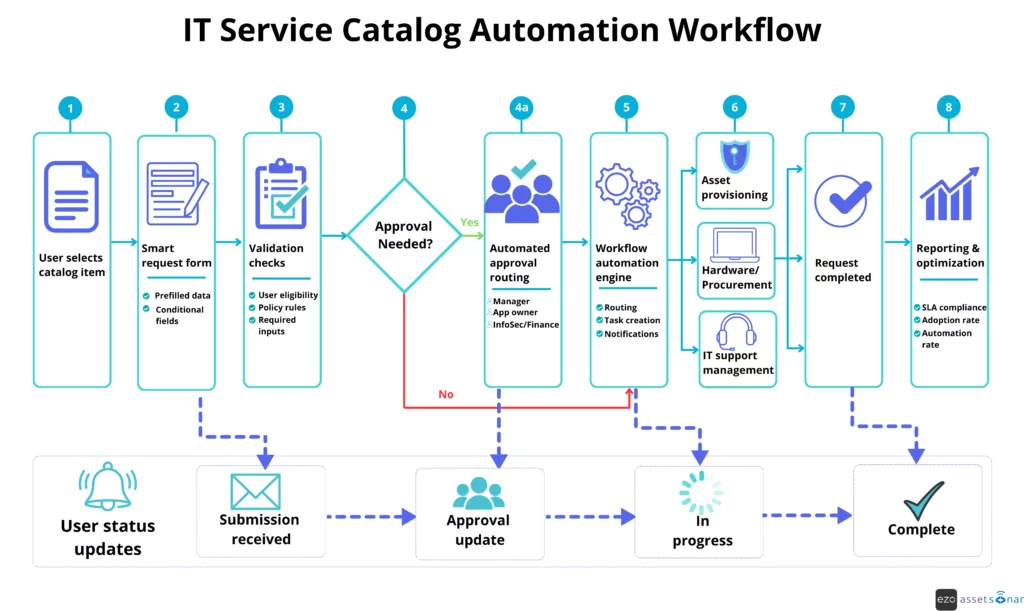
The workflow below shows how a well-designed IT service catalog moves a request from submission and approval through fulfillment, status updates, and reporting.
Service catalog vs. request catalog vs. self-service portal
These terms are often used together, but they are not the same thing.
| Concept | What it means | Primary user |
| Service catalog | The structured record of approved IT services, including ownership, fulfillment rules, approvals, SLA targets, and operational policies | IT and IT leadership |
| Request catalog | The employee-facing version of selected services, usually presented as request forms | Employees and managers |
| Self-service portal/ Employee Portal | The front-end place where users submit requests, search knowledge articles, and check ticket status | Employees |
| Service portfolio | The broader lifecycle view of planned, active, retired, or future services | IT leadership |
For example, IT may maintain a “Laptop Provisioning” service in the service catalog with device standards, approval rules, inventory logic, procurement steps, cost center requirements, and SLA expectations.
The employee should not have to see all of that. They should see a simple request such as “Request a laptop for a new hire,” with fields for start date, role, location, shipping address, and any role-specific equipment needs.
A good IT service catalog design connects both layers. The employee sees a clean form. IT receives structured data that can trigger the right approval path, asset check, procurement step, and fulfillment task.
Why IT service catalogs fail
Most service catalogs fail for one of five reasons: users cannot find the right item, forms ask for too much information, ownership is unclear, fulfillment is still manual, or employees do not trust the catalog after submission.
The failure is behavioral as much as technical. If emailing IT feels faster, employees will keep emailing IT.
1. The taxonomy reflects IT’s structure, not the user’s problem
Many catalogs are organized around internal IT categories such as endpoint management, infrastructure, access administration, network services, or application support. These labels may make sense to IT, but they do not match how employees think.
An employee does not usually think, “I need endpoint management.” They think, “My laptop is not working,” or “I need access to Salesforce.”
Fix: Organize catalog categories around user intent. Use plain-language categories such as:
| User intent | Better catalog category |
| “I need access to a system.” | Request access |
| “I need software installed.” | Request software |
| “My laptop is broken.” | Get device support |
| “A new employee is joining.” | Prepare a new hire |
| “An employee is leaving.” | Start offboarding |
| “I need something approved.” | Request hardware or services |
Review the last 90 days of tickets and email requests to see what employees actually ask for. Your taxonomy should reflect their language, not only the IT department’s internal service model.
2. Forms create more work than email
A catalog form should reduce the need for clarification, not create more friction. If an employee has to complete 15 fields for a routine request, they will look for a shortcut.
Long forms usually occur when IT tries to use a single generic form for many request types. That creates vague tickets and pushes sorting work back to the service desk.
Fix: Use short forms with conditional fields. Start with the minimum information needed, then reveal additional fields only when they apply.
For example, a software access form can start with:
- Application name
- Requested role or permission level
- Business reason
- Needed-by date
If the employee selects a sensitive application, the form can reveal additional fields for manager approval, data access justification, or security review. If the software is pre-approved, the form can stay short.
3. Users cannot see what happens next
A service catalog loses trust when the user clicks submit and hears nothing. Even if IT is working on the request, the employee experiences silence as a delay.
This is why catalog design should include expectations at the point of request, not only in the SLA policy.
Fix: Each catalog item should show:
- Who can request the service
- What approvals are required
- What information must be provided
- Expected response or fulfillment timeline
- What status updates will the requester receive
- What to do if the request is urgent
For example: “Most approved software installation requests are reviewed within one business day. If the software is already approved for your role, deployment can begin after device verification. Requests for unapproved software require manager and application owner approval.”
This tells the user what will happen before they submit the request.
4. The catalog collects tickets but does not move the work
A catalog that simply creates a ticket is not enough. If an agent still has to read the request, identify the right team, find the asset, ask for the manager, check the license, and send a manual update, the catalog has only moved the entry point. It has not improved the workflow.
Fix: Build fulfillment logic into the catalog item. High-volume requests should trigger the next step automatically.
For example:
| Request type | Workflow action to automate |
| Password reset | Identity verification and reset workflow |
| Software access | Approval routing and entitlement check |
| Laptop request | Inventory lookup and procurement trigger |
| Broken device | Asset lookup, warranty check, and replacement task |
| Offboarding | Access removal, asset recovery, and license reclamation task |
| New hire setup | Device, software, and access tasks tied to the start date |
The goal is not to automate every request from day one. The goal is to remove repetitive triage from the requests IT sees every week.
5. No one owns catalog quality after launch
A service catalog degrades when ownership is unclear. Duplicate services appear. Old forms remain alive. SLA promises no longer match actual capacity. Users search for a request and find three similar options.
Fix: Treat every catalog item as an owned service, not a one-time page.
Each catalog item should have:
| Governance area | What to define |
| Service owner | Who owns accuracy, language, SLA expectations, and form quality |
| Fulfillment owner | Which team completes the work |
| Approval owner | Who approves access, spend, or risk |
| Review cadence | How often the item is reviewed |
| Retirement rule | When duplicate or outdated items are removed |
| Performance signal | What metric shows the form needs improvement |
A catalog item with a high reassignment rate, high clarification rate, or low completion rate should be reviewed before adding more items.
What an effective IT service catalog should include
An effective IT service catalog should include enough detail to guide the user and enough structure to guide the workflow.
At a minimum, each catalog item should include:
| Field | Why it matters |
| Service name | Helps users recognize the right request |
| Plain-language description | Explains what the request covers and what it does not cover |
| Eligibility | Shows who can request it |
| Required information | Captures what IT needs upfront |
| Approval requirements | Shows whether a manager, app owner, Finance, HR, or InfoSec review is needed |
| SLA or expected timeline | Sets realistic expectations |
| Fulfillment owner | Clarifies who completes the work |
| Status updates | Reduces follow-up emails |
| Related knowledge articles | Helps users solve simple issues before submitting a request |
| Asset or software context | Connects the request to the right user, device, software, or license record |
For AssetSonar users, the service catalog is more useful than a standalone form. Service Catalog forms can be tied to ITSM workflows, user records, assets, software, tickets, and CIs through the IT Graph. That context helps IT understand what the request is connected to before the first response.
Best practices for IT service catalog design
1. Start with the requests that already consume the most time
Do not begin by building every possible service. Start with the request types that create the most volume, confusion, or avoidable back-and-forth.
Good starting points include:
- Password reset or account unlock
- Application access
- Software installation
- New laptop request
- Broken device replacement
- New hire setup
- Employee offboarding
- VPN or remote access
- Peripheral request
- Shared mailbox or group access
These requests are common, repeatable, and usually follow defined approval or fulfillment paths.
2. Write catalog items in employee language
A catalog item should sound like something the employee is trying to do.
Use:
- “Request software”
- “Get access to an application.”
- “Replace a broken laptop.”
- “Prepare equipment for a new hire.”
- “Start employee offboarding.”
Avoid:
- “Endpoint service request”
- “Identity administration”
- “Hardware lifecycle transaction”
- “General IT request”
- “Other”
“Other” should be the exception, not the most-used catalog item. If “Other” becomes a top request, your taxonomy is not matching user intent.
3. Use dynamic fields instead of long static forms
Good form feels short because it asks only relevant questions.
For example, a hardware request form can change based on the selected request type:
| Selected request | Fields shown |
| New laptop | Role, location, start date, device preference, shipping address |
| Replacement laptop | Current asset tag, issue type, urgency, warranty status |
| Peripheral request | Item type, quantity, location, business reason |
| Temporary device | Needed dates, assigned user, project, return location |
This keeps the form usable while still giving IT structured information.
In AssetSonar, Service Catalog forms support custom, dynamic, or conditional lookup and device selection fields. That matters because the form can capture a request in the same place where IT tracks the related asset, user, software, or ticket context.
4. Make approvals visible before submission
Users should not discover approval rules after they submit the request. If a software request needs manager and application owner approval, say that upfront.
Approval visibility reduces frustration because employees understand why a request is waiting.
A strong catalog item should state:
- Whether approval is required
- Who approves it
- What information will the approver review
- What happens if the request is denied
- Whether the requester will receive approval status updates
This is especially important for software access, hardware purchases, admin privileges, and offboarding tasks.
5. Connect requests to assets, users, software, and contracts
Many service requests are hard to fulfill because they arrive without context.
A laptop replacement request is easier when IT can see the device model, assigned user, warranty status, location, purchase date, and previous incidents. A software access request is easier when IT can see the user’s department, existing licenses, current device, and application ownership.
This is where service catalog design overlaps with ITAM. The catalog should not sit apart from asset and software records. It should use them.
AssetSonar’s IT Graph connects assets, software, users, contracts, tickets, and CIs, giving IT teams the context needed to route and fulfill service requests with fewer manual lookups. For service desk teams, that means the catalog is not just an intake form. It becomes a structured starting point for work.
6. Show request status without making users ask
Follow-up emails are usually a sign that the catalog is not communicating enough.
Every catalog request should show basic status:
- Submitted
- Waiting for approval
- Assigned
- In progress
- Waiting on requester
- Waiting on vendor or procurement
- Completed
- Closed
For more complex requests, such as onboarding or hardware procurement, break the work into visible stages. The user may not need every internal task, but they should know where the request stands.
7. Keep the knowledge base close to the catalog
Some catalog requests should never become tickets. If an employee is asking how to connect to the VPN, reset a password, install approved software, or troubleshoot a common device issue, a knowledge article may solve the problem more quickly.
Place relevant knowledge articles beside catalog items. If the article solves the issue, the ticket is deflected. If it does not, the employee can still submit a structured request.
In AssetSonar, the Knowledge Base can support internal and public articles, version control, embedded media, and links to tickets. Resolved tickets can also be converted into knowledge articles, helping service desk teams turn recurring support patterns into self-service content.
Common IT service catalog items and workflow design
Use the table below as a starting point for designing high-value catalog items.
| Catalog item | Required inputs | Required approvals | Workflow opportunity | Expected timeline guidance |
| Password reset/unlock | User ID, system name | None, if identity verification passes | Identity verification and reset workflow | Immediate or near-immediate |
| Application access | App name, role, justification | Manager, app owner, or InfoSec, depending on the app | Approval routing and role-based provisioning | Based on the approval path |
| New hire setup | Name, role, start date, department, location, required gear | Hiring manager, HR, IT | Create tasks for access, device, software, and onboarding | Before the start date |
| Offboarding | Name, end date, manager, asset return plan | HR, InfoSec, manager | Access removal, asset recovery, license reclamation | Based on exit risk and date |
| New laptop request | Role, location, device type, business reason | Team lead or Finance, if a purchase is needed | Inventory lookup, checkout, procurement trigger | Based on inventory availability |
| Broken device replacement | Asset tag, issue description, urgency | IT triage | Asset lookup, warranty check, replacement task | Based on impact and stock |
| Install approved software | Device, software title, business purpose | None if pre-approved | Entitlement check and deployment task | Based on the deployment method |
| VPN/remote access | User, device, location, business reason | Manager or InfoSec | Approval routing and access provisioning | Based on risk review |
The most important design rule is to branch early. Ask broad intent first, then show only the fields needed for that request.
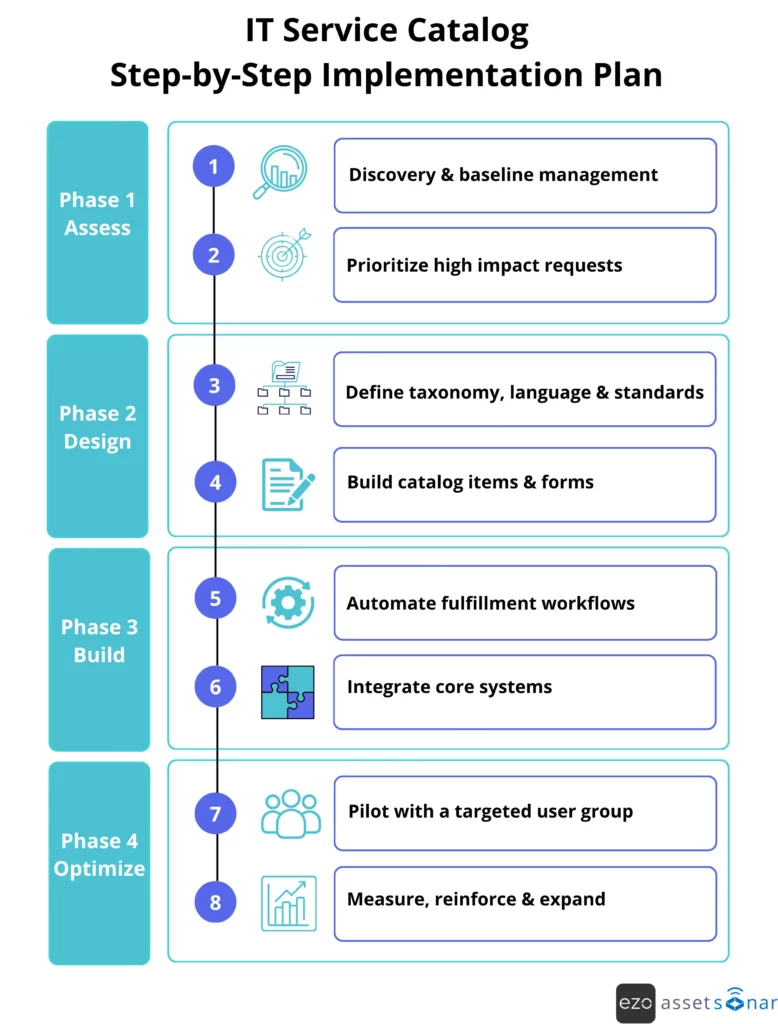
Step-by-step IT service catalog implementation plan
Step 1: Audit current request channels
Start by reviewing where requests currently come from. Include tickets, emails, Slack or Teams messages, walk-ups, shared inboxes, and manager escalations.
Look for:
- Most common request types
- Requests with high reassignment
- Requests with repeated clarification
- Requests with missed SLA targets
- Requests are often sent through unofficial channels
- Requests that depend on asset or software records
This gives you the first catalog backlog.
Step 2: Pick the first 10–15 catalog items
Start with request types that are frequent, repeatable, and easy to standardize. Password resets, software access, hardware requests, onboarding, and offboarding are usually strong candidates.
Avoid building rare or highly custom requests first. They create complexity before the catalog has earned user trust.
Step 3: Define ownership and approval rules
For each catalog item, document:
- Service owner
- Fulfillment team
- Approval owner
- Required fields
- SLA target
- Escalation rule
- Related assets, software, or contracts
- Knowledge base links
- Review date
This prevents catalog design from becoming a one-time content exercise.
Step 4: Build request forms around the workflow
Do not build the form first. Build the workflow first, then decide what information the form needs.
For example, if a software request needs approval by the application owner, the form must collect the application name and the requested role. If a hardware replacement requires a warranty review, the form must capture the current asset tag or allow the user to select the assigned device.
The form should collect the fields needed to move the work forward without a clarification email.
Step 5: Configure routing, SLAs, and notifications
Once the form is submitted, the request should move without manual sorting.
Set rules for:
- Assignment by request type
- Assignment by location
- Assignment by asset type
- Approval routing
- SLA timers
- Escalation
- Status notifications
- Task creation
In AssetSonar, IT teams can use Service Catalog forms with ITSM workflows, SLA management with business hours, and the ITSM Rule Engine to route requests based on the information captured in the form.
Step 6: Connect the catalog to the asset and software context
A service catalog is much more effective when it can see the records behind the request.
Connect the catalog to:
- User records
- Assigned devices
- Software licenses
- Contracts
- Configuration items
- Procurement records
- Knowledge articles
- Existing tickets
This helps technicians make faster decisions. A broken laptop request can show warranty details. A software request can show license availability. An offboarding request can show assigned assets and software access.
Step 7: Pilot with a real user group
Pilot the catalog with a department that submits frequent IT requests. Do not limit feedback to IT. Watch how employees search, which labels confuse them, which forms they abandon, and where they still email someone instead.
Useful pilot questions include:
- Could users find the right catalog item?
- Did the form ask for information that they understood?
- Did they know what would happen after submission?
- Did IT receive enough detail to act?
- Which requests still require manual clarification?
Use this feedback before a wider launch.
Step 8: Reinforce adoption after launch
A catalog launch is not finished when the portal goes live. Employees need repeated signals that the catalog is now the standard path for routine requests.
Use practical reinforcement:
- Link to the correct catalog item when users email IT
- Add catalog links to onboarding materials
- Train managers on approval workflows
- Place high-volume catalog links in Teams, Slack, or intranet pages
- Review “bypass” requests weekly
- Retire duplicate or confusing forms
A “no email fulfillment for standard requests” policy can work, but only after the catalog is genuinely easier than email.
How to measure IT service catalog success
Measure whether the catalog is reducing friction for employees and manual work for IT. Avoid measuring only the number of catalog items created. A large catalog can still be unusable.
Track these metrics:
| Metric | What does it tell you |
| Catalog adoption rate | Whether eligible requests are moving through the catalog instead of email or chat |
| Form completion rate | Whether forms are simple enough to finish |
| Search abandonment rate | Whether users can find the right service |
| Clarification rate | Whether IT gets enough information upfront |
| Reassignment rate | Whether routing rules and taxonomy are working |
| SLA compliance | Whether fulfillment expectations match capacity |
| Approval cycle time | Whether requests are waiting too long with managers, app owners, or Finance |
| Automation rate | Whether repeatable requests are moving without unnecessary manual handling |
| Self-service deflection | Whether knowledge articles are reducing avoidable tickets |
| CSAT by catalog item | Whether users trust the request experience |
The most useful metric is often the clarification rate. If agents keep asking for missing information, the form is not doing its job. If tickets are constantly reassigned, the taxonomy or routing logic needs work.
Service catalog governance checklist
Review catalog quality on a regular cadence. For high-volume services, review monthly or quarterly. For low-volume services, review at least twice a year.
Use this checklist:
- Is the service still active?
- Is the name written in the user’s language?
- Is the description clear?
- Are the required fields still necessary?
- Are any fields missing?
- Are approval rules current?
- Are SLA expectations realistic?
- Is the fulfillment team still correct?
- Are the related knowledge articles accurate?
- Are duplicate catalog items creating confusion?
- Are users abandoning the form?
- Are agents asking for the same missing details?
- Are requests routed correctly?
- Does the item connect to the right assets, software, contracts, or CIs?
A catalog that is not governed becomes another source of operational noise.
Where AssetSonar fits into IT service catalog design
AssetSonar is useful for IT teams that want the service catalog to work with the ITAM and ITSM context, rather than sit apart from them.
The platform supports ITSM intake through the Employee Portal, email-to-ticket creation, Service Catalog forms, manual agent creation, Slack bot, and MS Teams bot. Service Catalog forms can use custom fields, dynamic or conditional fields, lookup fields, and device selection, helping IT collect request details in a structured way.
The larger advantage is context. AssetSonar’s IT Graph connects assets, software, users, contracts, tickets, and CIs. That helps IT teams design catalog workflows that can reference the user’s assigned device, software access, ownership history, related tickets, or service record.
For example:
- A broken device request can include the assigned asset and previous ticket history.
- A software request can connect to software ownership and license context.
- A new hire request can trigger tasks across hardware, access, and software setup.
- An offboarding request can connect access removal, asset recovery, and license reclamation.
- A hardware request can move through approval, inventory review, and procurement steps.
AssetSonar helps when the catalog depends on connected assets, users, software, tickets, and approval contexts.
Final takeaway
Employees use a service catalog when it gives them a faster path to a clear outcome. IT teams benefit when that same request arrives with the context, approval logic, SLA rules, and asset data needed to fulfill it without extra triage.
The catalog should not be treated as a directory of IT services. It should be treated as the front door to controlled IT work.
Start with the requests that already create the most noise. Rewrite them in employee language. Keep forms short. Show what happens next. Connect each request to the records IT needs to act on. Then review performance often enough to keep the catalog clean.
That is how an IT service catalog moves from “we have a portal” to “this is how work gets done.”