
An asset tag is a physical label or electronic identifier attached to equipment that uniquely identifies the asset and links it to its digital record. Asset tags may display a number, barcode, QR code, or RFID identifier. They help organizations track location, custody, maintenance, audits, and lifecycle history.
Key takeaways
- Asset tags create a stable internal identity that links each physical asset to its digital lifecycle record.
- The tag itself does not track assets; its value comes from the connected records, scanning, workflows, and governance that support it.
- Choose barcode, QR code, or RFID based on workflow, environment, security, and scale rather than on the technology alone.
- Tag assets based on operational importance rather than purchase price, especially when losing visibility into an asset could disrupt operations.
- Keep stable identifiers on the tag and frequently changing information, such as location and custody, in the digital record.
- Effective asset tagging depends on standardized IDs, consistent placement, accurate records, testing, and clear governance rather than on labels alone.
Introduction
Most organizations own hundreds or thousands of physical assets, including laptops, medical devices, construction equipment, and machinery that move between people, departments, and locations. A manufacturer’s serial number can tell you what an item is, but not who currently has it, where it is located, or when it was last serviced.
That’s where asset tags come in. An asset tag gives each item a consistent internal identity that links the physical object to its digital record. Once attached, the tag can be scanned to retrieve information, update a location, transfer custody, trigger maintenance, or facilitate an audit. The tag itself doesn’t track anything. Its value comes from being part of a system that combines unique identifiers, standardized records, scanning technology, and defined workflows.
This guide explains what an asset tag is, how tags work, what they contain, how they differ from Asset IDs and serial numbers, which assets to tag, how to choose and implement a tagging method, and how software like EZO EAM turns scans into everyday workflows.
What is an asset tag?
An asset tag is a label, plate, or electronic tag attached to a physical asset to give it a unique, organization-controlled identity. It typically displays or encodes an asset number that links the item to a record in an asset management system. At its core, an asset management system must solve one fundamental problem: identity. Before an organization can maintain, inspect, transfer, or audit an asset, it must first answer a simpler question: “Which exact asset are we talking about?” An asset tag solves this identification problem by giving each physical asset a consistent identity that people, departments, and software systems can recognize throughout its lifecycle.
Tags often look simple, such as a barcode sticker or a numbered metal plate, but they act as a bridge between the physical and digital worlds, helping organizations to identify individual assets consistently throughout their lifecycle. Two companies may own the same laptop model with identical specifications. The manufacturer’s serial number identifies the device, but each company still needs its own internal identifier to connect that laptop to its purchase records, assigned employee, maintenance history, and audit trail. That internal identifier is the asset tag.
The four components of an asset tagging system
An asset tag is only one part of a complete system. Effective asset tracking combines four interconnected components:
- The physical tag: The visible label, plate, or electronic tag attached to the asset. It may be a printed barcode, a QR sticker, an RFID tag, or a durable metal plate for harsh conditions.
- The unique identifier, often called an Asset ID or Asset Identification Number (AIN), distinguishes one asset from all others in the organization and may appear as a printed number, barcode, QR code, or RFID chip ID.
- The scanning method: A smartphone camera, barcode scanner, QR scanner, or RFID reader that reads the identifier, eliminating the need for users to manually search spreadsheets.
- The digital asset record, stored in the asset management system, contains the asset name, manufacturer, model, serial number, location, custodian, maintenance history, warranty, purchase details, and lifecycle status.
Think of an asset tag as a key, not a filing cabinet
A useful analogy is to think of an asset tag as a house key. A key doesn’t contain everything inside the house; it simply provides access to it. Likewise, an asset tag doesn’t store an asset’s complete history. Instead, it provides a fast, reliable way to retrieve the digital record containing maintenance history, location, warranty details, inspections, and other lifecycle events.
Example: How a tag connects to its record
Imagine a construction company assigns the asset tag ATL-004287. The barcode encodes that identifier, and scanning it opens the matching record:
| Field | Value |
|---|---|
| Item | Rotary hammer |
| Location | Atlanta warehouse |
| Assigned to | Site Crew 2 |
| Status | Checked out |
| Next maintenance | September 12 |
| Purchase date | March 2025 |
The tag stores very little; it acts as a reliable shortcut to the digital record.
What is the purpose of an asset tag?
The purpose of an asset tag is to give every asset a reliable identity that can be verified wherever it is used. That identity supports accurate records, faster scanning, clearer accountability, more efficient audits, and consistent lifecycle management. Organizations often start tagging to simplify inventory, but the benefits extend well beyond simply knowing what they own:
- Unique identification: Distinguish one laptop, drill, infusion pump, or projector from dozens of otherwise identical assets.
- Faster record retrieval: A quick scan opens the correct record, avoiding a slow, error-prone serial-number search.
- Location tracking: Maintain an accurate history of where each asset has been and where it is assigned. This isn’t continuous broadcasting; the recorded location is updated whenever someone scans the asset or records a movement. A tag identifies an asset; it doesn’t automatically track it.
- Custody and accountability: Associate assets with employees, departments, project teams, customers, vehicles, or locations to create a clear chain of custody.
- Check-in and check-out: Scan assets when they are issued and returned to build a complete usage history without paper logs.
- Maintenance and inspections: Scan to access prior service records, schedules, and documentation immediately.
- Audits: Quickly verify that physical assets match digital records and update discrepancies as they are identified.
- Lifecycle management: Every scan contributes to one continuous history, from procurement through maintenance, transfers, upgrades, and retirement.
Ultimately, asset tags create a standardized connection between the physical asset, the people responsible for it, and the system that manages its lifecycle.
How does an asset tag work?
An asset tag works by connecting a physical asset to a unique digital record. When the tag is scanned, the asset management system uses its identifier to retrieve or update the correct record, enabling checkouts, transfers, inspections, audits, and maintenance. Every asset movement creates information. The question isn’t whether that information exists; it’s whether the organization captures it. Asset tags transform ordinary operational events, such as checkouts, inspections, and transfers, into structured data that can be stored, analyzed, and used to inform future decisions.
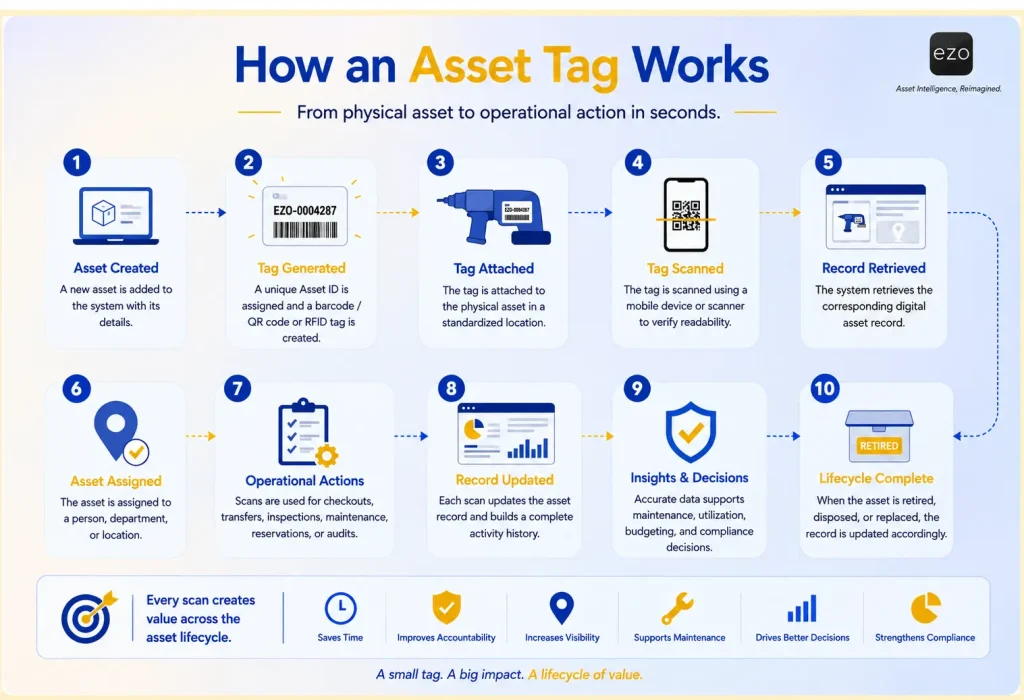
A common misconception is that scanning merely displays information. In reality, modern systems use a scan as the starting point for action. Depending on permissions and configuration, a scan may let users open a record, check an asset in or out, transfer custody, update its location, verify possession during audits, reserve equipment, record inspections, create service records, report damage, or open supporting documents. Viewed this way, a tag functions less like a label and more like a gateway into an organization’s asset management processes.
What information is included on an asset tag?
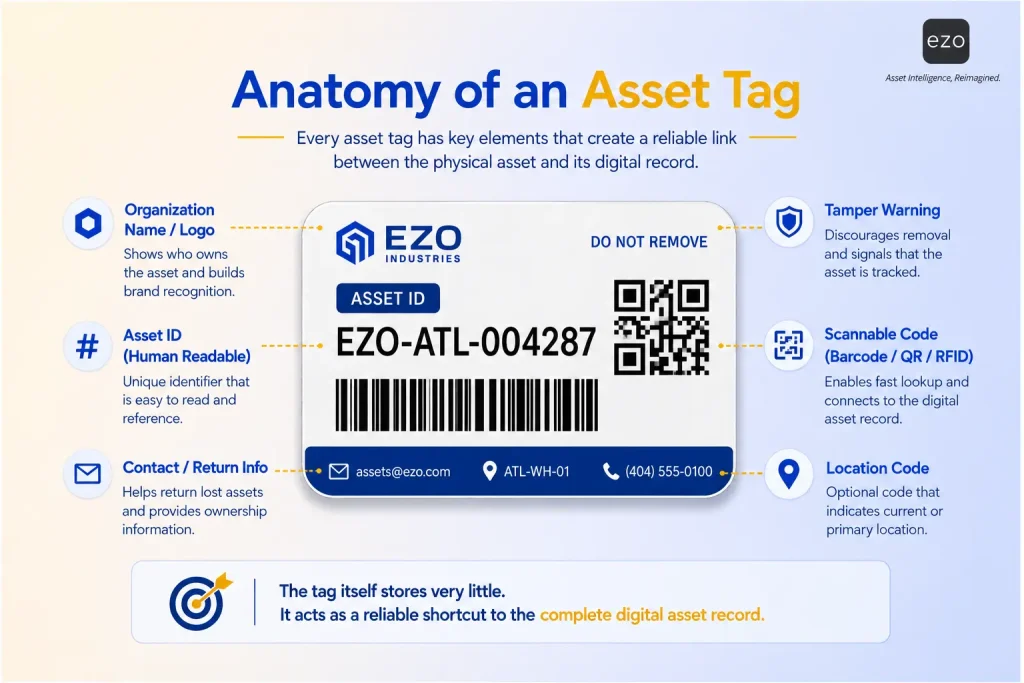
An asset tag should display enough information to identify and retrieve the correct asset without overcrowding the label. Most tags carry a unique Asset ID and a scannable code, while detailed operational data is stored in the linked system rather than printed on the label.
Commonly printed on a tag: the organization name or logo, a unique Asset ID, a barcode or QR code, a department or cost-center code, a “Property of” statement, contact information, return instructions, a tamper warning, and a human-readable asset number. Not every organization needs every element.
Stored in the digital record instead: Asset name, category, manufacturer, model, serial number, purchase date and cost, supplier, warranty, current location, assigned employee, status, maintenance and inspection history, documents, depreciation, audit history, and retirement records.
Keeping this information digital has a clear advantage: records remain accurate without needing to reprint labels whenever something changes. As a rule, avoid printing anything that changes frequently, such as the current custodian, current location, status, or next maintenance date. Print a stable identifier and let the software maintain the dynamic data. This keeps labels durable and ensures that every scan returns up-to-date information.
A simple rule helps determine what belongs on an asset tag.
- If information rarely changes, print it.
- If information changes regularly, store it digitally.
For example, an asset ID remains constant throughout an asset’s lifecycle, making it ideal for the tag itself. By contrast, location, custodian, maintenance schedules, and asset status can change frequently and are better maintained within the asset management system.
Is an asset tag the same as an Asset ID, barcode, QR code, RFID, or serial number?
No. These terms are related but refer to different parts of an identification system; treating them as interchangeable can cause confusion. In short, the asset tag is the physical item attached to the equipment, and the Asset ID is the organization’s unique identifier. A barcode, QR code, or RFID identifier represents or carries that identifier. The digital record stores the asset’s operational information.
| Term | Meaning | Assigned by | Primary purpose |
|---|---|---|---|
| Asset tag | Physical label, plate, or electronic tag | Organization | Connects the physical asset to its record |
| Asset ID | Internal unique identifier | Organization | Identifies assets consistently across systems |
| Barcode | Linear scannable code | Organization/ standards body | Encodes an identifier for optical scanning |
| QR code | Two-dimensional code | Organization | Encodes an identifier, URL, or other data |
| RFID tag | Tag containing an RFID identifier | Organization/ supplier | Identifies assets via radio frequency |
| Serial number | Manufacturer identifier | Manufacturer | Identifies a specific manufactured unit |
| Model number | Product model identifier | Manufacturer | Identifies the product design |
| SKU | Inventory identifier | Vendor/organization | Identifies a stock-keeping unit |
This distinction matters as organizations grow. Serial numbers vary by manufacturer, can be difficult to locate, and provide no indication of an organization’s internal ownership or processes. An internally managed Asset ID creates a standardized identifier that every department can use, regardless of who manufactured the equipment.
What are the main types of asset tags?
The main tag types are human-readable labels, barcode tags, QR code tags, RFID tags, tamper-evident labels, and durable metal plates. The right choice depends on scanning volume, environment, asset value, and workflow complexity, rather than the technology alone. A useful principle is to start with how users will interact with assets and then choose the method that best supports that workflow.
- Human-readable labels carry only printed text. They require no scanning hardware, are inexpensive, and work well as backups or for very small inventories, but manual entry introduces typing errors and does not scale well.
- Barcode tags are widely adopted for asset tracking. A linear barcode encodes a unique ID that can be scanned with a barcode scanner or compatible mobile device. They are cost-effective, easy to implement, and can speed up audits and checkouts, making them a practical step up from spreadsheets.
- QR code tags encode data in two dimensions, allowing them to store more information in a compact space and to be scanned readily with smartphone cameras. They suit field service, education, healthcare, construction, and facilities teams that need mobile access to asset records.
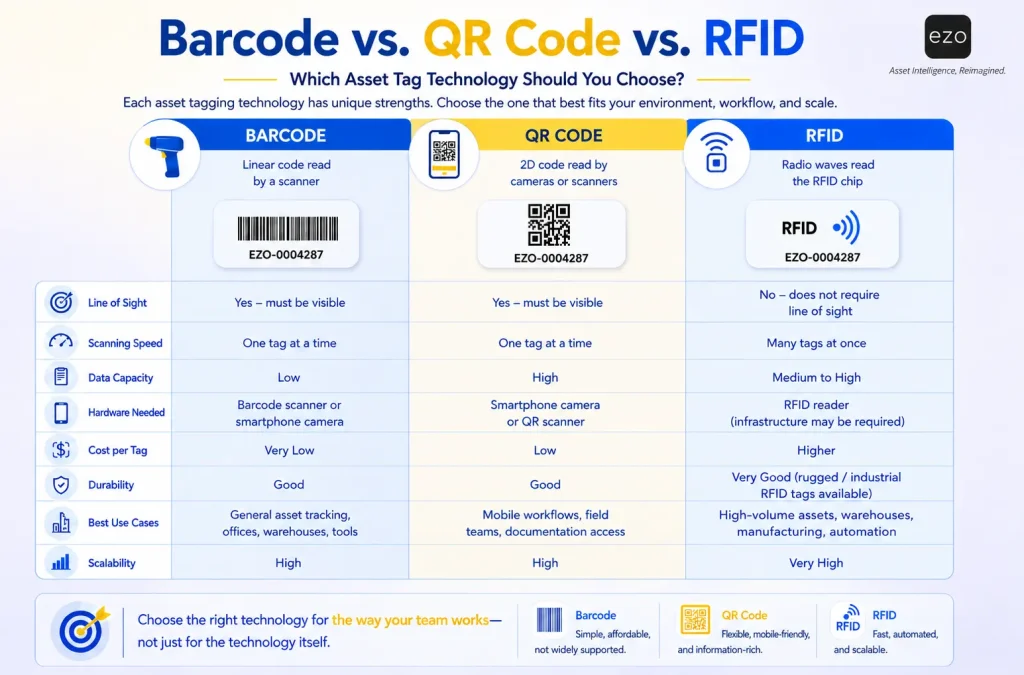
- RFID tags use radio frequency rather than optical scanning, so they do not require line of sight and can read multiple tags at once. This makes them valuable when large volumes of assets must be verified quickly, or manual scanning becomes a bottleneck. They require compatible readers and supporting infrastructure, so they are best suited to environments where the operational gains justify the investment.
While barcode, QR code, and RFID tags all serve the same fundamental purpose of identifying assets, they differ significantly in how they are scanned, the infrastructure they require, and the operational workflows they support. The comparison below highlights the strengths of each technology.
- Tamper-evident labels break apart or leave residue when removed, discouraging unauthorized relabeling. They are commonly used for IT equipment, medical and regulated devices, and portable high-value assets.
- Metal plates (often made of anodized aluminum) withstand chemicals, heat, abrasion, and outdoor conditions and can be riveted or screwed onto equipment in harsh industrial environments.
| Tag type | Reading method | Visual access required | Best for |
|---|---|---|---|
| Human-readable | Manual reading | Yes | Small inventories, backup ID |
| Barcode | Scanner or camera | Yes | General tracking, audits, checkouts |
| QR code | Smartphone or imaging scanner | Yes | Mobile asset access |
| Passive RFID | RFID reader | No | Faster multi-item scanning |
| Active RFID | RFID infrastructure | No | High-value or frequently moving assets |
| Tamper-evident | Visual, barcode, or QR | Depends | Sensitive equipment |
| Metal plate | Visual, barcode, QR, or RFID | Depends | Harsh industrial environments |
The best choice depends less on the technology itself and more on the operational problem you’re solving. For a deeper technical comparison, see our guide on barcode vs. QR code vs. RFID.
Which assets should be tagged?
Tag an asset when its identity, location, custody, maintenance, availability, cost, or compliance status is important enough to warrant individual tracking. The decision should be driven by operational value, not simply by purchase price. A better question than “Is it expensive?” is “Would losing visibility into this asset disrupt operations?” If so, then it is usually worth tagging.
- Consider tagging an asset if it is assigned to a specific person, moves between locations, is checked in and out, is reserved for projects, requires maintenance or inspection, carries a warranty, is costly to repair or replace, would disrupt operations if lost, stores sensitive information, must be verified during audits, supports compliance, influences purchasing decisions, or has a meaningful operational lifecycle.
- Prioritize operational importance: Many of these factors relate to operational complexity rather than dollar value. Therefore, an inexpensive calibration tool may be more important to track than a costly conference table if its absence would halt production.
- Commonly tagged assets: Organizations commonly tag laptops and other IT equipment, mobile devices, laboratory and medical equipment, construction and manufacturing machinery, tools and test equipment, safety and AV equipment, furniture, vehicles, facilities and communications equipment, and reusable kits. Conversely, low-cost, interchangeable supplies such as pens, gloves, printer paper, and cables are usually better managed as inventory quantities rather than individually tagged assets.
How do you choose the right asset tag?
Instead of choosing a tag based on technology alone, evaluate it through four practical considerations:
- Workflow: How will people interact with the asset?
- Environment: What conditions must the tag withstand?
- Security: Does the asset require tamper resistance or additional accountability?
- Scale: How many assets will be managed over time?
The right asset tag is the one that best balances these four considerations, not necessarily the one with the most advanced technology.
The decision tree below provides a practical starting point for selecting an asset-tagging technology based on your organization’s workflow, environment, and operational requirements.
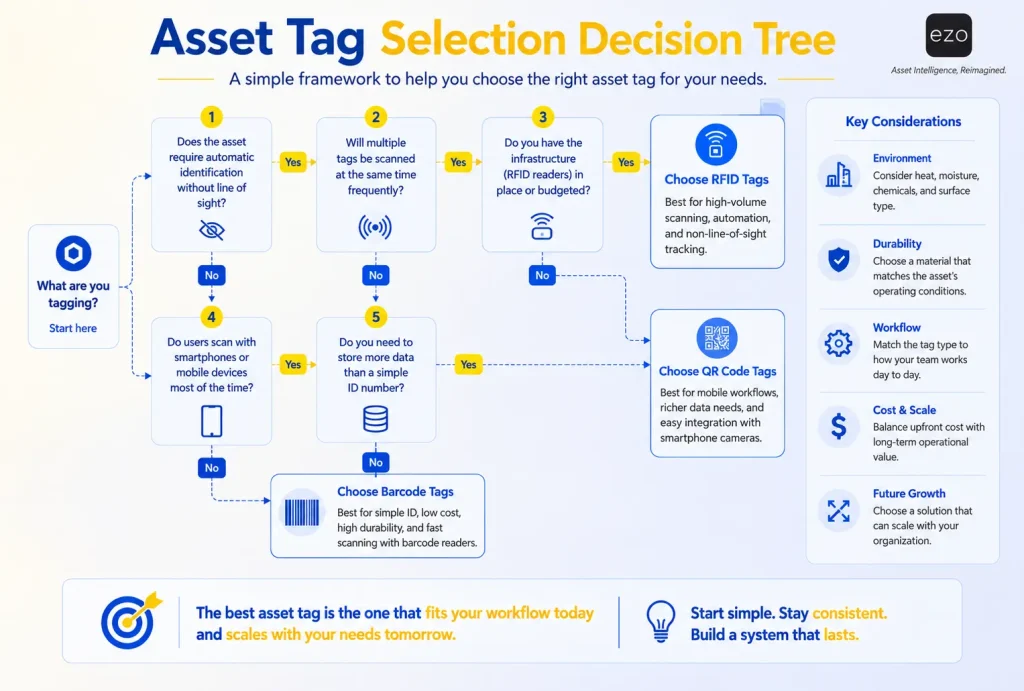
Choose an asset tag by matching its scanning method, material, attachment method, size, and durability to the asset’s operating environment and the workflow in which it will be scanned. Rather than asking, “Which technology is best?” ask four questions.
1. What’s the scanning workflow? Will items be scanned one at a time or audited in bulk? Will staff use smartphones or dedicated scanners? Is a clear line of sight practical, or must scanning happen from a distance or among densely stored assets? Barcodes and QR codes require line of sight and work well for scanning individual items; RFID can read multiple tags at once without line of sight.
2. What’s the environment? Assess exposure to heat, cold, moisture, chemicals, UV radiation, dirt, oil, abrasion, vibration, cleaning agents, and outdoor conditions. The environment usually determines the required material more than the technology itself.
3. What’s the asset surface? The surface’s shape, material, texture, and exposure to handling can all affect which label and adhesive will hold.
4. What are the security needs? Decide whether the tag should be permanent, removable, tamper-evident, destructible, or mechanically attached.
Avoid applying the most expensive tag to every asset. A layered strategy often works best. Use printed barcodes for high-volume, standard equipment; QR codes for mobile-access workflows; RFID for selected bulk-scanning environments; metal plates for harsh machinery; and tamper-evident tags for sensitive devices.
| Operational condition | Option to evaluate |
|---|---|
| Low-cost, high-volume assets | Barcode or QR label |
| Staff use phones for scanning | QR code or mobile-readable barcode |
| Bulk audits or no clear line of sight | RFID |
| Harsh outdoor environment | Industrial label, metal plate, or rugged RFID |
| Sensitive portable equipment | Tamper-evident barcode or QR label |
| Users need the full record to open on scan | QR code |
| Simple ID lookup only | Barcode |
Which material should you use?
Match the material to the surface, lifespan, and operating conditions:
- Paper: Suits temporary indoor use.
- Polyester: A durable, moisture-resistant default for office and IT equipment.
- Vinyl: Flexes around curved surfaces.
- Polypropylene: Resists moisture and some chemicals.
- Destructible vinyl: Supports tamper evidence.
- Anodized aluminum or metal plates: Withstand machinery, heat, and outdoor exposure but require mechanical mounting.
Durability depends not just on the material but also on the adhesive, surface preparation, temperature, printing method, and any protective laminate. Avoid absolute “weatherproof” claims and confirm performance with the label manufacturer for your specific conditions.
Where should the tag be placed?
Place tags where they are easy to scan and verify but protected from wear. Standardize placement by asset category so staff always know where to look. Keep tags visible; avoid moving joints, handles, vents, high-heat surfaces, and removable covers; do not cover safety warnings; and confirm that RFID reads reliably on the asset’s material. Test every placement for readability, scan angle, lighting, distance, accessibility, adhesion, and wear during normal use before rolling out the tagging system.
| Asset | Suggested placement |
|---|---|
| Laptop | Underside, away from vents and removable covers |
| Monitor | Back panel near the manufacturer’s label |
| Power tool | Recessed casing away from the grip |
| Vehicle | Door jamb or protected equipment panel |
| Machinery | Protected frame or control housing |
| Furniture | Underside or rear structural surface |
How do you build an effective asset tagging system?
A successful system requires more than attaching labels. It needs standardized identifiers, appropriate tag selection, consistent placement, accurate records, and software that turns scans into workflows. Many teams print labels first and design processes later; reversing that order produces better results. Let your workflows determine the design.
Step 1. Decide what to tag. Identify assets that create operational value when tracked individually: items that move, require maintenance, are assigned to people, or require warranty, audit, or compliance documentation.
Step 2. Create a standardized Asset ID structure. Give every asset a unique identifier that remains stable throughout its lifecycle. Avoid conventions based on department or location, since both can change. Keep formatting consistent, avoid ambiguous characters (O/0, I/1) when manual entry is required, never reuse retired IDs, and do not encode changeable data, such as custodian or location, into the identifier. A prefix, such as an organization or asset-class code, is appropriate only where it aids governance. Store descriptive details in the record, not the ID.
Step 3. Select the tag technology. Match the method to the workflow. Barcodes offer a strong balance of affordability and simplicity for many teams; QR codes suit mobile workflows, and RFID is well-suited to high-volume scanning. Ask, “Which technology supports the way our people actually work?” rather than “Which is most advanced?”
Step 4. Choose material and placement. Apply the selection logic above: match the material to the operating environment and surface, and position tags where they are easy to scan but protected from wear. Keep placement consistent across similar assets. Standardized placement speeds audits and improves adoption.
Step 5. Test before scaling. Pilot the system on a small group of assets and verify that labels stay attached, scanners read consistently, records open correctly, naming is intuitive, and users understand the workflow. Small fixes now can prevent large-scale relabeling efforts later.
Step 6. Establish governance. Define who creates Asset IDs, who approves records, how duplicates and damaged tags are handled, how retired assets are managed, and how audits verify accuracy. Without clear ownership, even well-designed systems can drift out of date.
Common asset tagging mistakes to avoid
Most challenges come from process design rather than from the tags themselves:
- Treating the tag as the asset record. A tag should identify an asset, not replace the system. Cramming information onto labels creates clutter and makes updates difficult. Use the tag as a stable key to a continuously updated record.
- Inconsistent naming conventions. When departments invent their own numbering systems, enterprise reporting becomes fragmented. One standardized Asset ID structure reduces duplication and simplifies expansion.
- Choosing technology before understanding workflows. Teams sometimes adopt RFID because it seems advanced. If employees only scan during occasional audits, barcodes may deliver comparable value with far less complexity. Technology should support workflows, not define them.
- Ignoring the operating environment. Labels that work well in an office may fail on construction sites or outdoor infrastructure. Match materials to operating conditions, and test label samples in the intended environment before buying in bulk.
- Failing to maintain data quality. Even well-designed tags lose value if records go stale. Regular audits, standardized processes, and clear ownership help keep the physical asset and its record in sync.
How does EZO support asset tagging?
Asset tags become more valuable when scans trigger meaningful actions rather than simply displaying an ID. EZO provides the software layer that connects tags to everyday workflows. Teams can create or import unique identifiers, generate barcode labels in bulk, customize them with the built-in Label Designer, and scan them with compatible mobile devices or third-party hardware. Those scans can then drive checkouts, check-ins, transfers, audits, maintenance, inventory management, reservations, and lifecycle tracking.
Because scans reference a centralized record, organizations can maintain one continuous history for each asset, from acquisition through maintenance, transfers, audits, and retirement, rather than relying on scattered spreadsheets across departments. As needs grow, EZO also supports location and custody tracking, inventory workflows, maintenance records, and barcode- and RFID-based scanning, allowing teams to scale their program without redesigning the underlying system.
Conclusion
An asset tag may look like a simple label, but its real value lies in the system behind it. By giving every asset a consistent identity, organizations can manage equipment throughout its lifecycle, from acquisition and deployment through maintenance, audits, transfers, and retirement. Combined with standardized processes and software, tags can reduce manual work, improve accountability, simplify audits, and provide more reliable visibility.
Choosing the right approach isn’t just about picking barcodes, QR codes, or RFID. It’s about designing a system that matches your workflows, scales with your organization, and supports better decisions over time. Whatever format you choose, the tag should remain a stable link to a trusted record. Without that record and the workflows around it, even the most advanced tag is only an identifier.

![[How-to] Bolster Asset Tracking By Implementing Role Based Access For Your Business](https://cdn.ezo.io/wp-content/uploads/2021/02/EZO-role-based-access-1.png)






