
As enterprises grow, tracking equipment-related costs becomes more complex than recording individual expenses. It requires coordination across procurement, maintenance, inventory, and finance teams. As organizations expand, these teams often adopt separate systems and reporting processes:
- Procurement tracks purchase orders and vendor spend in one system
- Maintenance teams manage work orders and repair costs in another
- Inventory managers monitor stock levels and carrying costs separately
- Finance attempts to reconcile everything after the fact
When these systems are poorly integrated, teams may struggle to reconcile operational costs and report consistent KPIs. Equipment managers may struggle to answer two important questions: What is each asset’s total cost of ownership (TCO), and where are unexpected expenses coming from? Incomplete cost visibility can drive budget overruns, delay purchasing decisions, and waste equipment resources.
In short, EZO EAM connects the operational records behind asset costs: purchase orders, work order labor and parts, inventory valuation, depreciation, and Cost Centers. Teams can then review those costs together in reports and dashboards. EZO EAM does not replace accounting or ERP software. Finance teams use its records alongside the general ledger to reconcile, budget, and plan.
Key Takeaways:
- Acquisition, maintenance, inventory, and depreciation costs need separate tracking, because combining them without a defined method can double-count spending.
- Work order costs combine logged labor hours, hourly rates, consumed spare parts, and external service charges for each repair.
- Cost Centers attribute work order, inventory, retirement, and depreciation costs to the department, project, or location that incurred them.
- A purchase order records a purchasing commitment, so finance still reconciles received, invoiced, and paid amounts separately.
- EZO EAM records operational asset costs alongside the ERP or general ledger, not instead of them.
- Full work order cost tracking requires the CMMS add-on, available on EZO EAM’s Premium and Enterprise plans.
Why unified cost data matters for enterprises
When equipment moves across facilities and departments, teams need consistent records of purchasing, maintenance, inventory usage, and asset ownership to understand where spending occurs. As operational responsibilities expand, equipment managers need timely cost information to identify spending changes across locations and departments. To maintain budget control throughout the year, they need to spot emerging cost overruns early, compare actual spending against approved budgets, and adjust procurement.
Without connected cost records, three problems tend to appear:
1. Operational inefficiencies
Without consolidated cost records across the asset lifecycle, inefficiencies remain hidden. Inaccurate cost calculations can drive unnecessary purchases, excess inventory, and inefficient equipment utilization.
2. Difficult audit preparation and reconciliation
Enterprise finance and operations teams may need to retrieve consistent asset and expense records during audits, budgeting reviews, and internal compliance checks. Fragmented records can increase the time required to assemble audit evidence, reconcile asset costs, and investigate discrepancies. Organizations with specific regulatory requirements may face additional risks if records are incomplete or inaccurate.
3. Inaccurate strategic planning
When cost records are disconnected, long-term planning relies on guesswork. Fragmented records make it harder to build a reliable TCO estimate from complete historical costs and documented assumptions. Without visibility into historical repair costs, managers may struggle to identify equipment that requires unusually frequent maintenance or to evaluate whether replacement would be more economical.
What counts as asset cost data
Before connecting cost data, separate the cost types involved. They are financially different, so you shouldn’t simply add them together.
| Cost type | Examples | How EZO EAM handles it |
|---|---|---|
| Acquisition costs and purchase commitments | Equipment purchase price, approved purchase orders | Recorded on purchase orders and asset records |
| Maintenance costs | Technician labor, consumed spare parts, external service charges | Recorded on work orders when work order costs are enabled |
| Inventory values | Stock on hand, value of parts consumed | Calculated with FIFO or average cost valuation |
| Depreciation | Change in book value over time | Calculated for asset groups with a chosen depreciation method |
| Cost attribution | Spending by department, project, or location | Assigned with Cost Centers |
| Costs outside EZO EAM | Insurance, fuel, payroll overhead, downtime losses | Kept in finance or other systems and combined during analysis |
Keep inventory purchases separate from the cost of parts consumed in maintenance, and keep acquisition costs separate from ongoing maintenance costs. Adding them into one total without a defined method can double-count spending.
How EZO EAM connects asset cost data across operations
EZO EAM is a physical asset management platform that connects five areas of asset operations: procurement, maintenance, asset and inventory management, cost attribution, and reporting. Here is how each area records equipment-related costs. Feature availability varies by plan, and the plan table later in this article lists the requirements.
1. Procurement: Track purchase orders, approvals, and vendor spend
Where procurement costs become fragmented
Disconnected purchase workflows can delay equipment procurement. Purchase decisions often pass through multiple teams, each with its own process. Requests may arrive via email, spreadsheets, or informal conversations, so some get overlooked, leading to delayed approvals, unauthorized purchases, or missed purchasing deadlines. Combined with limited visibility into vendor pricing, this makes it difficult for procurement teams to monitor purchasing commitments across departments.
How EZO EAM tracks procurement costs
Multi-currency POs: Enterprises with international suppliers need multi-currency purchase orders. EZO EAM supports purchase orders in vendor-specific currencies while recording corresponding values in the organization’s base currency. Exchange rates are configurable in settings and can be adjusted during the purchase order process, so teams can compare procurement activity across domestic and international suppliers.
Tax rates: When setting up purchase orders, procurement teams can configure multiple custom tax rates that apply by default and change the rate on an individual purchase order. This includes estimated tax amounts in purchase cost calculations. The organization should still validate the rates and tax treatment against its financial policies.
Purchase order approvals: With multi-tier approval workflows, teams can route purchase orders to approvers, teams, or roles based on conditions such as order value, delivery location, or vendor. For example, an organization might send purchase orders under $10,000 to a department manager and require both procurement and executive approval for orders of $10,000 or more. Each approval is recorded, giving teams a documented approval trail for procurement decisions.
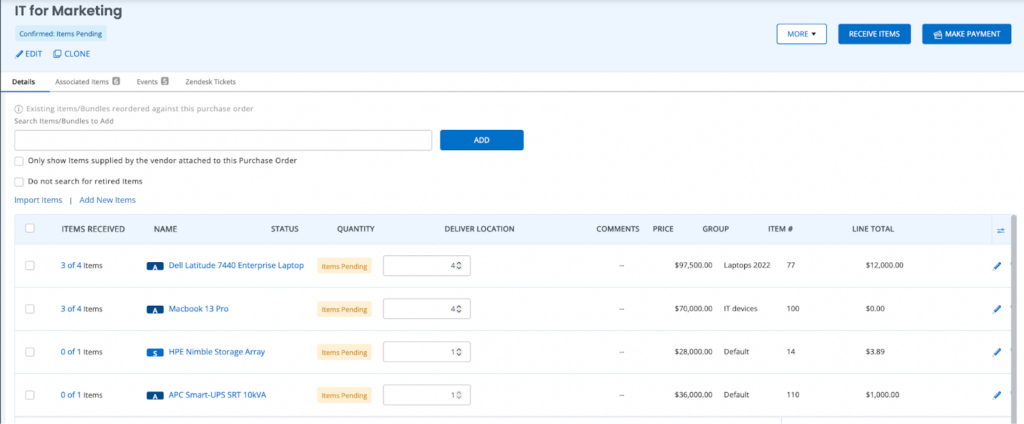
The screenshot below shows a purchase order’s details page in EZO EAM.
Reviewing vendor spend across locations
Consolidated procurement records help teams compare vendor prices, review historical purchasing patterns, and identify opportunities to consolidate orders or negotiate terms. Because a purchase order is a purchasing commitment rather than a recorded expense, finance teams should still compare approved, received, invoiced, and paid amounts in their accounting system.
2. Maintenance: Track labor, spare parts, and repair costs
Maintenance costs are easy to underestimate. Procurement costs are visible at purchase, but the ongoing costs of keeping assets operational build up gradually through service events, technician labor, and spare parts consumed during repairs.
Full work order management, including work order cost tracking and preventive maintenance workflows, is available as a CMMS add-on on the Premium and Enterprise plans.
Where maintenance costs become fragmented
Many large organizations lack a single system for tracking labor hours, consumed parts, and repair history. Organizations that rely heavily on reactive maintenance may also face more unexpected repairs and find maintenance expenses harder to control. Unplanned repairs can lead to emergency labor, expedited spare-parts orders, and equipment downtime, increasing overall maintenance costs.
How EZO EAM tracks maintenance costs
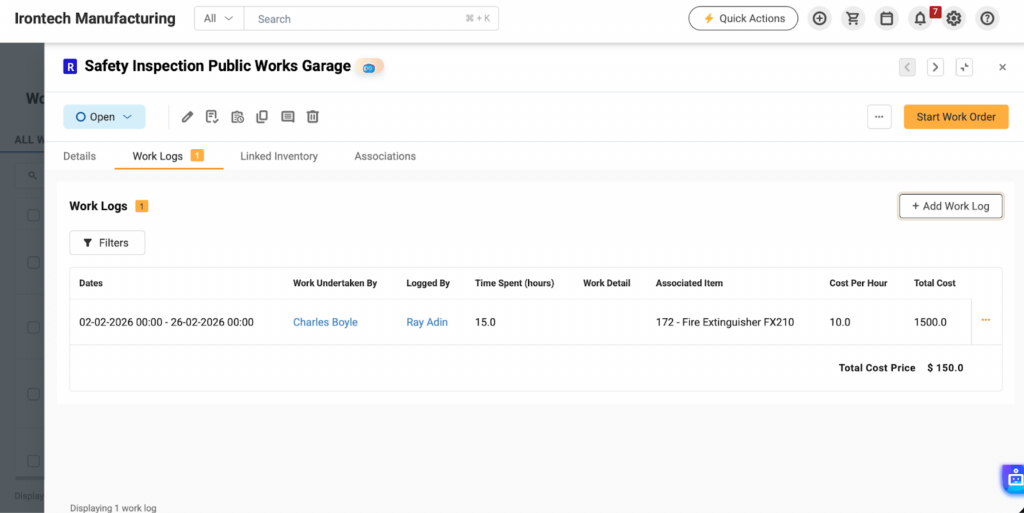
Work order costs: Once you enable work order costs, maintenance managers can record labor and other maintenance expenses against work orders. Work logs capture hours spent and the cost per hour, so EZO EAM calculates each entry’s labor cost, and teams can add external service charges to the same work order. For example, a 4-hour work log at $60 per hour records $240 in labor.
Linked spare parts: EZO EAM links inventory to work orders, so it records the spare parts and consumables used in a job. When you select a costing method for consumables, the cost of consumed parts appears alongside labor and service charges on the work order.
Maintenance history: EZO EAM records maintenance history against each asset, including service costs, parts consumed, and work performed. This history feeds into lifecycle cost analysis. Combined with acquisition costs, depreciation, and operating costs in other systems, it helps teams build a fuller picture of an asset’s total cost over its life.
The screenshot below shows the work logs tab on a work order.
Maintenance cost decisions this supports
By combining maintenance history with planned service workflows, teams can identify recurring failures, prioritize interventions, and make more informed maintenance decisions that may help reduce unplanned downtime. The Work Orders report includes cost columns and a total cost for each work order, which makes it easier to evaluate maintenance costs for individual equipment.
3. Asset and inventory costs: Monitor inventory values and depreciation
Capital equipment is a long-term investment, while spare parts and consumable inventory support ongoing operating costs and working capital needs. Limited insight into how these costs build up over time can lead to over- or under-utilization of resources and wasted budget.
Where asset and inventory costs become fragmented
Disconnected records make it harder to reconcile asset acquisition values, maintenance expenses, and depreciation, limiting visibility into equipment performance. Limited visibility into historical inventory consumption may also lead teams to keep excessive safety stock to cover unexpected demand. That stock may remain unused for extended periods, tying up working capital.
How EZO EAM tracks asset and inventory costs
Depreciation by asset group: EZO EAM lets teams configure depreciation methods, straight-line or declining balance, for asset groups such as IT equipment, tools, or fleet vehicles. This makes it easier to track book value changes across similar assets. For example, a $24,000 machine depreciated on a straight-line basis over eight years with no salvage value loses $3,000 of book value each year. Finance teams should reconcile these figures with the organization’s accounting policies and ERP records.
Inventory valuation: Inventory valuation methods determine how costs are assigned to remaining stock and to inventory consumption. EZO EAM supports first-in, first-out (FIFO) and average cost (AVCO) valuation, helping teams maintain consistent inventory cost records. Valuation affects cost records, not which physical items are picked from the shelf.
Custom fields for added context: Core cost data comes from purchase values, depreciation, work order expenses, and consumed inventory. Custom fields supplement these records with details EZO EAM does not track by default, such as warranty terms, compliance attributes, or usage metrics that help explain cost trends.
Inventory and asset decisions this supports
With asset and inventory costs in view, teams can compare equipment costs with utilization, operating requirements, and expected business value to support repair, replacement, and purchasing decisions. They can also identify slow-moving inventory before it ties up more working capital.
4. Cost Centers: Assign spending to departments, projects, or locations
Connecting cost data is only half the job. Teams also need to know who incurred each cost. Cost Centers in EZO EAM let teams assign costs to a department, job, project, or location. Teams can assign Cost Centers to work orders, inventory checkouts and reservations, cart checkouts, item retirement, and asset depreciation. Cost Center activity then appears in reports, so finance and operations teams can review spending by area instead of by system.
5. Reports and AI-assisted analysis
Enterprises accumulate large volumes of operational data, but unanalyzed data has limited value. Spreadsheets can support detailed financial analysis, but manually consolidating operational data from multiple systems increases reporting effort and the risk of outdated information.
Where reporting breaks down
When reporting depends on manual exports and reconciliation, leadership may receive cost information too late for operational decisions. Teams may also have the underlying data but lack a way to build consistent reports that combine the metrics needed for specific decisions.
How EZO EAM reports on costs
Standard reports: EZO EAM includes standard reports built from data already in the system, which reduces manual compilation. For cost review, the Work Orders report shows cost columns and a total cost per work order; the Linked Inventory report shows inventory used in work orders, and valuation reports show inventory values. Cost Center activity is also available in reports.
Custom reports for specific KPIs: On the Advanced plan and above, teams can build custom reports with the data fields, filters, date ranges, and aggregation functions they need, such as sums or averages. Teams can save custom reports and schedule them to run periodically.
AI-assisted report analysis with Zoe: After running a report, users can ask Zoe Copilot questions about the report data. Zoe analyzes the data and returns direct answers, helping teams spot trends and outliers without scanning every row. For example, after running a Work Orders report for the past month, a manager can ask which assets had the highest maintenance cost.
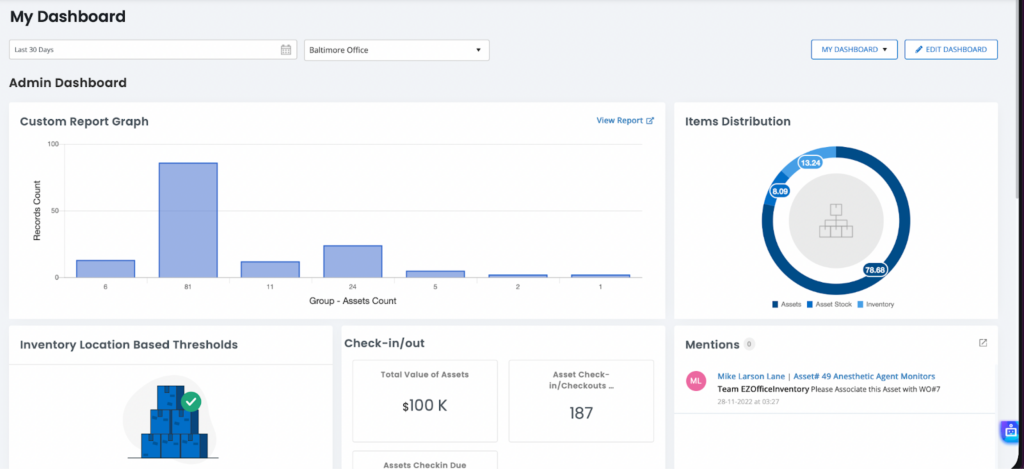
Cost dashboards: EZO EAM’s Advanced Dashboard lets teams choose the KPI widgets they see. With work order costs enabled, teams can add widgets such as Total Cost of Completed Work Orders for a chosen time range, alongside other configured asset and operational metrics.
The screenshot below shows an EZO EAM dashboard with configured KPI widgets.
Reporting decisions this supports
Consistent reporting and AI-assisted analysis can reduce manual review effort and help teams make decisions from recorded operational data. Reviewing cost trends by asset, vendor, or Cost Center makes it easier to spot unusual spending patterns and address them before the next budget cycle. The quality of these insights still depends on complete, correctly classified records.
Example: Tracking one asset’s costs from purchase to repair
Here is how the records connect for a single piece of equipment. The figures are illustrative, not EZO EAM output.
| Stage | Illustrative cost event | Where it is recorded |
|---|---|---|
| Procurement | Equipment purchase: $24,000 | Purchase order and asset record (acquisition cost) |
| Maintenance labor | Technician: 4 hours at $60 per hour | Work log: $240 labor |
| Spare parts | Replacement part: $350 | Linked inventory on the work order: $350 parts cost |
| External service | Repair invoice: $180 | Service charge on the work order: $180 |
| Cost attribution | Repair assigned to the plant’s maintenance department | Cost Center on the work order |
| Reporting | Review the asset’s recorded costs | $24,000 acquisition cost, reported separately from $770 in maintenance costs |
This example excludes depreciation, downtime losses, taxes, and other lifecycle costs.
How EZO EAM fits alongside financial systems
EZO EAM is not a general ledger or ERP. It records the operational side of asset costs, while the financial system handles statutory accounting. A practical division of work looks like this:
- Operations teams record purchase orders, work order costs, inventory consumption, and Cost Center assignments in EZO EAM
- Finance teams reconcile those records with invoices, payments, and accounting entries in the ERP
- Procurement leaders and controllers use the combined view to review vendor spend, track spending against budgets, and investigate variances
Budgets usually live in finance systems or planning worksheets. EZO EAM reports supply recorded operational costs for comparison.
For teams using QuickBooks Online, EZO EAM can sync purchase orders and work orders to reduce manual re-entry. Work order syncing requires the CMMS add-on.
Cost data is only as reliable as the records behind it. Assign clear ownership of cost data, use role-based permissions to control who can edit costs, standardize cost categories, and regularly review discrepancies.
Cost management features by plan
Feature availability depends on the EZO EAM plan. Based on the EZO EAM pricing page as of October 2026:
| Capability | Plan availability |
|---|---|
| Purchase orders | Advanced and above |
| Advanced and custom reports | Advanced and above |
| Multi-currency purchase orders | Premium and Enterprise |
| Multi-tier approvals | Premium and Enterprise |
| Work order cost tracking (CMMS add-on) | Premium and Enterprise |
| Zoe AI chatbot | All plans |
Check the pricing page for current details before choosing a plan.






